


 Video Converter Ultimate
 Bildschirm recorder
 Videoreparatur
 Sicherer Download
So führen Sie 3GP-Videos vom Mobiltelefon in eine Datei zusammen
Wenn Sie während Ihrer Reise mit Ihrem Smartphone mehrere Videos aufnehmen, möchten Sie möglicherweise 3GP-Dateien zu einem Video zusammenführen. Was sind die besten Methoden, um die Videoclips zu kombinieren? Egal, ob Sie einfach die 3GP-Videos beitreten oder Filme mit den Smartphone-Dateien erstellen, Sie können im Artikel mehr über die 2 am häufigsten verwendeten Methoden erfahren.

Teil 1: Wie man 3GP online kostenlos zusammenführt
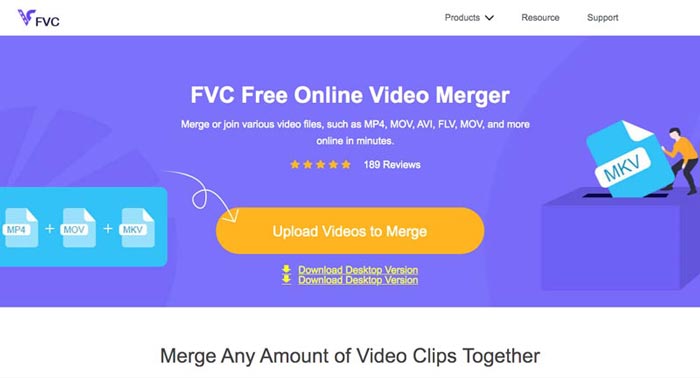
Um Ihre 3GP-Dateien ohne Bearbeitung zusammenzuführen, benötigen Sie nur ein praktisches Tool, mit dem Sie 3GP-Videos kostenlos online zusammenführen können. FVC Free Online Video Merger ist einer der besten 3GP-Video-Merger mit einer einfachen Benutzeroberfläche. Damit können Sie 3GP-Dateien ohne Mengen- oder Größenbeschränkung kombinieren. Außerdem können Sie die Auflösung und das Videoformat anpassen.
Schritt 1: Öffnen Sie den Free Online Video Merger mit einem beliebigen Webbrowser. Sie können auf die Schaltfläche Upload Videos to Merge klicken, um eine 3GP-Datei in den Online-Video-Merger zu laden. Sie werden dann zu einer Online-Video-Joiner-Oberfläche weitergeleitet.
Schritt 2: Laden Sie einfach weitere 3GP-Dateien hoch, die Sie kombinieren möchten. Anschließend können Sie die Auflösung und das Format Ihres Videos ändern, indem Sie auf die Felder Resolution und Format klicken. Sie können Ihre 3GP-Dateien zu beliebten Videoformaten wie MP4 oder MKV zusammenführen.
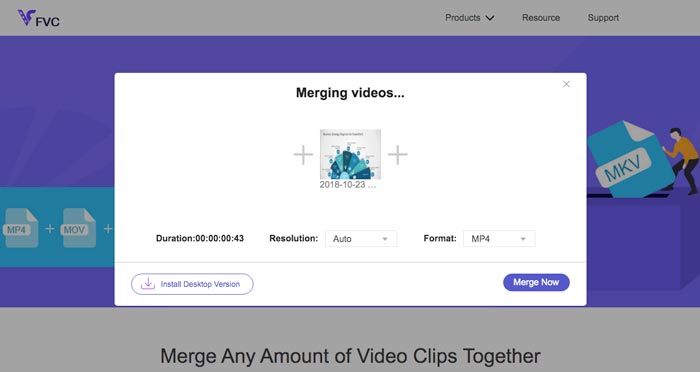
Schritt 3: Sobald Sie mit dem Ausgabevideo zufrieden sind, können Sie auf die Schaltfläche Merge Now klicken, um den Zusammenführungsvorgang zu starten. Wenn das Zusammenführen abgeschlossen ist, wird das verbundene Video auf Ihrer Festplatte gespeichert.
Es ist eine einfache Möglichkeit, 3GP-Dateien kostenlos online zu verbinden. Wenn Sie Ihre Videodateien jedoch weiter bearbeiten möchten, benötigen Sie ein professionelleres Werkzeug.
Teil 2. So kombinieren Sie 3GP-Videos zu einem Film
Ganz gleich, ob Sie 3GP-Videos mit beeindruckenden Filtern zu einem Film kombinieren oder lediglich 3GP-Dateien zu einer Datei zusammenfügen möchten, Video Converter Ultimate ist ein vielseitiger Videokonverter, den Sie in Betracht ziehen sollten. Er ermöglicht Ihnen, Videoclips zu teilen und zusammenzuführen, Videothemen auszuwählen, Wasserzeichen zu Videos hinzuzufügen und sogar 3GP-Videos direkt in andere Videoformate für soziale Netzwerke zu konvertieren.
- 1. Ermöglicht es Ihnen, die gewünschten Teile auszuschneiden oder mehrere 3GP zu einem zu kombinieren.
- 2. Bieten Sie grundlegende Videobearbeitungsfunktionen wie Trimmen, Teilen, Zuschneiden und Drehen.
- 3. Verbinden Sie 3GP-Videoclips zu einem Film mit verschiedenen Filtern, Themen, Musikdateien usw.
- 4. Fügen Sie Untertitel, Audiospuren, 3D-Effekte, Wasserzeichen hinzu, Video komprimieren, und mehr.
Gratis DownloadFür Windows 7 oder neuerSicherer Download
Gratis DownloadFür MacOS 10.7 oder neuerSicherer Download
Methode 1: So kombinieren Sie mehrere 3GP-Videos direkt
Schritt 1: Laden Sie Video Converter Ultimate von der offiziellen Website herunter und starten Sie das Programm. Wählen Sie die Oberfläche Converter und klicken Sie auf die Schaltfläche Add Files, um die 3GP-Dateien hinzuzufügen, die Sie zusammenführen möchten. Darüber hinaus können Sie die 3GP-Videos auch in das Programm ziehen.

Schritt 2: Sobald Sie die 3GP-Dateien importiert haben, sollten Sie das Format der Ausgabedatei wählen. Klicken Sie auf das Scherensymbol, um den gewünschten Teil auszuschneiden. Außerdem können Sie die Videos drehen/zuschneiden, Filter anwenden, ein Wasserzeichen hinzufügen oder Audiotracks für das Ausgabevideo anpassen.

Schritt 3: Gehen Sie zum unteren Bereich der Benutzeroberfläche, um den Zielordner für die zusammengeführten 3GP-Dateien auszuwählen. Danach können Sie das Kästchen Merge into One File aktivieren und auf Convert All klicken, um mit dem Zusammenführen der 3GP-Dateien zu beginnen.

Methode 2: So verbinden Sie 3GP-Dateien zu einem Film
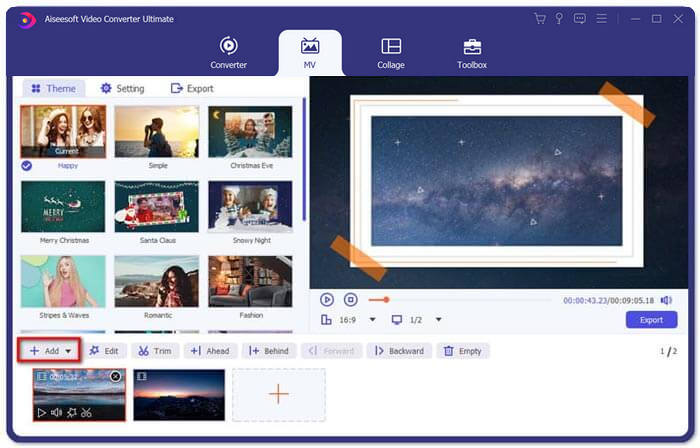
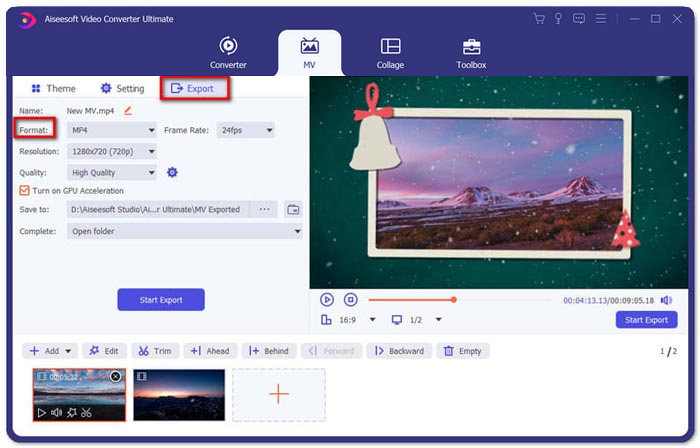
Schritt 1: Wenn Sie 3GP-Dateien zu einem Film zusammenfügen müssen, können Sie das MV-Menü wählen und gelangen dann in die MV-Erstellungsoberfläche. Klicken Sie auf die Schaltfläche Add unten links im Fenster, um Ihre 3GP-Videos und Bilder zu importieren.
Schritt 2: Danach können Sie auf die Schaltfläche Edit klicken, um die Videoeffekte anzuwenden. Außerdem können Sie ein Thema für Ihren MV-Film auswählen. Klicken Sie im linken Bereich auf den Tab Theme und wählen Sie dann Ihr gewünschtes Thema für Ihren MV aus.
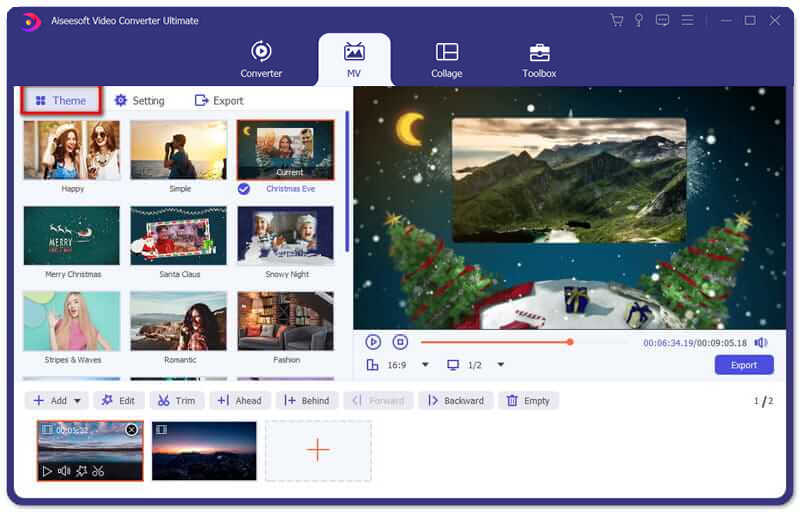
Schritt 3: Wenn Sie mit der kombinierten 3GP-Datei zufrieden sind, können Sie auf die Schaltfläche Export klicken, um die Videodatei zu speichern. Standardmäßig ist das Ausgabeformat MP4. Natürlich können Sie je nach Bedarf auch das bevorzugte Videoformat auswählen.
Teil 3. Häufig gestellte Fragen zum Zusammenführen von 3GP
1. Was ist ein 3GP-Format?
3GP ist ein Multimedia-Dateiformat, das zum Speichern von Datenspeichern entwickelt wurde. Es wird häufig auf mobilen Geräten verwendet. Wenn Sie mit Ihrem Mobiltelefon Fotos oder Videos aufnehmen, wird die Datei normalerweise im 3GP-Format gespeichert. Normalerweise wird 3GP auf 3G-Mobiltelefonen verwendet und kann auch auf einigen 2G- und 4G-Telefonen abgespielt werden.
2. Wie füge ich 3GP-Dateien auf einem Smartphone zusammen?
Wenn Sie 3GP-Dateien auf einem iPhone oder Android-Telefon zusammenführen möchten, können Sie Video Merger für ein Android-Telefon, VivaVideo für ein iPhone verwenden oder andere Anwendungen herunterladen, um die Videos zu kombinieren. Wenn Sie die 3GP-Dateien jedoch als Film zusammenfügen müssen, müssen Sie dennoch eine professionelle Videozusammenführung verwenden.
3. Kann ich 3GP-Videos mit Audiodateien kombinieren?
Ja. Sie können die Audiodateien jedoch nicht als Hintergrund für 3GP-Video verwenden. Unabhängig davon, ob Sie zwei Dateien kombinieren oder das Audio als Hintergrund für ein 3GP-Video verwenden möchten, der professionelle 3GP-Combiner sollte Ihre Wahl sein.
Fazit
Wenn Sie 3GP-Videodateien zusammenführen müssen, die sich auf Ihren Mobilgeräten befinden, um sie zu einer Videodatei zu kombinieren, können Sie in diesem Artikel 2 effiziente Methoden kennenlernen. Sie können 3GP kostenlos online mit dem Free Online Video Joiner zusammenführen. Wenn Sie Ihr Video bearbeiten und spezielle Effekte hinzufügen müssen, ist Video Converter Ultimate ein ideales Tool für Sie. Wenn Sie Fragen zum Zusammenführen von 3GP-Dateien haben, können Sie uns jederzeit kontaktieren.
-
 Top 3 kostenlose Möglichkeiten zum Konvertieren von FLV in 3GP unter Windows / Mac
 Kann FLV-Dateien nicht auf Smartphone oder Tablet öffnen? Mach dir keine Sorgen! Hier teilen wir drei Methoden, um FLV in 3GP zu konvertieren, ohne die Qualität beim Spielen auf dem Handy zu verlieren.
-
 3 Methoden zum problemlosen Konvertieren von MP4 in 3GP
 Möchten Sie MP4 schnell und einfach in 3GP konvertieren? Hier werden wir 3 MP4 zu 3GP Konverter teilen, um MP4 zu 3GP für das Spielen auf verschiedenen Handys zu ändern.
-
 Die 3 besten kostenlosen 3GP-Player für Computer und Mobilgeräte, die Sie kennen sollten
 Wenn Sie Ihren 3GP-Film ohne Installation oder Konvertierung eines Videocodecs problemlos abspielen möchten, erfahren Sie in diesem Artikel mehr über die 3 besten 3GP-Player unter Windows, Mac, Android und iPhone.
