


 Video Converter Ultimate
 Bildschirm recorder
 Videoreparatur
 Sicherer Download
So kombinieren Sie MPEG-Videodateien zu einer – 2 ultimative Methoden, die Sie kennen sollten
Wie kann man MPEG-Dateien zusammenfügen? Sie haben gerade eine alte TV‑Serie im MPEG‑Format heruntergeladen, zum Beispiel 8 kurze Episoden, von denen jede einen überflüssigen Vorspann und Abspann hat. Wie lassen sich diese MPEG-Dateien zu einem einzigen Film zusammenfügen? Egal, ob Sie die Videos nur einfach zu einer Datei verbinden oder MPEG-Dateien mit erweiterten Funktionen zusammenführen möchten – hier sind 2 effiziente Methoden, die Sie nicht verpassen sollten.

Teil 1: Wie man MPEG-Dateien kostenlos online kombiniert
FVC Free Online Video Merger ist ein kostenloses Online-Tool zum Zusammenführen von MPEG-Dateien, mit dem Sie MPEG-, MP4-, AVI- und andere Videoformate ohne Größenbeschränkung kombinieren können. Sie können mehrere MPEG-Dateien zu beeindruckenden Videos zusammenfügen, ohne dass ein Wasserzeichen hinzugefügt wird. Zudem werden die hochgeladenen Dateien innerhalb von 24 Stunden gelöscht, um Ihre Privatsphäre zu schützen.
Schritt 1: Rufen Sie den FVC Free Online Video Merger mit einem beliebigen Webbrowser auf. Klicken Sie auf die Schaltfläche Upload Videos to Merge in der Mitte der Webseite, um das Installationsprogramm zu erhalten. Danach können Sie erneut auf die Schaltfläche klicken, um die MPEG-Dateien hochzuladen, die Sie in dem Online-Programm zusammenfügen möchten.

Schritt 2: Wenn Sie zur Oberfläche Merging videos gelangen, können Sie die Reihenfolge der MPEG-Videos festlegen, die Sie zusammenführen möchten. Sie können die Position der Videos verwalten, Dateien löschen oder über die Schaltfläche insert new an der gewünschten Stelle weitere MPEG-Dateien hinzufügen.
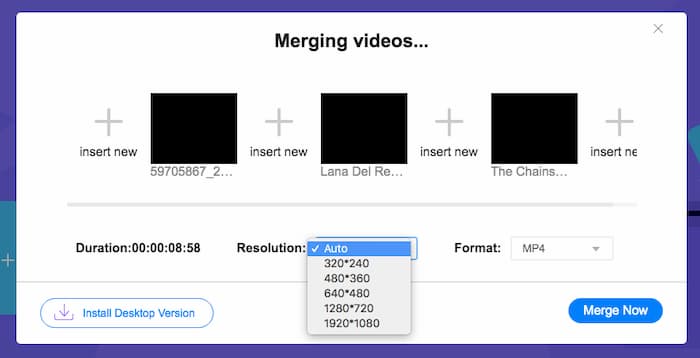
Schritt 3: Anschließend können Sie die Auflösung und das Format des Ausgabevideos festlegen. Sie können die MPEG-Dateien zu einer MP4-Datei zusammenfügen, bevor Sie auf die Schaltfläche Merge now klicken, um den Vorgang zu starten. So erhalten Sie innerhalb kurzer Zeit das gewünschte Video.

Der Online-Videocombiner ist einfach zu bedienen. Wenn Sie jedoch die überflüssigen Eröffnungen und Enden der Episoden kürzen möchten, kann es Ihnen nicht weiterhelfen. Sie müssen einen leistungsfähigeren MPEG-Merger verwenden.
Weiterführende Informationen:
Teil 2: Die vielseitige Methode zum Zusammenführen von MPEG-Videos
Aiseesoft Video Converter Ultimate ist ein professionelles MPEG-Zusammenführungsprogramm, mit dem Sie die gewünschten Teile Ihrer MPEG-Dateien zu einem Film kombinieren können. Sie können die gewünschten Teile der MPEG-Dateien zuschneiden, die Videoqualität anpassen, ein Wasserzeichen individuell gestalten oder sogar einen Film mit verschiedenen Themen erstellen.
- 1. Kombinieren Sie MPEG-Dateien in MPEG, MP4 und mehr als 300 Videoformate.
- 2. Optimieren Sie die Videoauflösung oder verbessern Sie sogar die Videoqualität für das Zusammenführen von Dateien.
- 3. Schneiden Sie die gewünschten Teile der MPEG-Dateien zu und kombinieren Sie sie zu einem Video.
- 4. Fügen Sie Effekte und Filter hinzu und passen Sie Wasserzeichen in die MPEG-Videos an.
Gratis DownloadFür Windows 7 oder neuerSicherer Download
Gratis DownloadFür MacOS 10.7 oder neuerSicherer Download
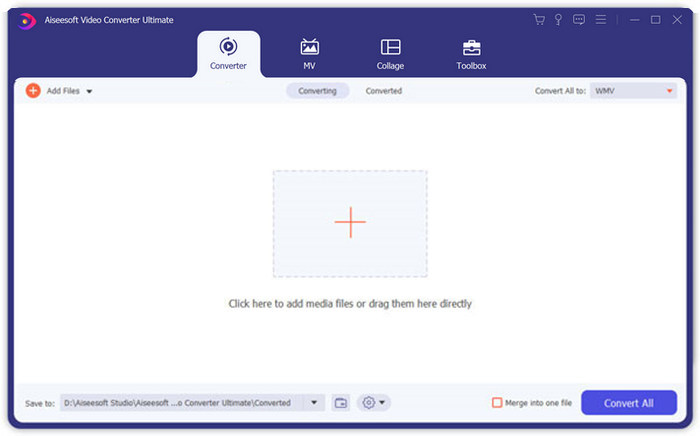
Schritt 1: Starten Sie Aiseesoft Video Converter Ultimate auf Ihrem Computer. Gehen Sie zum Menü Converter und klicken Sie auf die große “+”-Schaltfläche in der Mitte der Hauptoberfläche, um die MPEG-Dateien hinzuzufügen, die Sie zusammenführen möchten. Klicken Sie auf die Schaltfläche Add Files, um alle Dateien zu importieren, die Sie kombinieren möchten.
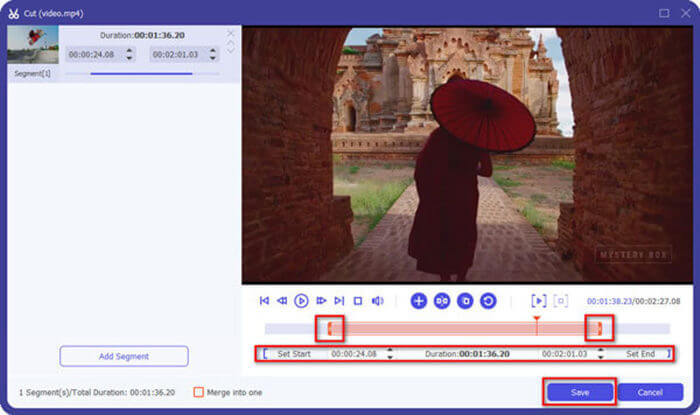
Schritt 2: Für die MPEG-Clips, die zugeschnitten werden müssen, klicken Sie auf die Schaltfläche Cut neben dem Video. Sie können Start- und Endpunkt festlegen, um Vorspann und Abspann Ihrer MPEG-Videos zu entfernen. Danach klicken Sie unten auf die Schaltfläche Save, um die Datei zu speichern.
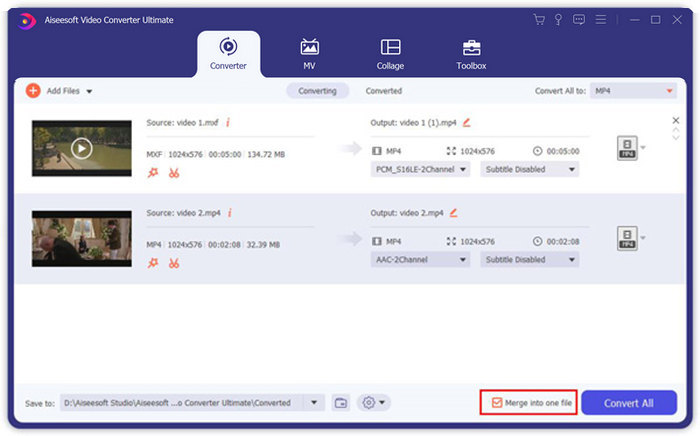
Schritt 3: Anschließend können Sie das zugeschnittene Video wieder in das Programm ziehen. Passen Sie die Reihenfolge der MPEG-Videos an. Wenn alles bereit ist, aktivieren Sie das Kontrollkästchen Merge into one file neben Convert All. Klicken Sie auf die Schaltfläche Convert All, um mit dem Zusammenführen der MPEG-Dateien zu beginnen.
Teil 3: Häufig gestellte Fragen zum Zusammenfügen von MPEG-Dateien
Wie füge ich MPEG-Dateien mit der besten Qualität zusammen?
Wenn Sie MPEG-Dateien mit ähnlicher Qualität zusammenführen möchten, können Sie die Parameter wie bei den Originalvideos auswählen. Wenn sich die MPEG-Dateien jedoch in der Videoqualität unterscheiden, müssen Sie einige MPEG-Dateien mit niedriger Qualität vorher mit dem professionellen Videocombiner hochskalieren.
Kann ich MPEG-Dateien mit einem iPhone oder Android-Handy kombinieren?
Ja. Bevor Sie Video-Combiner-Apps zum Zusammenfügen von MPEG-Dateien herunterladen, sollten Sie sicherstellen, dass die App mit MPEG oder anderen Videos, die Sie kombinieren möchten, kompatibel ist. Adobe Premiere Clip, Viva Video und Splice Video sind die empfohlenen, die Sie berücksichtigen können.
Was ist das MPEG-Dateiformat?
MPEG ist ein Videodateiformat, das entweder MPEG-1- oder MPEG-2-Dateikomprimierung verwendet. Es ist ein beliebtes Format für Filme, die im Internet verbreitet werden und das Streamen und Herunterladen viel schneller als andere gängige Videoformate macht.
Fazit
In diesem Artikel werden zwei effiziente Möglichkeiten zum Zusammenführen von MPEG-Videodateien vorgestellt, insbesondere wenn Sie zusätzliche Teile zuschneiden müssen. Der FVC Free Online Video Merger ist eine einfache Methode, um MPEG-Dateien online zusammenzuführen, aber Sie können die Videoclips nicht bearbeiten. Wenn Sie also MPEG-Videos zuschneiden und bearbeiten möchten, sollte Aiseesoft Video Converter Ultimate die ultimative Lösung sein.
-
 Top 6 der besten MP4-Video-Joiner zum kostenlosen Kombinieren von MP4-Videos
 Es gibt viele MP4-Joiner, mit denen verschiedene MP4-Clips verbunden werden können. In diesem Artikel haben wir einige kostenlose MP4-Joiner für Windows 10/8/7 und Mac ausgewählt.
-
 Wie füge ich M4V-Dateien zusammen? Hier sind die 2 schnellsten Lösungen
 Wenn Sie nach einer Lösung suchen, um M4V-Videodateien zu einer zu kombinieren, verpassen Sie diese Passage nicht. Hier werden wir über die beiden besten Methoden zum Kombinieren von M4V-Videodateien sprechen.
-
 So führen Sie 3GP-Videos vom Mobiltelefon in eine Datei zusammen
 Wenn Sie einige 3GP-Videos von Ihrem BlackBerry zu einem Video kombinieren möchten, erfahren Sie im Artikel mehr über 2 effiziente Methoden zum Zusammenführen von 3GP-Dateien.
