


 Video Converter Ultimate
 Bildschirm recorder
 Videoreparatur
 Sicherer Download
Einfache Möglichkeiten zum Entfernen des Coub-Wasserzeichens online und offline
Coub ist eine Website, die zum Online-Teilen von Videos verwendet wird. Es ist eine beliebte Seite, auf der Nutzer Videos von bis zu zehn Sekunden Länge erstellen und teilen können. Anders als GIFs haben Coub‑Videos eine hochwertige Tonspur, was sie bei vielen Menschen beliebt macht. Wenn du jedoch Videos von Coub speicherst oder herunterlädst, enthält das Video ein Wasserzeichen. Wenn du also das Coub‑Wasserzeichen entfernen möchtest, brauchst du ein Tool, das Wasserzeichen entfernen kann. In diesem Artikel stellen wir dir die besten Tools vor, mit denen du ganz einfach Coub‑Wasserzeichen entfernen kannst.

Teil 1. 4 Möglichkeiten zum Entfernen des Coub-Wasserzeichens
Viele Menschen sind jetzt daran interessiert, Coub-Videos online anzusehen und herunterzuladen. Aber wenn Sie Videos von coub herunterladen, enthält es ein Wasserzeichen. Sie werden wissen, wie Sie das Coub-Wasserzeichen mit diesen vier einfachen Methoden entfernen können.
FVC Video Converter Ultimate
FVC Video Converter Ultimate ist eine Desktop‑Anwendung, mit der du beliebige Wasserzeichen aus deinen Videos entfernen kannst. Dieses Tool ist benutzerfreundlich, weil es eine einfache Benutzeroberfläche hat und leicht herunterzuladen ist. Außerdem wirst du keine Probleme mit den unterstützten Dateiformaten haben, da es zahlreiche Formate unterstützt, wie MP4, MKV, AVI, MOV, M4V, WEBM, FLV und über 1000 weitere Formate.
Es verfügt auch über erweiterte Bearbeitungsfunktionen, einschließlich eines Medienmetadaten-Editors, Video Merger, Video Compressor und mehr aus der Toolbox. Und wenn Sie das Wasserzeichen aus Ihrem Video entfernen, können Sie die Größe des Entfernungsbereichs festlegen. Sie sehen auch ein Vorschauvideo Ihrer Datei, damit Sie die Ausgabe Ihres Videos überprüfen können. Wenn Sie diesen Konverter verwenden möchten, um das Coub-Wasserzeichen zu entfernen, führen Sie die folgenden Schritte aus.
Schritt 1. Lade FVC Video Converter Ultimate auf deinen Desktop herunter, indem du unten auf die Schaltfläche Download klickst. Folge dem Installationsvorgang und starte anschließend die App.
Gratis DownloadFür Windows 7 oder neuerSicherer Download
Gratis DownloadFür MacOS 10.7 oder neuerSicherer Download
Schritt 2. Gehe dann in der ersten Oberfläche der Software zu Video Watermark Remover. Wenn du es auf der ersten Oberfläche nicht findest, klicke auf Toolbox.
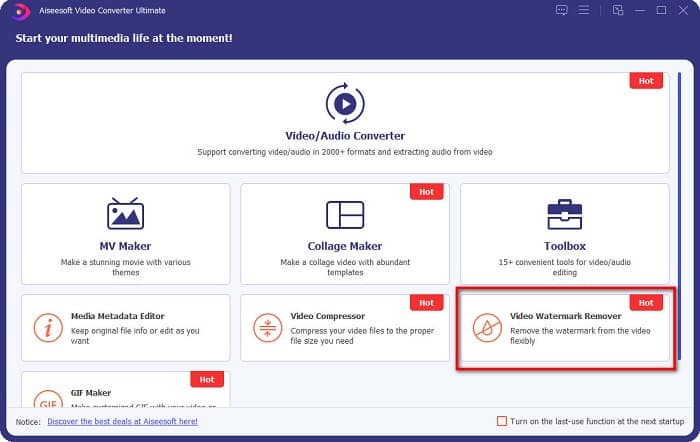
Schritt 3. Klicke auf der nächsten Oberfläche auf die +-Schaltfläche, um das Coub‑Video hochzuladen. Es öffnet sich dein Dateiexplorer, in dem du das Video auswählst und auf Öffnen klickst.

Schritt 4. Klicke als Nächstes auf die Schaltfläche Add watermark removing area, damit der Entfernungsbereich erscheint. Verschiebe dann das Kästchen für den Entfernungsbereich auf das Coub‑Wasserzeichen. Du wirst sehen, dass der von dir gewählte Bereich unscharf wird.
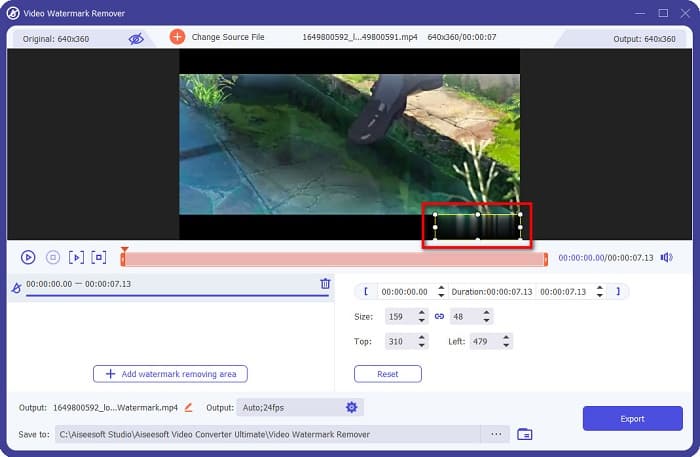
Schritt 5. Klicke abschließend auf die Schaltfläche Export, um das Coub‑Wasserzeichen zu entfernen; deine Ausgabe wird dann automatisch in den Ordnern deines Computers gespeichert.

Ganz einfach, oder? Mit den einfachen Schritten oben kannst du das Coub‑Wasserzeichen aus deinem Video entfernen. Klicke hier, um zu erfahren, wie du das TikTok‑Wasserzeichen entfernst.
Hitpaw Wasserzeichen-Entferner
Hitpaw Watermark Remover ist ein beliebtes herunterladbares Tool zum Entfernen von Wasserzeichen, mit dem du das Coub‑Wasserzeichen aus deinem Video leicht entfernen kannst. Wenn du ein Coub‑Video ohne Wasserzeichen haben möchtest, kannst du dieses Tool verwenden, um es zu entfernen. Darüber hinaus hat dieses Tool eine einfache Benutzeroberfläche und ist somit sehr benutzerfreundlich.
Es wird Ihnen auch leicht fallen, ein Wasserzeichen an einem bestimmten Teil des Videos zu entfernen, indem Sie die Schieberegler bewegen. Darüber hinaus ermöglicht es Ihnen eine glatte Füllung beim Entfernen des Wasserzeichens. Es kann auch kostenlos auf fast allen Mediengeräten heruntergeladen werden.
Schritt 1. Lade zuerst den Hitpaw Watermark Remover herunter, folge dem Installationsprozess und starte die App.
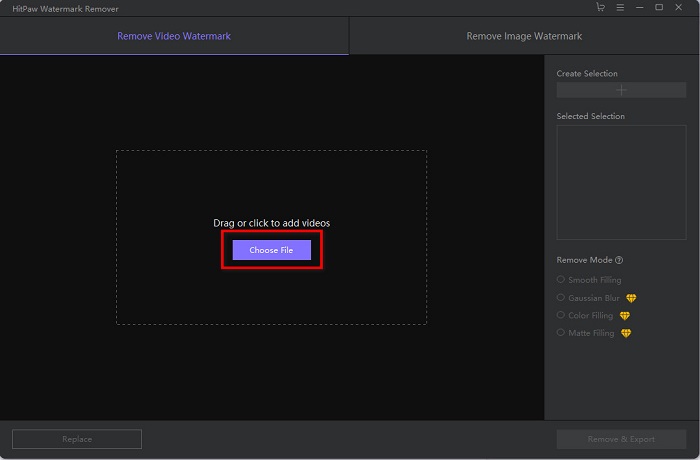
Schritt 2. Klicke dann auf der Hauptoberfläche der Software auf die Schaltfläche Choose File, um dein Coub‑Video hochzuladen. Es öffnet sich dein Dateiexplorer, in dem du dein Coub‑Video öffnest.
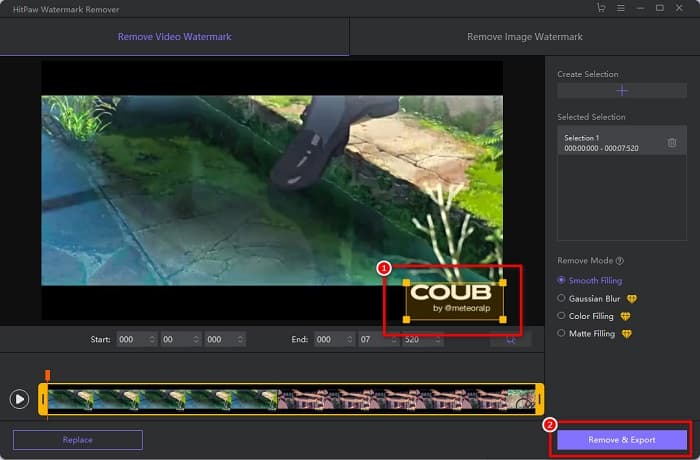
Schritt 3. Verschiebe den Entfernungsbereich auf das Coub‑Wasserzeichen und klicke anschließend unten rechts in der Oberfläche auf die Schaltfläche Remove & Export, um das Wasserzeichen dauerhaft zu entfernen.
Media.io
Media.io ist ein Online‑Tool zum Entfernen von Wasserzeichen aus Videos. Mit diesem Online‑Tool kannst du Wasserzeichen wie Logos, Texte und Stempel entfernen. Wenn du zum ersten Mal einen Wasserzeichen‑Entferner verwendest, wirst du mit diesem Online‑Tool keine Schwierigkeiten haben, da es einfach zu bedienen ist. Außerdem unterstützt es die gängigsten Videoformate wie MP4, MKV, AVI, FLV, MOV und mehr. Du kannst auch Videodateien aus deinem Dropbox‑Konto, von Google Drive und YouTube auswählen. Darüber hinaus ist es sicher in der Anwendung und kostenlos. Media.io ist in allen gängigen Webbrowsern zugänglich, einschließlich Google, Firefox und Safari.
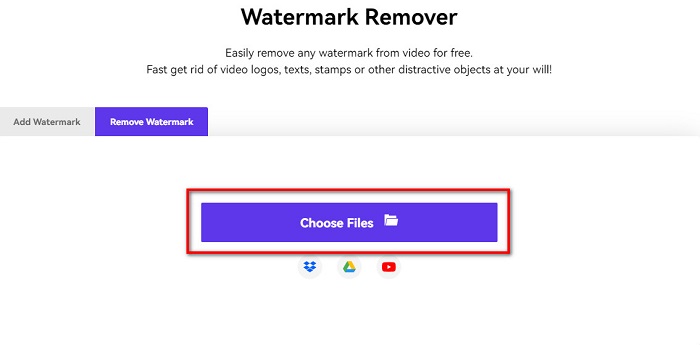
Schritt 1. Suche in deinem Browser nach Media.io und gehe dann auf die Webseite. Klicke auf der Hauptoberfläche der Software auf die Schaltfläche Choose Files.
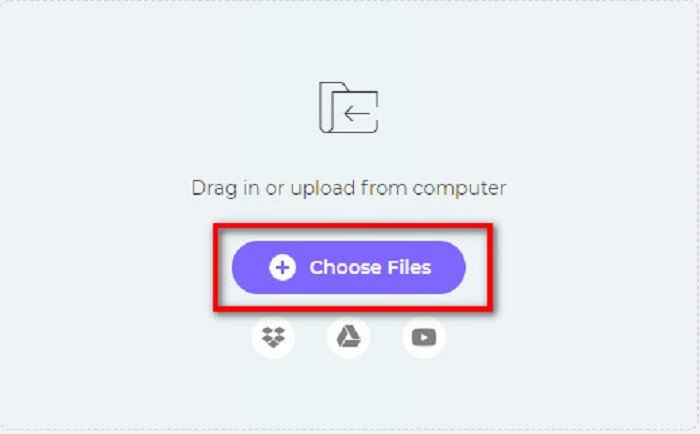
Schritt 2. Es öffnet sich eine neue Oberfläche, auf der du auf die Schaltfläche Choose Files klickst oder dein Coub‑Video per Drag & Drop auf die Oberfläche der Software ziehst. Warte, bis dein Video hochgeladen ist, und fahre dann mit dem nächsten Schritt fort.
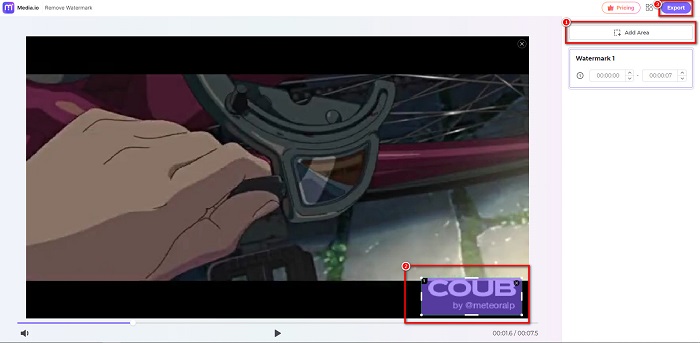
Schritt 3. Klicke anschließend in der linken Ecke der Oberfläche auf Add Area und verschiebe den Entfernungsbereich auf das Coub‑Wasserzeichen. Klicke auf die Schaltfläche Export, um das Wasserzeichen zu entfernen; deine Datei wird automatisch auf deinem Gerät gespeichert. Du kannst diese Methode auch verwenden, um das Video‑Wasserzeichen zu entfernen.
BeeCut
BeeCut ist eine weitere Möglichkeit, Coub‑Wasserzeichen online zu entfernen. Dieses Tool ist sehr praktisch, da du nichts auf dein Gerät herunterladen musst. Außerdem ist es kostenlos und sicher zu verwenden. Interessanterweise unterstützt dieses Tool zahlreiche Dateiformate, darunter MP4, AVI, MKV, FLV und andere gängige Formate.
Darüber hinaus ist es ein anfängerfreundliches Tool, da es über eine einfach zu bedienende Benutzeroberfläche verfügt. Es kann jedoch zu einem langsamen Betriebsprozess kommen, wenn Ihre Internetverbindung langsam ist, da sie internetabhängig ist. Um Coub-Wasserzeichen mit BeeCut zu entfernen, folgen Sie der einfachen Anleitung unten.
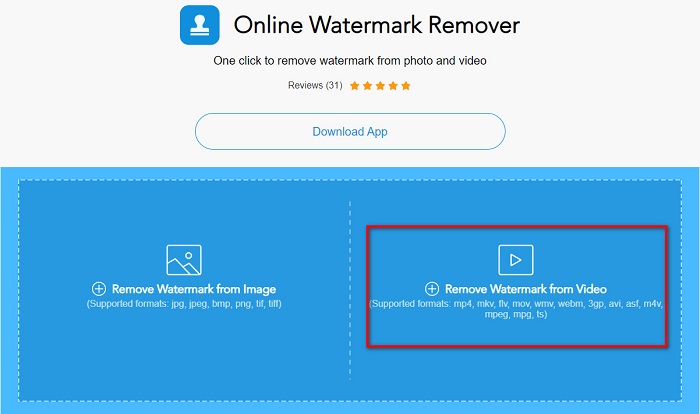
Schritt 1. Suche in deinem Browser nach BeeCut und klicke dann auf der Hauptoberfläche der Software auf Remove Watermark from Video. Lade dein Video hoch, indem du es aus deinen Computerordnern öffnest.
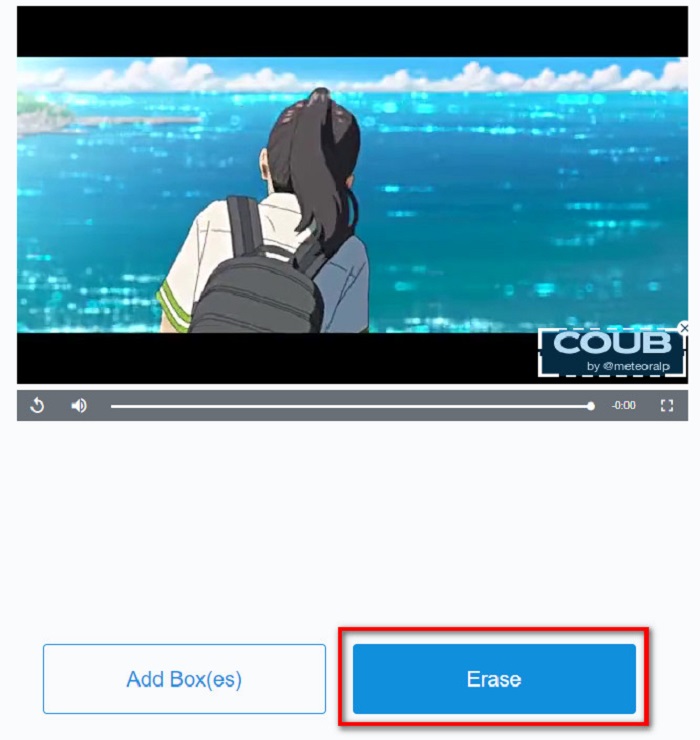
Schritt 2. Verschiebe in der nächsten Oberfläche den Entfernungsbereich auf das Coub‑Wasserzeichen, das du entfernen möchtest. Und wenn du noch weitere Wasserzeichen, Logos oder Stempel in deinem Video hast, kannst du durch Klicken auf Add Box(es) ein weiteres Entfernungsfeld hinzufügen.
Schritt 3. Klicke zum Schluss auf die Schaltfläche Erase, um das Coub‑Wasserzeichen aus deinem Video zu entfernen. Du findest dein Ergebnis anschließend in deinen Computerordnern.
Teil 2. Häufig gestellte Fragen zum Entfernen des Coub-Wasserzeichens
Können Sie Coub-Videos ohne Wasserzeichen erhalten?
Leider gibt es keine speziellen Möglichkeiten oder Tools, um ein Coub-Video ohne Wasserzeichen herunterzuladen. Wasserzeichenentferner helfen Ihnen jedoch dabei, ein Coub-Video ohne Wasserzeichen zu haben.
Verringert das Entfernen des Wasserzeichens die Dateigröße Ihres Videos?
Nein. Das Entfernen des Wasserzeichens aus Ihrem Video wirkt sich nicht auf die Dateigröße Ihres Videos aus.
Warum ist der Wasserzeichenbereich unscharf, nachdem Sie ihn entfernt haben?
Unschärfe im Wasserzeichenbereich, den Sie entfernt haben, da die Tools auf diese Weise das Wasserzeichen auf Ihren Bildern oder Videos entfernen.
Fazit
Das Entfernen des Coub‑Wasserzeichens aus Videos mag kompliziert klingen. Mit den oben vorgestellten Tools kannst du jedoch ganz einfach Coub‑Wasserzeichen entfernen. Wenn du allerdings einen Wasserzeichen‑Entferner verwenden möchtest, der schnell arbeitet und viele Funktionen bietet, lade FVC Video Converter Ultimate herunter.
-
 4 beste Möglichkeiten, das Wasserzeichen aus GIF zu entfernen [Online & Offline]
 Müssen Sie Wasserzeichen aus GIF entfernen? Mit dem Tool in diesem Artikel lernen Sie die verschiedenen Stile mit den verschiedenen Wasserzeichenentfernern kennen, die auf Ihrer Plattform verfügbar sind.
-
 Hervorragender Photobucket-Wasserzeichenentferner online und offline
 Erfahren Sie, wie Sie mit diesem erstaunlichen Photobucket-Wasserzeichenentferner das Photobucket-Wasserzeichen von Ihren Fotos entfernen. Lesen Sie diesen Artikel, um die Möglichkeiten zu erfahren.
-
 Einfaches Entfernen von Wasserzeichen aus PDF mit einfachen Schritten
 Entfernen Sie Wasserzeichen aus PDF, indem Sie diesen einfachen Schritten folgen. Erfahren Sie, wie Sie mit diesen erstaunlichen Tools ganz einfach Wasserzeichen aus Ihrer PDF-Datei entfernen können.
