


 Video Converter Ultimate
 Bildschirm recorder
 Videoreparatur
 Sicherer Download
Anspruchslose Methoden zum Entfernen des iSkysoft-Logos aus dem Video
iSkysoft ist eine ausgezeichnete Anwendung mit vielen großartigen Funktionen, die sie von anderen Programmen abhebt. Es ist ein einfaches Programm, mit dem Sie Videoformate in andere Formate konvertieren und einige grundlegende Videobearbeitungen durchführen können. Der traurigste Teil dieser Software ist jedoch, dass nach der Verwendung ein großes iSkysoft‑Wasserzeichen auf Ihren Videos erscheint. Ein großes Wasserzeichen/Logo auf Ihrem Video ist überhaupt nicht angenehm anzusehen. Zum Glück gibt es zuverlässige Anwendungen, mit denen Sie störende Objekte wie das iSkysoft‑Logo/Wasserzeichen entfernen können. Wenn Sie herausfinden möchten, welche Methoden am besten geeignet sind, um das iSkysoft‑Logo aus Ihrem Video zu entfernen, müssen Sie diesen Beitrag lesen.

Teil 1: Entfernen Sie das iSkysoft-Logo aus dem Video auf dem Desktop
Das iSkysoft‑Logo auf Ihrem Bildschirm ist wirklich störend, besonders wenn Sie Ihre Lieblingsvideos ansehen. Aber Sie müssen sich nicht länger Sorgen machen. Sie können dieses Logo mit dem Video Converter Ultimate loswerden. Diese zuverlässige Software kann Ihnen auf zwei einfache Arten helfen, das iSkysoft‑Logo aus Ihren Videos zu entfernen: mit dem Tool Video Watermark Remover und dem Tool Video Cropper. Mit diesen Werkzeugen können Sie das iSkysoft‑Logo ganz leicht aus Ihrem Video entfernen. Befindet sich ein iSkysoft‑Logo in einer Ecke Ihres Videos, wird empfohlen, das Tool Video Cropper zu verwenden. Wurde das Logo jedoch in der Mitte platziert, können Sie das Tool Video Watermark Remover einsetzen. Auf diese Weise können Sie Ihre Lieblingsfilme oder ‑videos ansehen, ohne vom Logo genervt zu sein.
Darüber hinaus bietet Video Converter Ultimate neben dem Entfernen von Wasserzeichen aus Ihren Videos noch weitere Funktionen. Es hat einen Video Enhancer, Video Merger, Cropper, Trimmer, Rotator, Konverter und mehr. Darüber hinaus besteht eine der Hauptfunktionen dieser Anwendung darin, verschiedene Videodateiformate zu konvertieren. Auch nicht professionelle Benutzer können diese Anwendung nutzen, da sie über eine einfache Benutzeroberfläche verfügt. Wenn Sie erfahren möchten, wie Sie das iSkysoft-Logo aus Ihrem Video entfernen können, zeigen wir Ihnen zwei einfache Möglichkeiten, die diese Anwendung bietet.
Verwenden des Video-Wasserzeichen-Entferners
Schritt 1: Laden Sie zunächst den Video Converter Ultimate auf Ihren Desktop herunter, um diese großartige Software zu verwenden. Nachdem Sie ihn heruntergeladen haben, folgen Sie dem Installationsvorgang und starten Sie die Anwendung.
Gratis DownloadFür Windows 7 oder neuerSicherer Download
Gratis DownloadFür MacOS 10.7 oder neuerSicherer Download
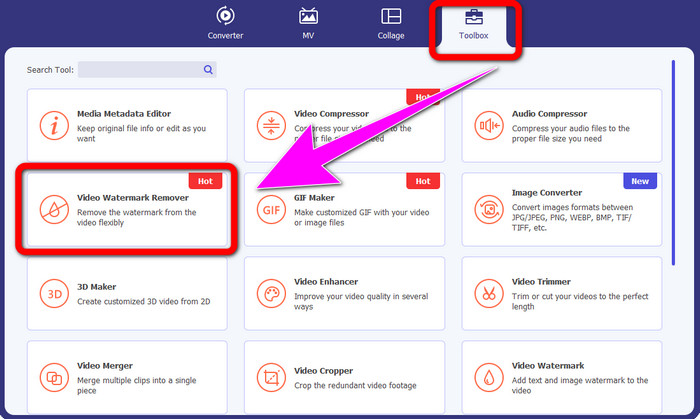
Schritt 2: Sobald Sie die Software gestartet haben, gehen Sie zum Bereich Toolbox und wählen Sie das Tool Video Watermark Remover aus. Es wird eine weitere Oberfläche auf Ihrem Bildschirm erscheinen.
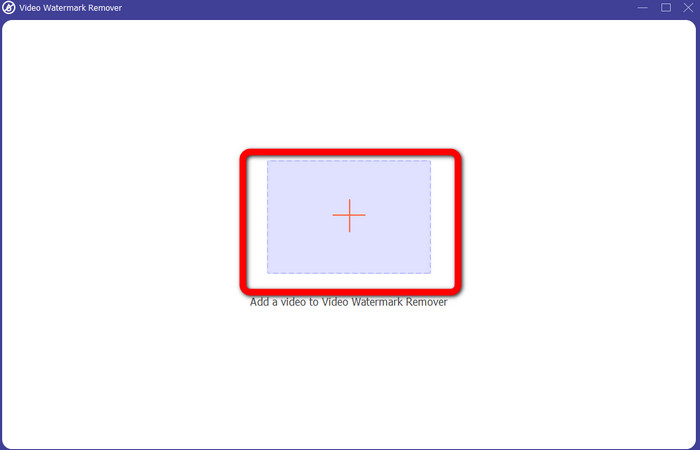
Schritt 3: Wenn Sie die neue Oberfläche sehen, klicken Sie auf das Plus‑Symbol und fügen Sie Ihr Video mit dem iSkysoft‑Logo hinzu, das Sie entfernen möchten.
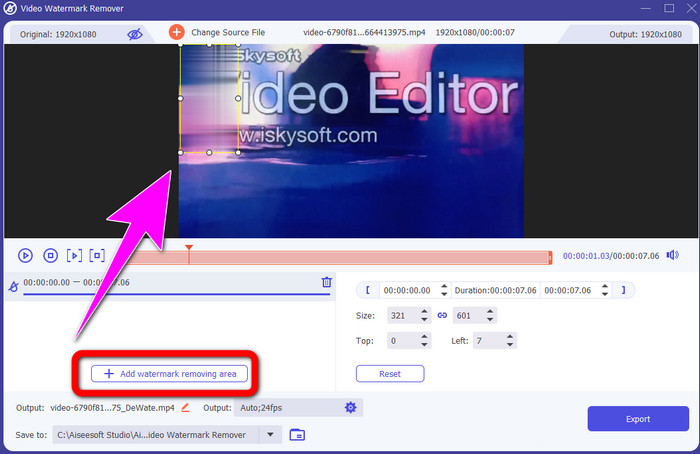
Schritt 4: Klicken Sie anschließend auf die Schaltfläche Add Watermark Removing Area. Bewegen Sie das Kästchen auf Ihrem Video und decken Sie damit das iSkysoft‑Logo ab.
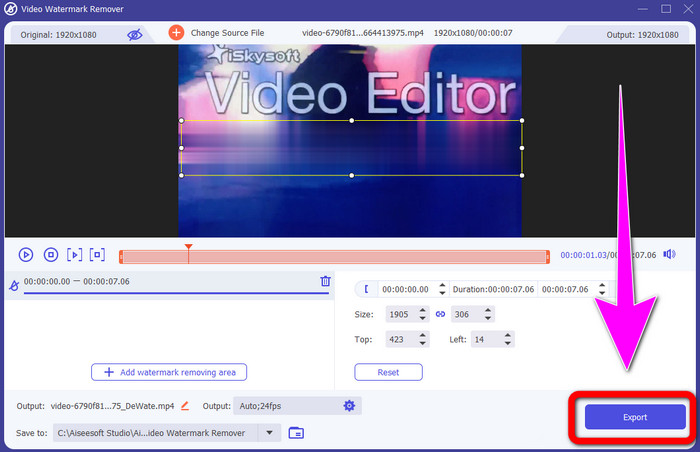
Schritt 5: Klicken Sie abschließend auf die Schaltfläche Export, um Ihr fertiges Video zu speichern.
Verwenden von Video Cropper
In diesem Teil zeigen wir Ihnen, wie Sie das iSkysoft-Logo mit dem Video Cropper-Tool aus Ihrem Video entfernen.
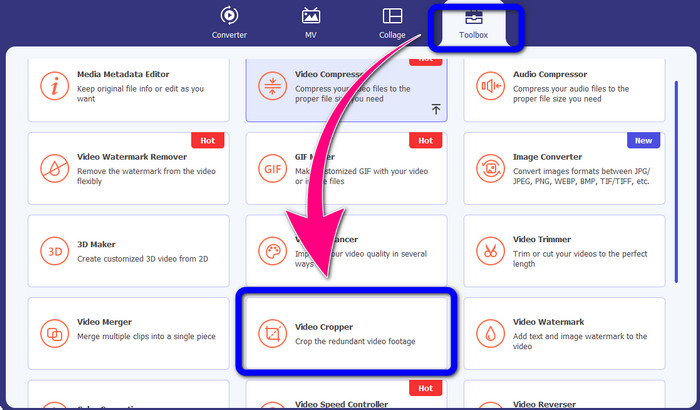
Schritt 1: Starten Sie die Anwendung auf Ihrem Desktop. Klicken Sie im Bereich Toolbox auf das Tool Video Cropper. Wie bei dem oben genannten Tool erscheint eine weitere Oberfläche auf Ihrem Bildschirm.
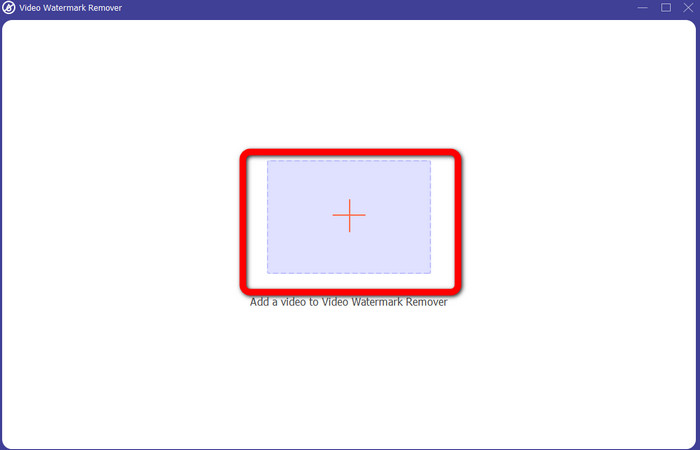
Schritt 2: Klicken Sie auf die Schaltfläche mit dem Plus-Symbol, um Ihr Video mit dem iSkysoft‑Logo zu importieren.
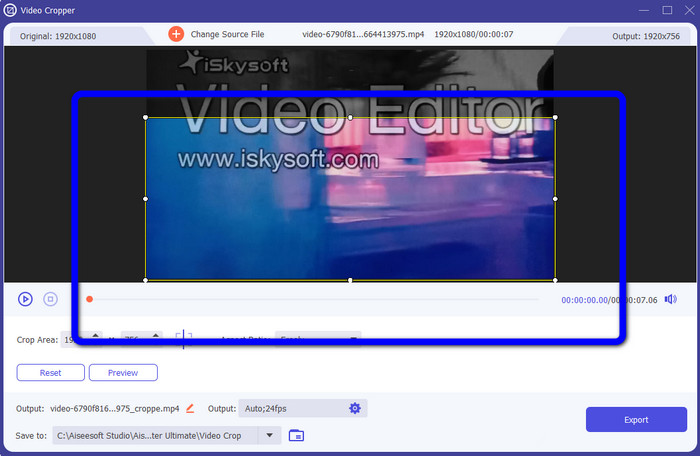
Schritt 3: In diesem Schritt können Sie das Video nun zuschneiden, um das iSkysoft‑Logo aus Ihrem Video zu entfernen. Verwenden Sie Ihre Maus, um den Rand Ihres Videos zu verschieben.
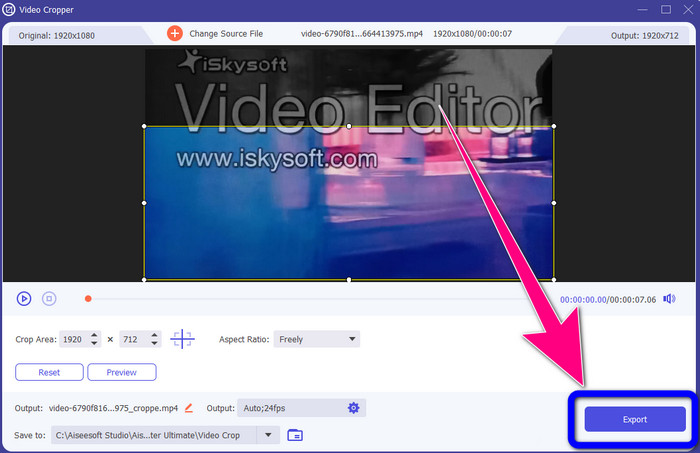
Schritt 4: Klicken Sie für den letzten Schritt auf die Schaltfläche Export und speichern Sie Ihr Ergebnis auf Ihrem Desktop.
Teil 2: So entfernen Sie das iSkysoft-Logo aus Video Online
Mit HitPaw
Sie können das iSkysoft‑Logo auch online entfernen. Eines der besten Tools, die Sie verwenden können, ist HitPaw. Diese Online‑Anwendung kann das Logo ganz einfach aus Ihrem Video entfernen. Sie können sie sowohl auf dem Desktop als auch online nutzen, was für alle Benutzer praktisch ist. Außerdem ist HitPaw sicher in der Anwendung. Es stellt sicher, dass die Videos nur von Ihnen bearbeitet und angesehen werden können. Zudem müssen Sie sich keine Sorgen über Einschränkungen dieser Software machen. Es gibt keine Beschränkungen hinsichtlich des Entfernens von Logos aus Ihren Videos. Sie müssen diese Anwendung nicht kaufen, da sie kostenlos ist. Wenn Sie jedoch das Logo oder ein beliebiges
unnötige Elemente aus Ihrem Video entfernen, müssen Sie etwas länger warten. Diese Anwendung hat ein langsames Entfernungsverfahren, das für die Benutzer zeitaufwändig ist. Außerdem hängt es von Ihrer Internetverbindung ab. Es funktioniert gut, wenn Sie eine schnelle Verbindung haben. Wenn Sie jedoch eine langsame Verbindung haben, müssen Sie mit einer Verzögerung rechnen. Befolgen Sie die nachstehenden einfachen Schritte, um das iSkysoft-Logo aus Ihren Videos zu entfernen.
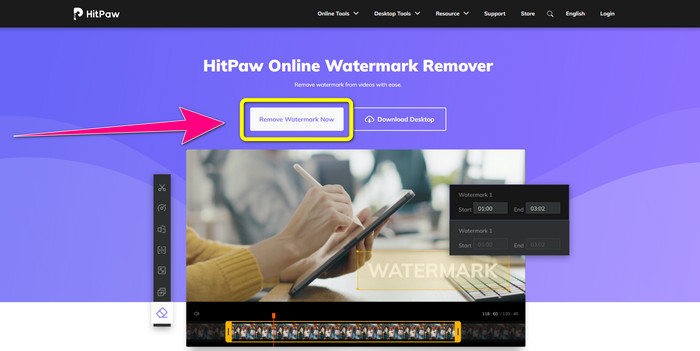
Schritt 1: Besuchen Sie die HitPaw-Website. Klicken Sie auf die Schaltfläche Remove Watermark Now - Choose File, um Ihr Video mit dem iSkysoft‑Logo einzufügen, das Sie entfernen möchten.
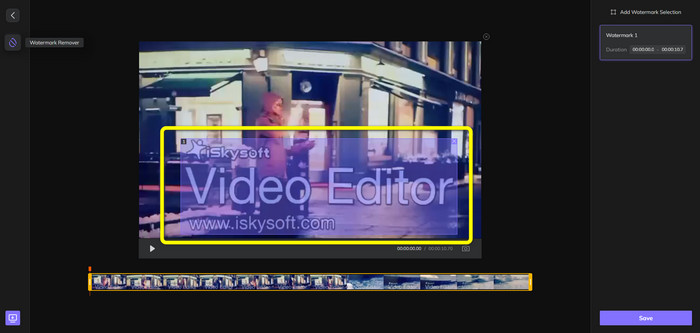
Schritt 2: Sobald Sie Ihre Videodatei hinzugefügt haben, erscheint ein blaues Kästchen auf Ihrem Bildschirm. Verwenden Sie dieses Kästchen, um das iSkysoft‑Logo abzudecken. Sie können die Größe des Kästchens anpassen.
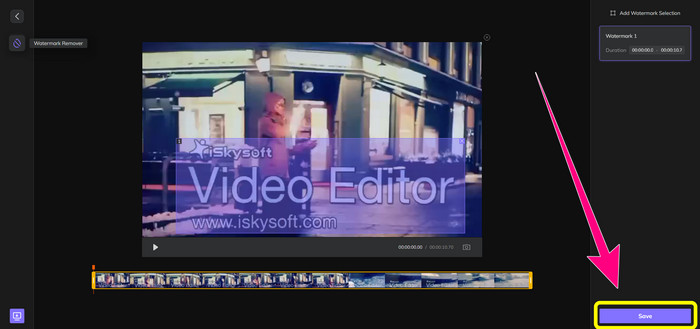
Schritt 3: Wenn Sie das iSkysoft‑Logo in Ihrem Video vollständig abgedeckt haben, klicken Sie auf die Schaltfläche Save. Warten Sie auf den Entfernungsprozess und speichern Sie Ihr Video.
Verwenden von Video-Wasserzeichen-Entferner online
Ein weiteres Online‑Tool, das Sie verwenden können, ist der Video Watermark Remover Online. Mit dieser Anwendung können Sie das iSkysoft‑Logo aus Ihren Videos entfernen. Sie ist ebenfalls eine einfach zu bedienende Software und daher für nicht‑professionelle Benutzer geeignet. Sie können auch andere störende Elemente aus Ihren Videos entfernen, ohne die Qualität Ihrer Videos zu verlieren. Bei der Nutzung der kostenlosen Version gibt es jedoch eine Einschränkung beim Entfernen von Logos aus Ihren Videos. Sie können Logos oder Wasserzeichen nur aus 5 Videos entfernen. Sie müssen ein Abonnement erwerben, wenn Sie mit dem Video Watermark Remover Online weitere Videos bearbeiten möchten. Außerdem können Sie Ihr Ergebnis nicht in einem anderen Format speichern. Sie können es nur im selben Format sichern, was nicht ideal ist. Schließlich ist die Dateiverarbeitung langsam. Folgen Sie der einfachen Anleitung unten, um das iSkysoft‑Logo aus Ihren Videos zu entfernen.
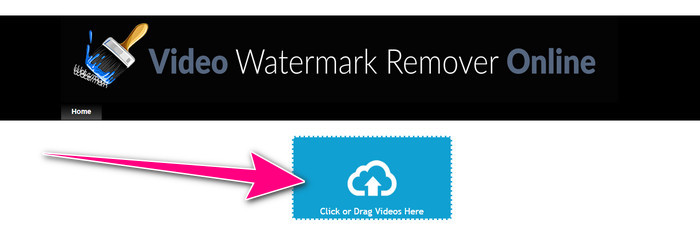
Schritt 1: Gehen Sie auf die Website von Video Watermark Remover Online. Wählen Sie die Schaltfläche Click or Drag Videos Here, um Ihre Videodatei mit dem iSkysoft‑Logo zu importieren, das Sie entfernen möchten.
Schritt 2: Klicken Sie anschließend auf die Schaltfläche Remove Watermark und warten Sie auf den Entfernungsprozess.

Verwandte Themen:
Schnellste Methode, ein Logo aus einem Video in Adobe Premiere Pro zu entfernen
Wie man ein Logo mit Windows Movie Maker aus einem Video entfernt
Teil 3: Häufig gestellte Fragen zum Entfernen des iSkysoft-Logos
Können Sie ein Logo von einem Bild entfernen?
Ja, Sie können den FVC Free Watermark Remover verwenden, um das Logo schnell und einfach aus Ihrem Bild zu entfernen.
Ist das Entfernen des Wasserzeichens illegal?
Gemäß dem US-amerikanischen Urheberrechtsgesetz, Abschnitt 1202, ist das Entfernen von Wasserzeichen ohne die Erlaubnis des Eigentümers illegal.
Wie entferne ich das Logo kostenlos?
Sie können die kostenlose Testversion von Video Converter Ultimate verwenden, um kostenlos ein Logo aus Ihrem Video zu entfernen.
Fazit
Dieser Artikel hat ausgezeichnete Methoden vorgestellt, um mit Desktop‑ und Online‑Tools das iSkysoft‑Logo aus Ihrem Video zu entfernen. Wenn Sie jedoch nach einem hervorragenden Logo‑Entferner suchen, den Sie verwenden können, dann laden Sie Video Converter Ultimate herunter. Diese Anwendung bietet einen schnellen Entfernungsprozess und ist für alle Benutzer leicht zugänglich.
-
 8 herausragende Video-Wasserzeichen-Entferner online und offline
 Wenn Sie nach der besten kostenlosen Software zum Entfernen von Video-Wasserzeichen suchen, die Sie auf Ihren Windows-, Mac-, iPhone- und Android-Telefonen verwenden können, ist dieser Artikel genau das Richtige für Sie
-
 Beste Methoden zum Entfernen von beißbaren Wasserzeichen aus Videos
 Dieser Artikel zeigt Ihnen einen äußerst zuverlässigen und fantastischen beißbaren Wasserzeichenentferner. Diese wunderbaren Anwendungen werden Ihnen helfen, diese Art von Problem zu lösen
-
 Leicht zu erlernende Verfahren zum Entfernen von Logos aus Videos
 Suchen Sie nach dem besten und einfachsten Video-Logo-Entferner? Dann ist dieser Artikel gut für Sie. Nutzen Sie die Gelegenheit, um zu erfahren, wie Sie ein Logo aus einem Video entfernen.
