


 Video Converter Ultimate
 Bildschirm recorder
 Videoreparatur
 Sicherer Download
Hervorragende Möglichkeiten zum Entfernen von Logos aus einem Video mit Ihren Geräten
Es ist zwar zufriedenstellend, seine Lieblingsvideos anzusehen – aber nicht, wenn das Video unnötige Objekte wie Logos, Wasserzeichen, Texte usw. enthält. Wenn Sie nach den besten und nützlichsten Methoden suchen, sollten Sie diesen Artikel lesen, um sich einen Überblick zu verschaffen. Mit hervorragenden Programmen können Sie viele Möglichkeiten ausprobieren, um Logos sowohl offline als auch online aus Videos zu entfernen. Mit Hilfe dieser Logo-Entferner können Sie Ihre Lieblingsfilme, Videoclips, Diashows und mehr genießen. So werden Sie nicht wieder auf dasselbe Problem stoßen. Wenn Sie wirksame Methoden kennenlernen möchten, um ein Logo aus Ihren Videos zu entfernen, sollten Sie diesen informativen Artikel nicht überspringen.

Teil 1: Beste Methode zum Entfernen von Logos aus einem Video
Wenn Sie nach einem kostenlosen Logo-Entferner suchen, ist die beste Anwendung, die Sie verwenden können, der Video Converter Ultimate. Dieses Programm kann Ihnen helfen, ein Logo aus Ihrem Video zu entfernen. Nicht nur Logos, sondern auch andere unnötige Objekte in Ihren Videos wie Wasserzeichen, Texte, Bilder usw. können entfernt werden. Außerdem können Sie das Logo leicht entfernen, da es nur ein paar einfache Schritte gibt, denen sogar Anfänger folgen können.
Darüber hinaus verfügt Video Converter Ultimate im Gegensatz zu anderen Anwendungen, die viel Zeit zum Entfernen von Logos aus einem Video benötigen, über einen schnellen Entfernungsprozess. Mit dieser Anwendung können Sie das Logo mit zwei einfachen Werkzeugen entfernen, dem Video-Wasserzeichen-Entferner und dem Video-Cropper. Darüber hinaus verfügt es über Funktionen, die Sie genießen können, wie einen Videokonverter, einen Video-Geschwindigkeitsregler, einen Videokompressor, eine Farbkorrektur, einen Video-Cropper, einen Collage-Maker und mehr. Wenn Sie diese zwei Möglichkeiten zum Entfernen der Logos mit Video Converter Ultimate kennenlernen möchten, befolgen Sie die nachstehenden Schritte.
1. Verwenden der Video Watermark Remover-Funktion
Schritt 1: Gehen Sie zunächst auf die Website von Video Converter Ultimate und laden Sie die Software herunter. Nach dem Herunterladen fahren Sie mit der Installation fort und starten den Video Converter Ultimate auf Ihrem Desktop.
Gratis DownloadFür Windows 7 oder neuerSicherer Download
Gratis DownloadFür MacOS 10.7 oder neuerSicherer Download
Schritt 2: Nachdem Sie die Software gestartet haben, wechseln Sie zum Bereich Toolbox. Suchen Sie anschließend nach Video Watermark Remover und klicken Sie darauf.
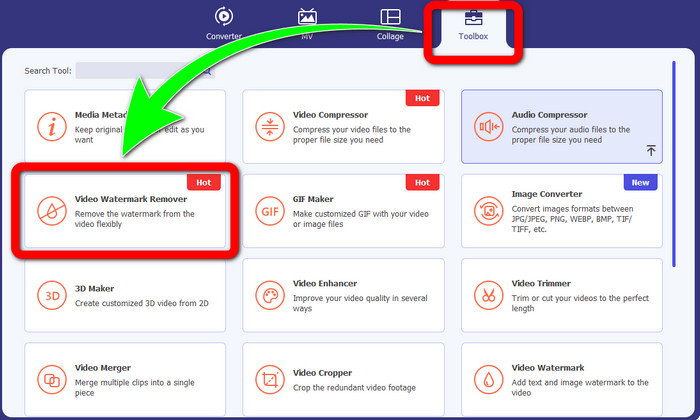
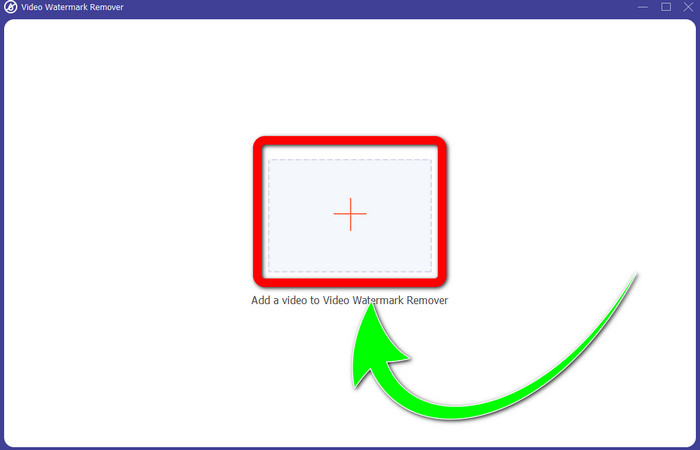
Schritt 3: Nachdem Sie auf Video Watermark Remover geklickt haben, erscheint eine weitere Oberfläche auf Ihrem Desktop. Wählen Sie die Plus-Schaltfläche und importieren Sie Ihr Video mit Logo.
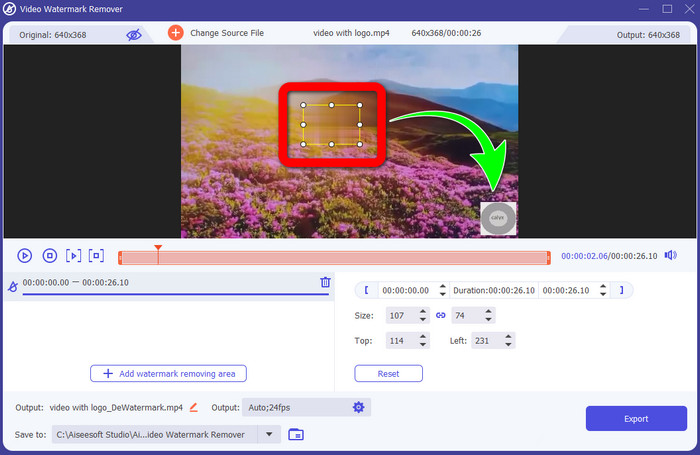
Schritt 4: Klicken Sie auf die Schaltfläche Add Watermark Removing Area. Auf Ihrem Video erscheint ein kleines Kästchen. Verschieben Sie das Kästchen über das Logo, um es abzudecken.
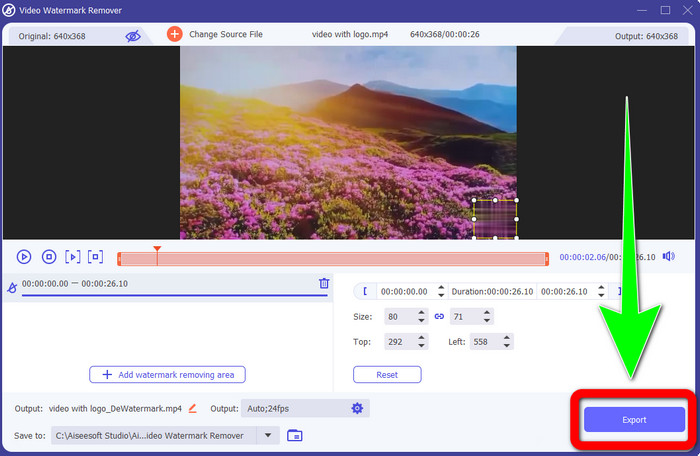
Schritt 5: Wenn Sie das Kästchen so positioniert haben, dass es das Logo verdeckt, klicken Sie auf die Schaltfläche Export, um Ihr fertiges Video zu speichern.
1. Verwenden der Video Cropper-Funktion
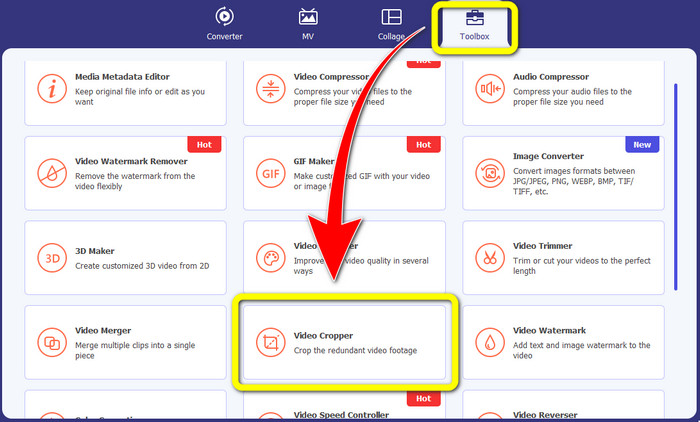
Schritt 1: Öffnen Sie den Video Converter Ultimate, gehen Sie zur Toolbox und klicken Sie auf die Schaltfläche Video Cropper. Dann erscheint eine weitere Oberfläche auf Ihrem Bildschirm.
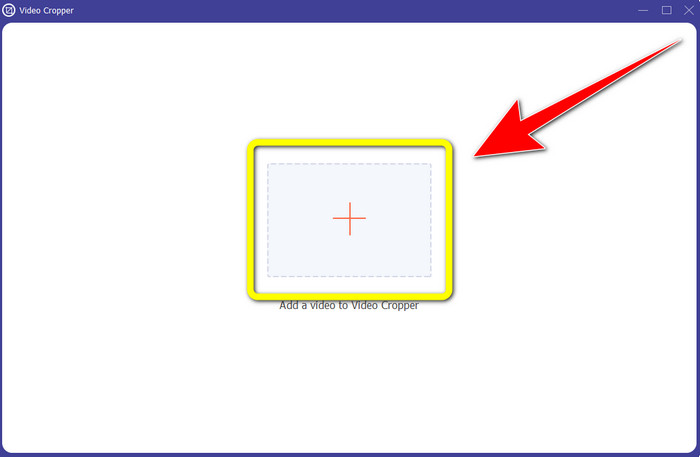
Schritt 2: Wenn die neue Oberfläche auf Ihrem Bildschirm angezeigt wird, klicken Sie auf das Plus-Symbol und importieren Sie Ihr Video mit Logo.
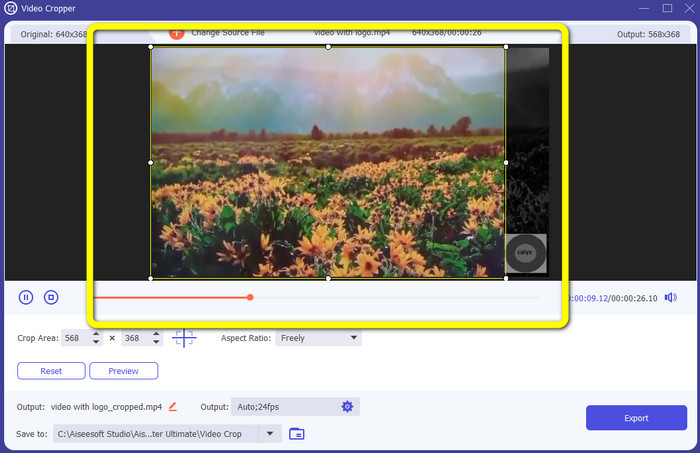
Schritt 3: Nach dem Importieren des Videos können Sie Ihr Video zuschneiden, um das Logo zu entfernen.
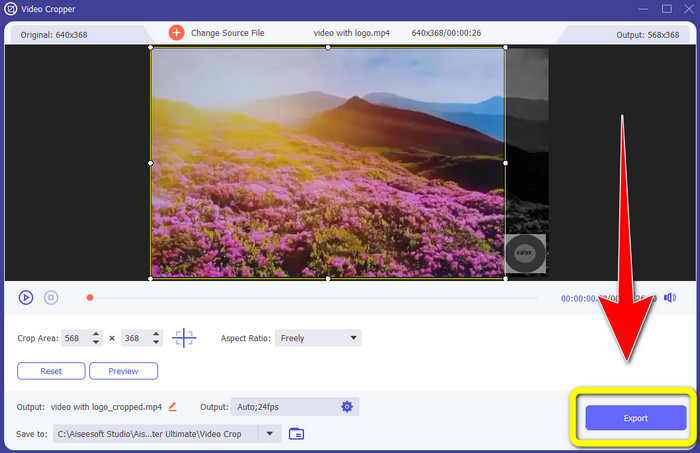
Schritt 4: Klicken Sie nach dem Zuschneiden des Videos auf die Schaltfläche Export.
Teil 2: So entfernen Sie das Logo von Video Online
Wenn Sie eine großartige Anwendung suchen, die Ihnen dabei hilft, Logos aus Videos zu entfernen, können Sie 123APPS verwenden. Dieses Programm kann Ihnen helfen, ein Logo schnell und mühelos aus Ihrem Video zu entfernen, was es besonders für Anfänger ideal macht. Außerdem ist dieses Online-Tool kostenlos, sodass Sie sich keine Gedanken darüber machen müssen, ob Sie es kaufen sollen oder nicht. Eine seiner nützlichen Funktionen besteht zudem darin, störende Objekte aus Ihren Videos zu beseitigen, wie Wasserzeichen, Texte, Bilder usw. Darüber hinaus unterstützt es verschiedene Dateiformate wie MOV, WMV, AVI, MP4 und mehr. Allerdings dauert es jedes Mal recht lange, eine Datei hochzuladen. Auch der Entfernungsvorgang ist sehr langsam. Wenn Sie ein Logo aus Ihren Videos entfernen möchten, folgen Sie diesen einfachen Schritten.
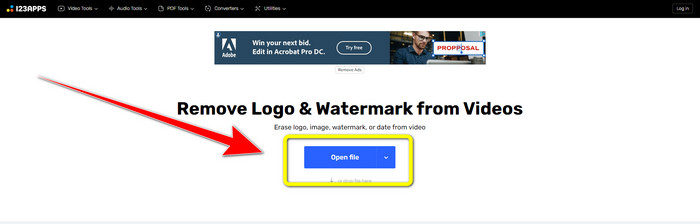
Schritt 1: Gehen Sie auf die Website von 123APPS. Klicken Sie auf die Schaltfläche Open file und fügen Sie Ihr Video mit TikTok-Logo hinzu.
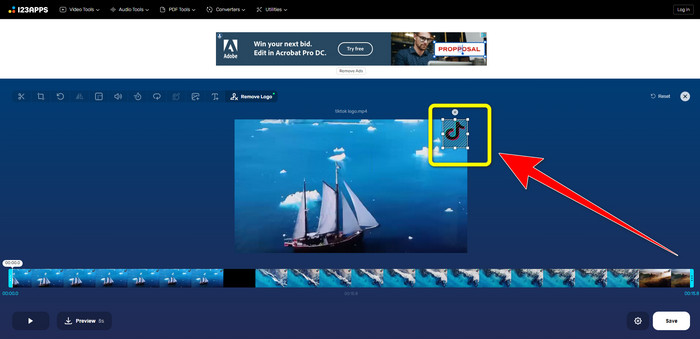
Schritt 2: Nachdem Sie Ihr Video angehängt haben, erstellen Sie mit der Maus auf dem Bildschirm ein Rechteck und ziehen Sie es über das Logo, um es zu entfernen.
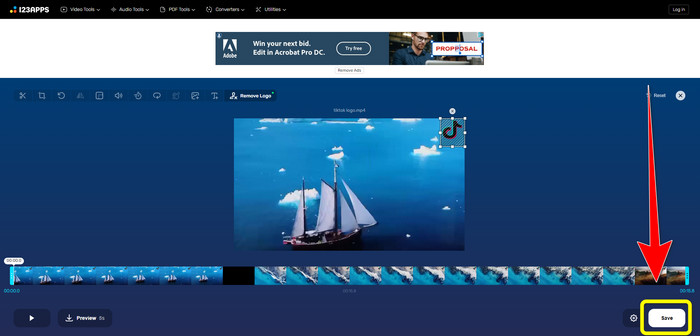
Schritt 3: Nachdem Sie das Logo abgedeckt haben, können Sie nun auf die Schaltfläche Save klicken, um Ihr endgültiges Video ohne Logo zu speichern.
Teil 3: So entfernen Sie das Logo von Videos auf iPhone und Android
So löschen Sie das Logo aus einem Video auf Android
Wenn Sie wissen möchten, wie man ein Logo in einem Video unter Android entfernt, können Sie die Anwendung Remove and Add Watermark verwenden. Diese Software kann Ihnen helfen, Logos in Ihren Videos sofort zu entfernen. Außerdem ist sie nicht nur zum Entfernen unnötiger Objekte in Ihren Videos geeignet. Sie können damit auch Logos aus Ihren Bildern entfernen, was für die Nutzer sehr praktisch ist. Darüber hinaus ist dieser Entferner einfach und leicht zu bedienen. Schließlich ist er auch schnell beim Speichern Ihrer Videos. Wenn Sie das Logo aus Ihren Videos entfernen möchten, folgen Sie den einfachen Schritten unten.
Schritt 1: Laden Sie Remove and Add Watermark auf Ihr Android-Gerät herunter.
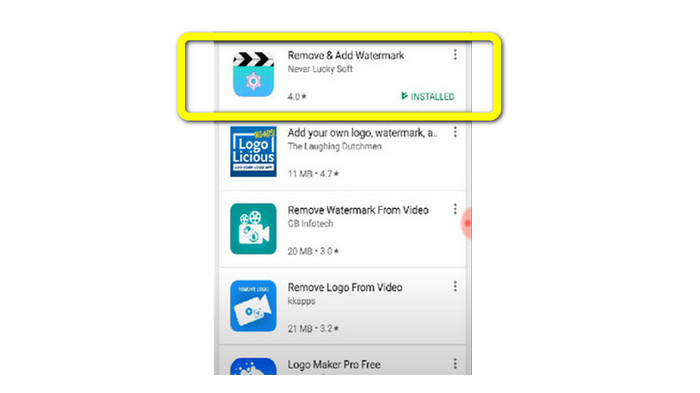
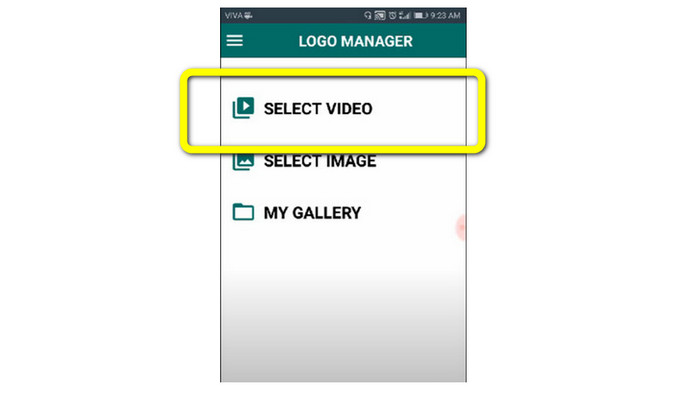
Schritt 2: Nachdem Sie die Anwendung heruntergeladen haben, klicken Sie auf die Schaltfläche Select Video > Remove Logo, um Ihr Video mit Logo hinzuzufügen.
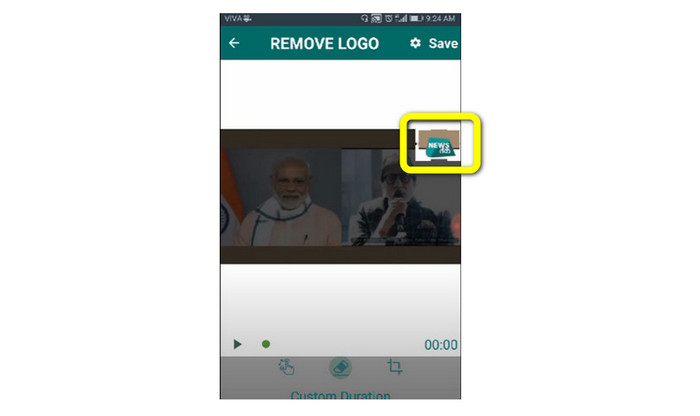
Schritt 3: Sobald Sie Ihr Video hinzugefügt haben, erscheint ein kleines Kästchen auf Ihrem Bildschirm. Verwenden Sie dieses Kästchen, um das Logo zu entfernen.
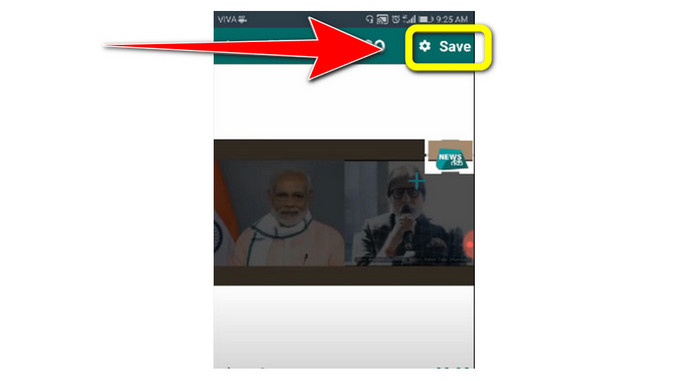
Schritt 4: Wenn Sie das Logo vollständig abgedeckt haben, klicken Sie auf die Schaltfläche Save, um Ihr Video ohne Logo zu speichern.
So löschen Sie das Logo aus einem Video auf dem iPhone
Wenn Sie ein Logo mit Ihrem iPhone aus Videos entfernen möchten, ist Watermark Remover Retouch die beste Anwendung dafür. Mit diesem Programm können Sie unnötige Objekte aus Ihren Videos entfernen, wie Logos, Wasserzeichen, Texte, Bilder usw. Außerdem können Sie diese Elemente schnell entfernen, was besonders für neue Nutzer vorteilhaft ist. Zudem verfügt es über eine einfache Benutzeroberfläche, sodass Sie die Anwendung mühelos bedienen können. Wenn Sie diese App nutzen möchten, um Logos aus Ihren iPhone-Videos zu entfernen, folgen Sie den einfachen Schritten unten.
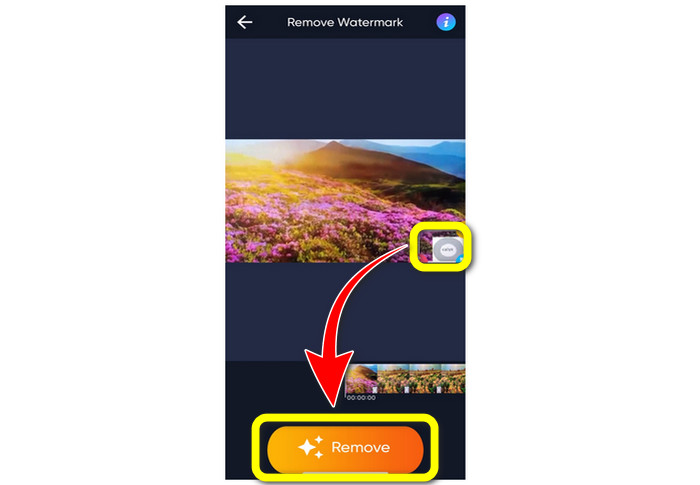
Schritt 1: Laden Sie Watermark Remover Retouch auf Ihr iPhone herunter. Starten Sie anschließend die Anwendung und fügen Sie das Video mit Logo hinzu.
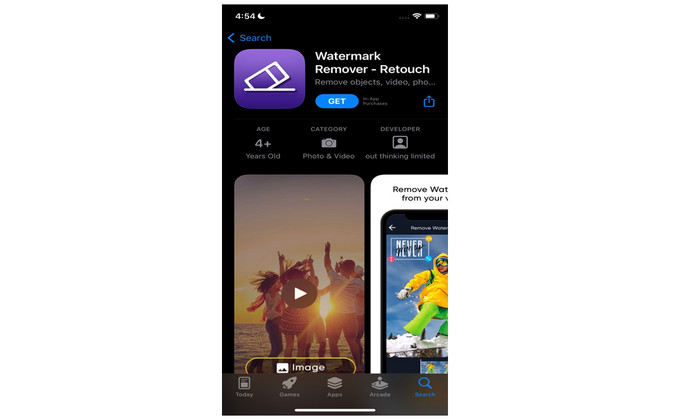
Schritt 2: Sobald das Video hinzugefügt wurde, erscheint ein kleines Kästchen auf dem Video. Verwenden Sie dieses Kästchen, um das Logo zu überdecken. Klicken Sie dann auf die Schaltfläche Remove und speichern Sie Ihr Video ohne Wasserzeichen.
Verwandte Themen:
So entfernen Sie das Filmora-Wasserzeichen kostenlos aus Ihren Videos oder Projekten
Die schnellste Methode, das Adobe-Stock-Wasserzeichen aus einem Video zu entfernen [Tutorial]
Teil 4: Häufig gestellte Fragen zum Entfernen von Logos aus Videos
Ist es sicher, das Logo online zu entfernen?
Ja, so ist es! Online-Anwendungen sind sicher und sicher zu verwenden. Das Beste, was Sie tun müssen, ist, nach einer Anwendung zu suchen, die Ihnen hilft, Logos zu entfernen und zu verwenden.
Ist es möglich, Signaturen von meinen Videos zu entfernen?
Ja, natürlich. Sie können mit Video Converter Ultimate die Signaturen aus Ihren Videos entfernen. Signaturen, Wasserzeichen, Logos und Texte lassen sich mit dieser hervorragenden Anwendung ganz einfach löschen.
Was ist die beste Anwendung, mit der ich Logos von meinem Mac entfernen kann?
Die beste Anwendung, die Sie auf dem Mac zum Entfernen von Logos verwenden können, ist Video Converter Ultimate. Diese Software ist nicht nur für Windows, sondern auch für Mac verfügbar, was für die Nutzer sehr praktisch ist.
Fazit
Dieser Artikel hat Ihnen eine effektive und zuverlässige Methode gezeigt, um Logos aus Ihren Videos zu entfernen. So können Sie Ihre Lieblingsvideos ohne Logo genießen. Wenn Sie schließlich die einfachste und müheloseste Methode zum Entfernen von Logos aus Ihren Videos suchen, sollten Sie unbedingt Video Converter Ultimate verwenden.
-
 So entfernen Sie das Animaker-Wasserzeichen kostenlos [bewährte Methoden]
 Wie entferne ich das Animaker-Wasserzeichen? Mit den besten Tools, die wir in diesem Blog vorstellen, können Sie sie verwenden, um das Wasserzeichen loszuwerden.
-
 Tutorial zum Entfernen des Wasserzeichens aus dem Origin-Diagramm [100% Working]
 Um das Wasserzeichen aus Origin Graph zu entfernen, benötigen Sie Hilfe. Die Hilfe, die Sie benötigen, ist in diesem Artikel enthalten, Sie können dies lesen, um mehr zu erfahren.
-
 So entfernen Sie das Wasserzeichen in SmartDraw ganz einfach [2 bewährte Methoden]
 Wie entferne ich das Wasserzeichen in Smart Draw? Wenn Sie die gleiche Frage haben, können Sie sich auf diesen Artikel verlassen, da wir Sie abgedeckt haben!
