


 Video Converter Ultimate
 Bildschirm recorder
 Videoreparatur
 Sicherer Download
Top-Möglichkeiten zum Entfernen des VideoShop-Wasserzeichens auf verschiedenen Plattformen [kostenlos]
Videoshop ist ein All-in-One-Paket-Videoeditor, den Sie auf Ihren Mobilgeräten verwenden können, und bis jetzt hat die App regelmäßig ein Update erhalten. Da die App regelmäßig aktualisiert wird und neue Funktionen hinzugefügt werden, sobald sie ein Update erhält, neigen mobile Benutzer dazu, dies als ihren Video-Editor zu wählen. Obwohl die App fast vollständige Videobearbeitungsfunktionen bietet, stoßen viele Benutzer immer noch auf Nachteile, wie die verwirrende Benutzeroberfläche und das dem exportierten Video hinzugefügte Wasserzeichen. Daher erklären wir Ihnen im heutigen Artikel die verschiedenen Ansätze, mit denen Sie das Videoshop-Wasserzeichen entfernen können, das Sie auf Ihr iOS und Android herunterladen können, sowie die ultimative Software, die Sie auf Ihrem Desktop verwenden können.

Teil 1. So entfernen Sie das VideoShop-Wasserzeichen mit den effektivsten Tools auf Ihrer Plattform
FVC Video Converter Ultimate - Ultimative Lösung zum Entfernen von Wasserzeichen unter Windows und Mac
FVC Video Converter Ultimate ist unsere Empfehlung im heutigen Artikel, weil es Wasserzeichen in Ihren Videos besonders effizient entfernen kann. Dieses Tool ist randvoll mit Funktionen zur Entfernung von Wasserzeichen, die Sie bereits beim ersten Versuch leicht beherrschen können. Sie werden sich beim Entfernen des Wasserzeichens nicht verirren, wenn Sie sich für dieses Programm entscheiden, da es eine intuitive Benutzeroberfläche hat und sehr ressourcenschonend ist. Mit diesem Tool können Sie außerdem viele weitere beeindruckende Dinge tun, wie etwa Wasserzeichen hinzufügen, die Größe ändern, komprimieren, schneiden, trimmen und so weiter.
Die ultimative Lösung für Wasserzeichen ist hier; Wenn Sie ein Tutorial zum Entfernen von Videoshop-Wasserzeichen benötigen, befolgen Sie die unten angegebenen Schritte und verwenden Sie das ultimative Tool, um das Wasserzeichen zu entfernen.
Schritt 1. Bevor Sie beginnen, müssen Sie das Tool zunächst auf Ihren Desktop herunterladen, indem Sie auswählen, welches Betriebssystem Sie verwenden. Führen Sie die Installation bis zum Ende durch und starten Sie anschließend die Software, um sie zu verwenden.
Gratis DownloadFür Windows 7 oder neuerSicherer Download
Gratis DownloadFür MacOS 10.7 oder neuerSicherer Download
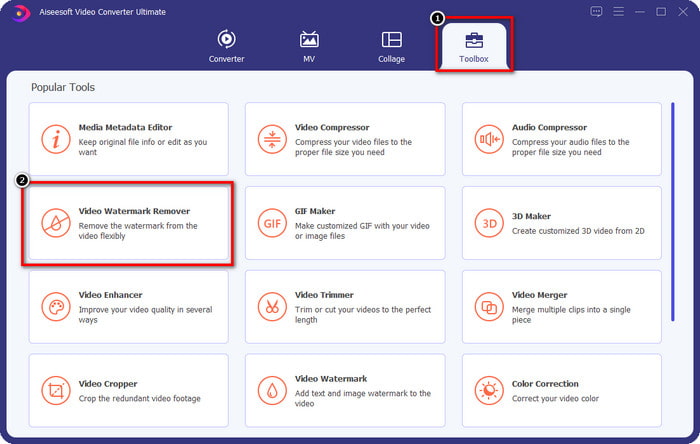
Schritt 2. Öffnen Sie die Toolbox, indem Sie darauf klicken, und suchen Sie dann in der Funktionsliste, die auf Ihrem Bildschirm erscheint, den Video Watermark Remover.
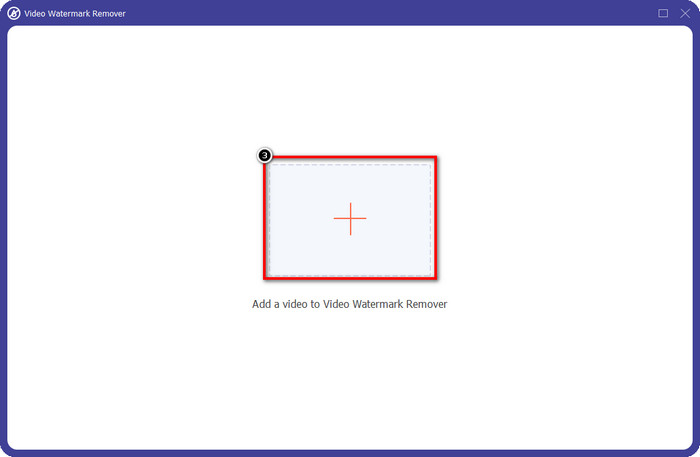
Schritt 3. Klicken Sie dann auf +, um die Videodatei mit dem Videoshop-Wasserzeichen hinzuzufügen. Suchen Sie die Videodatei im Dateimanager, klicken Sie einmal darauf und drücken Sie dann auf Öffnen, um sie hochzuladen.
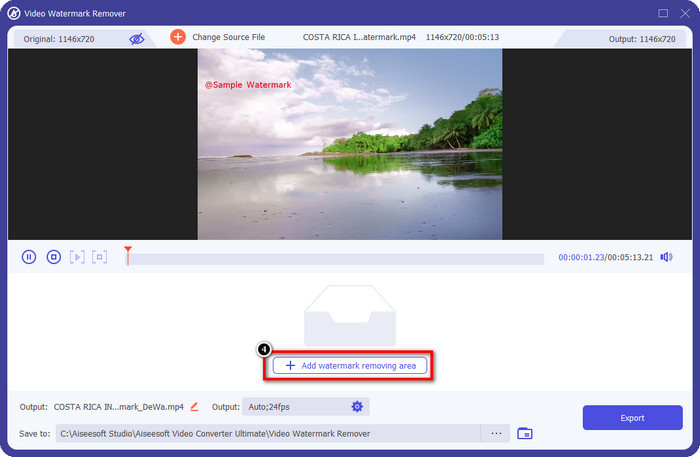
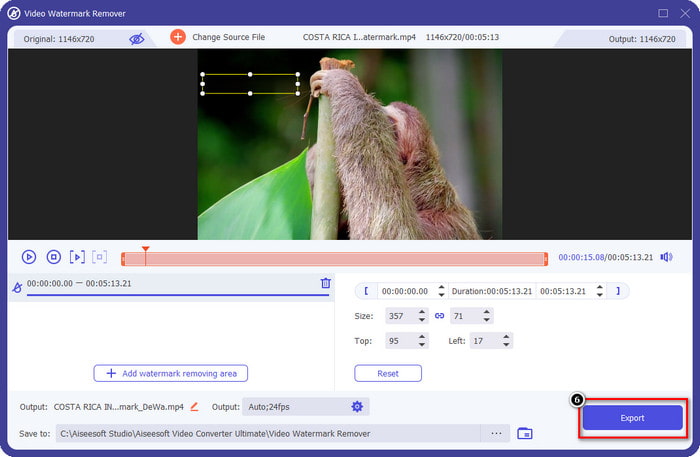
Schritt 4. Klicken Sie im nächsten Fenster, das nach dem Hochladen der Datei angezeigt wird, auf Add Watermark Removing Area.
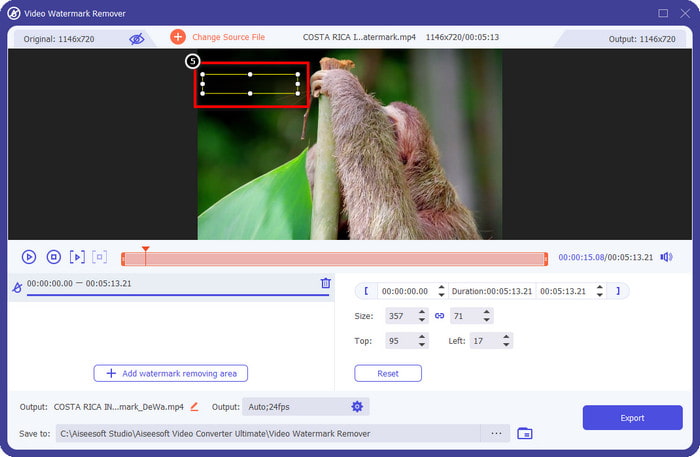
Schritt 5. Platzieren Sie die rechteckige Form auf dem Wasserzeichen, um es abzudecken. Achten Sie darauf, dass das Rechteck in der Vorschau das Wasserzeichen in Ihrem Video komplett verdeckt, damit beim Herunterladen der Datei kein Wasserzeichen mehr zu sehen ist.
Schritt 6. Drücken Sie Export, um das bearbeitete Videoshop-Video ohne Wasserzeichen auf Ihrem Desktop zu speichern. Sie können die Datei im Ordner überprüfen, der nach Abschluss des Exportvorgangs automatisch geöffnet wird.
Verwandt:
Dxtory-Wasserzeichen entfernen
Fotoretusche [iOS] - Bester Wasserzeichenentferner auf iOS-Geräten
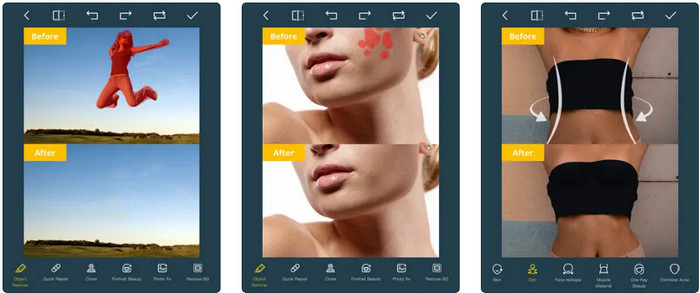
Photo Retouch ist eine iOS‑basierte App, mit der Sie Wasserzeichen aus Ihrem Video entfernen können, ohne dass nach dem Export Rückstände zurückbleiben. Diese App kann im App Store kostenlos heruntergeladen werden. Sie können sie einfach ausprobieren. Auch wenn der Name des Tools auf Fotos verweist, können Sie es für Videowasserzeichen nutzen und so beliebige Objekte in Ihrem Video entfernen. Wenn Sie diese App testen möchten, können Sie der untenstehenden Anleitung folgen, wie man das Videoshop‑Wasserzeichen entfernt.
Schritt 1. Laden Sie die Anwendung aus dem App Store herunter, indem Sie danach suchen und auf Laden tippen.
Schritt 2. Öffnen Sie anschließend die App, tippen Sie auf das +-Symbol und wählen Sie Video Eraser. Wählen Sie die Videodatei aus, die ein Wasserzeichen enthält.
Schritt 3. Umrahmen Sie das Wasserzeichen in Ihrem Video mit den unten verfügbaren Werkzeugen; Sie können die von diesem Tool unterstützte Markierungsform verwenden, um das Wasserzeichen in Ihrem Video hervorzuheben.
Schritt 4. Der Exportvorgang startet automatisch, nachdem Sie das Wasserzeichen im Video markiert haben. Schalten Sie Ihr iOS‑Gerät nicht aus, um Unterbrechungen zu vermeiden, und warten Sie, bis der Vorgang zu 100 % abgeschlossen ist.
Wasserzeichen entfernen und hinzufügen [Android] - Top-Wasserzeichenentferner für Android-Geräte
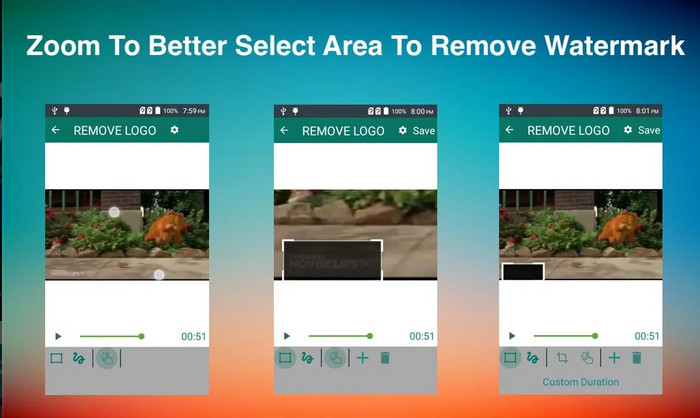
Wie entferne ich das Videoshop-Wasserzeichen auf Android? Android-Benutzer müssen sich keine Sorgen machen, denn Sie können Wasserzeichen entfernen und hinzufügen auf Ihr Gerät herunterladen. Diese App kann kostenlos heruntergeladen werden; Sie können später zum Playstore gehen, wenn Sie die App auf Ihr Gerät herunterladen möchten. Was macht diese App so besonders, dass sie aufgenommen wird? Dies liegt an den effektiven Funktionen zum Entfernen von Wasserzeichen, die es für Bilder und Videos bietet. Mit dieser App können Sie auch Ihr personalisiertes Wasserzeichen auf den visuellen Medien hinzufügen, wenn Sie möchten. Befolgen Sie die nachstehende Anleitung, wenn Sie diese App verwenden möchten, um das Wasserzeichen zu entfernen, das der Videoshop auf Ihrem Video hinterlässt.
Schritt 1. Um auf die App zuzugreifen, müssen Sie sie zunächst im Play Store herunterladen, indem Sie ihren Namen in das Suchfeld eingeben.
Schritt 2. Öffnen Sie die App, klicken Sie auf Video auswählen; es werden zwei Optionen angezeigt, klicken Sie auf Wasserzeichen entfernen. Laden Sie das gewünschte Video aus Ihrer Galerie hoch.
Schritt 3. Verwenden Sie ein rechteckiges Auswahlwerkzeug oder ein Lasso, um das Wasserzeichen in Ihrem Video zu markieren.
Schritt 4. Klicken Sie auf Speichern, um das von Ihnen hochgeladene Video ohne Wasserzeichen herunterzuladen.
Teil 2. Häufig gestellte Fragen zum Entfernen von Videoshop-Wasserzeichen
Wie viel kostet Videoshop?
Der Preis der Videoshop Pro-Version beträgt $2.99. Mit diesem günstigen Preis haben Sie mit dem Videoshop einen der besten Video-Editoren auf Ihrem Gerät.
Kann Videoshop für Android und iOS heruntergeladen werden?
Ja, Videoshop kann auf Android und iOS heruntergeladen werden. Sie müssen sich also keine Sorgen um Multiplattform-Benutzer machen, da dieser Video-Editor auf zwei verschiedenen Betriebssystemen mit denselben Merkmalen und Funktionen verfügbar ist.
Wie kann ich in der Videoshop-App bezahlen?
Für iOS-Benutzer können Sie Ihr iTunes-Konto für eine einfachere Transaktion laden, es wird Ihr Konto automatisch je nach gewähltem Abonnementplan belasten, aber es wird einen Tag vorher geben. Für Android-Nutzer können Sie Google Pay verwenden, um die Pro-Version zu nutzen.
Fazit
Dieser Artikel richtet sich an Benutzer, die nach einem Tutorial zum effektiven Entfernen des Videoshop-Wasserzeichens auf verschiedenen Plattformen suchen. Mit den hier aufgeführten Apps ist es möglich, das Wasserzeichen spurlos zu entfernen, wenn Sie die in diesem Artikel aufgeführten Schritte befolgen. Sie müssen sich keine Gedanken über die Verwendung machen, da wir sie zuerst ausprobiert haben und mit dem Ergebnis zufrieden sind, also teilen wir sie heute. Auch wenn Sie mit dem Entfernen von Wasserzeichen nicht vertraut sind, können Sie es trotzdem mit dem mitgelieferten Wasserzeichen-Entferner versuchen. Wir hoffen, dass wir Ihnen mit diesem Artikel geholfen haben; Sie können unten weitere hilfreiche Artikel lesen, wenn Sie möchten.
-
 So entfernen Sie mühelos Wasserzeichen aus Wondershare DVD Creator
 Dieser Artikel enthält Informationen zum Entfernen des Wasserzeichens aus Wondershare DVD Creator. Um alle Informationen zu erhalten, die Sie benötigen, ist es ein Muss, dies zu lesen.
-
 Einfaches Entfernen von Wasserzeichen aus PDF mit einfachen Schritten
 Entfernen Sie Wasserzeichen aus PDF, indem Sie diesen einfachen Schritten folgen. Erfahren Sie, wie Sie mit diesen erstaunlichen Tools ganz einfach Wasserzeichen aus Ihrer PDF-Datei entfernen können.
-
 So entfernen Sie das Coub-Wasserzeichen mit einfachen Schritten
 Erfahren Sie, wie Sie mit diesen beliebten Wasserzeichen-Entfernern Coub-Wasserzeichen aus Ihren Videos entfernen. Lesen Sie diesen Artikel, um diese erstaunlichen Tools und ihre Verwendung kennenzulernen.
