


 Video Converter Ultimate
 Bildschirm recorder
 Videoreparatur
 Sicherer Download
So entfernen Sie das Wasserzeichen aus dem Origin-Diagramm effektiv auf dem Diagramm
Möglicherweise müssen Sie Origin Graph verwenden, um eine Vorlage für mathematische oder wissenschaftliche Daten zu erstellen, die zu kompliziert sind, um sie in Worte zu fassen. Diese Software hat bereits Studierenden, Forschenden, Professoren, Geschäftsleuten und vielen anderen geholfen, die ein eigenes Diagramm erstellen müssen. Mit den verfügbaren Vorlagen können Sie ein ansprechendes Diagramm erstellen, das die Aufmerksamkeit der Betrachter auf sich zieht. Das Problem, auf das Sie bei der Nutzung der kostenlosen Version wahrscheinlich stoßen, ist, dass sie ein Text-Wasserzeichen im Endergebnis einfügt. Haben Sie Schwierigkeiten mit dem Wasserzeichen? Kein Problem mehr! Denn wir haben eine Lösung für Sie. Im Folgenden stellen wir hilfreiche Tipps zum Entfernen des Wasserzeichens aus Origin Graph vor, damit Sie das Diagramm anschließend in Word oder PowerPoint verwenden können.

Teil 1. So entfernen Sie Wasserzeichen aus dem Origin-Diagramm mit dem Online Image Watermark Remover
FVC Free Watermark Remover Online ist ein erstklassiger Text-Wasserzeichenentferner, mit dem Sie das Origin-Graph-Wasserzeichen beseitigen können. Dieses Tool eignet sich hervorragend, um beliebige Objekte aus Ihren Bildern zu entfernen, sodass sie nach dem Entfernen des Wasserzeichens noch professioneller wirken. Damit können wir Ihnen zusichern, dass es sich um einen speziellen Wasserzeichenentferner handelt, auf den Sie sich in solchen Fällen verlassen können. Fragen Sie sich, ob dieses Tool leicht zu bedienen ist? Kein Problem mehr! Denn die unten aufgeführten Schritte können Sie befolgen, um das von Origin Graph hinzugefügte Text-Wasserzeichen aus dem Bild zu entfernen.
Schritt 1. Klicken Sie auf diesen Link, um den Online-Bild-Wasserzeichenentferner zu öffnen; es wird ein neuer Tab geöffnet, in dem Sie das Tool nutzen können.
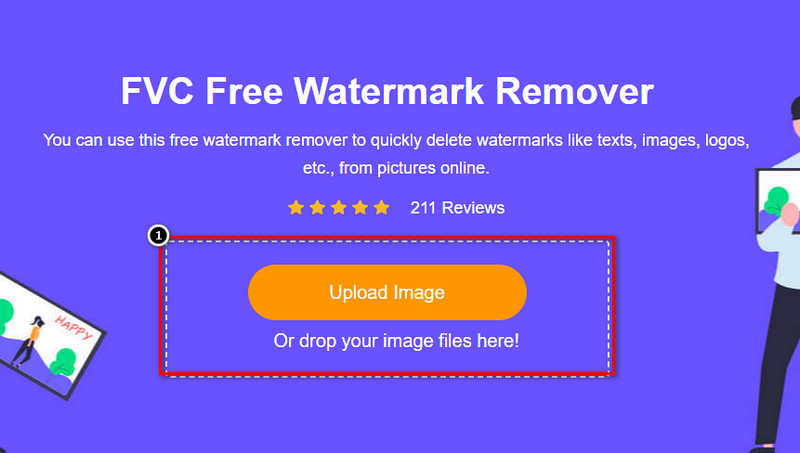
Schritt 2. Drücken Sie auf Upload Image, um das Foto mit Wasserzeichen hinzuzufügen, suchen Sie die Bilddatei im Ordner und klicken Sie auf Open, um sie erfolgreich hochzuladen.
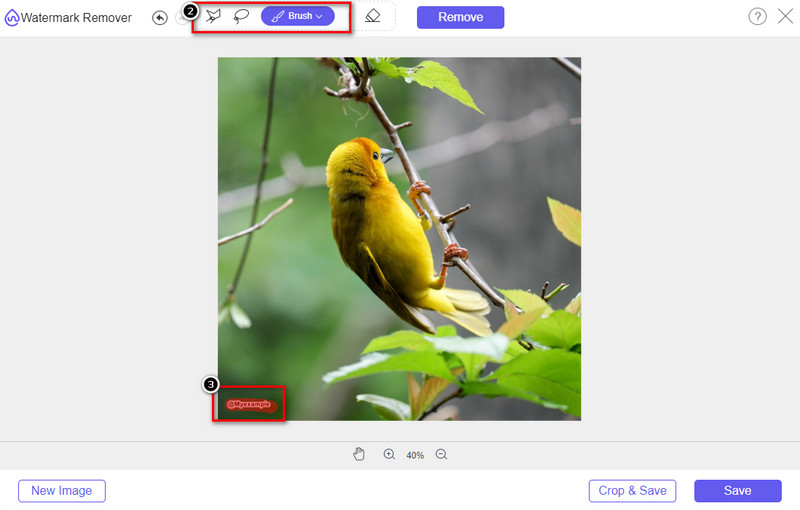
Schritt 3. Sie können drei Werkzeuge verwenden, um das Wasserzeichen zu markieren; auch wenn sie unterschiedlich funktionieren, ist ihre Wirksamkeit gleich. Wählen Sie ein Werkzeug aus und markieren Sie damit den Bildbereich, auf dem sich das Wasserzeichen befindet.
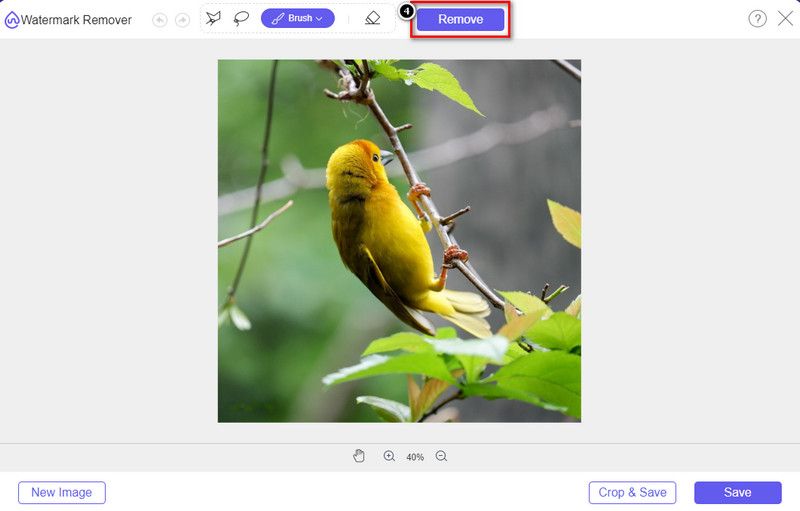
Schritt 4. Achten Sie darauf, nach dem Markieren des Wasserzeichens auf das Symbol Remove zu klicken. Dieser Schritt ist wichtig, damit das Bild beim Export ohne Wasserzeichen vorliegt.
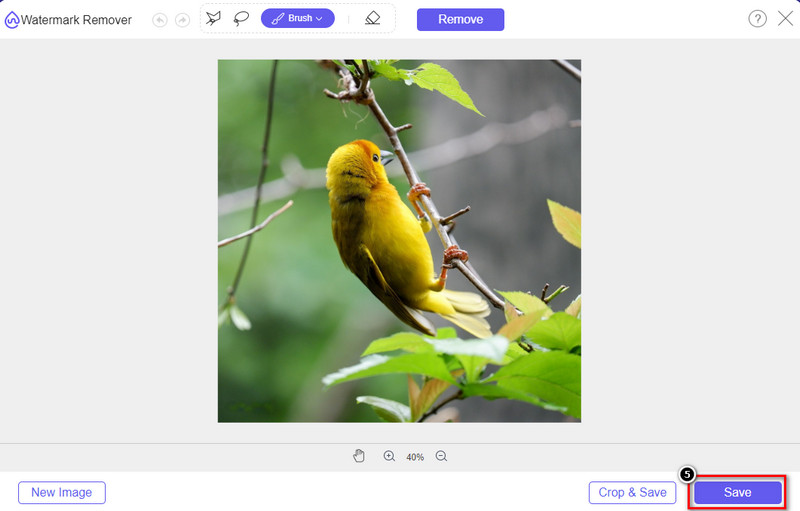
Schritt 5. Um den Exportvorgang zu starten, klicken Sie nun auf die Schaltfläche Save. Warten Sie, bis der Vorgang abgeschlossen ist, und sehen Sie sich dann das Bild an – jetzt ist das Wasserzeichen von Origin Graph im betreffenden Bereich nicht mehr sichtbar.
Vorteile
- Ein kostenloser webbasierter Wasserzeichenentferner für Bilder, auf den Sie zugreifen können.
- Es funktioniert effizient beim Entfernen des Wasserzeichens mit Unterstützung der KI-Technologie.
- Es unterstützt eine Vielzahl von Bildformaten, die Sie möglicherweise auf Ihrem lokalen Laufwerk haben.
- Exportierten Bildern wird kein Wasserzeichen hinzugefügt.
Nachteile
- Benötigen Sie eine Internetverbindung, um zu funktionieren.
- Der Fokus liegt auf dem Entfernen des Wasserzeichens und sonst nichts.
Teil 2. Wie man Diagramme ohne Wasserzeichen von Origin nach Word oder PowerPoint kopiert
In diesem Teil des Artikels geben wir Ihnen das Verfahren, das Sie kennen müssen, um das Diagramm, das Sie auf Origin Graph erstellt haben, ohne das Wasserzeichen hinzuzufügen. Folgen Sie ihm entsprechend, um das Diagramm erfolgreich hinzuzufügen, das Sie in Microsoft Word und PowerPoint ohne Wasserzeichen erstellt haben.
Aufgrund der enormen Dateigröße müssen Sie mindestens 1,9 GB freigeben. In der 1,9-GB-Datei finden Sie die Hilfe, die Sie benötigen, aber wenn Sie keine Hilfe benötigen, können Sie die 652-MB-Version davon über .zip oder .exe herunterladen.
Schritte zum Erstellen eines Diagramms im Origin-Diagramm ohne Wasserzeichen:
Schritt 1. Laden Sie zunächst Origin Graph für Ihr Betriebssystem von der offiziellen Website herunter. Öffnen Sie das Programm, um mit der Erstellung des gewünschten Diagramms zu beginnen.
Schritt 2. Geben Sie nach dem Start der Software die benötigten Tabellenwerte ein. Sie können hier weitere Variablen sowie entsprechend viele Diagramme hinzufügen.
Zusätzlich: Klicken Sie auf Plot, um andere Diagrammtypen anzuzeigen, die Sie verwenden können, etwa Basic 2D, Balken-, Statistikdiagramme und mehr.
Schritt 3. Klicken Sie auf File und dann auf Save, um das Diagramm, das Sie erstellt haben, zu exportieren.
Schritt 4. Befolgen Sie die Schritte aus Teil 1 und nutzen Sie die Anleitung zum Entfernen des Wasserzeichens aus Origin Graph mit Hilfe von FVC Free Watermark Remover Online.
So verwenden Sie das Diagramm in Word ohne Wasserzeichen:
Schritt 1. Öffnen Sie die Word-App auf Ihrem Desktop und klicken Sie auf Leeres Dokument. Wenn Sie das Word-Dokument bereits erstellt haben, öffnen Sie diese Datei.
Schritt 2. Gehen Sie zum Bereich Einfügen und klicken Sie auf Bilder. Suchen Sie die Diagrammdatei auf Ihrem lokalen Laufwerk, klicken Sie sie einmal an und drücken Sie dann auf Öffnen, um sie in Word hochzuladen.
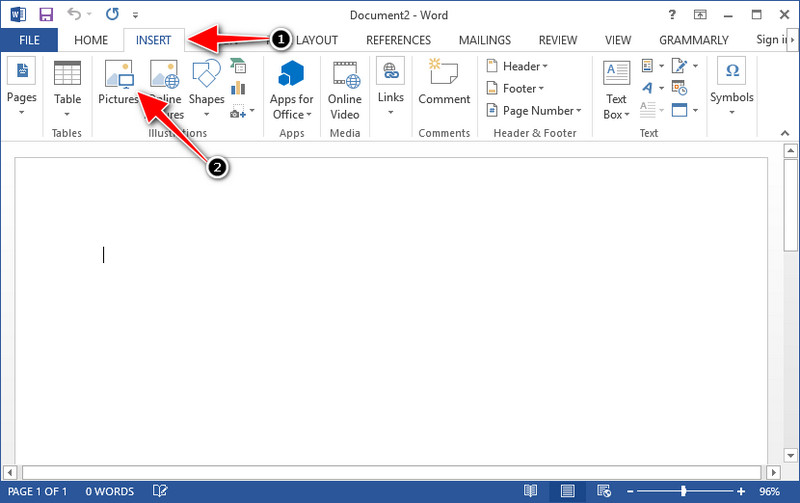
Schritt 3. Das Bild wird automatisch in dem Word-Dokument geladen, das Sie geöffnet oder erstellt haben; Sie können das Diagramm nun platzieren, indem Sie es festhalten und an die gewünschte Stelle ziehen.
So verwenden Sie das Diagramm auf Powerpoint ohne Wasserzeichen:
Schritt 1. Starten Sie PowerPoint auf Ihrem Computer und klicken Sie auf Leere Präsentation. Sie können auch auf der linken Seite die zuletzt erstellten Präsentationen prüfen. Wenn es eine Datei gibt, zu der Sie das Diagramm hinzufügen möchten, klicken Sie darauf, um sie zu öffnen.
Schritt 2. Drücken Sie auf Einfügen und klicken Sie auf Bild, um das Bilddiagramm einzufügen, das Sie mit Origin Graph erstellt haben.
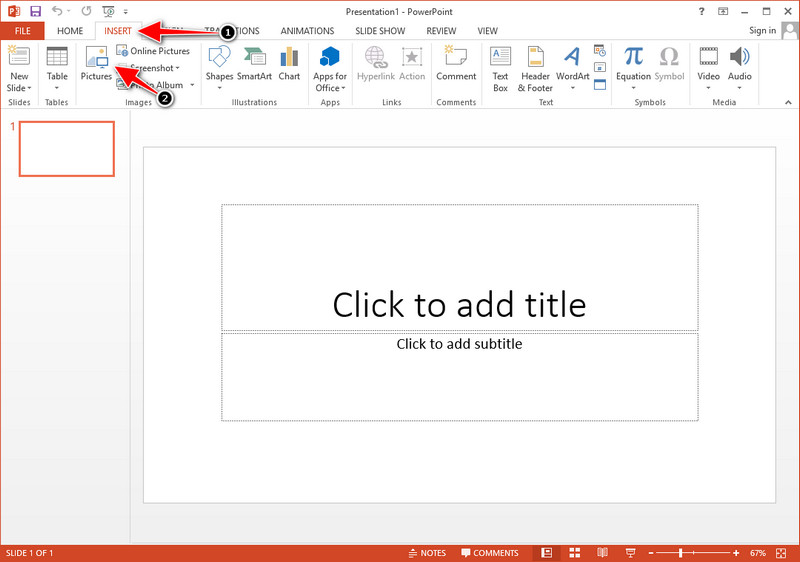
Schritt 3. Passen Sie das Diagrammbild an und platzieren Sie es auf der Folie.
Weiterführende Lektüre:
So entfernen Sie das B612‑Wasserzeichen von Ihren Bildern
So entfernen Sie das WOW Slider‑Wasserzeichen kostenlos
Teil 3. Häufig gestellte Fragen zum Entfernen von Wasserzeichen aus dem Origin-Diagramm
Wie viel kostet Origin Pro?
Für die einzelnen Benutzer können Sie die Premium-Version von Origin Graph für $435 starten. Du kannst seinen offiziellen Store auf Origin Lab besuchen.
Wo kann ich das Origin-Diagramm offiziell herunterladen?
Besuchen Sie das Origin Lab, um das Origin-Diagramm herunterzuladen. Bevor Sie die Software auf Ihren Desktop herunterladen können, werden Fragen gestellt. Danach gibt es zwei Möglichkeiten, die Datei herunterzuladen, ob Sie sie mit Hilfe herunterladen möchten oder nicht, in Form von .exe oder zip.
Sind Excel und Origin gleich?
Excel und Origin verfügen über eine Tabellenkalkulations-ähnliche Benutzeroberfläche zum Anordnen der Daten, Berechnen und Definieren von Beschriftungen. Excel konzentriert sich jedoch darauf, viele Spalten und Zeilen zu enthalten, die Sie verwenden können. Aber bei Origin dient es zum Anordnen von Attributen, die eine Spaltenformel anstelle einer Zellenformel verwenden, wie sie von Excel unterstützt wird.
Fazit
Nachdem Sie nun gelernt haben, wie man das Wasserzeichen aus dem Origin-Diagramm entfernt, ist es an der Zeit, das von Ihnen erstellte Diagramm zu verwenden und es professionell zu präsentieren. Wenn Sie es in Word oder Powerpoint verwenden möchten, können Sie Teil 2 lesen, um zu erfahren, wie es geht. Das Entfernen des Wasserzeichens mit diesem Tool ist bei weitem das am meisten gewünschte von allen, die das Wasserzeichen auf Bildern entfernen möchten. Mit diesem Tool ist das Problem gelöst. Wenn dieser Artikel Ihnen geholfen hat, hinterlassen Sie bitte unten 5 Sterne.
-
 So entfernen Sie Wasserzeichen mit Pixlr in detaillierten Schritten [effektiv]
 Möchten Sie wissen, wie Sie ein Wasserzeichen mit Pixlr entfernen? Wenn ja, lesen Sie weiter unten, um zu erfahren, wie es geht und welche Alternativen Sie verwenden können.
-
 Entfernen Sie das Animotica-Wasserzeichen auf exportierten Videos mit 3 bewährten Methoden
 Haben Sie sich jemals gefragt, ob es möglich ist, das Animotica-Wasserzeichen auf exportierten Videos zu entfernen? Dieser Artikel enthält eine Vorgehensweise.
-
 Kostenlose Möglichkeiten zum Entfernen des VideoShop-Wasserzeichens auf Videos [mühelos]
 Um das VideoShop-Wasserzeichen zu entfernen, benötigt Ihr Gerät einen Wasserzeichenentferner. Um zu erfahren, welche das sind, lesen Sie diesen Artikel.
