


 Video Converter Ultimate
 Bildschirm recorder
 Videoreparatur
 Sicherer Download
Vollständiges Tutorial zum Entfernen des Weibo-Wasserzeichens, das Sie kennen müssen
Weibo ist eine bekannte Social-Media-Plattform, die verwendet wird, um Informationen wie Twitter zu teilen, zu verbreiten und zu erhalten, die Sie in China häufig verwenden können. Sie können hier auch Miniaturansichten, Fotos und Videos posten und herunterladen. Es wird jedoch ein Wasserzeichen angezeigt, sobald Sie es exportieren. Viele Benutzer möchten es entfernen, weil es die Optik des Inhalts stört.
Trotz der tausenden verfügbaren Wasserzeichen-Entferner können nur wenige Tools Wasserzeichen wirklich effektiv entfernen. Wenn dir also das Wasserzeichen auf den heruntergeladenen visuellen Medien nicht gefällt, ist dieser Artikel genau das Richtige. Er stellt die besten Tools zusammen, die du verwenden kannst. Wir haben sie getestet, um zu belegen, dass sie beim Entfernen von Wasserzeichen tatsächlich funktionieren und praxistauglich sind. Damit du lernst, wie man das Weibo-Wasserzeichen entfernt, solltest du diesen Artikel aufmerksam weiterlesen.

Teil 1. So entfernen Sie Wasserzeichen aus Weibo-Videos mit dem ultimativen Wasserzeichen-Entferner
Das Weibo-Wasserzeichen kann bei anderen Tools problematisch sein, weil die meisten einen Schleier oder Schatten des Wasserzeichens zurücklassen. Wenn du jedoch den FVC Video Converter Ultimate verwendest, bleibt keinerlei Schleier des Wasserzeichens zurück. Egal, wie groß oder klein das Wasserzeichen ist – dieses Tool kann es effektiv entfernen, ohne eine Spur zu hinterlassen. So kannst du das Video, das du von Weibo exportierst, ungestört ansehen. Mit anderen Worten: Mit Hilfe dieses Tools ist das Entfernen des Wasserzeichens kinderleicht.
Darüber hinaus können Sie dieses Tool auch für andere Dinge verwenden, z. B. Ausschneiden, Zusammenführen, Komprimieren, Trimmen, Erstellen von GIFs und mehr. Und wenn Sie Ihrem Video ein Wasserzeichen hinzufügen möchten, damit niemand es Ihnen stehlen kann, können Sie dies mit dieser Software tun. Es ist die All-in-One-Software, die auf Ihrem Desktop benötigt wird. Möchten Sie wissen, wie Sie das Wasserzeichen aus dem Weibo-Video entfernen können? Sie können den folgenden Schritten folgen, da wir Schritt für Schritt erklären, wie es geht.
Gratis DownloadFür Windows 7 oder neuerSicherer Download
Gratis DownloadFür MacOS 10.7 oder neuerSicherer Download
': Bevor Sie die folgenden Schritte ausführen, vergewissern Sie sich, dass Sie das Weibo-Video exportiert haben, von dem Sie das Wasserzeichen entfernen möchten, damit Sie es leicht im Ordner finden können.
Schritt 1. Lade zunächst die Software auf deinen Desktop herunter und wähle die Version passend zu deinem Betriebssystem. Nachdem du die Software installiert hast, folge dem WinRAR-Setup-Prozess, der auf deinem Bildschirm angezeigt wird, klicke auf „Jetzt starten“, um sie zu öffnen, und fahre fort.
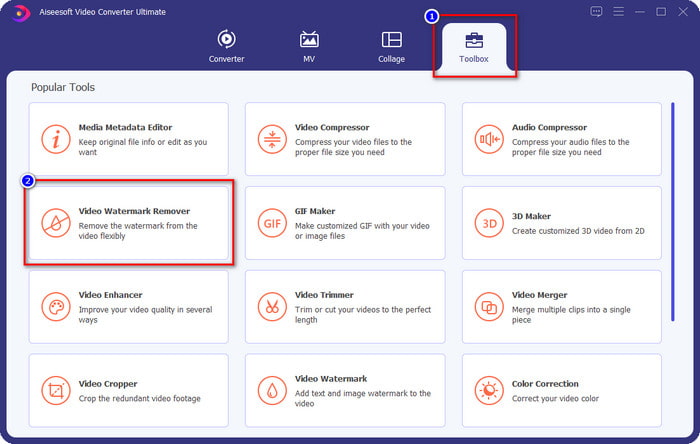
Schritt 2. Gehe zum Bereich Toolbox und suche nach Video Watermark Remover; klicke darauf.
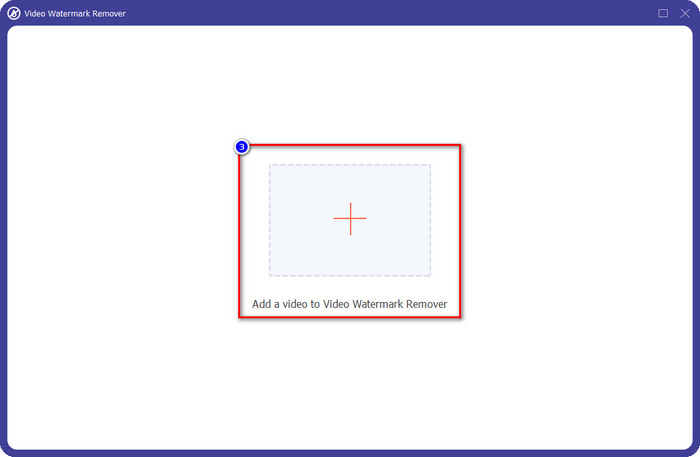
Schritt 3. Klicke auf die +-Schaltfläche, suche im Ordner das zuvor heruntergeladene Weibo-Video mit Wasserzeichen, klicke auf die Datei und drücke Öffnen, um sie hochzuladen.
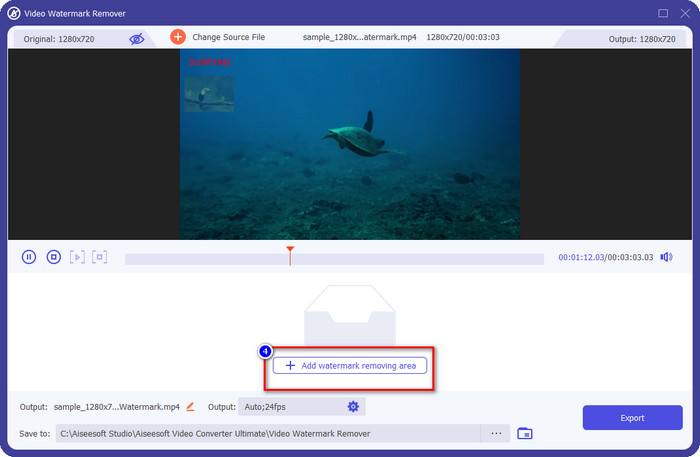
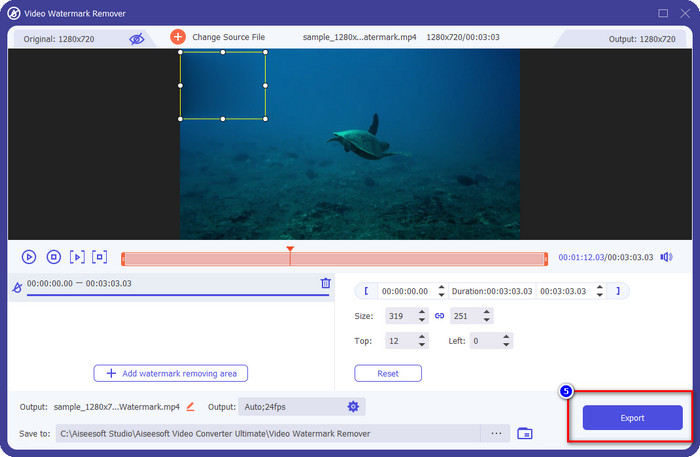
Schritt 4. In dem neuen Fenster, das erscheint, klicke auf Add Watermark Removing Area, um mit dem Entfernen des Wasserzeichens fortzufahren.
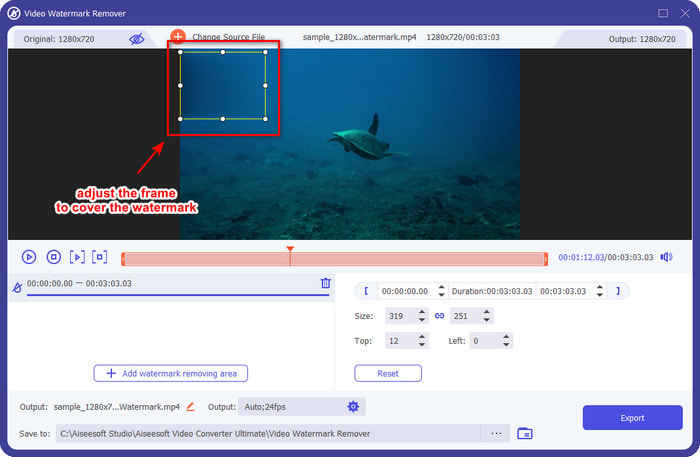
Schritt 5. Ziehe und halte den Auswahlrahmen, um das Wasserzeichen zu überdecken; du kannst ihn nach Bedarf vergrößern oder verkleinern und das Wasserzeichen vollständig abdecken, bevor du exportierst.
Schritt 6. Nachdem du den Auswahlrahmen auf dem Wasserzeichen platziert hast, klicke auf Export, um das Wasserzeichen aus dem hochgeladenen Video zu entfernen. Du musst nicht lange warten, denn es wird ein ultraschneller Vorgang unterstützt; nach wenigen Sekunden erhältst du das Weibo-Video ohne Wasserzeichen.
Teil 2. So entfernen Sie Wasserzeichen von Weibo Photo mit der kostenlosen Version im Web
Wie kann man Weibo-Fotos ohne Wasserzeichen speichern? Du kannst ein Bild nicht ohne Wasserzeichen speichern, wenn es direkt über Weibo exportiert wird. Du kannst jedoch den FVC Free Watermark Remover verwenden, um das Wasserzeichen auf Bildern zu entfernen. Er ist dein kompletter Wasserzeichen-Entferner für Bilder mit Wasserzeichen. Was die Funktionalität betrifft, können wir sagen, dass dieses Tool deutlich besser ist als andere Wasserzeichen-Entferner, die du im Web nutzen kannst. Wenn du also das Wasserzeichen auf einem Bild entfernen möchtest, ist dies die erste Wahl, die du ausprobieren solltest. Auch wenn es Wasserzeichen auf Bildern entfernen kann, ist es nicht in der Lage, sie in Videos zu entfernen, so wie es das Ultimate-Tool für dich kann.
Nichtsdestotrotz ist die Nutzung kostenlos und die Weboberfläche ist sauber, sodass Sie nicht einmal Werbung sehen, die Sie stören könnte. Möchten Sie wissen, wie Sie dieses Web-Tool verwenden? Befolgen Sie dann die unten angegebenen Schritte, um es selbst auszuprobieren.
Hinweis: Stellen Sie wie beim Video sicher, dass Sie das gewünschte Weibo-Bild herunterladen, und stellen Sie sicher, dass Sie es in einem sichtbaren und leicht zugänglichen Ordner platzieren.
Schritt 1. Um auf den Wasserzeichen-Entferner im Web zuzugreifen, klicke auf diesen Link, um ihn zu öffnen.
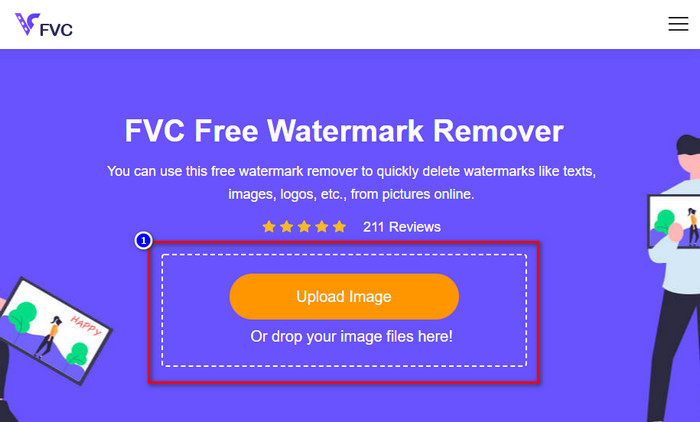
Schritt 2. Klicke in der Weboberfläche auf Upload Image; anschließend wird ein Ordner auf deinem Bildschirm angezeigt, suche das Bild und drücke Open, um es hochzuladen.
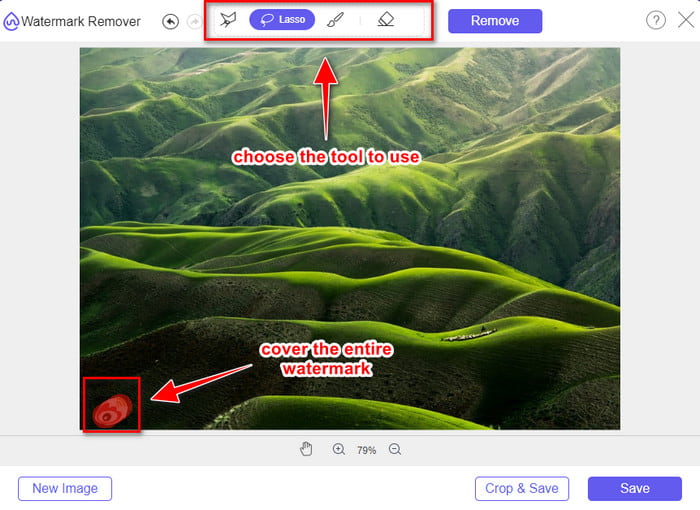
Schritt 3. Du kannst hier das Wasserzeichen nachzeichnen, um es zu entfernen, und solltest sicherstellen, dass jeder Teil des Wasserzeichens von deiner Markierung erfasst ist.
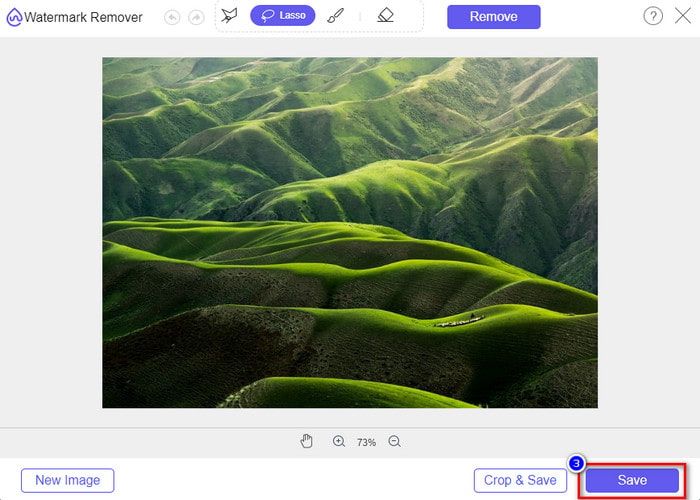
Schritt 4. Drücke Remove, um das Wasserzeichen aus deinem Bild zu löschen.

Schritt 5. Nachdem du das Wasserzeichen aus dem Weibo-Bild entfernt hast, klicke auf Save, um das Weibo-Bild ohne Wasserzeichen herunterzuladen.
Verwandt:
So entfernst du das TikTok-Wasserzeichen
So fügst du einem Video ein Wasserzeichen hinzu
Teil 3. Häufig gestellte Fragen zum Entfernen des Weibo-Wasserzeichens
Warum wurde das Weibo-Wasserzeichen nach dem Export verschwommen?
Einige Tools verwischen das Wasserzeichen, sodass es auf den visuellen Medien, die sie auf Weibo exportiert haben, nicht zu sehen ist. Aber nicht alle Tools verwischen Wasserzeichen; Einige entfernen das Wasserzeichen auf den visuellen Medien spurlos. Wenn Sie also das Wasserzeichen auf Weibo entfernen möchten, ohne es zu verwischen, müssen Sie das oben erwähnte Tool kennen, das Ihnen beim Entfernen hilft.
Kann ich das Weibo-Logo in der exportierten Datei verdecken?
Ja, du kannst. Auf diese Weise sehen Sie das Wasserzeichen von Weibo nicht in der Datei. Eine Manipulation würde jedoch einige Teile der Datei verdecken, sodass die Datei möglicherweise schlechter wird, anstatt Ihnen zu helfen. Daher wird ein Wasserzeichenentferner benötigt, um das Wasserzeichen der Datei zu löschen.
Haben alle exportierten Dateien auf Weibo ein Wasserzeichen?
Der Export jeder Art von Datei auf dieser Microblogging-Plattform hinterlässt Spuren. Egal was es ist, Wasserzeichen werden der Datei hinzugefügt. Sie können es jedoch mit dem zuvor in diesem Artikel erwähnten Tool entfernen.
Fazit
Beeindruckend, oder? FVC stellt dir die Tools zur Verfügung, die du benötigst, um das Weibo-Wasserzeichen auf Videos und Bildern sofort zu entfernen. Selbst wenn du keine Erfahrung hast oder kein Profi in dieser Art von Bearbeitung bist, ist das Editieren mit den genannten Tools problemlos möglich. Wenn du ein Wasserzeichen auf einem Bild entfernen möchtest – egal, ob es von Weibo exportiert wurde oder nicht –, ist der FVC Free Watermark Remover das Tool, das du brauchst. Für Videos und GIFs solltest du jedoch professionelle, leicht zu bedienende und erschwingliche Software wie den FVC Video Converter Ultimate verwenden. Worauf wartest du noch? Entferne das Wasserzeichen auf deinen visuellen Medien, damit du sie ohne jegliche Spur des Wasserzeichens genießen kannst.
-
 Beste Methode zum Hinzufügen eines Wasserzeichens zu einem Video in Photoshop unter Windows und Mac
 Möchten Sie wissen, wie Sie einem Video in Photoshop ein Wasserzeichen hinzufügen? In diesem Fall liefert Ihnen dieser Artikel das eine oder andere, was Sie wissen müssen.
-
 Die 3 besten Lösungen zum einfachen Entfernen von Wasserzeichen aus Videos
 Möchten Sie das lästige Wasserzeichen auf dem Video entfernen? In diesem Blog können Sie die verschiedenen Ideen zum Entfernen des Wasserzeichens in einem Video kennenlernen.
-
 4 beste Möglichkeiten, das Wasserzeichen aus GIF zu entfernen [Online & Offline]
 Müssen Sie Wasserzeichen aus GIF entfernen? Mit dem Tool in diesem Artikel lernen Sie die verschiedenen Stile mit den verschiedenen Wasserzeichenentfernern kennen, die auf Ihrer Plattform verfügbar sind.
