


 Video Converter Ultimate
 Bildschirm recorder
 Videoreparatur
Vereinfachtes Tutorial zum Synchronisieren von Audio und Video in Adobe Premiere Pro
If you are a pro then you've already used the Adobe Premiere Pro as your video editor software that performs really well. A lot of Adobe users really love this software because it provides the best output you would love to insert on your video. But did you know that you can also use this tool to sync your audio with video? So, if you don't have an idea on how to do it then this is one of your lucky days. As we try it for yourself on how to sync it easily. So now, you will not need to read a manual because this write-up makes it simple for you to understand how to sync audio in Premiere easily and effectively with another alternative tool.

Teil 1. So synchronisieren Sie Audio und Video in Adobe Premiere Pro
Before we start, let's have a brief introduction to the Adobe Premiere Pro. As we indicate above, this tool has already been used a lot by the professional editors who love to make amazing videos. However, this tool will take a lot of your time to learn because it provides a lot of advanced features that beginners will not understand. Although learning how to use it will surely take a lot of time, it is worth it to learn how to use it if you have free time. Moreover, the indicated steps below are simpler for you to understand to learn how to sync audio and video in Premiere if you follow the steps below.
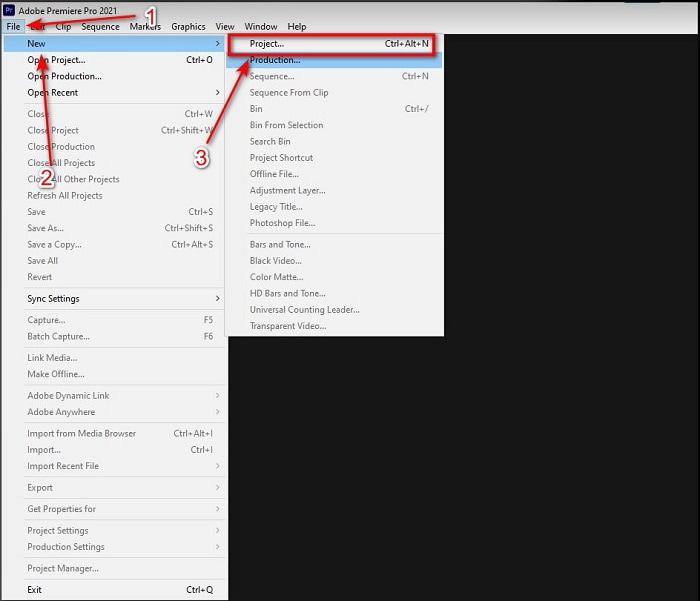
Step 1. First, you must buy the tool first and download it on your computer drive. Launch it after the downloading process has already been taken in place. Then click the File and under it is the New then click the Project to proceed then press OK on the new interface will be going to pop-up.
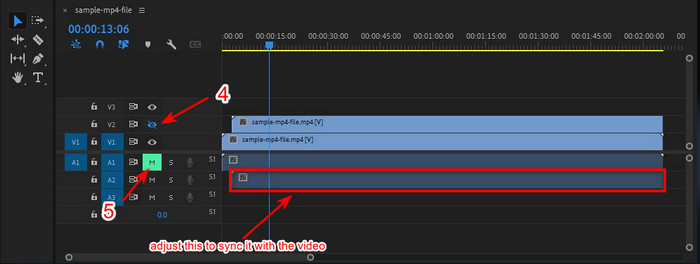
Step 2. And add the same video and audio to the Timeline twice. Then click the Toggle Track Output of the second video and mute the second by clicking the Mute Track. Adjust the audio track to make it sure that it will sync with the video.
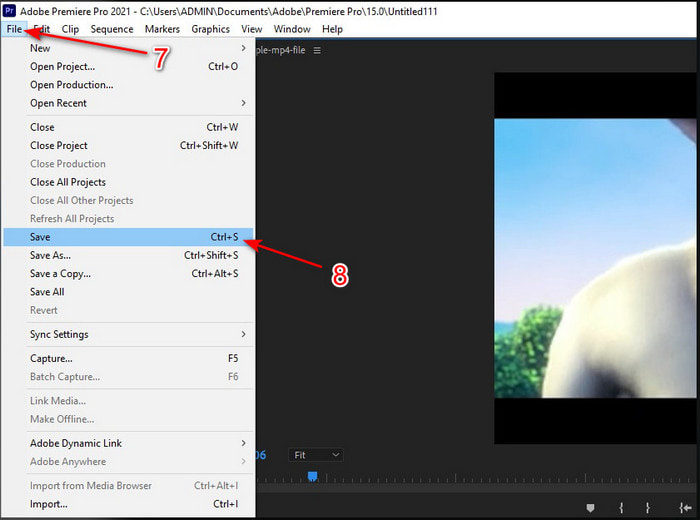
Step 3. Re-click the File above and locate the Save to finally export the media file into your computer drive.
Vorteile
- Dieses Tool bietet eine erweiterte Bearbeitungsfunktion.
- Erstklassiger Editor, den Sie herunterladen können.
- Beste Wahl für eine professionelle Ausgabe.
Nachteile
- Nicht die beste Wahl für den Anfänger, der keine Ahnung von Bearbeitung hat.
- Die Software ist im Vergleich zu den anderen Editoren, die fast die gleiche Funktion bieten, total teuer.
Teil 2. Einfachste Methode zum Synchronisieren von Audio für Anfänger und Profis mit dem Video Converter Ultimate
Just like Adobe Premiere Pro this phenomenal converter also produces high-quality and advanced editing features that you would love to use. But this is way easier to use compared to the premiere pro. The Video Converter Ultimate is the best friend of the editors who loves to make a video, enhance, boost, create Gif and more. This software specialized almost all of the internet user's problems even in syncing. And because of how easy it is to use, more than a million users have already downloaded and fell in love with it. So, if you want to make your life easier instead of using premiere pro sync audio why don't you use this? Follow the step below.
Steps on How to Sync Audio and Video with the Video Converter Ultimate:
Step 1. Download the software on your computer and choose whether it is a PC or Mac. Install it later on, do the set-up and click the Start Now to proceed.
Gratis DownloadFür Windows 7 oder neuerSicherer Download
Gratis DownloadFür MacOS 10.7 oder neuerSicherer Download
Step 2. Launch the tool after the first step and go next to the Toolbox section and press the Audio Sync in the lower part.
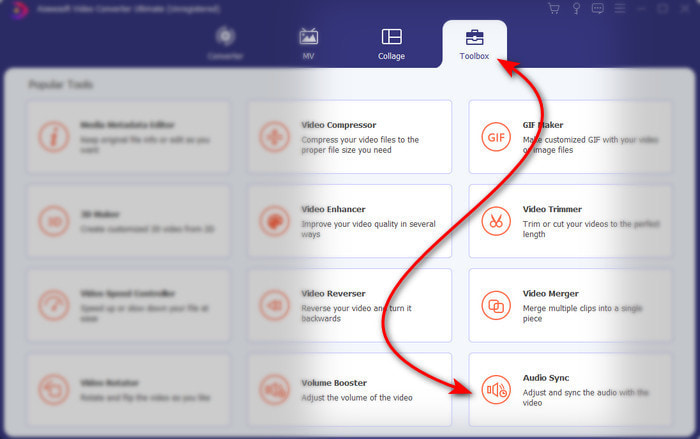
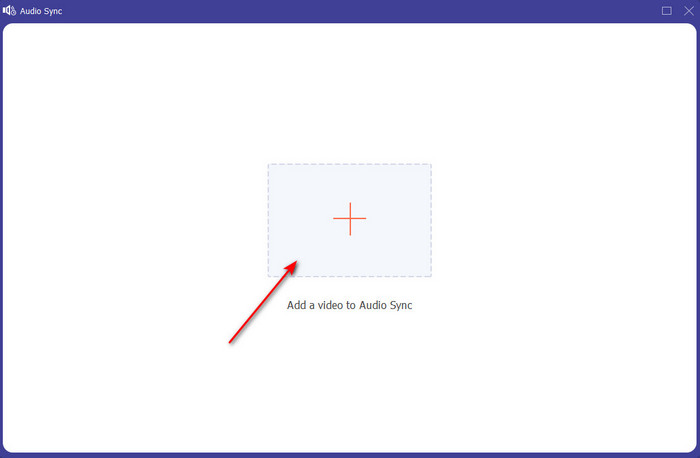
Step 3. Press the + button to insert the video and audio you want to be synced. After locating it on the folder click Open to proceed.
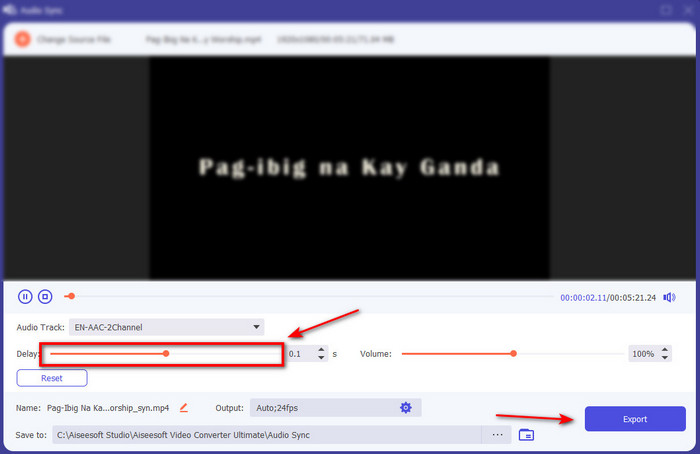
Step 4. To make the audio sync adjust the Delay slider to match it with the video. In addition, you can also boost the audio there as well by adjusting the volume slider. After it is done click Export to save the final output.
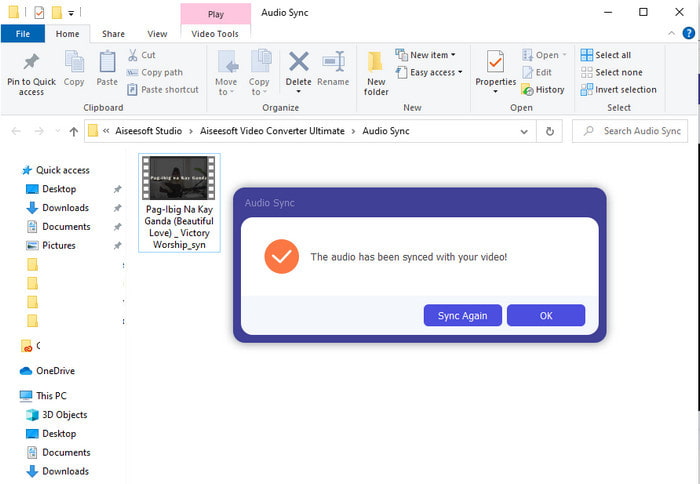
Step 5. After it is done, a folder will be going to show on your screen with synchronized audio and video you've made. Click the file to watch, play and enjoy the audio-video in sync.
Vorteile
- Beste Wahl, um Ihr Video phänomenal aussehen zu lassen.
- Das Gesamterlebnis bei der Verwendung dieses Tools ist buchstäblich ultimativ und dennoch einfach zu bedienen.
- Es ist auf allen Plattformen verfügbar, egal ob es sich um einen PC oder Mac handelt.
Nachteile
- Dieses Tool ist genau wie Premiere Pro kostenpflichtig, jedoch deutlich günstiger als Premiere Pro.
- Muss zuerst auf Ihr Laufwerk heruntergeladen werden, bevor Sie darauf zugreifen können.
Teil 3. Häufig gestellte Fragen zur Audio- und Videosynchronisierung in Premiere
Kann ich Premiere als Bildschirmrekorder verwenden?
If you're trying to record a screen on the Premiere pro then you must surrender now because you can't do it here. However, we can tell you a secret screen recorder you can choose on. So, if you want to know what are the Top 5 Best Screencasts you can use on PC, Mac, online, iOS, and Android.
Ist Adobe Premiere Pro kostenlos?
Eigentlich ist es ein Ja, Sie können dieses Tool kostenlos herunterladen, aber Sie können auf dieses Tool nur 7 Tage lang in der Testversion zugreifen. Wenn die Testversion abgelaufen ist, müssen Sie also Adobe Premiere Pro erneut abonnieren, um die volle Kapazität der Bearbeitungsfunktionen nutzen zu können, die Premiere Pro bietet.
Kann ich eine andere Website verwenden, um Premiere Pro herunterzuladen?
Nein, denn es ist illegal, alle Apps mit der anderen Website herunterzuladen. Wenn Sie eine andere Website zum Herunterladen von Premiere Pro verwenden, besteht außerdem die Möglichkeit, dass sie Spyware, Viren oder noch viel Schlimmeres enthält. Wenn Sie also Ihre Sicherheit gewährleisten möchten, laden Sie die Software nur von den offiziellen Hauptwebsites herunter.
Kann ich einen lebenslangen Zugriff auf Adobe Premiere Pro kaufen?
Obwohl Sie einen monatlichen Zugriff auf Adobe Premiere Pro kaufen können, können Sie keinen lebenslangen Zugriff darauf kaufen. Sie können es jedoch über eine andere Website kaufen, die jedoch illegal ist, und es besteht die Möglichkeit, dass die Datei, die Sie herunterladen werden, beschädigt ist, einen Virus enthält oder ein Betrug ist. Wenn Sie also Adobe Premiere Pro verwenden und kaufen möchten, empfehlen wir jedem, es auf seiner Hauptwebsite zu kaufen.
Fazit
Nach 5 Minuten Lesen dieses Artikels wissen wir bereits, wie man Adobe Premiere Pro verwendet, um Audio mit Video zu synchronisieren. Es gibt jedoch eine einfachere Möglichkeit, es zu synchronisieren, indem Sie den Video Converter Ultimate verwenden. Da dieses Tool viel schneller bei der Anpassung von unsynchronisiertem Video und Audio liefert und gleichzeitig die beste Qualität bietet. Also jetzt, wenn Sie viel Geld haben, dann gehen Sie mit Adobe Premiere Pro, aber wenn Sie viel sparen wollen, während Sie die gleiche Funktion haben, dann müssen Sie zum Video Converter Ultimate gehen.
-
 So verlangsamen Sie ein Video: Perfekte Tipps [Desktop/Mobiltelefon]
 Sind Sie es leid, nach den besten Tools zu suchen, die Ihnen helfen, ein Video online zu verlangsamen? Lesen Sie diesen speziellen Artikel, damit Sie mit den unten aufgeführten Informationen aufgeklärt werden.
-
 Windows Media Player | Erfahren Sie, wie Sie Videos beschleunigen können [Bewährt]
 Sie möchten Ihren Videoclip mit Ihrem Windows Media Player verlangsamen, haben aber Probleme damit? Dieser Artikel ist ideal zum Lesen und kann Ihren Standpunkt zum Beschleunigen von Videos mit Windows Media Player aufklären.
-
 So ändern Sie Zeitlupenvideos in normale Geschwindigkeit [einfache Schritte]
 Möchten Sie wissen, wie Sie ein aus dem Internet heruntergeladenes oder versehentlich in Zeitlupe aufgenommenes Zeitlupenvideo wiederherstellen können? Erfahren Sie, wie Sie auf Mac, Windows, iOS und Android Zeitlupenvideos in normale Geschwindigkeit konvertieren.
