


 Video Converter Ultimate
 Bildschirm recorder
 Videoreparatur
Umfassende Überprüfung des WAV-Metadaten-Editors für Windows, Mac und Online
Ich habe ein Problem mit meiner WAV-Datei; Ich habe festgestellt, dass die Tags falsch sind. Ich habe versucht, verschiedene WAV-Metadaten-Editoren zu verwenden, um das Problem zu beheben, aber leider hat es das nicht behoben. Hast du eine Idee, wie man es beheben kann? Es wäre eine große Hilfe. Danke.
Haben Sie dasselbe Problem? Es ist ganz natürlich, dieses Problem zu haben, denn die Nachfrage nach dem besten WAV-Metadaten-Editor für Windows und Mac auf dem Markt ist sehr groß. Obwohl es viele Optionen gibt, ist es trotzdem mühsam herauszufinden, ob sie dieses Problem gut lösen. Atmen Sie also einmal tief durch, denn wir können dieses Problem schnell mit den von uns sorgfältig ausgewählten Tools beheben, die Ihnen beim Bearbeiten der Tags Ihrer WAV-Dateien helfen. Dank gründlicher Recherche und dieses Artikels haben wir sie in drei verschiedene Optionen unterteilt und helfen Ihnen dabei, den besten WAV-Editor für die Online- und Offline-Nutzung auszuwählen.

Teil 1. Bester WAV-Metadaten-Editor für Windows und Mac [Benutzerauswahl]
FVC Video Converter Ultimate ist einer der WAV-Tag-Editoren, der Ihnen bei dieser Aufgabe ganz sicher helfen und sie mit nur wenigen Klicks erledigen wird. Mit Millionen von Downloads hat dieses Tool seine Aufgabe, die Metadaten der Nutzer zu bearbeiten, sowie andere Zwecke wie Konvertieren, Bearbeiten usw. bereits erfüllt und ist bei den Anwendern sehr beliebt geworden. Anders als andere Tag-Editoren, die Sie auf dem Markt finden können, ist dieses Tool in Bezug auf das Bearbeiten und viele weitere Aspekte deutlich überlegen, da es ein professionelles und dennoch leicht zu bedienendes Werkzeug ist. Fragen Sie sich immer noch, ob dies die beste Wahl als Metadaten-Editor ist? In diesem Fall listen wir die Funktionen auf, die Sie erhalten, wenn Sie diesen Converter auf Ihrem Desktop installieren.

FVC Video Converter Ultimate
Über 5.689.200 Downloads- Es ist das schnellste Tool, um die Metadaten mit wenigen Klicks zu Ihrer Mediendatei hinzuzufügen.
- Es unterstützt eine breite Palette von Audioformaten, angefangen bei WAV, WMV, MP3 und 1000+.
- Es ist die beste Wahl für jeden Anfänger, der dringend einen Metadaten-Editor auf einem Desktop benötigt.
- Es hat keine Dateigrößenbeschränkung und bietet einen Batch-Konvertierungsprozess für mehrere Dateien.
- Die Toolbox verfügt über viele erweiterte Funktionen, die Sie gerne verwenden würden.
Gratis DownloadFür Windows 7 oder neuerSicherer Download
Gratis DownloadFür MacOS 10.7 oder neuerSicherer Download
Sind Sie erstaunt über die Funktionen und Möglichkeiten des Tools? Wenn ja, lesen Sie die folgenden Details, während wir Ihnen beibringen, wie Sie WAV-Tags mit dem ultimativen Tool bearbeiten. Vor allem anderen müssen Sie die Software auf Ihr System herunterladen und auswählen, welches Betriebssystem Sie verwenden. Folgen Sie dem Installationsvorgang und klicken Sie auf Jetzt starten, um zu beginnen.
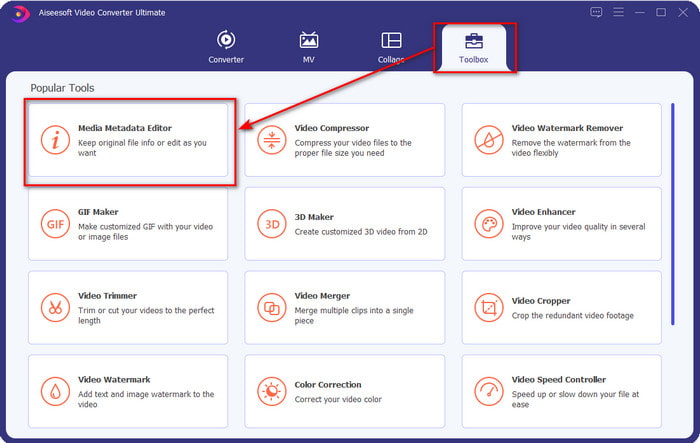
Schritt 1. Nachdem Sie die Software heruntergeladen haben, müssen Sie auf Toolbox klicken und dann den Media Metadata Editor suchen.
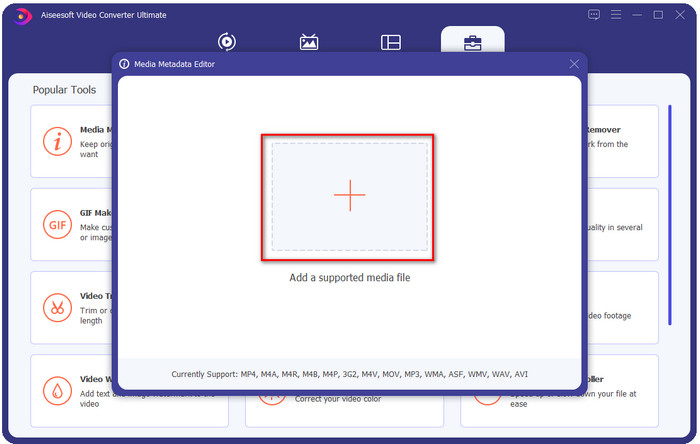
Schritt 2. Fügen Sie die WMA-Datei hinzu, indem Sie auf die Schaltfläche + drücken, suchen Sie die WMA-Datei im Ordner auf Ihrem Desktop und klicken Sie nach dem Auffinden auf Öffnen.
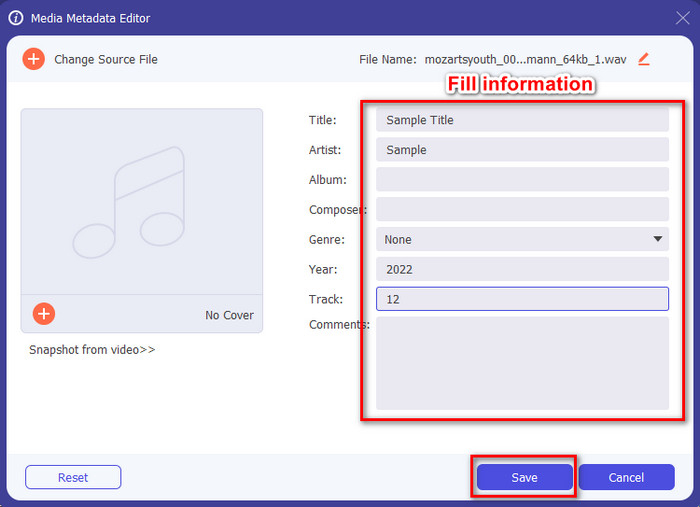
Schritt 3. Fügen Sie die gewünschten Informationen hinzu, füllen Sie die verfügbaren Textfelder aus und drücken Sie auf die Schaltfläche Speichern, wenn Sie fertig sind. Einfach, oder? Nun, Erfolg ist der zweite Vorname unseres Converters.
Verwandt:
Wie man MP3 in WAV konvertiert
Wie man M4A in WAV konvertiert
Teil 2. Die 2 wichtigsten im Web verfügbaren WAV-Metadaten-Viewer
Angenommen, Sie können nicht alle Tags im WAV anzeigen; was tun? In diesem Fall ist es ideal, einen Tag-Viewer für WAV zu verwenden. Wenn Sie kein Tool herunterladen möchten, können Sie diesen im Internet verfügbaren Meta-Viewer verwenden. Diese beiden Tools können jedoch keine WAV-Datei-Metadaten bearbeiten, da sie beabsichtigen, die Metadaten anzuzeigen.
Kostenloser Online-EXIF- und Metadaten-Viewer
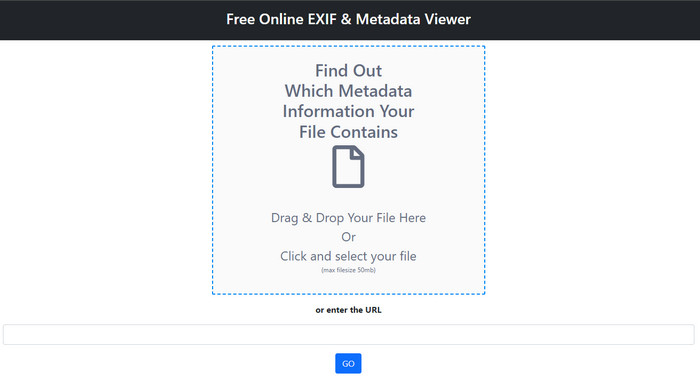
Free online EXIF & Metadata Viewer ist ein kostenloser Online-Metadaten-Viewer, mit dem Sie die Tags der Mediendatei anzeigen können. Mit diesem Web-Tool können Sie die verschiedenen Strukturen der hochgeladenen Datei sehen, wie RAW, FILE, RIFF und COMPOSITE. Dieses Tool gehört zu den Metadaten-Viewern, auf die Sie zugreifen können und die kostenlos derart viele Details unterstützen. Einige Tag-Viewer müssen gekauft werden, wenn Sie so viele Details zu einer Datei sehen möchten. Obwohl das Bearbeiten in diesem Tool nicht möglich ist, ist es dennoch der beste, besonders detaillierte Meta-Viewer, den Sie verwenden können, um anschließend mit dem oben vorgestellten ultimativen Tool WAV-Metadaten hinzuzufügen, zu entfernen oder zu ändern.
Metadata2Go
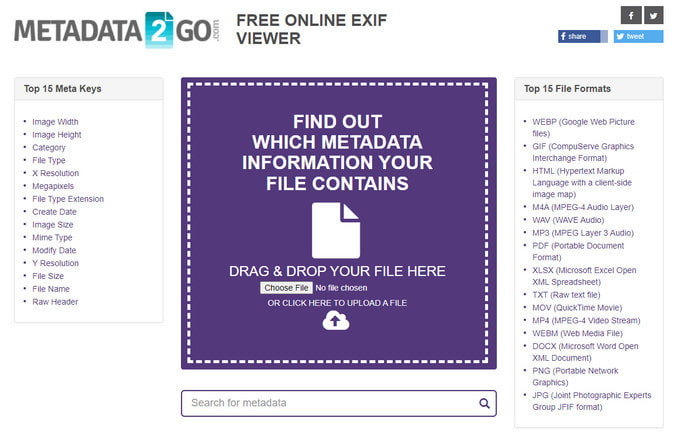
Wie das erste ist auch Metadata2Go ein kostenloser Tag-Viewer und -Extractor für Ihre Dateien, auf den Sie im Web frei zugreifen können. Mit diesem Tool können Sie die versteckten Metadaten sehen, die Sie in Ihrer Datei noch nie bemerkt haben. Wenn Sie die Metadaten Ihrer Mediendatei anzeigen müssen, ist dies Ihr zentraler Viewer im Web. Anders als das erste Tool unterstützt dieses sogar Bild-Metadaten zur Ansicht und kann die Daten bei Bedarf aus dieser Datei extrahieren. Je nach Datei kann es die Informationen Ihrer Datei anzeigen. Wie der erste Meta-Viewer oben kann es jedoch die Tags Ihrer Mediendatei, auch nicht bei WAV, nicht bearbeiten. Wenn Sie also das Gefühl haben, dass der erste Tag-Viewer Ihre Anforderungen nicht erfüllt, versuchen Sie dieses Tool. Verwenden Sie anschließend das Ultimate-Tool und lernen Sie, wie Sie ID3-Tags zu WAV-Dateien hinzufügen, falls Sie diese korrigieren müssen.
Teil 3. FAQs zum WAV-Metadaten-Editor
Warum kann ich nicht auf die Metadaten in WAV zugreifen?
Es gibt viele Gründe, warum Sie nicht darauf zugreifen können, aber es gibt zwei Hauptgründe, warum Sie nicht darauf zugreifen können. Der erste Grund ist, dass die Datei beschädigt ist; Natürlich verschwinden auch die Metadaten auf der WAV, wenn die Datei beschädigt ist. Zweitens hat die Datei überhaupt keine Metadaten. Nicht alle Mediendateien wie WAV haben Metadaten. Wenn Sie die Datei aus dem Internet heruntergeladen haben, besteht die Möglichkeit, dass der Autor oder Hersteller diese Metadaten löscht, um keine Informationen preiszugeben.
Sind die WAV-Metadaten die gleichen wie die MP3?
Ja, in diesem Audioformat sehen Sie den Namen des Autors, Titel, Albumtitel, Genre, Bewertungen und vieles mehr. Sie können sie aber auch mit einem für MP3 oder WAV verfügbaren Metadaten-Editor wie dem FVC Video Converter Ultimate ergänzen.
Ist es in Ordnung, WAV ins Internet hochzuladen?
Dies liegt nicht daran, dass das Format unkomprimiert ist, und es wird viel Zeit in Anspruch nehmen, die Datei ins Internet hochzuladen. Obwohl Sie das Format in ein internetfreundliches Freigabeformat umwandeln können, ist seine Qualität nicht die gleiche wie bei WAV, insbesondere wenn es komprimiert ist.
Fazit
Schließlich haben wir den besten WAV-Metadaten-Editor gefunden, den Sie kostenlos herunterladen können, nämlich den FVC Video Converter Ultimate. Mit diesem Tool können Sie diese Aufgabe jederzeit erledigen, und selbst wenn Ihr Dateiformat ein anderes ist, werden hier alle über 1000 Formate unterstützt. Möchten Sie ein Tool auf Ihrem Mac herunterladen? Dann müssen Sie sich nicht abwenden und weitersuchen, denn Sie können das Ultimate-Tool auch als Mac-Nutzer verwenden.
-
 Was sind Metadaten: Lernen Sie die grundlegenden Informationen über Metadaten kennen
 Was sind Metadaten? Ist das wichtig? Was sind die Bestandteile von Metadaten? Haben Sie die gleiche Frage? In diesem Artikel erfahren Sie die grundlegenden Informationen zu Metadaten.
-
 4 der besten Metadaten-Viewer online und offline [Aktualisiert 2022]
 Kann ich die Metadaten meiner Datei überprüfen? Ja, das können Sie, mit Hilfe dieses Beitrags stellen wir Ihnen die verschiedenen Metadaten-Viewer vor, die Sie verwenden können.
-
 6 beliebte Snapchat-Animationsfilter für Snapchat
 Möchten Sie wissen, wie Sie Snapchat-Videos am besten Filter hinzufügen können? Nun, Sie können darauf klicken und die verschiedenen Filter kennenlernen, die Sie zum Anwenden auf Snapchat-Videos verwenden können.
