


 Video Converter Ultimate
 Bildschirm recorder
 Videoreparatur
Was sind die besten WMV-Tag-Editoren zum Bearbeiten von WMV-Metadaten [narrensicher]
WMV ist ein natives Dateiformat, dem du als Windows‑Benutzer häufig begegnest. Mit diesem Format kannst du Animationen, Videoclips und HD‑Folgen von TV‑Sendungen speichern, wobei eine oder mehrere von Microsofts Videokomprimierungen verwendet werden. Obwohl es all dies leisten kann, müssen einige Tags in WMV‑Dateien korrigiert werden. Auch wenn du die Metadaten einer WMV‑Datei im Windows Media Player anzeigen kannst, lassen sie sich dort nicht anpassen. Welches Tool solltest du also unter Windows verwenden? In diesem Beitrag stellen wir eine neutrale Bewertung von vier WMV‑Tag‑Editoren vor, die du nutzen kannst.

Teil 1. Phänomenaler WMV-Tag-Editor für Windows & Mac [empfohlen]
FVC Video Converter Ultimate ist eine zuverlässige Software, die dir erstklassige Funktionen bietet, um WMV‑Metadaten mühelos zu bearbeiten. Das Programm ist für alle Windows‑ und Mac‑Betriebssysteme verfügbar. Mit diesem Tool erlebst du eine ganz neue Stufe des Entfernens, Bearbeitens und Aktualisierens von Tags in über 1000 Formaten, die von der Software unterstützt werden. Für Einsteiger bietet das Tool eine intuitive Oberfläche, über die sie alle Funktionen problemlos verstehen können. Für Profis ist es ideal, um erweiterte Bearbeitungen an ihren Videos vorzunehmen. Erstaunlich, oder? Ganz gleich, ob du Erfahrung mit der Bearbeitung von Tags hast oder nicht – du kannst dich auf dieses Tool verlassen. Möchtest du eine hervorragende Bearbeitung der Metadaten mit der Software vornehmen? Dann konzentrieren sich die folgenden Details darauf, wie du diesen fantastischen WMV‑Tag‑Editor verwendest. Lade ihn zunächst auf deinen Windows‑PC oder Mac herunter und installiere ihn.
Vorteile der Verwendung des ultimativen WMV-Tag-Editors
- 1. Es kann die Tags für WMV, AVI, MP4, MKV, MOV und die anderen über 1000 verfügbaren Formate schnell bearbeiten.
- 2. Es unterstützt eine All-in-One-Toolbox, mit der Sie Videos trimmen, schneiden, zusammenführen, schneiden, umkehren und vieles mehr können.
- 3. Es ist die beste Wahl für Anfänger und Profis, die ein Mehrzweckwerkzeug benötigen.
- 4. Laden Sie das ultimative Tool auf Ihren Windows- und Mac-Computer herunter, während Sie dieselben erweiterten Funktionen nutzen.
Gratis DownloadFür Windows 7 oder neuerSicherer Download
Gratis DownloadFür MacOS 10.7 oder neuerSicherer Download
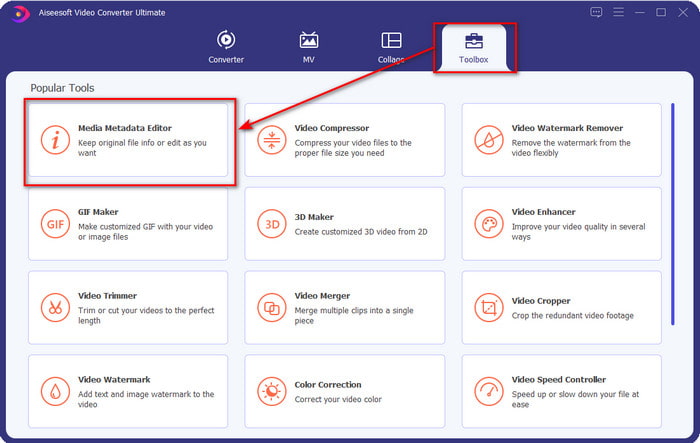
Schritt 1. Nachdem du das Tool erfolgreich installiert hast, starte es sofort. Rufe in der Programmoberfläche den Bereich Toolbox auf und suche nach dem Media Metadata Editor; klicke darauf, um ihn zu öffnen.
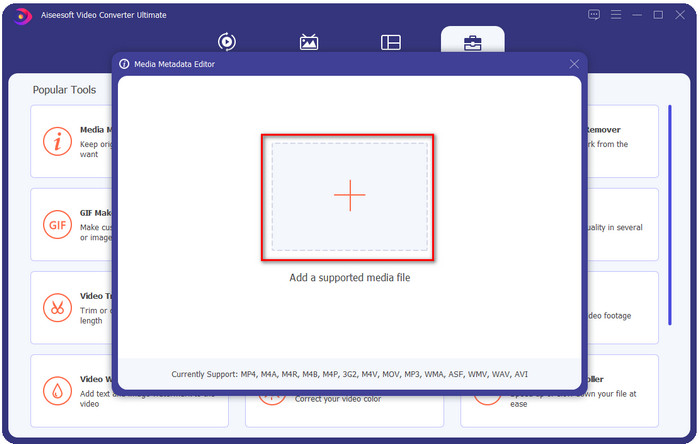
Schritt 2. Klicke nach dem Öffnen des Editors auf das +-Symbol und wähle die WMV‑Datei im Ordner aus, der auf deinem Bildschirm angezeigt wird. Drücke auf „Öffnen“, sobald du dich für eine Datei entschieden hast.
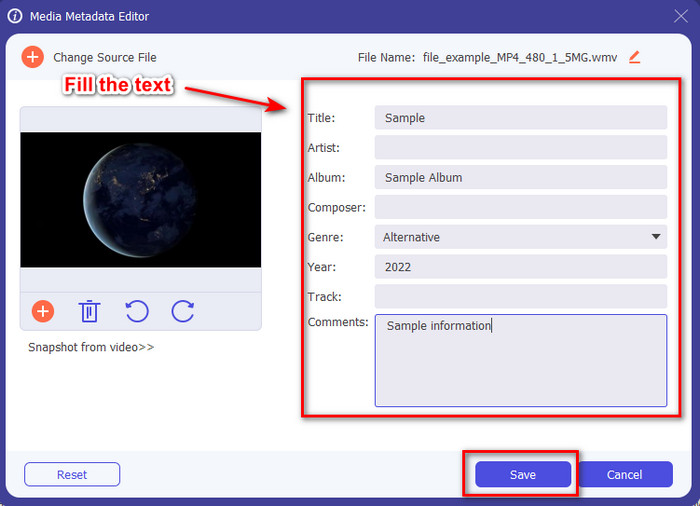
Schritt 3. Fülle das Textfeld nach deinen Anforderungen aus und klicke anschließend auf Speichern, um die von dir hinzugefügten Tags auf die Datei anzuwenden.
Verwandt:
Teil 2. Weitere 3 beste Tag-Editoren unter Windows
Machete Video Editor Lite
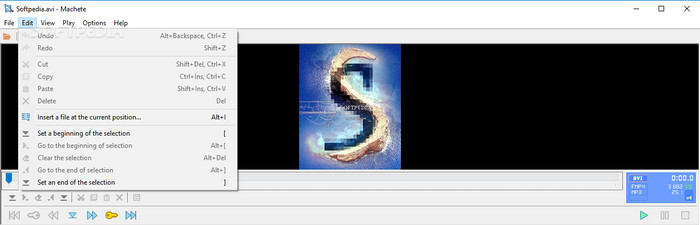
Machete Video Editor Lite ist ein WMV‑Metadateneditor für Windows, den du auf deinen PCs herunterladen kannst. Mit diesem Tool kannst du Tags nur für AVI und MKV bearbeiten; andere Formate werden nicht unterstützt. Es ist ein spezialisierter Metadateneditor für Windows, daher musst du dir bei der Nutzung keine Sorgen machen – er hilft dir zuverlässig bei dieser Aufgabe. Trotz seiner Stärken als Metadateneditor ist die Benutzeroberfläche veraltet und bräuchte ein modernes Design, um mit den besser gestalteten Metadateneditoren auf dem Markt konkurrieren zu können. Außerdem unterstützt das Tool nur zwei Formate, AVI und MKV. Dies ist wohl der größte Nachteil, da andere Tag‑Editoren eine Vielzahl von Formaten unterstützen und so das Hochladen von Dateien erleichtern.
TigoTago
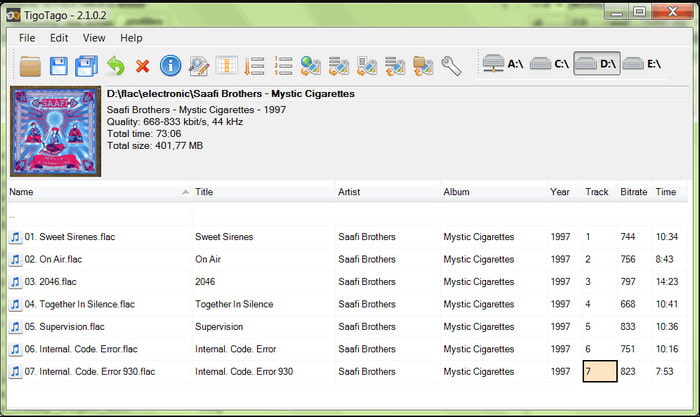
Ein weiterer spezialisierter WMV‑Tag‑Editor für Windows ist TigoTago. Anders als Machete Video Editor Lite unterstützt dieses Tool drei Videoformate: MP4, WMV und AVI. Wenn du Audiotags bearbeiten möchtest, kannst du außerdem MP3, WMA, WAV und viele weitere Formate laden. Die Benutzeroberfläche des Tools ähnelt stark einer Tabellenkalkulation, in der du verschiedene Spalten für unterschiedliche Tags deiner Datei siehst. Trotz dieses Tabellenlayouts benötigt das Programm ein Update, da es so wirkt, als hätte es schon lange keine Aktualisierung mehr erhalten. Während der Nutzung sind uns einige verwirrende Funktionen aufgefallen, die das Bearbeiten der Tags zeitaufwendig und etwas umständlich machen. Obwohl solche Probleme auftreten können, kannst du das Programm weiterhin kostenlos unter Windows herunterladen.
Eigenschaften unter Windows
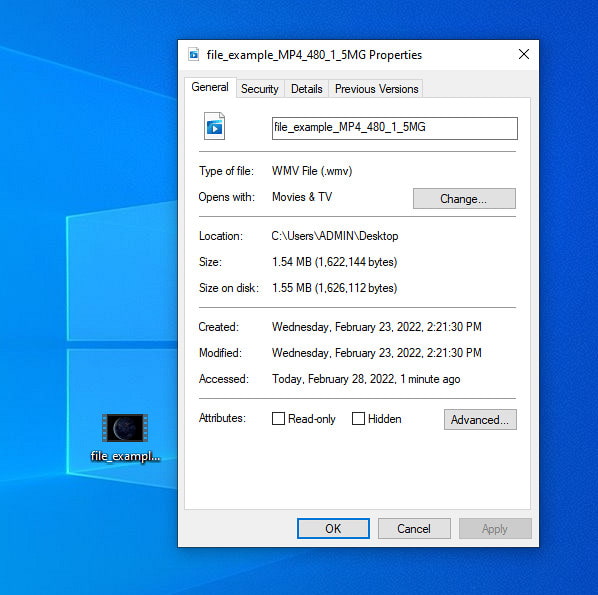
Eigenschaften unter Windows ist eine spezielle Funktion, die du auf jedem Windows‑Betriebssystem kostenlos nutzen kannst. Diese Funktion muss nicht heruntergeladen werden und ist nicht über das Web zugänglich, was für uns ein großer Vorteil ist. Mit ihr kannst du die Tags jeder Mediendatei – etwa einer WMV‑Datei – mit nur wenigen Klicks aktualisieren. In letzter Zeit fanden einige Nutzer, wir eingeschlossen, diese Funktion jedoch etwas umständlich. Denn als wir versucht haben, die Metadaten der Datei auf die Originaldatei zu aktualisieren, wurden die Tags nicht gespeichert. Das ist zu erwarten, denn es handelt sich nicht um einen professionellen Metadateneditor. Wenn du WMV‑Metadaten aktualisieren möchtest, kannst du sie damit aber dennoch recht einfach bearbeiten.
Teil 3. Häufig gestellte Fragen zum WMV-Tag-Editor
Kann ich WMV-Metadaten auf dem Mac bearbeiten?
Absolut, ja, das kannst du. Mit Hilfe des ultimativen Tools, das wir oben vorstellen, ist diese Aufgabe einfach. Wenn Sie also ein Mac-Benutzer sind, laden Sie das Tool auf Ihr Gerät herunter, indem Sie auf die Download-Schaltfläche für Mac klicken, und folgen Sie demselben Verfahren. Die Bilder können bei der Funktion auf dem Mac jedoch etwas anders aussehen, aber das von Ihnen hinzugefügte Tag wird erfolgreich gespeichert, ohne ins Schwitzen zu geraten.
Werden WMV-Metadaten beim Ansehen mit Windows Media Player angezeigt?
Während der Wiedergabe auf dem Windows Media Player, dem nativen Media Player von Windows, werden die Tags nicht auf dem Bildschirm angezeigt. Sie können jedoch darauf zugreifen, indem Sie mit der rechten Maustaste auf die Datei klicken, auf Eigenschaften klicken und ein Minifenster zeigt, wo Sie die Tags in Ihrer WMV-Datei sehen können. Denken Sie daran, dass Sie sie anzeigen, aber nicht Ihren Anforderungen entsprechend bearbeiten können.
Gehen bei der Übertragung von WMV im Web die Metadaten verloren?
Dieses Problem tritt ganz natürlich bei den meisten Mediendateien auf. Die Metadaten gehen unterwegs verloren, da der von Ihnen verwendete App-Typ die Metadaten entfernen muss, um die Dateigröße für eine reibungslose Segelübertragung zu reduzieren. Daher ist es besser, die Metadaten zu kopieren und separat zu senden, um dieses Problem zu vermeiden.
Fazit
Abschließend lässt sich sagen, dass alle von uns ausgewählten Tools sehr effektive WMV‑Metadateneditoren sind, die du auf jedem Windows‑System herunterladen oder kostenlos nutzen kannst, das das schnelle Hochladen von WMV unterstützt. Auch wenn dir diese Tools helfen können, können manche dich auch enttäuschen; daher ist die Wahl des passenden Tag‑Editors entscheidend, um Probleme oder Schäden zu vermeiden. Wenn du dich noch fragst, welches Tool den idealen Tag‑Editor, eine multifunktionale Toolbox und eine einfache Bedienung vereint, können wir mit Überzeugung sagen, dass FVC Video Converter Ultimate all diese Anforderungen erfüllt. Anders als viele Konkurrenten auf dem Markt ist dieses Tool darauf ausgelegt, Nutzern bei ihren täglichen Videoaufgaben wie Konvertieren, Tag‑Bearbeitung, Bearbeiten usw. zu helfen. Unglaublich, oder? Genau das bietet dir dieses ultimative Tool.
-
 Was sind Metadaten: Lernen Sie die grundlegenden Informationen über Metadaten kennen
 Was sind Metadaten? Ist das wichtig? Was sind die Bestandteile von Metadaten? Haben Sie die gleiche Frage? In diesem Artikel erfahren Sie die grundlegenden Informationen zu Metadaten.
-
 4 der besten Metadaten-Viewer online und offline [Aktualisiert 2025]
 Kann ich die Metadaten meiner Datei überprüfen? Ja, das können Sie, mit Hilfe dieses Beitrags stellen wir Ihnen die verschiedenen Metadaten-Viewer vor, die Sie verwenden können.
-
 Schnelle und einfache Tipps zum Konvertieren von WMV in MOV [Bewährt]
 Möchten Sie wissen, welche die besten und benutzerfreundlichsten Konverter sind, die WMV in MOV konvertieren? Lesen Sie diesen Artikel weiter, da er alle möglichen Optionen bespricht, die Sie in Betracht ziehen müssen.
