


 Video Converter Ultimate
 Εγγραφή οθόνης
 Επισκευή βίντεο
 Ασφαλές κατέβασμα
Πώς να μετατρέψετε MP4 σε WMV για Mac / Windows
Πριν παρουσιάσω μια προτεινόμενη λίστα από μετατροπείς MP4 σε WMV, επιτρέψτε μου πρώτα να σας ρωτήσω κάτι σχετικά με τις μορφές βίντεο.
Για να αποθηκεύσουμε ψηφιακά δεδομένα βίντεο σε ένα υπολογιστικό σύστημα, πρέπει να χρησιμοποιήσουμε μια μορφή αρχείου που έχει σχεδιαστεί για βίντεο. Λοιπόν, τι είδους μορφές βίντεο γνωρίζετε; MP4; WMV; FLV; AVI; Αυτές είναι πράγματι ευρέως χρησιμοποιούμενες μορφές βίντεο για την αποθήκευση ψηφιακών δεδομένων βίντεο. Αλλά έχετε ποτέ αναρωτηθεί γιατί υπάρχουν τόσες πολλές μορφές αρχείων βίντεο; Ποια είναι η διαφορά μεταξύ MP4 και WMV;
Γενικά, το MP4 είναι συμβατό με σχεδόν κάθε τύπο συσκευών στην αγορά, πράγμα που σημαίνει ότι μπορείτε να παίξετε MP4 παντού, ακόμη και στην προεπιλεγμένη συσκευή αναπαραγωγής βίντεο του υπολογιστή ή του τηλεφώνου σας. Ωστόσο, εάν χρησιμοποιείτε συσκευές Windows, πιστεύω ότι το WMV μπορεί να σας εξυπηρετήσει καλύτερα. Όχι μόνο επειδή έχει αναπτυχθεί από τη Microsoft, αλλά επειδή μπορεί να σώσει το HQ βίντεο σε μικρό χώρο στο δίσκο.
Σήμερα λοιπόν θα μάθετε πώς να μετατρέψετε ένα αρχείο MP4 σε WMV με τους καλύτερους μετατροπείς βίντεο που προτείνουμε.

Μέρος 1. Πώς να μετατρέψετε MP4 σε WMV Online δωρεάν
Εκτός από την εγκατάσταση κλασικού επιτραπέζιου λογισμικού, η χρήση μετατροπέων μέσω διαδικτύου είναι επίσης μια επιλογή στις μέρες μας. Αν και απλοί, πολλοί διαδικτυακοί μετατροπείς είναι λίγο αργοί κατά τη διάρκεια της μετατροπής. Ορισμένοι περιορίζουν ακόμη και το μέγεθος και την ποσότητα των αρχείων που ανεβάζετε και δεν μπορούν να εγγυηθούν την ποιότητα των βίντεο εξόδου.
Έτσι, σας παρουσιάζουμε εδώ το FVC Free Online Video Converter, έναν δωρεάν, γρήγορο και αποδοτικό μετατροπέα βίντεο που μπορεί να σας βοηθήσει να μετατρέψετε μια σειρά από βίντεο ή ήχο χωρίς απώλειες.
Ως ένας πολυλειτουργικός δωρεάν online μετατροπέας MP4 σε WMV, το FVC Video Converter υποστηρίζει σχεδόν κάθε τύπο μορφής βίντεο. Μπορείτε να μετατρέψετε μεγάλα αρχεία MP4 προς/από MKV, MOV, WMV, AVI, TS, κ.λπ. Μπορείτε επίσης να επεξεργαστείτε το βίντεό σας σύμφωνα με τις ανάγκες σας. Είναι παιχνιδάκι να ρυθμίσετε το bitrate βίντεο, τον ρυθμό δειγματοληψίας, τον ρυθμό καρέ, την ανάλυση και την ένταση στο FVC. Και δεν υπάρχει κανένα υδατογράφημα στο βίντεό σας μετά τη μετατροπή.
Τώρα μπορεί να ανησυχείτε ότι με όλες αυτές τις δυνατότητες, μπορεί να είναι δύσκολο να καταλάβετε πώς να χρησιμοποιήσετε αυτόν τον μετατροπέα. Στην πραγματικότητα, η αλήθεια είναι εντελώς αντίθετη. Χρειάζονται μόνο μερικά βήματα για να αποκτήσετε αυτό το μετατροπέα MP4 σε WMV.
Βήμα 1. Κάντε κλικ εδώ για να μεταβείτε στο FVC Free Online Video Converter. Έπειτα κάντε κλικ στο Add Files to Convert για να κατεβάσετε πρώτα το FVC Launcher.
Κατεβάστε την έκδοση για υπολογιστή για μαζική μετατροπή αρχείων.
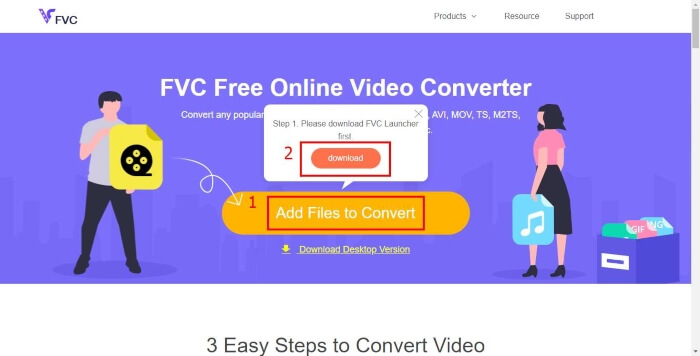
Βήμα 2. Αφού εγκαταστήσετε το launcher, θα εμφανιστεί το παράθυρο Open File. Απλώς βρείτε το αρχείο MP4 που θέλετε να μετατρέψετε.
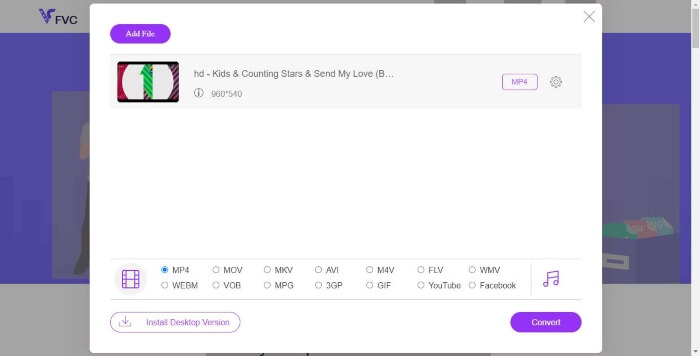
Βήμα 3. Στη σελίδα μετατροπής, επιλέξτε ως μορφή εξόδου το WMV. Παρεμπιπτόντως, αν θέλετε να αλλάξετε τις παραμέτρους του βίντεο, απλώς ανοίξτε το παράθυρο ρυθμίσεων κάνοντας κλικ στο εικονίδιο Setting. Κάντε κλικ στο κουμπί Convert και επιλέξτε έναν φάκελο προορισμού για να αποθηκεύσετε το μετατρεπόμενο βίντεο.
Μέρος 2. Μετατροπή MP4 σε WMV με επιτραπέζιο λογισμικό
1. RealPlayer
Το RealPlayer είναι ένα από τα πιο δημοφιλή προγράμματα αναπαραγωγής πολυμέσων από το 1995. Δεν σας βοηθά μόνο να διαχειρίζεστε εύκολα τα βίντεο, τη μουσική και τις εικόνες σας, αλλά και να μετατρέπετε βίντεο σε πολλαπλές μορφές και να τα μεταφέρετε σε άλλες φορητές συσκευές.
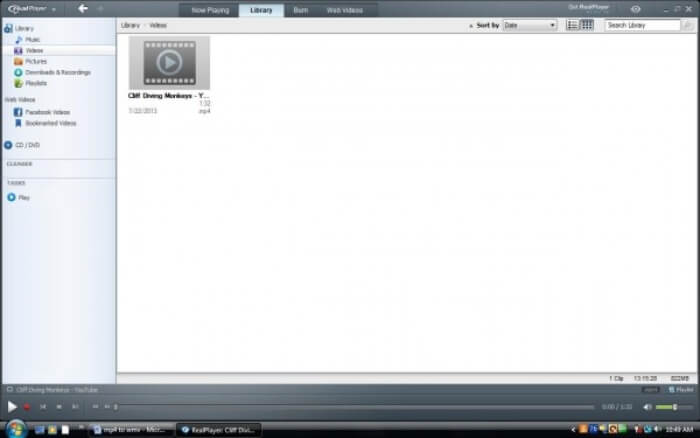
Βήμα 1. Αν το RealPlayer είναι εγκατεστημένο στον υπολογιστή σας, αποθηκεύστε το αρχείο MP4 στη βιβλιοθήκη του RealPlayer. Επιλέξτε Library μετά την εκκίνηση του RealPlayer. Βρείτε το αρχείο σας στη λίστα Video.
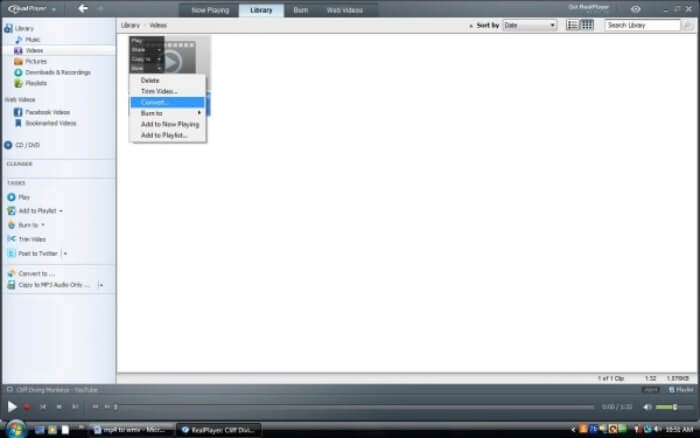
Βήμα 2. Κάντε κλικ στο αρχείο και επιλέξτε την επιλογή More από το αναδυόμενο μενού. Στη συνέχεια, επιλέξτε την επιλογή Convert.
Βήμα 3. Επιλέξτε WMV από το μενού Select a Device και κάντε κλικ στο OK. Τώρα κάντε κλικ στο κουμπί Start. Σε λίγα δευτερόλεπτα, το βίντεό σας θα βρίσκεται στη βιβλιοθήκη του RealPlayer.
2. VLC Media Player
Το VLC είναι ένα πρόγραμμα αναπαραγωγής ανοικτού κώδικα, πολλαπλών πλατφορμών, που μπορεί να αναπαράγει βίντεο σε διάφορες μορφές. Υποστηρίζει επίσης μετατροπή αρχείων σε πολλές δημοφιλείς μορφές. Ακολουθήστε τα παρακάτω βήματα για να εξαχθεί αρχείο WMV από MP4.
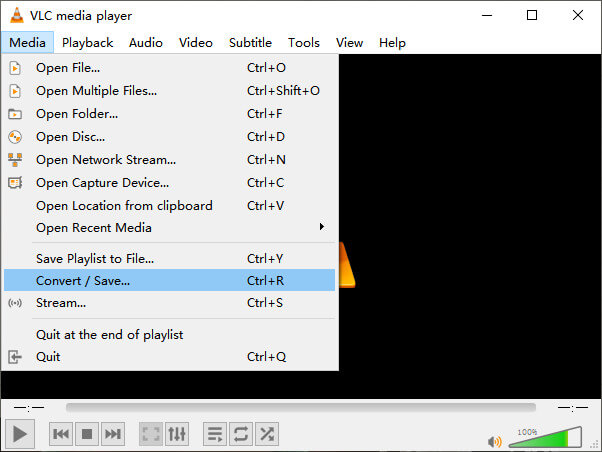
Βήμα 1. Ανοίξτε το VLC Media Player και κάντε κλικ στο Convert / Save στο μενού Media.
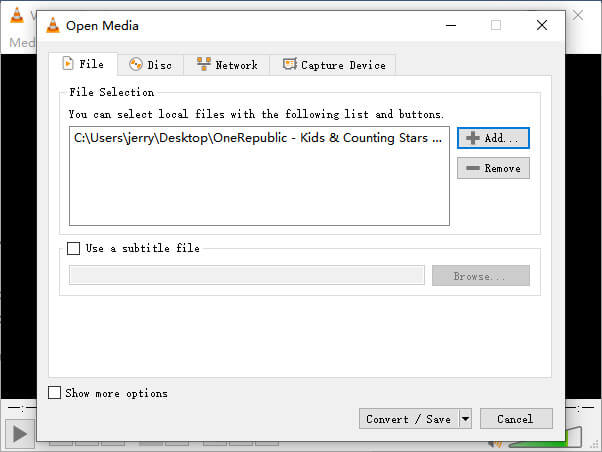
Βήμα 2. Προσθέστε το αρχείο στο VLC. Έπειτα κάντε κλικ στο κουμπί Convert / Save.
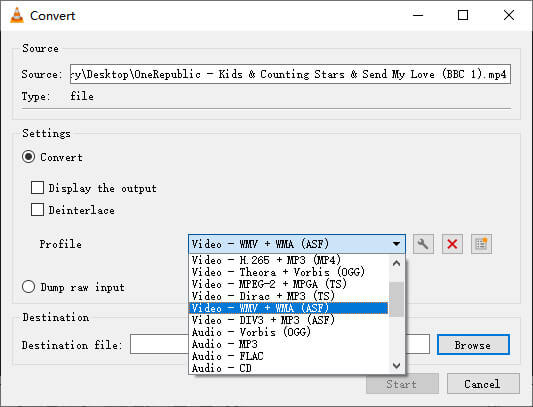
Βήμα 3. Βρείτε το WMV από το Profile και επιλέξτε έναν φάκελο ως προορισμό αποθήκευσης του αρχείου εξόδου. Στη συνέχεια, κάντε κλικ στο Start.
MP4 εναντίον WMV
Κυκλοφόρησε από το Moving Picture Experts Group (MPEG) το 2001, η μορφή MP4 μπορεί να σας βοηθήσει να αποθηκεύσετε δεδομένα βίντεο, ήχου, υπότιτλων και εικόνας σε ξεχωριστά κομμάτια. Είναι σύντομο για το MPEG-4 Part 14. Επιπλέον, είναι μια από τις πιο δημοφιλείς μορφές που χρησιμοποιούνται για ροή και κοινή χρήση βίντεο.
Κατασκευασμένο από τη Microsoft, το WMV ήταν μια από τις πιο κοινές μορφές βίντεο τη δεκαετία του 2000. Μπορεί να είναι ορατό στον Ιστό και να αναπαραχθεί από διάφορες συσκευές αναπαραγωγής πολυμέσων στα Windows. Και είναι επίσης η προεπιλεγμένη μορφή αρχείου βίντεο του Windows Media Player. Αλλά το έχουν καταλάβει και άλλες μορφές πρόσφατα.
Μέρος 3. Συχνές ερωτήσεις MP4 σε WMV Μετατροπή
1. Μπορεί το χειρόφρενο να μετατρέψει MP4 σε WMV;
Μετά από έρευνα, δυστυχώς η πιο πρόσφατη έκδοση του Handbrake δεν μπορεί να μετατρέψει MP4 σε WMV. Είναι αλήθεια ότι το Handbrake υποστηρίζει τα περισσότερα συνηθισμένα πολυμεσικά αρχεία. Αλλά αυτό ισχύει για τις πηγές εισόδου. Οι επιλογές για τις μορφές εξόδου είναι MP4(.M4V) και MKV.
2. Μπορώ να μετατρέψω ένα αρχείο MP4 άνω των 100MB σε WMV online δωρεάν;
Εξαρτάται. Διαφορετικοί δωρεάν online μετατροπείς βίντεο έχουν διαφορετικούς περιορισμούς. Κάποιοι μετατροπείς όπως το FVC Free Online Video Converter σας επιτρέπουν να μετατρέπετε αρχεία πάνω από 100MB. Αλλά κάποιοι άλλοι μετατροπείς μπορεί να σας χρεώσουν γι’ αυτό.
3. Μπορεί το Windows Media Player να μετατρέψει MP4 σε WMV;
Δεν μπορείτε να μετατρέψετε αρχείο MP4 σε WMV με το Windows Media Player. Αυτό συμβαίνει επειδή είναι μόνο πρόγραμμα αναπαραγωγής, όχι μετατροπέας. Αν θέλετε να μετατρέψετε MP4 σε WMV, θα πρέπει να χρησιμοποιήσετε έναν αποδοτικό μετατροπέα βίντεο.
4. Μπορώ να παίξω αρχείο WMV σε Mac;
Τα ενσωματωμένα εργαλεία βίντεο στο Mac δεν μπορούν να αναπαράγουν αρχεία WMV. Ωστόσο, υπάρχουν άλλοι τρόποι για να αναπαράγετε βίντεο WMV στο MacOS. Μπορείτε να μετατρέψετε το WMV σε άλλη μορφή που υποστηρίζεται από το Mac. Ή να εγκαταστήσετε το Windows Media Player for Mac για να αναπαράγετε αρχεία WMV.
συμπέρασμα
Παρόλο που τα MP4 και WMV έχουν ορισμένες ομοιότητες, διαθέτουν επίσης τα δικά τους χαρακτηριστικά. Γι' αυτό πρέπει να αποφασίζετε ανάλογα με τις συγκεκριμένες συνθήκες. Ελπίζουμε ότι μετά την ανάγνωση αυτού του άρθρου, τα ζητήματα μετατροπής από MP4 σε WMV δεν θα αποτελούν πλέον πρόβλημα για εσάς. Την επόμενη φορά που θα χρειαστείτε ένα αρχείο WMV, απλώς ακολουθήστε τον παραπάνω οδηγό και μετατρέψτε το αρχείο με ευκολία.
-
 Πώς να μετατρέψετε τα αρχεία βίντεο MP4 σε κινούμενες εικόνες GIF χωρίς απώλεια ποιότητας
 Ψάχνετε τον καλύτερο τρόπο για να μετατρέψετε το βίντεο MP4 σε κινούμενα GIF; Εδώ είναι ένας αναλυτικός οδηγός για να το κάνετε στο Photoshop, το Windows Movie Maker, τον online μετατροπέα βίντεο και άλλα.
-
 Πώς να μετατρέψετε τα αρχεία βίντεο FLV σε MP4 χωρίς να πληρώσετε ούτε δεκάρα
 Αυτός ο οδηγός μοιράζεται τέσσερις δωρεάν μεθόδους για τη μετατροπή των αρχείων βίντεο FLV σε μορφή MP4 σε Windows 10/8/7 / XP και σε Mac OS X, ώστε να μπορείτε να απολαύσετε τα βίντεο σε οποιαδήποτε συσκευή.
-
 Πώς να μετατρέψετε MOV σε MP4 χωρίς να χάσετε την ποιότητα
 Θέλετε να μετατρέψετε αρχεία MOV (Apple QuickTime Movie) σε MP4; Αυτή η ανάρτηση μοιράζεται 4 δωρεάν μεθόδους για να μετατρέψετε τα αρχεία βίντεο MOV σε μορφή MP4 σε Windows 10/8/7 / XP και σε Mac OS X.

