


 Video Converter Ultimate
 Εγγραφή οθόνης
 Επισκευή βίντεο
Σε λεπτομερείς κριτικές σχετικά με τις κορυφαίες 5 προσβάσιμες εφαρμογές ενισχυτή ήχου
Όλοι οι άνθρωποι σε ολόκληρο το σύμπαν αγαπούν τη μουσική, είτε είναι ποπ, μέταλ, ροκ, τζαζ κ.ο.κ. Ωστόσο, δεν προσφέρουν όλα τα ηχεία εξαιρετική ηχητική απόδοση που να μας ανατριχιάζει. Επίσης, η αγορά ενισχυτών μπορεί να κοστίσει πάνω από εκατό δολάρια ή, ακόμη χειρότερα, πάνω από χίλια. Δεν είναι ακριβό; Μπορούμε όμως να αποφύγουμε να ξοδέψουμε τόσα χρήματα αν δοκιμάσουμε αυτούς τους κορυφαίους ενισχυτές που είναι διαθέσιμοι σε όλες τις πλατφόρμες. Και τώρα, αν θέλετε να χρησιμοποιήσετε μια εφαρμογή ενισχυτή ήχου, τότε ρίξτε μια ματιά στη λίστα παρακάτω, η οποία θα σας κοστίσει λιγότερο από τα παραπάνω ποσά και παρ’ όλα αυτά προσφέρει εξαιρετική ενίσχυση.

Μέρος 1. Φαινόμενος ενισχυτής ήχου Διαθέσιμος σε PC & Mac
Αν θέλετε να πετύχετε 8D ή 16D ήχο χωρίς να ξοδέψετε πολλά σε εξοπλισμό ενίσχυσης ήχου, τότε δοκιμάστε το Video Converter Ultimate. Σε αντίθεση με κάθε είδους φυσικό ενισχυτή, με αυτό το εργαλείο θα ξοδέψετε πολύ λιγότερα και δεν θα χρειαστεί να κάνετε περίπλοκο στήσιμο ή να διαβάσετε ένα ογκώδες εγχειρίδιο για να μάθετε πώς χρησιμοποιείται. Επίσης, αυτό το πρόγραμμα για υπολογιστή είναι εξαιρετικό στη βελτίωση βίντεο, ήχου, GIF και πολλών άλλων. Αν και το εργαλείο είναι επί πληρωμή, εξακολουθεί να είναι πολύ εύχρηστο, χωρίς περίπλοκες διαδικασίες, και προσφέρει προηγμένες δυνατότητες που μπορείτε να εφαρμόσετε εύκολα στα βίντεο και τα ηχητικά σας αρχεία. Λοιπόν, αν θέλετε να μάθετε πώς να χρησιμοποιήσετε το λογισμικό, είναι απαραίτητο να ακολουθήσετε τα παρακάτω βήματα.
Βήματα για τη χρήση του ενισχυτή έντασης στο Video Converter Ultimate:
Βήμα 1. Πρώτα από όλα, κατεβάστε το λογισμικό στον σκληρό δίσκο του PC ή του Mac σας. Στη συνέχεια, εγκαταστήστε το στον υπολογιστή σας και κάντε τη γρήγορη, απλή ρύθμιση με το χέρι.
Δωρεάν ΛήψηΓια Windows 7 ή νεότεραΑσφαλής λήψη
Δωρεάν ΛήψηΓια MacOS 10.7 ή νεότεροΑσφαλής λήψη
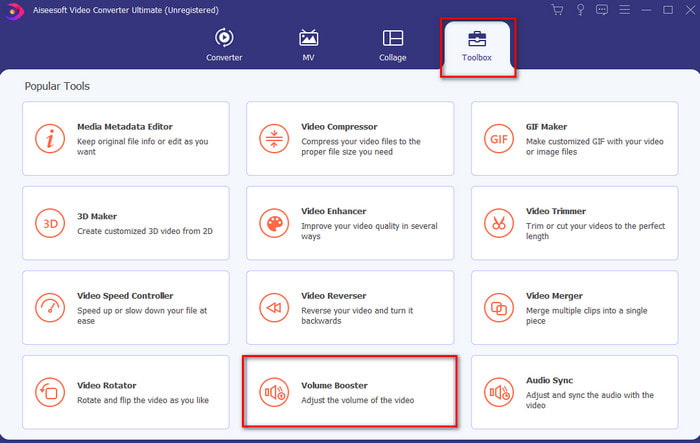
Βήμα 2. Στην ενότητα Toolbox κάντε κλικ στο Volume Booster.
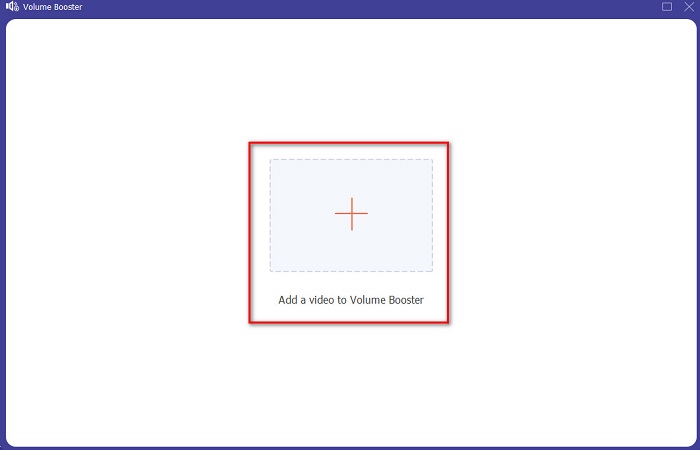
Βήμα 3. Κάντε κλικ στο κουμπί + για να επιλέξετε το αρχείο του οποίου τον ήχο θέλετε να ενισχύσετε. Έπειτα πατήστε Open για να συνεχίσετε.
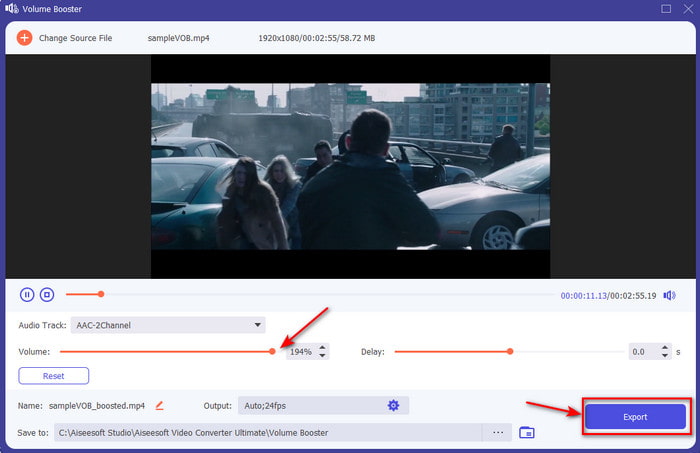
Βήμα 4. Στο περιβάλλον εργασίας μπορείτε τώρα να σύρετε το volume slider για να κάνετε τον ήχο πιο δυνατό και καθαρό. Όταν ολοκληρώσετε τη ρύθμιση του ήχου, κάντε κλικ στο Export.
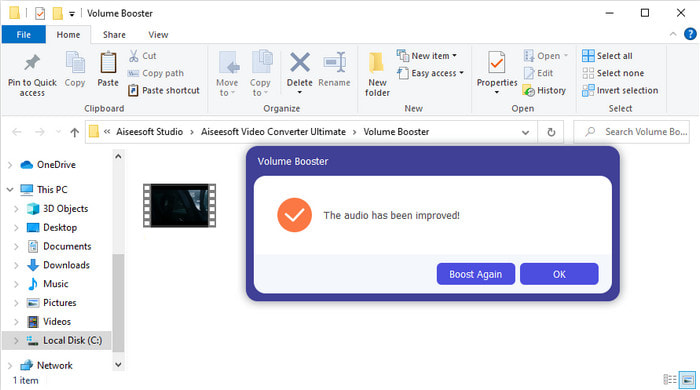
Βήμα 5. Περιμένετε μερικά δευτερόλεπτα μέχρι να ολοκληρωθεί η διαδικασία και, όταν τελειώσει, θα εμφανιστεί στην οθόνη σας ένα παράθυρο διαχείρισης αρχείων με το αρχείο που ενισχύσατε· κάντε κλικ στο αρχείο για να το ακούσετε.
Πλεονεκτήματα
- Αυτό το λογισμικό είναι εύκολο στη χρήση και μπορεί να κάνει τον ήχο σας εκπληκτικό.
- Η απόδοση του λογισμικού εκτιμάται ιδιαίτερα από τους πελάτες του.
- Είναι διαθέσιμο και εύκολα για λήψη σε PC και Mac.
Μειονεκτήματα
- Αυτό το λογισμικό δεν υποστηρίζει κινητές συσκευές.
- Αυτό το εργαλείο πληρώνεται, αλλά δεν είναι τόσο ακριβό σε σύγκριση με τα άλλα εργαλεία επιφάνειας εργασίας.
Σχετικά:
Πώς να αυξήσετε την ένταση ήχου σε βίντεο MP4
Πώς να διορθώσετε την καθυστέρηση ήχου στο VLC
Μέρος 2. 4 της εφαρμογής καλύτερου ενισχυτή ήχου που είναι διαθέσιμη σε κινητά τηλέφωνα iOS και Android
1. Ενίσχυση έντασης ήχου – Ενισχυτής ήχου 4+ (iOS)
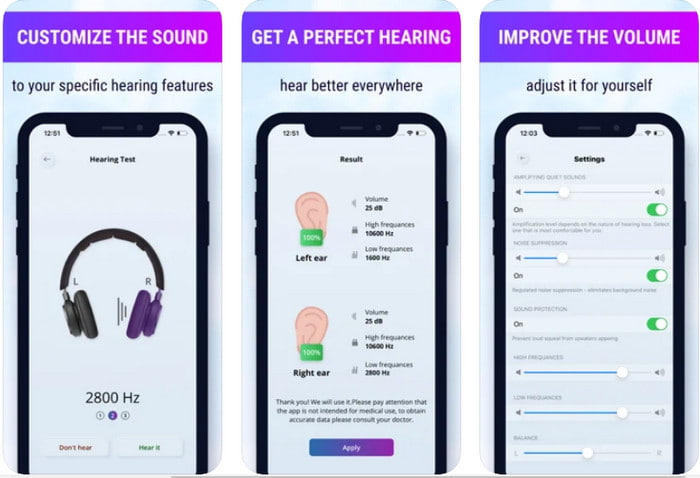
Οι χρήστες iOS μπορούν εύκολα να κατεβάσουν δωρεάν την εφαρμογή Volume Boost- Sound Amplifier 4+. Αυτή η εφαρμογή μπορεί να ενισχύσει τον ήχο εύκολα και χωρίς ταλαιπωρία, χάρη στην αυτόματη ρύθμισή της, αλλά μπορείτε επίσης να κάνετε και χειροκίνητη παρέμβαση. Επιπλέον, η εφαρμογή είναι πολύ καλή ως ενισχυτής, ωστόσο δεν λειτουργεί με ηχεία Bluetooth και με ασύρματα ακουστικά ή earbuds/pods. Επίσης, είναι πιθανό να αντιμετωπίσετε αρκετά κρασαρίσματα και αναπόφευκτες διαφημίσεις όταν την ανοίγετε. Αν και η εφαρμογή διατίθεται δωρεάν, υπάρχει αγορά μέσα από την εφαρμογή για την αφαίρεση των διαφημίσεων και για τη χρήση επιπλέον λειτουργιών.
Πλεονεκτήματα
- Δωρεάν λήψη σε οποιαδήποτε συσκευή iOS.
- Ενισχύστε τον ήχο του ηχείου σας εύκολα έως και 30db.
- Διαισθητική διεπαφή και ρύθμιση.
Μειονεκτήματα
- Αντιμετωπίστε πολλά σφάλματα, παγώσεις και σφάλματα εξακολουθούν να υπάρχουν σε αυτήν την εφαρμογή.
- Οι διαφημίσεις πρέπει να αποφεύγονται πολλά.
2. Extra Volume Booster - ηχείο δυνατού ήχου (Android)
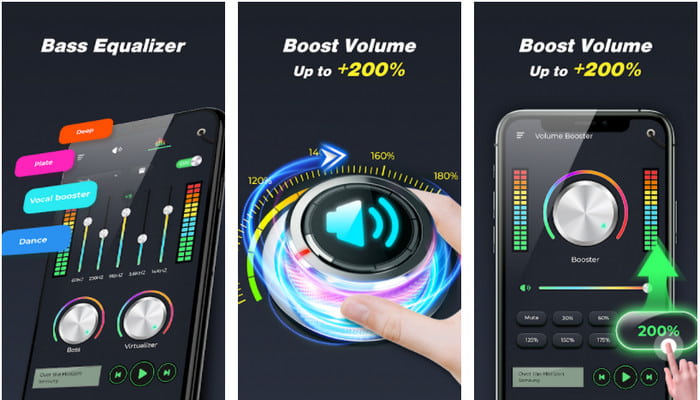
Αν οι χρήστες iOS έχουν εφαρμογή ενίσχυσης ήχου στο τηλέφωνό τους, τότε και οι χρήστες Android θα πρέπει να έχουν κάτι αντίστοιχο, όπως το Extra Volume Booster. Πέρα από αυτό, πολλοί χρήστες έχουν ήδη μείνει ικανοποιημένοι από την απόδοση της εφαρμογής, γιατί είναι εξαιρετική στην ενίσχυση και στην αύξηση της έντασης. Ωστόσο, αν ανοίξετε αυτή την εφαρμογή, όλοι οι ήχοι που παράγει το τηλέφωνό σας, όπως ήχοι κλήσης, ξυπνητήρια, ειδοποιήσεις κ.λπ., θα ενισχυθούν ταυτόχρονα. Αυτό σημαίνει ότι δεν υπάρχουν ξεχωριστές ρυθμίσεις για κάθε κατηγορία ήχου. Αν και το εργαλείο είναι δωρεάν, θεωρείται σε κάποιο βαθμό καλύτερο από άλλες πληρωμένες εφαρμογές στο Android ή ακόμη και στο iOS. Όμως, αν βεβαιώσετε την ένταση στο 200%, τότε να περιμένετε παραμόρφωση ή ακόμη και ζημιά στα ενσωματωμένα ηχεία ή στα ηχεία Bluetooth που δεν μπορούν να διαχειριστούν ένταση ήχου 200%.
Πλεονεκτήματα
- Απλοποιημένη έκδοση του ενισχυτή που μπορείτε να κατεβάσετε σε συσκευές Android.
- Αν και η διεπαφή της εφαρμογής δεν είναι μεγάλη, είναι εξαιρετική.
- Διαφορετική ενίσχυση και ενίσχυση είναι διαθέσιμα σε αυτήν την εφαρμογή.
Μειονεκτήματα
- Αναμένετε να συναντήσετε αμέτρητες διαφημίσεις κατά τη χρήση της εφαρμογής.
- Κατά τη χρήση του εργαλείου υπάρχει πιθανότητα να ζεσταθεί η CPU ή το τηλέφωνο.
3. Speaker Boost: Volume Booster & Sound Amplifier 3D (Android)
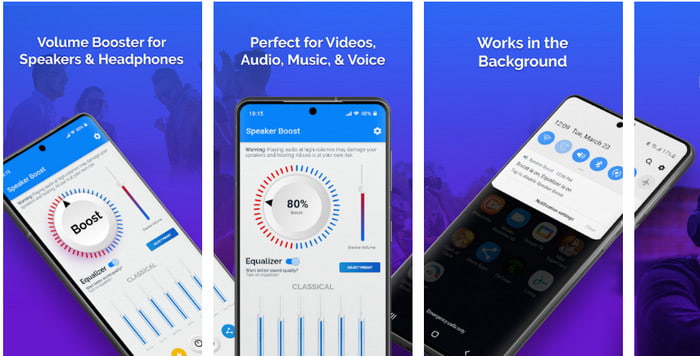
Μια ακόμη εφαρμογή Android που μπορείτε να χρησιμοποιήσετε και η οποία προσφέρει εξαιρετικό surround sound ενίσχυσης είναι το Speaker Boost. Όπως και το Extra Volume Booster, αυτή η εφαρμογή είναι πολύ στοχευμένη και πολύ πιο εύχρηστη, ακόμη κι αν δεν έχετε εμπειρία. Μπορείτε επίσης να την κατεβάσετε δωρεάν, αλλά διαθέτει αγορές μέσα από την εφαρμογή που ίσως θελήσετε, όπως η αφαίρεση των ενοχλητικών διαφημίσεων και άλλες δυνατότητες. Αν και το εργαλείο φαίνεται δίκαιο ως προς τη χρήση, η αγορά των πρόσθετων λειτουργιών σε αυτή την εφαρμογή θα σας κοστίσει αρκετά χρήματα σε σύγκριση με άλλα προγράμματα αυτής της λίστας. Ένα ακόμη ζήτημα που ενοχλεί πολλούς χρήστες είναι ότι η εφαρμογή λειτουργεί παρακάμπτοντας τον ad-blocker και υπάρχει πιθανότητα να είναι spyware.
Πλεονεκτήματα
- On-point για να ενισχύετε τον ήχο εύκολα και όμως είναι ισχυρό στη χρήση.
- Κατεβάστε το εργαλείο δωρεάν χωρίς καμία ταλαιπωρία για την ενίσχυση των ήχων.
- Κάντε τη χειροκίνητη παράκαμψη του ισοσταθμιστή.
Μειονεκτήματα
- Αυτό το εργαλείο είναι ημιτελές, πράγμα που ουσιαστικά σημαίνει ότι είναι υπό πειραματικό στάδιο.
- Όταν αυξήσετε τον ήχο, θα ακούσετε κάποιες παραμορφώσεις.
4. Boom: Bass Booster & Equalizer 4+ (iOS)
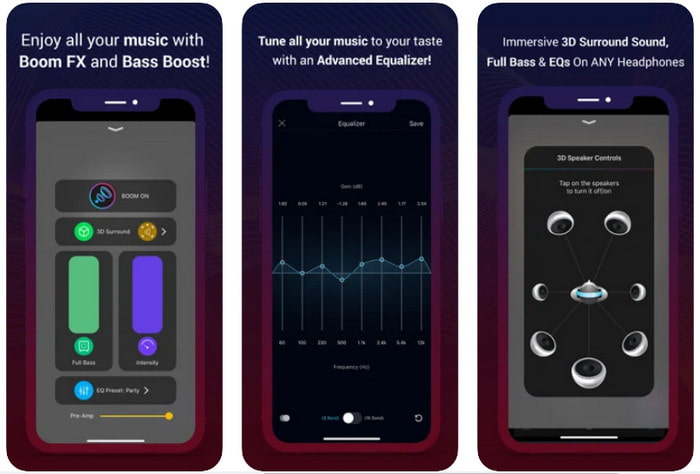
Αν αναζητάτε μια πιο προηγμένη εφαρμογή ενίσχυσης ήχου, τότε το Boom: Bass Booster είναι μια εξαιρετική επιλογή. Ωστόσο, αυτή η εφαρμογή είναι διαθέσιμη μόνο σε συσκευές iOS και δεν μπορείτε να τη βρείτε σε Android. Μέχρι στιγμής, αυτό το εργαλείο έχει ήδη λάβει πολλά θετικά σχόλια από τους χρήστες, αλλά ορισμένες μορφές αρχείων δεν υποστηρίζονται για ενίσχυση. Επίσης, όταν χρησιμοποιείτε την εφαρμογή, να περιμένετε κάποια σφάλματα και κρασαρίσματα. Επιπλέον, η εφαρμογή μπορεί να παραπλανήσει τους νέους χρήστες. Αν και η απόδοσή της φαίνεται ικανοποιητική, χρειάζεται ακόμη βελτίωση για να γίνει καλύτερη.
Πλεονεκτήματα
- Ορισμένες από τις προηγμένες λειτουργίες είναι διαθέσιμες εδώ.
- Φορητοί ενισχυτές που μπορείτε να χρησιμοποιήσετε εύκολα.
- Η εφαρμογή λαμβάνει 4,1 αστέρια από 5 αστέρια.
Μειονεκτήματα
- Δεν είναι η καλύτερη επιλογή για αρχάριους λόγω της μπερδεμένης δομής της διεπαφής.
- Οι περισσότερες μορφές ήχου δεν υποστηρίζονται για ενίσχυση με αυτήν την εφαρμογή.
- Ζητήματα σφαλμάτων και καθυστερήσεων εξακολουθούν να συμβαίνουν με την εφαρμογή.
Μέρος 3. Συχνές ερωτήσεις σχετικά με τους ενισχυτές ήχου
Τι είναι το db;
Db σημαίνει ντεσιμπέλ και αυτή είναι η μονάδα μέτρησης για την έκφραση της έντασης ή της ισχύος του ηχητικού κύματος. Επίσης, με τη βοήθεια των ντεσιμπέλ μπορούμε εύκολα να προσδιορίσουμε τον ήχο που είμαστε ασφαλείς να ακούμε για μεγάλο χρονικό διάστημα. Και όλα τα 85 ντεσιμπέλ παρακάτω είναι πολύ ασφαλή.
Ποια είναι τα μειονεκτήματα του δυνατού ήχου;
Είναι πολύ συνηθισμένο σε εμάς ότι όταν εκτιθέμεθα σε δυνατούς ήχους, η ακοή μπορεί να βλάψει. Γνωρίζατε όμως ότι αυτό μπορεί να οδηγήσει σε ναυτία, πονοκέφαλο, άγχος, κόπωση και πολλά άλλα. Έτσι, εάν πρόκειται να χρησιμοποιήσετε έναν ενισχυτή, χρησιμοποιήστε τον σωστά και μην τον παρακάνετε για να αποφύγετε τις αναπόφευκτες βλαβερές συνέπειες.
Γιατί ακούω μερικές ρωγμές στα ηχεία μου;
Αυτό το πρόβλημα είναι πολύ συνηθισμένο για τα ηχεία με πολύ περιορισμένο Hertz που μπορούν να χειριστούν. Επομένως, εάν αυξήσετε τον ήχο, βεβαιωθείτε ότι το ηχείο μπορεί να τον χειριστεί. Και αν ακούσετε κάποιο κράξιμο, πρέπει να χαμηλώσετε αμέσως τον ήχο. Ωστόσο, αν ακούσετε μερικές ρωγμές ακόμα κι αν χαμηλώσετε τον ήχο, τότε είναι πολύ αργά.
συμπέρασμα
Όλες οι εφαρμογές και τα προγράμματα που παρουσιάζονται εδώ είναι πολύ κατάλληλα για χρήση ως ενισχυτές. Παρόλο που τα παραπάνω προγράμματα έχουν κάποιες διαφορές, οι βασικές λειτουργίες τους είναι παρόμοιες. Ωστόσο, αν αναζητάτε τον καλύτερο ενισχυτή ήχου για PC και Mac, τότε το Video Converter Ultimate είναι πιθανότατα η καλύτερη επιλογή. Προσφέρει εντυπωσιακές προηγμένες δυνατότητες που μπορείτε να χρησιμοποιήσετε με ευκολία. Οπότε, αν αναρωτιέστε αν είναι όντως η καλύτερη επιλογή, κατεβάστε το πρώτα στον υπολογιστή σας και ακολουθήστε τα βήματα που αναφέρονται παραπάνω.
Δωρεάν ΛήψηΓια Windows 7 ή νεότεραΑσφαλής λήψη
Δωρεάν ΛήψηΓια MacOS 10.7 ή νεότεροΑσφαλής λήψη
-
 [Εύκολο] Πώς να διορθώσετε τον εκτός συγχρονισμού ήχο και βίντεο
 Ας υποθέσουμε ότι πρόκειται να προγραμματίσετε τη ροή σας για αύριο, αλλά όταν ελέγξετε τις ρυθμίσεις σας, ο ήχος και το βίντεο δεν συγχρονίζονται. Διαβάστε αυτό το άρθρο για να μάθετε περισσότερα σχετικά με αυτήν την ανησυχία.
-
 7 εύκολα βήματα για τον τρόπο επίλυσης προβλημάτων καθυστέρησης ήχου OBS [Επιλύθηκε]
 Δυσκολεύεστε να παρακολουθήσετε το βίντεο κλιπ σας μετά την εγγραφή λόγω της καθυστέρησης ήχου όταν χρησιμοποιείτε το OBS Studio; Διαβάστε το παρακάτω άρθρο για να μάθετε πώς να διορθώνετε αποτελεσματικά τον μη συγχρονισμένο ήχο.
-
 Πώς να προσθέσετε δωρεάν ήχο και μουσική στο βίντεο στον υπολογιστή / το τηλέφωνό σας
 Αυτό το άρθρο παρουσιάζει 4 εύκολους τρόπους για να προσθέσετε ήχο στο βίντεο δωρεάν. Ανεξάρτητα από το ποιο κομμάτι ήχου θέλετε να προσθέσετε στο βίντεό σας, μπορείτε να έχετε ικανοποιητικά αποτελέσματα εδώ.
