


 Video Converter Ultimate
 Εγγραφή οθόνης
 Επισκευή βίντεο
Πώς να μειώσετε την ανάλυση ενός βίντεο σε Windows, Mac και κινητά τηλέφωνα
Videos on 1080 and 720 HD have the best resolution you would love to use, especially watching. Although these resolutions are best, sooner or later, you will need to convert the video resolution into less to save some space on your drive. But the question is how to convert the video resolution to lower it? This article will identify the leading video resolution converter to lower the video resolution on Windows, Mac, Online, Android, & iPhone.

Μέρος 1. Γιατί πρέπει να μειώσετε την ανάλυση βίντεο
Ως προετοιμασία προτού μειώσουμε την ανάλυση βίντεο, ας προσδιορίσουμε πρώτα την αιτία για την οποία πρέπει να αλλάξουμε τη μείωση της ανάλυσης ενός βίντεο. Οι πληροφορίες που παρέχουμε παρακάτω είναι η πιο συνηθισμένη περίπτωση που θα χρειαστείτε για να μειώσετε την ανάλυση.
Αιτία 1. Δεν υποστηρίζεται σε φορητές συσκευές
Ορισμένες κινητές συσκευές δεν υποστηρίζουν υψηλότερη ανάλυση βίντεο επειδή το κινητό σας δεν την αναγνωρίζει. Μερικές φορές, πιστεύαμε ότι το βίντεο δεν άνοιγε λόγω συμβατότητας μορφής, αλλά αυτός είναι ένας άλλος λόγος πίσω από αυτό. Εάν θέλετε να παίξετε το βίντεο, τότε πρέπει να έχετε στο μυαλό σας την ανάλυση του βίντεο που έχετε αποθηκεύσει στο τηλέφωνό σας.
Λόγος 2. Αφιερώστε χρόνο για να φορτώσετε το αρχείο σε ένα Media Player
Κάθε πρόγραμμα αναπαραγωγής πολυμέσων μπορεί να αναπαράγει το βίντεό σας στην υψηλότερη δυνατή ανάλυση, αλλά δεν μπορούν όλοι να φορτώσουν το βίντεο με υψηλή ποιότητα αμέσως. Αν και η παρακολούθηση ενός βίντεο με υψηλή ανάλυση είναι πιο ευχάριστη από την παρακολούθηση ενός χαμηλότερου. Το να μάθετε πώς να μειώνετε την ανάλυση ενός βίντεο είναι απαραίτητο εάν θέλετε να παρακολουθήσετε το βίντεο αμέσως με μικρό ή μικρότερο φορτίο στη συσκευή αναπαραγωγής πολυμέσων.
Λόγος 3. Βίντεο με υψηλή ποιότητα τρώει πολύ χώρο
Αυτός ο λόγος δεν είναι νέος για εμάς. Το βίντεο υψηλής ποιότητας είναι πιο πιθανό να έχει τεράστιο μέγεθος αρχείου. Λόγω της υψηλής ποιότητας εξόδου, πρέπει να περιμένετε ότι το μέγεθος του αρχείου είναι μεγάλο. Για παράδειγμα, τα 720 και 1080 είναι μερικά από τα καλύτερα ποιοτικά, αλλά το μέγεθος αρχείου των 720 βίντεο είναι πολύ μικρότερο από 1080 βίντεο. Από την άλλη, η ανάλυση του 1080 είναι πολύ υψηλότερη από το 720.
Τώρα που καταλάβαμε γιατί πρέπει να μειώσουμε την ανάλυση του βίντεο, οι πληροφορίες που ακολουθούν παρακάτω θα σας διδάξουν τα διάφορα σύνολα εργαλείων που μπορείτε να χρησιμοποιήσετε για να μειώσετε την ανάλυση του βίντεό σας. Κρατήστε την μπάλα να κυλάει για να έχετε μια ολοκληρωμένη ιδέα για αυτό.
Μέρος 2. Ο ευκολότερος τρόπος για να μειώσετε την ανάλυση βίντεο στην επιφάνεια εργασίας
If you need a user-friendly video converter that can help you quickly change the video resolution, then Video Converter Ultimate will offer this to you. This tool supports 200+ formats with different presets you can choose from. Want to know what impressed us about this converter? With this tool, you can create presets that can go up to 4k or as low as 360 resolution. Moreover, you don't need to be a professional video editor to learn how to convert video to a lower resolution; by following the steps below, you can convert resolution successfully.
Step 1. Kindly click the appropriate button to get the version you are currently using, whether Windows or Mac. Open the download file to install the software follow the installation process to install it properly. After installation, open the Video Converter Ultimate and proceed to the next step.
Δωρεάν ΛήψηΓια Windows 7 ή νεότεραΑσφαλής λήψη
Δωρεάν ΛήψηΓια MacOS 10.7 ή νεότεροΑσφαλής λήψη
Step 2. Upload the video with the highest resolution by dragging and dropping it on the tool's interface. But you can click the + button to open the folder, locate the file and click Open to upload the video.
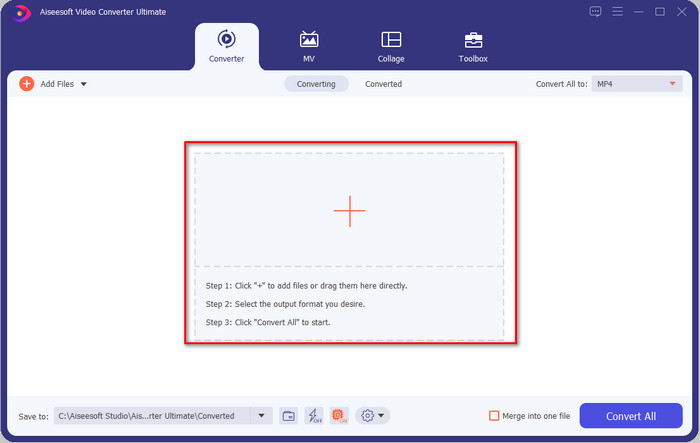
Step 3. Click Convert All to, and a setlist of the premade format will show. You can select different formats such as MP4, MOV, AVI, MKV, and 200+ more with different resolutions, click the format you want, and proceed.
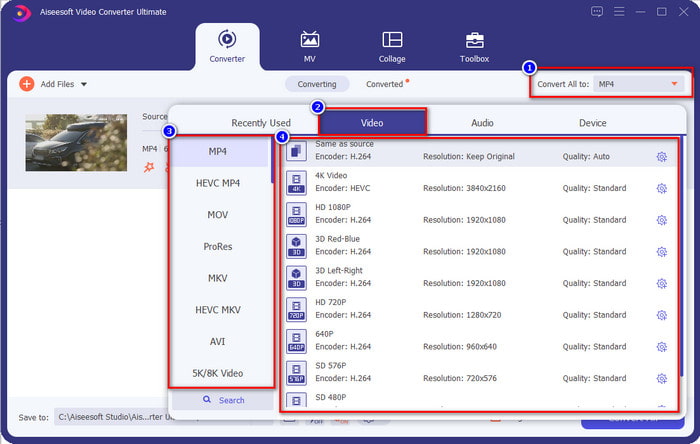
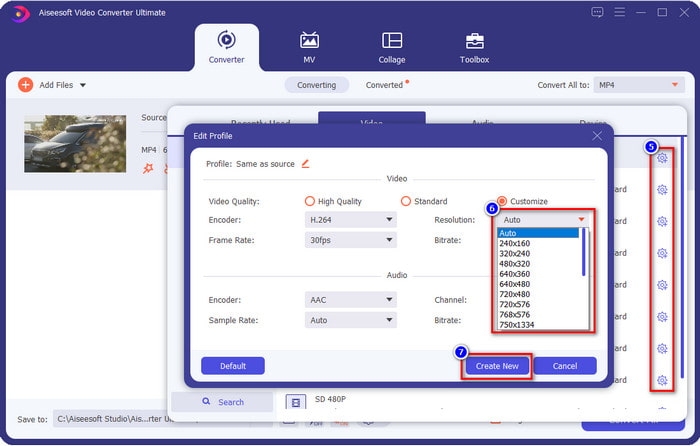
What if the resolution you want to achieve is not on the pre-made list? No need to worry; you can create your resolution. After clicking the Convert All to, choose the format you want and click the gear with a plus icon. Click the drop-down button, select the resolution you want, click Create New, and click the preset you've made.
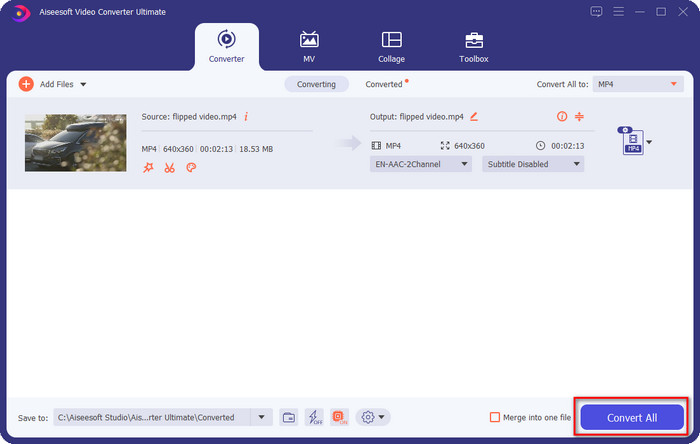
Step 4. To start lowering your video resolution, hit the Convert All button. With the ultra-fast conversion, the download will take less than a minute. And voila, the resolution of your video is now lowered, all thanks to the ultimate tool.
Μέρος 3. Δωρεάν τρόπος για να μετατρέψετε την ανάλυση βίντεο σε χαμηλότερη ανάλυση στον Ιστό
If you are looking for a way to convert HD video to lower resolution online, then you can use the FVC Free Video Converter Online as a solution. This web tool supports numerous formats you can upload and export into. Unlike the ultimate tool, you won't need to download this tool to convert the high-resolution video into a lower one. However, the tool doesn't have an ultra-fast converting process, and the supported format is not as many as the ultimate tool. So, if you want to try and use this web tool, you can follow the steps below.
Step 1. To go to the main webpage of FVC Free Video Converter Online, click this link.
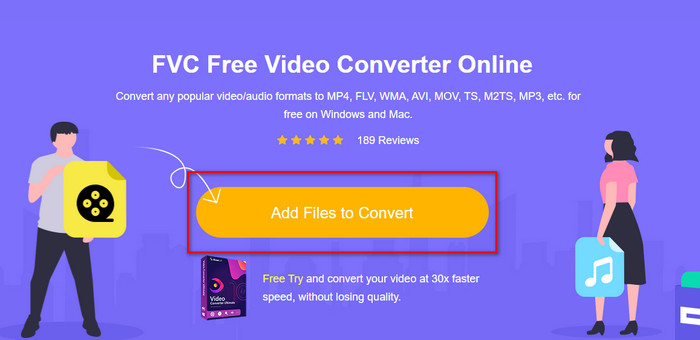
Step 2. Press Add Files to Convert to upload the video you want to lower the resolution. Additionally, if this is your first time using the tool, you must download the launcher. After that, click the Add Files to Convert again to upload the file.
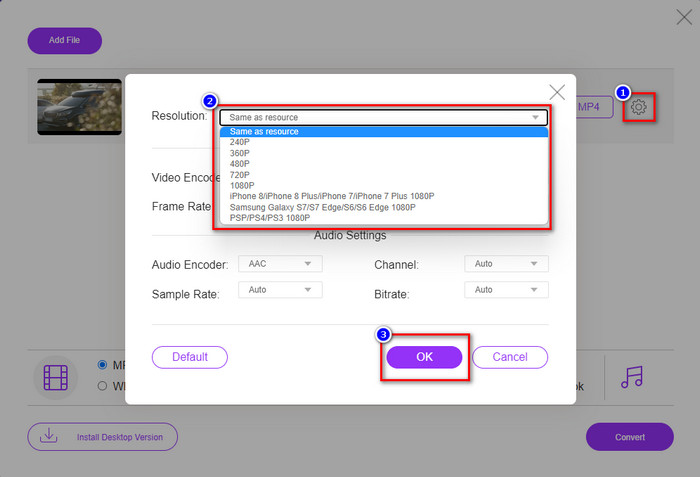
Step 3. Click the gear icon on the right side of the window that will show. Choose the resolution you want by clicking the drop-down button and pressing OK to save.
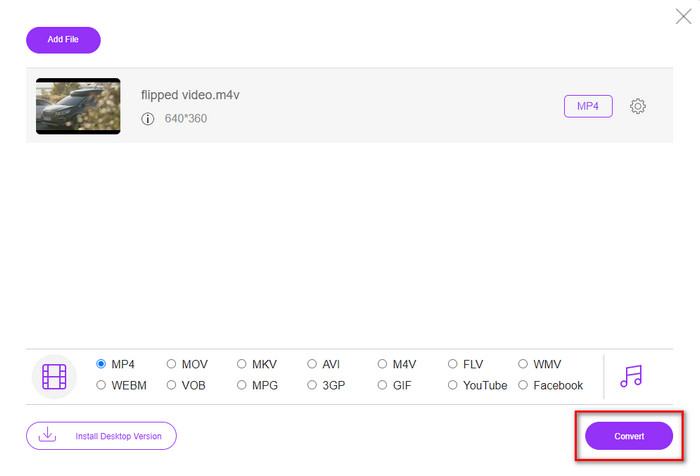
Step 4. To export the lower-quality video, click Convert and wait to download it on your drive.
Μέρος 4. 2 καλύτερες εφαρμογές για μείωση της ανάλυσης βίντεο σε iPhone και Android
Video Format Factory (Μόνο για χρήστες Android)
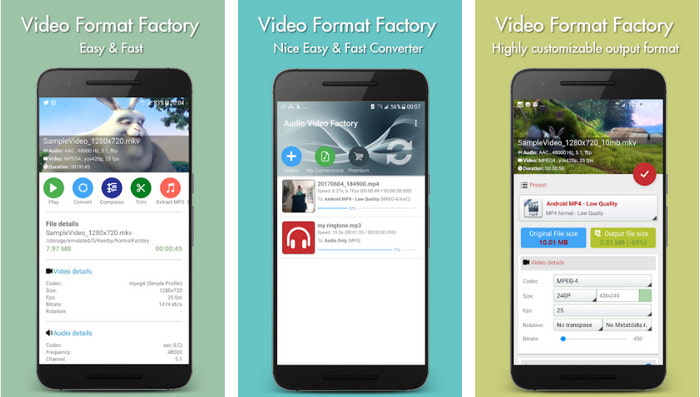
Εάν πρέπει να μάθετε πώς να μειώνετε την ανάλυση βίντεο στο Android, τότε το Audio Video Factory μπορεί να σας βοηθήσει. Με αυτήν την εφαρμογή, μπορείτε εύκολα να μετατρέψετε την ανάλυση βίντεο του βίντεό σας δωρεάν. Ωστόσο, ορισμένες διαφημίσεις θα εμφανιστούν κατά τη μετατροπή και δεν μπορείτε να χρησιμοποιήσετε όλες τις δυνατότητες του εργαλείου εάν δεν το αγοράσετε. Έτσι, για να σας μάθουμε πώς να το χρησιμοποιείτε, ακολουθήστε τα βήματα.
Step 1. Download the app on Playstore, then open it.
Step 2. Click Add to upload the video, choose where your video is, and click the video. After that, click Convert; click the Size and choose the resolution you want.
Step 3. Scroll up and click Convert Now to begin the process.
Κάμερα χαμηλότερης-πολύ χαμηλής ανάλυσης (Μόνο για χρήστες iOS)
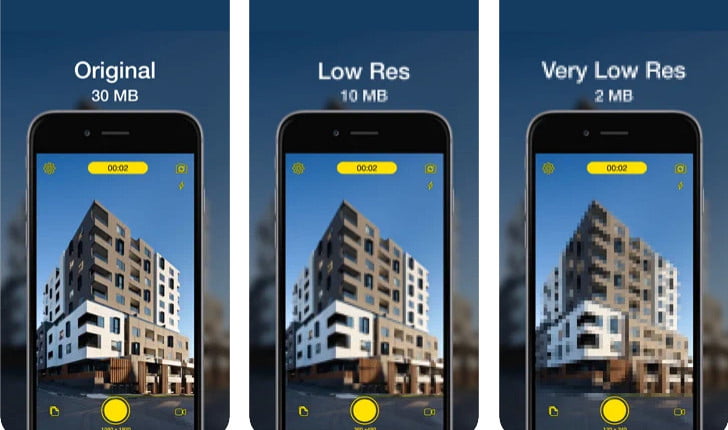
If you are an iOS user, you can still learn how to reduce the resolution of the video on the iPhone by using the Lower- Very Low Res Camera. Unlike the tools in this list, you can shoot a video with a lower resolution if you download this app on the App Store. However, the tools have some limitations, and it has pop-up ads while using the app.
Step 1. Download the app on the App Store, then click it to open.
Step 2. Click the file's icon and select the video you want to convert; after clicking the video, press Resize.
Step 3. Select the Recording Quality, and the process of converting it will begin.
Μέρος 5. Συχνές ερωτήσεις σχετικά με τη μείωση της ανάλυσης βίντεο
Το VLC υποστηρίζει ανάλυση 4k;
Yes, VLC 3.0 supports playing videos that are on 4k resolution. But did you know there are many things VLC can do? If you want to explore VLC more, click this link and learn about VLC and its other perfect alternatives to use.
Ποια είναι τα άλλα εργαλεία που μπορώ να χρησιμοποιήσω για να μετατρέψω την ανάλυση βίντεο;
This review will learn the 8 of the best video resolution converters you can use on different platforms. By clicking this link, you will have more detailed information and different varieties of converter choices.
Ποια είναι η υψηλότερη ανάλυση βίντεο που μπορώ να έχω;
Η ανάλυση βίντεο 8k είναι η υψηλότερη ανάλυση βίντεο που μπορείτε να χρησιμοποιήσετε στην τηλεόραση. Αυτή η ανάλυση είναι 4 φορές πιο ευκρινής από την 4k και 16 φορές καλύτερη από την 1080.
συμπέρασμα
Finally, we now have a clearer idea on how to lower the video resolution in your platform; whether you are using a Windows, Mac, Online, Android, or iPhone, you can use the converters in this list. But if you want a tool that can change your resolution without reducing the quality, we recommend using the FVC Video Converter Ultimate. As we present above, there are many reasons you should use this tool, and if you still do not believe us, you can download the tool and try if it works, as we explain in this post.
-
 Ultimate Guide How to Change Video Resolution Διατίθεται σε Cross-Platforms
 Θέλετε να αλλάξετε την ανάλυση βίντεο του βίντεο; Εάν ναι, μάθετε τους διαφορετικούς τρόπους που μπορείτε εύκολα να κάνετε για να αλλάξετε την ανάλυση βίντεο του βίντεο που παρακολουθείτε.
-
 Οι 8 κορυφαίοι μετατροπείς ανάλυσης βίντεο για χρήση σε πολυπλατφόρμες [Ενημερώθηκε το 2022]
 Δεν έχετε ιδέα για τον καλύτερο μετατροπέα ανάλυσης βίντεο στη συσκευή σας; Εάν ναι, μπορείτε να διαβάσετε πλήρως αυτό το άρθρο για να μάθετε περισσότερα σχετικά με τους διαθέσιμους μετατροπείς βίντεο.
-
 Καλύτερο πρόγραμμα αναπαραγωγής βίντεο 1080p HD για Windows / Mac / iOS / Android το 2021
 Αν ψάχνετε για ένα πρόγραμμα αναπαραγωγής βίντεο για να παρακολουθήσετε βίντεο υψηλής ευκρίνειας 1080p στον υπολογιστή σας, ελέγξτε τις επιλογές μας από τις καλύτερες συσκευές αναπαραγωγής βίντεο 1080p HD για Mac, Windows PC, iOS και Android.
