


 Video Converter Ultimate
 Εγγραφή οθόνης
 Επισκευή βίντεο
 Ασφαλές κατέβασμα
Εύκολοι τρόποι για να αφαιρέσετε το υδατογράφημα Coub online και offline
Το Coub είναι ένας ιστότοπος που χρησιμοποιείται για την κοινή χρήση βίντεο στο διαδίκτυο. Είναι ένας δημοφιλής ιστότοπος που χρησιμοποιούν οι χρήστες για να δημιουργούν και να μοιράζονται βίντεο διάρκειας έως δέκα δευτερολέπτων. Σε αντίθεση με τα GIF, τα βίντεο του Coub έχουν ήχο υψηλής ποιότητας, γεγονός που τα κάνει δημοφιλή σε πολλούς ανθρώπους. Ωστόσο, όταν αποθηκεύετε ή κατεβάζετε βίντεο από το Coub, το βίντεο περιέχει ένα υδατογράφημα. Άρα, αν θέλετε να αφαιρέσετε το υδατογράφημα του Coub, πρέπει να χρησιμοποιήσετε ένα εργαλείο που μπορεί να αφαιρεί υδατογραφήματα. Αυτό το άρθρο θα σας παρουσιάσει τα πιο εντυπωσιακά εργαλεία για να αφαιρέσετε τα υδατογραφήματα του Coub από τα βίντεό σας με ευκολία.

Μέρος 1. 4 τρόποι για να αφαιρέσετε το υδατογράφημα Coub
Πολλοί άνθρωποι ενδιαφέρονται πλέον να παρακολουθούν και να κατεβάζουν βίντεο Coub στο διαδίκτυο. Αλλά όταν κατεβάζετε βίντεο από το coub, περιέχει ένα υδατογράφημα. Θα ξέρετε πώς να αφαιρέσετε το υδατογράφημα Coub χρησιμοποιώντας αυτούς τους τέσσερις εύκολους τρόπους.
FVC Video Converter Ultimate
Το FVC Video Converter Ultimate είναι μια εφαρμογή για υπολογιστή που μπορεί να αφαιρέσει οποιαδήποτε υδατογραφήματα από τα βίντεό σας. Αυτό το εργαλείο είναι φιλικό προς τον χρήστη, επειδή έχει ένα απλό περιβάλλον χρήστη και είναι εύκολο στο κατέβασμα. Επιπλέον, δεν θα αντιμετωπίσετε πρόβλημα με τους τύπους αρχείων που υποστηρίζει, αφού υποστηρίζει πολυάριθμες μορφές αρχείων, όπως MP4, MKV, AVI, MOV, M4V, WEBM, FLV και πάνω από 1000 ακόμη μορφές.
Διαθέτει επίσης προηγμένες λειτουργίες επεξεργασίας, όπως πρόγραμμα επεξεργασίας μεταδεδομένων πολυμέσων, συγχώνευση βίντεο, συμπιεστή βίντεο και πολλά άλλα από την εργαλειοθήκη. Και όταν αφαιρείτε το υδατογράφημα από το βίντεό σας, σας επιτρέπει να ορίσετε το μέγεθος της περιοχής αφαίρεσης. Θα δείτε επίσης ένα βίντεο προεπισκόπησης του αρχείου σας, ώστε να μπορείτε να ελέγξετε την έξοδο του βίντεό σας. Εάν θέλετε να χρησιμοποιήσετε αυτόν τον μετατροπέα για να αφαιρέσετε το υδατογράφημα Coub, ακολουθήστε τα παρακάτω βήματα.
Βήμα 1. Κατεβάστε το FVC Video Converter Ultimate στον υπολογιστή σας κάνοντας κλικ στο κουμπί Download παρακάτω. Ακολουθήστε τη διαδικασία εγκατάστασης και, στη συνέχεια, εκκινήστε την εφαρμογή.
Δωρεάν ΛήψηΓια Windows 7 ή νεότεραΑσφαλής λήψη
Δωρεάν ΛήψηΓια MacOS 10.7 ή νεότεροΑσφαλής λήψη
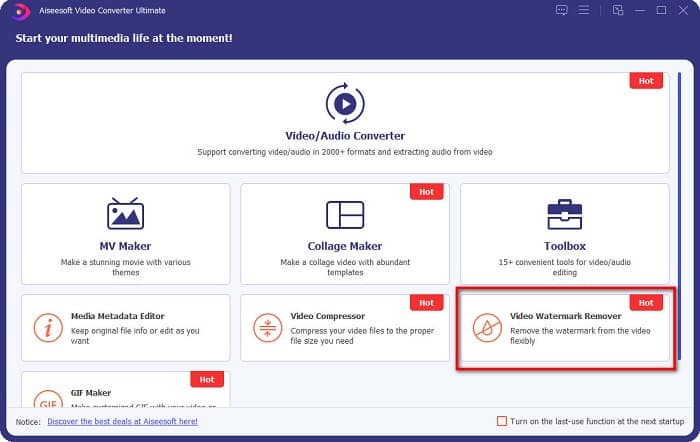
Βήμα 2. Στην πρώτη διεπαφή του λογισμικού, μεταβείτε στο Video Watermark Remover. Αν δεν μπορείτε να το βρείτε στην πρώτη διεπαφή, κάντε κλικ στο Toolbox.
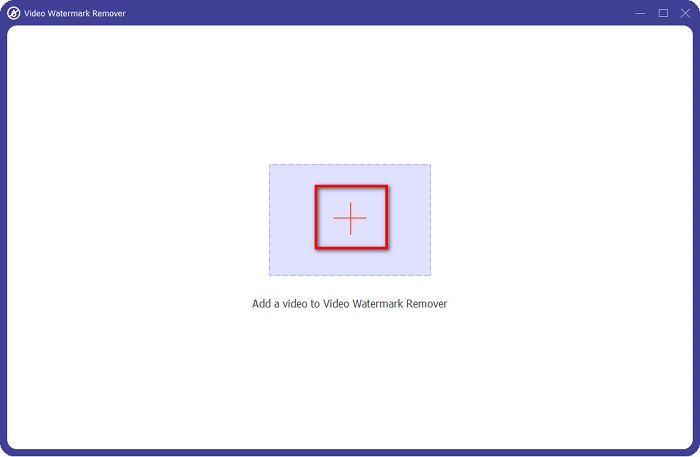
Βήμα 3. Κάντε κλικ στο κουμπί με το σύμβολο + για να ανεβάσετε το coub βίντεο στην επόμενη διεπαφή. Θα εμφανιστούν τα αρχεία του υπολογιστή σας, όπου θα επιλέξετε το βίντεο και θα κάνετε κλικ στο Open.
Βήμα 4. Στη συνέχεια, κάντε κλικ στο κουμπί Add watermark removing area ώστε να εμφανιστεί η περιοχή αφαίρεσης. Έπειτα, μετακινήστε το πλαίσιο περιοχής αφαίρεσης πάνω στο υδατογράφημα του coub. Θα δείτε ότι η περιοχή που επιλέγετε θα θολώσει.
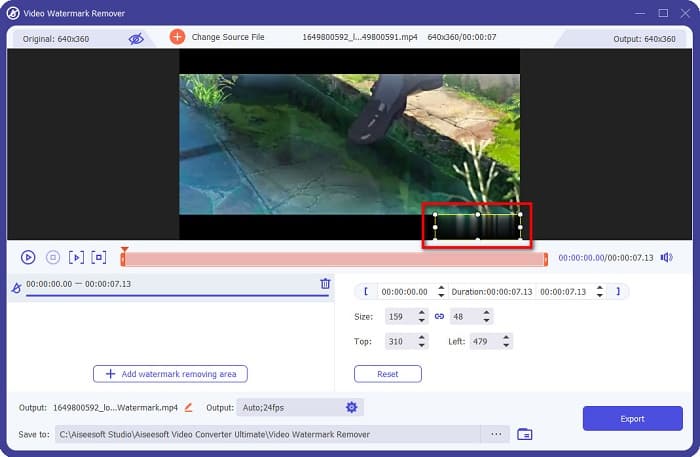
Βήμα 5. Τέλος, κάντε κλικ στο κουμπί Export για να αφαιρέσετε το υδατογράφημα του Coub και το αποτέλεσμα θα αποθηκευτεί αυτόματα στους φακέλους του υπολογιστή σας.

Εύκολο, έτσι δεν είναι; Ακολουθώντας τα απλά βήματα παραπάνω, μπορείτε να αφαιρέσετε το υδατογράφημα του coub από το βίντεό σας. Κάντε κλικ εδώ για να μάθετε πώς να αφαιρέσετε το υδατογράφημα του TikTok.
Hitpaw Αφαίρεση υδατογραφήματος
Το Hitpaw Watermark Remover είναι ένα από τα πιο δημοφιλή προγράμματα αφαίρεσης υδατογραφημάτων που μπορείτε να κατεβάσετε και σας επιτρέπει να αφαιρείτε εύκολα το υδατογράφημα του coub από το βίντεό σας. Αν θέλετε ένα βίντεο του Coub χωρίς υδατογράφημα, μπορείτε να χρησιμοποιήσετε αυτό το εργαλείο για να το αφαιρέσετε. Επιπλέον, αυτό το εργαλείο έχει ένα απλό περιβάλλον χρήστη, γεγονός που το καθιστά φιλικό προς τον χρήστη.
Θα είναι επίσης εύκολο για εσάς να αφαιρέσετε ένα υδατογράφημα σε ένα συγκεκριμένο μέρος του βίντεο μετακινώντας τα ρυθμιστικά. Επιπλέον, σας επιτρέπει να έχετε ομαλή γέμιση κατά την αφαίρεση του υδατογραφήματος. Είναι επίσης δωρεάν για λήψη σε όλες σχεδόν τις συσκευές πολυμέσων.
Βήμα 1. Πρώτα, κατεβάστε το Hitpaw Watermark Remover, ακολουθήστε τη διαδικασία εγκατάστασης και εκκινήστε την εφαρμογή.
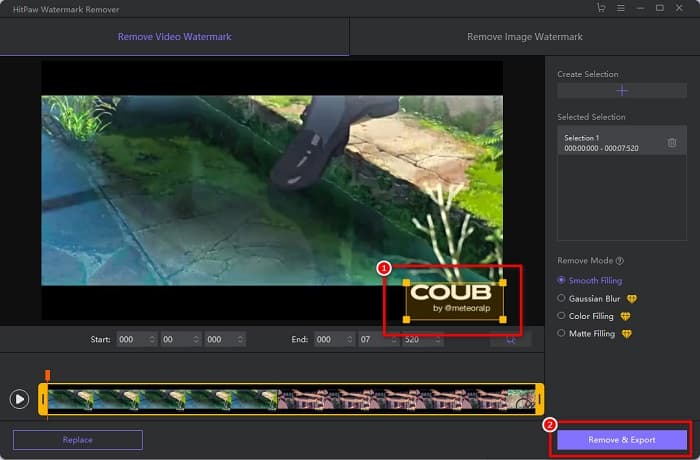
Βήμα 2. Έπειτα, κάντε κλικ στο κουμπί Choose File στην κύρια διεπαφή του λογισμικού για να ανεβάσετε το coub βίντεό σας. Θα εμφανιστούν τα αρχεία του υπολογιστή σας, όπου θα ανοίξετε το coub βίντεο.
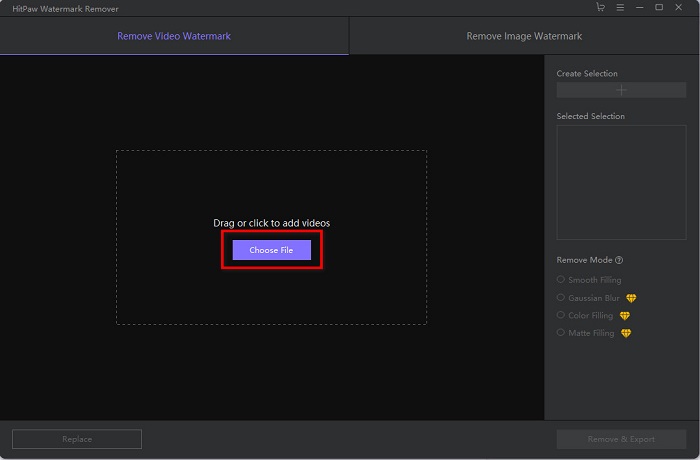
Βήμα 3. Μετακινήστε την περιοχή αφαίρεσης στο υδατογράφημα του coub και στη συνέχεια κάντε κλικ στο κουμπί Remove & Export στην κάτω δεξιά πλευρά της διεπαφής για να αφαιρέσετε οριστικά το υδατογράφημα.
Media.io
Το Media.io είναι ένα διαδικτυακό εργαλείο αφαίρεσης υδατογραφημάτων για βίντεο. Αυτό το online εργαλείο μπορεί να αφαιρεί υδατογραφήματα όπως λογότυπα, κείμενα και σφραγίδες. Αν είναι η πρώτη φορά που χρησιμοποιείτε ένα εργαλείο αφαίρεσης υδατογραφημάτων, δεν θα δυσκολευτείτε με αυτό, γιατί είναι εύκολο στη χρήση. Επιπλέον, υποστηρίζει τις πιο συνηθισμένες μορφές βίντεο, όπως MP4, MKV, AVI, FLV, MOV και άλλες. Μπορείτε επίσης να επιλέξετε αρχεία βίντεο από το Dropbox, το Google Drive και το YouTube. Επιπλέον, είναι ασφαλές στη χρήση και δωρεάν. Το Media.io είναι προσβάσιμο από όλους τους φυλλομετρητές, συμπεριλαμβανομένων των Google, Firefox και Safari.
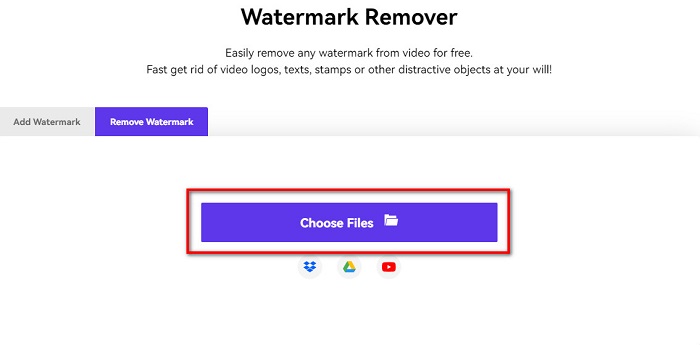
Βήμα 1. Στον φυλλομετρητή που χρησιμοποιείτε, αναζητήστε το Media.io και επισκεφθείτε την ιστοσελίδα τους. Στην κύρια διεπαφή του λογισμικού, κάντε κλικ στο κουμπί Choose Files.
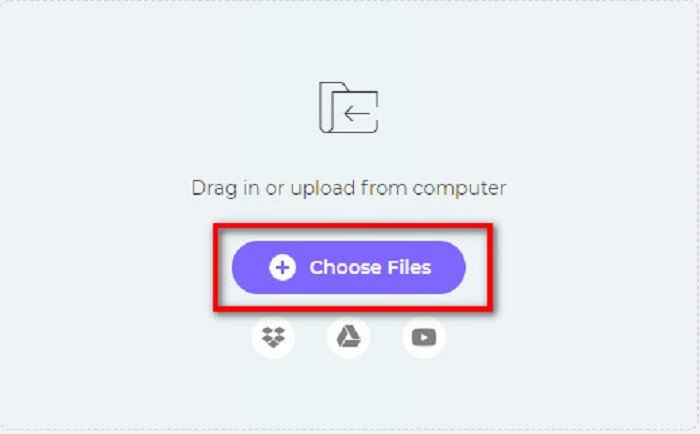
Βήμα 2. Θα εμφανιστεί μια νέα διεπαφή όπου θα κάνετε κλικ στο κουμπί Choose Files ή θα σύρετε και θα αφήσετε το Coub βίντεό σας στη διεπαφή του λογισμικού. Περιμένετε να ανέβει το βίντεο και προχωρήστε στο επόμενο βήμα.
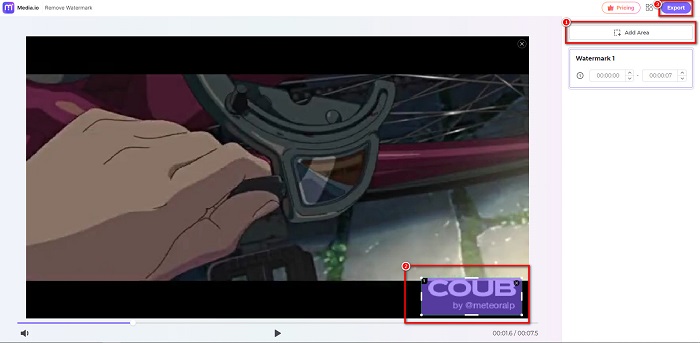
Βήμα 3. Έπειτα, κάντε κλικ στο Add Area στην αριστερή γωνία της διεπαφής και μετακινήστε την περιοχή αφαίρεσης πάνω στο υδατογράφημα του coub. Κάντε κλικ στο κουμπί Export για να αφαιρέσετε το υδατογράφημα και το αρχείο σας θα αποθηκευτεί αυτόματα στη συσκευή σας. Μπορείτε επίσης να χρησιμοποιήσετε αυτή τη μέθοδο για να αφαιρέσετε το υδατογράφημα από βίντεο.
BeeCut
Το BeeCut είναι ένας ακόμη τρόπος για να αφαιρείτε διαδικτυακά τα υδατογραφήματα του Coub. Αυτό το εργαλείο είναι πολύ βολικό γιατί δεν χρειάζεται να κατεβάσετε τίποτα στη συσκευή σας. Επιπλέον, είναι δωρεάν και ασφαλές στη χρήση. Ενδιαφέρον είναι ότι αυτό το εργαλείο υποστηρίζει πολυάριθμες μορφές αρχείων, όπως MP4, AVI, MKV, FLV και άλλες κοινές μορφές.
Επιπλέον, είναι ένα εργαλείο φιλικό για αρχάριους, επειδή έχει ένα εύκολο στη χρήση περιβάλλον χρήστη. Ωστόσο, ενδέχεται να αντιμετωπίσετε μια αργή διαδικασία λειτουργίας όταν η σύνδεσή σας στο Διαδίκτυο είναι αργή επειδή εξαρτάται από το Διαδίκτυο. Για να αφαιρέσετε το υδατογράφημα coub χρησιμοποιώντας το BeeCut, ακολουθήστε τον παρακάτω απλό οδηγό.
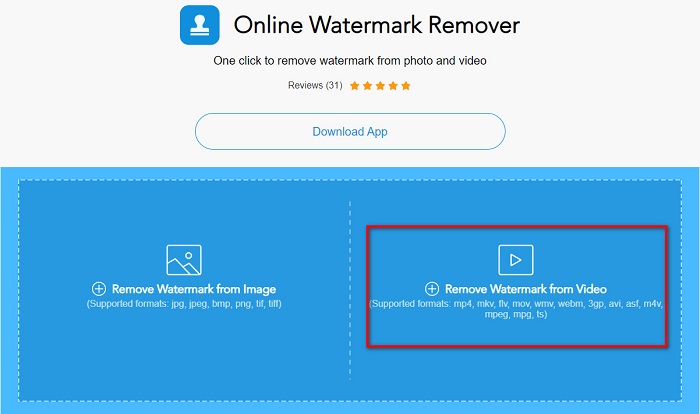
Βήμα 1. Αναζητήστε το BeeCut στον φυλλομετρητή σας και στη συνέχεια κάντε κλικ στο Remove Watermark from Video στην κύρια διεπαφή του λογισμικού. Ανεβάστε το βίντεό σας ανοίγοντάς το από τα αρχεία του υπολογιστή σας.
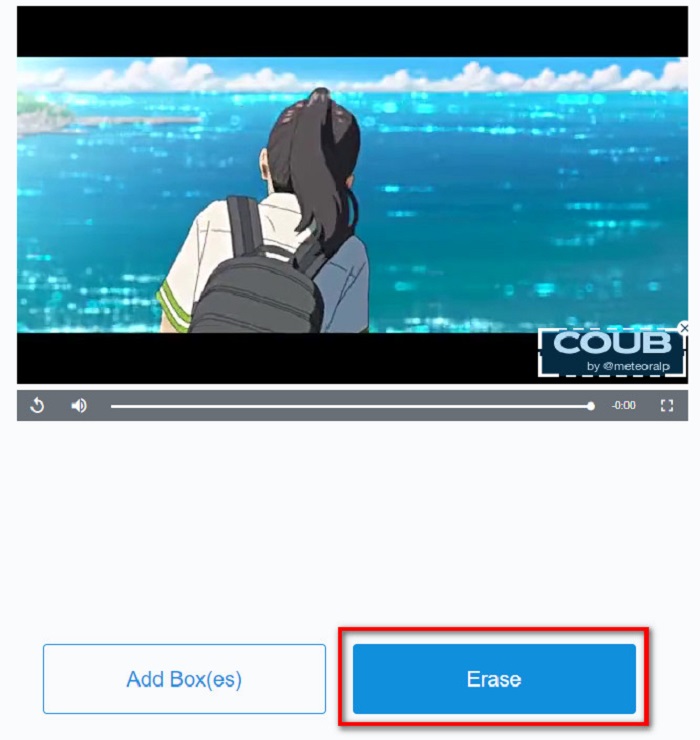
Βήμα 2. Στην επόμενη διεπαφή, μετακινήστε την περιοχή αφαίρεσης στο υδατογράφημα του coub που θέλετε να αφαιρέσετε. Κι αν έχετε άλλα υδατογραφήματα, λογότυπα ή σφραγίδες στο βίντεό σας, μπορείτε να προσθέσετε ένα ακόμη πλαίσιο αφαίρεσης κάνοντας κλικ στο Add Box(es).
Βήμα 3. Τέλος, κάντε κλικ στο κουμπί Erase για να αφαιρέσετε το υδατογράφημα του coub από το βίντεό σας. Θα δείτε το αποτέλεσμα στους φακέλους του υπολογιστή σας.
Μέρος 2. Συχνές ερωτήσεις σχετικά με την κατάργηση του υδατογραφήματος Coub
Μπορείτε να λάβετε βίντεο coub χωρίς υδατογράφημα;
Δυστυχώς, δεν υπάρχουν συγκεκριμένοι τρόποι ή εργαλεία για τη λήψη ενός βίντεο coub χωρίς υδατογράφημα. Ωστόσο, τα εργαλεία αφαίρεσης υδατογραφημάτων θα σας βοηθήσουν να έχετε ένα βίντεο coub χωρίς υδατογράφημα.
Η κατάργηση του υδατογραφήματος μειώνει το μέγεθος του αρχείου του βίντεό σας;
Όχι. Η κατάργηση του υδατογραφήματος από το βίντεό σας δεν επηρεάζει το μέγεθος του αρχείου του βίντεό σας.
Γιατί υπάρχει θάμπωμα στην περιοχή του υδατογραφήματος αφού το αφαιρέσετε;
Έχοντας θάμπωμα στην περιοχή υδατογραφήματος που αφαιρέσατε, επειδή έτσι τα εργαλεία αφαιρούν το υδατογράφημα στις εικόνες ή τα βίντεό σας.
συμπέρασμα
Η αφαίρεση του υδατογραφήματος του Coub από βίντεο μπορεί να ακούγεται περίπλοκη. Όμως, όταν χρησιμοποιείτε τα εργαλεία που παρουσιάστηκαν παραπάνω, μπορείτε εύκολα να αφαιρέσετε τα υδατογραφήματα του Coub από το βίντεό σας. Ωστόσο, αν θέλετε να χρησιμοποιήσετε ένα εργαλείο αφαίρεσης υδατογραφημάτων με γρήγορη επεξεργασία και πολλές λειτουργίες, κατεβάστε το FVC Video Converter Ultimate.
-
 4 καλύτεροι τρόποι για να αφαιρέσετε το υδατογράφημα από το GIF [Online & Offline]
 Θέλετε να αφαιρέσετε το υδατογράφημα από το GIF; Με το εργαλείο σε αυτό το άρθρο, θα μάθετε τα διαφορετικά στυλ με το διαφορετικό εργαλείο αφαίρεσης υδατογραφήματος που είναι διαθέσιμο στην πλατφόρμα σας.
-
 Εξαιρετικό Photobucket Watermark Remover Online και Offline
 Μάθετε πώς να αφαιρείτε το υδατογράφημα Photobucket από τις φωτογραφίες σας χρησιμοποιώντας αυτό το εκπληκτικό εργαλείο αφαίρεσης υδατογραφήματος Photobucket. Διαβάστε αυτό το άρθρο για να μάθετε τους τρόπους.
-
 Καταργήστε εύκολα το υδατογράφημα από το PDF με απλά βήματα
 Καταργήστε το υδατογράφημα από το PDF ακολουθώντας αυτά τα απλά βήματα. Μάθετε πώς να αφαιρείτε εύκολα τα υδατογραφήματα από το αρχείο PDF χρησιμοποιώντας αυτά τα καταπληκτικά εργαλεία.
