


 Video Converter Ultimate
 Εγγραφή οθόνης
 Επισκευή βίντεο
 Ασφαλές κατέβασμα
Πλήρες σεμινάριο σχετικά με το πώς να αφαιρέσετε το υδατογράφημα του Weibo που θα πρέπει να γνωρίζετε
Το Weibo είναι μια γνωστή πλατφόρμα κοινωνικών μέσων που χρησιμοποιείται για την κοινή χρήση, τη διάδοση και τη λήψη πληροφοριών όπως το Twitter που μπορείτε να χρησιμοποιήσετε συχνά στην Κίνα. Μπορείτε επίσης να δημοσιεύσετε και να κατεβάσετε μικρογραφίες, φωτογραφίες και βίντεο εδώ. Ωστόσο, θα υπάρχει ένα υδατογράφημα μόλις το εξαγάγετε. Πολλοί χρήστες θέλουν να το αφαιρέσουν επειδή διαταράσσει τα οπτικά στοιχεία του περιεχομένου.
Παρά τα χιλιάδες διαθέσιμα εργαλεία αφαίρεσης υδατογραφημάτων, λίγα μπορούν πραγματικά να τα αφαιρέσουν αποτελεσματικά. Αν λοιπόν δεν σας αρέσει το υδατογράφημα στα οπτικά μέσα που κατεβάζετε, αυτό το άρθρο συγκεντρώνει τα καλύτερα εργαλεία που μπορείτε να χρησιμοποιήσετε. Τα δοκιμάσαμε ώστε να αποδείξουμε ότι είναι λειτουργικά και πρακτικά στην αφαίρεση υδατογραφημάτων. Για να σας δείξουμε πώς να αφαιρέσετε το υδατογράφημα του Weibo, συνεχίστε να διαβάζετε αυτό το άρθρο.

Μέρος 1. Πώς να αφαιρέσετε το υδατογράφημα από το βίντεο του Weibo χρησιμοποιώντας το Ultimate Watermark Remover
Το υδατογράφημα του Weibo μπορεί να είναι πρόβλημα για άλλα εργαλεία, επειδή τα περισσότερα αφήνουν ένα «μουτζούρωμα» στη θέση του υδατογραφήματος. Αν όμως χρησιμοποιήσετε το FVC Video Converter Ultimate, δεν θα υπάρχει κανένα ίχνος. Όσο μεγάλο ή μικρό κι αν είναι το υδατογράφημα, αυτό το εργαλείο μπορεί να το σβήσει αποτελεσματικά χωρίς να αφήσει σημάδι. Έτσι μπορείτε να απολαύσετε το βίντεο που εξάγετε από το Weibo. Με άλλα λόγια, η αφαίρεση του υδατογραφήματος με τη βοήθεια αυτού του εργαλείου είναι παιχνιδάκι.
Επιπλέον, μπορείτε επίσης να χρησιμοποιήσετε αυτό το εργαλείο για άλλα πράγματα, όπως κοπή, συγχώνευση, συμπίεση, περικοπή, δημιουργία GIF και άλλα. Και αν θέλετε να προσθέσετε ένα υδατογράφημα στο βίντεό σας ώστε να μην μπορεί κανείς να σας το κλέψει, μπορείτε να χρησιμοποιήσετε αυτό το λογισμικό για να το κάνετε. Είναι το λογισμικό all-in-one που απαιτείται στην επιφάνεια εργασίας σας. Θέλετε να μάθετε πώς να αφαιρέσετε το υδατογράφημα από το βίντεο του Weibo; Μπορείτε να ακολουθήσετε τα επόμενα βήματα καθώς σας εξηγούμε πώς να το κάνετε βήμα προς βήμα.
Δωρεάν ΛήψηΓια Windows 7 ή νεότεραΑσφαλής λήψη
Δωρεάν ΛήψηΓια MacOS 10.7 ή νεότεροΑσφαλής λήψη
': Προτού ακολουθήσετε τα επόμενα βήματα, βεβαιωθείτε ότι έχετε εξαγάγει το βίντεο του Weibo στο οποίο θέλετε να αφαιρέσετε το υδατογράφημα, ώστε να μπορείτε να το βρείτε εύκολα στον φάκελο.
Βήμα 1. Πρώτα απ’ όλα, πρέπει να κατεβάσετε το λογισμικό στον υπολογιστή σας και να επιλέξετε την έκδοση ανάλογα με το λειτουργικό σας σύστημα. Αφού εγκαταστήσετε το λογισμικό, ακολουθήστε τη διαδικασία ρύθμισης του WinRAR που θα εμφανιστεί στην οθόνη σας, κάντε κλικ στο Start Now για να το εκκινήσετε και συνεχίστε.
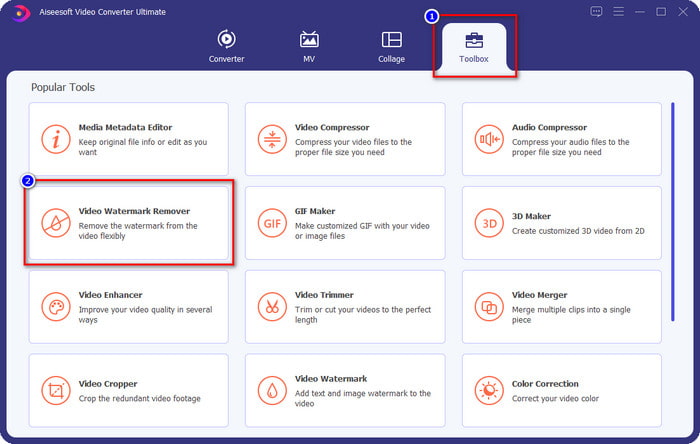
Βήμα 2. Μεταβείτε στην ενότητα Toolbox και βρείτε το Video Watermark Remover· κάντε κλικ σε αυτό.
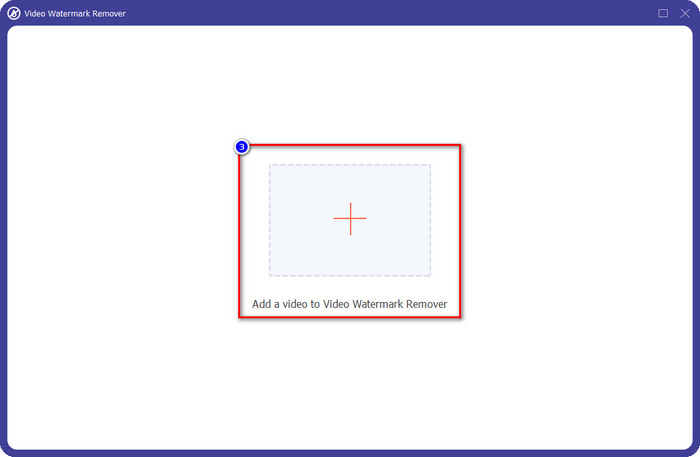
Βήμα 3. Κάντε κλικ στο κουμπί + και εντοπίστε στο φάκελο το βίντεο από το Weibo με υδατογράφημα που κατεβάσατε νωρίτερα, κάντε κλικ στο αρχείο και πατήστε Open για να το ανεβάσετε.
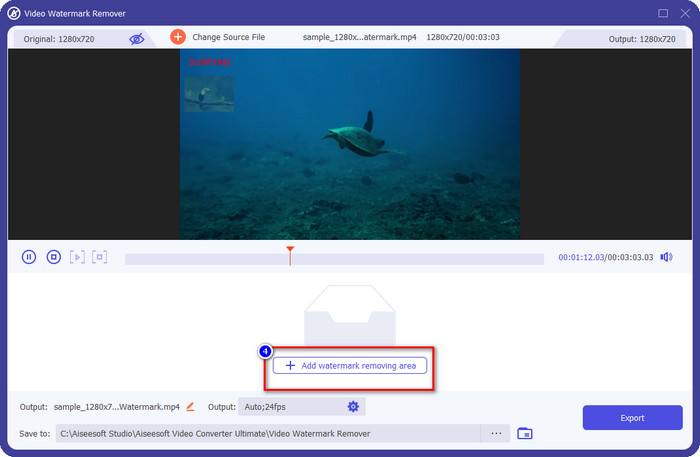
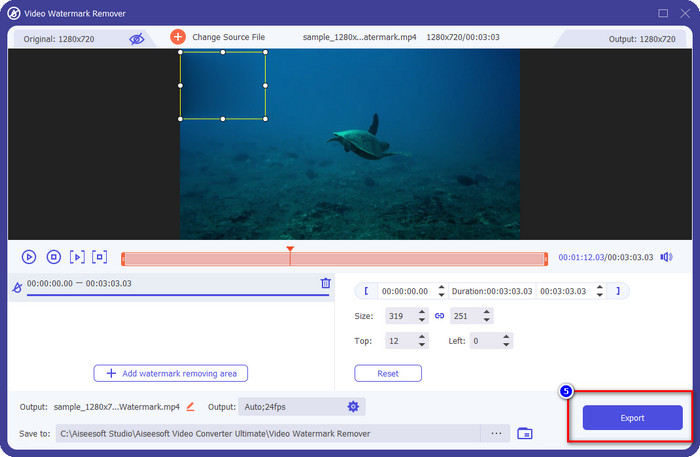
Βήμα 4. Στο νέο παράθυρο που θα εμφανιστεί, κάντε κλικ στο Add Watermark Removing Area για να προχωρήσετε στην αφαίρεση του υδατογραφήματος.
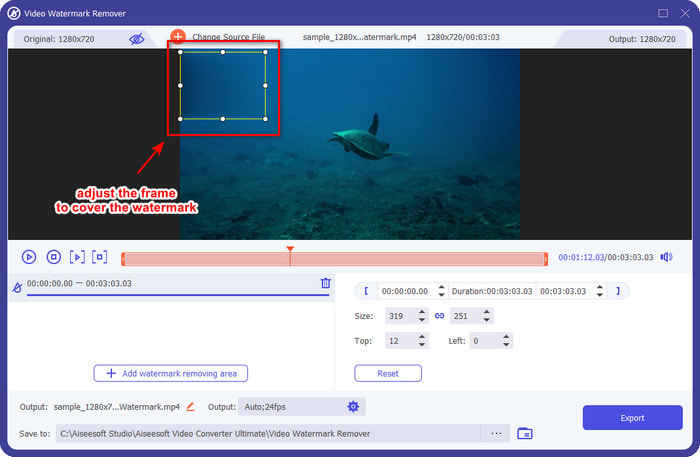
Βήμα 5. Σύρετε και κρατήστε το πλαίσιο επιλογής ώστε να καλύπτει το υδατογράφημα· μπορείτε επίσης να το μεγαλώσετε ή να το μικρύνετε ανάλογα με τις ανάγκες σας και να βεβαιωθείτε ότι καλύπτει πλήρως το υδατογράφημα πριν εξαγάγετε το αρχείο.
Βήμα 6. Αφού τοποθετήσετε το πλαίσιο επιλογής πάνω από το υδατογράφημα, κάντε κλικ στο Export για να αφαιρέσετε το υδατογράφημα από το βίντεο που ανεβάσατε. Δεν χρειάζεται να περιμένετε, καθώς υποστηρίζει εξαιρετικά γρήγορη επεξεργασία· μέσα σε λίγα δευτερόλεπτα θα έχετε το βίντεο του Weibo χωρίς υδατογράφημα.
Μέρος 2. Πώς να αφαιρέσετε το υδατογράφημα από τη φωτογραφία του Weibo χρησιμοποιώντας τη δωρεάν έκδοση στον Ιστό
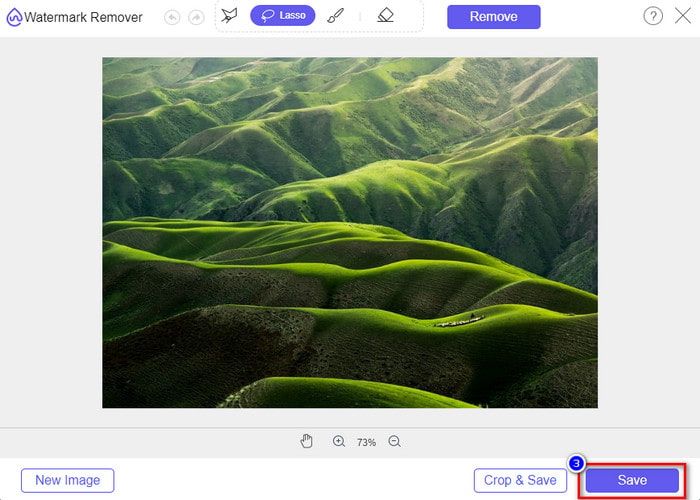
Πώς να αποθηκεύσετε φωτογραφίες από το Weibo χωρίς υδατογράφημα; Δεν μπορείτε να αποθηκεύσετε μια εικόνα χωρίς υδατογράφημα όταν γίνεται εξαγωγή μέσα από το Weibo. Ωστόσο, μπορείτε να χρησιμοποιήσετε το FVC Free Watermark Remover για να σβήσετε το υδατογράφημα από τις εικόνες. Είναι ένα ολοκληρωμένο εργαλείο αφαίρεσης υδατογραφημάτων για εικόνες. Από πλευράς λειτουργικότητας, μπορούμε να πούμε ότι αυτό το εργαλείο είναι πολύ καλύτερο από άλλα προγράμματα αφαίρεσης υδατογραφημάτων που θα βρείτε στο διαδίκτυο. Αν λοιπόν θέλετε να αφαιρέσετε το υδατογράφημα από μια εικόνα, αυτή είναι η πρώτη επιλογή που αξίζει να δοκιμάσετε. Αν και μπορεί να αφαιρέσει υδατογραφήματα από εικόνες, δεν είναι σε θέση να τα αφαιρέσει από βίντεο, όπως μπορεί να κάνει για εσάς το ultimate εργαλείο.
Ωστόσο, είναι δωρεάν στη χρήση και η διεπαφή ιστού του είναι καθαρή, επομένως δεν θα βλέπετε καν διαφημίσεις που θα μπορούσαν να σας ενοχλήσουν. Θέλετε να μάθετε πώς να χρησιμοποιείτε αυτό το εργαλείο web; Στη συνέχεια, ακολουθήστε τα παρακάτω βήματα για να το δοκιμάσετε μόνοι σας.
Σημείωση: Όπως και στο βίντεο, φροντίστε να κάνετε λήψη της εικόνας του Weibo που θέλετε να έχετε και βεβαιωθείτε ότι την έχετε τοποθετήσει σε έναν ορατό και εύκολο στην πρόσβαση φάκελο.
Βήμα 1. Για να αποκτήσετε πρόσβαση στο online εργαλείο αφαίρεσης υδατογραφημάτων, κάντε κλικ σε αυτόν τον σύνδεσμο για να το ανοίξετε.
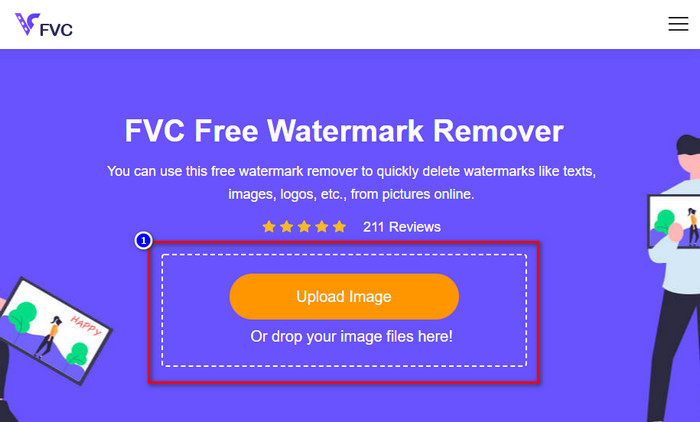
Βήμα 2. Στη διαδικτυακή διεπαφή, κάντε κλικ στο Upload Image, έπειτα θα εμφανιστεί ένας φάκελος στην οθόνη σας· βρείτε την εικόνα και πατήστε Open για να την ανεβάσετε.
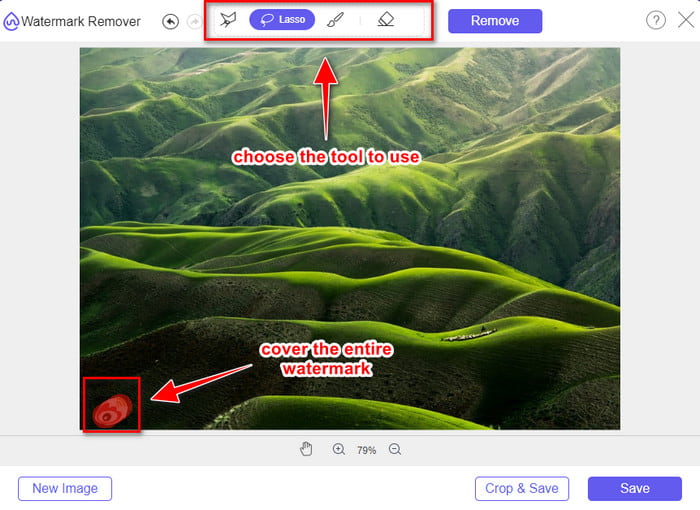
Βήμα 3. Μπορείτε να περιγράψετε το υδατογράφημα εδώ για να το αφαιρέσετε και να βεβαιωθείτε ότι κάθε σημείο του υδατογραφήματος βρίσκεται μέσα στην περιοχή που έχετε επισημάνει.
Βήμα 4. Πατήστε Remove για να διαγράψετε το υδατογράφημα από την εικόνα σας.
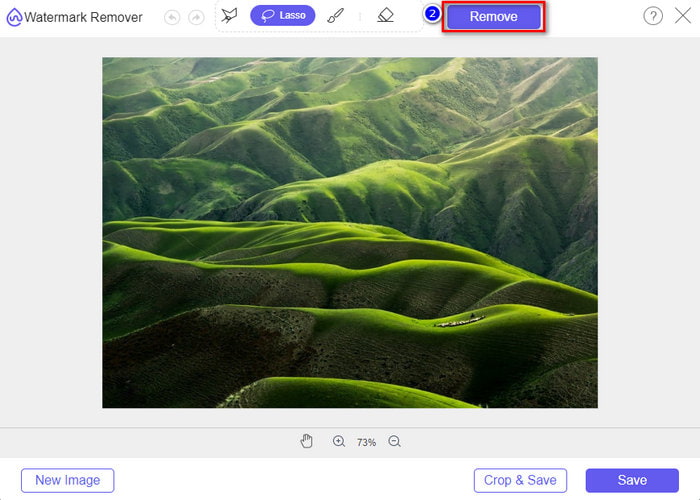
Βήμα 5. Αφού αφαιρέσετε το υδατογράφημα από την εικόνα του Weibo, κάντε κλικ στο Save για να κατεβάσετε την εικόνα χωρίς υδατογράφημα.
Σχετικά:
Πώς να αφαιρέσετε το υδατογράφημα του TikTok
Πώς να προσθέσετε υδατογράφημα σε βίντεο
Μέρος 3. Συχνές ερωτήσεις σχετικά με τον τρόπο κατάργησης του υδατογραφήματος του Weibo
Γιατί το υδατογράφημα του Weibo έγινε θολό μετά την εξαγωγή του;
Ορισμένα εργαλεία θολώνουν το υδατογράφημα έτσι ώστε να μην είναι ορατό στα οπτικά μέσα που έχουν εξαγάγει στο Weibo. Αλλά δεν θολώνουν όλα τα εργαλεία τα υδατογραφήματα. μερικοί αφαιρούν το υδατογράφημα στα οπτικά μέσα χωρίς κανένα ίχνος. Επομένως, εάν θέλετε να αφαιρέσετε το υδατογράφημα στο Weibo χωρίς να το θολώσετε, πρέπει να γνωρίζετε το εργαλείο που αναφέρουμε παραπάνω για να σας βοηθήσει να το αφαιρέσετε.
Μπορώ να καλύψω το λογότυπο του Weibo στο εξαγόμενο αρχείο;
Ναι μπορείς. Με αυτόν τον τρόπο, δεν θα βλέπετε το υδατογράφημα του Weibo στο αρχείο. Ωστόσο, η παραβίασή του θα κάλυπτε ορισμένα μέρη του αρχείου, επομένως αντί να σας βοηθήσει, θα μπορούσε να χειροτερέψει το αρχείο. Επομένως, απαιτείται ένα εργαλείο αφαίρεσης υδατογραφήματος για τη διαγραφή του υδατογραφήματος του αρχείου.
Έχουν όλα τα εξαγόμενα αρχεία στο Weibo υδατογράφημα;
Η εξαγωγή οποιουδήποτε τύπου αρχείου σε αυτήν την πλατφόρμα microblogging θα αφήσει ένα σημάδι. Δεν έχει σημασία τι είναι, τα υδατογραφήματα προστίθενται στο αρχείο. Ωστόσο, μπορείτε να το αφαιρέσετε με το εργαλείο που αναφέραμε νωρίτερα σε αυτό το άρθρο.
συμπέρασμα
Εντυπωσιακό, έτσι δεν είναι; Το FVC σάς προσφέρει τα εργαλεία που χρειάζεστε για να αφαιρέσετε άμεσα το υδατογράφημα του Weibo από βίντεο και εικόνες. Ακόμα κι αν δεν έχετε εμπειρία ή δεν είστε επαγγελματίας σε τέτοιου είδους επεξεργασία, η επεξεργασία είναι εφικτή με τα προαναφερθέντα εργαλεία. Αν λοιπόν θέλετε να αφαιρέσετε υδατογράφημα από μια εικόνα, είτε έχει εξαχθεί από το Weibo είτε όχι, το FVC Free Watermark Remover είναι το μόνο εργαλείο που θα χρειαστείτε. Για βίντεο και GIF όμως, πρέπει να χρησιμοποιήσετε επαγγελματικό, εύχρηστο και οικονομικό λογισμικό, όπως το FVC Video Converter Ultimate. Τι περιμένετε; Αφαιρέστε το υδατογράφημα από τα οπτικά σας μέσα για να τα απολαμβάνετε χωρίς κανένα ίχνος σήμανσης.
-
 Ο καλύτερος τρόπος για να προσθέσετε υδατογράφημα σε βίντεο στο Photoshop σε Windows και Mac
 Θέλετε να μάθετε πώς να προσθέσετε ένα υδατογράφημα σε ένα βίντεο στο Photoshop; Σε αυτήν την περίπτωση, αυτό το άρθρο θα σας παρέχει τα δύο πράγματα που πρέπει να γνωρίζετε.
-
 3 καλύτερες λύσεις για το πώς να αφαιρέσετε εύκολα το υδατογράφημα από τα βίντεο
 Θέλετε να αφαιρέσετε το ενοχλητικό υδατογράφημα στο βίντεο; Με αυτό το ιστολόγιο, μπορείτε να μάθετε τις διαφορετικές ιδέες για την αφαίρεση του υδατογραφήματος σε ένα βίντεο.
-
 4 καλύτεροι τρόποι για να αφαιρέσετε το υδατογράφημα από το GIF [Online & Offline]
 Θέλετε να αφαιρέσετε το υδατογράφημα από το GIF; Με το εργαλείο σε αυτό το άρθρο, θα μάθετε τα διαφορετικά στυλ με το διαφορετικό εργαλείο αφαίρεσης υδατογραφήματος που είναι διαθέσιμο στην πλατφόρμα σας.
