


 Video Converter Ultimate
 Εγγραφή οθόνης
 Επισκευή βίντεο
 Ασφαλές κατέβασμα
Τα 5 πιο σημαντικά προϊόντα αφαίρεσης υδατογραφημάτων Arnold Maya που αξίζει να τα δοκιμάσετε
Ο Arnold είναι renderer από την Autodesk. Το renderer χρησιμοποιείται για γραφικά, βίντεο, ακόμη και ήχο. Επιπλέον, το Arnold είναι μια προηγμένη εφαρμογή απόδοσης που μπορείτε να χρησιμοποιήσετε με VFX και απόδοση κινούμενων εικόνων. Επίσης, παράγει εξόδους υψηλής ποιότητας, καθιστώντας το δημοφιλές για επαγγελματίες συντάκτες. Επιπλέον, έχει πολλές προηγμένες λειτουργίες επεξεργασίας που μπορείτε να χρησιμοποιήσετε για να αποδώσετε ένα κινούμενο σχέδιο.
Το Arnold απαιτεί από τους χρήστες του να πληρώνουν για την εφαρμογή· γι’ αυτό και αφήνει υδατογράφημα στις εικόνες τους. Έτσι, πολλοί άνθρωποι αναζητούν εργαλεία αφαίρεσης υδατογραφημάτων που μπορούν να αφαιρέσουν το υδατογράφημα του Arnold από τις φωτογραφίες τους. Διαβάστε αυτήν την ανάρτηση για να γνωρίσετε τα πέντε πιο εξαιρετικά εργαλεία αφαίρεσης υδατογραφημάτων Arnold Maya.

Μέρος 1. Κορυφαία 5 κορυφαία προϊόντα αφαίρεσης υδατογραφημάτων Arnold
Αν και μπορείτε να κάνετε λήψη πολλών εργαλείων για να αφαιρέσετε το υδατογράφημα Arnold από την εικόνα σας, δεν παράγουν όλα καθαρά αποτελέσματα, γι' αυτό αναζητήσαμε τα πιο χρησιμοποιούμενα εργαλεία αφαίρεσης υδατογραφήματος και επιλέξαμε τα καλύτερα από αυτά. Αυτό το μέρος σας παρουσιάζει τα κορυφαία πέντε καλύτερα προϊόντα αφαίρεσης υδατογραφημάτων Arnold.
Μοβάβι
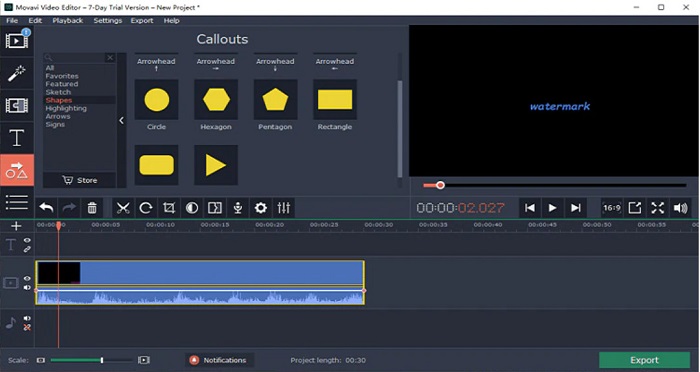
Το Movavi είναι ένας βασικός video editor που μπορεί να σας βοηθήσει να αφαιρέσετε το υδατογράφημα του Arnold από την εικόνα σας. Διαθέτει επίσης μια επιλογή με την οποία μπορείτε να προσθέσετε υδατογραφήματα στην εικόνα ή στο βίντεό σας. Επιπλέον, περιέχει πολλές δυνατότητες επεξεργασίας που μπορείτε να χρησιμοποιήσετε για να βελτιώσετε την εικόνα σας. Ωστόσο, χρειάζεται να χρησιμοποιήσετε το εργαλείο διόρθωσης χρώματος για να «σβήσετε» το υδατογράφημα από το βίντεό σας. Είναι επίσης ένα φιλικό προς τον χρήστη εργαλείο, χάρη στη απλή διεπαφή χρήστη του.
Πλεονεκτήματα
- Έχει μια γρήγορη διαδικασία εξαγωγής.
- Διατίθεται για λήψη σε όλες τις πλατφόρμες πολυμέσων, συμπεριλαμβανομένων των Windows και Mac.
Μειονεκτήματα
- Αγοράστε πρώτα την πλήρη έκδοση προτού μπορέσετε να χρησιμοποιήσετε τη λειτουργία αφαίρεσης υδατογραφήματος.
- Έχει ζητήματα πολιτικής επιστροφής χρημάτων.
Watermark Remover.io
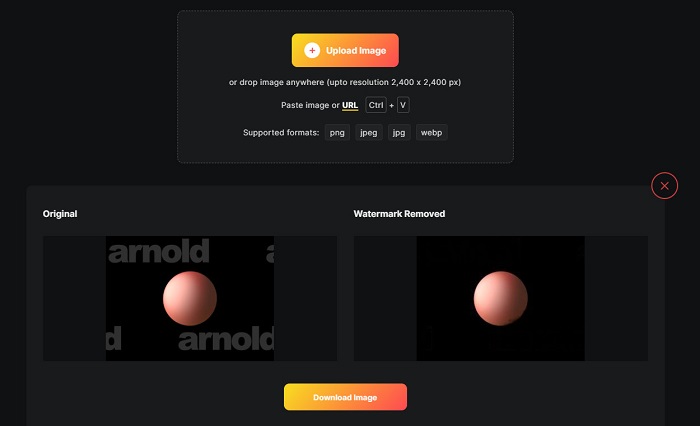
Αν θέλετε ένα Maya Arnold render χωρίς υδατογράφημα, τότε το Watermark Remover.io μπορεί να σας βοηθήσει. Πολλοί αρχάριοι προτιμούν επίσης να χρησιμοποιούν αυτό το εργαλείο, επειδή έχει μια εύχρηστη διεπαφή λογισμικού. Επιπλέον, το Watermark Remover.io είναι ένα διαδικτυακό εργαλείο στο οποίο μπορείτε να έχετε πρόσβαση από όλους τους φυλλομετρητές, όπως Google, Firefox και Safari. Λειτουργεί επίσης σε συσκευές Mac, Windows, iPhone και Android.
Επίσης, αυτό το εργαλείο αφαίρεσης υδατογραφήματος σάς δίνει τη δυνατότητα να αφαιρέσετε τυχόν ανεπιθύμητα αντικείμενα στις φωτογραφίες σας, όπως λογότυπα, κείμενα ή εικόνες. Το μειονέκτημα αυτής της διαδικτυακής εφαρμογής είναι ότι μπορεί να αντιμετωπίσετε μια αργή διαδικασία μεταφόρτωσης, καθώς είναι μια εφαρμογή που βασίζεται στον ιστό.
Πλεονεκτήματα
- Είναι δωρεάν και εύκολο στη χρήση.
- Υποστηρίζει τις πιο κοινές μορφές εικόνας, όπως PNG, JPEG, JPG και WEBP.
- Διαθέτει γρήγορη διεπαφή επεξεργασίας.
- Διαθέτει δυνατότητα πρόβλεψης περιοχής.
Μειονεκτήματα
- Είναι ένα εργαλείο που εξαρτάται από το Διαδίκτυο.
Αφαίρεση υδατογραφήματος HitPaw
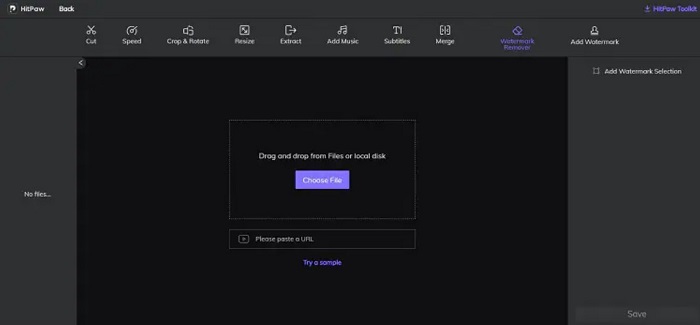
Το HitPaw είναι ένα ακόμη εργαλείο αφαίρεσης υδατογραφημάτων που σας επιτρέπει να αφαιρείτε εύκολα το υδατογράφημα του Arnold από την εικόνα σας. Σας επιτρέπει να επεξεργάζεστε επαγγελματικά και να αφαιρείτε οποιαδήποτε υδατογραφήματα από την εικόνα σας. Επιπλέον, διαθέτει μια απλή και εύχρηστη διεπαφή, ώστε να μη δυσκολευτείτε να χρησιμοποιήσετε αυτό το online εργαλείο. Αν έχετε ένα βίντεο Arnold, το εργαλείο αυτό αφαιρεί αποτελεσματικά το υδατογράφημα. Εντυπωσιακό είναι ότι διαθέτει τόσο online όσο και offline έκδοση. Ωστόσο, η offline έκδοση έχει μια δύσχρηστη διεπαφή λογισμικού, κάτι που δυσκολεύει τους αρχάριους. Παρ’ όλα αυτά, πολλοί χρήστες εξακολουθούν να χρησιμοποιούν αυτό το εργαλείο για την αφαίρεση υδατογραφημάτων.
Πλεονεκτήματα
- Έχει εκδόσεις online και offline.
- Η διαδικτυακή του έκδοση είναι προσβάσιμη σε όλα τα προγράμματα περιήγησης ιστού, όπως το Google και το Safari.
- Δεν αφήνει κανένα σημάδι θαμπώματος στην περιοχή του υδατογραφήματος.
Μειονεκτήματα
- Πρέπει να εγγραφείτε για να μπορέσετε να επεξεργαστείτε τα βίντεο ή τις φωτογραφίες σας.
Inpaint
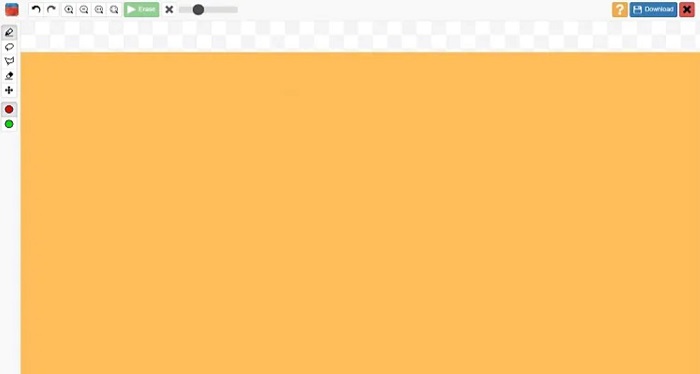
Το Inpaint είναι ένα από τα πιο δημοφιλή εργαλεία αφαίρεσης υδατογραφημάτων που μπορείτε να κατεβάσετε σε Windows και Mac. Αυτό το offline εργαλείο υποστηρίζει πολυάριθμες μορφές βίντεο και εικόνας, όπως MP4, MKV, AVI, PNG, JPG κ.λπ. Πολλοί χρήστες προτιμούν αυτό το εργαλείο επειδή αφαιρεί ανεπιθύμητα στοιχεία από την εικόνα ή το βίντεό σας. Επιπλέον, διαθέτει και άλλες δυνατότητες επεξεργασίας που μπορείτε να χρησιμοποιήσετε για να βελτιώσετε την εικόνα ή το βίντεό σας.
Πλεονεκτήματα
- Δυνατότητα λήψης σε όλες σχεδόν τις πλατφόρμες πολυμέσων, συμπεριλαμβανομένων των Windows και Mac.
- Εξάγει επαγγελματικά κατασκευασμένο προϊόν.
Μειονεκτήματα
- Διαθέτει μια εύχρηστη διεπαφή λογισμικού.
- Μερικές φορές δεν μπορεί να αφαιρέσει περίπλοκα στοιχεία από τα βίντεο ή τις εικόνες σας.
Μέρος 2. Πώς να αφαιρέσετε το υδατογράφημα Arnold με ένα κλικ
Έχουμε το προτεινόμενο εργαλείο εάν θέλετε έναν πιο απλό τρόπο για να αφαιρέσετε το υδατογράφημα Arnold στην εικόνα σας. Διαβάστε αυτό το μέρος παρακάτω για να μάθετε σχετικά με αυτό το εργαλείο και πώς μπορείτε να αφαιρέσετε υδατογραφήματα χρησιμοποιώντας αυτό το εργαλείο.
Το FVC Video Converter Ultimate είναι ένα ολοκληρωμένο εργαλείο που μπορείτε να χρησιμοποιήσετε για να αφαιρέσετε ανεπιθύμητα αντικείμενα από την εικόνα σας. Υποστηρίζει πολλές μορφές βίντεο, όπως MP4, MKV, AVI, MOV, M4V και πάνω από 1000 ακόμη. Χάρη στην εύχρηστη διεπαφή του, πολλοί αρχάριοι χρησιμοποιούν αυτό το εργαλείο για να αφαιρέσουν υδατογραφήματα από βίντεο. Επιπλέον, διαθέτει πολλές προηγμένες λειτουργίες επεξεργασίας που μπορείτε να χρησιμοποιήσετε, όπως αφαίρεση υδατογραφήματος βίντεο, διόρθωση χρώματος, κόψιμο βίντεο και άλλα. Επομένως, αν θέλετε να χρησιμοποιήσετε αυτήν την εφαρμογή λογισμικού για να αφαιρέσετε το υδατογράφημα του Arnold, ακολουθήστε τον απλό οδηγό παρακάτω.
Πώς να αφαιρέσετε το υδατογράφημα Arnold χρησιμοποιώντας το FVC Video Converter Ultimate:
Βήμα 1. Κατεβάστε το FVC Video Converter Ultimate στη συσκευή σας, κάνοντας κλικ στο κουμπί Download παρακάτω.
Δωρεάν ΛήψηΓια Windows 7 ή νεότεραΑσφαλής λήψη
Δωρεάν ΛήψηΓια MacOS 10.7 ή νεότεροΑσφαλής λήψη
Βήμα 2. Μεταβείτε στον πίνακα Toolbox στην κύρια διεπαφή του λογισμικού και επιλέξτε το Video Watermark Remover.
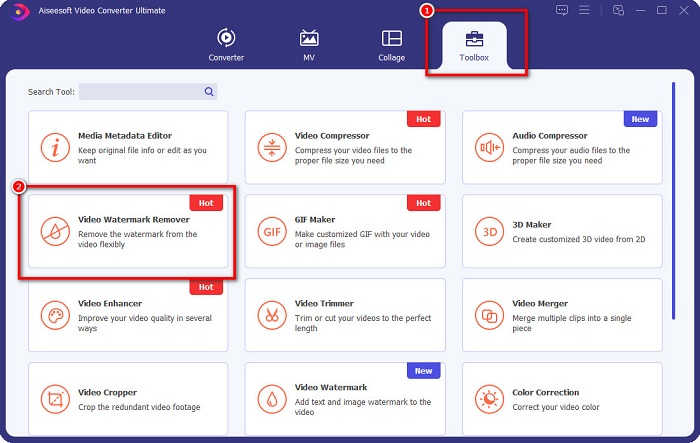
Βήμα 3. Στη συνέχεια, κάντε κλικ στο κουμπί με το σύμβολο + για να ανεβάσετε το βίντεο Arnold από το οποίο θέλετε να αφαιρεθεί το υδατογράφημα.
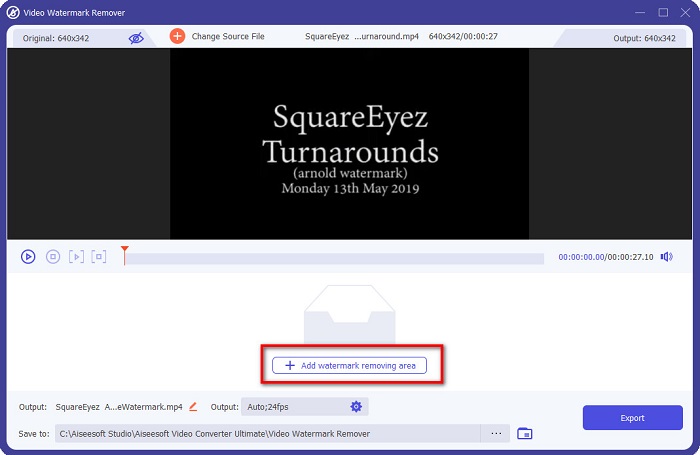
Βήμα 4. Έπειτα θα δείτε την προεπισκόπηση του βίντεό σας. Κάντε κλικ στο κουμπί Add watermark removing area για να προσθέσετε μια περιοχή αφαίρεσης.
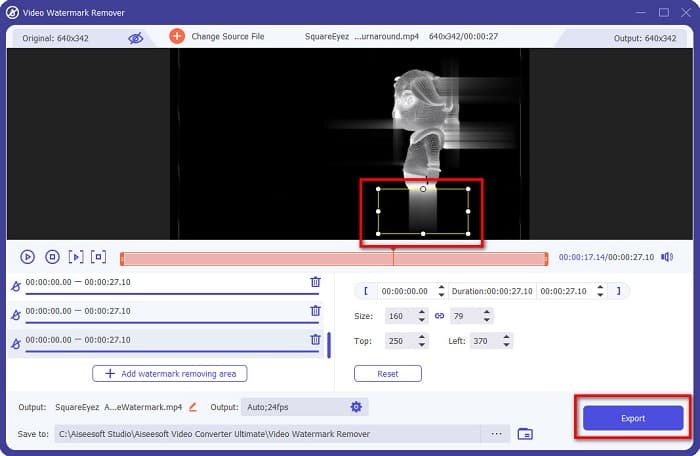
Βήμα 5. Τοποθετήστε την περιοχή αφαίρεσης υδατογραφήματος επάνω στο υδατογράφημα του βίντεό σας. Αν υπάρχουν δύο ή περισσότερα υδατογραφήματα στο βίντεό σας, κάντε κλικ στο Add watermark removing area. Έπειτα, κάντε κλικ στο κουμπί Export μόλις καλύψετε όλα τα υδατογραφήματα στο βίντεό σας. Επιπλέον, μπορείτε να χρησιμοποιήσετε αυτό το εργαλείο για να αφαιρέσετε υδατογραφήματα Dxtory.
Μέρος 3. Πώς να αφαιρέσετε το υδατογράφημα Arnold χρησιμοποιώντας το εργαλείο ακολουθίας απόδοσης
Τα υδατογραφήματα Arnold εμφανίζονται μόνο στο τελικό render χωρίς άδεια χρήσης όταν χρησιμοποιείτε το Maya. Για να διαγράψετε το υδατογράφημα, πρέπει να εκτελέσετε τη διαδικασία render sequence. Αφού δημιουργήσετε μια κίνηση, χρειάζεται να ρυθμίσετε τις επιλογές απόδοσης (render settings). Στις ρυθμίσεις περιλαμβάνονται η μορφή εικόνας, οι επεκτάσεις καρέ ή animation, τα αρχικά και τελικά καρέ, τα presets και άλλα. Αφού προσαρμόσετε τις ρυθμίσεις απόδοσης, κάντε κλικ στο Render > Batch Render. Αφού το κάνετε αυτό, όλες οι εικόνες θα έχουν υδατογράφημα.
Για να αφαιρέσετε το υδατογράφημα του Arnold, πρέπει να κάνετε render την κίνησή σας. Μεταβείτε στις Render Settings και βεβαιωθείτε ότι έχετε επιλέξει την κάμερα που θέλετε να γίνει render. Έπειτα, κάντε κλικ στο Render Sequence. Στη συνέχεια, ανοίξτε τις εικόνες και θα δείτε ότι δεν έχουν ενσωματωμένα υδατογραφήματα. Μπορείτε πλέον να χρησιμοποιήσετε αυτές τις εικόνες για να δημιουργήσετε μια κίνηση.
Μέρος 4. Συχνές ερωτήσεις σχετικά με τα Arnold Watermark Removers
Μπορείτε να κάνετε μαζική απόδοση με τον Arnold;
Ναί. Μπορείτε να χρησιμοποιήσετε το πρόγραμμα απόδοσης παρτίδων Maya για να αποδώσετε ένα πλαίσιο ακολουθίας. Μπορείτε να το κάνετε μεταβαίνοντας στο Maya κάνοντας κλικ στο Render > Batch Render στη γραμμή εντολών.
Ο Άρνολντ περιλαμβάνεται στη Μάγια;
Σε μια προεπιλεγμένη εγκατάσταση, το Arnold για Maya περιλαμβάνεται μέσω του mtoa. mll plug in. Σε αυτό το plug-in, ο Arnold είναι ο προτιμώμενος renderer στο Maya.
Πόσο κοστίζει ο Arnold;
Η ετήσια συνδρομή είναι 380$, ενώ η μηνιαία είναι 50$ το μήνα.
συμπέρασμα
Όλα τα παραπάνω εργαλεία αφαίρεσης υδατογραφημάτων Arnold Maya παρουσιάζουν ενθαρρυντικά αποτελέσματα όσον αφορά την αφαίρεση υδατογραφημάτων. Αν όμως θέλετε να χρησιμοποιήσετε μια εφαρμογή λογισμικού με πολλές λειτουργίες, η οποία αφαιρεί υδατογραφήματα χωρίς να επηρεάζει την ποιότητα, κατεβάστε τώρα το FVC Video Converter Ultimate.
-
 123rf Watermark Removers – Ενδελεχής επισκόπηση των απόλυτων εργαλείων
 Αν θέλετε να μάθετε ποια είναι τα πιο σημαντικά προϊόντα αφαίρεσης υδατογραφημάτων 123rf, διαβάστε προσεκτικά αυτό το άρθρο. Αυτό το άρθρο παρέχει μια εις βάθος ανασκόπηση των εργαλείων.
-
 Πώς να αφαιρέσετε το υδατογράφημα DeviantArt σε Windows και Mac
 Θέλετε να μάθετε πώς να αφαιρείτε το υδατογράφημα DeviantArt στις εικόνες σας; Χρησιμοποιώντας τα πιο σημαντικά εργαλεία αφαίρεσης υδατογραφημάτων DeviantArt, μπορείτε εύκολα να αφαιρέσετε αυτά τα ενοχλητικά υδατογραφήματα.
-
 Πώς να αφαιρέσετε το υδατογράφημα Pond5 χρησιμοποιώντας τα Ultimate Tools
 Μάθετε πώς να αφαιρέσετε το υδατογράφημα Pond5 ακολουθώντας τα παρακάτω απλά βήματα. Μπορείτε εύκολα να αφαιρέσετε το υδατογράφημα Pond5 στην εικόνα σας χρησιμοποιώντας αυτά τα εντυπωσιακά εργαλεία.
