


 Video Converter Ultimate
 Εγγραφή οθόνης
 Επισκευή βίντεο
 Ασφαλές κατέβασμα
Πώς να αφαιρέσετε αποτελεσματικά το υδατογράφημα iStock σε βίντεο και εικόνες με βήματα
Όταν χρειάζεται να έχετε στα χέρια σας ένα αδειοδοτημένο αρχείο οπτικού μέσου, μπορείτε να μπείτε στο iStock για να κατεβάσετε αυτά τα αρχεία. Δεν μπορούν όλοι να χρησιμοποιούν τον ιστότοπο δωρεάν, που σημαίνει ότι θα πρέπει να αγοράσετε την εικόνα με πραγματικά χρήματα. Αν και μπορείτε να κατεβάσετε εδώ το αρχείο δωρεάν, θα προστεθεί υδατογράφημα στο αρχείο που κατεβάζετε. Με την προσθήκη ενός προεπιλεγμένου υδατογραφήματος στο αρχείο, ο ιστότοπος δηλώνει ότι αυτό το αρχείο ανήκει στο iStock. Δεν σας ενοχλεί το υδατογράφημα; Αν συμφωνούμε, διαβάστε αυτό το άρθρο μέχρι το τέλος για να σας δείξουμε τη λύση που βρήκαμε στο διαδίκτυο. Θα προσθέσουμε επίσης τα πακέτα που μπορείτε να αποκτήσετε στον συγκεκριμένο ιστότοπο και πώς να αφαιρέσετε το υδατογράφημα του iStock σε κάθε περίπτωση.

Μέρος 1. Πώς να αφαιρέσετε βίντεο και εικόνες υδατογραφήματος iStock με τους 3 χρήσιμους τρόπους
1ος τρόπος. Αγορά πίστωσης στο iStock
Ας ξεκινήσουμε με την αγορά πίστωσης στο iStock. Η πίστωση στο iStock είναι ένα νόμισμα. αυτός ο ιστότοπος αναγνωρίζει την πίστωση ίση με τα χρήματά σας. Μπορείτε να χρησιμοποιήσετε πίστωση για να αγοράσετε οποιοδήποτε αρχείο με ένα συγκεκριμένο ποσό. Μπορείτε να αποθηκεύσετε εικόνες iStock χωρίς υδατογράφημα εάν αγοράσετε μια πίστωση. Για να μάθετε πώς να το κάνετε, μπορείτε να διαβάσετε πλήρως τα βήματα που προσθέτουμε παρακάτω για να σας βοηθήσουμε πώς να το κάνετε.
Βήμα 1. Ανοίξτε την επίσημη ιστοσελίδα και συνδεθείτε στον λογαριασμό σας. Αν δεν έχετε δημιουργήσει λογαριασμό, μπορείτε να δημιουργήσετε έναν πριν αγοράσετε τις απαραίτητες μονάδες (credits).
Βήμα 2. Στον ιστότοπο, πατήστε Pricing για να δείτε ποια πακέτα υποστηρίζει αυτό το εργαλείο.
Βήμα 3. Θα εμφανιστεί μια λίστα με τα credits που μπορείτε να αγοράσετε· επιλέξτε πόσα credits θέλετε και, στη συνέχεια, κάντε κλικ στο Purchase Credits.
Βήμα 4. Συμπληρώστε τα στοιχεία και τα στοιχεία χρέωσης που θα χρησιμοποιήσετε για να αγοράσετε credits εδώ.
2ος Τρόπος. Καταργήστε το υδατογράφημα iStock στα βίντεο χρησιμοποιώντας το FVC Video Converter Ultimate
Για να αφαιρέσετε το υδατογράφημα του iStock από βίντεο, θα χρειαστεί να χρησιμοποιήσετε το απόλυτο εργαλείο αφαίρεσης υδατογραφημάτων, το FVC Video Converter Ultimate. Είναι το πιο δημοφιλές πρόγραμμα αφαίρεσης υδατογραφημάτων που αφαιρεί χωρίς κόπο το υδατογράφημα από τα βίντεό σας. Αυτό το εργαλείο αφαιρεί το υδατογράφημα καρέ προς καρέ από τα βίντεο και δεν αφήνει κανένα ίχνος όταν τα εξάγετε. Επομένως, αν σκοπεύετε να χρησιμοποιήσετε αυτό το λογισμικό στον υπολογιστή σας, μπορούμε να σας διαβεβαιώσουμε ότι πολύ σύντομα θα έχετε ένα βίντεο χωρίς υδατογράφημα. Θέλετε να χρησιμοποιήσετε αυτό το λογισμικό; Αν ναι, συνεχίστε και ακολουθήστε τα βήματα που παραθέτουμε παρακάτω για να σας βοηθήσουμε να αφαιρέσετε το υδατογράφημα από το βίντεο που αποθηκεύσατε από το iStock.
Βήμα 1. Κάντε κλικ στο κουμπί λήψης που παραθέτουμε παρακάτω για να αποκτήσετε το πρόγραμμα στον υπολογιστή σας. Επιλέξτε το κατάλληλο λειτουργικό σύστημα για να κατεβάσετε τη σωστή έκδοση. Εγκαταστήστε και ρυθμίστε το εργαλείο μετά τη λήψη και, στη συνέχεια, κάντε κλικ στο Start Now για να ανοίξετε το λογισμικό και να αρχίσετε να το χρησιμοποιείτε.
Δωρεάν ΛήψηΓια Windows 7 ή νεότεραΑσφαλής λήψη
Δωρεάν ΛήψηΓια MacOS 10.7 ή νεότεροΑσφαλής λήψη
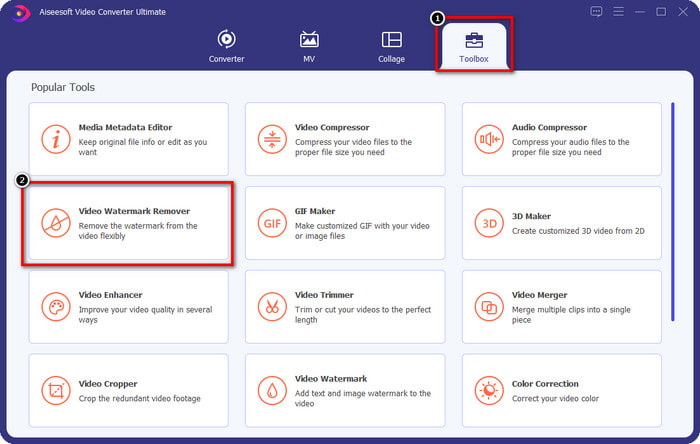
Βήμα 2. Τώρα που έχετε αυτό το iStock watermark remover, πρέπει να μεταβείτε στο Toolbox. Βρείτε το Video Watermark Remover για να χρησιμοποιήσετε αυτήν τη λειτουργία.
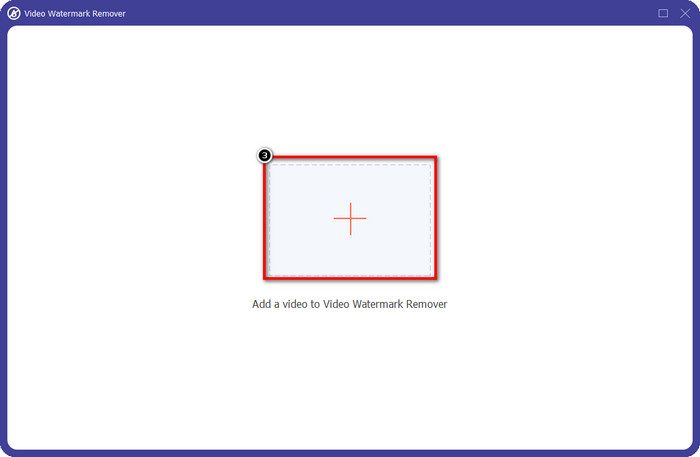
Βήμα 3. Πατήστε το κουμπί + για να ανεβάσετε το αρχείο βίντεο που κατεβάσατε από το iStock και έχει υδατογράφημα. Βρείτε το αρχείο βίντεο στον εξερευνητή αρχείων που θα εμφανιστεί στην οθόνη σας και, στη συνέχεια, πατήστε Open για να το ανεβάσετε.
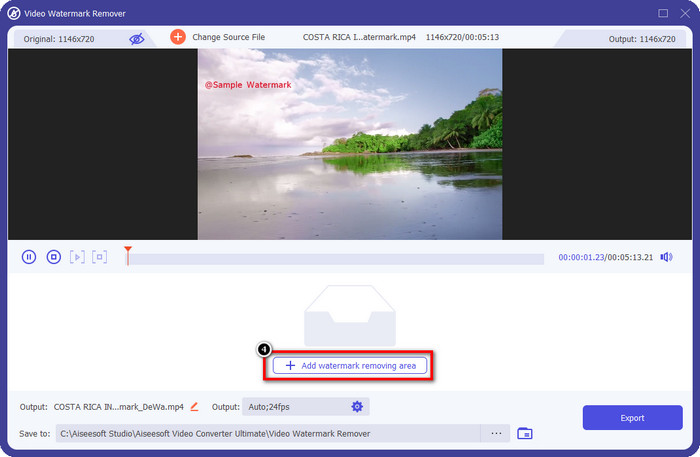
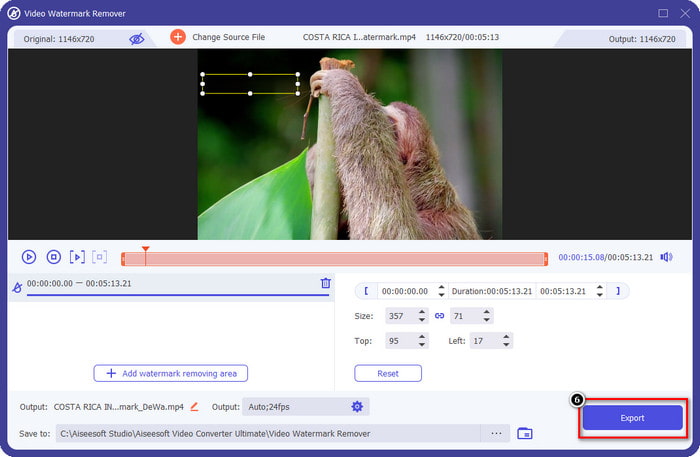
Βήμα 4. Στο νέο παράθυρο, επιλέξτε το Add Watermark Removing Area για να ορίσετε την περιοχή του υδατογραφήματος στο βίντεο που ανεβάσατε.
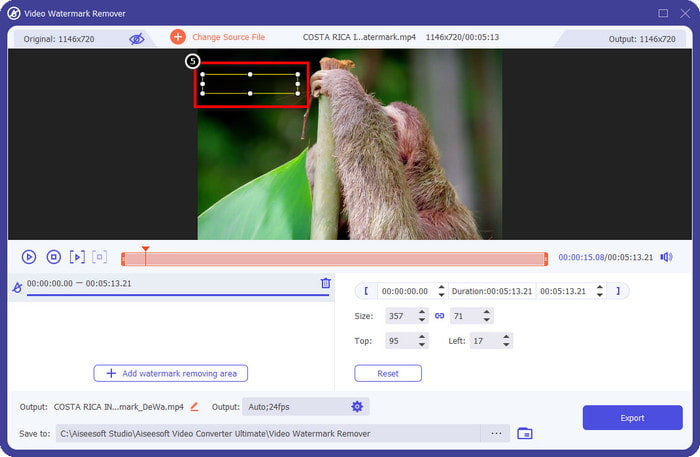
Βήμα 5. Στο επάνω-μεσαίο μέρος, ρυθμίστε το ορθογώνιο σχήμα και τοποθετήστε το πάνω στο υδατογράφημα, ώστε να εφαρμοστεί στην αντίστοιχη περιοχή.
Βήμα 6. Ξεκινήστε την εξαγωγή του αρχείου, αν έχετε ολοκληρώσει όσα αναφέρονται σε αυτό το βήμα, πατώντας το κουμπί Export. Με αυτόν τον τρόπο, ολοκληρώσατε πλέον την αφαίρεση του υδατογραφήματος από το βίντεό σας με τη βοήθεια του απόλυτου εργαλείου.
3ος Τρόπος. Αφαιρέστε το υδατογράφημα iStock σε εικόνες χρησιμοποιώντας το δωρεάν εργαλείο αφαίρεσης υδατογραφημάτων FVC
Για να αντιμετωπίσετε τα υδατογραφήματα σε εικόνες, θα χρειαστεί να χρησιμοποιήσετε το FVC Free Watermark Remover. Είναι ένα χρήσιμο online iStock watermark remover που μπορείτε να χρησιμοποιήσετε για να αφαιρείτε αποτελεσματικά τα υδατογραφήματα από εικόνες χωρίς να κατεβάζετε τίποτα στη συσκευή σας. Επίσης, δεν θα χρειαστεί να αγοράσετε ή να αποκτήσετε κάποιο πακέτο εδώ, επειδή είναι δωρεάν στη χρήση. Παρά το ότι είναι online εργαλείο, η απόδοσή του στην αφαίρεση υδατογραφημάτων είναι αναμφισβήτητα καλύτερη από άλλα εργαλεία αφαίρεσης υδατογραφημάτων εικόνας που μπορείτε να χρησιμοποιήσετε. Δεν πιστεύετε όσα λέμε; Υπάρχει μόνο ένας τρόπος να σας αποδείξουμε ότι λειτουργεί εξαιρετικά: ακολουθώντας τα βήματα που παραθέτουμε εδώ.
Βήμα 1. Κάντε κλικ σε αυτόν τον σύνδεσμο για να χρησιμοποιήσετε αμέσως το online εργαλείο αφαίρεσης υδατογραφημάτων από εικόνες.
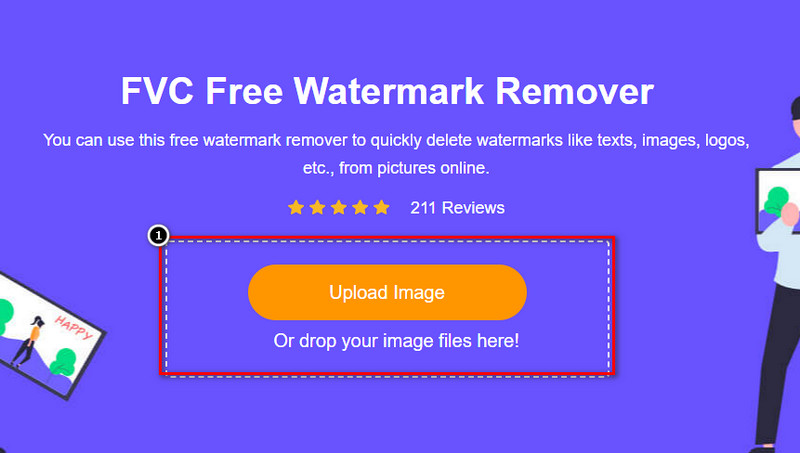
Βήμα 2. Πατήστε Upload Image, επιλέξτε την εικόνα με το υδατογράφημα και περιμένετε να ολοκληρωθεί η διαδικασία μεταφόρτωσης.
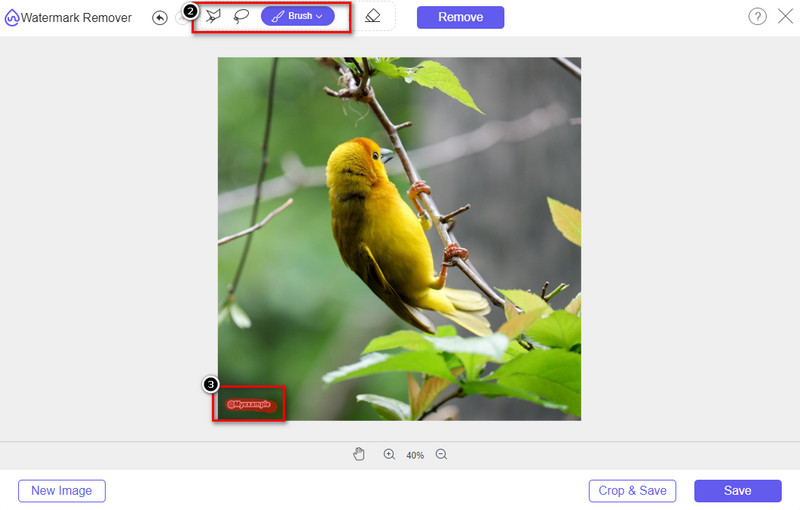
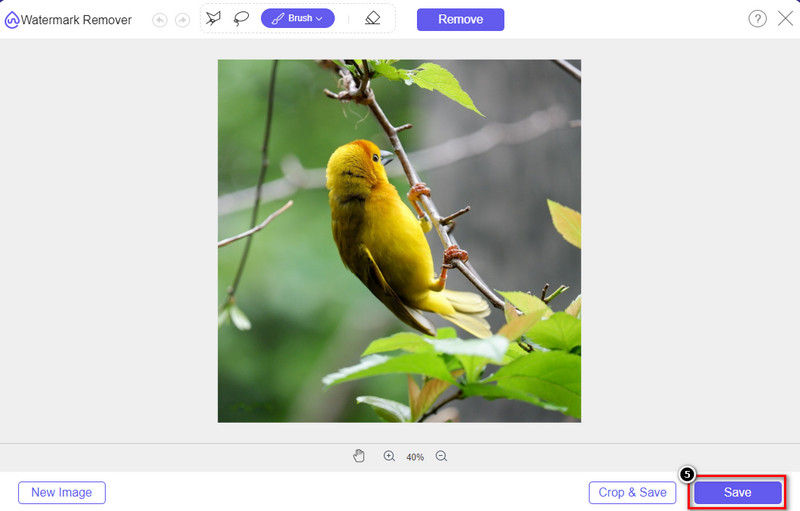
Βήμα 3. Σχεδιάστε πάνω στο υδατογράφημα με αυτά τα εργαλεία για να το επισημάνετε.
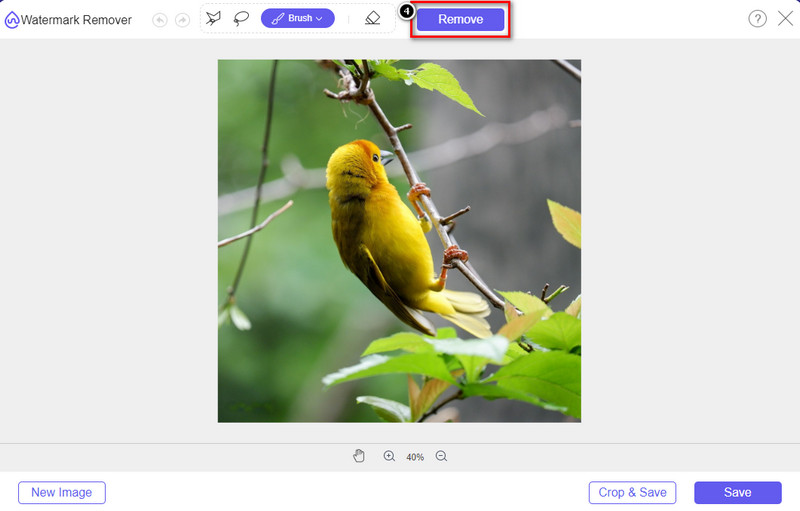
Βήμα 4. Κάντε κλικ στο Remove για να δείτε πώς φαίνεται η εικόνα αφού αφαιρεθεί το υδατογράφημα εδώ.
Βήμα 5. Τέλος, για να αποθηκεύσετε το αρχείο εικόνας, κάντε κλικ στο Save για να εξαγάγετε την εικόνα χωρίς το υδατογράφημα του iStock.
Σχετικά:
Πώς να αφαιρέσετε το υδατογράφημα από βίντεο που έχουν εξαχθεί από το Renderforest
Πώς να αφαιρέσετε το υδατογράφημα του Viva Video από τα βίντεο
Μέρος 2. Συχνές ερωτήσεις σχετικά με τον τρόπο κατάργησης του υδατογραφήματος iStock
Πώς να κατεβάσετε δωρεάν εικόνες iStock χωρίς υδατογράφημα;
Εάν σκοπεύετε να κάνετε λήψη μιας εικόνας στο iStock αμέσως, τότε ο ιστότοπος θα εφαρμόσει ένα υδατογράφημα στην εικόνα. Αυτός ο ιστότοπος προστατεύει κάθε αρχείο για την αποφυγή ζητημάτων πνευματικών δικαιωμάτων και υπερβολικής χρήσης μιας συγκεκριμένης εικόνας. Εάν θέλετε να κατεβάσετε μια εικόνα χωρίς υδατογράφημα, τότε πρέπει να αγοράσετε κάποια πίστωση. μπορείτε να ακολουθήσετε τα βήματα που προσθέσαμε παραπάνω για το πώς να το κάνετε.
Πόσο είναι η τιμή μιας πίστωσης στο iStock;
Η τιμή μιας πίστωσης στο iStock αξίζει $12. Μπορείτε να χρησιμοποιήσετε την πίστωση για να αγοράσετε ένα αρχείο πολυμέσων εδώ και να το κατεβάσετε χωρίς το υδατογράφημα στο οπτικό μέσο που θέλετε. Όσο περισσότερη πίστωση θα αγοράσετε, θα υπάρχει έκπτωση ανά πίστωση. μπορείτε να δείτε τις διαθέσιμες πιστώσεις που μπορεί να σας αρέσουν.
Δεν είναι ακριβό να αγοράσετε ένα αρχείο στο iStock;
Σε σύγκριση με τον άλλο ιστότοπο που παρέχει την ίδια υπηρεσία, είναι ένας από τους φθηνότερους ιστότοπους που μπορείτε να χρησιμοποιήσετε για να αγοράσετε ένα αρχείο με άδεια χρήσης. Μόλις αγοράσετε ένα αρχείο εδώ, μπορείτε να το χρησιμοποιήσετε απεριόριστα σε αντίθεση με το άλλο, όπου μόλις αγοράσετε, εξακολουθούν να υπάρχουν περιορισμοί στη χρήση του αρχείου.
συμπέρασμα
Τώρα που ξέρετε πώς να αφαιρέσετε αποτελεσματικά το υδατογράφημα iStock σε βίντεο και εικόνες, μπορούμε να πούμε ότι η δουλειά έχει ολοκληρωθεί. Λοιπόν, ποιον τρόπο προτιμάτε περισσότερο; Θέλετε να αγοράσετε μια πίστωση για να έχετε έτοιμο το αρχείο χωρίς το υδατογράφημα; Ή θέλετε να χρησιμοποιήσετε τα εργαλεία που προσθέτουμε εδώ που θα μπορούσαν να αντιμετωπίσουν το υδατογράφημα σε εικόνες και βίντεο; Όποια και αν είναι η επιλογή σας, θα εξακολουθείτε να έχετε το αρχείο τέλειο και έτοιμο για χρήση χωρίς την ενόχληση του υδατογραφήματος.
-
 Πώς να αφαιρέσετε το υδατογράφημα με το Pixlr με λεπτομερή βήματα [Αποτελεσματική]
 Θέλετε να μάθετε πώς να αφαιρέσετε ένα υδατογράφημα με το Pixlr; Αν ναι, συνεχίστε να διαβάζετε παρακάτω για να μάθετε πώς να το κάνετε και τις εναλλακτικές που μπορείτε να χρησιμοποιήσετε.
-
 Καταργήστε το υδατογράφημα Animotica σε εξαγόμενα βίντεο με 3 αποδεδειγμένους τρόπους
 Αναρωτηθήκατε ποτέ εάν είναι δυνατό να αφαιρέσετε το υδατογράφημα Animotica στα βίντεο που έχετε εξαγάγει; Αυτό το άρθρο παρέχει έναν τρόπο με τον οποίο πρέπει να κάνετε.
-
 Δωρεάν τρόποι για να αφαιρέσετε το υδατογράφημα του VideoShop στα βίντεο [χωρίς κόπο]
 Για να αφαιρέσετε το υδατογράφημα του VideoShop, η συσκευή σας θα χρειαστεί ένα εργαλείο αφαίρεσης υδατογραφήματος. Για να μάθετε τι είναι αυτά, διαβάστε αυτό το άρθρο.
