


 Video Converter Ultimate
 Εγγραφή οθόνης
 Επισκευή βίντεο
 Ασφαλές κατέβασμα
Συμβουλές και κόλπα για την αποτελεσματική κατάργηση του υδατογραφήματος Powtoon στα βίντεο
Έχετε δημιουργήσει ποτέ την τέλεια κινούμενη εικόνα και, μόλις την εξαγάγατε, το Powtoon πρόσθεσε υδατογράφημα; Τέτοια περιστατικά είναι πολύ πιθανό να συμβούν αν χρησιμοποιείτε τη δωρεάν έκδοση της εφαρμογής. Χάλασε το υδατογράφημα το βίντεό σας; Μην ανησυχείτε άλλο! Μπορείτε να μάθετε πώς να αφαιρέσετε το υδατογράφημα του Powtoon χρησιμοποιώντας τις διαφορετικές μεθόδους που παραθέτουμε εδώ.

Μέρος 1. Πώς να αφαιρέσετε το υδατογράφημα Powtoon χωρίς συνδρομή [Επιλογή συντάκτη]
Το FVC Video Converter Ultimate είναι κάτι παραπάνω από μια ολοκληρωμένη λύση που μπορείτε να κατεβάσετε στα Windows ή το Mac σας για να αφαιρέσετε το υδατογράφημα του Powtoon. Ακόμα κι αν δεν έχετε εμπειρία στην αφαίρεση υδατογραφημάτων από βίντεο που δημιουργείτε, μπορείτε και πάλι να τα καταφέρετε εδώ. Άνεση και ταχύτητα· αυτό θέλει το FVC να βιώσετε όταν χρησιμοποιείτε αυτό το λογισμικό, και το έχει πετύχει πολύ καλά. Οπότε, αν θέλετε να δείτε πώς αφαιρείται το υδατογράφημα, μπορείτε να ακολουθήσετε τα βήματα που παραθέτουμε στη συνέχεια.
Βήματα για το πώς να αφαιρέσετε το υδατογράφημα Powtoon με χρήση του FVC Video Converter Ultimate:
Βήμα 1. Μπορείτε να αποκτήσετε ένα από τα πιο εντυπωσιακά προγράμματα επεξεργασίας βίντεο σε Windows και Mac κάνοντας κλικ στο κουμπί λήψης παρακάτω. Στη συνέχεια, εγκαταστήστε το λογισμικό, κάντε τη γρήγορη ρύθμιση και εκκινήστε το πρόγραμμα.
Δωρεάν ΛήψηΓια Windows 7 ή νεότεραΑσφαλής λήψη
Δωρεάν ΛήψηΓια MacOS 10.7 ή νεότεροΑσφαλής λήψη
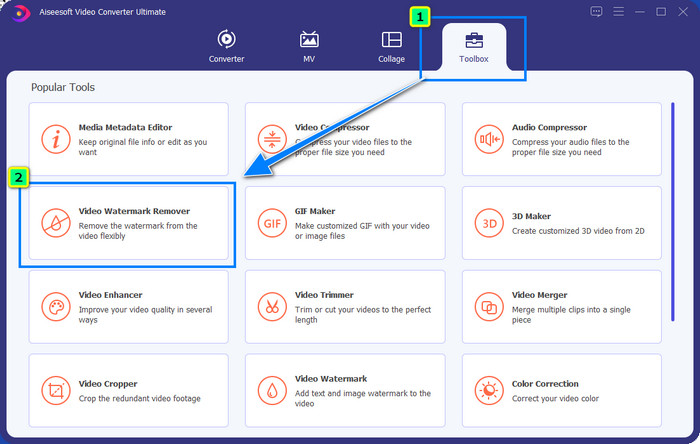
Βήμα 2. Στο Toolbox, κάντε κλικ στο Video Watermark Remover για να αφαιρέσετε το υδατογράφημα που προσθέτει το Powtoon στο επεξεργασμένο βίντεό σας.
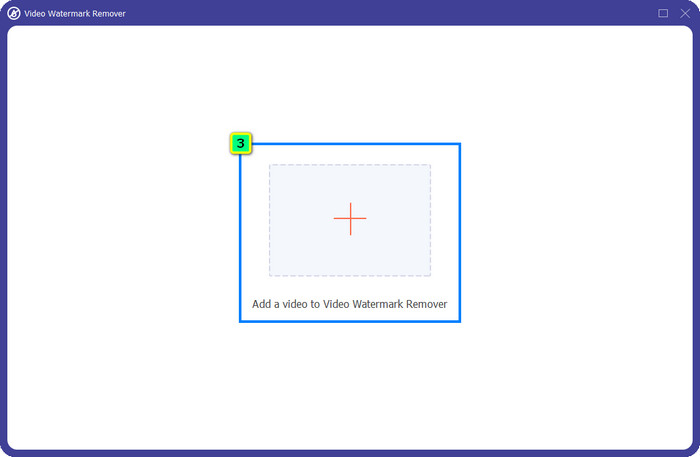
Βήμα 3. Έπειτα, πατήστε το εικονίδιο + για να ανεβάσετε το βίντεο που θέλετε να επεξεργαστείτε, επιλέξτε το αρχείο βίντεο στον φάκελο που θα εμφανιστεί και πατήστε Open.
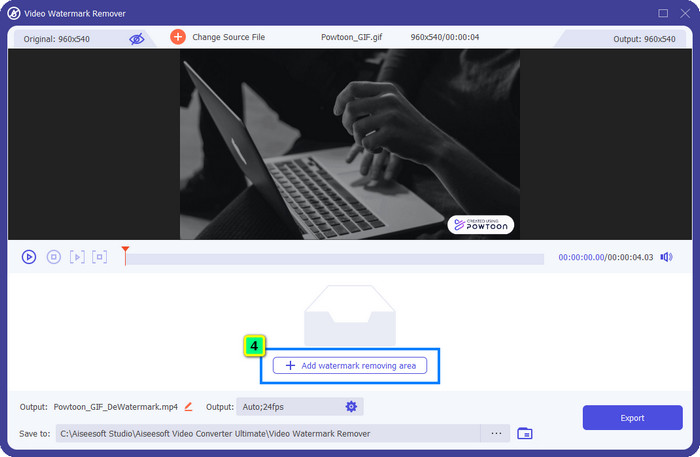
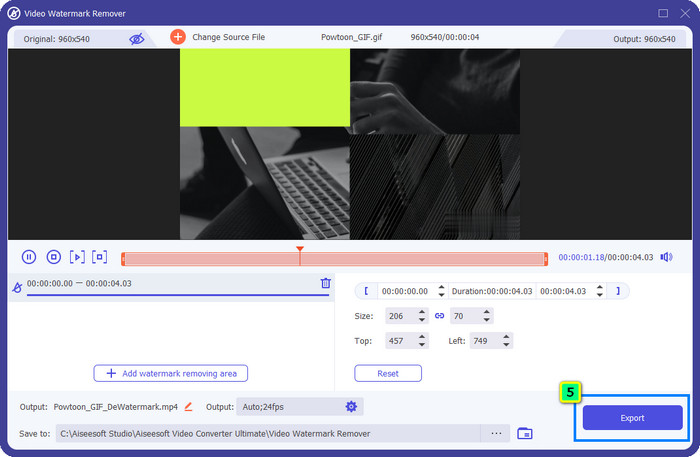
Βήμα 4. Πατήστε Add Watermark Removing Area και τοποθετήστε το πλαίσιο επιλογής πάνω στο υδατογράφημα· μπορείτε να το προσαρμόσετε όπως χρειάζεται.
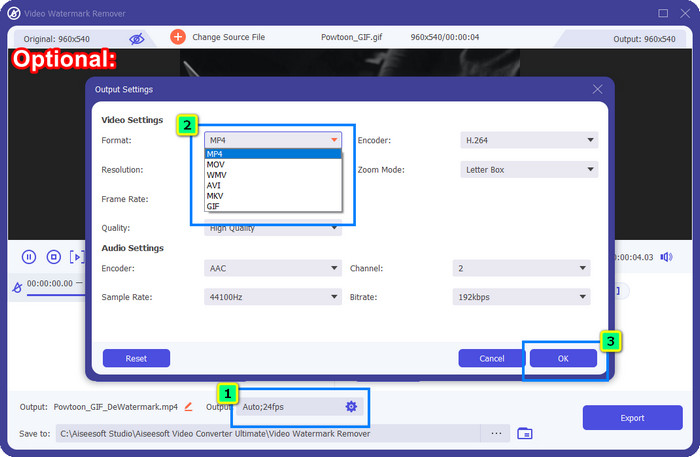
Προαιρετικό: Θέλετε να αποθηκεύσετε το τελικό αποτέλεσμα σε νέα μορφή; Κάντε κλικ στο Output στο Format και επιλέξτε τη νέα μορφή βίντεο που θέλετε. Μπορείτε να προσαρμόσετε και άλλες ρυθμίσεις βίντεο και ήχου και να κάνετε κλικ στο OK για να αποθηκεύσετε τις αλλαγές.
Βήμα 5. Πατήστε το κουμπί Export για να κατεβάσετε το βίντεο από το οποίο αφαιρέσατε το υδατογράφημα.
Μέρος 2. Πώς να αφαιρέσετε το υδατογράφημα Powtoon με συνδρομή [Βάσει προγράμματος]
Το Powtoon έχει υδατογράφημα; Ναι, προσθέτει ένα υδατογράφημα όταν χρησιμοποιείτε τη δωρεάν έκδοση. Αλλά αν αγοράσετε το Pro ή το Pro+, μπορείτε να εξαγάγετε το τελικό αποτέλεσμα χωρίς το υδατογράφημα. Επομένως, εάν θέλετε να μάθετε πώς να αγοράσετε το λογισμικό για να απολαύσετε το βίντεο που επεξεργαστήκατε χωρίς το υδατογράφημα, ακολουθήστε τα παρακάτω βήματα.
Βήματα για τον τρόπο αγοράς του προγράμματος Powtoon Pro και Pro+:
Βήμα 1. Ανοίξτε την επίσημη ιστοσελίδα του Powtoon και κάντε κλικ στο Pricing για να δείτε τις τιμές για την επαγγελματική έκδοση.
Βήμα 2. Επιλέξτε το πλάνο που προτιμάτε, Pro ή Pro+, και κάντε κλικ στο Get Plan.
Βήμα 3. Συμπληρώστε τα απαραίτητα στοιχεία χρέωσης, συνεχίστε στη Μέθοδο Πληρωμής και κάντε κλικ στο Make Secure Payment.
Μέρος 3. Πώς να αφαιρέσετε το υδατογράφημα Powtoon Online δωρεάν [Υπηρεσία Ιστού]
1. Media.io - Watermark Remover
Το Media.io - Watermark Remover μπορεί να αφαιρέσει δωρεάν το υδατογράφημα του Powtoon. Είναι διαθέσιμο σε οποιονδήποτε φυλλομετρητή, πράγμα που σημαίνει ότι δεν χρειάζεται να κατεβάσετε την εφαρμογή για να το χρησιμοποιήσετε. Αν και το εργαλείο αφαίρεσης υδατογραφημάτων είναι δωρεάν, θα χρειαστείτε σταθερή και γρήγορη σύνδεση στο διαδίκτυο για να λειτουργήσει σωστά. Η διαδικασία μεταφόρτωσης και λήψης απαιτεί περισσότερο χρόνο σε σύγκριση με το πρώτο εργαλείο αφαίρεσης υδατογραφημάτων που παρουσιάσαμε. Παρ’ όλα αυτά, αυτό το λογισμικό είναι μια εξαιρετική επιλογή για εσάς, και αν θέλετε να μάθετε πώς να το χρησιμοποιείτε, ακολουθήστε τα παρακάτω βήματα.
Βήματα για το πώς να αφαιρέσετε το υδατογράφημα Powtoon με χρήση του Media.io:
Βήμα 1. Ανοίξτε την ιστοσελίδα και κάντε κλικ στο Choose File για να προσθέσετε το βίντεο από το οποίο θέλετε να αφαιρέσετε το υδατογράφημα. Περιμένετε τη διαδικασία φόρτωσης, καθώς μπορεί να πάρει αρκετό χρόνο, ανάλογα με τη σύνδεσή σας στο διαδίκτυο.
Βήμα 2. Πατήστε Add Area και τοποθετήστε την περιοχή αφαίρεσης υδατογραφήματος στο σημείο όπου βρίσκεται το υδατογράφημα.
Βήμα 3. Πατήστε Export για να αποθηκεύσετε το επεξεργασμένο Powtoon βίντεο στον τοπικό σας δίσκο τόσο απλά.
2. Kapwing
Το Kapwing είναι ένα ακόμη εξειδικευμένο διαδικτυακό εργαλείο που μπορεί να αφαιρέσει το υδατογράφημα από το βίντεό σας, περικόπτοντάς το. Επιπλέον, προσφέρει επιπρόσθετες λειτουργίες επεξεργασίας που μπορείτε να χρησιμοποιήσετε για να δημιουργήσετε ένα εξαιρετικό βίντεο, σχεδόν όπως στο Powtoon. Σε αντίθεση με άλλες λύσεις αφαίρεσης υδατογραφημάτων που αναφέρουμε, αυτό το λογισμικό αλλάζει τις διαστάσεις του βίντεο επειδή περικόπτετε το σημείο όπου βρίσκεται το υδατογράφημα. Αν δεν σας πειράζει να μειωθεί το μέγεθος της εικόνας του βίντεο, ακολουθήστε τα βήματα για το πώς να απαλλαγείτε από το υδατογράφημα του Powtoon.
Βήματα για το πώς να περικόψετε το υδατογράφημα Powtoon με χρήση του Kapwing:
Βήμα 1. Χρησιμοποιώντας τον φυλλομετρητή σας, αναζητήστε το πρόγραμμα και ανοίξτε το.
Βήμα 2. Κάντε κλικ στο Add Media για να εισαγάγετε εδώ το βίντεο που θέλετε να περικόψετε.
Βήμα 3. Αφού τοποθετήσετε το υλικό, κάντε κλικ στο Crop για να προσαρμόσετε το κάδρο σύμφωνα με το επιθυμητό μέγεθος.
Βήμα 4. Αν θέλετε να αποθηκεύσετε το τελικό αποτέλεσμα, κάντε κλικ στο Done Cropping.
Μέρος 4. Συχνές ερωτήσεις σχετικά με τον τρόπο κατάργησης του υδατογραφήματος Powtoon
Ποια είναι η καλύτερη πλατφόρμα για να αυξήσετε την ανάλυση βίντεο στο Powtoon;
Υπάρχουν αμέτρητοι τρόποι για να αυξήσετε την ανάλυση του βίντεό σας στο Powtoon. Ωστόσο, κάποιοι από αυτούς δεν λειτουργούν όπως θα περιμένατε. Έτσι, αντί να δοκιμάζετε την τύχη σας, θα κάνουμε εμείς τη δύσκολη δουλειά για εσάς και εσείς θα χρειαστεί να αφιερώσετε μόνο λίγα λεπτά για να διαβάσετε αυτό το άρθρο. Επιλέξτε ποιος από τους 8 μετατροπείς ανάλυσης βίντεο ταιριάζει καλύτερα στις ανάγκες σας.
Πώς να προσθέσετε ένα υδατογράφημα σε ένα βίντεο;
Ο καλύτερος τρόπος να προσθέσετε υδατογράφημα σε ένα βίντεο είναι με τη βοήθεια κάποιου λογισμικού, είτε πρόκειται για κείμενο, λογότυπο, σφραγίδα, ημερομηνία και ώρα ή κάτι παρόμοιο. Αν έχετε λίγο ελεύθερο χρόνο, μπορείτε να δοκιμάσετε να διαβάσετε και να κατανοήσετε πώς να προσθέτετε υδατογραφήματα σε διαφορετικές πλατφόρμες με ευκολία.
Γιατί είναι ακριβό το Powtoon;
Το Powtoon έγινε ακριβό λόγω της επεξεργασίας κινούμενων σχεδίων που παρέχει που δεν μπορείτε να έχετε ως επί το πλείστον σε άλλο πρόγραμμα επεξεργασίας βίντεο, είτε στο διαδίκτυο είτε εκτός σύνδεσης. Είναι επίσης εν κινήσει, επομένως δεν θα χρειαστεί να εγκαταστήσετε έναν εκτοξευτή για να αρχίσετε να το χρησιμοποιείτε. Ωστόσο, η τιμή του δεν είναι προσιτή για πολλούς. Αντί να χρησιμοποιείτε τη δωρεάν έκδοση Powtoon και να έχετε υδατογράφημα, προσπαθήστε να χρησιμοποιήσετε την καλύτερη εναλλακτική λύση επεξεργασίας βίντεο, το FVC Video Converter Ultimate. Προσφέρει μια πληθώρα χαρακτηριστικών και λειτουργιών που σίγουρα μπορείτε να απολαύσετε χρησιμοποιώντας.
συμπέρασμα
Μπορείτε να αποθηκεύσετε βίντεο από το Powtoon χωρίς υδατογράφημα, αλλά θα πρέπει να αγοράσετε ένα πλάνο για να αποθηκεύσετε το επεξεργασμένο βίντεο χωρίς κανένα υδατογράφημα. Δεν σας αρέσει η ιδέα να αγοράσετε πλάνο; Τότε δοκιμάστε να χρησιμοποιήσετε τα διαδικτυακά εργαλεία αφαίρεσης υδατογραφημάτων που παρουσιάζουμε. Η σύνδεση στο διαδίκτυο είναι αργή; Τότε σας προτείνουμε να χρησιμοποιήσετε το FVC Video Converter Ultimate για να αφαιρέσετε το υδατογράφημα από το βίντεο γρήγορα και επαγγελματικά. Σε σύγκριση με αμέτρητα άλλα προγράμματα, το FVC Video Editor προσφέρει την πιο αποδοτική λύση για να αφαιρέσετε οτιδήποτε από το βίντεό σας. Μπορείτε επίσης να κάνετε πρόσθετες ρυθμίσεις χρησιμοποιώντας τις λειτουργίες και τα εργαλεία που παρέχει αυτό το λογισμικό.
-
 Καταργήστε εύκολα το υδατογράφημα από το PDF με απλά βήματα
 Καταργήστε το υδατογράφημα από το PDF ακολουθώντας αυτά τα απλά βήματα. Μάθετε πώς να αφαιρείτε εύκολα τα υδατογραφήματα από το αρχείο PDF χρησιμοποιώντας αυτά τα καταπληκτικά εργαλεία.
-
 Εύκολοι τρόποι για να αφαιρέσετε το υδατογράφημα από τις φωτογραφίες αποφοίτησης
 Θέλετε να μάθετε τους καλύτερους τρόπους για να αφαιρέσετε τα υδατογραφήματα από τις φωτογραφίες αποφοίτησης; Διαβάζοντας αυτό το άρθρο, θα μπορείτε να μάθετε πώς να αφαιρείτε εύκολα τα υδατογραφήματα στις φωτογραφίες grad.
-
 Πώς να αφαιρέσετε το υδατογράφημα από το βίντεο χρησιμοποιώντας το Final Cut Pro [Πλήρης οδηγός]
 Έχετε πρόβλημα με το υδατογράφημα στα βίντεο; Δεν είπα περισσότερα, γιατί παρείχαμε ένα σεμινάριο για το πώς να αφαιρέσετε το υδατογράφημα από το βίντεο χρησιμοποιώντας το Final Cut Pro.
