


 Video Converter Ultimate
 Εγγραφή οθόνης
 Επισκευή βίντεο
 Ασφαλές κατέβασμα
Πώς να μετατρέψετε εύκολα το F4V σε MP4 χρησιμοποιώντας εργαλεία εκτός σύνδεσης και ηλεκτρονικά
Η μορφή αρχείου FLV είναι μία από τις τυπικές μορφές που χρησιμοποιούνται από το Adobe Flash, αλλά αν θέλετε να αναπαράγετε βίντεο με υψηλότερη ποιότητα, πρέπει να μετατρέψετε το αρχείο F4V σε άλλες μορφές όπως MP4. Μπορείτε να αναπαράγετε αρχεία MP4 σχεδόν σε όλες τις συσκευές, όπως iPhone, iPad, Android και υπολογιστές. Επομένως, αν προτιμάτε βίντεο υψηλής ποιότητας, θα σας προσφέρουμε τις πιο αποτελεσματικές μεθόδους για να μετατρέψετε F4V σε MP4 με τη βοήθεια εργαλείων εκτός σύνδεσης και διαδικτυακών εργαλείων.

Μέρος 1: Βασική μέθοδος μετατροπής F4V σε MP4 σε Mac και Windows
Αν χρησιμοποιείτε Mac και σας αρέσει να μετατρέπετε αρχεία βίντεο, τότε μπορείτε να χρησιμοποιήσετε το Video Converter Ultimate. Αυτός ο μετατροπέας εκτός σύνδεσης είναι εξαιρετικός στη μετατροπή F4V σε MP4 σε Mac και Windows, κάτι που τον καθιστά βολικό για όλους τους χρήστες. Επίσης, μπορεί να μετατρέψει σχεδόν όλα τα αρχεία βίντεο, καθώς υποστηρίζει AVI, MP4, MOV, FLV, VOB, MTS, SWF, MKV, WMV και άλλα. Επιπλέον, η μετατροπή αρχείων F4V σε αυτήν την εφαρμογή είναι εύκολη, επειδή διαθέτει ένα απλό στη χρήση περιβάλλον με βασικές μεθόδους μετατροπής. Με αυτόν τον τρόπο, μπορείτε να βεβαιωθείτε ότι είναι κατάλληλο για χρήση, ειδικά για αρχάριους. Επιπλέον, όσον αφορά την ταχύτητα μετατροπής, θα μείνετε πάντα ικανοποιημένοι. Το Video Converter Ultimate προσφέρει διαδικασία μετατροπής υπερ-υψηλής ταχύτητας, που είναι 30 φορές γρηγορότερη από άλλους μετατροπείς. Μπορείτε επίσης να μετατρέψετε πολλαπλά αρχεία βίντεο ταυτόχρονα, καθώς υποστηρίζει μαζική μετατροπή. Επιπλέον, μπορείτε να κάνετε περισσότερα σε αυτήν την εφαρμογή πέρα από τη μετατροπή βίντεο. Μπορείτε επίσης, αν θέλετε, να δημιουργήσετε ένα μουσικό βίντεο με αυτό το εργαλείο. Η εφαρμογή προσφέρει δημιουργό Μουσικών Βίντεο και παρέχει διάφορα θέματα, όπως απλό, χαρούμενο, νύχτα με χιόνι, τακτοποιημένο και άλλα. Επιπλέον, αυτός ο μετατροπέας βίντεο διαθέτει λειτουργία δημιουργίας Κολάζ, με την οποία μπορείτε να φτιάξετε κολάζ με διάφορα πρότυπα και φίλτρα. Μπορείτε να απολαύσετε ακόμη περισσότερες εξαιρετικές λειτουργίες όταν χρησιμοποιείτε το FVC Video Converter Ultimate.
Λειτουργίες
◆ Μετατρέψτε 100+ μορφές αρχείων βίντεο, όπως MP4, F4V, MOV, AVI, MKV, WMV, VOB κ.λπ.
◆ Δημιουργήστε ένα Κολάζ με δωρεάν πρότυπα και φίλτρα.
◆ Φτιάξτε ένα φανταστικό μουσικό βίντεο με διάφορα θέματα.
◆ Συμπιέστε ένα βίντεο στο επιθυμητό μέγεθος αρχείου.
◆ Προσαρμόστε την ταχύτητα του βίντεο από 0,125x σε 8x ταχύτερη από τη μέση ταχύτητα βίντεο.
◆ Προσθέστε και αφαιρέστε το υδατογράφημα από ένα βίντεο.
◆ Μετατρέψτε μορφές αρχείων εικόνας, όπως BMP, PNG, JPG, TIF κ.λπ.
Ακολουθήστε τις παρακάτω απλές μεθόδους για να μετατρέψετε γρήγορα το F4V σε MP4 χρησιμοποιώντας το FVC Video Converter Ultimate.
Βήμα 1: Κατεβάστε το Video Converter Ultimate στον υπολογιστή σας, κάνοντας κλικ στο κουμπί Download παρακάτω. Έπειτα, προχωρήστε στη διαδικασία εγκατάστασης και εκκινήστε την εφαρμογή.
Δωρεάν ΛήψηΓια Windows 7 ή νεότεραΑσφαλής λήψη
Δωρεάν ΛήψηΓια MacOS 10.7 ή νεότεροΑσφαλής λήψη
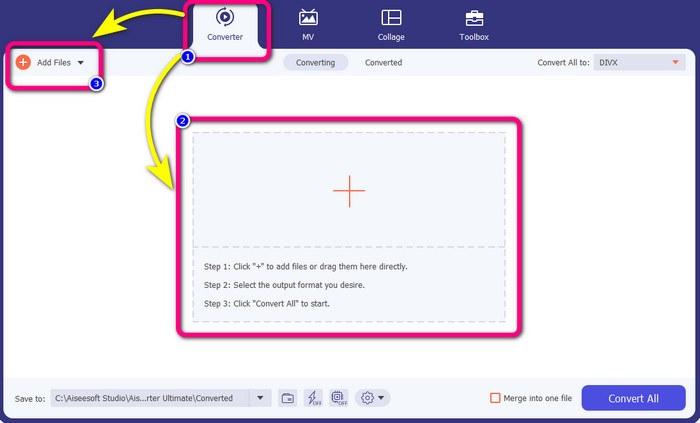
Βήμα 2: Για να μετατρέψετε το βίντεο F4V, πηγαίνετε στην επιλογή Converter και επιλέξτε το εικονίδιο Plus ή το κουμπί Add File για να εισαγάγετε το βίντεο με μορφή αρχείου F4V.
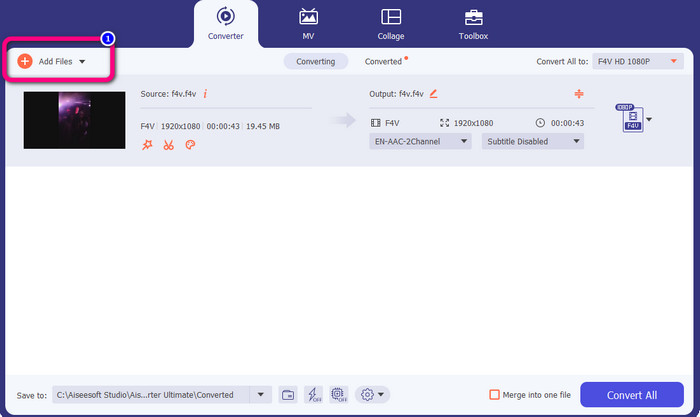
Βήμα 3: Αν θέλετε να μετατρέψετε περισσότερα αρχεία F4V ταυτόχρονα, πατήστε το κουμπί Add Files και εισαγάγετε ένα ακόμη αρχείο F4V.
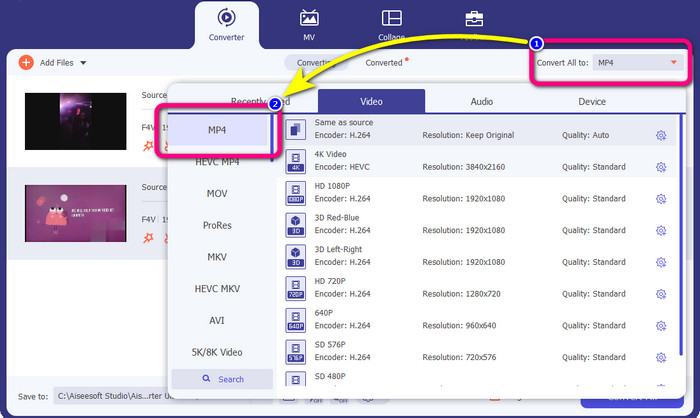
Βήμα 4: Μεταβείτε στο κουμπί Convert All to για να αλλάξετε τη μορφή εξόδου. Θα δείτε τις επιλογές μορφών και επιλέξτε τη μορφή MP4. Μπορείτε επίσης να επιλέξετε την προτιμώμενη ποιότητα βίντεο.
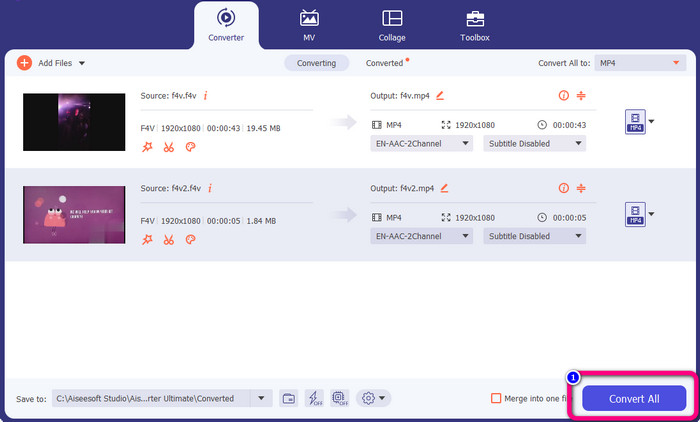
Βήμα 5: Αφού ολοκληρώσετε την αλλαγή της μορφής εξόδου, μπορείτε να μετατρέψετε τα αρχεία κάνοντας κλικ στο κουμπί Convert All. Η διαδικασία μετατροπής θα ξεκινήσει και το βίντεο F4V σας θα μετατραπεί σε αρχείο MP4 μέσα σε λίγα δευτερόλεπτα.
Μέρος 2: Απλά βήματα για τη μετατροπή F4V σε MP4 χρησιμοποιώντας VLC
Σε αυτό το μέρος, θα μάθετε πώς να μετατρέπετε το F4V σε MP4 χρησιμοποιώντας το VLC Media Player. Ναί! Σωστά το διάβασες! Εκτός από την αναπαραγωγή βίντεο, το VLC είναι ένα άλλο εργαλείο που μπορείτε να χρησιμοποιήσετε για να μετατρέψετε αρχεία. Επίσης, υποστηρίζει διάφορες μορφές αρχείων, όπως MP4, WEBM, OGG, TS, ASF και άλλα. Ωστόσο, πρέπει να γνωρίζετε αρκετά για αυτό το εργαλείο επειδή έχει μια μπερδεμένη διεπαφή. Παρακολουθήστε μαθήματα ή ζητήστε από μερικούς προχωρημένους χρήστες να πάρουν μια ιδέα σχετικά με τη μετατροπή αρχείων χρησιμοποιώντας VLC. Επίσης, είναι χρονοβόρα η λήψη αυτού του μετατροπέα. Ακολουθήστε τις παρακάτω διαδικασίες για να μετατρέψετε το F4V σε MP4 χρησιμοποιώντας το VLC Media Player.
Βήμα 1: Κατεβάστε το VLC Media Player στον υπολογιστή σας. Εκκινήστε την εφαρμογή μετά τη διαδικασία εγκατάστασης.
Βήμα 2: Μεταβείτε στο Media > κουμπί Convert/Save. Έπειτα, κάντε κλικ στο κουμπί Add για να επισυνάψετε το βίντεο F4V.
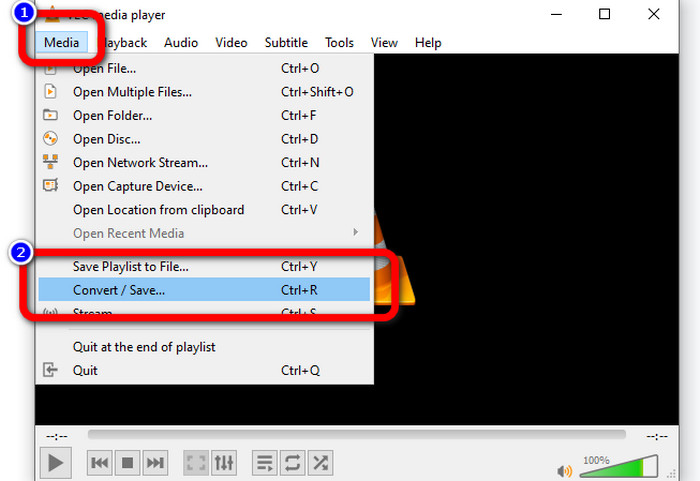
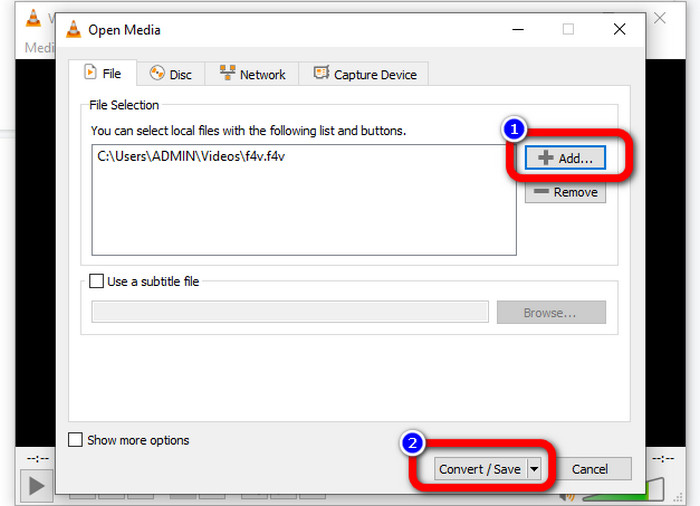
Βήμα 3: Αφού προσθέσετε το βίντεο F4V, κάντε ξανά κλικ στο κουμπί Convert/Save στο κάτω μέρος της διεπαφής.
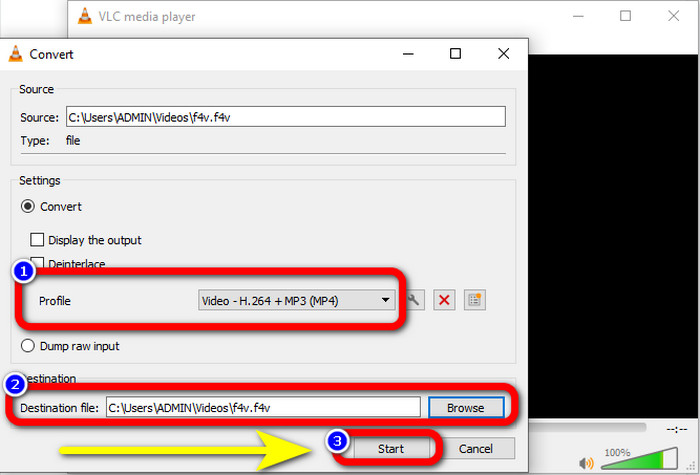
Βήμα 4: Μεταβείτε στο Profile και επιλέξτε τη μορφή αρχείου MP4. Έπειτα, πηγαίνετε στο Browse για να ορίσετε τη θέση αρχείου όπου θέλετε να αποθηκεύσετε το βίντεό σας. Πατήστε το κουμπί Start για να προχωρήσετε στη διαδικασία μετατροπής.
Μέρος 3: Εύκολος τρόπος μετατροπής F4V σε MP4 με χειρόφρενο
Αν εξακολουθείτε να αναζητάτε έναν ακόμη μετατροπέα F4V σε MP4 για Windows, μπορείτε να χρησιμοποιήσετε το Handbrake. Είναι ένα εργαλείο εκτός σύνδεσης που υποστηρίζει διάφορες μορφές βίντεο, όπως MP4, MKV, WEBM κ.λπ. Ωστόσο, αυτό το εργαλείο είναι περίπλοκο επειδή διαθέτει πολλές επιλογές που μπορεί να προκαλέσουν σύγχυση. Χρησιμοποιήστε τα παρακάτω βήματα για να μετατρέψετε το αρχείο F4V σε μορφή MP4.
Βήμα 1: Κατεβάστε το Handbrake στον υπολογιστή σας με Windows. Έπειτα, εκκινήστε την εφαρμογή όταν ολοκληρώσετε την εγκατάσταση.
Βήμα 2: Κάντε κλικ στο κουμπί File για να προσθέσετε το αρχείο F4V.
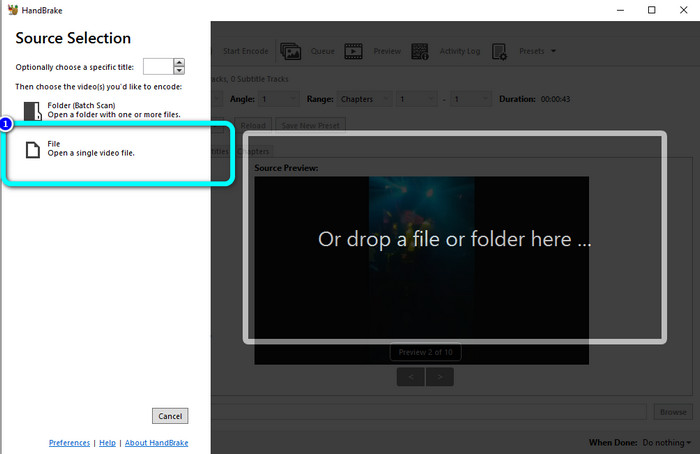
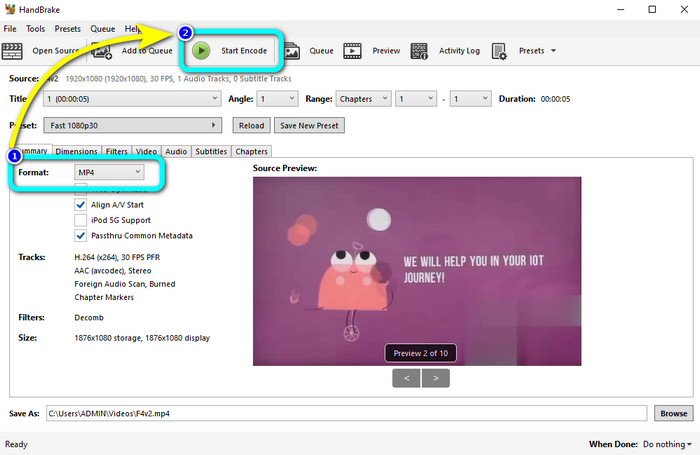
Βήμα 3: Μεταβείτε στις επιλογές μορφής και επιλέξτε τη μορφή αρχείου MP4. Έπειτα, πατήστε το κουμπί Start Encode. Περιμένετε να ολοκληρωθεί η διαδικασία μετατροπής και αποθηκεύστε το τελικό βίντεο.
Μέρος 4: Λεπτομερή βήματα για τη μετατροπή F4V σε MP4 Δωρεάν Online
Θέλετε να χρησιμοποιήσετε μια διαδικτυακή εφαρμογή για να μετατρέψετε F4V σε MP4 δωρεάν; Χρησιμοποιήστε το FVC Free Video Converter Online. Μπορείτε να μετατρέψετε το αρχείο F4V χωρίς να ξοδέψετε ούτε ένα ευρώ. Επίσης, αυτός ο μετατροπέας έχει μια απλή διεπαφή, η οποία είναι κατάλληλη για μη επαγγελματίες χρήστες. Υποστηρίζει διάφορες μορφές βίντεο, όπως FLV, WMA, MOV, AVI, WMV και άλλες. Το καλύτερο είναι ότι μπορείτε να μετατρέπετε αρχεία βίντεο χωρίς απώλεια ποιότητας. Ακολουθήστε τα αναλυτικά βήματα παρακάτω για να μετατρέψετε εύκολα F4V σε MP4.
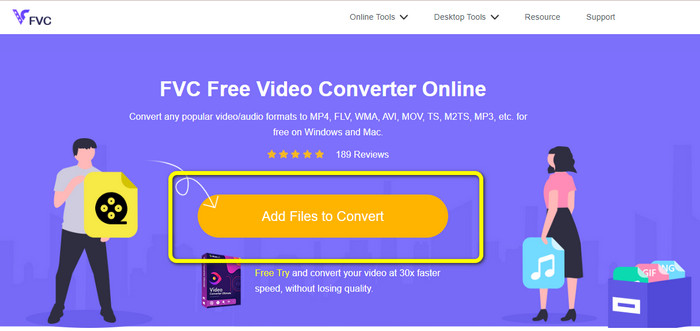
Βήμα 1: Επισκεφτείτε τον ιστότοπο του FVC Free Video Converter Online. Πατήστε το κουμπί Add Files to Convert για να ανεβάσετε το αρχείο βίντεο F4V.
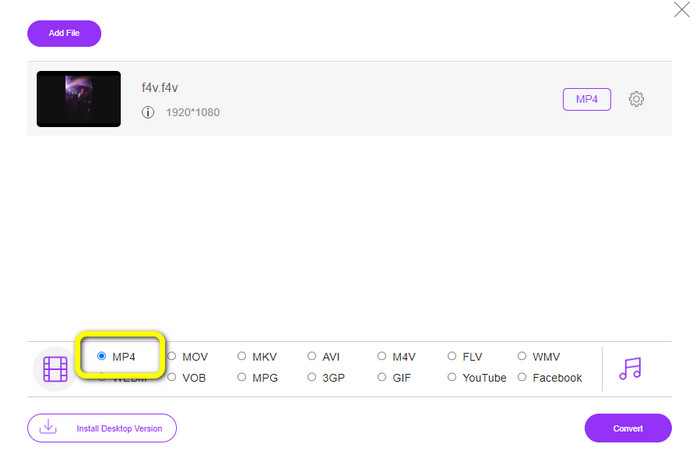
Βήμα 2: Μετά τη μεταφόρτωση του βίντεο, μεταβείτε στο κάτω μέρος της διεπαφής και κάντε κλικ στη μορφή αρχείου MP4.
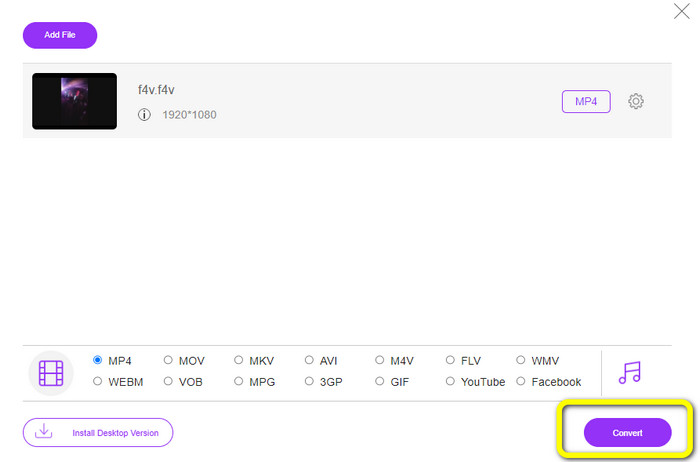
Βήμα 3: Τέλος, πατήστε το κουμπί Convert. Περιμένετε να ολοκληρωθεί η διαδικασία μετατροπής και αποθηκεύστε το αρχείο σας στην επιθυμητή τοποθεσία.
Μέρος 5: F4V εναντίον MP4
Δείτε τις πρόσθετες πληροφορίες παρακάτω σχετικά με αυτές τις δύο μορφές αρχείων.
| F4V | MP4 | |
| Επέκταση αρχείου | .f4v | .mp4 |
| Αναπτύχθηκε από | μήλο | Ομάδα εμπειρογνωμόνων μετακίνησης εικόνων |
| Περιγραφή | Αυτή είναι η αρχική μορφή αρχείου flash. Βασίζεται επίσης στη βασική μορφή αρχείου πολυμέσων ISO που υποστηρίζει το flash player 9. Επίσης, τα αρχεία F4V δεν μπορούν να αναπαραχθούν σε συσκευές iOS, αλλά σε προγράμματα περιήγησης που υποστηρίζουν flash, μπορείτε να τα αναπαράγετε. | Αυτό είναι ένα αρχείο πολυμέσων. Το κοντέινερ μπορεί να αποθηκεύσει δεδομένα υποτίτλων, ήχο και βίντεο. Επίσης, όπως και άλλες μορφές κοντέινερ, το MP4 επιτρέπει τη ροή στο Διαδίκτυο. |
| Συνοδευτικά Προγράμματα | XVLC Media Player LAN βίντεο Windows Media Player Εμφάνιση FFDS Microsoft Windows Πρόγραμμα προβολής συλλογής φωτογραφιών | Apple QuickTime Player LAN βίντεο VLC Media Player Apple iTunes Microsoft Windows Media Player |
Περαιτέρω ανάγνωση:
2 από τις αγαπημένες επιλογές μετατροπέων για μετατροπή F4V σε WMV [2023]
2 από τους ταχύτερους τρόπους για μετατροπή F4V σε FLV [Online & Offline]
Μέρος 6: Συχνές ερωτήσεις σχετικά με τη μετατροπή του F4V σε MP4
1. Μπορώ να μετατρέψω MP4 σε F4V;
Ναι μπορείς! Μπορείτε να χρησιμοποιήσετε το Video Converter Ultimate. Αυτή η εφαρμογή μπορεί να μετατρέψει άμεσα το αρχείο MP4 σε μορφή F4V.
2. Ποια είναι η διαφορά μεταξύ F4V και FLV;
Η κύρια διάκριση μεταξύ αυτών των δύο μορφών είναι ότι το F4V υποστηρίζει βίντεο υψηλής ποιότητας που κωδικοποιούνται από H.264, αλλά η μορφή FLV χρησιμοποιεί γενικά H.263.
3. Πώς να χρησιμοποιήσετε το FFmpeg για να μετατρέψετε το F4V σε MP4;
Κατεβάστε το FFmpeg στον υπολογιστή σας. Ανοίξτε τη γραμμή εντολών. Πληκτρολογήστε Desktop για εναλλαγή της γραμμής εντολών. Η εντολή μετατροπής ξεκινά με FFmpeg-i και, στη συνέχεια, πληκτρολογήστε το όνομα του βίντεο και τη μορφή αρχείου του. Επίσης, τον τύπο του αρχείου εξόδου. Πατήστε Enter και περιμένετε για τη διαδικασία μετατροπής. Μετά από αυτό, μπορείτε να δείτε το αρχείο σας στην επιφάνεια εργασίας σας
συμπέρασμα
Αυτός ο οδηγός σάς δείχνει αναλυτικές οδηγίες για τη μετατροπή F4V σε MP4 διαδικτυακά και εκτός σύνδεσης. Οι χρήστες προτιμούν έναν πιο απλό και γρήγορο τρόπο μετατροπής βίντεο. Τότε μπορείτε να χρησιμοποιήσετε το Video Converter Ultimate για να μετατρέψετε άμεσα τα αρχεία βίντεό σας, επειδή έχει ταχύτητα μετατροπής 30 φορές μεγαλύτερη από άλλους μετατροπείς. Μπορείτε επίσης να χρησιμοποιήσετε το FVC Free Video Converter Online για να μετατρέψετε βίντεο με απλό τρόπο, που απαιτεί μόνο λίγα κλικ.
-
 4 νεότεροι διαδικτυακοί και εκτός σύνδεσης μετατροπείς για μετατροπή F4V σε μορφή AVI
 Δεν έχετε ιδέα τι μετατροπέα πρέπει να χρησιμοποιήσετε για να μετατρέψετε το F4V σε AVI ή σε οποιαδήποτε άλλη μορφή βίντεο; Στη συνέχεια, διαβάστε αυτό το άρθρο καθώς μαθαίνουμε πώς να κάνετε μετατροπή με το διαθέσιμο εργαλείο.
-
 Πώς να μετατρέψετε το F4V σε MOV χωρίς απώλεια ποιότητας [Επίλυση]
 Εάν δυσκολεύεστε να αναγνωρίσετε ορισμένες μορφές βίντεο όπως το F4V. Διαβάστε αυτό το άρθρο για να μάθετε περισσότερα σχετικά με τη μορφή βίντεο F4V και MOV και μάθετε πώς να μετατρέπετε το F4V σε MOV χρησιμοποιώντας διαφορετικές μεθόδους.
-
 Επιτυχείς μέθοδοι για τη μετατροπή DIVX σε MP4 αμέσως
 Πώς μπορώ να μετατρέψω το DIVX σε MP4; Αν ψάχνετε για την καλύτερη λύση, είστε στο σωστό άρθρο. Θα σας δείξουμε πώς να μετατρέψετε εύκολα το DIVX σε MP4
