


 Video Converter Ultimate
 Εγγραφή οθόνης
 Επισκευή βίντεο
 Ασφαλές κατέβασμα
Διορθώστε το Pixelated Video Online Δωρεάν: Mastering Pixel Repair
Η εικονοστοιχείωση (pixelation) εμφανίζεται όταν μεμονωμένα εικονοστοιχεία γίνονται ορατά, δημιουργώντας μια τετραγωνισμένη και παραμορφωμένη εμφάνιση στο βίντεο. Συνηθισμένες αιτίες είναι η χαμηλή ανάλυση, τα συμπιεστικά τεχνουργήματα και το transcoding βίντεο. Η εικονοστοιχείωση στα βίντεο μπορεί να είναι ένα ενοχλητικό εμπόδιο, επηρεάζοντας τη συνολική εμπειρία θέασης και μειώνοντας την ποιότητα του περιεχομένου σας. Τα καλά νέα είναι ότι δεν χρειάζεται να είστε ειδικός στο μοντάζ βίντεο ή να επενδύσετε σε ακριβό λογισμικό για να αντιμετωπίσετε προβλήματα εικονοστοιχείωσης. Σε αυτό το άρθρο, θα σας καθοδηγήσουμε στο πώς να διορθώσετε εικονοστοιχειωμένα βίντεο online, δωρεάν, δίνοντάς σας τη δυνατότητα να κατακτήσετε την τέχνη της «επισκευής» των pixel. Διορθώστε το εικονοστοιχειωμένο βίντεο και ανακαλύψτε σήμερα τη διαυγή μέθοδό μας για ένα επαγγελματικό αποτέλεσμα!

Μέρος 1. Τι προκαλεί το βίντεο με εικονοστοιχεία
Η δημιουργία εικονοστοιχείων στα βίντεο μπορεί να προκύψει λόγω διαφόρων παραγόντων και η κατανόηση αυτών των αιτιών είναι απαραίτητη για την αποτελεσματική αντιμετώπιση και πρόληψη του προβλήματος. Ακολουθούν μερικοί συνήθεις λόγοι για τους οποίους μπορεί να προκύψει pixelation σε βίντεο:
1. Χαμηλή ανάλυση. Τα βίντεο χαμηλής ανάλυσης στερούνται λεπτομέρειας, καθώς διαθέτουν λιγότερα εικονοστοιχεία. Η εικονοστοιχείωση εμφανίζεται όταν αυτά τα βίντεο τεντώνονται ή προβάλλονται σε μεγαλύτερα μεγέθη, κάνοντας τα μεμονωμένα pixel πιο εμφανή. (Μάθετε πώς να αλλάζετε την ανάλυση βίντεο εδώ.)
2. Λανθασμένος κωδικοποιητής ή μορφότυπος. Η εικονοστοιχείωση μπορεί να προκύψει κατά την εγγραφή ή εξαγωγή βίντεο σε ακατάλληλο κωδικοποιητή (codec) ή μορφή. Η εικονοστοιχείωση μπορεί να γίνει πιο έντονη όταν χρησιμοποιούνται ορισμένοι κωδικοποιητές που θυσιάζουν την ποιότητα εικόνας προς όφελος μικρότερου μεγέθους αρχείου.
3. Χαμηλό bitrate. Το bitrate είναι ο όγκος δεδομένων που επεξεργάζεται σε ένα δευτερόλεπτο. Η εικονοστοιχείωση μπορεί να προκύψει από ανεπαρκές bitrate κατά τη μείωση του μεγέθους του βίντεο, ιδιαίτερα σε σκηνές με πολλή κίνηση ή περίπλοκες λεπτομέρειες.
4. Συμπίεση κατά το ανέβασμα/κατέβασμα. Η εικονοστοιχείωση μπορεί να εμφανιστεί σε πλατφόρμες που συμπιέζουν τα βίντεο κατά το ανέβασμα ή το κατέβασμα. Για παράδειγμα, οι ιστότοποι κοινωνικής δικτύωσης χρησιμοποιούν συχνά τις δικές τους μεθόδους συμπίεσης.
5. Ποιότητα κάμερας. Ένας σημαντικός παράγοντας είναι η ποιότητα της κάμερας που χρησιμοποιείται για την εγγραφή του βίντεο. Βίντεο που έχουν τραβηχτεί με κάμερες χαμηλής ποιότητας μπορεί να έχουν εγγενή εικονοστοιχείωση, η οποία γίνεται πιο εμφανής σε μεγαλύτερες οθόνες.
Μέρος 2. Διορθώστε τα βίντεο με εικονοστοιχεία στο διαδίκτυο δωρεάν
Η δωρεάν επιδιόρθωση φιλμ με pixel στο διαδίκτυο είναι δυνατή με διάφορα εργαλεία και πλατφόρμες. Χωρίς να χρειάζεστε ακριβό λογισμικό, ακολουθήστε αυτά τα βήματα για να βελτιώσετε την ποιότητα των βίντεό σας με pixel:
◆ Flixier Video Clearer
◆ Clideo Video Clearer
◆ VEED.IO Video Clearer
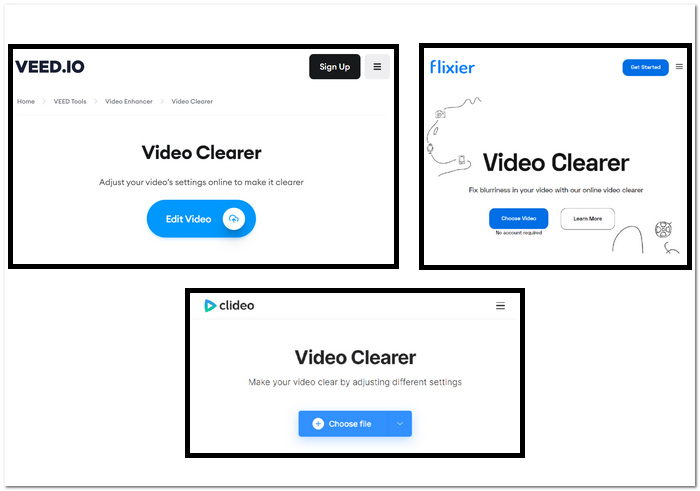
Βήματα για τη διόρθωση εικονοστοιχειωμένων βίντεο με χρήση διαδικτυακών εργαλείων:
Βήμα 1. Επιλέξτε ένα από τα διαδικτυακά εργαλεία παραπάνω και μεταβείτε στον ιστότοπό του.
Βήμα 2. Κάντε drag and drop το βίντεό σας MOV ή MP4 ή ανεβάστε το από τους τοπικούς σας φακέλους.
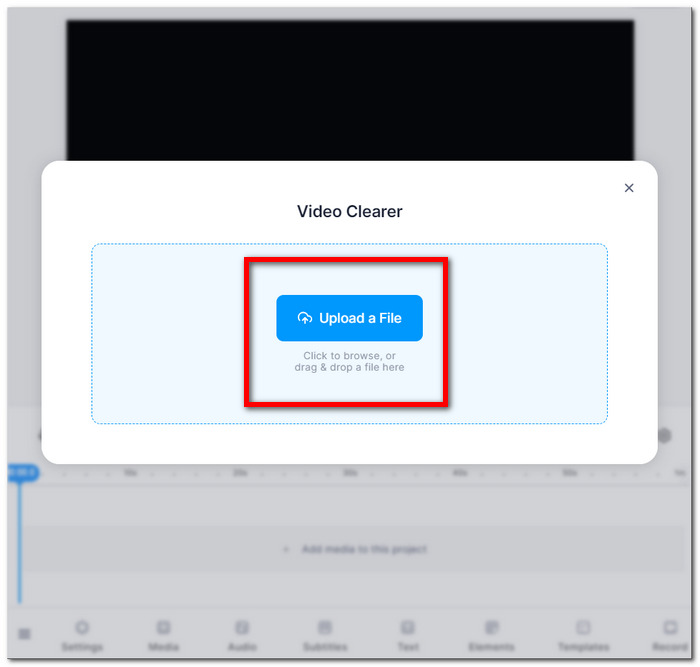
Βήμα 3. Προσαρμόστε τις ρυθμίσεις του βίντεο, όπως φωτεινότητα, αντίθεση, κορεσμό κ.λπ.
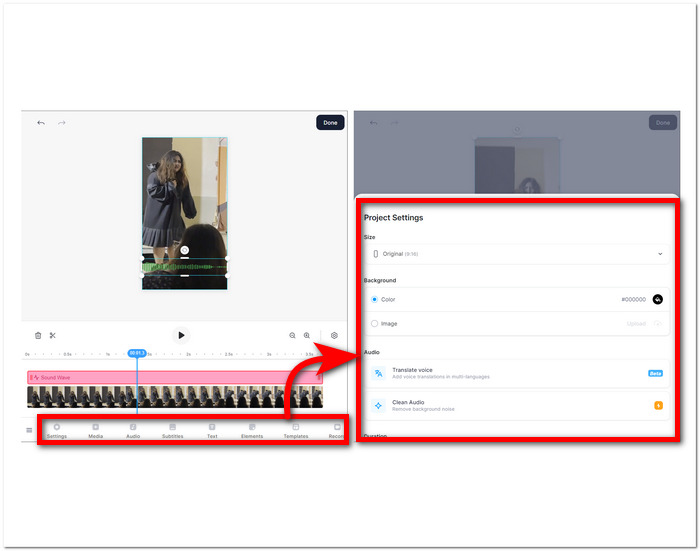
Βήμα 4. Όταν είστε ικανοποιημένοι με τις επεξεργασίες σας, κάντε κλικ στο Done και συνεχίστε πατώντας το κουμπί Export ή Download για να αποθηκεύσετε το βίντεό σας.
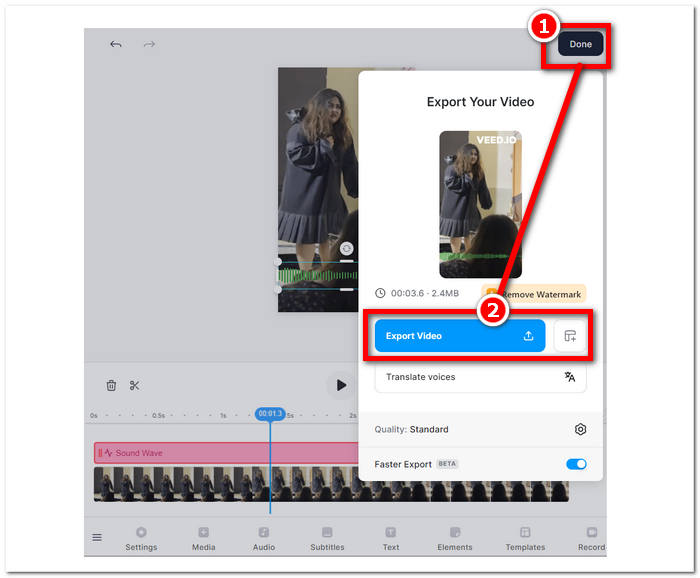
Αυτές οι οδηγίες θα σας βοηθήσουν να βελτιώσετε την ποιότητα των ταινιών σας με pixel χωρίς να πληρώσετε για πρόσθετο λογισμικό. Δοκιμάστε διάφορες τεχνικές για να δείτε ποια ταιριάζει καλύτερα στους στόχους σας για τη βελτίωση της ποιότητας και της ιδιαιτερότητας των βίντεό σας.
Μέρος 3. Πώς να κάνετε το βίντεο λιγότερο pixelated σε Windows & Mac
1. Video Converter Ultimate
Σας παρουσιάζουμε το Video Converter Ultimate, ένα ολοκληρωμένο «εργαλειοθήκη» βίντεο σχεδιασμένο για να αναβαθμίσει την πολυμεσική σας εμπειρία. Αυτό το ισχυρό εργαλείο σάς επιτρέπει να μετατρέπετε, να βελτιώνετε, να συμπιέζετε και να επεξεργάζεστε απρόσκοπτα αρχεία βίντεο και ήχου, όλα με εξαιρετικά υψηλή ταχύτητα. Είτε θέλετε να αλλάξετε τη μορφή των βίντεό σας, να ενισχύσετε την ποιότητα εικόνας και ήχου, να μειώσετε το μέγεθος των αρχείων χωρίς να θυσιάσετε την ποιότητα, είτε να προσθέσετε μια επαγγελματική πινελιά μέσω ομαλής επεξεργασίας, η ολοκληρωμένη εργαλειοθήκη βίντεο καλύπτει κάθε σας ανάγκη. Ζήστε την ευκολία μιας ενιαίας, ευέλικτης πλατφόρμας που ικανοποιεί όλες τις πολυμεσικές σας απαιτήσεις, εξασφαλίζοντας αποτελεσματικότητα χωρίς συμβιβασμούς σε ταχύτητα ή ποιότητα.
Βήματα χρήσης του Video Converter Ultimate:
Βήμα 1. Εγκαταστήστε και εκτελέστε το λογισμικό στον υπολογιστή σας.
Δωρεάν λήψηΓια Windows 7 ή νεότεραΑσφαλής λήψη
Δωρεάν λήψηΓια MacOS 10.7 ή νεότεροΑσφαλής λήψη
Βήμα 2. Στην κύρια διεπαφή, εντοπίστε την ενότητα Toolbox και, εκεί, κάντε κλικ στο Video Enhancer.
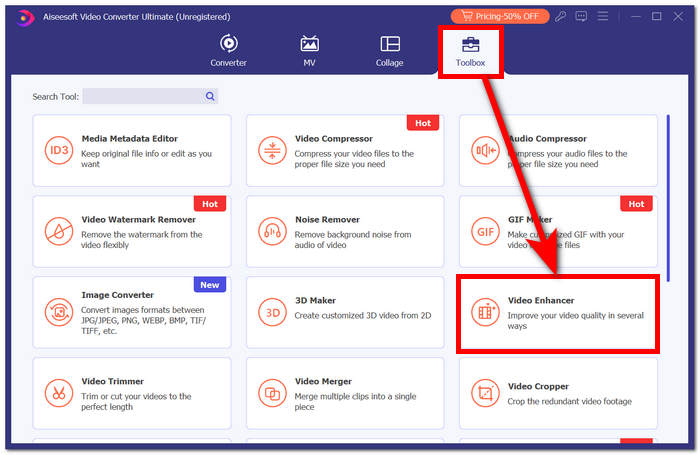
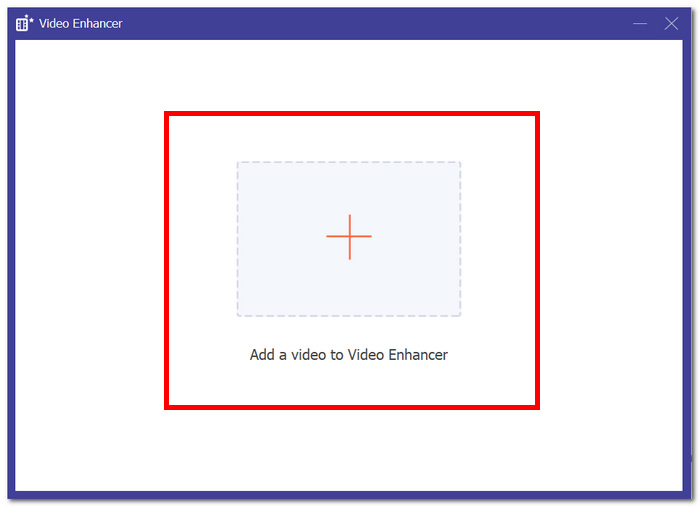
Βήμα 3. Κάντε κλικ στο + για να προσθέσετε ένα βίντεο στο Video Enhancer.
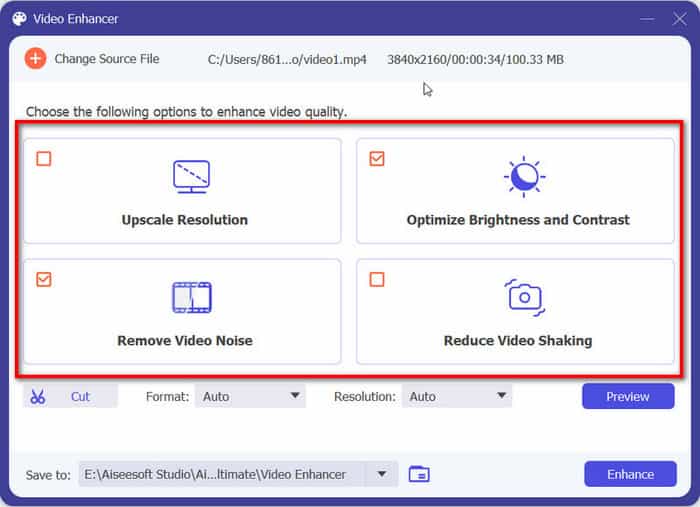
Βήμα 4. Το τελευταίο βήμα είναι να ρυθμίσετε τις επιλογές σας για να βελτιώσετε το βίντεο. Μπορείτε να κάνετε Upscale Resolution και Preview. Όταν είστε ικανοποιημένοι με τις αλλαγές, κάντε κλικ στο κουμπί Enhance για να εξαχθεί και να αποθηκευτεί το βίντεό σας χωρίς εικονοστοιχείωση στον υπολογιστή σας.
Με την εμπειρία FVC Video Converter Ultimate, η άνεση μιας ενιαίας, ευέλικτης πλατφόρμας καλύπτει όλες τις ανάγκες πολυμέσων σας, εξασφαλίζοντας αποτελεσματικότητα χωρίς συμβιβασμούς στην ταχύτητα ή την ποιότητα.
2. Επισκευή βίντεο Aiseesoft
Το Aiseesoft Video Repair είναι μια ισχυρή λύση για την ανάκτηση βίντεο που έχουν επηρεαστεί από χαμένα, κατεστραμμένα δεδομένα και εικονοστοιχειωμένη εικόνα. Αυτό το ισχυρό πρόγραμμα απαιτεί μόνο ένα δείγμα βίντεο στην ίδια μορφή για την αποκατάσταση. Το λογισμικό είναι εύχρηστο και μπορεί να επιδιορθώσει διάφορους τύπους αρχείων βίντεο, συμπεριλαμβανομένων των MP4, MOV, AVI, WMV και FLV. Μπορεί επίσης να επισκευάσει βίντεο που έχουν καταστραφεί, εικονοστοιχειωθεί, προσβληθεί από ιούς ή παρουσιάζουν σφάλματα στο σύστημα αρχείων. Το Aiseesoft Video Repair είναι ένα εξαιρετικό εργαλείο για όσους έχουν καταστρέψει κατά λάθος ένα βίντεο ή χρειάζονται να επιδιορθώσουν ένα βίντεο που έχει υποστεί ζημιά λόγω προβλήματος υλικού ή λογισμικού.
Βήματα χρήσης του Aiseesoft Video Repair:
Βήμα 1. Από τον ιστότοπό τους, κατεβάστε το λογισμικό και, μετά την εγκατάσταση, εκτελέστε το στον υπολογιστή σας.
Δωρεάν λήψηΓια Windows 7 ή νεότεραΑσφαλής λήψη
Δωρεάν λήψηΓια MacOS 10.7 ή νεότεροΑσφαλής λήψη
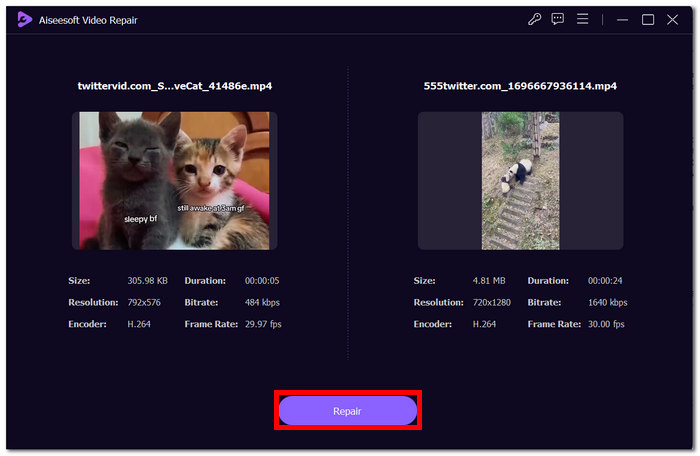
Βήμα 2. Στη διεπαφή του λογισμικού, προσθέστε το εικονοστοιχειωμένο αρχείο βίντεο κάνοντας κλικ στο κόκκινο κουμπί + στα αριστερά και, στη συνέχεια, προσθέστε ένα δείγμα βίντεο κάνοντας κλικ στο μοβ κουμπί + στα δεξιά.
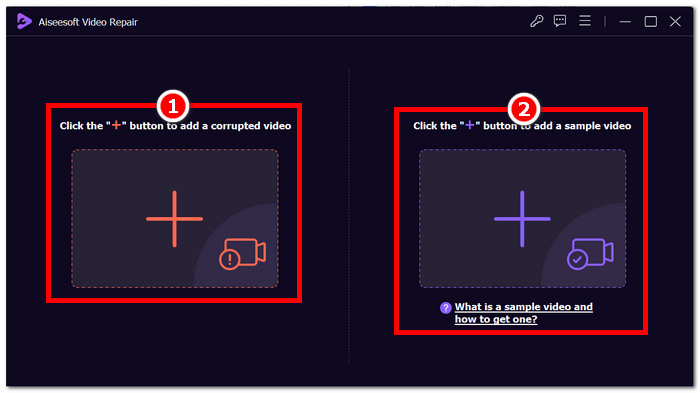
Βήμα 3. Αφού προσθέσετε το εικονοστοιχειωμένο και το δείγμα βίντεο, κάντε κλικ στο Repair για να ξεκινήσει η διαδικασία και, στη συνέχεια, στο Preview για να ελέγξετε την ποιότητα.
Βήμα 4. Όταν μείνετε ικανοποιημένοι με τα αποτελέσματα, κάντε κλικ στο Save για να αποθηκεύσετε το πλέον διορθωμένο βίντεό σας.
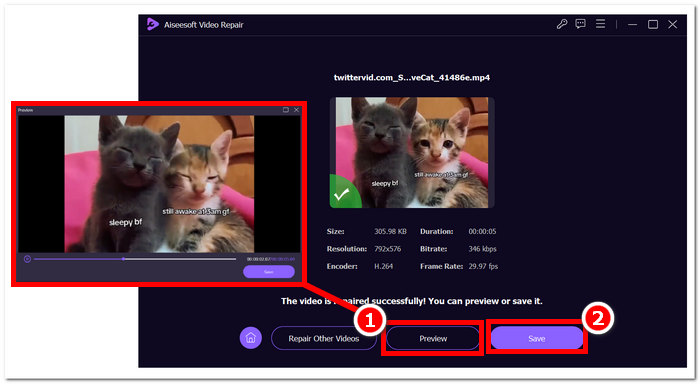
Η φιλική προς τον χρήστη διεπαφή και οι προηγμένες δυνατότητές του προσφέρουν έναν γρήγορο και αποτελεσματικό τρόπο για να αναζωογονήσετε τα παραβιασμένα βίντεο, καθιστώντας το ένα χρήσιμο εργαλείο για επισκευή βίντεο.
Μέρος 4. Συχνές ερωτήσεις σχετικά με τη διόρθωση βίντεο με εικονοστοιχεία
Μπορεί να διορθωθεί το pixelation;
Ναι, το pixelation μπορεί συχνά να διορθωθεί χρησιμοποιώντας διάφορες μεθόδους και εργαλεία. Είτε μέσω διαδικτυακών πλατφορμών, είτε μέσω λογισμικού επεξεργασίας βίντεο, είτε μέσω εξειδικευμένων αλγορίθμων, υπάρχουν τρόποι αντιμετώπισης των pixelation και βελτίωσης της συνολικής ποιότητας ενός βίντεο. Η αποτελεσματικότητα της λύσης μπορεί να εξαρτάται από τη σοβαρότητα και τη βασική αιτία της pixelation.
Γιατί συμβαίνει το pixelation;
Το pixelation οφείλεται σε διάφορους παράγοντες, συμπεριλαμβανομένων των βίντεο με χαμηλότερη ανάλυση, έχουν λιγότερα pixel, καθιστώντας τα μεμονωμένα pixel πιο αισθητά, ειδικά όταν είναι τεντωμένα ή προβάλλονται σε μεγαλύτερες μορφές. Τα βίντεο με χαμηλότερη ανάλυση έχουν λιγότερα pixel, καθιστώντας τα μεμονωμένα pixel πιο αισθητά, ειδικά όταν είναι τεντωμένα ή προβάλλονται σε μεγαλύτερες μορφές. Η μετατροπή βίντεο μεταξύ διαφορετικών μορφών ή κωδικοποιητών μπορεί να οδηγήσει σε pixelation εάν δεν γίνει σωστά, καθώς ορισμένες πληροφορίες ενδέχεται να χαθούν. Η κατανόηση της συγκεκριμένης αιτίας της pixelation είναι ζωτικής σημασίας για τον προσδιορισμό της πιο αποτελεσματικής μεθόδου για την επίλυσή της.
Η βελτίωση της ποιότητας βίντεο διορθώνει το pixelation του βίντεο;
Ναι, η βελτίωση της συνολικής ποιότητας του βίντεο μπορεί συχνά να βοηθήσει στην αντιμετώπιση των προβλημάτων εικονοστοιχείωσης. Αντιμετωπίζοντας παράγοντες όπως η ανάλυση, η συμπίεση και το transcoding, μπορείτε να ενισχύσετε την καθαρότητα και να μειώσετε την ορατότητα των μεμονωμένων εικονοστοιχείων. Η αύξηση της ανάλυσης βίντεο, η προσαρμογή των ρυθμίσεων συμπίεσης και η χρήση εξοπλισμού καλύτερης ποιότητας κατά την παραγωγή του βίντεο είναι όλες αποτελεσματικές στρατηγικές για τη βελτίωση της ποιότητας και τον περιορισμό της εικονοστοιχείωσης. Ωστόσο, η επιτυχία αυτών των μεθόδων εξαρτάται από την αρχική ποιότητα του βίντεο και τον βαθμό της υπάρχουσας εικονοστοιχείωσης.
συμπέρασμα
Η δωρεάν επιδιόρθωση βίντεο με pixel στο διαδίκτυο είναι μια προσιτή δεξιότητα που μπορεί να βελτιώσει την ποιότητα του περιεχομένου σας. Είτε επιλέγετε φιλικές προς τον χρήστη πλατφόρμες όπως το Google Photos είτε εξειδικευμένα εργαλεία όπως το Fix. Η επισκευή pixel mastering βίντεο σάς δίνει τη δυνατότητα να παράγετε βίντεο με κρυστάλλινα γραφικά. Θυμηθείτε να κατανοήσετε τα αίτια της δημιουργίας εικονοστοιχείων, να εξερευνήσετε διάφορα διαδικτυακά εργαλεία και να εφαρμόσετε μη αυτόματες τεχνικές για να εξασφαλίσετε τη βέλτιστη ποιότητα βίντεο σε μελλοντικά έργα. Πείτε αντίο στο pixelation και γεια σε μια πιο ομαλή, πιο ευχάριστη εμπειρία θέασης!
-
 Top 7 δωρεάν επισκευή βίντεο: Επαναφέρετε τα κατεστραμμένα βίντεό σας
 Ανακαλύψτε τις καλύτερες 7 δωρεάν επισκευές βίντεο στο διαδίκτυο για να διορθώσετε κατεστραμμένα ή κατεστραμμένα αρχεία βίντεο. Ζωντανέψτε τις πολύτιμες αναμνήσεις σας με αυτά τα κορυφαία εργαλεία επισκευής βίντεο.
-
 Πώς να διορθώσετε το θολό βίντεο: Αναμένουν πεντακάθαρα βίντεο
 Πώς να καθαρίσετε ένα θολό βίντεο; Μην αφήνετε τα θολά βίντεο να μειώνουν το περιεχόμενό σας. βρείτε λύσεις για κρυστάλλινη προβολή για να επιτύχετε βίντεο με επαγγελματική εμφάνιση.
-
 Οδηγός για τον τρόπο επιδιόρθωσης βίντεο που δεν παίζουν σε τηλέφωνα Android
 Θέλετε να μάθετε τους λόγους για τους οποίους δεν μπορούν να αναπαραχθούν τα βίντεο στη συσκευή σας Android; Εάν ναι, για να διορθώσετε το πρόβλημα μόνοι σας, μπορείτε να συνεχίσετε να διαβάζετε για να μάθετε περισσότερα.
