


 Video Converter Ultimate
 Εγγραφή οθόνης
 Επισκευή βίντεο
Το 5 καλύτερο MP4 Cutter: Μάθετε πώς να αποκόπτετε βίντεο σε υπολογιστή, Mac και φορητές συσκευές
Αν είστε vlogger ή φιλόδοξοι, η λήψη ενός βίντεο με τον εαυτό σας είναι πολύ συνηθισμένη. Αυτό θα απαιτούσε πολλή προσπάθεια και αυτοπεποίθηση, καθώς και να φωτογραφίζετε μπροστά σε μια κάμερα. Επίσης, το πιο συνηθισμένο πράγμα που όλοι οι επαγγελματίες και νέοι στο vlogging είναι τα λάθη που κάνετε. Αντί να ξαναγυρίσουν το βίντεο, τείνουν να το κόβουν και να συγχωνεύονται με τα αρχικά βίντεο. Για να δημιουργήσουν ένα ολόκληρο νέο βίντεο που αποτελείται από διαφορετικές γωνίες, προβολές, μοντάζ και άλλα, το κόβουν από διαφορετικά βίντεο και το προσθέτουν σε ένα. Αλλά ως νέος σε αυτό το είδος εργασίας ή ακόμα και επαγγελματίας, η επιλογή του σωστού ψαλιδιού είναι δύσκολη. Γιατί δεν είναι όλες οι λειτουργίες όπως είπαν στη διαφήμιση του εργαλείου δεν είναι στα εργαλεία. Αντί να πάτε στο άλλο άρθρο και να διαβάσετε τη σύσταση, γιατί δεν μαθαίνετε πρώτα από αυτό. Καθώς συγκεντρώσαμε μόνο τα πραγματικά στοιχεία για δικό σας κέρδος. Έτσι, εδώ στη λίστα είναι οι κόφτες MP4 που μπορείτε να χρησιμοποιήσετε για να ξεκινήσετε το vlogging. Μείνετε εστιασμένοι για να μάθετε ποια είναι τα καλύτερα μηχανήματα κοπής που μπορείτε να χρησιμοποιήσετε και τα οποία παρέχουν μια απλή αλλά επαγγελματική προοπτική στα βίντεό σας.

Μέρος 1. Κατεβάστε το καλύτερο λογισμικό MP4 Video Cutter σε PC και Mac
Αν πρόκειται να μιλήσουμε για το καλύτερο, τότε πρέπει πρώτα να δώσεις προτεραιότητα στην ανάγνωση αυτού. Όπως ειπώθηκε και νωρίτερα, η δημιουργία vlogs είναι πολύ πιο δύσκολη απ’ όσο περιμέναμε, όχι μόνο ως προς την αυτοπεποίθηση μπροστά στην κάμερα και το ανέβασμά τους. Πρέπει επίσης να σκεφτείς να έχεις και ένα πολυεργαλείο. Ένα εργαλείο που προσφέρει πιο ελκυστικό βίντεο στα μάτια κάθε θεατή. Το FVC Video Converter Ultimate προσφέρει εντυπωσιακές δυνατότητες επεξεργασίας και μετατροπής, που μπορεί να χρησιμοποιήσει όποιος θέλει. Είτε είσαι αρχάριος είτε επαγγελματίας, πρέπει να λάβεις υπόψη σου τα καλύτερα από τα καλύτερα στην αγορά. Αν και πρόκειται για επί πληρωμή έκδοση, εξακολουθεί να προσφέρει ό,τι καλύτερο μπορείς να έχεις. Κι αν το επιλέξεις ως προσωπική σου λύση, τότε σε περιμένει ένα φωτεινό μέλλον. Θέλεις να ξεκινήσεις το vlogging σήμερα; Τότε ακολούθησε αυτά τα βήματα για το πώς να χρησιμοποιήσεις αυτό το κόφτη βίντεο MP4.
Βήμα 1. Κάνε κλικ στο κουμπί λήψης παρακάτω και εγκατέστησέ το στον υπολογιστή σου Windows ή στο Mac σου. Ακολούθησε τα βήματα εγκατάστασης του εργαλείου και κάνε κλικ στο Τέλος για να εκκινήσεις το λογισμικό.
Δωρεάν ΛήψηΓια Windows 7 ή νεότεραΑσφαλής λήψη
Δωρεάν ΛήψηΓια MacOS 10.7 ή νεότεροΑσφαλής λήψη
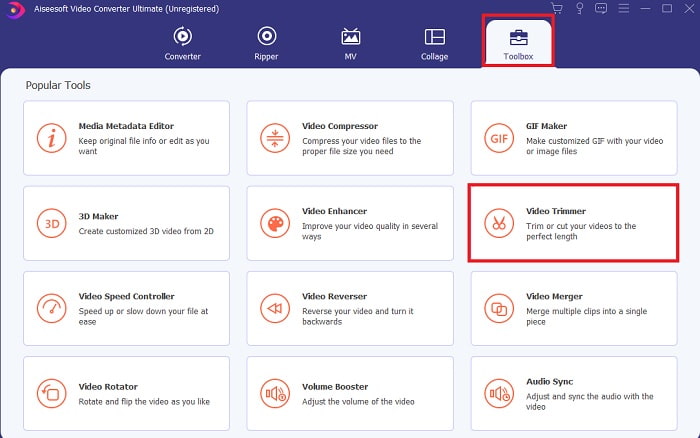
Βήμα 2. Αν αυτό εμφανίζεται στην οθόνη σου, τότε κάνε κλικ στη Γραμμή εργαλείων (Toolbar) και αναζήτησε παρακάτω το Video Trimmer.
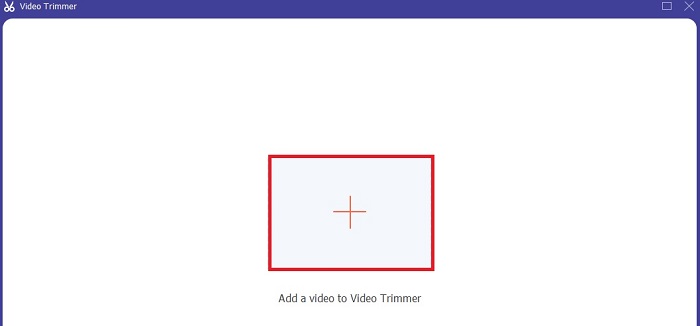
Βήμα 3. Κάνε κλικ στο κουμπί συν για να προσθέσεις το αρχείο. Επίλεξε το αρχείο στον δίσκο σου που θέλεις να κοπεί και κάνε κλικ στο Άνοιγμα (open) για να εισαγάγεις το βίντεο.
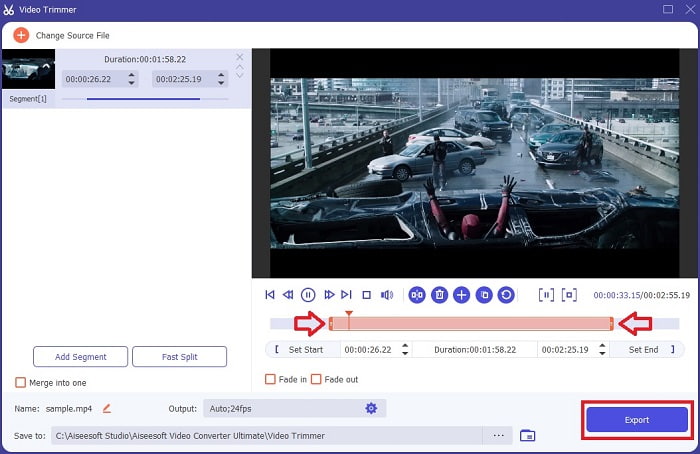
Βήμα 4. Ρύθμισε το σημείο έναρξης και λήξης του βίντεό σου χειριζόμενος τα playback in και out ώστε να ορίσεις τη διάρκεια που θέλεις. Πρόσθεσε fade in και fade out αν το επιθυμείς. Μπορείς επίσης να αλλάξεις και το προφίλ εξόδου του πολυμέσου αν κάνεις κλικ στο κουμπί με το γρανάζι (cog). Όταν τελειώσεις, κάνε κλικ στο κουμπί Export για να ξεκινήσει η διαδικασία κοπής.
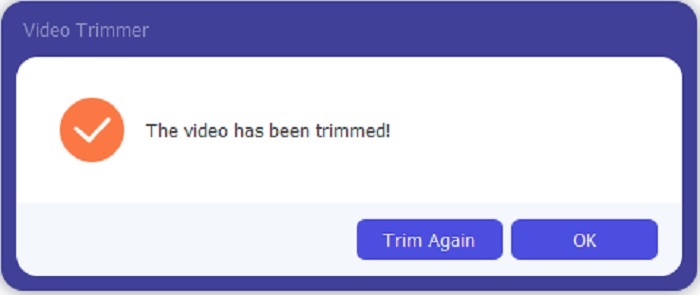
Βήμα 5. Περίμενε μόλις για ένα δευτερόλεπτο και το βίντεό σου θα έχει ήδη κοπεί. Έπειτα κάνε κλικ στο OK ή στο Trim Again αν χρειάζεται να κόψεις κι άλλο βίντεο. Αν θέλεις να βελτιώσεις το βίντεο που μόλις δημιούργησες, κάνε ξανά κλικ στη γραμμή εργαλείων και αναζήτησε το video enhancer.
Το πλεονέκτημα της ύπαρξης ενός εργαλείου συγχώνευσης που παρέχεται από το FVC Video Converter Ultimate with Steps
Σε αντίθεση με οποιαδήποτε άλλη εφαρμογή, η συγχώνευση βίντεο στο FVC Video Converter Ultimate είναι εξαιρετικά εύκολη. Αυτή είναι μια δυνατότητα μπόνους εάν αποκτήσετε αυτό το εργαλείο. Όπως ειπώθηκε, αυτό το εργαλείο είναι πολλαπλών χρήσεων, οπότε χωρίς περαιτέρω καθυστέρηση, ας αρχίσουμε να συγχωνεύουμε διαφορετικά βίντεο σε ένα.
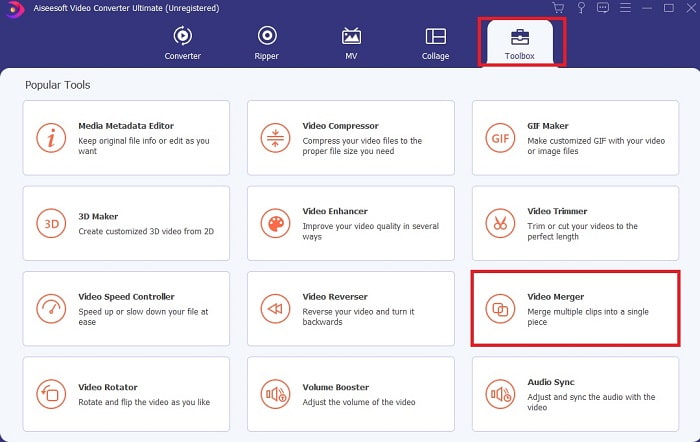
Βήμα 1. Άνοιξε το λογισμικό και πήγαινε στη Γραμμή εργαλείων (Toolbar), έπειτα εντόπισε το Video Merger και κάνε κλικ πάνω του.
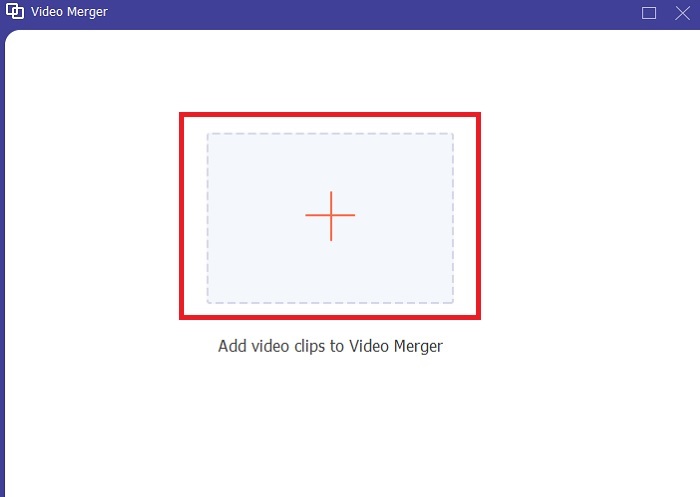
Βήμα 2. Κάνε κλικ στο κουμπί add και επίλεξε το βίντεο που θέλεις να συγχωνεύσεις, έπειτα κάνε κλικ στο open για να συνεχίσεις. Αφού επιλέξεις το πρώτο αρχείο, κάνε κλικ στο σύμβολο συν για να προσθέσεις και το άλλο αρχείο που θέλεις να συγχωνεύσεις.
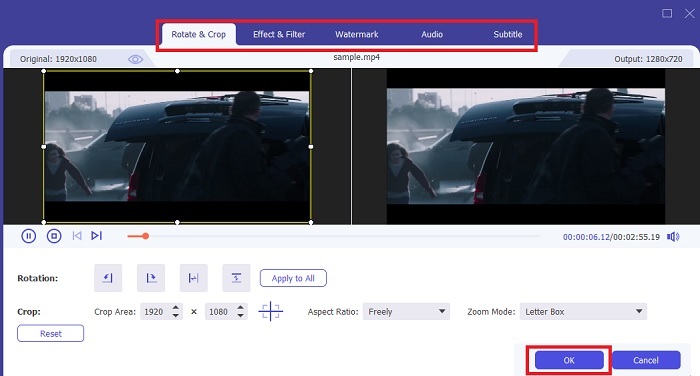
Βήμα 3. Στη διεπαφή, κάνε κλικ στο κουμπί με το μαγικό ραβδί (wand) για να προσθέσεις εφέ, να βελτιώσεις τον ήχο, να περιστρέψεις ή να περικόψεις και να προσθέσεις υπότιτλους. Για να αποθηκεύσεις την επεξεργασία που μόλις έκανες, κάνε κλικ στο OK. Ακολούθησε την ίδια διαδικασία και για τα υπόλοιπα βίντεο, αν θέλεις.
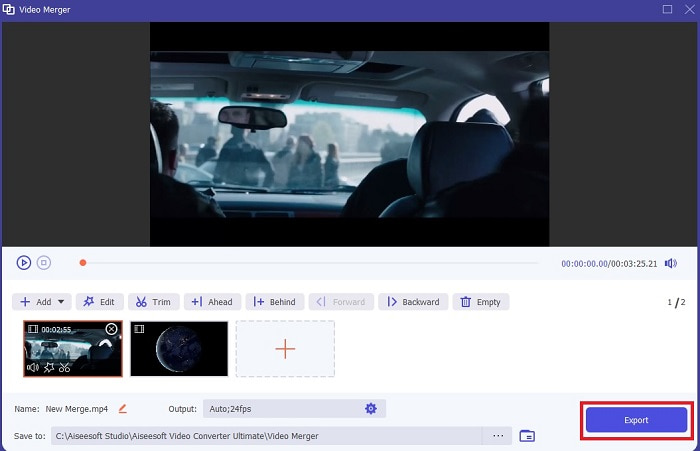
Βήμα 4. Όταν είσαι έτοιμος να ξεκινήσεις τη διαδικασία, κάνε κλικ στο Export. Μόλις ολοκληρωθεί η εξαγωγή, θα εμφανιστεί ένας διαχειριστής αρχείων στην οθόνη σου. Για να παρακολουθήσεις το εξαγόμενο βίντεο, απλώς κάνε κλικ σε αυτό και απόλαυσε.
Μέρος 2. Οι καλύτεροι κοπτήρες MP4 στο Διαδίκτυο
Μπορεί να είναι ένας καλός κόφτης, αλλά δεν είναι ο καλύτερος, όπως το FVC Video Converter Ultimate. Ωστόσο, αξίζει να δοκιμάσεις αυτούς τους online κόφτες MP4.
1. 123 Εφαρμογές Online Video Cutter
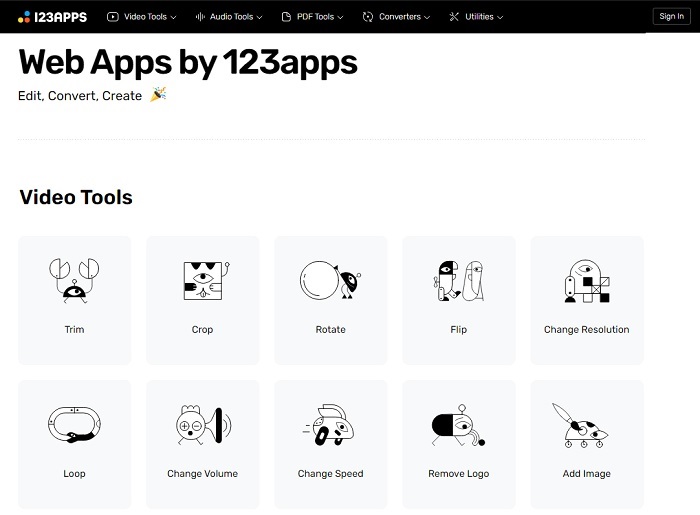
Αυτό το πρώτο διαδικτυακό εργαλείο έχει σκοπό να κάνει τα βίντεό σας καλύτερα. Μπορεί να προσαρμόσει τη διάρκεια του βίντεο, να περικόψει, να προσθέσει κείμενο και πολλά άλλα. Αλλά αυτό το εργαλείο παίρνει πολύ χρόνο για να εξαχθεί. Μετά την εξαγωγή, πρέπει να το κατεβάσετε και αυτή η διαδικασία θα εξαρτηθεί από την ταχύτητά σας στο Διαδίκτυο. Επίσης, δεν μπορείτε να προσαρμόσετε την ποιότητα των βίντεό σας. Επομένως, εάν το βίντεό σας είναι λίγο θολό και χρειάζεται να προσαρμόσετε τα fps του, δεν μπορείτε να το κάνετε εδώ. Ωστόσο, αξίζει να προσπαθήσετε.
2. Clideo
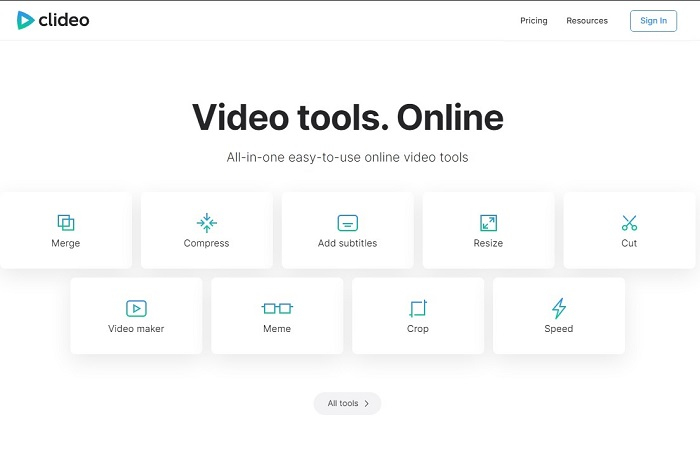
Αν μιλάμε για κοπή (trimming), τότε αυτή είναι επίσης μια καλή επιλογή. Το Clideo είναι ένας από τους καλύτερους online κόφτες MP4 που μπορείς να βρεις. Όπως και το πρώτο online εργαλείο που αναφέρθηκε παραπάνω, έτσι κι αυτό προσφέρει βασικές δυνατότητες επεξεργασίας. Αν και υποστηρίζει βασική επεξεργασία, δεν είναι αρκετό αν θέλεις να δημιουργήσεις ένα πραγματικά εντυπωσιακό, «eye‑catching» βίντεο. Παρ’ όλα αυτά, μπορείς να το δοκιμάσεις online χωρίς ανησυχία, είναι δωρεάν και ασφαλές.
Μέρος 3. 3 Καλύτερες εφαρμογές MP4 Cutter σε Android και iOS
Τι γίνεται αν δεν έχετε επιτραπέζιο υπολογιστή για να χρησιμοποιήσετε τα παραπάνω εργαλεία και θέλετε να γίνετε vlogger, είναι ακόμα δυνατό; Εάν έχετε ένα τηλέφωνο όπως το Android ή το iOS, μπορείτε να χρησιμοποιήσετε αυτές τις εφαρμογές για να κάνετε επεξεργασία στα τηλέφωνά σας. Αλλά υπάρχουν ορισμένες λειτουργίες που είναι διαθέσιμες παραπάνω και δεν είναι εδώ. Επομένως, συνεχίστε να διαβάζετε παρακάτω για να μάθετε ποια είναι αυτά τα εργαλεία και επιλέξτε από αυτά.
1. iMovie για iOS
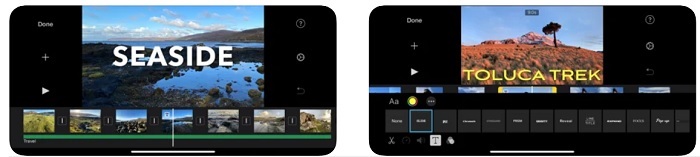
Αν θέλεις να δώσεις μια αίσθηση Χόλιγουντ στο βίντεό σου, τότε το iMovie είναι το κατάλληλο λογισμικό. Αυτή η εφαρμογή κοπής MP4 έχει δημιουργηθεί μόνο για χρήστες iOS. Παρόλο που το εργαλείο προσφέρει προηγμένες δυνατότητες επεξεργασίας, κάποια σφάλματα (bugs) δεν έχουν ακόμη διορθωθεί. Σε ορισμένες περιπτώσεις, η εφαρμογή κρασάρει κάθε φορά που προσπαθείς να επεξεργαστείς και η οθόνη γίνεται μαύρη. Μερικές φορές ο ήχος και η εικόνα δεν είναι συγχρονισμένα λόγω των κολλημάτων. Αυτά είναι μερικά ενδεικτικά προβλήματα· μπορεί να φαίνονται μικρά, αλλά είναι ιδιαίτερα εκνευριστικά τις περισσότερες φορές. Αν πάντως θέλεις να δοκιμάσεις το iMovie, μπορείς ακόμα να το κατεβάσεις από το App Store.
2. Video Editor & Maker – Viva Video για Android
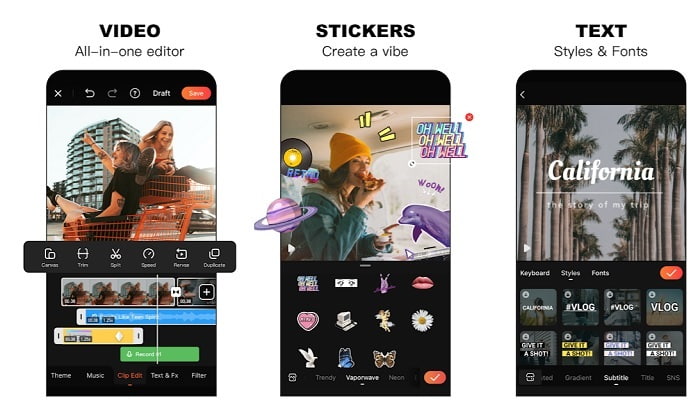
Ένας από τους καλύτερους δωρεάν κόφτες MP4 στο Android είναι το Video Editor & Maker – Viva Video. Όπως και το προηγούμενο εργαλείο, έτσι κι αυτό προσφέρει εξαιρετικές δυνατότητες επεξεργασίας σε κινητά. Όπως μεταβάσεις στο βίντεο, glitch εφέ και άλλα, αλλά πρόκειται για εργαλείο επί πληρωμή. Υπάρχει η περίπτωση να μην είναι ιδανικό, γιατί δεν υπάρχει κουμπί διακοπής συνδρομής μέσα στην εφαρμογή. Έτσι, ίσως να νομίσεις ότι η καλύτερη λύση είναι να διαγράψεις την εφαρμογή για να λήξει η συνδρομή, αλλά αυτό δεν θα συμβεί. Η χρέωση στην πιστωτική σου κάρτα θα συνεχιστεί αν έχεις επιλέξει αυτόν τον τρόπο πληρωμής. Πάντως, συνολικά, το εργαλείο είναι κλάσης Α, τίποτα περισσότερο και τίποτα λιγότερο.
Μέρος 4. Συχνές ερωτήσεις σχετικά με το MP4 Cutter
Τι είναι ένα MP4;
Το MP4 είναι επίσης γνωστό ως μορφή πολυμέσων πολλαπλών χρήσεων. Αντί να αποθηκεύει έναν κωδικό, αποθηκεύει δεδομένα βίντεο, φωτογραφιών, υπότιτλων ή κειμένων. Επίσης, είναι η πιο συχνά χρησιμοποιούμενη μορφή βίντεο σε όλο τον κόσμο.
Είναι το MP4 με απώλειες ή χωρίς απώλειες;
Όντας μια μορφή πολλαπλών χρήσεων, το MP4 είναι συμπίεση με απώλειες.
Ποια είναι η καλύτερη μορφή εκτός από το MP4;
Υπάρχουν ορισμένες μορφές που προσφέρουν καλύτερο αποτέλεσμα πολυμέσων από το MP4, αλλά δεν είναι τόσο ευέλικτες όσο αυτή η μορφή. Για παράδειγμα, το WMV: αυτή η μορφή προσφέρει μικρότερο μέγεθος αρχείου από το MP4, αλλά δεν είναι συμβατή με τις συσκευές Apple, επειδή προορίζεται ως εγγενής μορφή για το Windows Media Player. Μπορείς να επιλέξεις να μετατρέψεις τα αρχεία MP4 σου σε WMV για καλύτερη αναπαραγωγή.
συμπέρασμα
Κλείνοντας, τώρα είναι πιο εύκολο να κατανοήσεις τη διαφορά κάθε εργαλείου που μπορείς να χρησιμοποιήσεις. Όμως, όπως ειπώθηκε και νωρίτερα, δεν προσφέρουν όλα τις εξαιρετικές δυνατότητες κοπής που μπορεί να προσφέρει το FVC Video Converter Ultimate. Ειδικά αν θέλεις να δημιουργήσεις πιο ελκυστικά βίντεο, ώστε να κερδίσεις περισσότερες προβολές και κέρδος. Οπότε, αντί να συμβιβαστείς με μια προσωρινή λύση, γιατί να μην επιλέξεις το FVC Video Converter Ultimate για να αντιμετωπίσεις το μέλλον και να αποκτήσεις την καλύτερη εκδοχή για εσένα;.
-
 Οδηγός για το πώς να μετατρέψετε το RMVB σε MP4 σε Windows / Mac (3 δωρεάν τρόποι)
 Θέλετε να μετατρέψετε το RMVB σε MP4 για εύκολη αναπαραγωγή στον υπολογιστή σας ή στο κινητό τηλέφωνο; Θα βρείτε απλούς τρόπους για να μετατρέψετε τα αρχεία RMVB σε MP4 σε αυτόν τον οδηγό.
-
 4 καλύτεροι μετατροπείς MP4 σε M4V για να μετατρέψετε τα βίντεο MP4 σε M4V με ευκολία
 Όταν πρέπει να αλλάξετε αρχεία MP4 σε M4V, θα πρέπει να μάθετε περισσότερες λεπτομέρειες σχετικά με τις διαφορές μεταξύ των δύο μορφών, καθώς και τους καλύτερους μετατροπείς MP4 σε M4V από το άρθρο.
-
 Μετατροπέας AMV - 3 καλύτερες μέθοδοι για τη μετατροπή MP4 σε AMV σε Win / Mac
 Ποιοι είναι οι καλύτεροι μετατροπείς MP4 σε AMV για να μετατρέψετε τα βίντεο σε Amine Music Video, μπορείτε να μάθετε περισσότερα σχετικά με 3 πιο αποτελεσματικές μεθόδους για να αποκτήσετε εύκολα τα επιθυμητά βίντεο από το άρθρο.
