


 Video Converter Ultimate
 Εγγραφή οθόνης
 Επισκευή βίντεο
Επιλέξτε την καλύτερη συσκευή εγγραφής οθόνης GIF για εγγραφή GIF [Online και Offline]
Είναι το γεγονός ότι τα GIF είναι απλά αλλά εύκολα προσβάσιμα σε μορφή αρχείου στον Ιστό. Το μέγεθος αρχείου των GIF είναι τόσο μικρό που έγινε ένας από τους πιο αποτελεσματικούς τρόπους αποστολής βίντεο ή κινούμενων εικόνων μέσω του Διαδικτύου. Ενώ παρακολουθούσατε μια ταινία, βρήκατε μια υπέροχη σκηνή για την ταινία που παρακολουθείτε και θέλετε να τη μοιραστείτε με τους φίλους, τα αγαπημένα σας πρόσωπα ή την οικογένειά σας. Αλλά οι περισσότερες συσκευές εγγραφής οθόνης είναι σε μορφή MP4 και MOV που είναι μία από τις μεγαλύτερες μορφές μεγέθους αρχείων. Δεν είναι καινούργιο για εμάς ότι η μεταφορά αυτού του τύπου μορφής αρχείου θα διαρκέσει μία ώρα ή περισσότερο και τις περισσότερες φορές αποτυγχάνει λόγω διακοπής του διαδικτύου ή σε άλλες περιπτώσεις η μορφή καθίσταται μη διαθέσιμη επειδή δεν υποστηρίζεται όλη η τοπική συσκευή αναπαραγωγής πολυμέσων μορφές.
Καθώς κάνεις scroll στο διαδίκτυο και ψάχνεις για μια λύση, συναντάς GIF. Αυτός ο τύπος αρχείου είναι πολύ μικρότερος σε μέγεθος και εύκολος στο διαμοιρασμό. Έτσι, σκέφτεσαι ποιο είναι το καλύτερο GIF recorder που θα έπρεπε να χρησιμοποιήσεις για να καταγράψεις μια σκηνή από την ταινία που βλέπεις. Η παρακάτω λίστα παρουσιάζει μερικά δημοφιλή εργαλεία εγγραφής GIF, με τα οποία ίσως έχεις ήδη έρθει σε επαφή στο διαδίκτυο, ίσως και όχι. Συνέχισε να διαβάζεις για να μάθεις ποια είναι αυτά τα εργαλεία και πώς να τα χρησιμοποιήσεις για να καταγράφεις κινούμενες εικόνες σε μορφή GIF.

Μέρος 1. Τα καλύτερα χαρακτηριστικά που πρέπει να έχει μια συσκευή εγγραφής GIF
Πριν από οτιδήποτε άλλο, είναι απαραίτητο να επιλέξεις τον καλύτερο καταγραφέα οθόνης. Ίσως όμως αναρωτιέσαι τι πρέπει να βάλεις σε προτεραιότητα όταν διαλέγεις ένα GIF Recorder; Η παρακάτω λίστα σου δίνει μια ιδέα για το ποιες ιδιότητες πρέπει να έχει ένας πραγματικά καλός recorder.
● Πρέπει να είναι φιλικό προς τον χρήστη – Διάλεξε ένα προϊόν που δεν θα σου δημιουργεί προβλήματα κατά την εγγραφή.
● Φιλικό προς το πορτοφόλι – αυτό ισχύει μόνο αν το εργαλείο είναι επί πληρωμή. Είναι προτιμότερο να είναι οικονομικό, παρά να ξοδεύεις χρήματα για κάτι που μπορεί να προσφέρει και μια φθηνή premium έκδοση. Είναι γεγονός ότι ένα premium εργαλείο παρέχει την καλύτερη ποιότητα αποτελέσματος. Αυτό αφορά μόνο τα εργαλεία επί πληρωμή. Επομένως, τα δωρεάν online ή offline εργαλεία δεν χρειάζεται να ανησυχούν γι’ αυτό.
● Διαθεσιμότητα του προγράμματος – σε περίπτωση, για παράδειγμα, που αλλάξεις από PC σε Mac ή το αντίστροφο, δεν χρειάζεται να συνηθίσεις νέο recorder. Είναι λοιπόν απαραίτητο να επιλέξεις έναν GIF screen recorder που να είναι διαθέσιμος σε όλες τις πλατφόρμες. Επίσης, για λιγότερο μπελά, αν γίνουν αλλαγές στο πρόγραμμα, είναι προτιμότερο να είναι απλές (π.χ. στο όνομα) και όχι να αλλάζει ολόκληρο το περιβάλλον εργασίας.
● Χωρίς κακόβουλο λογισμικό ή ιούς – αυτό ισχύει τόσο για online όσο και για offline εργαλεία. Κάθε πρόγραμμα οφείλει να σου παρέχει την καλύτερη δυνατή εγγραφή με τη μέγιστη ασφάλεια. Έτσι αποφεύγονται η απώλεια δεδομένων και η διαρροή προσωπικών πληροφοριών.
Αν και αυτά είναι τα απλά χαρακτηριστικά που πρέπει να παρέχει μια συσκευή εγγραφής, η μοναδικότητα του εργαλείου που μπορείτε να επιλέξετε βρίσκεται στην παρακάτω λίστα. Βρείτε τη διαφορά μεταξύ κάθε εργαλείου και επιλέξτε την καλύτερη συσκευή εγγραφής GIF από τη λίστα για την εγγραφή σας.
Μέρος 2. Καλύτερες συσκευές εγγραφής GIF στον Ιστό
1. Δωρεάν συσκευή εγγραφής οθόνης FVC
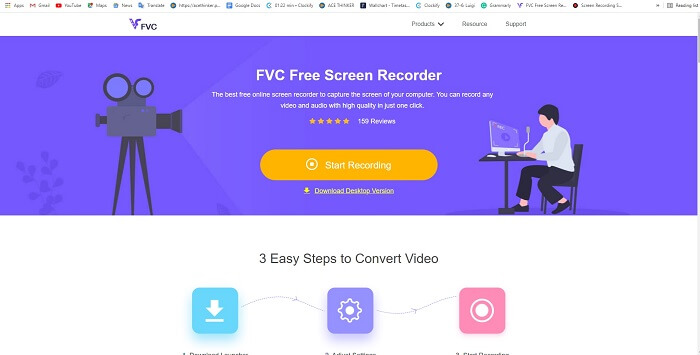
Ο καλύτερος τρόπος να μοιραστείς μια στιγμή είναι να την καταγράψεις, και ο καλύτερος τρόπος να καταγράψεις μια σκηνή ή μια ενέργεια στην οθόνη σου είναι το FVC Free Screen Recorder. Αυτό το open‑source εργαλείο επιτρέπει στον χρήστη να κάνει εγγραφή με τη βοήθεια του διαδικτύου. Αν υπάρχει σύνδεση στο internet, τότε μπορείς να χρησιμοποιήσεις αυτό το εργαλείο. Επιπλέον, υποστηρίζει τις βασικές μορφές αρχείων, codecs κ.λπ. Αν και είναι ένα ελαφρύ GIF recorder online για PC και Mac, σου δίνει μεγάλη ευκαιρία να κάνεις απεριόριστες εγγραφές χωρίς κανένα υδατογράφημα. Για να σου δείξουμε πώς να χρησιμοποιήσεις το εργαλείο, ακολούθησε τα παρακάτω βήματα.
Βήμα 1. Κάνε κλικ σε αυτόν τον σύνδεσμο για να πας στην κύρια ιστοσελίδα.
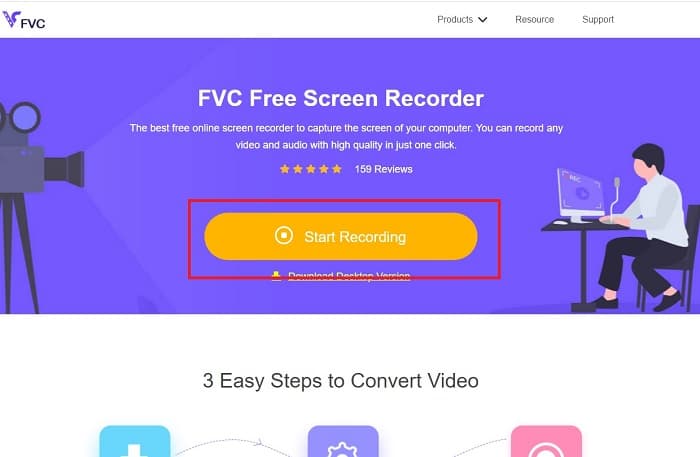
Βήμα 2. Μια ιστοσελίδα σαν αυτή θα εμφανιστεί στην οθόνη σου. Κάνε κλικ στο Start Recording και στο Allow για να εκκινήσεις το online εργαλείο.
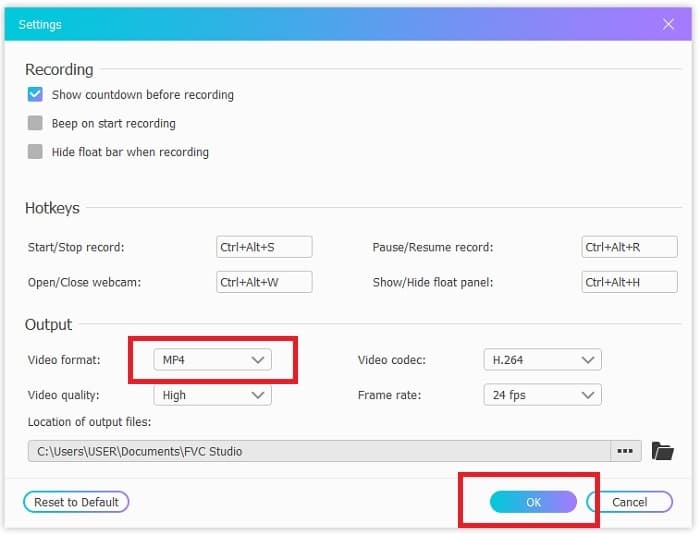
Βήμα 3. Μια πλωτή γραμμή εργαλείων θα εμφανιστεί στην οθόνη σου. Πάτησε το εικονίδιο με το γρανάζι για να πας στις ρυθμίσεις, άλλαξε τη μορφή βίντεο και τις άλλες επιλογές, αν χρειάζεται. Κάνε κλικ στο OK για να αποθηκεύσεις τις αλλαγές.
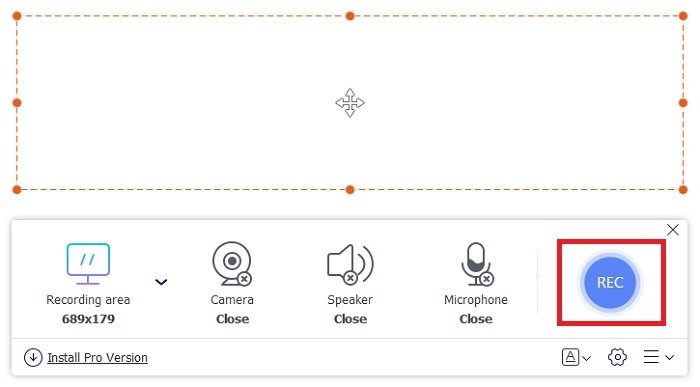
Βήμα 4. Ρύθμισε την περιοχή εγγραφής ή κάνε κλικ στο Full screen για πλήρη προβολή. Ο ήχος από τα ηχεία και το μικρόφωνο δεν περιλαμβάνονται κατά τη δημιουργία GIF, επειδή τα GIF δεν έχουν ήχο. Ωστόσο, μπορείς να προσθέσεις το πρόσωπό σου ανοίγοντας το Webcam. Όταν είσαι έτοιμος να ξεκινήσεις την εγγραφή, κάνε κλικ στο κουμπί REC για έναρξη.
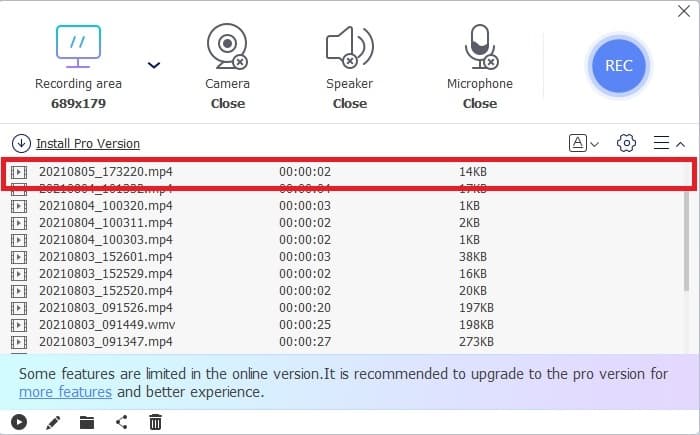
Βήμα 5. Για να τερματίσεις την εγγραφή, κάνε κλικ στο κουμπί τετράγωνο για διακοπή. Μπορείς επίσης να ελέγξεις την ολοκληρωμένη εγγραφή που έκανες στη λίστα ιστορικού.
2. Εγγραφή οθόνης FVC
Αν το δωρεάν online εργαλείο του FVC σου προκαλεί ήδη ενθουσιασμό, τότε με την εγκατάσταση αυτού του best GIF recorder – του FVC Screen Recorder – θα πάρεις το «wow» που πάντα ήθελες. Τι προσφέρει αυτό το εργαλείο ώστε να σου δώσει αυτό το αποτέλεσμα; Δεν προορίζεται μόνο για εγγραφή GIF. Παρέχει επίσης εγγραφή βίντεο και ήχου, καθώς και εντυπωσιακή καταγραφή gameplay. Κι όμως, αυτά είναι τα δευτερεύοντα χαρακτηριστικά του. Το πρόγραμμα μπορεί να παράγει διάφορες μορφές εξόδου, όπως MP4, GIF, MOV και πολλές ακόμη.
Ένα άλλο χαρακτηριστικό του είναι η δυνατότητα κλειδώματος της οθόνης, αυτό είναι το μοναδικό χαρακτηριστικό αυτού του εργαλείου, ακόμη και μια συσκευή εγγραφής βαρέων βαρών όπως η Bandicam δεν μπορεί να προσφέρει αυτήν τη δυνατότητα. Εγγραφή και στιγμιότυπο οθόνης σε μορφή GIF χωρίς να εμφανίζεται το ίδιο το εργαλείο. Το FVC Screen Recorder παρέχει τη λίρα για τον βασιλιά λίβρα στην εγγραφή. Έτσι, ανεξάρτητα από το τι ηχογραφείτε, αυτή η συσκευή εγγραφής μπορεί να το εγγράψει. Για να μάθετε πώς να χρησιμοποιείτε αυτό το εργαλείο, ακολουθήστε αυτά τα απλά βήματα για την επιτυχία της εγγραφής GIF.
Βήμα 1. Εδώ σου παρέχεται το αρχείο εγκατάστασης του εργαλείου. Διάλεξε ανάμεσα στα δύο διαθέσιμα λειτουργικά συστήματα. Εγκατέστησε το πρόγραμμα στον σκληρό σου δίσκο, άλλαξε τις προτιμήσεις σύμφωνα με τις ανάγκες σου και κάνε κλικ στο finish για να αποθηκεύσεις.
Free DownloadΓια Windows 7 ή νεότεραΑσφαλής λήψη
Free DownloadΓια MacOS 10.7 ή νεότεραΑσφαλής λήψη
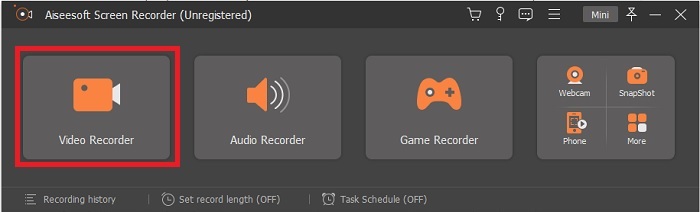
Βήμα 2. Επίλεξε το Video Recorder για να καταγράψεις ό,τι εμφανίζεται στην οθόνη σου. Οι διαθέσιμες επιλογές, όπως audio recorder και gameplay recorder, θα σου φανούν χρήσιμες αργότερα.
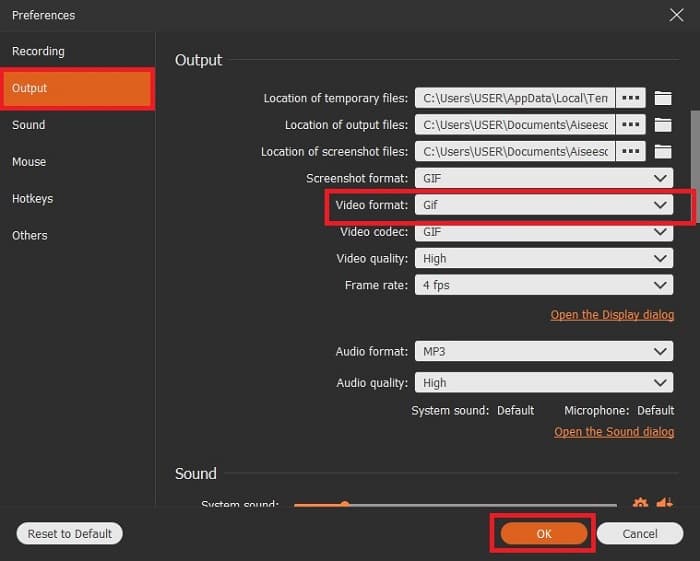
Βήμα 3. Η πλωτή γραμμή εργαλείων θα εμφανιστεί στην οθόνη σου. Πάτησε το κουμπί με το γρανάζι για να μπεις στις ρυθμίσεις και, στην καρτέλα Output, άλλαξε τη μορφή σε GIF ή σε οποιαδήποτε άλλη θέλεις να χρησιμοποιήσεις. Για να αποθηκεύσεις την προσαρμογή κάνε κλικ στο OK για να συνεχίσεις.
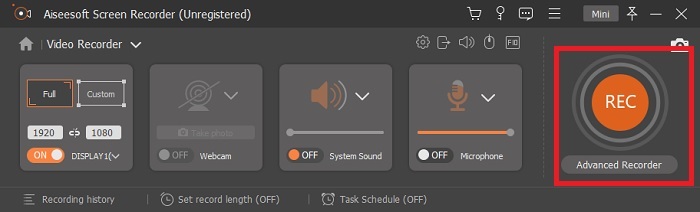
Βήμα 4. Στην κύρια γραμμή εργαλείων, ρύθμισε τις διαστάσεις της οθόνης ή, αν θέλεις πλήρη προβολή, κάνε κλικ στο full screen. Κατά την εγγραφή σε μορφή GIF, ο ήχος και το μικρόφωνο δεν έχουν σημασία. Μπορείς όμως να ενεργοποιήσεις το Webcam για να φαίνεται η αντίδρασή σου. Όταν είσαι έτοιμος, κάνε κλικ στο round κουμπί για να ξεκινήσει η εγγραφή.
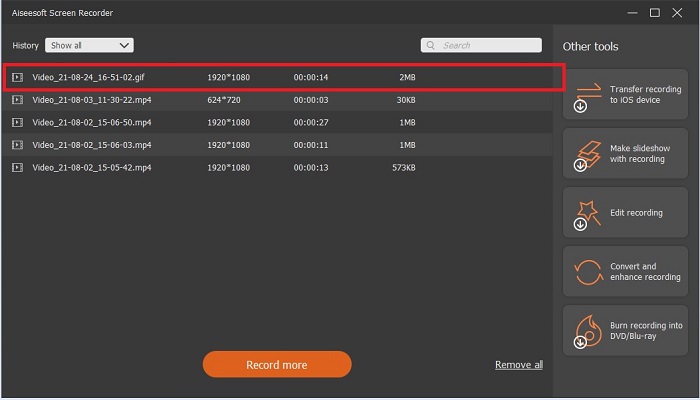
Βήμα 5. Όταν ολοκληρωθεί η εγγραφή, μπορείς να κάνεις κλικ στο κουμπί‑κύβο για να τη σταματήσεις. Πάτησε Save και Next για να αποθηκεύσεις την πρόοδο. Για να κάνεις προεπισκόπηση του GIF που κατέγραψες νωρίτερα, κάνε κλικ στο εικονίδιο με τις τρεις γραμμές και το ιστορικό των εγγραφών θα εμφανιστεί στην οθόνη σου.
3. ScreenToGif
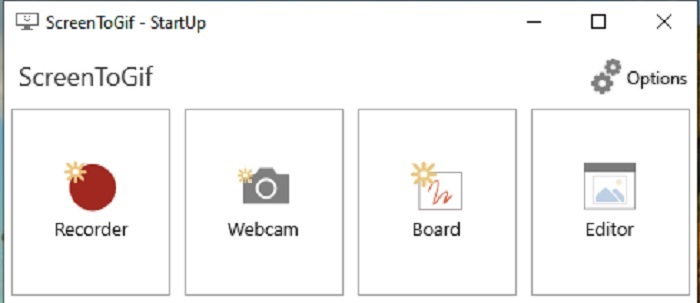
Αυτό το εργαλείο είναι ένα λογισμικό GIF recorder για Mac και PC που κατεβαίνει τοπικά και διατίθεται σε δύο εκδόσεις: Installer και Portable. Διάλεξε ποια από τις δύο θέλεις να κατεβάσεις. Ωστόσο, υπάρχουν περιπτώσεις που, όσο τρέχει το πρόγραμμα, μπορεί να συναντήσεις κάποια μικρά bugs. Επιπλέον, η μοναδική μορφή που είναι διαθέσιμη ως τελικό αποτέλεσμα είναι το .gif. Αν, λοιπόν, χρειάζεσαι άλλη μορφή, αυτό το εργαλείο δεν μπορεί να στην προσφέρει. Από την άλλη, είναι δωρεάν, οπότε αν θέλεις απλώς να ηχογραφήσεις GIF, μπορείς να το χρησιμοποιήσεις. Το περιβάλλον εργασίας όμως είναι κάπως φτωχό, κυρίως λόγω του λευκού φόντου. Δείχνει λίγο βαρετό, αλλά κάνει τη δουλειά.
4. Gyazo
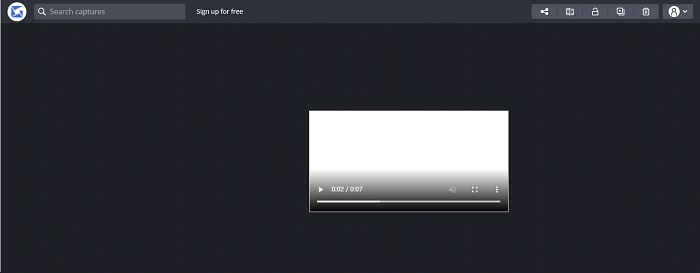
Πρόκειται για έναν από τους καλύτερους GIF recorders για Windows. Το Gyazo είναι ένα λογισμικό αφιερωμένο στην εγγραφή GIF. Μετά την εγκατάσταση, τρία εργαλεία θα κατέβουν αυτόματα στον αποθηκευτικό σου χώρο. Αποτελούν μέρος του πακέτου, αλλά διαφέρουν μεταξύ τους, όπως και στη λειτουργία τους. Αυτά τα τρία εργαλεία είναι τα Gyazo, Gyazo GIF και Gyazo Replay. Η διάρκεια εγγραφής GIF στο Gyazo GIF είναι περιορισμένη στα 7 δευτερόλεπτα. Αν λοιπόν η εγγραφή σου ξεπερνά τα 7 δευτερόλεπτα, αυτό το εργαλείο δεν είναι η καλύτερη επιλογή. Επίσης, το αποθηκευμένο βίντεο δεν κατεβαίνει αυτόματα στον υπολογιστή σου. Ανοίγει μια νέα καρτέλα στον browser σου και πρέπει να το κατεβάσεις χειροκίνητα. Η ταχύτητα λήψης του τελικού αρχείου εξαρτάται από τη σύνδεσή σου στο internet, οπότε πρόσεξε το αυτό.
5. RecordIt!
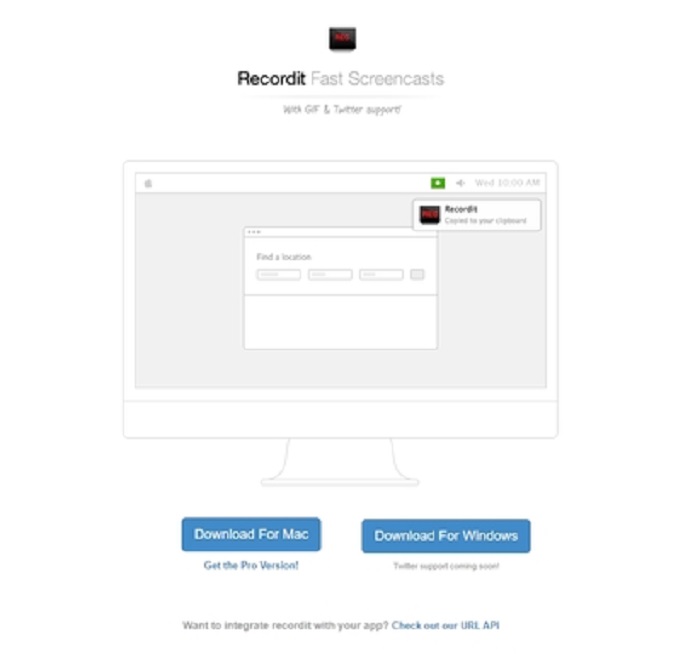
Ένα ακόμη εργαλείο για δημιουργία GIF είναι το RecordIt!, ίσως το καλύτερο GIF recorder για Mac. Το εργαλείο αυτό διαθέτει και έκδοση για Windows. Το πρόβλημα όμως είναι στη διαδικασία εγκατάστασης. Ακόμη κι αν ολοκληρώσεις όλες τις ρυθμίσεις, μπορεί να αντιμετωπίσεις δυσκολίες στο να εγκατασταθεί τελικά στο σύστημά σου. Αυτό είναι αναμενόμενο, γιατί αν δεν ενημερώνεις τις εφαρμογές στο λειτουργικό σου, το εργαλείο δεν θα κατέβει ποτέ. Υπάρχει βέβαια και μια επιλογή, αλλά μπορεί να βλάψει τον υπολογιστή σου: μπορείς να κάνεις κλικ στο ignore, να συνεχίσεις το κατέβασμα και να αγνοήσεις όλες τις προειδοποιήσεις. Οπότε κατέβασέ το με δική σου ευθύνη. Επιπλέον, το εργαλείο εμφανίζει διαφημίσεις· χρειάζεται επίσης προσοχή, γιατί μερικές από αυτές δεν είναι κατάλληλα φιλτραρισμένες. Πάντως, υπάρχει pro έκδοση που αφαιρεί τις διαφημίσεις και προσθέτει επιπλέον δυνατότητες.
Μέρος 3. Συχνές ερωτήσεις σχετικά με τη συσκευή εγγραφής GIF
Μπορώ να μετατρέψω το GIF σε μορφή MOV;
Ναι, μπορείτε να μετατρέψετε το GIF σε μορφή MOV με τη βοήθεια ενός διαδικτυακού μετατροπέα βίντεο όπως το FVC Free Online Video Converter.
Ποιοι είναι οι διαφορετικοί τύποι GIF;
Υπάρχουν 5 GIF: το Replay GIF, το Reaction GIF, το Cinema graph, το Perfect loop και το Technical GIF. Όλα αυτά θα μπορούσαν να βασίζονται σε κινούμενα σχέδια, σε βίντεο και αυτοκόλλητα.
Ποιες είναι οι άλλες εναλλακτικές λύσεις για τα GIF;
Παρά τη δημιουργία GIF για περισσότερα από 30 χρόνια. Υπάρχουν ορισμένοι ανταγωνιστές στο διαδίκτυο που παράγουν κινηματογραφικές ταινίες καθώς και GIF. Αυτές είναι οι καλύτερες εναλλακτικές για τα κινούμενα GIF: APNG, WebP, AVIF, MNG και FLIF.
συμπέρασμα
Φτάσαμε στο τέλος· λέγεται πως κάθε ωραία ιστορία κλείνει με ένα δυνατό συμπέρασμα. Συνοψίζοντας τα παραπάνω, τα GIF μεταφέρουν ένα εκφραστικό συναίσθημα στον παραλήπτη. Όμως, δεν είναι όλα τα βίντεο που θέλεις διαθέσιμα σε μορφή GIF. Αντί να περιμένεις να δημιουργηθεί κάποιο GIF, γιατί να μη δημιουργήσεις εσύ το δικό σου; Με τη βοήθεια του καλύτερου GIF recorder, δηλαδή του FVC Screen Recorder. Το εργαλείο αυτό σου επιτρέπει να καταγράφεις GIF και να προσθέτεις την προσωπική σου πινελιά. Αν εξακολουθείς να αναρωτιέσαι τι πρέπει να χρησιμοποιήσεις, τότε αξίζει να ξαναδιαβάσεις τα βασικά χαρακτηριστικά· κι όλα αυτά τα χαρακτηριστικά τα συγκεντρώνει το «εκλεκτό» εργαλείο, το FVC Screen Recorder.
-
 [2 Λύσεις] Πώς να μετατρέψετε εύκολα SWF σε αρχεία GIF δωρεάν
 Όταν δεν μπορείτε να εξαγάγετε τη μορφή GIF μέσω λογισμικού Flash, μπορείτε να δοκιμάσετε πρώτα να αποθηκεύσετε τα αρχεία σε μορφή SWF. Στη συνέχεια, μπορείτε να μάθετε 2 εύκολους τρόπους μετατροπής SWF σε αρχεία GIF από αυτό το άρθρο.
-
 4 τρόποι συγχώνευσης βίντεο δωρεάν σε Windows / Mac / Online
 Ακολουθούν 4 γρήγοροι τρόποι για να συγχωνεύσετε βίντεο σε ένα νέο βίντεο. Δεν υπάρχει όριο μεγέθους ή μορφής αρχείου βίντεο. Μπορείτε να ενώσετε 2, 3, 4 και ακόμη περισσότερα βίντεο κλιπ σε διαφορετικές μορφές και αναλύσεις με επιτυχία.
-
 (2 Λύσεις) Πώς να μετατρέψετε τα βίντεο WMV σε αρχεία GIF δωρεάν
 Αν θέλετε να αποκόψετε τα υπέροχα μέρη των βίντεο WMV και να δημιουργήσετε GIF από αυτά, μπορείτε να μάθετε για 2 εύκολες μεθόδους για τη μεταφορά βίντεο WMV σε GIF σε αυτό το άρθρο.
