


 Video Converter Ultimate
 Εγγραφή οθόνης
 Επισκευή βίντεο
 Ασφαλές κατέβασμα
7 εύκολοι τρόποι για γρήγορη μετατροπή HEIC σε PNG σε δευτερόλεπτα
Θέλετε να κάνετε το αρχείο HEIC σας ευρέως συμβατό με άλλες συσκευές; Έχουμε ακριβώς αυτό που χρειάζεστε! Σε αυτό το άρθρο θα δείτε τους καλύτερους τρόπους για να μετατρέψετε το αρχείο HEIC σε PNG χωρίς καμία δυσκολία. Λοιπόν, ετοιμαστείτε καθώς θα εξερευνήσουμε τους καλύτερους τρόπους για να μετατρέψετε HEIC σε PNG χωρίς κόπο.

Μέρος 1. Γιατί να μετατρέψετε το HEIC σε μορφή PNG
Η μορφή αρχείου HEIC είναι μια μορφή εικόνας που δημιουργήθηκε από την Apple. Είναι μια μορφή εικόνας που χρησιμοποιούν συνήθως οι συσκευές Apple. Αν και έχει ανάλυση υψηλής ποιότητας, δεν καταλαμβάνει πολύ χώρο στη συσκευή σας. Ωστόσο, τα αρχεία HEIC δεν είναι συμβατά με συσκευές που δεν ανήκουν στην Apple. Αντίθετα, το PNG, που σημαίνει φορητή μορφή γραφικών, είναι μια μορφή αρχείου εικόνας που δημιουργήθηκε για να αντικαταστήσει τις μορφές GIF.
Είναι η πιο χρησιμοποιούμενη μορφή εικόνας που δεν είναι συμπιεσμένη, πράγμα που σημαίνει ότι έχει τεράστιο μέγεθος αρχείου. Ωστόσο, σχεδόν όλες οι συσκευές υποστηρίζουν αυτήν τη μορφή αρχείου εικόνας. Επομένως, εάν θέλετε να ανοίξετε την εικόνα HEIC σε άλλες συσκευές εκτός από την Apple, καλύτερα να την μετατρέψετε σε μορφή αρχείου PNG.
Μέρος 2. 5 εύκολοι τρόποι για να μετατρέψετε το αρχείο HEIC σε αρχείο PNG Online
Η αναζήτηση των καλύτερων τρόπων μετατροπής του HEIC σε PNG είναι αρκετά δύσκολη. Ωστόσο, αναζητήσαμε τις καλύτερες και απλούστερες μεθόδους για να αλλάξετε το HEIC σε μορφή αρχείου PNG.
Χρησιμοποιήστε μετατροπέα FVC Free HEIC σε PNG
Ο καλύτερος τρόπος για να μετατρέψετε HEIC σε PNG είναι να χρησιμοποιήσετε ένα εργαλείο μετατροπής. Και το καλύτερο εργαλείο που βρήκαμε στο διαδίκτυο είναι το FVC Free HEIC to PNG Converter. Αυτός ο μετατροπέας είναι ένα online εργαλείο που μετατρέπει εύκολα το αρχείο HEIC σε μορφή αρχείου PNG. Επιπλέον, αν θέλετε να μετατρέψετε μαζικά τα αρχεία HEIC σε PNG, αυτό το εργαλείο διαθέτει και αυτή τη λειτουργία για εσάς.
Είναι επίσης προσβάσιμο σε όλα σχεδόν τα κοινά προγράμματα περιήγησης, καθιστώντας το ένα εργαλείο χωρίς περιορισμούς προγράμματος περιήγησης. Επιπλέον, έχει μια απλή διεπαφή λογισμικού και δεν έχει όριο μεγέθους αρχείου, ώστε να μπορείτε να μετατρέψετε αρχεία HEIC χωρίς να σκέφτεστε το μέγεθος του αρχείου. Επομένως, ακολουθήστε τον παρακάτω απλό οδηγό εάν ενδιαφέρεστε να χρησιμοποιήσετε αυτόν τον διαδικτυακό μετατροπέα HEIC σε PNG.
Βήμα 1. Στον περιηγητή σας, αναζητήστε το FVC Free HEIC to PNG Converter. Μπορείτε επίσης να κάνετε κλικ σε αυτόν τον σύνδεσμο για να μεταβείτε απευθείας στη σελίδα τους. Έτσι φαίνεται η πρώτη διεπαφή:

Βήμα 2. Στη συνέχεια, κάντε κλικ στο κουμπί Add HEIC/HEIF File(s). Θα εμφανιστούν οι φάκελοι του υπολογιστή σας, από όπου θα επιλέξετε το αρχείο HEIC.
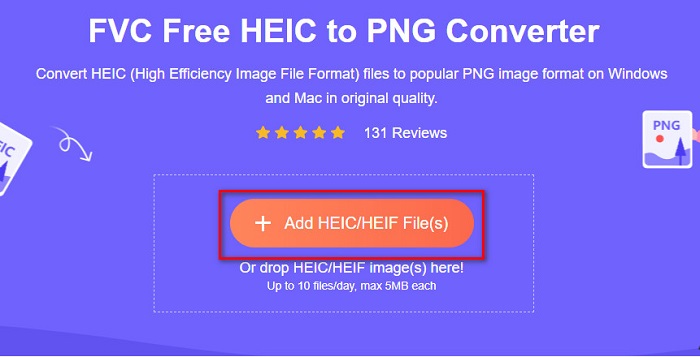
Βήμα 3. Έπειτα, θα εμφανιστούν οι φάκελοι του υπολογιστή σας, όπου θα επιλέξετε το αρχείο HEIC. Πατήστε Open. Τότε θα ξεκινήσει η μετατροπή του HEIC σε PNG.

Βήμα 4. Τέλος, στη διεπαφή του λογισμικού, κάντε κλικ στο κουμπί Download για να κατεβάσετε το αρχείο PNG σας.

Απλό, έτσι δεν είναι; Μπορείτε να μετατρέψετε το αρχείο HEIC σε αρχείο PNG ακολουθώντας αυτά τα εύκολα βήματα.
Χρησιμοποιήστε το Xconvert.com
Το Xconvert είναι ένας δωρεάν online μετατροπέας HEIC σε PNG που μετατρέπει εύκολα αρχεία HEIC σε αρχεία PNG. Αυτός ο online μετατροπέας έχει μια εύχρηστη διεπαφή λογισμικού, ιδανική για αρχάριους χρήστες. Επιπλέον, μπορείτε να αλλάξετε την ανάλυση της εικόνας σας όταν χρησιμοποιείτε αυτόν τον online μετατροπέα. Ωστόσο, επειδή εξαρτάται από τη σύνδεση στο διαδίκτυο, μπορεί να αντιμετωπίσετε αργή διαδικασία μετατροπής όταν το ίντερνετ είναι αργό. Περιέχει επίσης διαφημίσεις που ενδέχεται να σας ενοχλήσουν.
Βήμα 1. Αναζητήστε το Xconvert.com στον περιηγητή σας. Στον ιστότοπό τους, κάντε κλικ στο κουμπί Add Files, έπειτα θα εμφανιστούν τα αρχεία του υπολογιστή σας και στη συνέχεια επιλέξτε το αρχείο HEIC.

Βήμα 2. Η εικόνα σας θα ανέβει στη διεπαφή του λογισμικού. Μετά τη μεταφόρτωση, κάντε κλικ στο κουμπί Convert που βρίσκεται στην κάτω δεξιά γωνία της διεπαφής. Έπειτα περιμένετε να είναι έτοιμο το αρχείο σας για λήψη και προχωρήστε στο επόμενο βήμα.
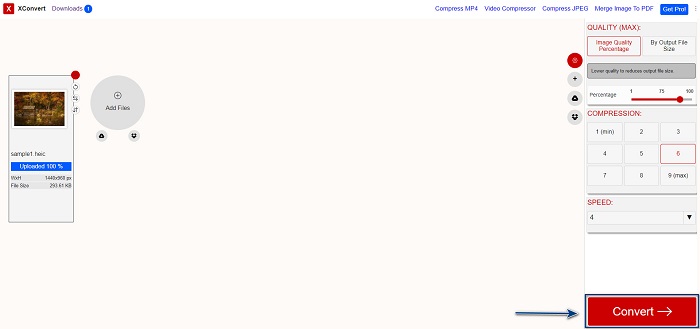
Βήμα 3. Όταν το αρχείο σας είναι έτοιμο, κάντε κλικ στο κουμπί Download για να κατεβάσετε το αρχείο PNG· πάνω από το κουμπί λήψης θα δείτε επίσης το μέγεθος του τελικού αρχείου και πόσο χρόνο πήρε η μετατροπή.

Χρησιμοποιήστε το Zamzar
Ένας άλλος τρόπος για να μετατρέψετε HEIC σε PNG online είναι με το διαδικτυακό μετατροπέα Zamzar. Πιθανότατα το έχετε συναντήσει όταν ψάχνατε μετατροπέα HEIC σε PNG. Αυτός ο μετατροπέας είναι προσβάσιμος σχεδόν από όλους τους διαθέσιμους περιηγητές. Επιπλέον, έχει απλή διεπαφή χρήστη, γεγονός που τον καθιστά ιδιαίτερα φιλικό προς τον χρήστη. Ωστόσο, το αρχείο σας μπορεί να αλλοιωθεί αν η σύνδεση στο διαδίκτυο διακοπεί κατά τη διάρκεια της μετατροπής. Παρ’ όλα αυτά, πολλοί χρήστες χρησιμοποιούν αυτό το εργαλείο για να μετατρέπουν αρχεία HEIC σε PNG.
Βήμα 1. Στον περιηγητή που χρησιμοποιείτε, αναζητήστε το Zamzar. Στον ιστότοπό τους, κάντε κλικ στο κουμπί Add Files. Θα εμφανιστούν τα αρχεία του υπολογιστή σας· στη συνέχεια ανεβάστε την εικόνα HEIC.

Βήμα 2. Αφού ανεβάσετε το αρχείο HEIC, κάντε κλικ στο κουμπί drop-down και επιλέξτε PNG ως μορφή εξόδου του αρχείου σας.

Βήμα 3. Τέλος, κάντε κλικ στο κουμπί Convert Now για να μετατρέψετε το αρχείο HEIC σε μορφή PNG. Έπειτα κατεβάστε το αρχείο PNG σας. Απλώς περιμένετε μερικά δευτερόλεπτα, και αυτό ήταν!

Χρησιμοποιήστε το Conversion Tools.io
Το Conversion Tool είναι ένας online μετατροπέας HEIC σε PNG με απλή διεπαφή χρήστη. Μπορεί να μετατρέψει το αρχείο HEIC σε PNG με υψηλή ταχύτητα. Επιπλέον, δεν περιέχει πολλές διαφημίσεις, σε αντίθεση με άλλους online μετατροπείς. Ωστόσο, το μειονέκτημά του είναι ότι μπορείτε να μετατρέψετε μόνο δέκα αρχεία την ημέρα και υπάρχει όριο μεγέθους αρχείου. Αν όμως θέλετε να μετατρέψετε ένα μικρό αρχείο, τότε αυτό το εργαλείο μπορεί να σας ταιριάξει.
Βήμα 1. Αναζητήστε το Conversion Tools.io στον περιηγητή σας. Έπειτα, κάντε κλικ στο κουμπί Browse στην κύρια διεπαφή του λογισμικού ή σύρετε και αφήστε το αρχείο HEIC πάνω στο κουμπί Browse.

Βήμα 2. Στη συνέχεια, κάντε κλικ στο κουμπί Run Conversion για να ξεκινήσει η μετατροπή του αρχείου HEIC σε αρχείο PNG. Έπειτα περιμένετε να φορτωθεί το αρχείο εικόνας και προχωρήστε στο επόμενο βήμα.

Βήμα 3. Τελειώνοντας, κάντε κλικ στο κουμπί Download για να κατεβάσετε το αρχείο PNG σας.

Χρησιμοποιήστε το CDKM
Το τελευταίο εργαλείο που θα σας παρουσιάσουμε είναι το CDKM. Αυτό το εργαλείο σάς επιτρέπει να μετατρέπετε αρχεία HEIC σε PNG με λίγα μόνο κλικ. Ωστόσο, η χρήση αυτού του online μετατροπέα μπορεί να χρειαστεί μερικά δευτερόλεπτα, ανάλογα με την ταχύτητα της σύνδεσής σας στο διαδίκτυο. Περιέχει επίσης διαφημίσεις που ενδέχεται να σας εκνευρίσουν. Παρ’ όλα αυτά, δεν έχει όριο μεγέθους αρχείου, οπότε αξίζει να το δοκιμάσετε.
Βήμα 1. Στον περιηγητή σας, αναζητήστε το CDKM online converter. Στην κύρια διεπαφή του λογισμικού, κάντε κλικ στο κουμπί Choose Files. Θα εμφανιστούν οι φάκελοι του υπολογιστή σας· στη συνέχεια επιλέξτε το αρχείο HEIC για μεταφόρτωση.

Βήμα 2. Έπειτα, κάντε κλικ στο κουμπί Start Conversion για να ξεκινήσει η διαδικασία μετατροπής.

Βήμα 3. Τέλος, κάντε λίγο κύλιση προς τα κάτω και θα δείτε το κουμπί Download. Κάντε κλικ στο κουμπί Download για να κατεβάσετε το αρχείο PNG σας.

Μέρος 3. Μετατροπή HEIC σε PNG σε Mac
Οι συσκευές Apple υποστηρίζουν μορφές αρχείων HEIC και χρησιμοποιώντας Mac, μπορείτε να ανοίξετε εγγενώς ένα αρχείο HEIC. Αλλά αν θέλετε να μετατρέψετε το αρχείο HEIC σε PNG, μπορείτε να το αλλάξετε χρησιμοποιώντας την εφαρμογή Photo στο Mac. Αντίστοιχα, εάν είστε χρήστης Mac, διαβάστε καλύτερα αυτό το μέρος.
Βήμα 1. Πρώτα, σύρετε και αφήστε το αρχείο HEIC στην εφαρμογή Φωτογραφίες (Photo App). Έπειτα, προβάλετε τη φωτογραφία HEIC και κάντε κλικ στο File > Export > Export 1 Photo.

Βήμα 2. Στη συνέχεια, στο Photo Kind, κάντε κλικ στη μορφή εξόδου που επιθυμείτε. Επιλέξτε μορφή αρχείου PNG.

Βήμα 3. Έπειτα, κάντε κλικ στο κουμπί Export και επιλέξτε τον φάκελο προορισμού του αρχείου εξόδου. Θα δείτε ότι το αρχείο HEIC έχει μετατραπεί σε μορφή PNG.

Μέρος 4. Μετατροπή αρχείου HEIC σε PNG στο iPhone
Εάν χρησιμοποιείτε iPhone, μπορείτε να ανοίξετε ένα αρχείο HEIC στη συσκευή σας. Αλλά αν θέλετε να μετατρέψετε το αρχείο HEIC σε PNG χρησιμοποιώντας μια συσκευή iPhone, τότε έχουμε έναν τρόπο για εσάς. Ακολουθώντας αυτά τα απλά και εύκολα βήματα παρακάτω, μπορείτε να μετατρέψετε το HEIC σε PNG χωρίς κόπο.
Βήμα 1. Στην εφαρμογή Φωτογραφίες (Photo App) στο iPhone σας, πατήστε το κουμπί Select που βρίσκεται στο επάνω μέρος της οθόνης. Έπειτα, επιλέξτε το αρχείο HEIC και πατήστε το εικονίδιο Share.
Βήμα 2. Σύρετε την οθόνη προς τα πάνω· θα δείτε την επιλογή Copy Photo, στη συνέχεια πατήστε την.
Βήμα 3. Τέλος, ανοίξτε την εφαρμογή Files, πατήστε το κουμπί browse και επιλέξτε την επιθυμητή θέση εξόδου (πατήστε iCloud Drive ή On my iPhone). Έπειτα επικολλήστε εκεί το αρχείο HEIC.

Αφού επικολλήσετε το αρχείο σας, θα δείτε ότι το αρχείο σας θα μετατραπεί αυτόματα σε αρχείο PNG.
Μέρος 5. Εκτεταμένες γνώσεις σχετικά με το αρχείο HEIC και το αρχείο PNG
Εάν εξακολουθείτε να αμφιβάλλετε εάν θέλετε να μετατρέψετε το αρχείο HEIC σε PNG, σας παρέχουμε ένα γράφημα σύγκρισης για να σας βοηθήσουμε να διακρίνετε τις διαφορές μεταξύ αυτών των δύο αρχείων. Επιπλέον, σας δίνει μια σαφή επισκόπηση των χαρακτηριστικών HEIC και PNG. Διαβάστε προσεκτικά για να μάθετε τη διαφορά μεταξύ αρχείων HEIC και αρχείων PNG.
| HEIC | PNG | |
| Συμβατότητα | Μόνο η συσκευή Apple υποστηρίζει αυτήν τη μορφή αρχείου. | Σχεδόν όλες οι συσκευές υποστηρίζουν αυτό το αρχείο, συμπεριλαμβανομένων των συσκευών Apple. |
| Μέγεθος αρχείου | Μικρό μέγεθος αρχείου. | Μπορεί να επιτύχει τεράστιο μέγεθος αρχείου. |
| Ποιότητα εικόνας | Υψηλή ποιότητα εικόνας. | Έχει καλή ποιότητα, αλλά όχι καλύτερη από το αρχείο HEIC. |
| Συμπιεσμένο/Ασυμπίεστο | Συμπιεσμένο | Ασυμπίεστος |
| Επεξεργασία | Διατηρεί την ποιότητα της εικόνας κατά την επεξεργασία. | Η ποιότητα μπορεί να υποβαθμιστεί κατά την επεξεργασία. |
Μέρος 6. Συχνές ερωτήσεις σχετικά με τη μετατροπή HEIC σε PNG
Η μετατροπή του HEIC σε PNG θα επηρεάσει το μέγεθος του αρχείου;
Ναί. Όταν μετατρέπετε το HEIC σε PNG, θα αυξήσει το μέγεθος του αρχείου, αν και δεν θα είναι υψηλό.
Μπορείτε να ανοίξετε αρχεία PNG στο Adobe Photoshop;
Σίγουρα. Μπορείτε να ανοίξετε αρχεία PNG στο Adobe Photoshop επειδή το Adobe Photoshop υποστηρίζει μορφή αρχείου PNG.
Μπορείτε να ανοίξετε τη μορφή αρχείου PNG σε συσκευές Apple εγγενώς;
Ναί. Όταν τραβάτε στιγμιότυπα οθόνης από το iPhone σας, θα αποθηκευτούν αυτόματα στο Camera Roll ως αρχείο PNG.
συμπέρασμα
Επιτέλους! Φτάσαμε στο τέλος της διαδρομής μας. Αυτό το άρθρο σάς προσφέρει τις καλύτερες λύσεις για να μετατρέψετε το αρχείο HEIC σε μορφή PNG. Όλοι οι online μετατροπείς HEIC σε PNG που παρουσιάστηκαν παραπάνω μπορούν να μετατρέψουν αποτελεσματικά το αρχείο σας χωρίς κόπο. Επιπλέον, υπάρχουν και άλλες επιλογές που μπορείτε να χρησιμοποιήσετε αν είστε χρήστης Mac ή iPhone. Αλλά αν αναζητάτε τον καλύτερο μετατροπέα HEIC σε PNG με εξαιρετικά χαρακτηριστικά, τότε ο μετατροπέας FVC Free HEIC to PNG είναι η καλύτερη επιλογή για εσάς.
-
 Πώς να ανοίξετε το αρχείο HEIC σε Windows, Mac και Online
 Ψάχνετε για έναν τρόπο να ανοίξετε αρχεία HEIC; Αυτό το άρθρο σάς παρέχει τις καλύτερες λύσεις για το άνοιγμα αρχείων HEIC σε Windows, Mac και Online.
-
 JPG VS GIF: 3 εύκολοι τρόποι για να μετατρέψετε το JPG σε GIF
 Θέλετε να μάθετε τη διαφορά μεταξύ JPG και GIF; Ή θέλετε να αλλάξετε μορφή JPG σε κινούμενη μορφή GIF; Στη συνέχεια, διαβάστε αυτό το άρθρο για να έχετε μια ιδέα.
-
 5 καλύτεροι τρόποι για να αλλάξετε την εικόνα σε κινούμενο GIF [Ενημερώθηκε 2022]
 Χρειάζεστε μια εικόνα μετατροπέα σε GIF; Αυτό το άρθρο θα παρέχει τους πέντε καλύτερους μετατροπείς που μπορούμε να βρούμε στην αγορά. Λοιπόν, ας μάθουμε αυτά τα εργαλεία διαβάζοντας αυτό το άρθρο.
