


 Video Converter Ultimate
 Εγγραφή οθόνης
 Επισκευή βίντεο
 Ασφαλές κατέβασμα
4 πιο εύκολοι τρόποι για να αφαιρέσετε τα υδατογραφήματα iFunny
Το iFunny είναι μία από τις πιο δημοφιλείς εφαρμογές αν θέλεις να διαβάζεις αστεία μηνύματα με εικόνες (memes). Ωστόσο, ορισμένες από αυτές τις εικόνες έχουν υδατογράφημα iFunny, κάτι που είναι ενοχλητικό. Αν όμως θέλεις να ανακαλύψεις τις πιο αποτελεσματικές μεθόδους για να αφαιρέσεις αυτά τα υδατογραφήματα, βρίσκεσαι στη σωστή σελίδα. Θα σου παρουσιάσουμε πολλές εφαρμογές που μπορείς να χρησιμοποιήσεις για να εξαλείψεις ενοχλητικά στοιχεία από τις φωτογραφίες σου. Αυτά τα εργαλεία είναι δοκιμασμένα και αποδεδειγμένα, οπότε δεν χρειάζεται να αμφιβάλλεις αν είναι αξιόπιστα ή όχι. Είσαι έτοιμος/η να μάθεις τις καλύτερες μεθόδους για να αφαιρέσεις τα υδατογραφήματα iFunny; Τότε διάβασε αυτό το άρθρο από την αρχή μέχρι το τέλος.

Μέρος 1: Αφαίρεση υδατογραφημάτων iFunny με χρήση του εργαλείου περικοπής
Ένας από τους καλύτερους τρόπους για να αφαιρέσετε τα υδατογραφήματα iFunny είναι να χρησιμοποιήσετε το εργαλείο περικοπής. Αυτή η μέθοδος ισχύει εάν το υδατογράφημα είναι τοποθετημένο στην άκρη ή στη γωνία της εικόνας σας. Μπορείτε να κόψετε την εικόνα σας από τη μια πλευρά στην άλλη και από πάνω προς τα κάτω. Εάν θέλετε να περικόψετε το υδατογράφημα iFunny από τις εικόνες σας, ακολουθήστε τα παρακάτω απλά βήματα.
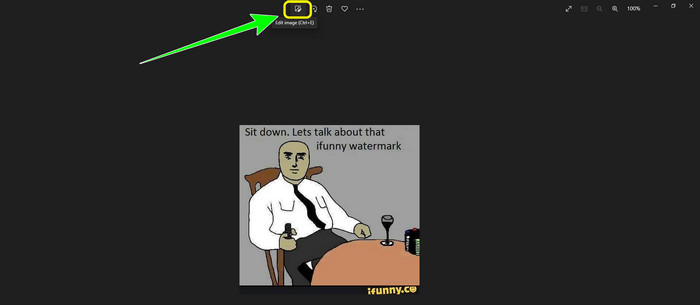
Βήμα 1: Άνοιξε τη φωτογραφία σου με το υδατογράφημα iFunny. Επίλεξε την επιλογή Edit Image για να χρησιμοποιήσεις το εργαλείο περικοπής (Cropping). Μπορείς επίσης να πατήσεις ctrl+E.
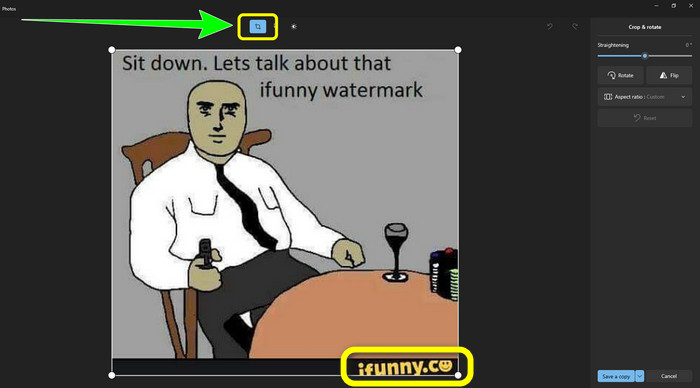
Βήμα 2: Στη συνέχεια, κάνε κλικ στο εργαλείο Cropping. Έπειτα μπορείς ήδη να περικόψεις τη φωτογραφία σου ώστε να αφαιρέσεις το υδατογράφημα iFunny από την εικόνα.
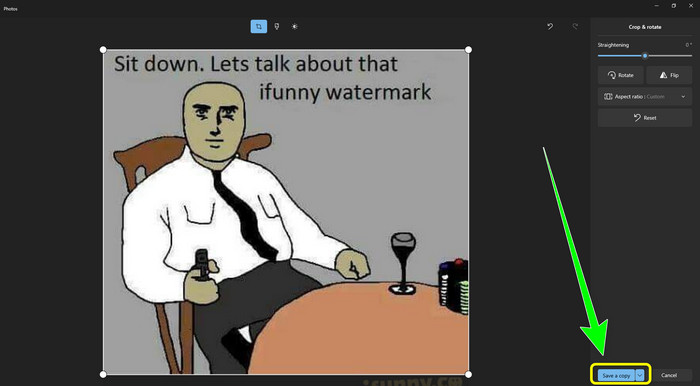
Βήμα 3: Όταν ολοκληρώσεις την περικοπή της φωτογραφίας, κάνε κλικ στο κουμπί Save a copy. Περίμενε να ολοκληρωθεί η αποθήκευση και τοποθέτησε την τελική φωτογραφία στη θέση που επιθυμείς.
Αυτή είναι η ευκολότερη μέθοδος για την αφαίρεση υδατογραφημάτων iFunny χρησιμοποιώντας το εργαλείο περικοπής.
Μέρος 2: Καλύτεροι τρόποι για να αφαιρέσετε το υδατογράφημα iFunny χωρίς περικοπή
Χρήση του FVC Free Watermark Remover
Αν, για παράδειγμα, αναζητάς ένα εργαλείο αφαίρεσης υδατογραφημάτων iFunny, τότε μπορείς να χρησιμοποιήσεις το FVC Free Watermark Remover. Μπορείς να αφαιρέσεις κάθε είδους υδατογραφήματα από εικόνες με αυτήν την εφαρμογή εύκολα και άμεσα. Επίσης, μπορείς να βασιστείς σε αυτό το εργαλείο αν έχεις πολλαπλά υδατογραφήματα στη φωτογραφία σου. Επιπλέον, σχεδόν όλες οι μορφές αρχείων εικόνας υποστηρίζονται από αυτό το online εργαλείο, όπως JPG, PNG, BMP, TIFF και άλλα. Για την αφαίρεση ανεπιθύμητων αντικειμένων και υδατογραφημάτων από εικόνες, αυτός ο αφαιρέτης υδατογραφημάτων προσφέρει τρία διαφορετικά εργαλεία: Λάσο (Lasso), Πινέλο (Brush) και Πολυγωνικό (Polygonal). Με τη βοήθειά τους μπορείς εύκολα να αφαιρέσεις οτιδήποτε δεν θέλεις από την εικόνα σου. Επιπλέον, το FVC Free Watermark Remover διαθέτει κατανοητό περιβάλλον εργασίας, προσβάσιμο σε όλους τους χρήστες, είτε είναι αρχάριοι είτε επαγγελματίες. Ακόμη, το αρχείο σου είναι ασφαλές εδώ, καθώς αυτός ο αφαιρέτης υδατογραφημάτων εγγυάται την ιδιωτικότητά σου, που σημαίνει ότι μόνο εσύ μπορείς να επεξεργαστείς τη φωτογραφία σου. Τέλος, πρόκειται για δωρεάν λογισμικό, ώστε να μπορείς να το χρησιμοποιείς όποτε θέλεις και να ανεβάζεις απεριόριστα αρχεία που θέλεις να βελτιώσεις.
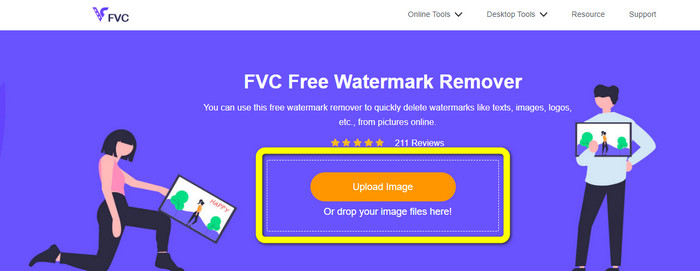
Βήμα 1: Άνοιξε στο πρόγραμμα περιήγησής σου το FVC Free Watermark Remover. Έπειτα, κάνε κλικ στο κουμπί Upload Image για να επισυνάψεις τη φωτογραφία σου με το υδατογράφημα iFunny.
Βήμα 2: Αφού επισυνάψεις τη φωτογραφία σου, επισήμανε το υδατογράφημα iFunny χρησιμοποιώντας τα εργαλεία αφαίρεσης υδατογραφήματος.
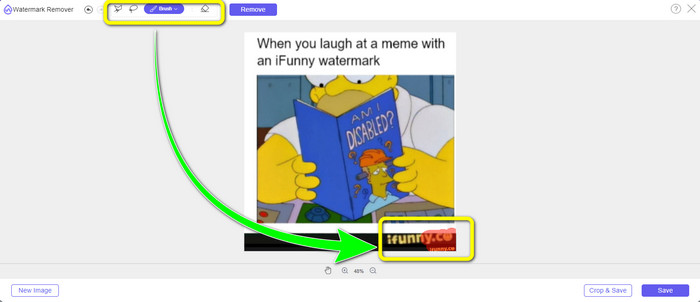
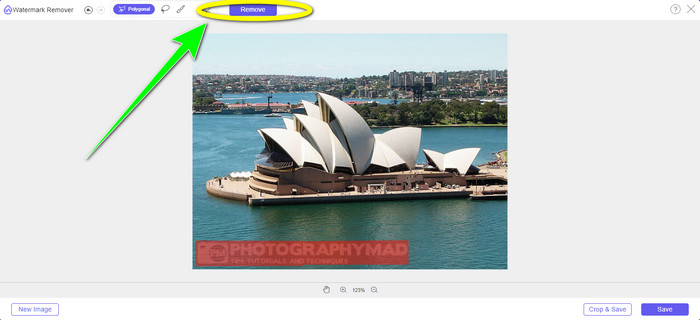
Βήμα 3: Στη συνέχεια, κάνε κλικ στο κουμπί Remove για να σβήσεις τα υδατογραφήματα iFunny από τη φωτογραφία σου.
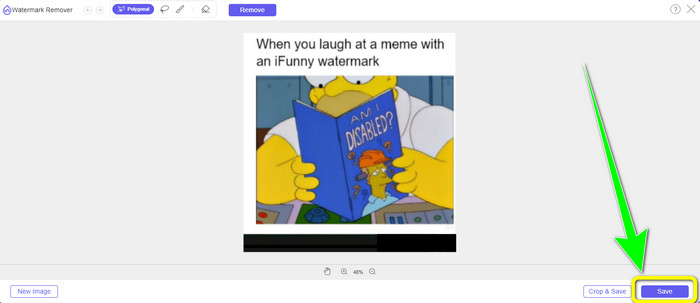
Βήμα 4: Μετά τη διαδικασία αφαίρεσης, το τελευταίο βήμα είναι να κάνεις κλικ στο κουμπί Save για να κατεβάσεις τη φωτογραφία σου στη συσκευή σου χωρίς το υδατογράφημα iFunny.
Χρησιμοποιώντας το WatermarkRemover.io
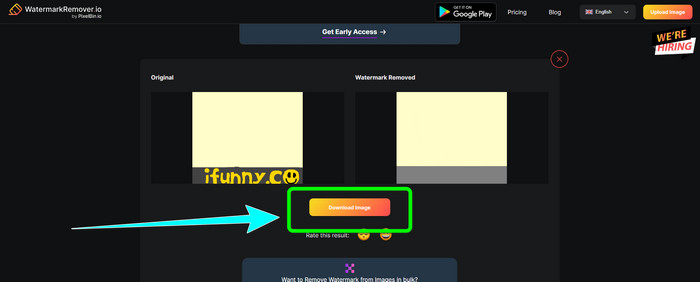
Χρησιμοποίησε το WatermarkRemover.io αν θέλεις να χρησιμοποιήσεις διαφορετική διαδικτυακή εφαρμογή για να απαλλαγείς από τα υδατογραφήματα iFunny στις φωτογραφίες σου. Αυτό το δωρεάν εργαλείο μπορεί να αφαιρέσει οποιαδήποτε περιττά στοιχεία από τις εικόνες σου, όπως λογότυπα, λεζάντες, σφραγίδες και άλλα. Επιπλέον, μπορείς να αφαιρέσεις πολλά υδατογραφήματα από τις εικόνες σου. Επίσης, προσφέρει ένα εύχρηστο περιβάλλον εργασίας, ιδανικό για αρχάριους. Διάφορες μορφές εικόνας, όπως PNG, JPG, WEBP και JPEG, υποστηρίζονται από αυτό το web εργαλείο. Ωστόσο, όταν χρησιμοποιείς τη δωρεάν έκδοση, υπάρχουν περιορισμοί. Μπορούν να ανέβουν μόνο 50 φωτογραφίες κάθε φορά και ο διαθέσιμος χώρος αποθήκευσης είναι μόνο 25 GB. Αν θέλεις να ανεβάζεις περισσότερες φωτογραφίες και να έχεις μεγαλύτερο χώρο αποθήκευσης, πρέπει να πληρώσεις συνδρομή, η οποία είναι σχετικά ακριβή. Ακολούθησε τα παρακάτω βήματα για να χρησιμοποιήσεις αυτό το εξαιρετικό εργαλείο αφαίρεσης υδατογραφημάτων iFunny.
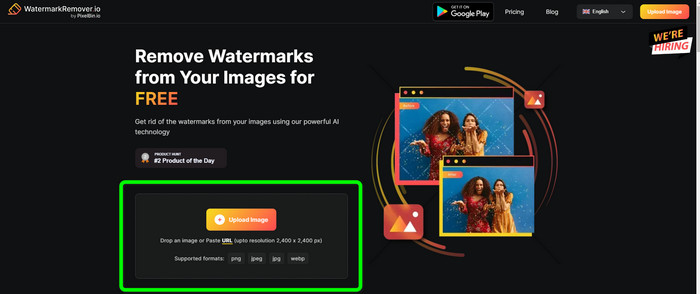
Βήμα 1: Άνοιξε το πρόγραμμα περιήγησής σου και επισκέψου το WatermarkRemover.io. Κάνε κλικ στο κουμπί Upload Image για να ανεβάσεις τη φωτογραφία σου με το υδατογράφημα iFunny. Μπορείς επίσης να σύρεις το αρχείο σου μέσα στο πλαίσιο.
Βήμα 2: Μετά το ανέβασμα της φωτογραφίας, το υδατογράφημα iFunny θα αφαιρεθεί αυτόματα. Όταν η φωτογραφία εμφανιστεί ήδη χωρίς υδατογράφημα, κάνε κλικ στο κουμπί Download.
Χρήση του Apowersoft Watermark Remover Online
Για να αφαιρέσεις αμέσως τα υδατογραφήματα iFunny από τη φωτογραφία σου, το Apowersoft Watermark Remover Online είναι επίσης μια καλή διαδικτυακή εφαρμογή για εσένα. Μπορεί να σβήσει ανεπιθύμητα στοιχεία από τις φωτογραφίες σου, συμπεριλαμβανομένων υπογραφών, κειμένων, λογοτύπων και άλλων. Υποστηρίζει επίσης διάφορες μορφές αρχείων εικόνας, όπως JPEG, JPG, PNG, TIFF και άλλα. Οι αρχάριοι μπορούν να χρησιμοποιήσουν αυτό το εργαλείο ακόμη και αν δεν έχουν ιδιαίτερες γνώσεις, επειδή το Apowersoft Watermark Remover Online διαθέτει απλές μεθόδους και ένα εύκολα κατανοητό περιβάλλον εργασίας. Επίσης, το αρχείο θα διαγραφεί αυτόματα μετά την αφαίρεση και τη λήψη της φωτογραφίας σου, γεγονός που σημαίνει ότι κανείς άλλος δεν μπορεί να δει τη δουλειά σου. Εκτός από την αφαίρεση υδατογραφημάτων από φωτογραφίες, αυτό το εργαλείο μπορεί επίσης να αφαιρεί υδατογραφήματα από βίντεο, κάτι που είναι βολικό για τον χρήστη. Υποστηρίζει διάφορες μορφές βίντεο, όπως MOV, WMV, MP4, 3GP, AVI κ.λπ. Ωστόσο, αυτός ο online αφαιρέτης υδατογραφημάτων έχει αργή διαδικασία αφαίρεσης, κάτι που δεν είναι ιδανικό για τους χρήστες. Επίσης, δεν λειτουργεί χωρίς σύνδεση στο διαδίκτυο. Αν θέλεις να χρησιμοποιήσεις αυτό το εργαλείο, ακολούθησε τα παρακάτω βασικά βήματα.
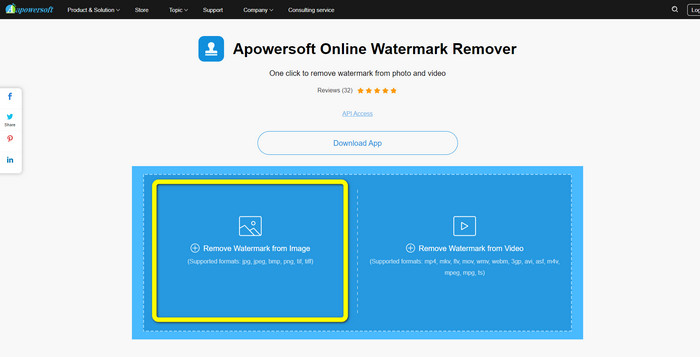
Βήμα 1: Αναζήτησε το Apowersoft Online Watermark Remover. Έπειτα, κάνε κλικ στο κουμπί Remove Watermark from Image για να επισυνάψεις τη φωτογραφία σου με το υδατογράφημα iFunny.
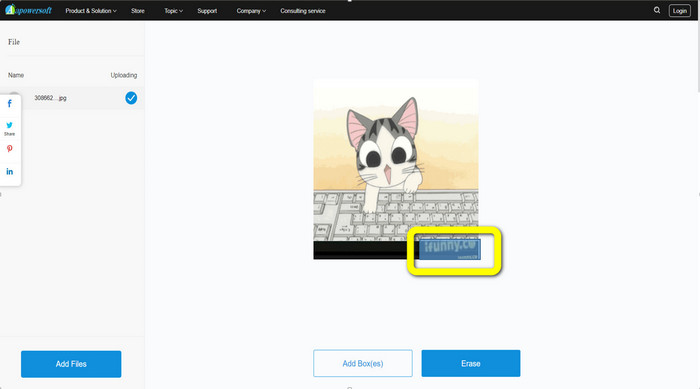
Βήμα 2: Αφού επισυνάψεις το αρχείο σου, μπορείς να χρησιμοποιήσεις το μπλε πλαίσιο για να καλύψεις το υδατογράφημα iFunny στη φωτογραφία σου.
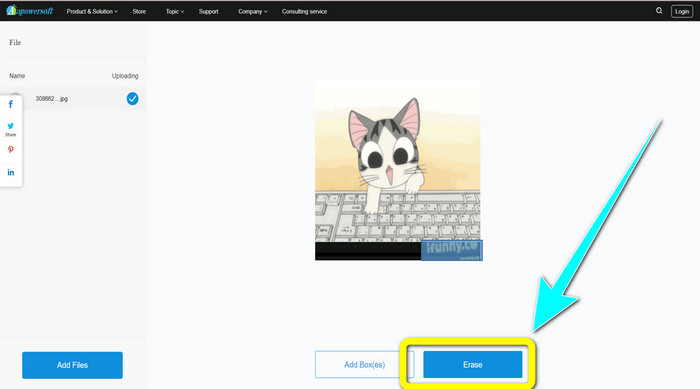
Βήμα 3: Έπειτα κάνε κλικ στο κουμπί Erase. Περίμενε να ολοκληρωθεί η διαδικασία αφαίρεσης και κατέβασε το τελικό αρχείο.
Σχετικά με:
Ειλικρινής αξιολόγηση του Inpaint Watermark Remover και εναλλακτικές λύσεις
Απλοί τρόποι για να αφαιρέσετε υδατογράφημα από JPG online
Μέρος 3: Συχνές ερωτήσεις σχετικά με την κατάργηση των υδατογραφημάτων iFunny
Ποια είναι η καλύτερη εφαρμογή για την αφαίρεση του υδατογραφήματος iFunny;
Η καλύτερη εφαρμογή που μπορείς να χρησιμοποιήσεις είναι το FVC Free Watermark Remover. Αυτό το εργαλείο μπορεί εύκολα να αφαιρέσει το υδατογράφημα iFunny από την εικόνα σου. Επιπλέον, διαθέτει γρήγορη διαδικασία αφαίρεσης και προσφέρει τις πιο απλές μεθόδους, γεγονός που το καθιστά τον καλύτερο αφαιρέτη υδατογραφημάτων.
Μπορώ επίσης να αφαιρέσω τα υδατογραφήματα από το βίντεό μου;
Φυσικά και Ναι. Μπορείς να χρησιμοποιήσεις πολλές online και offline εφαρμογές για να αφαιρέσεις υδατογραφήματα από τα βίντεό σου. Εδώ είναι τα καλύτερα εργαλεία που μπορείς να δοκιμάσεις.
1. Video Converter Ultimate.
2. Media.io
3. HitPaw
4. Online Video Cutter
5. Apowersoft Online Watermark Remover.
Υπάρχει κάποιο εργαλείο περικοπής που μπορώ να χρησιμοποιήσω στο FVC Free Watermark Remover;
Ναί. Το FVC Free Watermark Remover έχει δύο τρόπους για να αφαιρέσει τα υδατογραφήματα από μια φωτογραφία. Το πρώτο είναι να χρησιμοποιήσετε διαφορετικά εργαλεία αφαίρεσης υδατογραφήματος, όπως Lasso, Brush και Polygonal. Το δεύτερο χρησιμοποιεί το εργαλείο περικοπής.
συμπέρασμα
Όπως δείχνουν οι παραπάνω πληροφορίες, μπορείς να χρησιμοποιήσεις πολλές απλές μεθόδους για να αφαιρέσεις τα υδατογραφήματα iFunny, όπως η χρήση εργαλείων και λειτουργιών περικοπής. Αν όμως θέλεις να αφαιρέσεις ενοχλητικά στοιχεία από τις εικόνες σου με απλό τρόπο, χρησιμοποίησε τώρα το FVC Free Watermark Remover.
-
 Εξαιρετικοί τρόποι για να αφαιρέσετε αυτοκόλλητο από φωτογραφίες και βίντεο
 Θέλετε να αφαιρέσετε εύκολα αυτοκόλλητα από βίντεο και φωτογραφίες; Ακολουθούν οι αποτελεσματικοί τρόποι, συμπεριλαμβανομένων των πιο αξιόπιστων και πιο εύκολων μεθόδων που μπορείτε να δοκιμάσετε.
-
 Τρόποι για την εύκολη κατάργηση των υδατογραφημάτων του Reddit από τις εικόνες
 Αν βρίσκεστε εδώ, ίσως ψάχνετε για ένα εξαιρετικό εργαλείο αφαίρεσης υδατογραφημάτων Reddit. Σε αυτήν την περίπτωση, θα σας δείξουμε την πιο εύκολη μέθοδο για να αφαιρέσετε τα υδατογραφήματα του Reddit.
-
 Πώς να αφαιρέσετε το υδατογράφημα στο Lightroom Mobile [Επίλυση]
 Θέλετε να μάθετε πώς να αφαιρείτε υδατογραφήματα από φωτογραφίες στο lightroom; Ακολουθούν οι πιο εύκολες μέθοδοι που μπορείτε να δοκιμάσετε χρησιμοποιώντας τα κινητά τηλέφωνα και τους υπολογιστές σας.
