


 Video Converter Ultimate
 Εγγραφή οθόνης
 Επισκευή βίντεο
 Ασφαλές κατέβασμα
Αταίριαστοι και τέλειοι τρόποι μετατροπής AMV σε MP4
Θέλετε να απολαμβάνετε την προβολή του AMV βίντεό σας σε όλα τα προγράμματα; Τότε πρέπει να μετατρέψετε το αρχείο AMV σε μορφή MP4. Αλλά μην ανησυχείτε! Θα σας δώσουμε την καλύτερη λύση για τη μετατροπή των αρχείων βίντεο. Σε αυτό το άρθρο έχουν ήδη δοκιμαστεί οι μετατροπείς που θα ανακαλύψετε. Με αυτόν τον τρόπο, δεν χρειάζεται να ανησυχείτε αν οι εφαρμογές είναι ασφαλείς. Επιπλέον, θα σας παρουσιάσουμε τις λειτουργίες που μπορείτε να απολαύσετε χρησιμοποιώντας το λογισμικό. Αν κεντρίσαμε το ενδιαφέρον σας και ανήκετε στους χρήστες που θέλουν να μετατρέψουν AMV σε MP4, τότε διαβάστε αυτό το άρθρο και απορροφήστε τις γνώσεις σχετικά με τη μετατροπή βίντεο.

Μέρος 1: Εισαγωγή στα AMV και MP4
AMV
Κατάληξη αρχείου: .amv
Αναπτύχθηκε από: MTV
Κατηγορία αρχείου: Μορφή αρχείου βίντεο
Περιγραφή: Τα βίντεο που αποθηκεύονται σε μορφή Actions Media Video, την οποία υποστηρίζουν ορισμένες κινεζικές φορητές συσκευές αναπαραγωγής πολυμέσων, είναι γνωστά ως αρχεία AMV. Περιλαμβάνουν μια συμπιεσμένη ταινία με χαμηλή ανάλυση (96x96 έως 320x240 pixels). Τόσο το λογισμικό για υπολογιστές που συνοδεύει τις AMV συσκευές αναπαραγωγής όσο και το VideoLAN VLC media player μπορούν να αναπαράγουν αρχεία AMV.
Συσχετιζόμενα προγράμματα: K-Lite Codec Pack, VideoLAN και VLC Media Player
AMV
Κατάληξη αρχείου: .mp4
Αναπτύχθηκε από: Moving Picture Experts Group (MPEG)
Κατηγορία αρχείου: Μορφή αρχείου βίντεο
Περιγραφή: Τα πρότυπα βίντεο AAC και MPEG-4 ορίζουν από κοινού την επέκταση MP4. Οποιοσδήποτε τύπος μέσου, συμπεριλαμβανομένων ήχου, βίντεο, υποτίτλων και γραφικών 2D και 3D, μπορεί να περιέχεται εντός του κοντέινερ. Σχεδόν κάθε πρόγραμμα αναπαραγωγής μπορεί να αναπαράγει αρχεία MP4 στα Windows, αλλά σε Mac, πρέπει να εγκαταστήσετε μια προσθήκη ή να μετατρέψετε το αρχείο MP4 σε άλλη μορφή. Μια ομάδα που ονομάζεται The Moving Picture Experts.
Συσχετιζόμενα προγράμματα: Apple, QuickTime Player, VLC Media Player, Microsoft, Windows Media Player και VideoLAN.
Μέρος 2: Εξαιρετικές διαδικασίες για τη μετατροπή AMV σε MP4 εκτός σύνδεσης
Έχουμε την καλύτερη λύση για εσάς, αν θέλετε να μετατρέψετε AMV σε MP4 με χρήση ενός εργαλείου που κατεβάζετε στον υπολογιστή. Μπορείτε να χρησιμοποιήσετε το Video Converter Ultimate. Υποστηρίζει πάνω από 100 μορφές βίντεο, όπως AVI, MKV, WMV, MOV, FLV, M4V, SWF, MTS, M2TS και άλλες. Αυτό το εργαλείο διαθέτει διαισθητική διεπαφή με απλές μεθόδους, κατάλληλες για όλους τους χρήστες. Με αυτό το εργαλείο μπορείτε να μετατρέψετε πολλά αρχεία ταυτόχρονα, επειδή επιτρέπει μαζική (batch) μετατροπή. Επιπλέον, ένα από τα πιο αξιοσημείωτα χαρακτηριστικά που προσφέρει στη μετατροπή είναι η εξαιρετικά γρήγορη διαδικασία — έως και 30 φορές ταχύτερη από άλλους μετατροπείς. Μπορείτε επίσης να επεξεργαστείτε τα AMV βίντεό σας με αυτό το εργαλείο. Για να ανακαλύψετε περισσότερα χαρακτηριστικά της εφαρμογής, διαβάστε τις πρόσθετες πληροφορίες παρακάτω.
Χαρακτηριστικά
◆ Μετατρέψτε διάφορες μορφές βίντεο, όπως MP4, AMV, WMV, AVI, MKV, FLV, SWF, MOV και 100+ ακόμη.
◆ Προσφέρει μια διαδικασία μετατροπής δέσμης για τη μετατροπή πολλαπλών αρχείων ταυτόχρονα.
◆ Παρέχει εργαλεία επεξεργασίας βίντεο, όπως ενισχυτή βίντεο, κουρευτικό, κοπής, περιστροφέα, διόρθωση χρώματος και άλλα.
Ακολουθήστε τις παρακάτω απλές οδηγίες για να μετατρέψετε AMV σε MP4 χρησιμοποιώντας το FVC Video Converter Ultimate.
Βήμα 1: Πρέπει πρώτα να κατεβάσετε το Video Converter Ultimate στα Windows ή στο Mac σας. Κάντε κλικ στο κουμπί Download παρακάτω. Στη συνέχεια, εγκαταστήστε και ανοίξτε το λογισμικό.
Δωρεάν ΛήψηΓια Windows 7 ή νεότεραΑσφαλής λήψη
Δωρεάν ΛήψηΓια MacOS 10.7 ή νεότεροΑσφαλής λήψη
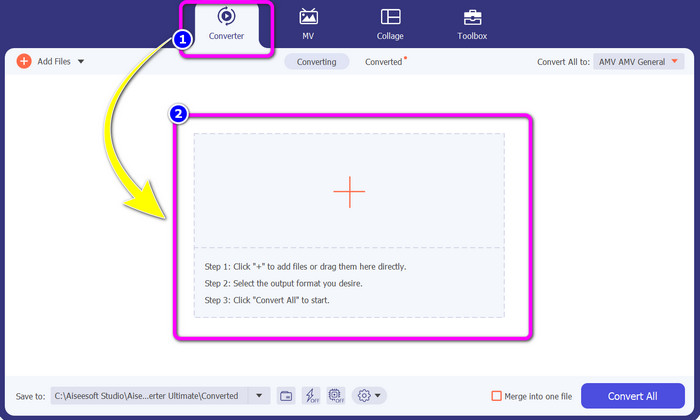
Βήμα 2: Επιλέξτε την καρτέλα Converter και κάντε κλικ στο κουμπί με το σύμβολο Plus. Ο φάκελος αρχείων σας θα εμφανιστεί στην οθόνη· επιλέξτε το AMV βίντεο που θέλετε να μετατρέψετε.
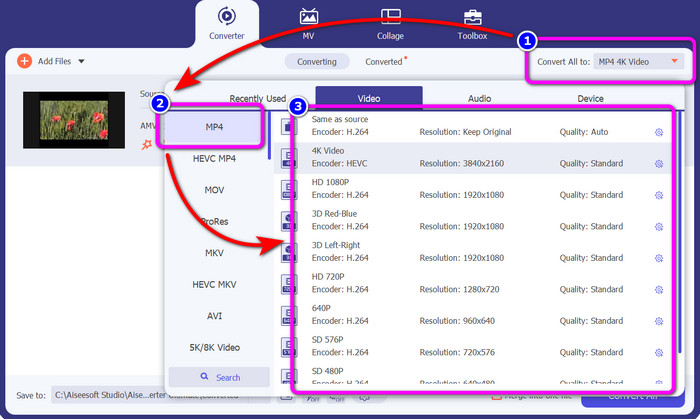
Βήμα 3: Πατήστε το κουμπί Convert All to. Όταν εμφανιστούν οι επιλογές μορφής, επιλέξτε τη μορφή εξόδου που επιθυμείτε, δηλαδή το αρχείο MP4. Έπειτα, μπορείτε να επιλέξετε ανάλυση για το βίντεό σας έως και 4K. Διαλέξτε την ανάλυση που προτιμάτε ή μπορείτε να κρατήσετε την ίδια ανάλυση με το αρχικό σας βίντεο.
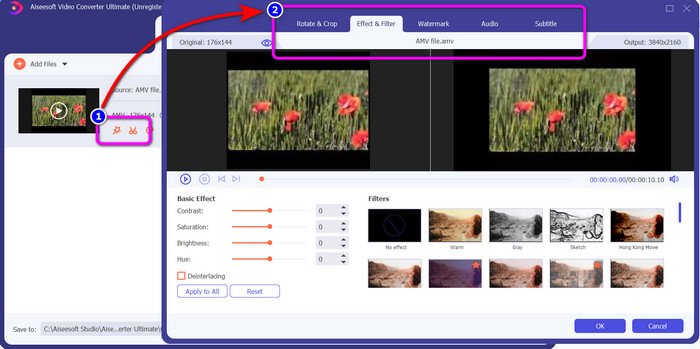
Βήμα 4: Αν θέλετε να επεξεργαστείτε το βίντεό σας, κάντε κλικ στο εικονίδιο Edit. Έπειτα μπορείτε να επεξεργαστείτε το βίντεο αλλάζοντας, προσθέτοντας ή αφαιρώντας υδατογραφήματα, προσθέτοντας εφέ ή φίλτρα, καθώς και περιστρέφοντας και περικόπτοντας τα βίντεό σας. Στη συνέχεια, κάντε κλικ στο OK. Έτσι μπορείτε να βελτιώσετε το βίντεό σας.
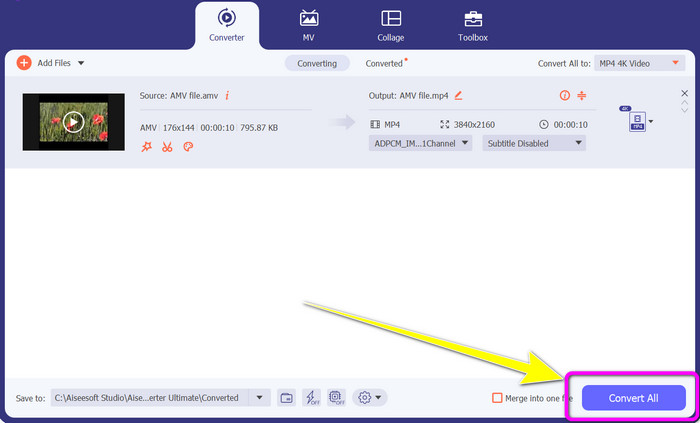
Βήμα 5: Αφού επεξεργαστείτε το βίντεό σας, κάντε κλικ στο κουμπί Convert All για να ξεκινήσει η διαδικασία μετατροπής. Μετά από αυτό, αποθηκεύστε το τελικό αποτέλεσμα στον υπολογιστή σας. Ανοίξτε το μετατρεπμένο βίντεο στον υπολογιστή για να δείτε το τελικό αποτέλεσμα. Κάντε κλικ εδώ για να δείτε πώς να μετατρέψετε DV σε MP4.
Μέρος 3: Ο ευκολότερος τρόπος για να μετατρέψετε AMV σε MP4 Online δωρεάν
Ένας άλλος τρόπος να μετατρέψετε AMV σε MP4 online είναι να χρησιμοποιήσετε το FVC Free Video Converter Online. Αυτό το εργαλείο έχει απλά βήματα και απλή διεπαφή, γεγονός που το καθιστά κατάλληλο τόσο για έμπειρους όσο και για αρχάριους χρήστες. Μπορείτε να μετατρέψετε βίντεο με μόλις λίγα κλικ. Επίσης, αυτός ο μετατροπέας υποστηρίζει πολλές μορφές βίντεο, όπως AVI, MP4, M4V, FLV, MOV, WMV, MKV και άλλες. Μπορείτε επίσης να κάνετε μαζική μετατροπή για να μετατρέψετε πολλά αρχεία ταυτόχρονα. Επιπλέον, μπορείτε να αλλάξετε την ανάλυση του βίντεό σας κατά τη διάρκεια της μετατροπής. Είναι επίσης δυνατό να προσαρμόσετε το bitrate και το frame rate του βίντεο. Μπορείτε να χρησιμοποιήσετε αυτήν τη διαδικτυακή εφαρμογή δωρεάν και να κατεβάσετε τα βίντεό σας χωρίς ανεπιθύμητα στοιχεία, όπως υδατογραφήματα, λογότυπα, αυτοκόλλητα, κείμενα κ.λπ. Είναι επίσης προσβάσιμη από όλους τους browsers, όπως Google Chrome, Safari, Internet Explorer, Microsoft Edge κ.ά.
Λειτουργίες
◆ Μετατρέψτε διάφορες μορφές βίντεο, όπως MP4, AMV, FLV, AVI, MOV, VOB, MKV και άλλα.
◆ Προσφέρει διαδικασία μετατροπής παρτίδας για ταχύτερη διαδικασία.
◆ Επεξεργαστείτε τον ρυθμό μετάδοσης bit, τον ρυθμό καρέ και την ανάλυση του βίντεο.
◆ Μετατρέψτε μορφές ήχου όπως MP3, FLAC, WAV, AAC, AC3 κ.λπ.
◆ Προσαρμόστε τον ρυθμό μετάδοσης bit και το ρυθμό δειγματοληψίας του ήχου.
Χρησιμοποιήστε τις παρακάτω απλές διαδικασίες για να μετατρέψετε AMV σε MP4 χρησιμοποιώντας το FVC Free Video Converter Ultimate.
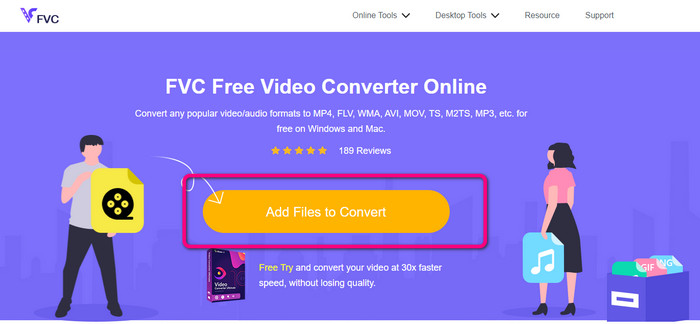
Βήμα 1: Μεταβείτε στον browser σας και ανοίξτε την ιστοσελίδα του FVC Free Video Converter Online. Πατήστε το κουμπί Add Files to Convert για να ανεβάσετε το AMV βίντεο που θέλετε να μετατρέψετε.
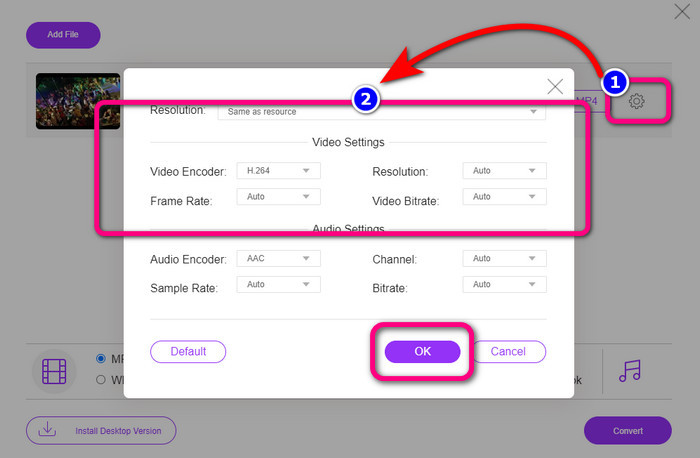
Βήμα 2: Αφού προσθέσετε το AMV βίντεο, κάντε κλικ στο εικονίδιο Setting για να ρυθμίσετε το frame rate, το bitrate και την ανάλυση του βίντεο. Έπειτα πατήστε OK.
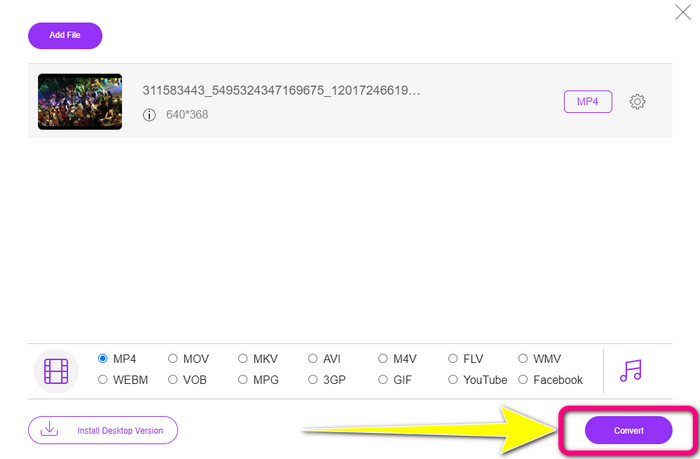
Βήμα 3: Μεταβείτε στο κάτω μέρος της διεπαφής και επιλέξτε τη μορφή αρχείου MP4. Έπειτα, πατήστε το κουμπί Convert. Μπορείτε επίσης να χρησιμοποιήσετε αυτό το εργαλείο για να μετατρέψετε AMV σε MKV.
Μέρος 4: Συχνές ερωτήσεις σχετικά με τη μετατροπή AMV σε MP4
1. Είναι το AMV το ίδιο με το WMV;
Δεν είναι το ίδιο. Το AMV είναι μια μορφή αρχείου βίντεο συμβατή με MP4 και S1 MP3 player. Σε σύγκριση με άλλες μορφές βίντεο όπως το WMV, είναι μικρότερο σε μέγεθος. Δεν απαιτεί μεγάλη επεξεργαστική ισχύ για να παίξει.
2. Τι είναι καλύτερο, AVI ή AMV;
Μπορείτε να χρησιμοποιήσετε το αρχείο AVI εάν θέλετε να παίξετε το βίντεό σας οπουδήποτε. Ωστόσο, η μορφή αρχείου AMV είναι μια καλή επιλογή εάν προτιμάτε μικρότερο μέγεθος αρχείου.
3. Πώς μπορώ να μετατρέψω αρχεία βίντεο σε MP4;
Μπορείτε να χρησιμοποιήσετε το Video Converter Ultimate. Υποστηρίζει σχεδόν όλες τις μορφές βίντεο και μπορείτε να μετατρέψετε αρχεία βίντεο πιο γρήγορα.
συμπέρασμα
Η μετατροπή από AMV σε MP4 είναι εύκολη αν χρησιμοποιήσετε τους δύο παραπάνω μετατροπείς. Τόσο οι προχωρημένοι όσο και οι αρχάριοι χρήστες μπορούν να αξιοποιήσουν αυτά τα εργαλεία, επειδή προσφέρουν διαισθητική διεπαφή και απλές μεθόδους. Γι' αυτό, χρησιμοποιήστε το Video Converter Ultimate και το FVC Free Video Converter Online τώρα!
-
 Επιτυχείς μέθοδοι για τη μετατροπή DIVX σε MP4 αμέσως
 Πώς μπορώ να μετατρέψω το DIVX σε MP4; Αν ψάχνετε για την καλύτερη λύση, είστε στο σωστό άρθρο. Θα σας δείξουμε πώς να μετατρέψετε εύκολα το DIVX σε MP4
-
 Πώς να μετατρέψετε το F4V σε MP4 με τις πιο αποτελεσματικές μεθόδους
 Τα βίντεό σας F4V δεν είναι καλής ποιότητας; Στη συνέχεια, μετατρέψτε το σε αρχείο MP4. Αυτή η ανάρτηση θα προσφέρει τον καλύτερο τρόπο για τη μετατροπή F4V σε MP4 online και offline
-
 Πέντε δημοφιλείς προσεγγίσεις για τη μετατροπή Xvid σε μορφή MP4
 Ρίξτε μια ματιά σε αυτές τις εκπληκτικές μεθόδους για το πώς να μετατρέψετε τη μορφή αρχείου Xvid σε MP4 σε αυτό το άρθρο. Επίσης, θα μάθετε τις καλύτερες εφαρμογές που μπορείτε να χρησιμοποιήσετε στη μετατροπή
