


 Video Converter Ultimate
 Εγγραφή οθόνης
 Επισκευή βίντεο
 Ασφαλές κατέβασμα
Πώς να μετατρέψετε MP4 σε OGG δωρεάν & σε απευθείας σύνδεση
Το MP4 είναι ένα ψηφιακό κοντέινερ πολυμέσων που αποθηκεύει βίντεο, ήχο και υπότιτλους. Το OGG είναι μια δωρεάν και ανοιχτή μορφή κοντέινερ για αποτελεσματική ροή και συμπίεση αρχείων. Μερικές φορές πρέπει να μετατρέψετε MP4 σε μορφή OGG για αναπαραγωγή σε ορισμένες συσκευές αναπαραγωγής ήχου. Αυτή η ανάρτηση θα μοιραστεί 3 δωρεάν MP4 σε OGG μετατροπείς για να μετατρέψει MP4 σε OGG χωρίς ταλαιπωρία.

Μέρος 1. Επαγγελματικός τρόπος μετατροπής MP4 σε OGG δωρεάν
If you want to find the best MP4 to OGG converter, you can try FVC Free FLV to MP4 Converter. It is the free and easy-to-use video converting software for Windows and Mac. You can convert various videos like MP4, FLV, MOV, MKV, MTS, M2TS, etc. to OGG with ease. Moreover, it offers editing features to add themes, adjust author, time, provider at the beginning/ending part.

- Μετατροπή βίντεο σε MP4, MKV, AVI, MOV, MP3, AAC, AIFF κ.λπ. σε OGG.
- Εξαγωγή βίντεο OGG και αρχείου ήχου χωρίς απώλειες από αρχείο MP4 με 1 κλικ.
- Επιτρέψτε στους χρήστες να επεξεργάζονται τον πάροχο, τον τίτλο, τον συγγραφέα, την ώρα και την προσθήκη θέματος.
- Batch μετατροπή MP4 σε OGG για αναπαραγωγή σε ορισμένες φορητές συσκευές αναπαραγωγής ήχου.
Free DownloadFor Windows 7 or laterSecure Download
Free DownloadFor MacOS 10.7 or laterSecure Download
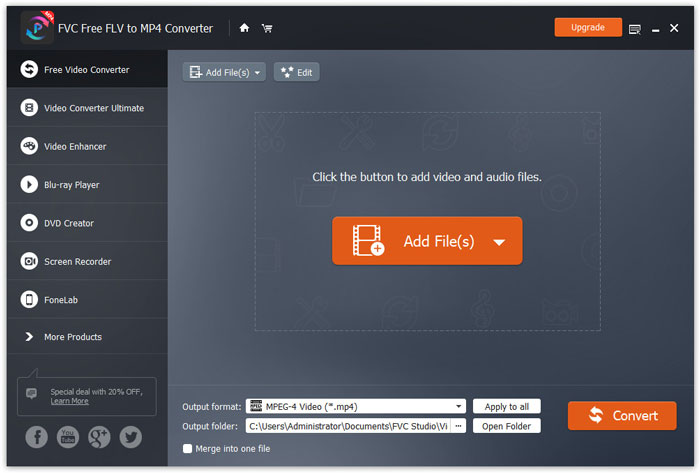
Step 1. After downloading, install and launch FVC Free FLV to MP4 Converter on your Windows or Mac. Click Add Files button to load the MP4 files from your computer. If you want to convert several MP4 files at one time, just upload them all.
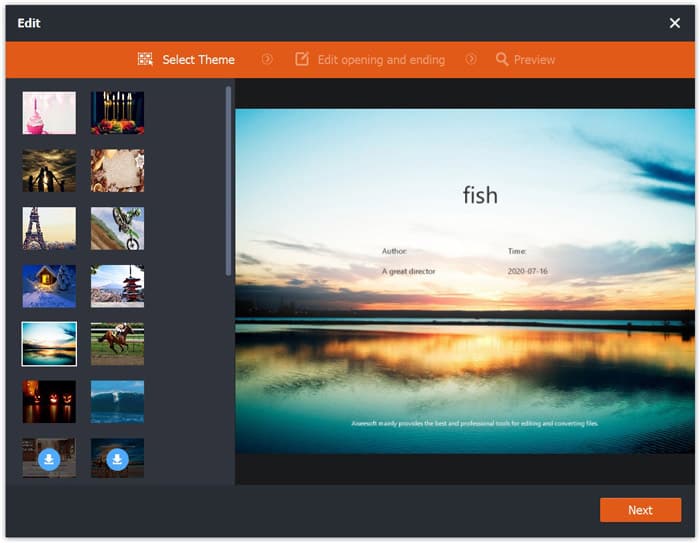
Step 2. Click on your MP4 file and click Edit button. You can add a theme to your MP4 file, and edit the opening and ending content. Then click Next to preview and save the changes.
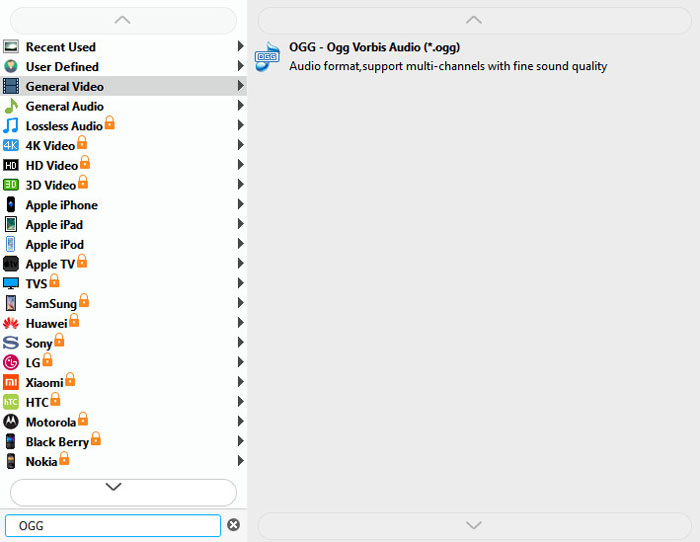
Step 3. Click the drop-down Output format button at the bottom, and search OGG format from the list. You can select OGG - Ogg Vorbis Audio (*.ogg) as the output format.
Step 4. Browse the output folder on your computer and click Convert button to start changing MP4 to OGG.
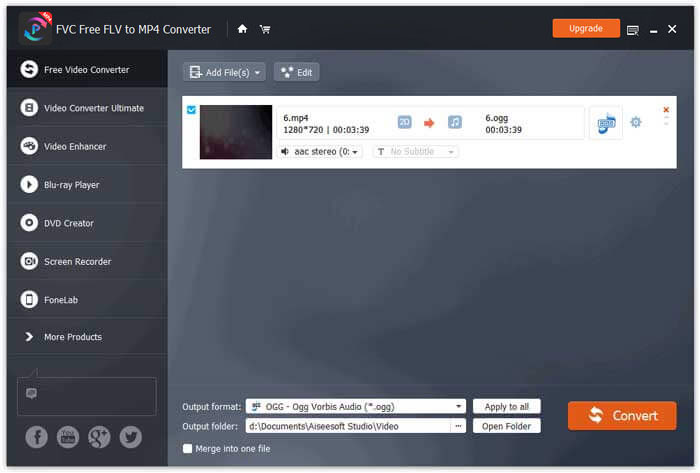
With FVC Free FLV to MP4 Converter, you can also combine several MP4 files into one.
Μέρος 2. Πώς να αλλάξετε MP4 σε OGG Online
Σε σύγκριση με έναν επιτραπέζιο μετατροπέα, η χρήση ενός διαδικτυακού μετατροπέα είναι μια μέθοδος εξοικονόμησης χρόνου για τη μετατροπή του MP4 σε OGG. Υπάρχουν πολλοί μετατροπείς MP4 σε OGG σε απευθείας σύνδεση που μπορείτε να επιλέξετε. Σε αυτό το μέρος, θα μοιραστούμε 2 MP4 σε μετατροπείς OGG για να μετατρέψουμε τα αρχεία MP4 σας σε OGG online δωρεάν.
1. Ζαμάρ
Το Zamzar είναι μια πολυλειτουργική διαδικτυακή πλατφόρμα για μετατροπέα βίντεο, μετατροπέα ήχου, μετατροπέα εικόνας και μετατροπέα eBook. Με το Zamzar, μπορείτε εύκολα να μετατρέψετε MP4 σε μια ποικιλία άλλων μορφών όπως το OGG. Εδώ είναι απλά βήματα για τη μετατροπή MP4 σε OGG με το Zamzar online.
Step 1. Go to www.zamzar.com/convert/mp4-to-ogg/, and click Add Files button to upload your MP4 files.
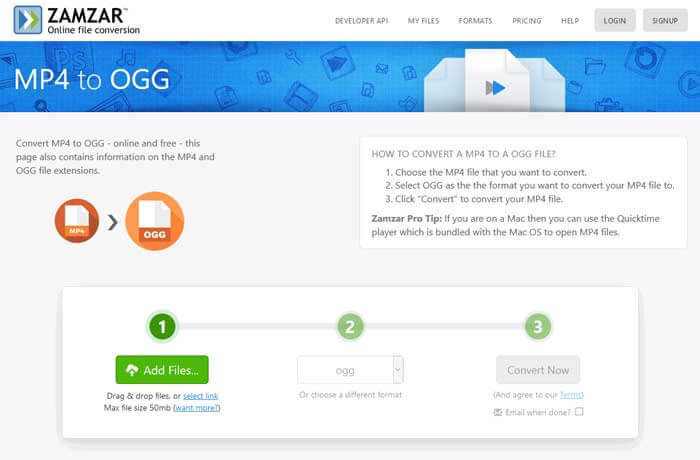
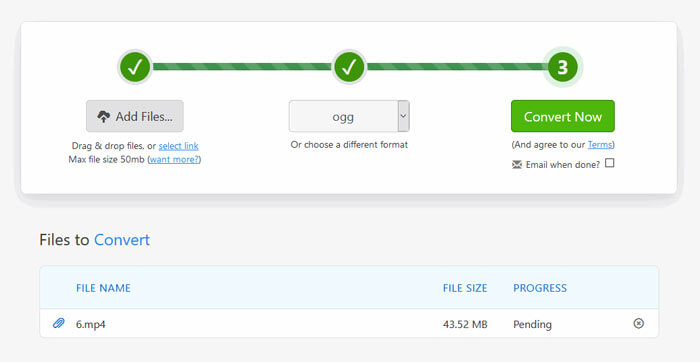
Step 2. The default output format has been set to ogg already. Click Convert Now button to start converting MP4 to OGG.
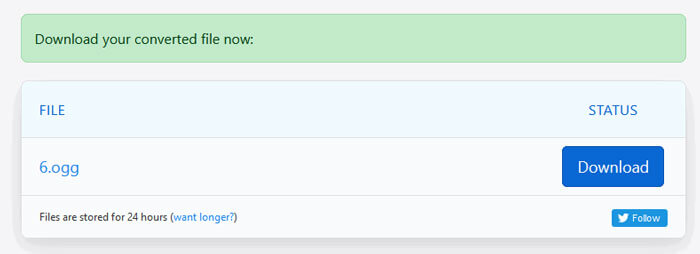
Step 3. Then it will jump to another page. You can click Download button to save the converted OGG file to your computer.
When you are converting a MP4 file in large size, the conversion may get stuck using Zamzar. You need to refresh the page and convert again. If you want a smooth conversion, FVC Free FLV to MP4 Converter can help you a lot. (See more MP4 players here)
2. Μετατροπή
Το Convertio είναι ένα εύκολο εργαλείο για τη μετατροπή αρχείων εγγράφων, εικόνων, υπολογιστικών φύλλων, ebook, ήχου και βίντεο. Χρησιμοποιώντας το Convertio, τα αρχεία MP4 μπορούν να μετατραπούν σε MP3 με εξαιρετική ακρίβεια. Ακολουθήστε τα παρακάτω βήματα για εξαγωγή OGG από το MP4 με το Convertio.
Step 1. Go to Convertio MP4 to OGG Converter (convertio.co/mp4-ogg/). Click Choose Files button to upload your MP4 files. You can also add MP4 files from Dropbox, Google Drive, or copy the URL.
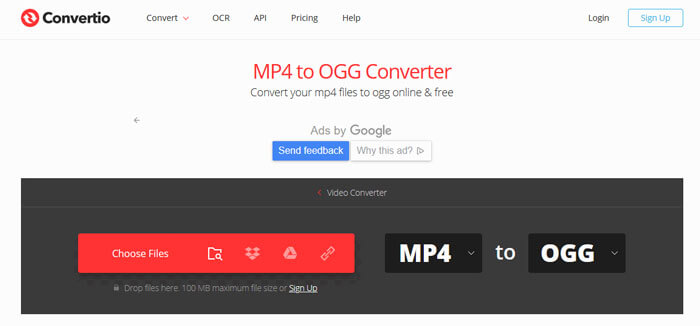
Step 2. Choose OGG from the drop-down icon, and then click the gear icon to set the codec, quality, audio channels, frequency, volume. You can cut the MP4 file to the wanted part.
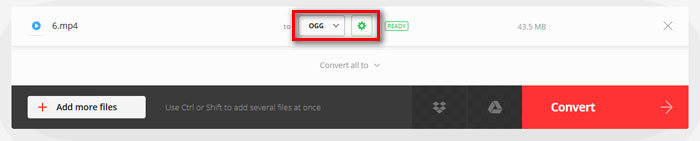
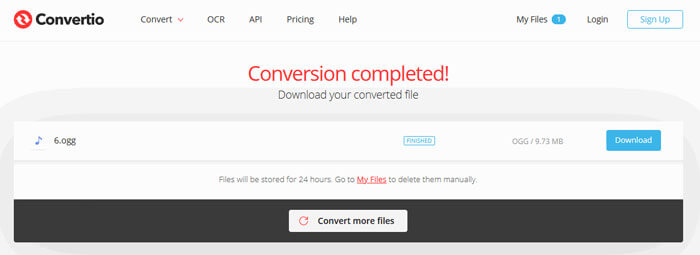
Step 3. After all is set, click the Convert button to convert MP4 to OGG. After conversion, click the Download button to save the converted OGG file to your computer.
Μέρος 3. Συχνές ερωτήσεις για τη μετατροπή MP4 σε OGG
1. Τι είναι η μορφή βίντεο OGG;
Το OGG είναι μια δωρεάν και ανοιχτή μορφή κοντέινερ που μπορεί να περιέχει μουσική, βίντεο, κείμενο όπως υπότιτλους και μεταδεδομένα.
2. Ποιος παίκτης μπορεί να παίξει αρχείο OGG;
Υπάρχουν πολλές φορητές συσκευές αναπαραγωγής που μπορούν να παίξουν αρχείο OGG όπως VLC, Windows Media Player, Adobe Audition, Audials, MPlayer και άλλα.
3. Πώς μπορώ να μετατρέψω MP4 σε MP3;
With the help of FVC Free Online Video Converter, you can easily convert MP4 to MP3 online. Go to this online site and click Add Files to Convert button to install the launcher. Then select the MP4 files from computer, and check MP3 as the output format. Click Convert button to convert MP4 to MP3.
συμπέρασμα
Εισαγάγαμε κυρίως 3 MP4 σε OGG μετατροπείς για να μετατρέψουμε MP4 σε OGG αρχεία online και offline. Με τον επιτραπέζιο FVC Free FLV to MP4 Converter, μπορείτε εύκολα να εξαγάγετε το αρχείο OGG ανοιχτού κώδικα από το MP4. Εάν έχετε καλύτερες λύσεις, μην διστάσετε να αφήσετε ένα σχόλιο.
-
 WebM έως MP4 | Δωρεάν μετατροπή WebM σε MP4
 Πώς να παρακολουθήσετε αρχεία WebM χωρίς πρόγραμμα περιήγησης στο Web; Πρέπει να μετατρέψετε το WebM σε MP4. Εδώ είναι οι 10 δωρεάν μετατροπείς WebM σε MP4 για να αλλάξετε WebM σε MP4 online και σε υπολογιστή Mac και Windows.
-
 MP4 έως FLV | Κορυφαίοι 3 δωρεάν μετατροπείς
 Αυτή η ανάρτηση είναι ο αναλυτικός οδηγός για τη μετατροπή MP4 σε FLV. Μπορείτε να πάρετε τους 3 πρώτους δωρεάν μετατροπείς για να αλλάξετε MP4 σε FLV online, σε υπολογιστή με Windows ή Mac με ευκολία.
-
 Κορυφαίοι 6 τρόποι συνδυασμού αρχείων MP4 σε Windows / Mac / Online
 Θέλετε να συγχωνεύσετε τα ακατέργαστα αρχεία MP4 για το έργο σας; Αυτή η ανάρτηση συγκεντρώνει τους 6 καλύτερους τρόπους για να σας βοηθήσει να συνδυάσετε εύκολα βίντεο MP4 σε Windows, Mac και online.
