


 Video Converter Ultimate
 Εγγραφή οθόνης
 Επισκευή βίντεο
Προσθέστε τη δική σας μαγεία στο βίντεο με τη βοήθεια των Mac Video Editors
Στις μέρες μας, το διαμοίρασμα βίντεο έχει κερδίσει πολύ μεγαλύτερη προσοχή και δημοτικότητα από ποτέ. Μέχρι σήμερα, οι πλατφόρμες διαμοιρασμού πολυμέσων έχουν ήδη κατακτήσει τον κόσμο και φαίνεται πως τίποτα δεν μπορεί να τις σταματήσει. Όταν μας πιάνει η ανία, πρέπει να ψυχαγωγηθούμε βλέποντας ή δημιουργώντας βίντεο. Γι’ αυτόν τον λόγο έχει αυξηθεί και η ζήτηση για προγράμματα επεξεργασίας βίντεο, ώστε να βελτιώνετε τα βίντεό σας και να τα κάνετε πιο ελκυστικά. Όμως, αν αναζητήσετε στην αγορά τον καλύτερο επεξεργαστή βίντεο για Mac, θα βρείτε πάρα πολλές επιλογές. Έτσι, αντί να δοκιμάζετε στην τύχη διάφορα εργαλεία, συγκεντρώσαμε εμείς για εσάς διαφορετικές επιλογές για να διαλέξετε. Συνεχίστε λοιπόν, ενώ εμείς κάνουμε την αναζήτηση επεξεργαστών πιο εύκολη από ποτέ. Χωρίς άλλη καθυστέρηση, ας προχωρήσουμε στα καλύτερα εργαλεία που προσφέρουν εντυπωσιακά αποτελέσματα και δυνατότητες επεξεργασίας στις οποίες μπορείτε να βασιστείτε.

Μέρος 1. Εκπληκτικό πρόγραμμα επεξεργασίας βίντεο Premium για Mac (Έκδοση επί πληρωμή)
Ο μοναδικός μετατροπέας είναι τώρα έτοιμος να σας βοηθήσει να κάνετε το πρώτο βήμα στην επεξεργασία βίντεο. Το FVC Video Converter Ultimate είναι ό,τι καλύτερο για μετατροπή και επεξεργασία. Αυτός ο επεξεργαστής βίντεο για PC και Mac βοηθά ήδη τους χρήστες που αντιμετωπίζουν προβλήματα με τη βελτίωση των βίντεο και του ήχου τους. Επιπλέον, αυτό το εργαλείο είναι ένας ολοκληρωμένος επεξεργαστής, που σημαίνει ότι προσφέρει προηγμένες λειτουργίες όπως κανένα άλλο, τις οποίες μπορείτε να χρησιμοποιήσετε με σαφείς και ακριβείς οδηγίες. Εάν λοιπόν θέλετε να έχετε μια εξαιρετική εμπειρία επεξεργασίας, ακόμα κι αν είστε αρχάριος, δοκιμάστε να χρησιμοποιήσετε αυτό το εργαλείο, ακολουθώντας τα παρακάτω βήματα που παρέχονται για τους χρήστες που θέλουν τα βίντεό τους να ξεχωρίζουν από των άλλων.
Βήμα 1. Κάντε κλικ στο κουμπί λήψης για Mac και εγκαταστήστε το. Ολοκληρώστε γρήγορα τη ρύθμιση και εκκινήστε το πρόγραμμα.
Δωρεάν ΛήψηΓια Windows 7 ή νεότεραΑσφαλής λήψη
Δωρεάν ΛήψηΓια MacOS 10.7 ή νεότεροΑσφαλής λήψη
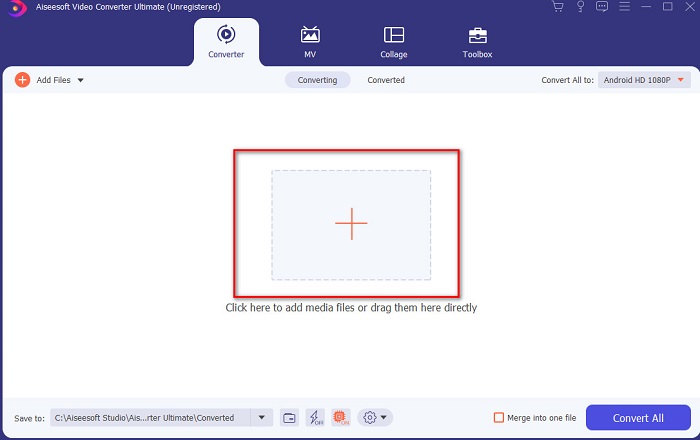
Βήμα 2. Όταν ο απόλυτος μετατροπέας εκτελείται ήδη στο σύστημά σας, κάντε κλικ στο κουμπί Add Files ή στο εικονίδιο + στο κέντρο για να προσθέσετε το βίντεο που θέλετε να επεξεργαστείτε.
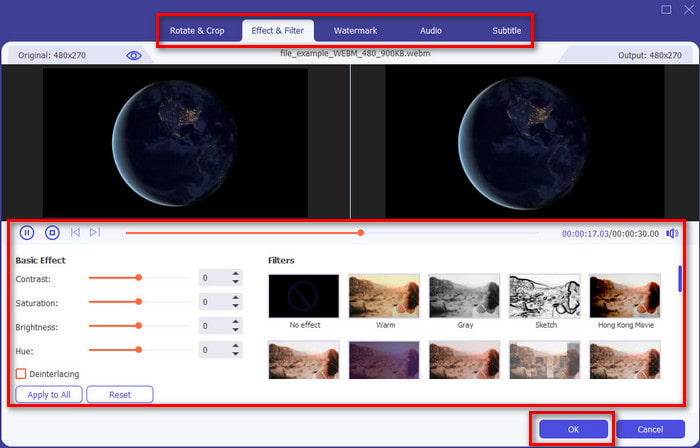
Βήμα 3. Στη συνέχεια, κάντε κλικ στο κουμπί με το ραβδί για να επεξεργαστείτε και να κάνετε τη «μαγεία» σας στο βίντεο. Υπάρχουν πολλές επιλογές που μπορείτε να προσθέσετε στα βίντεό σας, όπως φίλτρα, εφέ, περικοπή κ.λπ. Για να αποθηκεύσετε τις αλλαγές που κάνατε, κάντε κλικ στο OK.
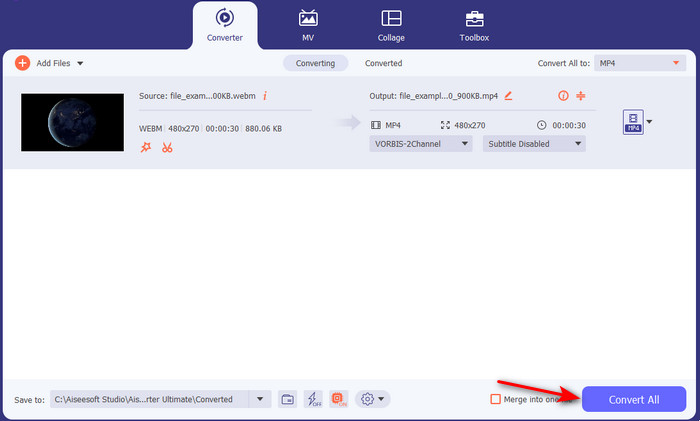
Βήμα 4. Για να εξαχθεί το βίντεο που επεξεργαστήκατε νωρίτερα, κάντε κλικ στο Convert All και περιμένετε για λίγο μέχρι να ολοκληρωθεί η διαδικασία.
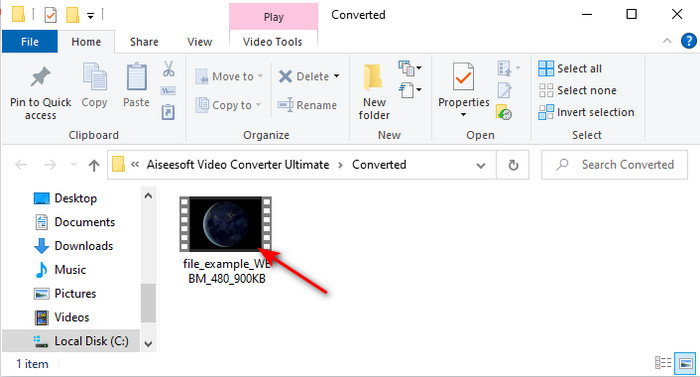
Βήμα 5. Ένας φάκελος με το επεξεργασμένο σας βίντεο θα εμφανιστεί στην οθόνη. Κάντε κλικ για να το παρακολουθήσετε και, αν θέλετε να το συγχωνεύσετε με κάποιο άλλο βίντεο, μπορείτε επίσης να δοκιμάσετε το εντυπωσιακό εργαλείο συγχώνευσης βίντεο που θα βρείτε στην εργαλειοθήκη.
Μέρος 2. Άλλα χρήσιμα προγράμματα επεξεργασίας βίντεο για Mac (δωρεάν έκδοση και προεγκατεστημένο εργαλείο)
1. iMovie
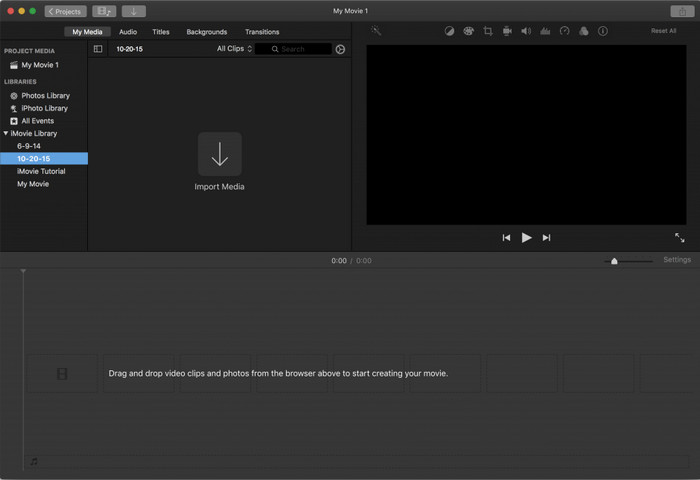
Το iMovie είναι ένας προεγκατεστημένος δωρεάν επεξεργαστής βίντεο για Mac, οπότε αν έχετε περιορισμένο προϋπολογισμό, μπορείτε να το χρησιμοποιήσετε. Αν και το εργαλείο αυτό προσφέρει ένα μεσαίο επίπεδο δυνατοτήτων επεξεργασίας, του λείπουν προηγμένες λειτουργίες, όπως για παράδειγμα το motion tracking. Παραμένει όμως ένας καλός επεξεργαστής – όχι ο καλύτερος – τον οποίο μπορείτε ωστόσο να χρησιμοποιήσετε δωρεάν στο Mac. Επίσης, αν θέλετε πραγματικά επαγγελματικό αποτέλεσμα, αυτό πρέπει να είναι η έσχατη λύση σας, καθώς παρέχει μόνο βασική επεξεργασία για απλά βίντεο. Επιπλέον, είναι ήδη προεγκατεστημένο και δωρεάν, οπότε δεν χρειάζεται να κατεβάσετε κάποια εφαρμογή τρίτου για να κάνετε την επεξεργασία.
Πλεονεκτήματα
- Εύκολο στην κατανόηση εργαλείο.
- Εγγενής πρόγραμμα επεξεργασίας για χρήστες Mac.
Μειονεκτήματα
- Δεν διαθέτει τα περισσότερα προηγμένα χαρακτηριστικά που χρειάζεται ένας επαγγελματίας.
- Δεν είναι το καλύτερο εργαλείο αν θέλετε να μοιραστείτε ένα ποιοτικό βίντεο.
2. Avidemux
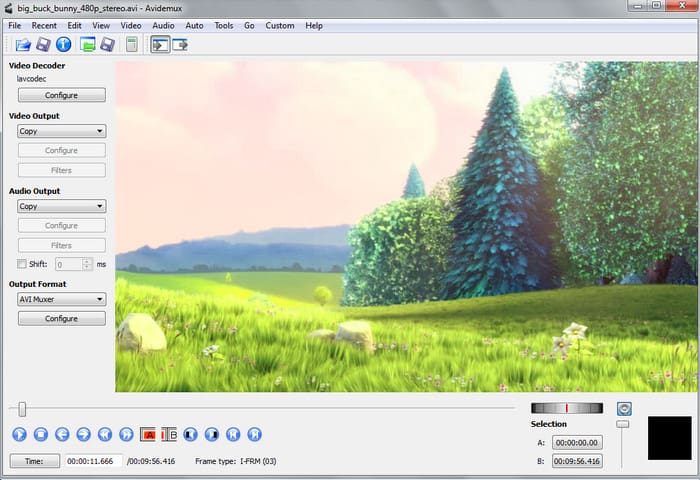
Το Avidemux είναι ένας επεξεργαστής βίντεο αργής κίνησης για Mac και προσφέρει επίσης αρκετή αποδοτικότητα. Παρέχει απλές δυνατότητες επεξεργασίας, αλλά το iMovie έχει περισσότερα να προσφέρει από αυτόν τον επεξεργαστή. Επιπλέον, όταν αποκτάτε πρόσβαση στην κεντρική σελίδα του εργαλείου, δεν είναι ιδανικό να δίνετε προσωπικές πληροφορίες, επειδή δεν προστατεύεται επαρκώς. Αν επιχειρήσετε να δώσετε ευαίσθητα στοιχεία, όπως λογαριασμό τράπεζας, υπάρχει μεγάλη πιθανότητα να παραβιαστείτε. Παρόλα αυτά, εξακολουθεί να προσφέρει αξιοπρεπή επεξεργασία για βίντεο που θα χρειαστείτε, αλλά αν είστε επαγγελματίας, το επίπεδο επεξεργασίας που προσφέρει είναι απλώς «οκ».
Πλεονεκτήματα
- Η επεξεργασία των χαρακτηριστικών είναι μια χαρά.
- Υποστηρίζει πολλούς τύπους αρχείων προς επεξεργασία.
Μειονεκτήματα
- Δεν είναι η καλύτερη επιλογή αν είστε επαγγελματίας στο μοντάζ επειδή δεν διαθέτει προηγμένες δυνατότητες.
- Η διεπαφή του εργαλείου είναι επίσης τόσο βαρετή.
3. Kdenlive
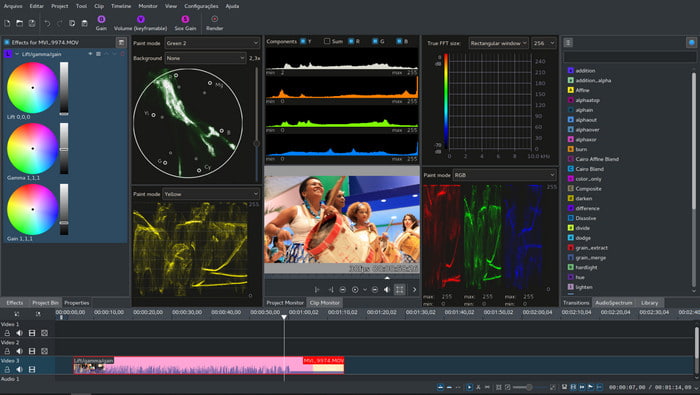
Ένας ακόμη επεξεργαστής βίντεο για Mac που μπορείτε εύκολα να κατεβάσετε στον υπολογιστή σας είναι το Kdenlive. Αυτό το εργαλείο διαθέτει τις δυνατότητες που θα έπρεπε να έχει ένας επεξεργαστής. Ωστόσο, εξακολουθούν να εμφανίζονται μικρά και μεγάλα σφάλματα (bugs) όταν προσπαθείτε να το χρησιμοποιήσετε. Είναι προτιμότερο να χρησιμοποιείται σε PC παρά σε Mac, γιατί έχει περισσότερους υποστηρικτές εκεί. Στο Mac διατίθεται μια παλαιότερη έκδοση του εργαλείου, αλλά λειτουργεί. Παρόλο που μπορεί να φαίνεται πως δεν θα σας βοηθήσει λόγω των σφαλμάτων ή της έλλειψης λειτουργιών επεξεργασίας, εξακολουθεί να είναι αρκετά χρήσιμο για να μάθετε πώς να το χρησιμοποιείτε.
Πλεονεκτήματα
- Υποστηρίζει όλες τις γνωστές πλατφόρμες.
- Δεν χρειάζεται να πληρώσετε γιατί είναι δωρεάν.
Μειονεκτήματα
- Τα βίντεο που θα επεξεργαστείτε εδώ έχουν λίγες πιθανότητες να ξεχωρίσουν.
- Έχει πολλά τεχνικά προβλήματα που δεν έχουν ακόμη επιλυθεί.
Μέρος 3. Συχνές ερωτήσεις σχετικά με το πρόγραμμα επεξεργασίας βίντεο Mac
Πώς να συνδυάσετε διαφορετικά βίντεο στο iMovie;
Αν θέλετε να συνδυάσετε δύο ή περισσότερα βίντεο που τραβήξατε ξεχωριστά στο iPhone σας, τότε δοκιμάστε να χρησιμοποιήσετε το iMovie για να τα ενώσετε. Για να μάθετε περισσότερα σχετικά με τη συγχώνευση στο iMovie, πρέπει να μεταβείτε σε αυτόν τον σύνδεσμο.
Γιατί επεξεργαζόμαστε τα βίντεό μας;
Η επεξεργασία βίντεο είναι γνωστή ως post-production, όπου βελτιώνετε το βίντεό σας και αφαιρείτε τα περιττά κλιπ. Αυτό το βήμα είναι πολύ σημαντικό, γιατί αυτό θα βοηθήσει το βίντεό σας να είναι πιο εντυπωσιακό και να ξεχωρίζει από άλλα. Ακόμα κι αν έχετε καταπληκτικό περιεχόμενο, αν το επεξεργασμένο βίντεό σας δεν είναι τόσο καλό, τότε θα κερδίσει λιγότερη προσοχή από τα άλλα.
Πώς να επεξεργαστείτε τα GIF σε Mac;
Παρόλο που το iMovie μπορεί να επεξεργαστεί βίντεο, δεν μπορεί να κάνει το ίδιο με τα GIF. Γι' αυτό συγκεντρώσαμε διάφορα εργαλεία που μπορείτε να χρησιμοποιήσετε για να επεξεργάζεστε GIF σε Mac. Εδώ λοιπόν θα βρείτε τα 9 κορυφαία προγράμματα επεξεργασίας που μπορείτε να χρησιμοποιήσετε για να επεξεργαστείτε GIF.
συμπέρασμα
Καθώς φτάνουμε στο τέλος, μπορείτε πλέον να κάνετε τη δική σας επεξεργασία με τη βοήθεια των εργαλείων που αναφέρονται σε αυτό το άρθρο. Αν και δεν μπορούν όλα τα εργαλεία να παρέχουν τις εντυπωσιακές δυνατότητες επεξεργασίας που ίσως επιθυμείτε, μην συγκρίνετε το Video Converter Ultimate με τα υπόλοιπα, γιατί αυτό το εργαλείο έχει πάρα πολλά να προσφέρει. Εάν λοιπόν θέλετε να εντυπωσιάσετε τους θεατές του βίντεό σας, χρησιμοποιήστε το απόλυτο αυτό εργαλείο για να δημιουργήσετε ένα εντυπωσιακό αποτέλεσμα.
-
 Συγκεκριμένος οδηγός - Πώς να συγχωνεύσετε δύο κομμάτια ήχου στο Audacity
 Το Audacity απολαμβάνει τη φήμη για την επεξεργασία ήχου. Κατεβάσατε το Audacity αλλά δεν ξέρετε πώς να συγχωνεύσετε κομμάτια ήχου στο Audacity; Αυτή η ανάρτηση θα σας πει πώς να συγχωνεύσετε κομμάτια στο Audacity.
-
 2 Αποτελεσματικές μέθοδοι για τη συγχώνευση αρχείων MPEG για το συνδυασμό παλαιών τηλεοπτικών σειρών
 Όταν έχετε κάποιες παλιές τηλεοπτικές σειρές στο MPEG, μπορείτε να μάθετε περισσότερα σχετικά με τις 2 αποτελεσματικές μεθόδους συγχώνευσης αρχείων MPEG σε μία ταινία σύμφωνα με τις απαιτήσεις σας.
-
 [Ενημέρωση 2025] 9 καλύτεροι επεξεργαστές GIF για PC, Mac, iOS και Android
 Θέλετε να προσθέσετε μια προσωπική πινελιά στο GIF σας, ώστε να γίνει πιο εκφραστικό; Συνεχίστε να διαβάζετε αυτό το άρθρο για να μάθετε πώς να επεξεργάζεστε και το καλύτερο εργαλείο για τη δουλειά.
