


 Video Converter Ultimate
 Εγγραφή οθόνης
 Επισκευή βίντεο
 Ασφαλές κατέβασμα
Πώς να αφαιρέσετε το υδατογράφημα από τα εξαγόμενα βίντεο του Renderforest τελικά
Το Renderforest είναι ένα πλήρες σύμφωνο εξαιρετικών κινούμενων προτύπων για εισαγωγικά, outros, τίτλους, διαφημίσεις ή τέτοια. Μπορείτε να ξεκινήσετε από το μηδέν ή να χρησιμοποιήσετε τα διαθέσιμα πρότυπα εδώ. Παρόλο που δεν είστε ειδικός στην επεξεργασία βίντεο, μπορείτε να καταφέρετε να το ξεπεράσετε χρησιμοποιώντας αυτήν την πλατφόρμα web. Λόγω της χρήσης και του βέλτιστου πλεονεκτήματος της, πολλοί χρήστες επέλεξαν αυτήν την πλατφόρμα για να δημιουργήσουν ένα υψηλής ποιότητας, αποτελεσματικό, συμβατό και αξιόπιστο σχέδιο, εάν έχετε συνδρομή.
Έτσι, μπορείτε να κατεβάσετε εδώ δωρεάν το βίντεο που επεξεργάζεστε, εφόσον κάνετε εγγραφή, αλλά με υδατογράφημα. Το υδατογράφημα δημιουργεί πρόβλημα σε πολλούς από εμάς που έχουμε ήδη κάνει εξαγωγή του βίντεο εδώ, καθώς και σε όσους δεν μπορούν να πληρώσουν τη συνδρομή αυτού του εργαλείου. Παρακάτω θα παραθέσουμε οδηγούς για το πώς να αφαιρέσετε το υδατογράφημα του Renderforest χρησιμοποιώντας τα πιο χρήσιμα εργαλεία που συγκεντρώσαμε κατά την έρευνά μας. Μπορούμε να τα μοιραστούμε μαζί σας αν συνεχίσετε να διαβάζετε το επόμενο μέρος αυτού του άρθρου.

Μέρος 1. 3 αποτελεσματικοί τρόποι για να αφαιρέσετε το υδατογράφημα από το βίντεο του Renderforest
FVC Video Converter Ultimate
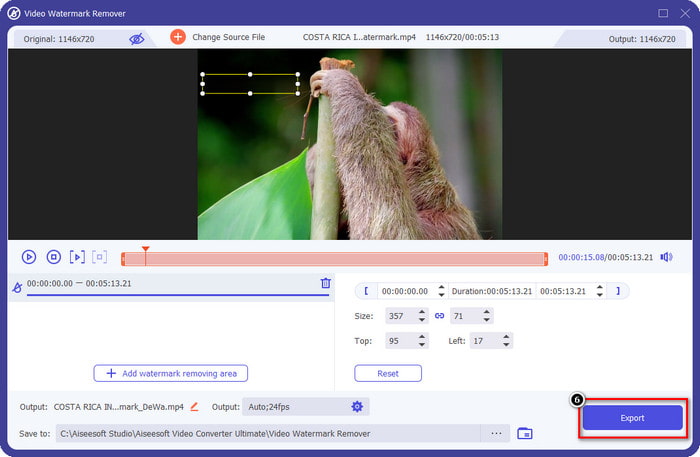
Το FVC Video Converter Ultimate είναι ένα εξαιρετικό εργαλείο αφαίρεσης υδατογραφημάτων από βίντεο, το οποίο μπορεί να σας καθοδηγήσει βήμα προς βήμα στο πώς να αφαιρέσετε το υδατογράφημα του Renderforest. Μπορείτε να βασιστείτε σε αυτό το εργαλείο για να αφαιρέσετε χωρίς δυσκολία το υδατογράφημα από το βίντεό σας. Αν το συγκρίνουμε με άλλα αντίστοιχα εργαλεία, αυτό διαθέτει τη δυνατότητα να αφαιρεί το υδατογράφημα από το βίντεό σας με την υποστήριξη τεχνολογίας ΤΝ. Παρ’ όλα αυτά, είναι το καλύτερο εργαλείο για να αφαιρέσετε το υδατογράφημα από το βίντεό σας, ανεξάρτητα από τη μορφή στην οποία το ανεβάζετε. Τι κάνει αυτό το εργαλείο τόσο καλό; Δεν χρειάζεται να είστε ειδικός στην τεχνολογία για να το χρησιμοποιήσετε· με τον απλό οδηγό και τα βήματα που ακολουθούν παρακάτω, μπορείτε να αφαιρέσετε το υδατογράφημα που προσθέτει το Renderforest στο βίντεο.
Βήμα 1. Κατεβάστε το λογισμικό στον υπολογιστή σας κάνοντας κλικ στο κατάλληλο κουμπί λήψης. Κάντε κλικ στο αρχείο λήψης, εγκαταστήστε το και πατήστε Start Now για να εκκινήσει άμεσα το λογισμικό.
Δωρεάν ΛήψηΓια Windows 7 ή νεότεραΑσφαλής λήψη
Δωρεάν ΛήψηΓια MacOS 10.7 ή νεότεροΑσφαλής λήψη
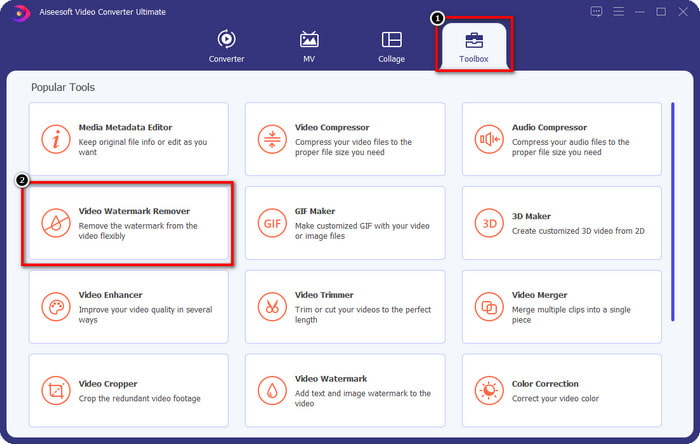
Βήμα 2. Αφού εκκινήσετε το λογισμικό, ανοίξτε το Toolbox και στη συνέχεια κάντε κλικ στο Video Watermark Remover που βρίσκεται εκεί.
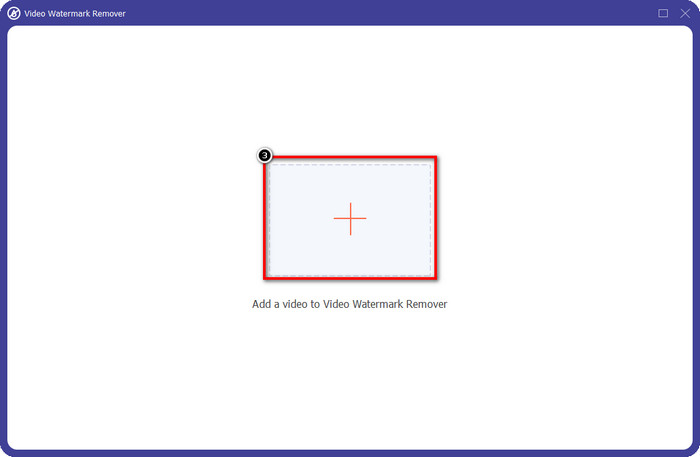
Βήμα 3. Κάντε κλικ στο εικονίδιο + στην οθόνη σας για να ανεβάσετε το βίντεο του Renderforest που έχετε κάνει εξαγωγή με υδατογράφημα.
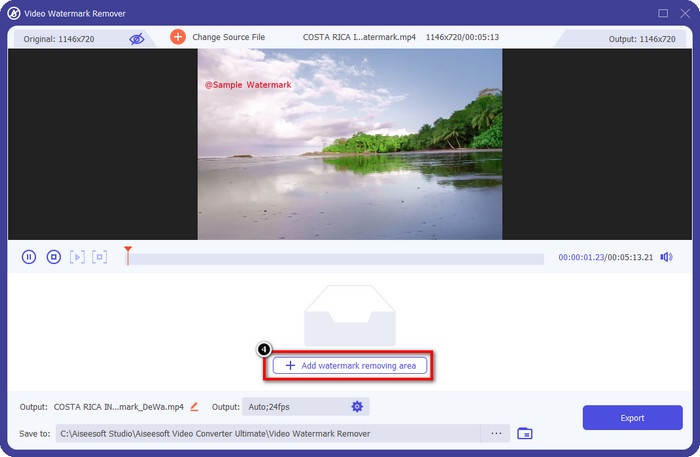
Βήμα 4. Πατήστε Add Removing Watermark Area για να ξεκινήσει η διαδικασία αφαίρεσης του υδατογραφήματος του Renderforest.
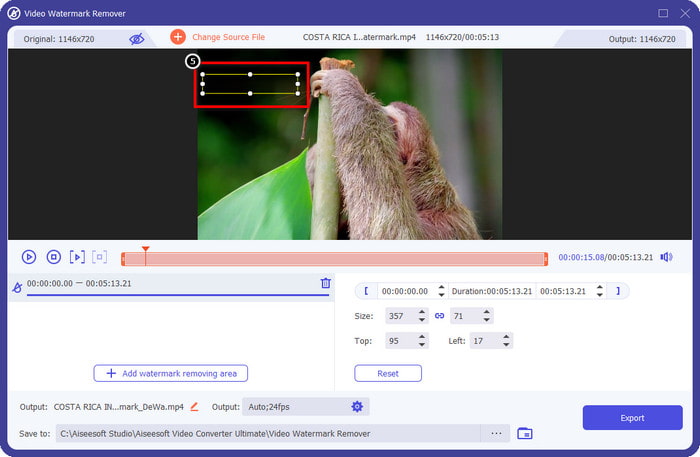
Βήμα 5. Στο νέο παράθυρο που εμφανίζεται στην οθόνη σας, σύρετε το selection box και προσαρμόστε το ώστε να καλύπτει το υδατογράφημα. Μπορείτε να ρυθμίσετε ελεύθερα το πλαίσιο επιλογής, αν χρειάζεται.
Βήμα 6. Αφού το πλαίσιο επιλογής εντοπίσει το υδατογράφημα στο βίντεό σας, κάντε κλικ στο Export για να ξεκινήσει η αφαίρεση και η αποθήκευση του βίντεο χωρίς υδατογράφημα. Η επεξεργασία του βίντεο θα ολοκληρωθεί πολύ γρήγορα και πλέον μπορείτε να χρησιμοποιήσετε το βίντεο χωρίς το ενοχλητικό υδατογράφημα.
Σχετικά:
Αφαίρεση υδατογραφήματος DeviantArt
Αφαίρεση υδατογραφήματος Video Helper
Καταργήστε το λογότυπο τώρα
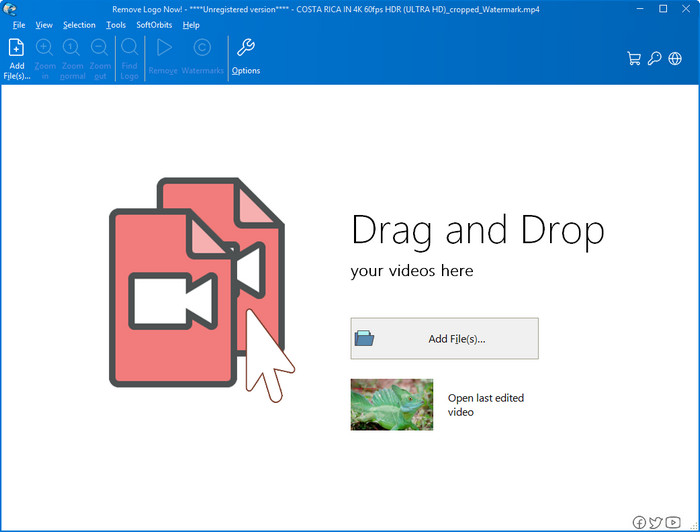
Στη συνέχεια στη λίστα μας, το Remove Logo Now έχει χτίσει μια εξαιρετική φήμη για την αφαίρεση επικαλυμμένων υδατογραφημάτων στα Windows. Με αυτό το εργαλείο, δεν θα χρειαστεί να έχετε ειδικές γνώσεις για να ξέρετε πώς να αφαιρέσετε το υδατογράφημα του Renderforest σε υπολογιστή. Μετά την αφαίρεση του υδατογραφήματος, αν παρατηρήσετε προσεκτικά, μπορεί να υπάρχουν ελαφρά ίχνη στο σημείο από όπου προήλθε το υδατογράφημα. Όμως, αν δεν το εξετάσετε διεξοδικά, δεν θα παρατηρήσετε το υδατογράφημα ή τα υπολείμματά του στο εξαγόμενο βίντεο. Ο παρακάτω οδηγός θα σας δείξει πώς να αφαιρέσετε το υδατογράφημα από το βίντεό σας σε συσκευές με Windows.
Βήμα 1. Κατεβάστε και εγκαταστήστε το Remove Logo Now στον υπολογιστή σας και στη συνέχεια ακολουθήστε τη διαδικασία εγκατάστασης.
Βήμα 2. Εκκινήστε το λογισμικό και κάντε κλικ στο Add Files για να ανεβάσετε εδώ το βίντεο. Μπορείτε επίσης να σύρετε και να αφήσετε το βίντεο στο παράθυρο για πιο αποδοτική μεταφόρτωση.
Βήμα 3. Επιλέξτε ποιο εργαλείο θέλετε να χρησιμοποιήσετε για να σημειώσετε το υδατογράφημα. Αφού επιλέξετε ένα, επισημάνετε το υδατογράφημα και κάντε κλικ στο Remove.
Βήμα 4. Κάντε κλικ στο Start για να ξεκινήσει η διαδικασία αφαίρεσης υδατογραφήματος που προσφέρει αυτό το εργαλείο.
Βίντεο για την αφαίρεση υδατογραφημάτων σε απευθείας σύνδεση

Αν δεν σας αρέσει να κατεβάζετε λογισμικό στον υπολογιστή σας αλλά εξακολουθείτε να θέλετε να μάθετε πώς να αφαιρέσετε το υδατογράφημα του Renderforest, τότε δοκιμάστε το Video Watermark Remover Online. Μπορείτε να χρησιμοποιήσετε αυτό το πλήρως αυτοματοποιημένο εργαλείο αφαίρεσης υδατογραφημάτων για να εξαλείψετε το υδατογράφημα από το βίντεό σας δωρεάν, χωρίς να το κατεβάσετε στον υπολογιστή σας. Όπως και το εργαλείο που αναφέρθηκε παραπάνω, ακόμη κι αν είστε αρχάριοι στην επεξεργασία βίντεο ή στην αφαίρεση υδατογραφημάτων, μπορείτε να το μάθετε μέσα σε λίγα λεπτά. Μπορείτε να ακολουθήσετε τον παρακάτω οδηγό για να μάθετε πώς να το χρησιμοποιείτε.
Βήμα 1. Ανοίξτε το online εργαλείο αφαίρεσης υδατογραφημάτων αναζητώντας το μέσω του αγαπημένου σας προγράμματος περιήγησης.
Βήμα 2. Κάντε κλικ στο εικονίδιο upload cloud στην κεντρική σελίδα για να εισαγάγετε το βίντεο που εξάγετε από το Renderforest.
Βήμα 3. Περιμένετε να ολοκληρωθεί η διαδικασία μεταφόρτωσης, επειδή το εργαλείο αφαιρεί αυτόματα το υδατογράφημα από το βίντεό σας, και στη συνέχεια κάντε κλικ στο Download για να αποκτήσετε το βίντεο χωρίς το υδατογράφημα.
Μέρος 2. Συχνές ερωτήσεις σχετικά με τον τρόπο κατάργησης του υδατογραφήματος Renderforst
Πόσο είναι το κόστος συνδρομής για το Renderforest;
Το Renderforest υποστηρίζει τρεις διαφορετικούς τύπους τιμολόγησης που μπορείτε να επωφεληθείτε. $ 14.99 για Lite, $24.99 για Pro και $29.99 για Business κάθε μήνα. Αυτή η τιμολόγηση έχει διαφορετικό σκοπό μεταξύ τους. μπορείτε να μεταβείτε στον κύριο ιστότοπό του για να δείτε ποια είναι τα διαθέσιμα διαθέσιμα στη συνδρομή που θέλετε να επωφεληθείτε.
Είναι δυνατόν να αφαιρέσετε το υδατογράφημα από το Renderforest Video χωρίς εργαλείο;
Ναι, μπορείτε να αφαιρέσετε το υδατογράφημα στο Renderforest σας χωρίς να χρησιμοποιήσετε κάποιο εργαλείο και αυτός ο τρόπος είναι αγοράζοντας μια μηνιαία ή ετήσια χρέωση για το λογισμικό. Έτσι, όταν εξάγετε το αρχείο βίντεο, δεν θα προστίθεται υδατογράφημα σε αυτό.
Ποιο είναι το καλύτερο σχέδιο για το Renderforest; Μηνιαία ή Ετήσια;
Η μηνιαία συνδρομή είναι μια καλή επιλογή εάν θέλετε να χρησιμοποιήσετε το εργαλείο μερικές φορές, αλλά εάν αποφασίσετε να χρησιμοποιήσετε το λογισμικό για μεγάλο χρονικό διάστημα, είναι προτιμότερο να επωφεληθείτε από ένα ετήσιο πρόγραμμα γιατί θα σας κοστίσει λιγότερο από την ανανέωση του κάθε μήνα. Αλλά προτού επωφεληθείτε, μπορείτε να χρησιμοποιήσετε το Renderforest δωρεάν καταγράφοντας τον λογαριασμό σας εδώ και, στη συνέχεια, προσπαθήστε να χρησιμοποιήσετε τα άλλα πρότυπα που παρέχει δωρεάν.
συμπέρασμα
Πράγματι, αυτό το άρθρο παρέχει ισχυρές αποδείξεις για την δωρεάν κατάργηση του υδατογραφήματος Renderforest χρησιμοποιώντας τα τρία πιο χρήσιμα εργαλεία αφαίρεσης υδατογραφημάτων που μπορείτε να χρησιμοποιήσετε. Εάν είστε χρήστης των Windows και θέλετε να αφαιρέσετε το υδατογράφημα από την επιφάνεια εργασίας σας, πρέπει να προσπαθήσετε να χρησιμοποιήσετε το Remove Logo Now. Αλλά αν δεν σας αρέσει η λήψη λογισμικού, πρέπει να δοκιμάσετε να χρησιμοποιήσετε το Video Watermark Remover Online, επειδή μπορείτε να χρησιμοποιήσετε αυτό το εργαλείο για να αφαιρέσετε αποτελεσματικά τα υδατογραφήματα.
Αλλά αν είστε χρήστης Windows ή Mac που θέλετε ένα αποτελεσματικό εργαλείο αφαίρεσης υδατογραφήματος, τότε χωρίς αμφιβολία, το καλύτερο εργαλείο αφαίρεσης υδατογραφήματος που μπορείτε να χρησιμοποιήσετε είναι το FVC Video Converter Ultimate. Είναι το απόλυτο εργαλείο αφαίρεσης υδατογραφήματος που μπορείτε να χρησιμοποιήσετε για να αφαιρέσετε αποτελεσματικά και επαγγελματικά το υδατογράφημα που ενοχλεί το βίντεό σας στο Renderforest.
-
 2 τρόποι για να καταργήσετε γρήγορα το υδατογράφημα VSDC σε Windows & Mac
 Ψάχνετε έναν τρόπο να αφαιρέσετε το υδατογράφημα VSDC στα βίντεό σας; Με αυτό το άρθρο, παρέχουμε εργαλεία που μπορείτε να χρησιμοποιήσετε για να απαλλαγείτε από το υδατογράφημα.
-
 Καταργήστε το υδατογράφημα Animoto στα βίντεο εύκολα και αποτελεσματικά
 Πώς να αφαιρέσετε το υδατογράφημα Animoto στο βίντεο; Συνεχίστε να διαβάζετε αυτό το άρθρο καθώς παρέχουμε ένα πλήρες σεμινάριο για το πώς να το κάνετε.
-
 Πώς να αφαιρέσετε το υδατογράφημα από το βίντεο χρησιμοποιώντας το Final Cut Pro [Πλήρης οδηγός]
 Έχετε πρόβλημα με το υδατογράφημα στα βίντεο; Δεν είπα περισσότερα, γιατί παρείχαμε ένα σεμινάριο για το πώς να αφαιρέσετε το υδατογράφημα από το βίντεο χρησιμοποιώντας το Final Cut Pro.
