


 Video Converter Ultimate
 Εγγραφή οθόνης
 Επισκευή βίντεο
Το πιο πρόσφατο διαδικτυακό και εκτός σύνδεσης λογισμικό που μπορείτε να χρησιμοποιήσετε για να αντιστρέψετε εύκολα βίντεο MP4
Τις περισσότερες φορές, όταν προσπαθούμε να αντιστρέψουμε το βίντεό μας, δημιουργούμε αστείες αντιδράσεις που μας κάνουν να σκεφτόμαστε ότι αυτό που βλέπουμε είμαστε εμείς. Επειδή αναπαράγεται προς τα πίσω, το εφέ που δημιουργείται είναι κάτι καινούργιο για τα μάτια μας. Επομένως, αν θέλετε να μάθετε αποτελεσματικούς τρόπους για να αντιστρέψετε βίντεο MP4, είναι απαραίτητο να διαβάσετε αυτό το άρθρο. Καθώς παρουσιάζει διάφορα προγράμματα, online και offline, μπορείτε να τα χρησιμοποιήσετε για να φτιάξετε πολλά βίντεο σε ανάποδη αναπαραγωγή με απλό τρόπο. Χωρίς λοιπόν περισσότερες καθυστερήσεις, ας σας τα παρουσιάσουμε ένα προς ένα.

Μέρος 1. Πώς να αντιστρέψετε ένα βίντεο MP4 (εκτός σύνδεσης)
Το εξαιρετικό εργαλείο σε ολόκληρο το διαδίκτυο είναι το Video Converter Ultimate. Αυτό το εργαλείο έχει ήδη βοηθήσει εκατομμύρια χρήστες που δυσκολεύονται να αντιστρέψουν αρχεία MP4. Σε αντίθεση με οποιοδήποτε άλλο εργαλείο σε αυτή τη λίστα, μπορείτε να έχετε πρόσβαση σε αυτό το λογισμικό ακόμη κι αν δεν έχετε σύνδεση στο διαδίκτυο. Επιπλέον, αυτό το εργαλείο μπορεί να εισάγει και να εξάγει αρχεία άμεσα, είναι σαν πριν προλάβετε να ανοιγοκλείσετε τα μάτια σας το βίντεο να έχει ήδη γυρίσει ανάποδα. Επίσης, ένα εντυπωσιακό χαρακτηριστικό αυτού του εργαλείου, όπως λίγα άλλα, είναι ότι διαθέτει όλες τις προηγμένες λειτουργίες που ίσως θελήσετε να χρησιμοποιήσετε. Πάμε λοιπόν τώρα στα βήματα για το πώς να αντιστρέψετε αποτελεσματικά το βίντεο.
Βήματα για το πώς να αντιστρέψετε βίντεο στο Video Converter Ultimate
Βήμα 1. Αρχικά, θα χρειαστεί να κατεβάσετε πρώτα το εργαλείο στον υπολογιστή σας. Έπειτα εγκαταστήστε το και ακολουθήστε τα βήματα ρύθμισης.
Δωρεάν ΛήψηΓια Windows 7 ή νεότεραΑσφαλής λήψη
Δωρεάν ΛήψηΓια MacOS 10.7 ή νεότεροΑσφαλής λήψη
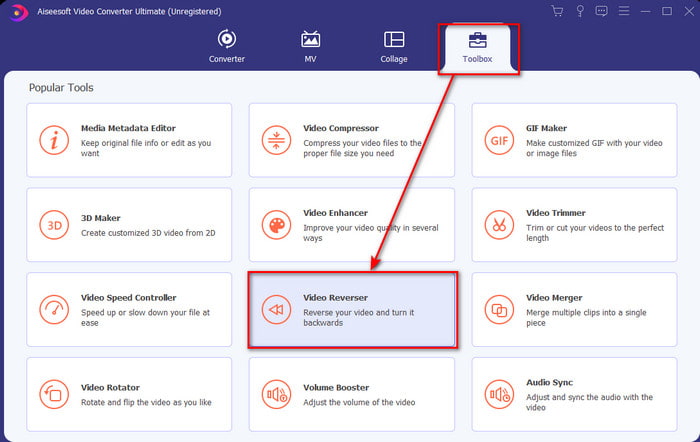
Βήμα 2. Εκκινήστε το λογισμικό, κάντε κλικ στο Toolbox και επιλέξτε Video Reverser.
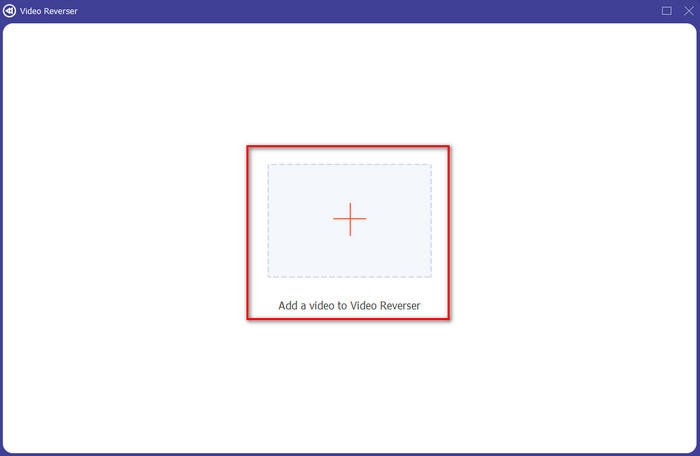
Βήμα 3. Έπειτα προσθέστε το αρχείο MP4 κάνοντας κλικ στο σύμβολο + και επιλέξτε το από τον φάκελο του υπολογιστή. Στη συνέχεια κάντε κλικ στο Open για να εισαγάγετε το .mp4 στη διεπαφή.
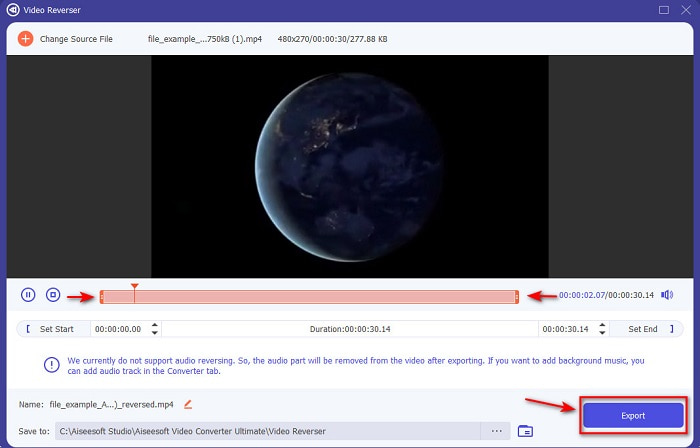
Βήμα 4. Τώρα ρυθμίστε τα σημεία playback in and out για να αλλάξετε τη διάρκεια του βίντεο. Κάντε κλικ στο Export για να συνεχίσετε.
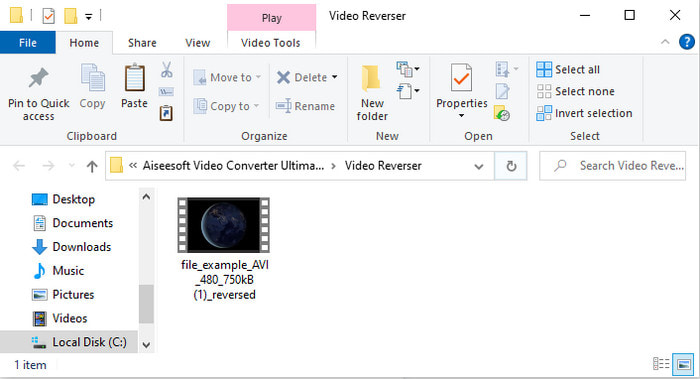
Βήμα 5. Μόλις ολοκληρωθεί η εξαγωγή, κάντε κλικ στο αρχείο μέσα στον φάκελο για να αναπαράγετε το βίντεο σε ανάποδη μορφή και για να δείτε πού είναι αποθηκευμένο.
Μέρος 2. Πώς να αντιστρέψετε ένα βίντεο MP4 (Διαδικτυακό)
1. FileConverto
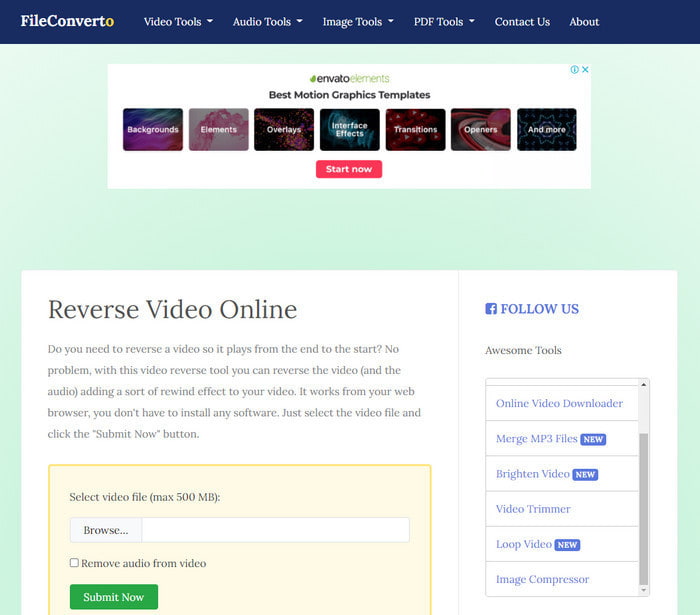
Το online εργαλείο για αντιστροφή βίντεο MP4, το FileConverto, διαθέτει πολλές λειτουργίες web που μπορείτε να χρησιμοποιήσετε για να κάνετε το βίντεό σας ξεχωριστό. Η απόδοση αυτού του διαδικτυακού εργαλείου είναι ιδανική για όσους δεν θέλουν να κατεβάσουν λογισμικό. Ωστόσο, η διεπαφή του ιστότοπου είναι λίγο μονότονη οπτικά, η διαδικασία μεταφόρτωσης θα σας πάρει αρκετό χρόνο και δεν υποστηρίζει όλες τις μορφές βίντεο. Επίσης, μπορεί να συναντήσετε σφάλματα και αναδυόμενες σελίδες όταν προσπαθήσετε να κάνετε αντιστροφή. Αν και έχει αρκετά γνωστά προβλήματα, εξακολουθεί να είναι ένα καλό εργαλείο για χρήση.
Πλεονεκτήματα
- Το λογισμικό είναι εύκολο στην πρόσβαση και έχει πολλές βασικές λειτουργίες επεξεργασίας που θα χρειαστείτε.
- Πολύ φιλικό προς το χρήστη που ακόμη και ένας χρήστης που δεν έχει εμπειρία αντιστροφής μπορεί να το κάνει εδώ.
- Περιορίζει τη μετατροπή σας στα 500 mb, κάτι που είναι υπέροχο.
Μειονεκτήματα
- Η εισαγωγή αρχείων εδώ και η εξαγωγή είναι εξαιρετικά πιο αργή από το αναμενόμενο.
- Έχει πολλές διαφημίσεις στο webtool μόνο που μπορεί να σας ενοχλήσει. Και αφού κάνετε κλικ σε μια λειτουργία εργαλείου ιστού, μια διαφήμιση θα δείξει ότι θα χρειαστεί να κάνετε ξανά κλικ σε αυτήν.
- Δεν υποστηρίζει όλες τις μορφές βίντεο.
2. Επιλογή Από
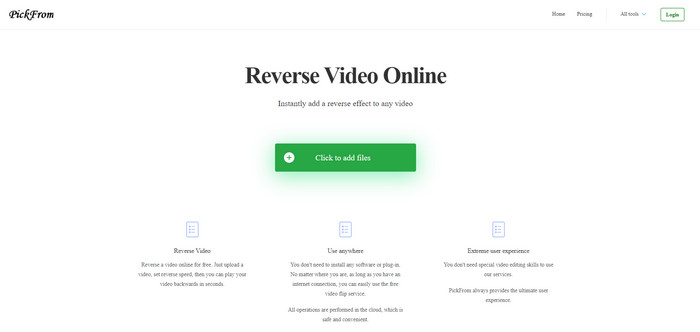
Το PickFrom έχει καλύτερη διεπαφή από το FileConverto, αν πρόκειται να τα συγκρίνουμε. Γιατί παρουσιάζει μινιμαλιστικό σχεδιασμό και ο συνδυασμός λευκού και κυανό χρώματος το κάνει ιδανικό. Ωστόσο, τα κείμενα είναι λίγο λεπτά και δυσανάγνωστα. Ουσιαστικά, αν δεν έχετε τέλεια όραση, μπορεί να δυσκολευτείτε να διαβάσετε τα στοιχεία του εργαλείου. Επιπλέον, όταν πρόκειται να κάνετε εδώ αντιστροφή βίντεο MP4, οι επιλογές είναι γραμμένες σε απλοποιημένα Κινέζικα. Άρα είναι κάπως δύσκολο να κατανοηθούν, αλλά η εισαγωγή αρχείων εδώ είναι ταχύτερη από ό,τι στο FileConverto.
Πλεονεκτήματα
- Έχει πολύ καλύτερη διεπαφή ιστού σε σύγκριση με το FileConverto.
- Δεν υπάρχουν διαφημίσεις στο επάνω μέρος του ιστότοπου, αλλά αν κάνετε κύλιση προς τα κάτω, υπάρχουν πολλές ενοχλητικές διαφημίσεις.
- Υποστηρίζει πολλές βασικές λειτουργίες επεξεργασίας.
Μειονεκτήματα
- Οι ρυθμίσεις του εργαλείου είναι γραμμένες στα κινέζικα, κάτι που είναι δύσκολο να το καταλάβεις αν δεν ξέρεις να μιλάς κινέζικα.
- Αφού κάνετε κλικ στο κουμπί έναρξης, το εργαλείο δεν ανταποκρίνεται και η διαδικασία εξαγωγής απαιτεί πολύ χρόνο.
- Μειώνει την ποιότητα του εξαγόμενου βίντεο.
3. Media.io
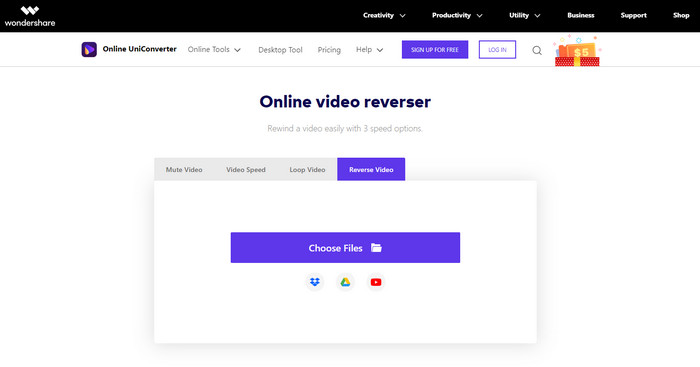
Το Media.io διαθέτει 3 διαφορετικές επιλογές ταχύτητας αντιστροφής: x 0.5, x 1, x 2. Μπορείτε ουσιαστικά να αντιστρέψετε το βίντεο και να αναπαράγετε το MP4 προς τα πίσω με τη βοήθεια της λειτουργίας αντιστροφής. Αν και το εργαλείο δείχνει εξαιρετικό, υπάρχουν ακόμη κάποια προβλήματα που θα συναντήσετε ενώ χρησιμοποιείτε το Media.io. Για παράδειγμα, όταν πρόκειται να εξαγάγετε το αρχείο, θα σας ζητήσει πρώτα να συνδεθείτε προτού μπορέσετε να το εξαγάγετε. Επίσης, μπορείτε να δημιουργήσετε μόνο 10 βίντεο σε ανάποδη μορφή εδώ, με περιορισμένο μέγεθος αρχείου.
Πλεονεκτήματα
- Η διεπαφή του εργαλείου είναι εξαιρετική και ελκυστική.
- Μπορείτε να αλλάξετε την τελική μορφή εξόδου του αντίστροφου βίντεο, εάν θέλετε ή να διατηρήσετε την αρχική μορφή.
- Μπορείτε να κάνετε σίγαση ή κατάργηση σίγασης του βίντεο.
Μειονεκτήματα
- Ο ιστότοπος θα σας ζητήσει να εγγραφείτε για να μπορέσετε να εξαγάγετε, πράγμα που σημαίνει ότι θα τους επιτρέψετε να στέλνουν ειδοποιήσεις μέσω email.
- Το πίσω μέρος του x 2 είναι λιγότερο αργό από το x 2 των άλλων εργαλείων.
- Το εργαλείο περιορίζει τη διαθεσιμότητα του εργαλείου Ιστού. Για παράδειγμα, δεν μπορείτε να αντιστρέψετε περισσότερα από 10 αρχεία την ημέρα και έχει ένα μέγιστο όριο για το μέγεθος του αρχείου.
Μέρος 3. Συχνές ερωτήσεις σχετικά με την αντιστροφή MP4
Μετά την αντιστροφή του βίντεο μειώνει την ποιότητα;
Η αντιστροφή ενός βίντεο στο εργαλείο δεν πρέπει να μειώνει την ποιότητα του βίντεο που θέλετε να αντιστρέψετε. Ωστόσο, υπάρχει πολύ λογισμικό που μειώνει την ποιότητα του βίντεο. Υπάρχουν όμως κάποιες περιπτώσεις που βάζεις την ποιότητα του χαμηλά και όχι ψηλά.
Πώς μπορώ να προσθέσω ήχο στο αντίστροφο αρχείο μου;
Τα περισσότερα από τα προγράμματα που αναφέρονται εδώ δεν υποστηρίζουν επίσης αντιστροφή ήχου, αλλά μπορείτε να επισκεφθείτε αυτόν τον σύνδεσμο και να μάθετε πώς να προσθέτετε ήχο σε βίντεο.
Πώς μπορώ να συγχωνεύσω το αντίστροφο βίντεό μου στο iPhone;
Υπάρχουν πολλοί διαφορετικοί τρόποι με τους οποίους μπορείτε να συγχωνεύσετε βίντεο στο iPhone αποτελεσματικά. Μόνο διαβάζοντας αυτό το άρθρο θα μάθετε 4 διαφορετικούς τρόπους για να συγχωνεύετε βίντεο στο iPhone.
συμπέρασμα
Συνοψίζοντας, τώρα που γνωρίζουμε πώς να αντιστρέψουμε ένα αρχείο MP4 με τη βοήθεια αυτών των διάφορων εργαλείων, μπορείτε να επιλέξετε ένα από αυτά. Επιπλέον, δεν προσφέρουν όλα όσα αναφέρονται σε αυτό το άρθρο ένα εντυπωσιακό τελικό αποτέλεσμα βίντεο, όπως το Video Converter Ultimate. Επομένως, αν θέλετε να εντυπωσιαστείτε από αυτό το εργαλείο, είναι απαραίτητο να το κατεβάσετε πρώτα. Γιατί δεν θα χρειαστεί να διαβάσετε ένα ολόκληρο εγχειρίδιο για να μάθετε πώς λειτουργεί συνολικά αυτό το εργαλείο.
Δωρεάν ΛήψηΓια Windows 7 ή νεότεραΑσφαλής λήψη
Δωρεάν ΛήψηΓια MacOS 10.7 ή νεότεροΑσφαλής λήψη
-
 [2021 Ενημερώθηκε] 9 Καλύτεροι επεξεργαστές GIF για PC, Mac, iOS και Android
 Θέλετε να προσθέσετε μια προσωπική πινελιά στο GIF σας, ώστε να γίνει πιο εκφραστικό; Συνεχίστε να διαβάζετε αυτό το άρθρο για να μάθετε πώς να επεξεργάζεστε και το καλύτερο εργαλείο για τη δουλειά.
-
 Οδηγός για τον τρόπο επιδιόρθωσης βίντεο που δεν παίζουν σε τηλέφωνα Android
 Θέλετε να μάθετε ποιοι είναι οι λόγοι για τους οποίους δεν είναι δυνατή η αναπαραγωγή βίντεο στη συσκευή σας Android; Και αν ναι, υπάρχουν τρόποι να διορθώσετε το πρόβλημα μόνοι σας; Συνεχίστε να διαβάζετε για να μάθετε περισσότερα.
-
 Λεπτομερής οδηγός σχετικά με τον τρόπο αναπαραγωγής αρχείων MKV στο PS4 [Ενημερώθηκε 2021]
 Διαβάζοντας αυτό το άρθρο θα μάθετε μερικούς τρόπους για το πώς να παίξετε το MKV στο PS4 και πώς να μετατρέψετε το αρχείο βίντεο σε περίπτωση που το βίντεο δεν συνηθίσει' παίζω.
