


 Video Converter Ultimate
 Εγγραφή οθόνης
 Επισκευή βίντεο
Πώς να επιταχύνετε τα βίντεο TikTok στο Tiktok ή να χρησιμοποιήσετε το άλλο εναλλακτικό λογισμικό
Μία από τις εφαρμογές ψυχαγωγίας με βίντεο που αναπτύσσονται πιο γρήγορα και μπορείς να χρησιμοποιήσεις στο κινητό σου είναι το TikTok. Αν και το TikTok κυκλοφόρησε το 2016, έγινε αμέσως πολύ δημοφιλές μέσα σε λίγους μήνες από την ημερομηνία κυκλοφορίας του. Επίσης, ένα από τα δημοφιλή είδη επεξεργασίας εδώ είναι η επιτάχυνση του βίντεο για να δημιουργηθεί ένα οπτικό εφέ. Έτσι, αν είσαι ένας από αυτούς που το θέλουν και θέλεις να μάθεις πώς να το κάνεις, τότε βρίσκεσαι στο σωστό μέρος. Θα παρουσιάσουμε διάφορα εργαλεία που θα σε βοηθήσουν να μάθεις πώς να επιταχύνεις ένα βίντεο στο TikTok.

Μέρος 1. Πώς να επιταχύνετε ένα βίντεο στο TikTok
Όπως αναφέρθηκε και πριν, το TikTok έχει γίνει μία από τις πιο γνωστές πλατφόρμες σύντομων βίντεο κλιπ, οπότε η επεξεργασία βίντεο εδώ μπορεί να γίνει εύκολα. Σημείωσε ότι μπορείς να κάνεις την επιτάχυνση του βίντεο κατά τη διάρκεια της λήψης και όχι αφού ολοκληρωθεί το βίντεο. Επίσης, αν προσπαθήσεις να επιταχύνεις ένα βίντεο στο TikTok, θα χρειαστεί να υπολογίσεις συνολικά την ταχύτητα χωρίς να ξέρεις εκ των προτέρων αν είναι πράγματι η ταχύτητα που θέλεις να πετύχεις. Ωστόσο, αν δεν θέλεις να κατεβάσεις κάποιο εργαλείο τρίτου για να επιταχύνεις ένα βίντεο, τότε το ίδιο το TikTok μπορεί να κάνει τη δουλειά. Λοιπόν, ακολούθησε τώρα τα παρακάτω βήματα για να επιταχύνεις ένα βίντεο στο TikTok.
Βήματα για το πώς να τραβήξεις ένα βίντεο σε γρήγορη κίνηση στο TikTok:
Βήμα 1. Πρώτα κατέβασε το TikTok στο κινητό σου και άνοιξέ το μόλις ολοκληρωθεί η διαδικασία λήψης.
Βήμα 2. Πάτησε το σύμβολο + για να ξεκινήσεις τη λήψη. Έπειτα, πάτησε «add sound» για να εισαγάγεις μουσική υπόκρουσης και φίλτρα, αν θέλεις. Τώρα, για να επιταχύνεις το βίντεο, πάτησε το Speed και διάλεξε τις διαθέσιμες επιλογές. Για να ξεκινήσεις την εγγραφή, πάτησε το στρογγυλό κουμπί και ξαναπάτησέ το αν θέλεις να τη σταματήσεις.
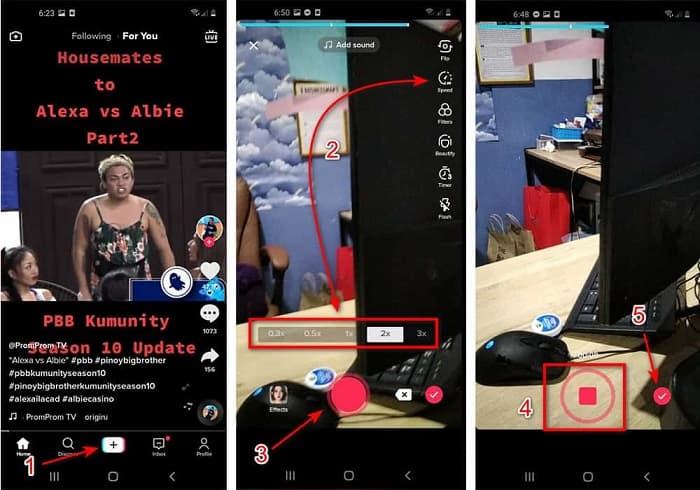
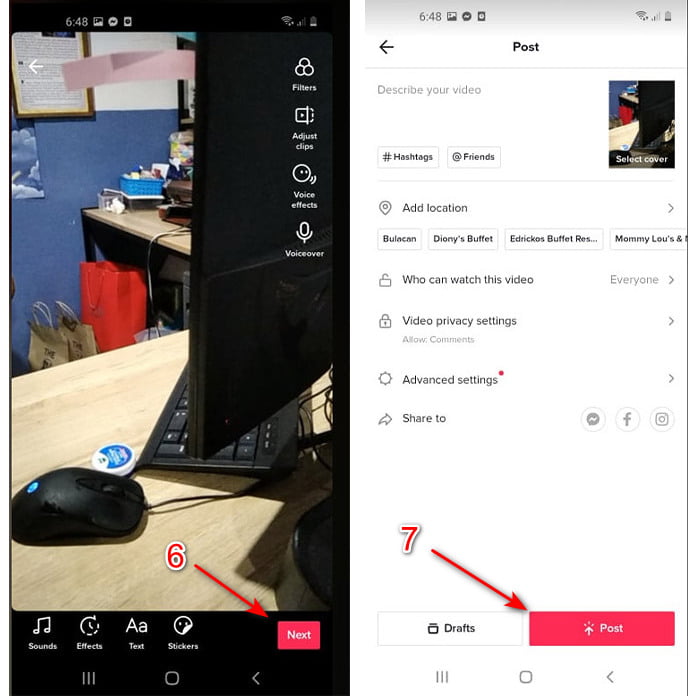
Βήμα 3. Για να ελέγξεις το βίντεο, πάτησε το κουμπί check και κατόπιν το Next. Μετά πάτησε Post για να το ανεβάσεις στο TikTok.
Μέρος 2. Πώς να επιταχύνετε τυχόν βίντεο TikTok στο Video Converter Ultimate
Σε αντίθεση με τη λειτουργία ενσωματωμένης επεξεργασίας που σου προσφέρει το TikTok, το Video Converter Ultimate σου επιτρέπει να ρυθμίσεις χειροκίνητα την ταχύτητα, αλλά με πιο εύκολο τρόπο. Επίσης, όσο κάνεις την επιτάχυνση, υπάρχει προεπισκόπηση ώστε να δεις αν η ταχύτητα του βίντεο ταιριάζει στις προτιμήσεις σου. Επιπλέον, αυτό το εντυπωσιακό λογισμικό επιτρέπει ήδη στους χρήστες του να απολαμβάνουν προηγμένο, επαγγελματικού επιπέδου μοντάζ, αλλά με απλοποιημένα βήματα. Λόγω των προηγμένων λειτουργιών που προσφέρει αυτό το εργαλείο, θα χρειαστεί να πληρώσεις μερικά δολάρια. Δεν χρειάζεται όμως να ανησυχείς, γιατί το κόστος δεν φτάνει ούτε σε χιλιάδες ούτε καν σε εκατοντάδες. Αν θέλεις να μάθεις ποια οφέλη ή βασικά χαρακτηριστικά θα αποκτήσεις αν έχεις αυτό το εργαλείο, ρίξε μια ματιά στη λίστα.
Κύρια χαρακτηριστικά που θα βρεις στο Video Converter Ultimate:
◆ Αυτό είναι ένα λογισμικό ανεξάρτητο από την πλατφόρμα που σημαίνει ότι μπορείτε να το κατεβάσετε στον υπολογιστή σας, Mac ή Linux.
◆ Όλη η προηγμένη επεξεργασία, ο μετατροπέας, ο κατασκευαστής GIF και άλλα είναι διαθέσιμα σε αυτό το εργαλείο.
◆ Η χρηστικότητα του εργαλείου είναι πολύ βολική για οποιονδήποτε, ακόμα και για επαγγελματίες ή νέους στην επεξεργασία.
◆ Επιτρέπει στους χρήστες να εκφράσουν τη δημιουργική τους πλευρά μέσω διαφόρων λειτουργιών επεξεργασίας που είναι διαθέσιμες εδώ.
◆ Παρόλο που το εργαλείο πληρώνεται, είναι λιγότερο ακριβό και πολύ προσιτό σε όποιον θέλει να το δοκιμάσει.
Τώρα λοιπόν, αν θέλεις να μάθεις πώς να επιταχύνεις βίντεο του TikTok με αυτόν τον εξαιρετικό εναλλακτικό επεξεργαστή, διάβασε και ακολούθησε τις παρακάτω οδηγίες για να έχεις 100% επιτυχία.
Βήματα για το πώς να επιταχύνεις βίντεο του TikTok με το Video Converter Ultimate:
Βήμα 1. Για να χρησιμοποιήσεις το λογισμικό, πρέπει πρώτα να το κατεβάσεις στον υπολογιστή ή το Mac σου. Έπειτα εγκατέστησέ το, κάνε τη βασική ρύθμιση σύμφωνα με τον οδηγό και πάτησε finish για να συνεχίσεις.
Δωρεάν ΛήψηΓια Windows 7 ή νεότεραΑσφαλής λήψη
Δωρεάν ΛήψηΓια MacOS 10.7 ή νεότεροΑσφαλής λήψη
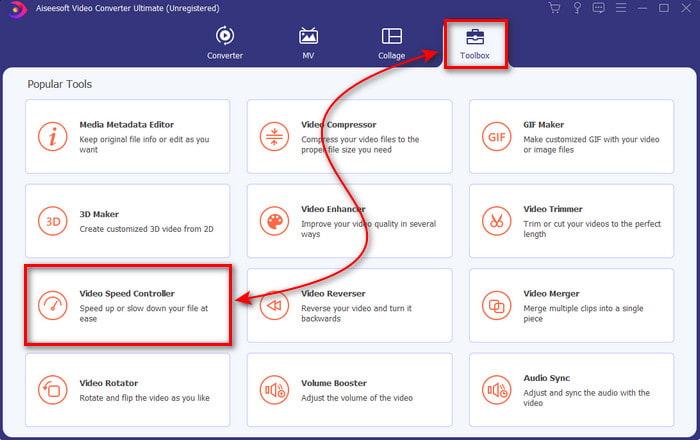
Βήμα 2. Πάτησε το Toolbox και επίλεξε το Video Speed Controller από κάτω.
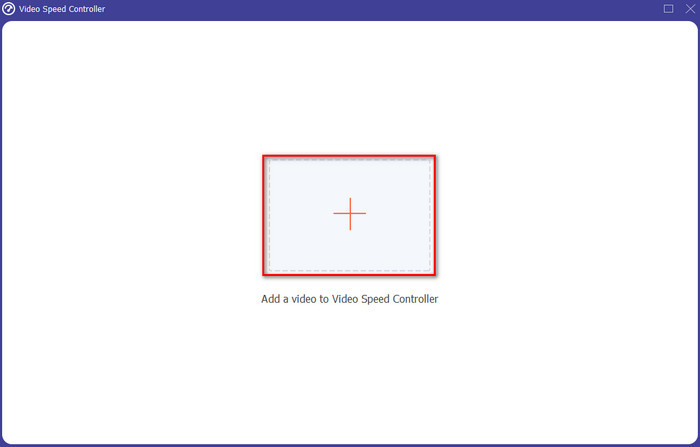
Βήμα 3. Για να προσθέσεις το αρχείο που θέλεις να επιταχύνεις, πάτησε το κουμπί +. Έπειτα, διάλεξε το αρχείο από τον φάκελο που θα εμφανιστεί και πάτησε Open για να συνεχίσεις.
Βήμα 4. Για να ρυθμίσεις την ταχύτητα του βίντεο, επίλεξε την επιλογή speed από κάτω. Και για να κατεβάσεις το αρχείο, πάτησε Export για να ξεκινήσει η διαδικασία εξαγωγής.
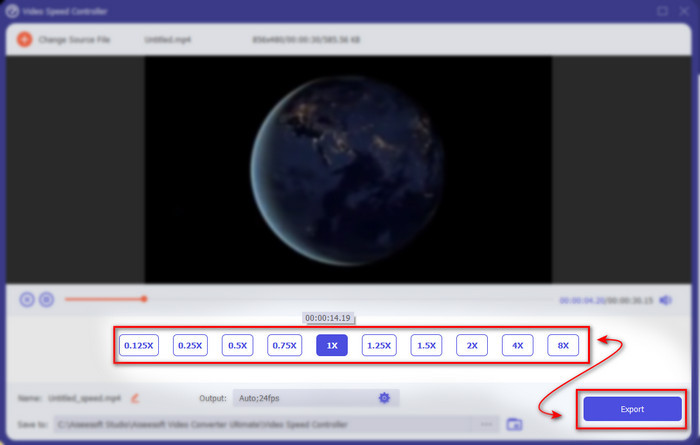
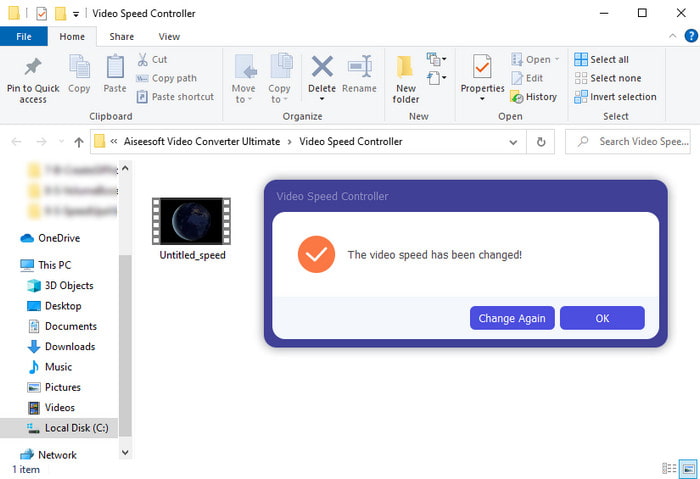
Βήμα 5. Δεν χρειάζεται να περιμένεις ούτε λεπτό, επειδή το αρχείο θα είναι έτοιμο μέσα σε λίγα δευτερόλεπτα. Αν εμφανιστεί στη συνέχεια ένας φάκελος στην οθόνη σου, αυτό σημαίνει ότι το αρχείο έχει ήδη εξαχθεί. Πάτησε στο αρχείο για να δεις το βίντεο που έχεις επιταχύνει.
Σχετικά:
Μέρος 3. Συχνές ερωτήσεις σχετικά με την επιτάχυνση ενός βίντεο στο Tiktok
Πώς να επιταχύνετε ένα βίντεο TikTok που δεν είναι δικό σας;
Αν θέλεις να επιταχύνεις ένα βίντεο που δεν είναι δικό σου, τότε πρέπει πρώτα να κατεβάσεις τα βίντεο από το TikTok. Πάτησε το κουμπί + και μετά Upload, έπειτα διάλεξε το βίντεο από τη συλλογή. Επίλεξε την επιλογή ταχύτητας και πάτησε Next για να το ανεβάσεις. Ή χρησιμοποίησε το Video Converter Ultimate για να το επιταχύνεις, ακολουθώντας τα βήματα που δόθηκαν παραπάνω.
Μπορώ να εγγράψω ένα βίντεο 3 λεπτών στο Tiktok;
Απολύτως Ναι, μπορείτε αν έχουν εγγραφεί ξεχωριστά, ωστόσο δεν μπορείτε να εγγράψετε ένα βίντεο διάρκειας 3 λεπτών. Επειδή η διάρκεια εγγραφής με αυτήν την υποστήριξη εφαρμογής είναι 15 έως 60 ολόκληρα δευτερόλεπτα. Έτσι, εάν η διάρκεια του βίντεο που θέλετε να εγγράψετε είναι μεγαλύτερη από ένα λεπτό, τότε είναι προτιμότερο να το εγγράψετε ξεχωριστά. Ωστόσο, εάν είστε ένας από τους χρήστες που έχουν επιλεγεί από το Tiktok για να δοκιμάσουν την εγγραφή 3 λεπτών, τότε είστε τυχεροί γιατί αυτό δοκιμάστηκε μόνο για μια μικρή ομάδα ατόμων.
Μπορώ να προσθέσω MP3 στα βίντεό μου στο Tiktok;
Όταν κυκλοφόρησε για πρώτη φορά το TikTok, οι χρήστες είχαν τη δυνατότητα να προσθέσουν μουσική στο βίντεό τους, αλλά τώρα έχουν αφαιρέσει αυτήν τη δυνατότητα. Λόγω του ζητήματος πνευματικών δικαιωμάτων που έχει κατατεθεί στο TikTok. Έτσι, για να αποφευχθεί το πρόβλημα, το αφαιρούν και προσθέτουν ένα διαθέσιμο δείγμα μουσικής ή μπορείτε να χρησιμοποιήσετε μια άλλη εφαρμογή για να το κάνετε για εσάς.
Το Tiktok έχει περιορισμό ηλικίας;
Σύμφωνα με τους όρους και τις προϋποθέσεις του TikTok, 13 ετών και άνω πρέπει να είναι η ηλικία του χρήστη που θα χρησιμοποιήσει αυτήν την εφαρμογή. Επίσης, το Tiktok δεν διαθέτει επαλήθευση ηλικίας όταν εγγραφείτε, επομένως περιμένετε να εμφανιστούν περισσότερα από 16 περιεχόμενα στη ροή σας.
συμπέρασμα
Και τώρα που ξέρεις πώς να επιταχύνεις ένα βίντεο στο TikTok, αυτή είναι η στιγμή να το απολαύσεις. Επιπλέον, διάλεξε τη λύση που θεωρείς ότι σου ταιριάζει καλύτερα. Αν πιστεύεις ότι οι ενσωματωμένες λειτουργίες επιτάχυνσης που παρέχει το TikTok είναι αρκετές, τότε χρησιμοποίησέ τες. Αλλά αν θέλεις να ζήσεις μια πολύ καλύτερη εμπειρία επιτάχυνσης με προεπισκοπήσεις, τότε χρησιμοποίησε το Video Converter Ultimate. Όποια επιλογή κι αν διαλέξεις, μπορείς να περιμένεις εξαιρετικό αποτέλεσμα χάρη στις δυνατότητες και τη συνολική απόδοσή τους.
-
 7 εύκολα βήματα για τον τρόπο επίλυσης προβλημάτων καθυστέρησης ήχου OBS [Επιλύθηκε]
 Δυσκολεύεστε να παρακολουθήσετε το βίντεο κλιπ σας μετά την εγγραφή λόγω της καθυστέρησης ήχου όταν χρησιμοποιείτε το OBS Studio; Διαβάστε το παρακάτω άρθρο για να μάθετε πώς να διορθώνετε αποτελεσματικά τον μη συγχρονισμένο ήχο.
-
 Εξαιρετικοί Πιθανοί Τρόποι | Πώς να διορθώσετε την καθυστέρηση ήχου VLC [2021]
 Δυσκολεύεστε να παρακολουθήσετε την αγαπημένη σας ταινία στη συσκευή αναπαραγωγής πολυμέσων VLC λόγω της αβεβαιότητας του ήχου; Συνεχίστε να διαβάζετε αυτό το άρθρο για να γνωρίζετε όλους τους πιθανούς τρόπους για να διορθώσετε την καθυστέρηση ήχου VLC.
-
 Οι καλύτεροι τρόποι για να αυξήσετε την ένταση του MP4 online και offline
 Δυσκολεύεστε να ακούσετε τους ήχους του βίντεο κλιπ σας; Διαβάστε το παρακάτω άρθρο για να μάθετε πώς να αυξήσετε την ένταση του mp4 με διαφορετικούς τρόπους.
