


 Video Converter Ultimate
 ضبط صفحه
 تعمیر ویدیو
جزئیاتی که باید در مورد تبدیل MPG به AVI آگاه باشید
Generally speaking, an MPG file is a typical video file that uses a digital video format that has been standardized by the Moving Picture Experts Group (MPEG). It stores video, audio, and metadata in a single file that is interleaved. It is common practice to employ MPG files to create movies that are delivered over the Internet. This kind of video format is not easy to convert if you don't have any knowledge or background in any converter that supports or converts MPG to AVI. Continue reading this article to be enlightened about the details and choices you should consider to achieve the converting process you want.

قسمت 1. MPG و AVI - مروری
MPEG is a video file format developed by the Moving Picture Experts Group, the same people who brought you such formats as MP3 and MP4. Depending on how it will be used, MPEG will use either MPEG-1 or MPEG-2 file compression.
To compress VHS-level raw video and CD music down to 1.5 megabits per second without sacrificing too much quality, MPEG-1 was created. As a result, it has become one of the most popular and widely compatible video/audio formats on the planet. Video data for MPEG-1 is typically transmitted at 30 frames per second (frames per second), with a resolution of around 352240 pixels (frames per second).
However, Windows computers use AVI as the default video format. In a multimedia container format, such as DivX or XviD, audio and video can be stored using several codecs. Many alternative video formats, such as MPEG and MOV, use less compression and more storage space than an AVI file. Compression-free AVI files are also possible to produce. This results in massively bigger file sizes — around 2-3 GB each minute of video — because the files are now lossless. Regardless of how many times you open or save the file, a lossless file retains its quality. Additional advantages include playback with no codecs required.
بخش 2. موثرترین نرم افزار برای تبدیل MPG به AVI
If you ever wondered how to convert an MPG video file to AVI for free, this new and best software is what this article recommends you to use. Video Converter Ultimate is a free-to-download software available in Windows and Mac that can convert your MPG file to AVI as fast as possible than converting files online. Other than these two video files, this software also supports various formats for you to choose from. The best because of the quality output you will have if you use this software. Now that you have the preview of what this software can do, buckle up and let's find out how this software operates:
Step 1. To get started, simply click on the Free Download button provided below. Once the download is complete, you can choose to download the software on either Windows or Mac. Once the software is installed on your computer's desktop, you can begin using it by clicking the Start Now button.
دانلود رایگانبرای ویندوز 7 یا بالاتردانلود امن
دانلود رایگانبرای MacOS 10.7 یا بالاتردانلود امن
Step 2. Open the software you've just downloaded. You'll see a window with the Converter interface when you initially open the software. You'll begin the process of transcoding your video here.
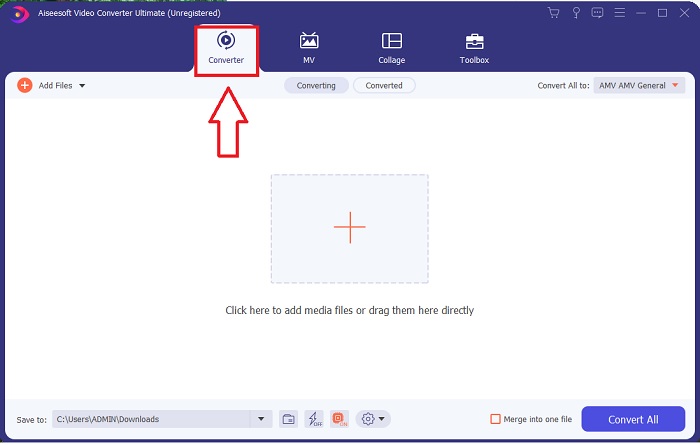
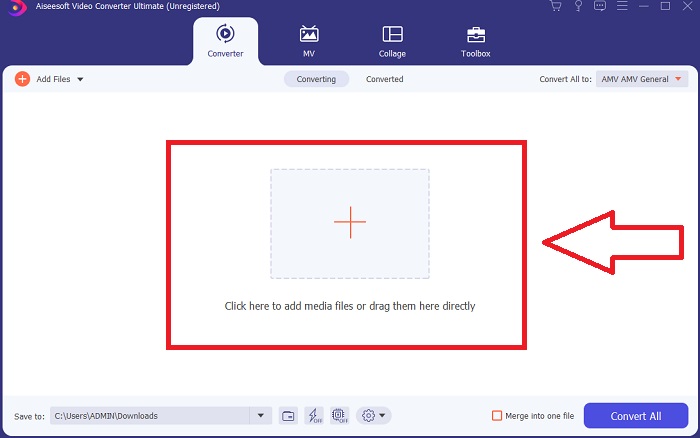
Step 3. You can begin the converting process by importing your files into the software. Converting a video is as simple as dragging it onto the Plus symbol.
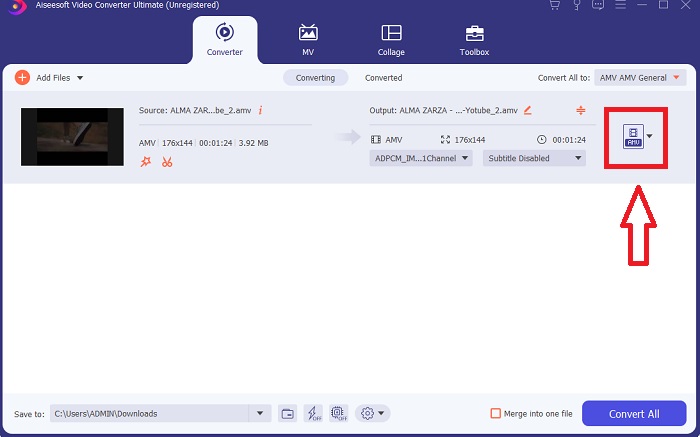
Step 4. Right-click on a video format and choose Save to or Save to external storage. Search for, and then select, an AVI file type from the drop-down option. Video quality settings are numerous once you've chosen an AVI video file type. You can alter the quality settings if your desired video output isn't mentioned. The gear icon allows you to change the display's resolution, frame rate, and audio quality. To save your edits, click the Create New button.
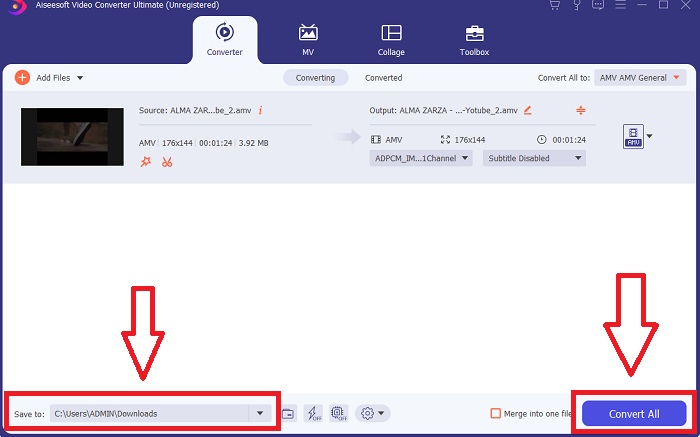
Step 5. Click Convert All when you've edited the video chosen, and it is ready to be transferred to your computer.
بخش 3. نکات سریع: ابزارهای موثر دیگری که باید در نظر بگیرید
روش 1. از CloudConvert استفاده کنید
CloudConvert یک مبدل ویدیوی آنلاین است. این مبدل آنلاین از فرمت های MP4، WEBM و AVI نیز پشتیبانی می کند. می توانید کیفیت، وضوح و اندازه فایل ویدیو را انتخاب کنید. اگر به نحوه تبدیل MPG به AVI در این ابزار آنلاین فکر می کنید، روش استفاده از آن در اینجا آمده است:
Step 1. Upload a file from your computer by clicking the Select the File.
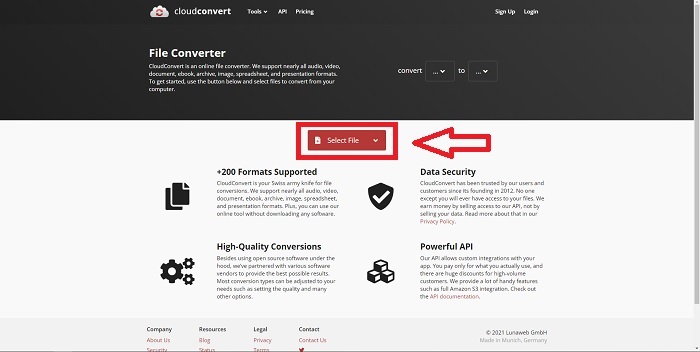
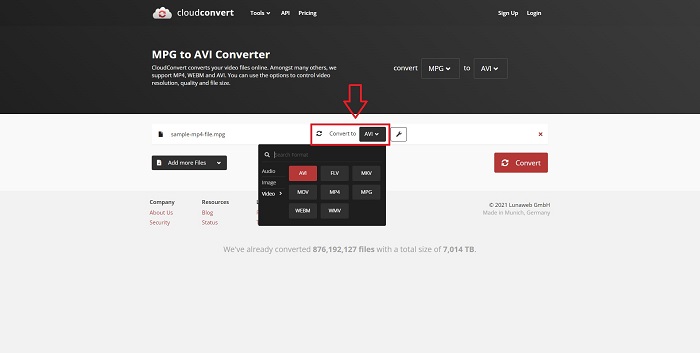
Step 2. Then, proceed with choosing where your file will be converted to by clicking the format section beside the wrench icon. You also have the option to add more files to convert.
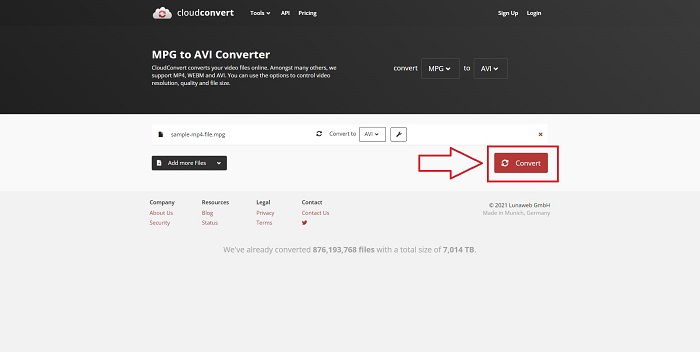
Step 3. Click Convert to convert all the files you uploaded.
روش 2. از زمزار استفاده کنید
Zamzar یک ابزار مبتنی بر وب برای تبدیل فایل ها است. تبدیل ها را می توان در فرمت های مختلف بدون نیاز به دانلود نرم افزار انجام داد. زمزار ممکن است با تایپ یک URL یا آپلود یک یا چند فایل (به شرطی که همه آنها در قالب یکسان باشند) یک فایل را از یک فرمت به فرمت دیگر، مانند Adobe PDF به سند مایکروسافت ورد، تبدیل کند. به منظور کسب دانش در مورد این ابزار آنلاین، در اینجا مراحل ارائه شده برای شما آورده شده است:
Step 1. Search for Zamzar on any search engine. After you click the website, you can now upload a file in its interface by clicking the Add Files.
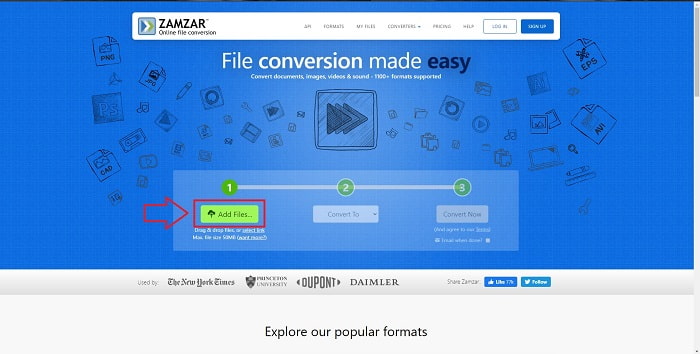
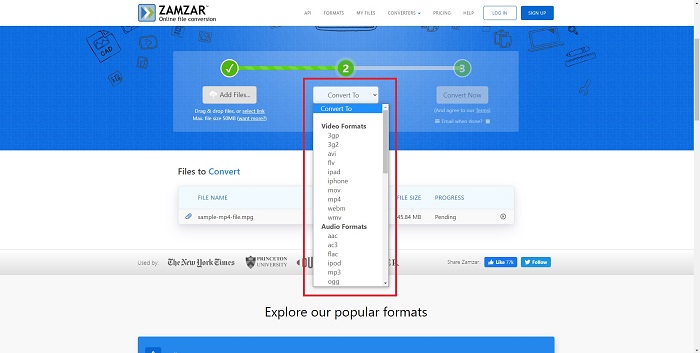
Step 2. Next, you can now convert the file by choosing the file you want. Click Convert To to see all the supported formats this online tool holds.
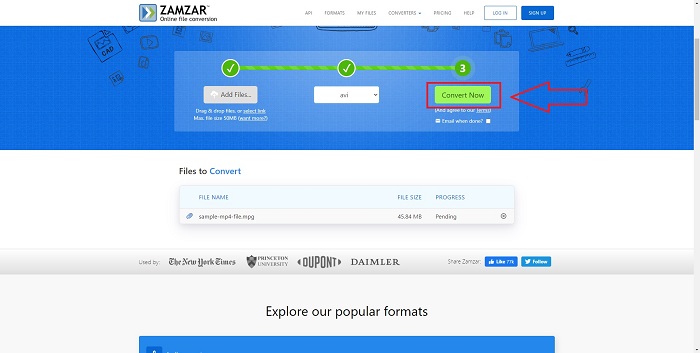
Step 3. To convert the file, click Convert Now.
بخش 4. سوالات متداول در مورد MPG و AVI
AVI بهتر است یا MPG؟
ذخیره سازی با فایل های AVI امکان پذیر است، در حالی که ضبط ویدئو با فایل های MPEG انجام می شود. AVI کمی برتر از MPEG است. با این حال، اگر MPEG فرمت مورد استفاده است، می خواهید فیلم های DVD را رایت کنید. مایکروسافت ویندوز فرمت فایل AVI را در پاسخ به فرمت فایل MOV اپل توسعه داد، در حالی که گروه تصویر متحرک فرمت MPG را توسعه داد.
مزایا و معایب AVI چیست؟
در مقایسه با سایر فرمتهای فایل، فایلهای AVI در صورت فشرده نبودن میتوانند بسیار بزرگ باشند. باید در ازای مزایای فایل AVI، مقداری از فضای دیسک را رها کنید، زیرا در غیر این صورت نمیتوانید فایلهای زیادی را ذخیره کنید. اگر یک فایل AVI را به صورت آنلاین بیش از یک نقطه خاص فشرده کنید، در نتیجه کیفیت ویدیو کاهش می یابد.
کدام AVI یا MPG سایز کوچکتر است؟
When it comes to the internet, larger files take longer to download. It makes sense to encode films in smaller file sizes, even if it results in a bit of loss of quality. When it comes to playback, AVI is still preferred over MPG because more set-top players can play AVI files than MPG files. Want to play your MPG files on your computer, click here to learn more.
نتیجه
To conclude everything we have discussed, Video Converter Ultimate is the best converter you should consider using over all the online MPG to AVI converters enlisted above. This software is free, and it has the fastest conversion process than the online converter tool. It also supports a lot of formats and gives you quality in video output. Other than that, there is no reason you shouldn't use this software.
-
 نحوه تبدیل MPEG به MP4 فایل به صورت رایگان در ویندوز ، مک ، آنلاین
 3 روش رایگان برای تبدیل MPEG به فایل های MP4 در رایانه خود بخوانید و دریافت کنید. برای تبدیل MPEG به MP4 با سهولت می توانید از مبدل های ویدئویی آنلاین و دسک تاپ استفاده کنید.
-
 [2025] بهترین ابزارها و روش های آسان برای تبدیل MPEG به MP3
 این مقاله عمدتاً در مورد چگونگی تبدیل ویدیوهای MPEG خود به MP3 با استفاده از مطمئن ترین ابزارهای موجود در لیست صحبت می کند.
-
 4 روش کارآمد برای تبدیل MOV به AVI در رایانه شخصی و مک [2025]
 آیا می خواهید بدانید بهترین مبدل MOV به AVI در وب چیست؟ و چرا FVC Ultimate Video Converter ممکن است برای شما مناسب باشد.
