


 Video Converter Ultimate
 ضبط صفحه
 تعمیر ویدیو
تبدیل MPEG به AVI با 5 مبدل ویدئویی MPEG به AVI قابل دسترسی
امپِگ (MPEG) یکی از بهترین فرمتهایی است که احتمالاً قبلاً با آن برخورد کردهاید، زیرا برای ذخیره فایلهای ویدئو و صدا بهکار میرود. همچنین، این فرمت فقط یک ظرف (Container) نیست، بلکه از فشردهسازی MPEG‑1 و MPEG‑2 نیز استفاده میکند. با این حال، MPEG‑1 و MPEG‑2 فرمتهای قدیمیتری هستند که قبلاً روی بلوریها ذخیره میشدند. حالا در ادامه توضیح میدهیم که چطور میتوان آن را با تبدیل فرمت به AVI بهبود داد. در فهرست زیر، ابزارهای مختلفی را معرفی میکنیم که میتوانید با آنها MPEG را به AVI تبدیل کنید و جزئیات بیشتری درباره MPEG و AVI ارائه میدهیم.
قسمت 1. توضیح مختصری درباره فرمت فایل MPEG و AVI
MPEG و AVI یکی از فرمت های درجه یک هستند که می توانید برای ذخیره یک فایل رسانه ای استفاده کنید. اگرچه آنها عالی هستند، اما هنوز دلایلی وجود دارد که چرا باید از مبدل ویدئویی MPEG به AVI استفاده کنید. اما فعلاً جزئیات زیادی در مورد این دو فرمت توضیح می دهیم و ایده ای در مورد MPEG و AVI خواهیم داشت.
همانطور که قبلاً گفته شد، MPEG تنها یک ظرف نیست، بلکه دارای یک کمپرسور داخلی نیز می باشد. اساسا، این یک فرمت فایل دو منظوره است. همچنین، این فرمت به دلیل کیفیت و فشردهسازی که دارد، بیشترین استفاده را در Blu-ray دارد. علاوه بر این، فرمت MPEG به 6 طبقه بندی می شود، اما ما در مورد دو مورد استفاده معمول صحبت خواهیم کرد و آن MPEG-1 و MPEG-2 است. علاوه بر این، MPEG-1 اولین نسل از MPEG ها است. این فرمت وضوح مبتنی بر استاندارد را ذخیره می کند اما در مقایسه با وضوح فرمت دیگر MPEG-1 بسیار کمتر است. در حالی که MPEG-2 کیفیت بسیار بهتری را نسبت به MPEG-1 ارائه می دهد، اما روی Blu-ray و DVD بهترین عملکرد را دارد. همچنین، این فرمت بیشتر توسط ایستگاه تلویزیونی برای انتقال و پخش ویدیو استفاده می شود.
اما AVI کاملاً با MPEG تفاوت دارد، زیرا فشردهنشده است. همچنین کیفیتی که این فرمت ارائه میدهد بالاست، چون فایلی را که در خود دارد فشرده نمیکند. هرچند حجم این فرمت بسیار زیاد است، اما همچنان نسبت به فایلهای MPEG روی تمام پلتفرمها پشتیبانی بسیار گستردهتری دارد.
قسمت 2. 2 از بهترین مبدل مورد استفاده برای تبدیل MPEG به فرمت AVI آفلاین
1. FVC Video Converter Ultimate
اگر بهدنبال یک مبدّل چندمنظوره MPEG به AVI و ابزار دانلود هستید، FVC Video Converter Ultimate باید همان ابزاری باشد که دنبالش هستید. این ابزار بهخاطر امکانات و سادگی کاربری که ارائه میدهد، در این مقاله جایگاه بالاتری گرفته است. با وجود سادگی استفاده، میتوانید به نتیجه خارقالعادهای که همیشه میخواستید برسید. همچنین، برخلاف بسیاری از مبدّلها، این نرمافزار یک استاندارد سطحبالا تعیین میکند. پس اگر میخواهید قبل، حین و بعد از تبدیل، به موفقیت 100% برسید، استفاده از این ابزار ضروری است. اکنون به آموزش گامبهگام نحوه استفاده از FVC Video Converter Ultimate میپردازیم.
گام 1. برای دانلود ابزار روی رایانه رومیزی خود، روی دکمهای که در زیر نمایش داده شده کلیک کنید. پس از اتمام دانلود، آن را نصب کنید، تنظیم اولیه را سریع انجام دهید و روی Start Now کلیک کنید.
دانلود رایگانبرای ویندوز 7 یا بالاتردانلود امن
دانلود رایگانبرای MacOS 10.7 یا بالاتردانلود امن
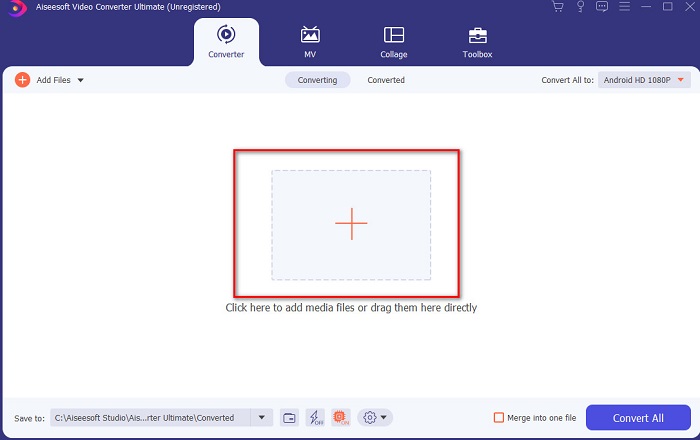
گام 2. رابط کاربری ابزار باید شبیه تصویر زیر باشد، سپس روی علامت + در قسمت میانی کلیک کنید. در ادامه یک پنجره پوشه روی صفحه شما ظاهر میشود؛ فایل ویدئویی MPEG موردنظر برای تبدیل را انتخاب کرده و روی Open کلیک کنید.
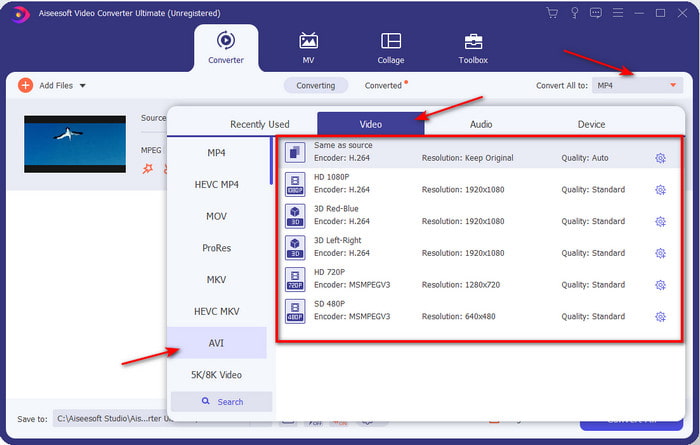
گام 3. اگر فایل در رابط کاربری ظاهر شد، روی Convert All to: کلیک کنید و فرمت AVI را پیدا کنید.
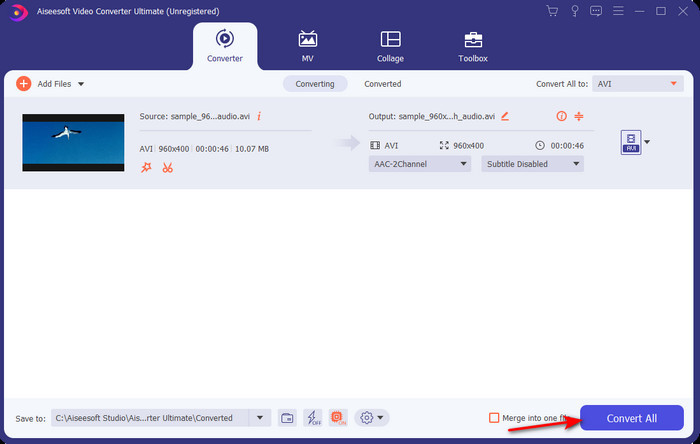
گام 4. اکنون برای شروع تبدیل فیلمهای MPEG‑4 به فرمت AVI، روی Convert All فشار دهید.
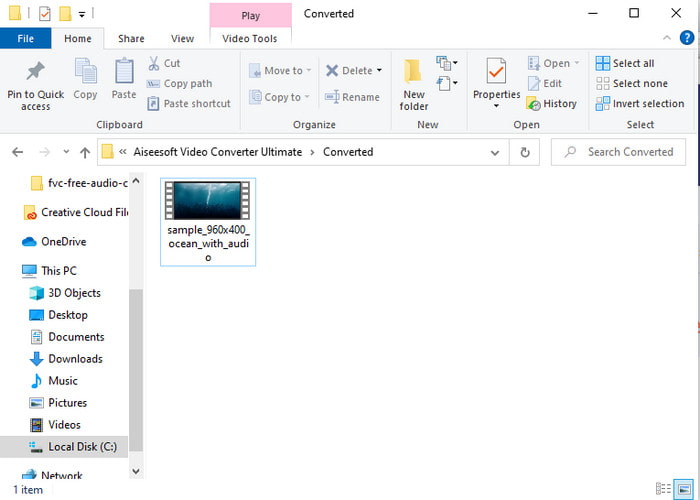
گام 5. دانلود فایل تنها چند دقیقه طول میکشد و پس از اتمام، پوشهای با فرمت تبدیلشده نمایش داده میشود. حالا روی آن فایل کلیک کنید تا نسخه تازه تبدیلشده MPEG خود را تماشا کنید.
2. FFmpeg
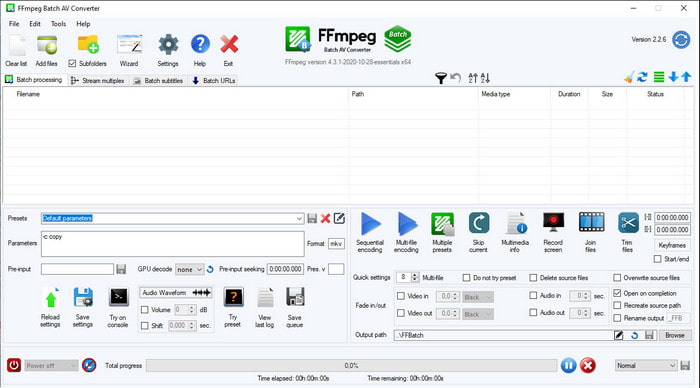
نرمافزار دیگری که در این فهرست وجود دارد FFmpeg است. اگر بهدنبال نرمافزار متنباز هستید، این یکی از گزینههایی است که میتوانید در وب پیدا کنید. با این حال، رابط کاربری این ابزار، بهویژه برای مبتدیان و حتی کاربران حرفهای، سخت و پیچیده است. روند تبدیل در اینجا بهطور کلی بسیار عالی است و خروجی باکیفیتی مانند سایر مبدّلها تولید میکند. پس اگر میخواهید با استفاده از FFmpeg، MPEG را به AVI تبدیل کنید، این مراحل را بهدقت دنبال کنید؛ ما آن را تا حد امکان ساده کردهایم.
گام 1. FFmpeg را روی رایانه خود دانلود کنید و یک پوشه جدید بسازید و فایل دانلودشده را در آن از حالت فشرده خارج کنید.
گام 2. در Windows خود بهدنبال CDM (Command Prompt) بگردید و آن را باز کنید.
گام 3. با استفاده از خط فرمان، پوشه حاوی فایل را پیدا کنید، سپس این کد را وارد کنید: ffmpeg -i input.mpeg -vn -ar 44100 -ac 2 -b:a 192k output.avi و برای شروع فرآیند، کلید Enter را روی صفحهکلید فشار دهید.
قسمت 3. 3 از بهترین مبدل مورد استفاده برای تبدیل MPEG به فرمت AVI آنلاین
3. مبدل ویدیوی رایگان FVC
اگر بهدنبال بهترین مبدّل رایگان MPEG به AVI بهصورت آنلاین هستید، FVC Free Video Converter همان مبدّل آنلاینی است که با سلیقه شما سازگار است؛ بهدلیل سادگی رابط وبابزار که ارائه میدهد. نکته عالی درباره این ابزار آنلاین این است که میتوانید بهراحتی از طریق مرورگر دلخواه خود به آن دسترسی پیدا کنید. افزون بر این، تبدیل با این ابزار هیچ محدودیتی ندارد، یعنی میتوانید هر فرمتی را در هر زمانی تبدیل کنید. با این حال، بر خلاف FVC Video Converter Ultimate امکان تبدیل گروهی (Batch) در این ابزار وجود ندارد. حال اگر میخواهید این ابزار آنلاین را امتحان کنید، مراحل زیر را دنبال کنید.
گام 1. برای رفتن به وبسایت اصلی مبدّل FVC ابتدا باید روی این لینک کلیک کنید.
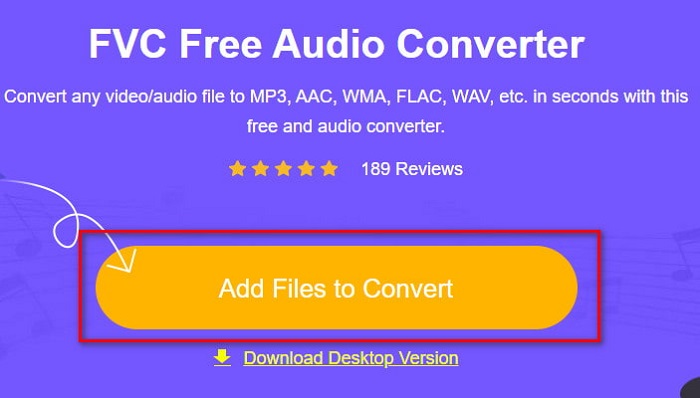
گام 2. روی Add Files to Convert کلیک کنید؛ سپس وبابزار اجرا میشود و یک پنجره پوشه باز خواهد شد. فایل را پیدا کرده و روی Open کلیک کنید.
گام 3. پس از آنکه وبابزار اجرا شد، فرمتی را که در این بخش ارائه شده است انتخاب کنید.
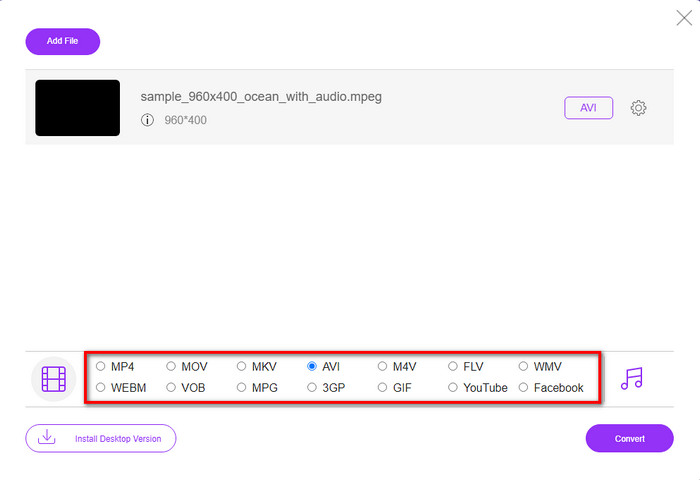
گام 4. اگر فرمت را انتخاب کردید، اکنون زمان تبدیل است؛ روی دکمه Convert کلیک کنید.
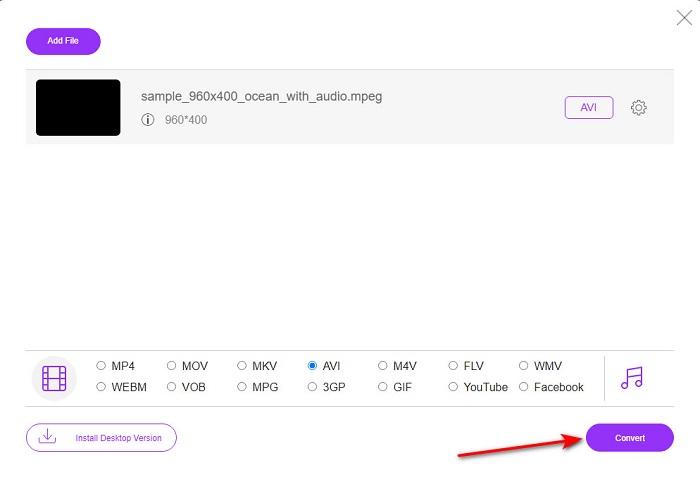
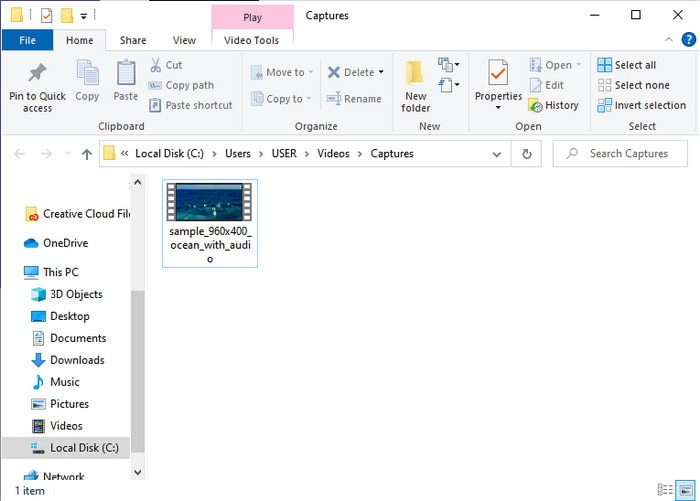
گام 5. چند لحظه صبر کنید تا فرآیند بهزودی آغاز شود. پس از اتمام فرآیند، پوشهای با فایلی که قبلاً تبدیل کرده بودید نمایش داده میشود.
4. Freeconvert.com
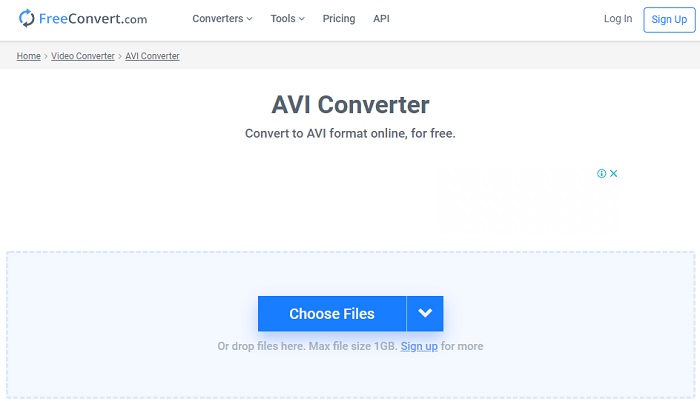
دقیقاً مانند ابزار آنلاین قبلی، این هم یک ابزار آنلاین دیگر است که میتوانید استفاده کنید: Freeconvert.com. این وبابزار در میان کاربران اینترنت از محبوبیت بالایی برخوردار شده است. همچنین بسیاری از کاربران بهخاطر سادگی استفاده و قابلیتهای دیگرش از آن تمجید میکنند. اما اگر این وبابزار را انتخاب کنید، یک نقطهضعف بزرگ وجود دارد: فرمتهایی که پشتیبانی میکند محدود است. نکته دیگر این است که فرآیند تبدیل در این سایت کمی کندتر از حد انتظار است. حال اگر میخواهید بدانید چگونه از این مبدّل آنلاین استفاده کنید، مراحل زیر را دنبال کنید.
گام 1. وبسایت freeconvert.com را در مرورگر خود جستوجو کنید. سپس زیر بخش Video Converters روی AVI کلیک کنید.
گام 2. روی Choose File کلیک کنید و فایل MPEG را در پوشهای که نمایش داده میشود پیدا کنید. پس از انتخاب فایل، روی Convert To AVI کلیک کنید.
گام 3. منتظر بمانید تا فرآیند آپلود به پایان برسد، سپس روی Download AVI کلیک کنید تا فایل ذخیره شود.
بخش 4. سوالات متداول در مورد تبدیل MPEG به AVI
آیا تبدیل MPEG کیفیت خود را از دست می دهد؟
خوب، بستگی به فرمت شما دارد. بنابراین، اگر MPEG خود را به GIF تبدیل کنید، انتظار تغییر شدید را دارید زیرا از ترکیب رنگ کمتری نسبت به فرمت های دیگر پشتیبانی می کند. با این حال، اگر از فرمت دیگری غیر از GIF استفاده می کنید، انتظار ضرر ندارید.
آیا MPEG دارای اتلاف است یا بدون تلفات؟
MPEG از فشردهسازی با اتلاف پشتیبانی میکند، بنابراین اگر از این فرمت استفاده میکنید، حتی اگر ویدیو و صدا طولانی دارید، حجم فایل کوچکتری داشته باشید.
آیا MPEG فرمت خوبی است؟
قبل از این یکی از بهترین فرمت هایی بود که می توانید برای ذخیره داده ها در دی وی دی های خود استفاده کنید. با این حال، در این دوره، MPEG بهترین انتخاب برای ذخیره داده ها نیست. اما اگر میخواهید آن را روی دیویدی، سیدی یا بلوری ذخیره کنید و آنها را خیلی سریعتر انتقال دهید، این باید یک انتخاب باشد.
نتیجه
به طور خلاصه، همه نرم افزارهای آنلاین و آفلاین ارائه شده در اینجا برای تبدیل فرمت عالی هستند. با این حال، یک ابزار وجود دارد که ثابت میکند میتوانید به راحتی با FVC Video Converter Ultimate به یک تبدیل فوقالعاده دست پیدا کنید. در واقع، ما می توانیم آن را در 3 کلمه توضیح دهیم و استفاده از آن آسان، موثر و ایمن است. بنابراین، اگر می خواهید به عظمت دست یابید، همین حالا این ابزار را دانلود کنید و آن را امتحان کنید.
-
 نحوه تبدیل MPEG به MP4 فایل به صورت رایگان در ویندوز ، مک ، آنلاین
 3 روش رایگان برای تبدیل MPEG به فایل های MP4 در رایانه خود بخوانید و دریافت کنید. برای تبدیل MPEG به MP4 با سهولت می توانید از مبدل های ویدئویی آنلاین و دسک تاپ استفاده کنید.
-
 [2021] بهترین ابزارها و روش های آسان برای تبدیل MPEG به MP3
 این مقاله عمدتاً در مورد چگونگی تبدیل ویدیوهای MPEG خود به MP3 با استفاده از مطمئن ترین ابزارهای موجود در لیست صحبت می کند.
-
 آموزش تبدیل MP4 به فایلهای AVI با 7 مبدل ویدیوی رایگان
 آیا می خواهید تمام راه های رایگان تبدیل AVI به ویدیوی MP4 را دریافت کنید؟ این مقاله را نباید از دست بدهید. در اینجا 7 روش برای تبدیل فایل های AVI به MP4 به صورت رایگان در ویندوز، مک، آیفون، اندروید و آنلاین آورده شده است.
