


 Video Converter Ultimate
 ضبط صفحه
 تعمیر ویدیو
3 روش برای تبدیل VOB به AVI آنلاین و آفلاین را بیاموزید
فایلهای VOB برای ذخیره جریانهای خصوصی استفاده میشوند و از فشردهسازی ویدیویی با اتلاف مانند MPEG-2 استفاده میکنند. همچنین اگر بخواهیم این دو را با هم مقایسه کنیم، ساختار تقریباً یکسانی دارند. با این حال، فایل های .vob قبل از اینکه حتی بتوانید از آنها استفاده کنید دارای محدودیت و مشخصات هستند. و به همین دلیل شما نمی توانید به راحتی یک فایل VOB را در پخش کننده رسانه محلی خود پخش کنید. بنابراین اکنون، برای صرفه جویی در وقت خود در جستجوی نحوه باز کردن آن، پیشنهاد می کنیم با انتخاب مبدل زیر، آن را تبدیل کنید. در این صورت، ما بهترین مبدلی را که میتوانیم ایجاد کنیم به شما ارائه میکنیم و نحوه تبدیل VOB به AVI را بهصورت آنلاین یا آفلاین با ابزارهایی که در لیست هستند، یاد میگیریم.
قسمت 1. نحوه تبدیل VOB به AVI آنلاین
اگر بودجه محدودی دارید، پیشنهاد میکنیم از یک ابزار رایگان که خودتان میتوانید از آن استفاده کنید بهره ببرید. در جستوجویی که در اینترنت انجام دادیم، متوجه شدیم ابزاری وجود دارد که بهعنوان بهترین مبدّل آنلاین شناخته میشود و آن هم FVC Free Video Converter است. علاوه بر این، این ابزار برای هر کاربری که از آن استفاده کرده، سادگی و راحتی بههمراه داشته و همه از عملکرد عالی آن شگفتزده شدهاند. بنابراین اگر شما هم میخواهید از کیفیت این مبدّل شگفتزده شوید، سعی کنید فایل VOB را با دنبال کردن مراحل زیر به فرمت AVI تبدیل کنید.
مرحله ۱. برای رفتن مستقیم به وبسایت این مبدّل، روی این لینک کلیک کنید.
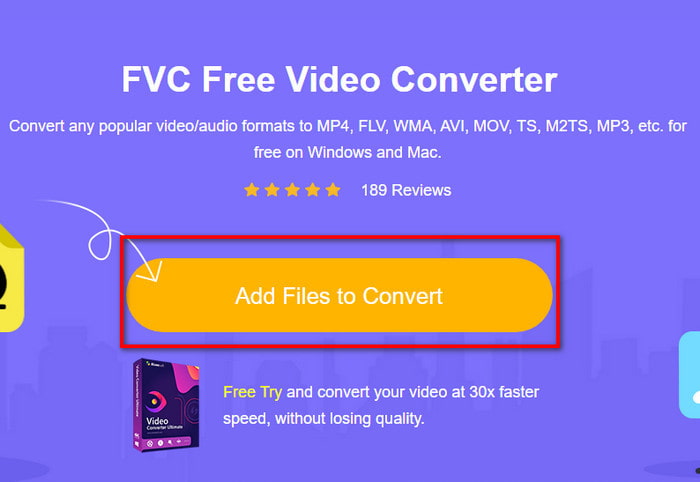
مرحله ۲. در وبسایت، روی گزینه Add Files to Convert کلیک کنید تا نصاب دانلود شود. نیازی به نگرانی نیست، چون حجم آن فقط چند کیلوبایت است. سپس دوباره روی آن کلیک کنید تا ابزار اجرا شود و فایل را در پوشه خود پیدا کنید؛ وقتی آن را پیدا کردید، روی Open کلیک کنید.
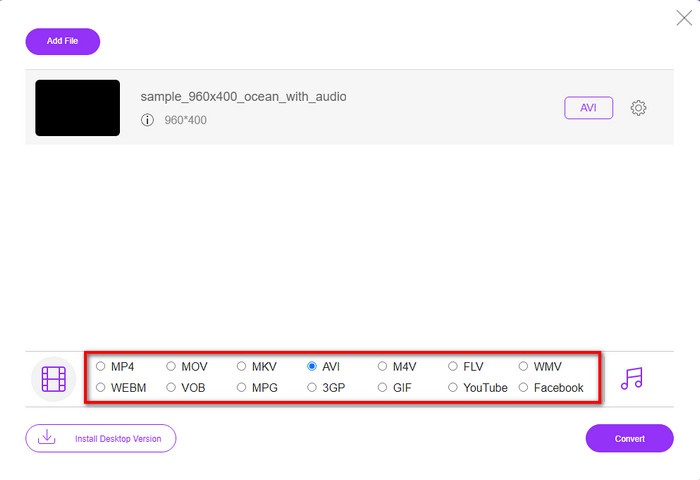
مرحله ۳. رابط کاربری جدید FVC روی صفحه نمایش شما ظاهر میشود. در فهرست پایین، فرمت AVI را انتخاب کنید یا هر فرمتی که میخواهید فایل به آن تبدیل شود.
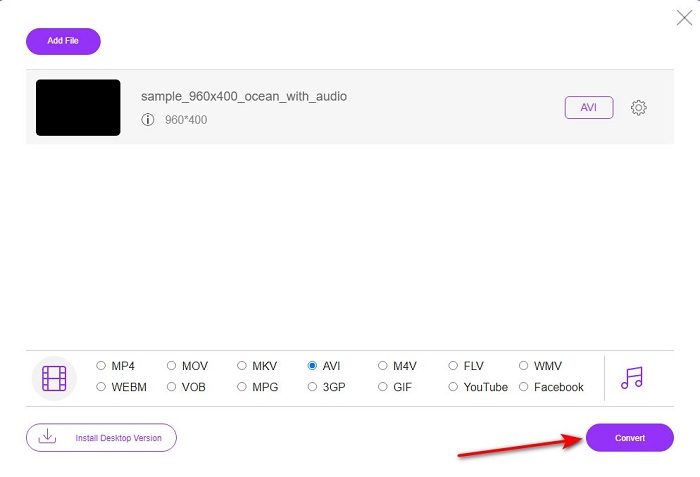
مرحله ۴. بعد از اینکه انتخاب فرمت تمام شد، با کلیک روی Convert تبدیل فایل را آغاز کنید.
مرحله ۵. این فرایند معمولاً کمتر از یک دقیقه طول میکشد. وقتی تبدیل تمام شد، پوشهای باز میشود که فایل تازهتبدیلشده در آن قرار دارد.
قسمت 2. نحوه تبدیل VOB به AVI در ویندوز و مک
از تبدیل پدیدار: FVC Video Converter Ultimate استفاده کنید
اگر به دنبال دانلود تبدیل VOB به AVI هستید، این باید بهترین انتخابی باشد که دوست دارید انجام دهید. FVC Video Converter Ultimate همیشه به نام خود به عنوان ابزاری نهایی که هر موقعیت نهایی را که می توانید به آن برسید، حل می کند، به ویژه در مورد تبدیل، مطابقت دارد. این نرم افزار با دو ابزاری که ذکر شد تفاوت زیادی دارد. شاید به این فکر می کنید که چرا، و این فقط به این دلیل است که کاملاً برای هر کسی، چه حرفه ای یا مبتدی، مناسب است. عملکرد کلی ما هنگام امتحان کردن این ابزار در حال حاضر شگفتانگیز است و ما تحت تأثیر قرار گرفتهایم که با چه سرعتی میتوان تبدیل را انجام داد. و اکنون، اگر میخواهید تبدیل فوقالعاده را تجربه کنید، در مورد آن صحبت میکنیم، مراحل زیر را دنبال کنید.
مرحله ۱. پیش از استفاده، لازم است ابتدا آن را دانلود کنید. بعد از پایان دانلود، آن را نصب کنید، تنظیمات اولیه را انجام دهید و روی Start Now کلیک کنید.
دانلود رایگانبرای ویندوز 7 یا بالاتردانلود امن
دانلود رایگانبرای MacOS 10.7 یا بالاتردانلود امن
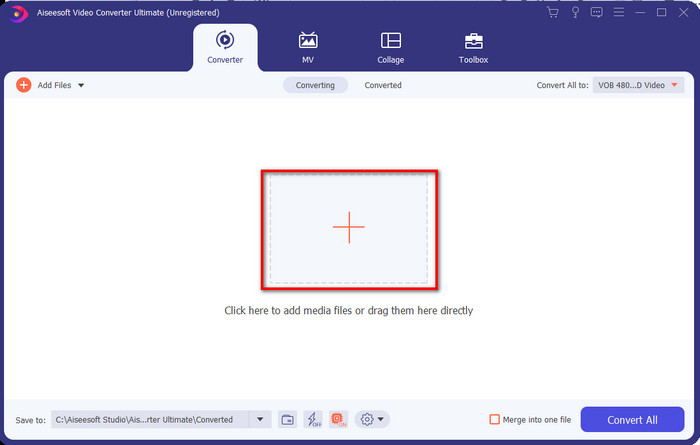
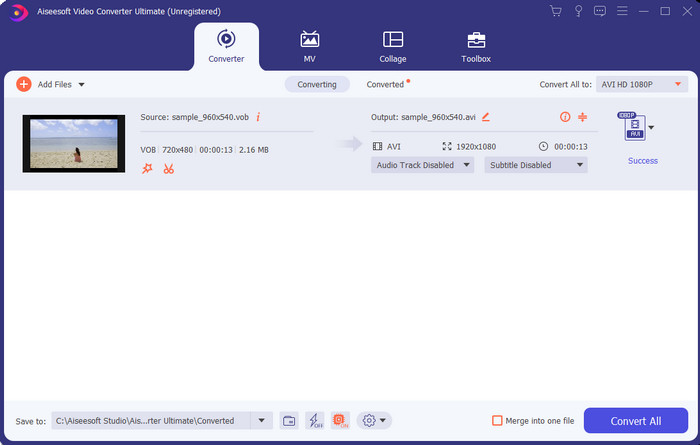
مرحله ۲. پس از پایان نصب، نرمافزار را باز کنید. سپس رابطی مانند تصویر روی صفحه شما ظاهر میشود. در وسط رابط، روی دکمه + کلیک کنید تا یک پوشه روی صفحه نمایش داده شود. برای ادامه مراحل، روی Open کلیک کنید.
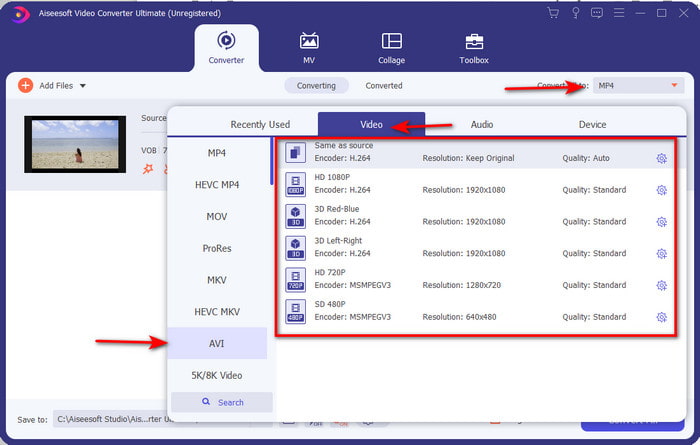
مرحله ۳. روی دکمه Convert All در بالای سمت چپ رابط کلیک کنید و از فهرست دستهبندی ویدیو، فرمت AVI را انتخاب کنید.
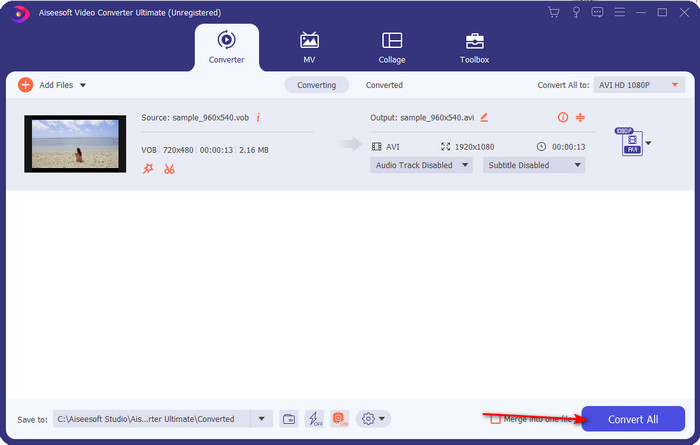
مرحله ۴. وقتی انتخاب فرمت تمام شد، برای شروع فرایند تبدیل، روی Convert All کلیک کنید.
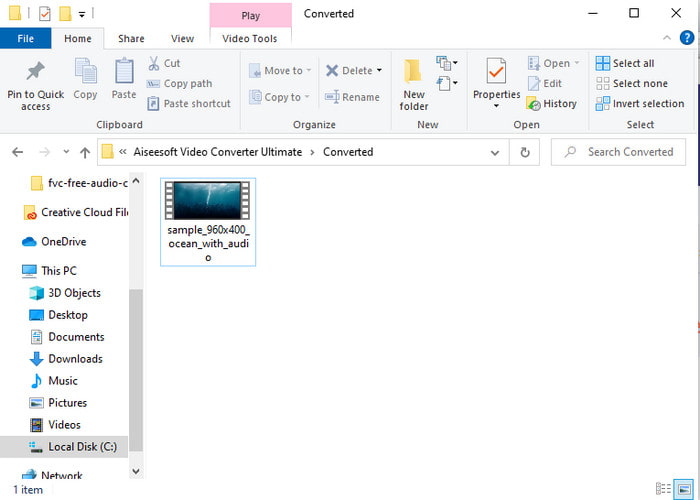
مرحله ۵. لازم نیست نگران انتظار طولانی باشید، چون تبدیل در چند ثانیه انجام میشود. سپس پوشهای بهصورت خودکار روی صفحه شما باز میشود که فایل رسانهای تبدیلشدهای را که دقایقی قبل ساختید در خود دارد. روی آن کلیک کنید تا نسخه جدید فایل .vob خود را تماشا کرده و لذت ببرید.
از ابزار رایگان: HandBrake استفاده کنید
اگر بهدنبال یک ابزار رایگان هستید، HandBrake میتواند در این زمینه به شما کمک کند و برای کار کردن، مانند FVC Video Converter Ultimate به اتصال اینترنتی نیاز ندارد. همچنین این برنامه برای هر کسی که روی رایانه رومیزی در خانه، محل کار یا هر جای دیگری کار میکند، رایگان برای دانلود و استفاده است. با این حال، اگر این ابزار را دانلود کنید، پیش از استفاده باید یک فایل جداگانه به نام .NET 5.0 نیز دانلود کنید. برخی کاربران این موضوع را کمی آزاردهنده میدانند، زیرا پس از دانلود خود ابزار باید یک بار دیگر هم فایل دیگری دانلود کنند. اما اگر میخواهید یک فرایند تبدیل مؤثر و رایگان داشته باشید، میتوانید از HandBrake برای تبدیل VOB به AVI استفاده کنید و مراحل زیر را دنبال کنید.
مرحله ۱. ابتدا ابزار را روی درایو رایانه خود نصب کنید.
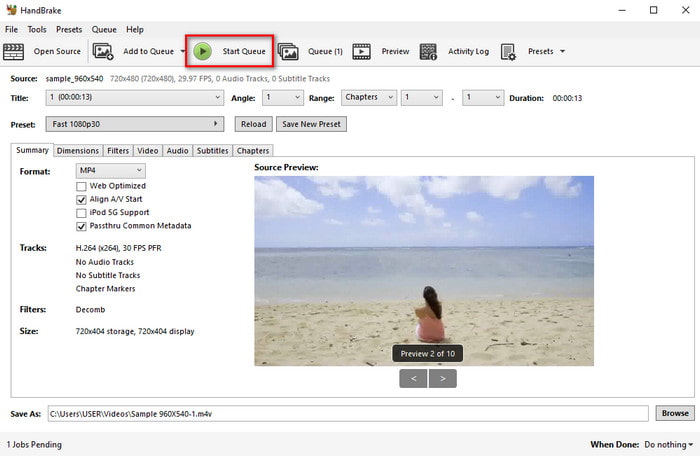
مرحله ۲. روی File کلیک کرده و فایل .vob را در پوشه خود پیدا کنید.
مرحله ۳. روی Format کلیک کنید و از فهرست موجود یکی را انتخاب کرده، سپس روی Start Queue کلیک کنید.
قسمت 3. بهترین مبدل برای تبدیل فایل های VOB به فرمت AVI کدام است
| امکانات | مبدل ویدیوی رایگان FVC | FVC Video Converter Ultimate | ترمز دستی |
| تبدیل فرمت |  | | |
| سخت افزار و شتاب تبدیل |  | | |
| اتصال به اینترنت | | | |
| تقویت کننده یا ویرایش ویدیو | | | |
| برنامه پشتیبانی می شود | ابزار مبتنی بر وب | ابزار مبتنی بر دسکتاپ | ابزار مبتنی بر دسکتاپ |
بخش 4. سوالات متداول در مورد VOB و AVI
فایل های دیگری که VOB می تواند شامل چه مواردی باشد؟
VOB یک فرمت DVD multi-plex است و به همین دلیل می تواند نه تنها ویدیوها و صداها، بلکه شامل زیرنویس ها، محتویات ناوبری و منو نیز باشد.
چرا نمی توانم فایل های VOB را در پخش کننده رسانه خود پخش کنم؟
یکی از دلایلی که فرمت VOB روی پخشکننده رسانهای شما قابلپخش نیست، این است که این فرمت تنها در مقیاس محدودی توسط پلیرها پشتیبانی میشود. میتوانید اینجا کلیک کنید تا پخشکنندههای VOB موجود را ببینید. اگر همچنان این مشکل را دارید، یک راهحل مناسب این است که فایل را با استفاده از یکی از مبدّلهای معرفیشده در بالا تبدیل کنید.
چرا فایل های VOB خیلی بزرگ هستند؟
تنها دلیل بزرگ بودن این فرمت این است که حاوی داده های مختلفی است که یک DVD باید داشته باشد. همچنین، نمیتوانیم از احتمال طولانی بودن ویدیو غافل شویم. یا برای یادگیری نحوه فشرده سازی فایل های VOB اینجا را کلیک کنید.
نتیجه
بنابراین اکنون، اگر میخواهید فایل VOB را تبدیل کنید، میتوانید به راحتی با کمک ابزارهای موجود در بالا این کار را انجام دهید. به غیر از آن، FVC Video Converter Ultimate مبدلی است که واقعاً در میان سایر ابزارهای آنلاین و آفلاین ذکر شده متمایز است. زیرا می توانید VOB را به AVI در ویندوز و حتی مک به راحتی تبدیل کنید. اگر هنوز ایده ای ندارید که از چه چیزی استفاده کنید، اکیداً پیشنهاد می کنیم که حتماً ابزار فوق العاده را دانلود کنید تا خروجی واضحی را تجربه کنید و شگفت زده شوید.
-
 VOB به MP4 - 3 روش برای تبدیل فایلهای VOB به MP4 به صورت رایگان
 این مقاله به معرفی 3 مبدل VOB رایگان به MP4 و آموزش های مربوطه می پردازد. می توانید فایل های VOB را به MP4 بصورت رایگان در ویندوز / مک / آنلاین با سهولت تبدیل کنید.
-
 بهترین راه برای تبدیل VOB به FLV [رایگان و آنلاین شامل]
 آیا می خواهید یک فایل VOB را به یک فایل FLV تبدیل کنید؟ به راحتی می توانید کار را با مبدل های دسک تاپ یا آنلاین انجام دهید. این راهنما را بخوانید و یاد بگیرید که چگونه VOB را به راحتی و به سرعت به FLV تبدیل کنید.
-
 VOB File چیست و چگونه فایل VOB را بصورت رایگان به GIF تبدیل کنیم
 آیا می خواهید در مورد فایل های VOB و نحوه اشتراک گذاری آن پس از ریپ شدن بیشتر بدانید؟ یا چرا باید VOB را به GIF تبدیل کنید؟ سپس این مقاله را با دقت بخوانید.
