


 Video Converter Ultimate
 ضبط صفحه
 تعمیر ویدیو
روش های عالی برای تصدیق در تبدیل TRP به AVI [2021]
فایلهای ویدئویی باکیفیت که در قالب حملونقل MPEG-2 بخش 1 ذخیره میشوند، بهعنوان فایلهای TRP شناخته میشوند. در این نرمافزار، چندرسانهای کردن (Multiplexing) جریانهای دیجیتال ویدئو و صدا و همگامسازی خروجی انجام میگیرد. همچنین دارای قابلیتهای اصلاح خطا است. TRP اصطلاحی است که در پخش تلویزیونی دیجیتال زیاد شنیده میشود. فایلهای TRP معمولاً حاوی دادههای ویدئویی و صوتی در قالبهای H.264 و AC3 هستند. آنها را میتوان با استفاده از انواع مختلف برنامههای پخش ویدئو مشاهده و پخش کرد. با این فرمت جدید ویدئویی که شاید برای برخی کاربران ناآشنا بهنظر برسد، ممکن است این سؤال برایتان پیش بیاید که چگونه این فایل جدید را به قالب دیگری مانند TRP به AVI تبدیل کنید؟ به خواندن این مطلب ادامه دهید، زیرا ما راهحلهای ممکن را که میتواند مشکل شما را در این زمینه برطرف کند، ارائه خواهیم کرد.

بخش 1. مقدمه ای بر جزئیات مربوط به فرمت های ویدئویی TRP و AVI
فرمت فایل TRP یک نوع فایل ویدئویی دیجیتال است که با الزامات رمزگذاری ویدئو MPEG-2 مطابقت دارد. پسوند فایل trp برای فایل های TRP استفاده می شود. از طرف دیگر، این فایلهای TRP به عنوان فایلهای ویدئویی با کیفیت بالا MPEG-2 نامیده میشوند. علاوه بر این، یک فایل TRP حاوی صدای دیجیتال با کدگذاری A3C است. این فایلهای trp شامل پروتکلهای انتقال با وضوح بالا برای جریانهای DVD (پخش ویدئوی دیجیتال) است. دستگاه های تلویزیونی ویژه و ضبط کننده های ویدئویی دیجیتال از این فایل های TRP برای پخش محتوای DVD استفاده می کنند. این فایلهای trp را میتوان با کمک پخشکنندههای ویدیو و ابزارهای چندرسانهای مانند پخشکننده رسانه VLC تیم Video LAN Project مشاهده و پخش کرد. مبدلهای ویدئویی دیجیتال و ابزارهای ویرایشی اضافی میتوانند فایلهای TRP را به سایر فرمتهای ویدئوی دیجیتال استاندارد ایجاد، باز، ویرایش و تبدیل کنند.
با این حال، اطلاعات Audio and Video Interleaved (AVI) میتواند بهصورت دیجیتال در قالب فایل AVI برای پخش ذخیره شود. تمام پلتفرمهای ویندوز مایکروسافت بهطور پیشفرض از فرمت AVI پشتیبانی میکنند. پسوند فایل .avi برای شناسایی فایلهای AVI بهکار میرود. فرمت AVI علاوه بر ویندوز، در تمام سیستمعاملهای اصلی نیز پشتیبانی میشود. فایلهای ویدئویی و صوتی که با استفاده از کدکهای مختلفی مانند DivX یا XviD ساخته شدهاند، میتوانند در ظرف (container) فایل AVI ذخیره شوند. در اینجا ما مزایا و معایب فرمت فایل AVI را همراه با تاریخچهای کوتاه، ساختار و نحوه تبدیل این فرمت مورد بحث قرار دادهایم.
قسمت 2. نحوه تبدیل TRP به AVI آفلاین
برای شروع تبدیل آفلاین TRP به AVI، این ابزار برتر در بازیابی و تبدیل طیف گستردهای از فرمتها قابل اعتماد است. Video Converter Ultimate میتواند TRP را با بیشترین سرعت ممکن به AVI تبدیل کند. علاوه بر این، میتوانید پیش از بارگذاری فایل، کیفیت خروجی ویدئو را تغییر دهید. این مبدل همچنین ابزارهای مختلفی دارد که میتواند به شما کمک کند فایل ویدئوی خود را به سطح بعدی ارتقا دهید. از آنجا که از فرمتهای ویدئویی زیادی پشتیبانی میکند، لازم نیست نگران تبدیل فرمتهای ویدئویی ناآشنا به فرمت دلخواه خود باشید. اکنون که با این بهترین مبدل آشنا شدید، میتوانید مراحل دادهشده در زیر را یاد بگیرید:
گام 1. برای شروع، روی دکمهٔ Free Download در زیر کلیک کنید تا فرایند دانلود آغاز شود. پس از اتمام دانلود، در صورت تمایل میتوانید نرمافزار را برای ویندوز یا مک دریافت کنید. پیش از آنکه برنامه را اجرا کنید، باید آن را روی دسکتاپ رایانهتان نصب کرده و برای شروع، روی Start Now کلیک کنید.
دانلود رایگانبرای ویندوز 7 یا بالاتردانلود امن
دانلود رایگانبرای MacOS 10.7 یا بالاتردانلود امن
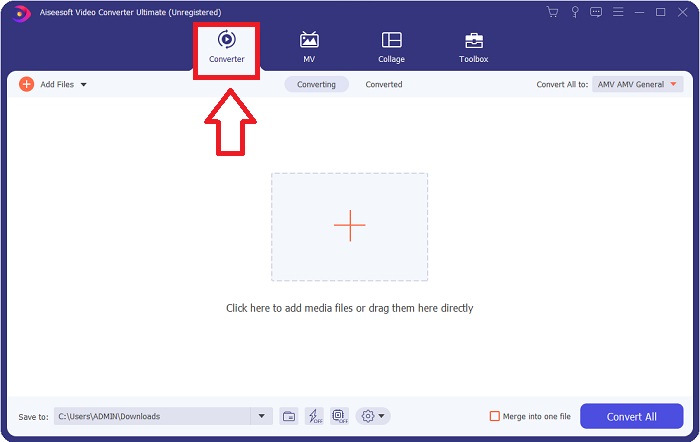
گام 2. برنامهٔ دانلودشده را اجرا کنید. زمانی که برای نخستین بار برنامه را باز میکنید، پنجرهای با رابط Converter نمایان میشود. اینجا جایی است که فایل ویدیویی خود را وارد کرده و تبدیل را آغاز میکنید.
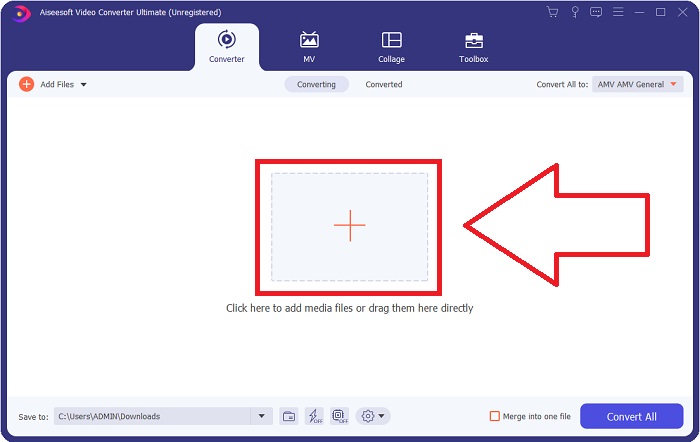
مرحله 3. با کشیدن فایل ویدئویی به داخل نرمافزار یا با کلیک روی آیکون +، فایلهای خود را در برنامه وارد کنید.
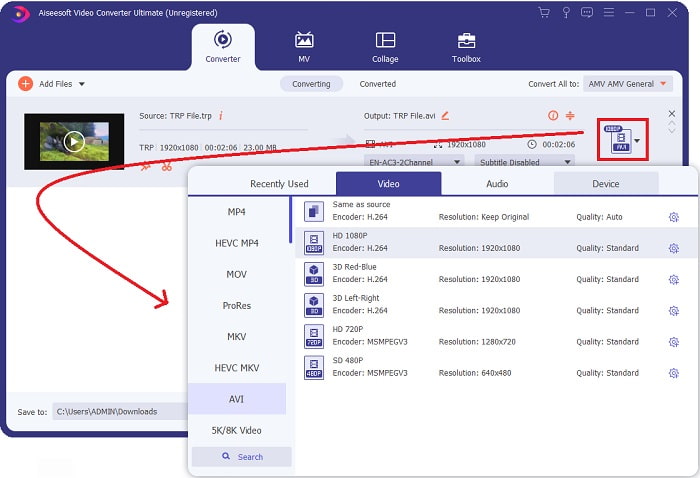
مرحله 4: در گوشه بالا-راست، روی آیکون فلش رو به پایین در کنار گزینه Convert All to کلیک کنید تا یک پنل باز شود. سپس به فهرست دستهبندی Video بروید و فرمت ویدئویی AVI را انتخاب کنید. با این حال، اگر خروجی ویدئوی موردنظر شما در فهرست نبود، میتوانید تنظیمات کیفیت را مطابق نیاز خود تغییر دهید. با کلیک روی آیکون چرخدنده، میتوانید رزولوشن تصویر، نرخ فریم و حتی کیفیت صدا را تغییر دهید. برای ذخیره تغییرات، روی دکمه Create New کلیک کنید.
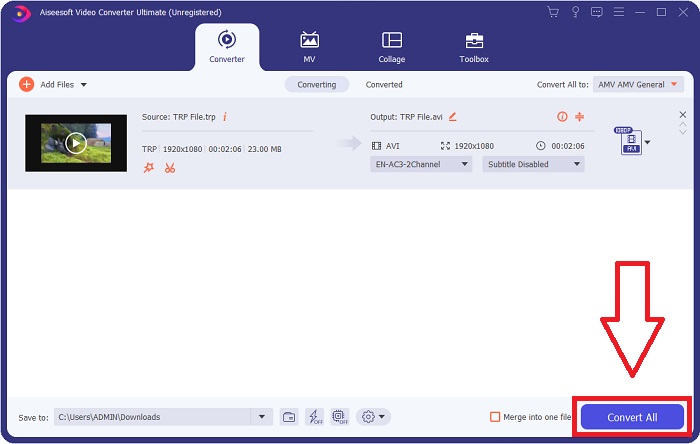
گام 5. زمانی که ویرایش ویدئو را به پایان رساندید و آمادهٔ تبدیل شد، روی Convert All کلیک کنید تا فرایند انتقال آن به رایانهتان آغاز شود.
قسمت 3. نحوه تبدیل TRP به AVI آنلاین
اگر وقت دانلود Video Converter Ultimate را ندارید، میتوانید از نسخه آنلاین این نرمافزار هم استفاده کنید. Free Video Converter Online بهترین ابزار وب آنلاین است که میتوانید در اینترنت به آن دسترسی داشته باشید و طیف وسیعی از فرمتها را با سرعت بالا تبدیل کنید. برخلاف برخی مبدلهای آنلاین، این مبدل محدودیتی در فرمتهای پشتیبانیشده ندارد؛ به همین دلیل برای بعضی کاربران مبتدی توصیه میشود. برای آشنایی بیشتر با این ابزار وب آنلاین، مراحل زیر ارائه شده است:.
مرحله 1. با کلیک روی این لینک به وبسایت اصلی مبدل FVC بروید.
مرحله 2. اگر نخستین بار است که از آن استفاده میکنید، روی دکمه Add Files to Convert کلیک کنید تا لانچر مخصوص رایانهتان دانلود شود. پس از دانلود، بهطور خودکار اجرا خواهد شد. پس از اینکه دوباره دانلود شد، فایل را از پوشه خود انتخاب کرده و روی Open کلیک کنید.

مرحله 3. پیش از شروع فرایند تبدیل، با کلیک روی منوی کشویی زیر، فرمت AVI را انتخاب کنید.
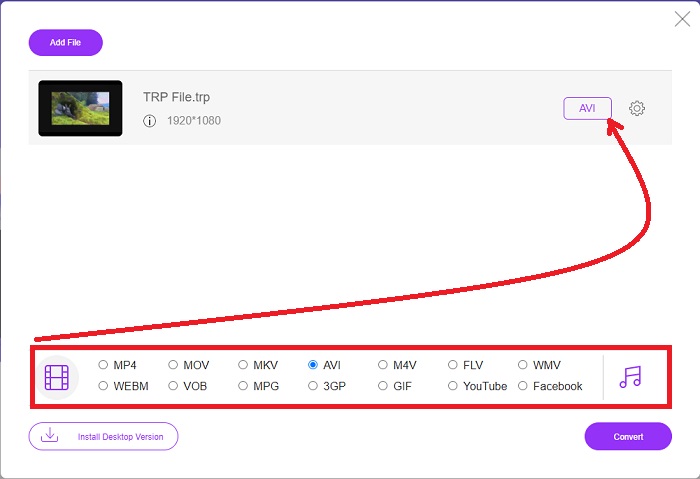
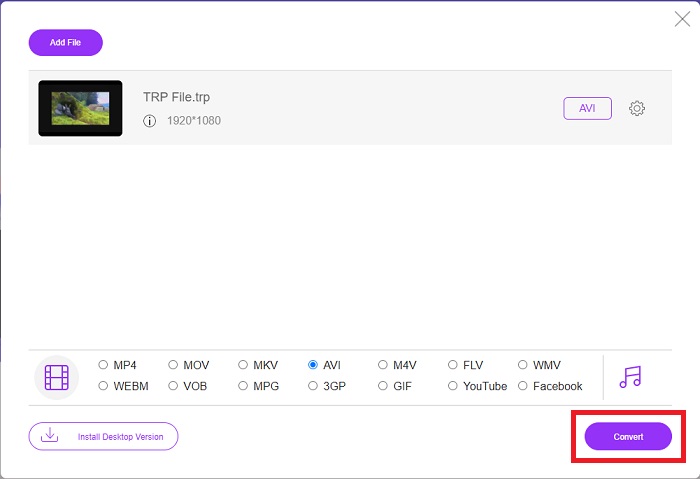
گام 4. پس از انتخاب فرمت، روی Convert کلیک کنید تا فرایند تبدیل فرمت به فرمت دیگر آغاز شود.
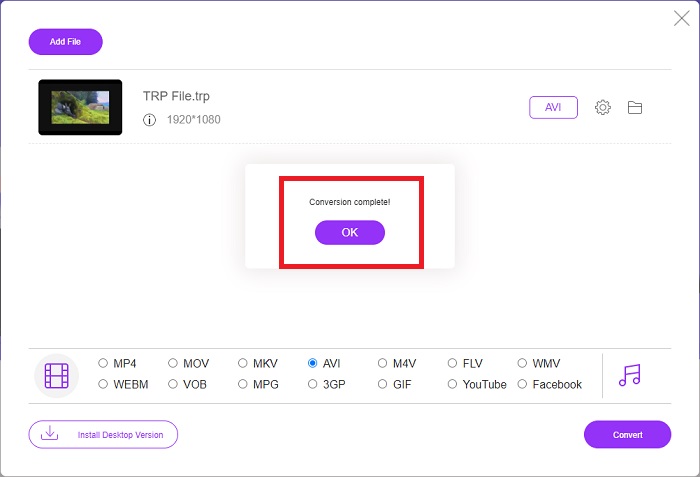
گام 5. پس از چند دقیقه، یک پوشهٔ فایل حاوی فایل تبدیلشده ظاهر میشود؛ تنها کافی است روی آن کلیک کنید تا تماشای آن را آغاز کنید.
قسمت 4. مقایسه بین TRP و AVI
| ویژگی های | FVC Video Converter Ultimate | مبدل ویدیوی رایگان FVC |
| تبدیل دسته ای |  |  |
| سخت افزار و شتاب تبدیل | | |
| اتصال به اینترنت | | |
| بهبود یا ویرایش ویدیو | | |
| برنامه پشتیبانی می شود | ابزار مبتنی بر وب | ابزار مبتنی بر دسکتاپ |
بخش 5. سوالات متداول در مورد تبدیل TRP به AVI
کاربرد AVI چیست؟
AVI مخفف Audio Video Interleaved است. AVI یک فرمت فایل ویدئو و صدا است که برای ذخیره اطلاعات صوتی و تصویری بهصورت دیجیتال جهت پخش بهکار میرود. همچنین برای ذخیره اطلاعات ویدئویی استفاده میشود. فرمت AVI بهصورت پیشفرض در تمام نسخههای سیستمعامل ویندوز مایکروسافت پشتیبانی میشود. پسوند فایل برای فایلهای AVI، .avi است.
معایب AVI چیست؟
فشردهسازی ضعیف و از دست رفتن نسبت ابعاد تصویر هنگام بزرگ کردن پنجره پخشکننده رسانه، رایجترین مشکلاتی هستند که کاربران فرمت فایل AVI با آن روبهرو میشوند. میتوان یک فایل AVI را به فایل MP4 تبدیل کرد. بنابراین، اگر با فایلهای AVI کار میکنید، باید از اهمیت این کار آگاه باشید.
فایده TRP چیست؟
محبوبیت TRP یک کانال به کسب و کارها اجازه می دهد تا مخاطبان را بر اساس محبوبیت آنها هدف قرار دهند و بازده سرمایه گذاری خود را اندازه گیری کنند. با استفاده از این روش، شرکت های پخش می توانند در صورت پخش برنامه های محبوب تر، نرخ های عالی تری را از تبلیغ کنندگان دریافت کنند.
نتیجه
با توجه به این نکات، دریافتیم که Video Converter Ultimate بهترین مبدلی است که باید در میان دیگر ابزارهای آنلاین به استفاده از آن فکر کنید. از آنجا که فرایند تبدیل سریعی دارد و از فرمتهای متنوعی پشتیبانی میکند، بهعنوان یک ابزار یا نرمافزار پیشنهادی برای تبدیل فرمتهای ویدئویی ناآشنایی مانند TRP در نظر گرفته میشود.
-
 نحوه تبدیل TS به AVI / MKV / MOV / WMV آنلاین و رایگان در Win / Mac
 آیا می خواهید پرونده های TS را به سرعت به AVI / MKV / MOV / WMV تبدیل کنید؟ این مقاله مبدل های ویدیویی آنلاین و آفلاین را با راهنمای کامل نشان می دهد. شاید بتوانید بهترین مبدل TS رایگان را از اینجا دریافت کنید.
-
 [رایگان و آنلاین] 7 روش برای تبدیل MTS به AVI در رایانه Mac/Windows
 چگونه می توان MTS را به راحتی به AVI تبدیل کرد؟ در این راهنما ، 7 روش آسان و رایگان برای تبدیل فایلهای MTS به AVI در ویندوز یا مک بدون افت کیفیت پیدا خواهید کرد.
-
 آموزش تبدیل MP4 به فایلهای AVI با 7 مبدل ویدیوی رایگان
 آیا می خواهید تمام راه های رایگان تبدیل AVI به ویدیوی MP4 را دریافت کنید؟ این مقاله را نباید از دست بدهید. در اینجا 7 روش برای تبدیل فایل های AVI به MP4 به صورت رایگان در ویندوز، مک، آیفون، اندروید و آنلاین آورده شده است.
