


 Video Converter Ultimate
 ضبط صفحه
 تعمیر ویدیو
آموزش تبدیل AMV به MOV بدون افت کیفیت
AMV یک فرمت ویدیویی اختصاصی است که برای ذخیرهی پخش ویدیو در پخشکنندههای رسانهای S1 MP3 و MP4 بهکار میرود. پسوند فایل .amv دارای وضوح پایین است و بهشدت فشرده میشود تا روی این پخشکنندهی قابلحمل جا بگیرد. با اینکه این فرمت هنوز وجود دارد، پیدا کردن پخشکنندهی رسانهای سازگار با گوشی سخت است زیرا این فرمت قدیمی است. بهجای جستوجو برای یک پخشکنندهی سازگار، چرا فایلهای AMV را به فرمتی جدید و پرحمایت مثل MOV تبدیل نکنید؟ بنابراین اگر میخواهید بهترین راه برای تبدیل AMV به MOV را بدانید، بیایید بررسی را آغاز کنیم.

قسمت 1. معرفی مختصر در مورد AMV و MOV
ایده Action Media Video یا AMV جایگزینی MP4 به عنوان یک فرمت جهانی است زیرا این فرمت بهتر و بسیار فشرده تر است. همچنین این فرمت نسخه بهتر فرمت AVI است. اما این قالب در این دوره جدید نادیده گرفته شده است زیرا هیچ به روز رسانی برای بهبود کیفیت وضوح دریافت نمی کند. و اکنون، اگر این فرمت را در دستگاه های تلفن همراه ما ذخیره کنید و آن را پخش کنید، انتظار می رود که نتوانید آن را پخش کنید زیرا فرمت پشتیبانی نمی شود. بنابراین اگر می خواهید ویدیویی را با این فرمت پخش کنید، باید یک پخش کننده رسانه شخص ثالث برای AMV دانلود کنید. در حالی که MOV، این فرمت پشتیبانی زیادی به دست می آورد زیرا این فرمت فایل بومی است که QuickTime توسعه می دهد.
قسمت 2. تبدیل AMV به MOV با نرم افزار Ultimate Desktop
FVC Video Converter Ultimate
با کمک این مبدل ویدیویی حرفهای که خروجی شگفتانگیزی تولید میکند و هیچ ابزاری توان رقابت با آن را ندارد، یعنی FVC Video Converter Ultimate، AMV را به MOV تبدیل کنید. این مبدل روی PC و مک در دسترس است و هر دو نسخه، امکانات پیشرفتهی یکسانی را ارائه میدهند. علاوهبراین، تبدیل سریع و شتابدهی سختافزاری که در نسخهی PC موجود است، در مک نیز در دسترس است. کاربران زیادی همین نرمافزار را بهعنوان انتخاب اول برای حل مشکل تبدیل فرمتهایشان برگزیدهاند. افزون بر این، پیش از استفاده از این ابزار باید آن را از FVC خریداری کنید. اگرچه نیاز به پرداخت هزینه دارد، اما لازم نیست صدها دلار خرج کنید و قیمت آن در برابر کاراییاش میارزد. بدون مقدمهی بیشتر، بیایید این ابزار را امتحان کنیم تا ببینیم آیا میتوانیم همان «تبدیل نهایی» را که نامش وعده میدهد بهدست آوریم یا نه.
مراحل تبدیل AMV به MOV با FVC Video Converter Ultimate:
مرحله 1. FVC Video Converter Ultimate را با کلیک روی دکمهی زیر روی دسکتاپ خود دانلود کنید؛ بعد از پایان دانلود، نرمافزار را نصب کنید.
دانلود رایگانبرای ویندوز 7 یا بالاتردانلود امن
دانلود رایگانبرای MacOS 10.7 یا بالاتردانلود امن
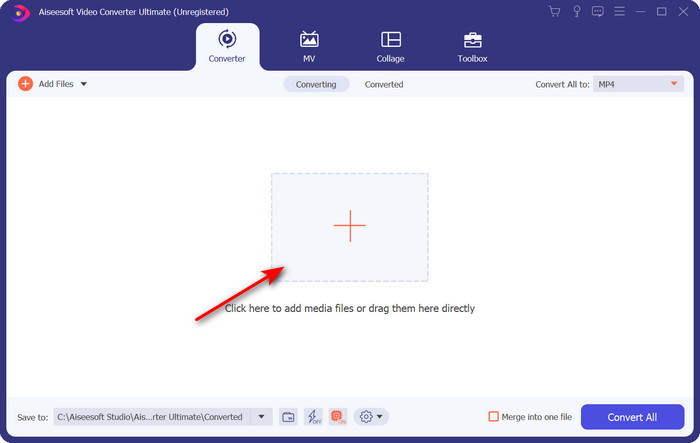
مرحله 2. نرمافزار را باز کنید تا از آن استفاده کنید و برای بارگذاری فایل .amv روی علامت + کلیک کنید. فایل را در پوشه پیدا کرده و روی Open کلیک کنید تا وارد شود.
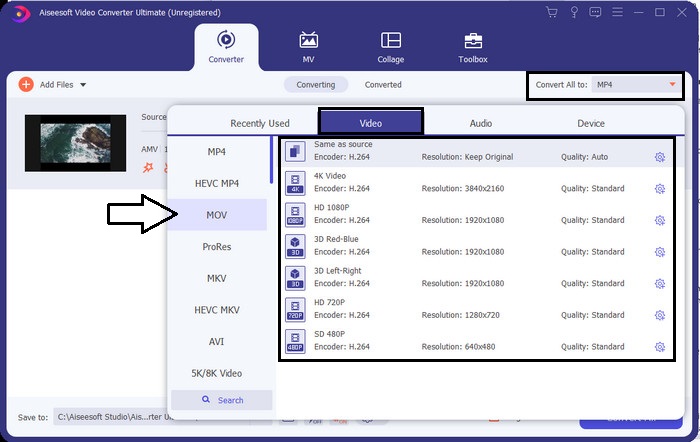
مرحله 3. برای تغییر فرمت به MOV، روی Convert All to: کلیک کنید و MOV را یا هر فرمتی را که میخواهید انتخاب کنید.
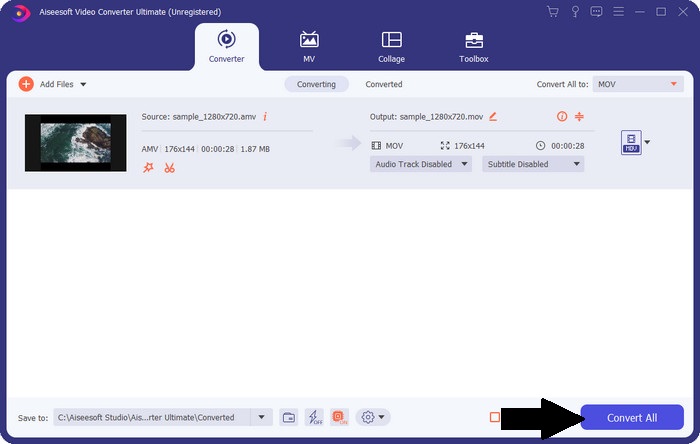
مرحله 4. برای تبدیل فایل AMV به MOV، روی Convert All کلیک کنید تا فرایند تبدیل شروع شود.
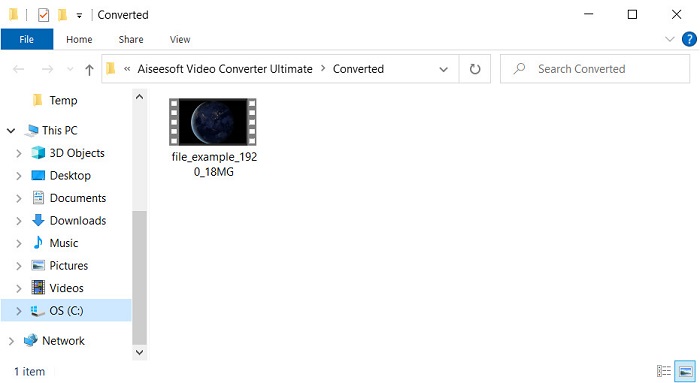
مرحله 5. تبدیل فایل فقط چند ثانیه زمان میبرد. سپس منتظر بمانید تا پوشهای که فایل .mov ساختهشدهی شما در آن است نمایش داده شود؛ روی فایل کلیک کنید تا آن را در پخشکنندهی رسانهای پیشفرض سیستم تماشا کنید.
قسمت 3. تبدیل AMV به MOV با 2 تبدیل سرویس آنلاین موجود
1. ConvertFiles
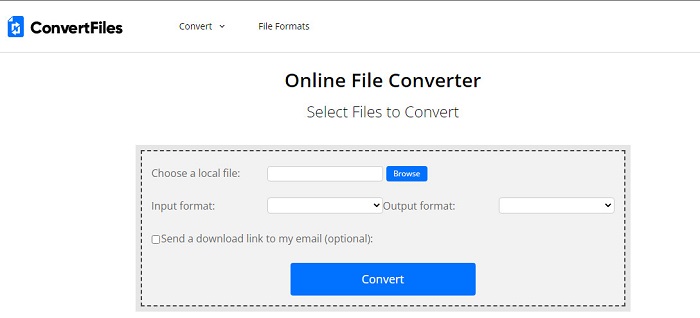
یکی از بهترین مبدلهای آنلاین که میتوانید در مرورگر محبوب خود به آن دسترسی داشته باشید ConvertFiles است. این ابزار آنلاین میتواند فرمت شما را بدون دردسر به فرمتی جدید تبدیل کند. همچنین این ابزار از مجموعهی کوچکی از فرمتها پشتیبانی میکند که میتوانید از میان آنها انتخاب کنید. با این حال، دانلود فایل تبدیلشده در اینجا زمان زیادی میبرد زیرا تبدیل سریعی ارائه نمیکند. نکتهی منفی دیگر، تبلیغات فراوانی است که روی رابط آن نمایش داده میشود. با وجود مشکل در فرایند دانلود و تبلیغات، این ابزار بهعنوان یک ابزار آنلاین رایگان عملکرد خوبی دارد.
مراحل تبدیل AMV به MOV با ConvertFiles:
مرحله 1. مرورگر مورد علاقهی خود را باز کنید و ConvertFiles را جستوجو کنید.
مرحله 2. وقتی وبسایت باز شد، روی Browse کلیک کنید تا فایل را در پوشه پیدا کنید؛ در بخش Output Format، فرمت MOV را پیدا کرده و روی Convert کلیک کنید.
مرحله 3. پس از اتمام تبدیل، روی لینک آبیرنگ کلیک کنید تا فایل را روی رایانهی خود دانلود کنید.
2. MCConverter
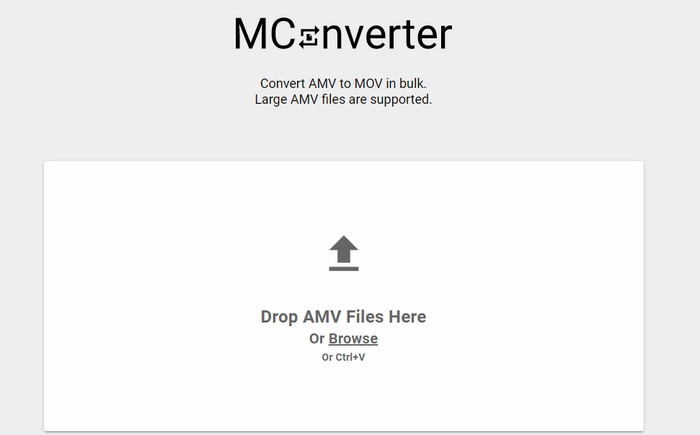
نمیخواهید هنگام تبدیل آرامِ AMV به MOV تبلیغی روی رابط کاربری ببینید؟ پس از MConverter که در مرورگر شما در دسترس است استفاده کنید. همچنین این ابزار از تبدیل دستهای پشتیبانی میکند تا درست مانند FVC Video Converter Ultimate، فرایند تبدیل شما را کارآمدتر کند. با این حال، نقطهضعف این ابزار آنلاین این است که نمیتوانید از حجم 200 مگابایت برای هر فایل فراتر بروید. بنابراین اگر میخواهید یک ویدیوی طولانی را تبدیل کنید و حجم فایل از حد مجاز بیشتر است، این ابزار انتخاب مناسبی برای شما نیست. اما اگر میخواهید تجربهی تبدیل بهتری نسبت به ConvertFile داشته باشید، مراحل زیر را دنبال کنید.
مراحل تبدیل AMV به MOV با MConverter:
مرحله 1. MConverter را در موتور جستوجوی خود جستوجو کرده و آن را باز کنید.
مرحله 2. روی دکمهی Upload کلیک کنید تا فایل را وارد کنید، کمی صبر کنید تا ابزار تحت وب بارگذاری شود، فرمت MOV را جستوجو کرده و روی آن کلیک کنید. با کلیک روی فرمت MOV فرایند تبدیل فایل آغاز خواهد شد.
مرحله 3. روی Download All کلیک کنید تا فایل را ذخیره کنید.
بخش 4. سوالات متداول در مورد AMV و MOV
آیا می توانم MP4 خود را به AMV تبدیل کنم؟
میتوانید برای انتقال سریعتر فایل بهصورت آنلاین، MP4 را به AMV تبدیل کنید. بهویژه اگر ویدیو یک ساعت طول داشته باشد، پیشنهاد میکنیم فایلهای .mp4 را به .amv تبدیل کنید زیرا در مقایسهی این دو فرمت، AMV حجم بسیار کمتری دارد.
آیا VLC از AMV پشتیبانی می کند؟
خوشبختانه میتوانید برای پخش فایلهای .amv، از VLC Media Player استفاده کنید، حتی اگر این فرمت قدیمی باشد. اما آیا میدانستید که پخشکنندههای رسانهای دیگری وجود دارند که از این پخشکننده بهتر عمل میکنند؟ پس اگر میخواهید بدانید این پخشکنندهها چه هستند، باید روی این لینک کلیک کنید تا با 5 جایگزین VLC Media Player آشنا شوید.
چگونه AMV خود را به AVI تبدیل کنم؟
AMV نسخهی بهتر AVI است؛ با این حال اگر از نظر کیفیت صحبت کنیم، AVI عملکرد شگفتانگیزی نسبت به این فرمت قدیمی دارد. همچنین AVI با همهی پلتفرمها سازگاری بسیار خوبی دارد. پس اگر میخواهید فایل AMV خود را با کیفیت بهتر و روی همهی پلتفرمها تماشا کنید، باید نحوهی تبدیل AMV به AVI را یاد بگیرید.
نتیجه
بحث باید در اینجا به پایان برسد. حتی اگر می خواهیم یک فایل AMV را روی دیسک خود ذخیره کنیم، مشکل سازگاری یکی از دلایلی است که باید آن را تبدیل کنیم. گذشته از این، گفته می شود که AMV قبلاً به دلیل نحوه فشرده سازی فایل توسط این کانتینر محبوب بوده است. با این حال، امروز باید در نظر داشته باشید که آن را به یک فرمت جدید تبدیل کنید تا همچنان از آن استفاده کنید. علاوه بر این، راه حل های ارائه شده در اینجا به طور موثر تبدیل می شوند. با این حال، FVC Video Converter Ultimate در مقایسه با دو ابزار دیگر فوق العاده عمل می کند. بنابراین، اگر میخواهید بهترین ابزار را تجربه کنید، باید آن را در رایانه خود دانلود کنید و مراحل ارائه شده در بالا را کپی کنید.
-
 4 بهترین روش برای تبدیل MOV به MP3 در ویندوز و مک به راحتی
 هنگامی که می خواهید فایل های صوتی MP3 را از فایل های MOV استخراج کنید ، می توانید با 4 کارآمدترین مبدل MOV به MP3 اطلاعات بیشتری کسب کنید تا فایل های مورد نظر را از مقاله دریافت کنید.
-
 MKV به MOV - نحوه تبدیل MKV به MOV
 چگونه می توانم MKV را به MOV در Mac تبدیل کنم؟ آیا iMovie می تواند MKV را بخواند؟ فرمت MOV به چه معناست؟ در این پست 2 روش ساده برای کمک به شما در تبدیل MKV به MOV با مبدل های ویدیویی رایگان آنلاین و حرفه ای آورده شده است.
-
 FLV به MOV - نحوه تبدیل FLV به MOV در Mac / PC / آنلاین رایگان
 چگونه FLV را به MOV تبدیل کنیم؟ چگونه FLV را به MOV در Mac تبدیل کنم؟ آیا راهی رایگان برای تبدیل YouTube FLV به MOV بصورت آنلاین وجود دارد؟ این پست دارای 3 مبدل FLV به MOV است تا فایل های FLV را به MOV تغییر دهد.
