


 Video Converter Ultimate
 ضبط صفحه
 تعمیر ویدیو
فرآیند تبدیل آفلاین و آنلاین: بهترین راه برای تبدیل OGV به FLV
هنگام استفاده از ویدیوهای OGV، این فرمت ویدیویی با فشردهسازی اتلافی ممکن است شما را آزار دهد، چون پس از انجام تنظیمات، تصویر تار میشود. با این حال، اوضاع بهتر میشود اگر قبل از اشتراکگذاری آنلاین، ابتدا OGV را به فرمت FLV تبدیل کنید؛ تنها چالش، پیدا کردن یک برنامه مبدل ویدیویی قدرتمند و در عین حال ساده برای استفاده است. خوشبختانه، ما بهترین گزینه را برای استفاده آفلاین و آنلاین در اختیار داریم تا بهراحتی فرمت فایل OGV را به FLV تبدیل کنید. فقط مراحل ارائهشده در این مقاله را برای راحتی خود دنبال کنید.

قسمت 1. نحوه تبدیل OGV به FLV با سهولت [آفلاین]
صادقانه بگوییم، مبدلهای ویدیویی زیادی به صورت آنلاین وجود دارد، اما فقط تعداد کمی از آنها میتوانند تبدیل OGV را پشتیبانی کنند. از آنجا که این فرمت برای بیشتر مصرفکنندگان ویدیو رایج نیست، مبدلها معمولاً توجهی به اضافهکردن آن به فهرست فرمتهای پشتیبانیشده خود ندارند. به همین دلیل است که Video Converter Ultimate به کار میآید. این برنامه به طور کامل از ورودی OGV پشتیبانی میکند و به شما امکان میدهد فایلهای ویدیویی OGV را به سرعت به فرمتهای FLV تبدیل کنید. همچنین شایان ذکر است که میتواند ویدیوهای OGV شما را تبدیل کرده و با ابزارهای کاربردی آنها را ویرایش کند. هر آنچه نیاز دارید در Video Converter Ultimate وجود دارد. از این رو، سادهترین مراحل را برای دنبالکردن در اختیار شما قرار میدهیم:
گام 1: پیش از آنکه بتوانید از نرمافزار استفاده کنید، باید ابتدا آن را روی رایانهتان نصب کنید. برای این کار، بسته به سیستمعاملی که استفاده میکنید، روی یکی از دکمههای «دانلود رایگان» در پایین کلیک کنید. صبر کنید تا فایل .exe یا .dmg به طور کامل دانلود شود، و پس از اتمام، آن را باز کنید تا فرآیند نصب آغاز شود. در نهایت، پس از پایان نصب میتوانید با کلیک روی «Start Now» نرمافزار را اجرا کنید.
دانلود رایگانبرای ویندوز 7 یا بالاتردانلود امن
دانلود رایگانبرای MacOS 10.7 یا بالاتردانلود امن
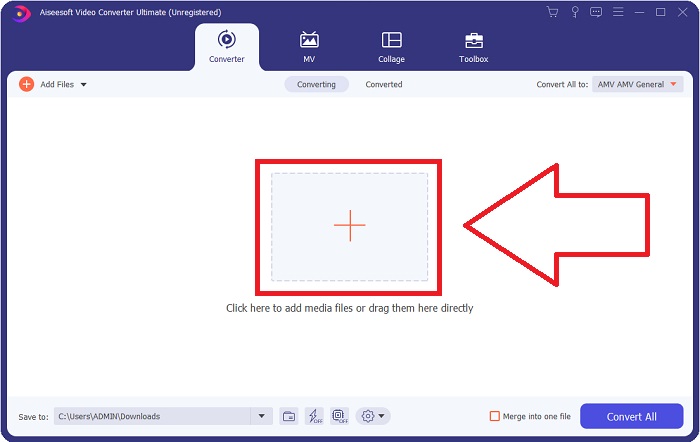
گام 2: به محض باز شدن پنجره، با رابط کاربریای روبهرو میشوید که یک دکمه + در وسط آن قرار دارد. برای وارد کردن فایل ویدیوییای که میخواهید تبدیل کنید، روی این دکمه کلیک کنید یا فایل را بکشید و رها کنید داخل برنامه.
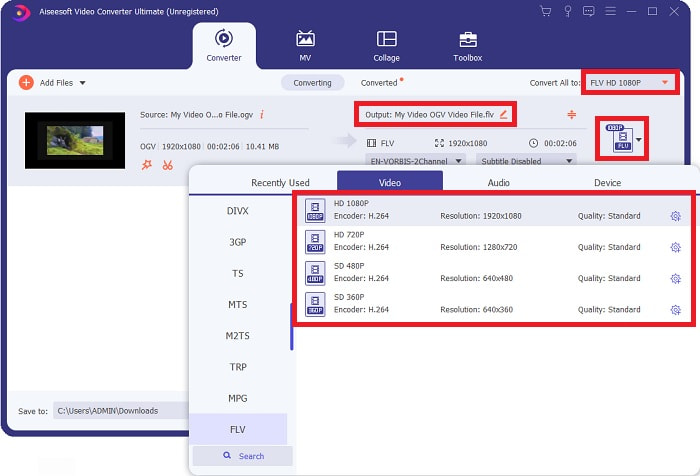
گام 3: در سمت راست، فرمت فعلی فایل ویدیوی شما نمایش داده میشود. روی آن کلیک کنید تا همه فرمتهایی را که میتوانید انتخاب کنید، ببینید. در این مورد، به پایین اسکرول کرده و FLV را انتخاب کنید، یا میتوانید آن را در نوار جستوجوی پایین صفحه جستوجو کنید. اکنون در سمت راست این زبانه، میتوانید کیفیت ویدیویی موردنظر خود را برای فایل تبدیلشده نیز انتخاب کنید.
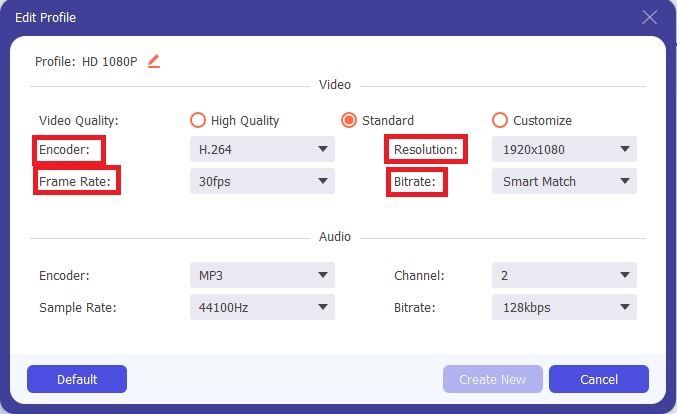
گام 4: اگر به دنبال گزینههای بیشتری هستید، میتوانید با کلیک روی آیکون چرخدنده کنار کیفیت ویدیوی انتخابی خود، آنها را پیدا کنید. با این کار میتوانید وضوح ویدیو و سایر گزینهها مانند نرخ فریم، نرخ نمونهبرداری، بیتریت و انکودر را بیشتر ویرایش کنید. پس از رضایت از تنظیمات، کافی است روی دکمه «Create New» در گوشه پایین سمت راست کلیک کنید تا تغییرات ذخیره شوند.
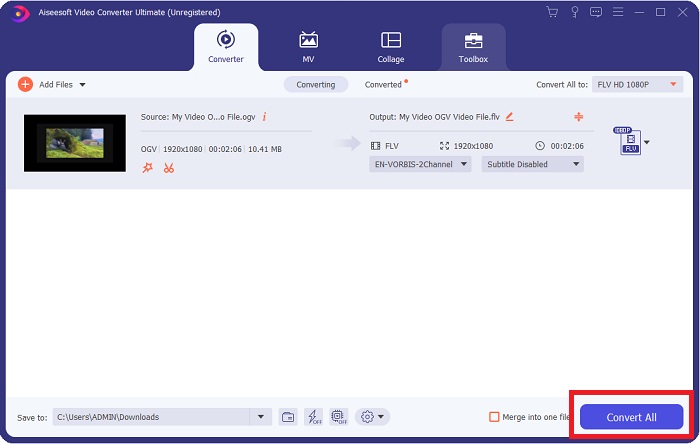
گام 5: هنگامی که تمام تنظیمات را انجام دادید، میتوانید با کلیک روی دکمه «Convert All» در گوشه پایین سمت راست، فرآیند تبدیل را به طور کامل آغاز کرده و منتظر بمانید تا تمام شود.
بخش 2. روش دیگری برای تبدیل OGV به FLV [آنلاین]
اگر وقت کافی ندارید و باید فایل OGV خود را هر چه سریعتر به FLV تبدیل کنید، جای نگرانی نیست، چون همچنان راهحل برای شما داریم. میتوانید از نسخه آنلاین همین نرمافزار استفاده کنید که در عین حال با یک فرآیند روان تبدیل، نهایت راحتی را برای شما فراهم میکند. FVC Free Video Converter Online یک ابزار تحت وب است که میتواند فایلهای OGV را بهراحتی به FLV تبدیل کند و همچنان گزینههای یکسانی برای وضوح و کیفیت صدا ارائه دهد. برای استفاده از آن، مراحل زیر را دنبال کنید:
گام 1: روی این لینک کلیک کنید تا به خودِ مبدل آنلاین هدایت شوید. در وسط صفحه، دکمهای با عنوان 'Add Files to Convert' وجود دارد. باید روی آن کلیک کنید تا لانچر لازم برای وارد کردن فایل ویدیوییای که میخواهید تبدیل کنید، دانلود شود.
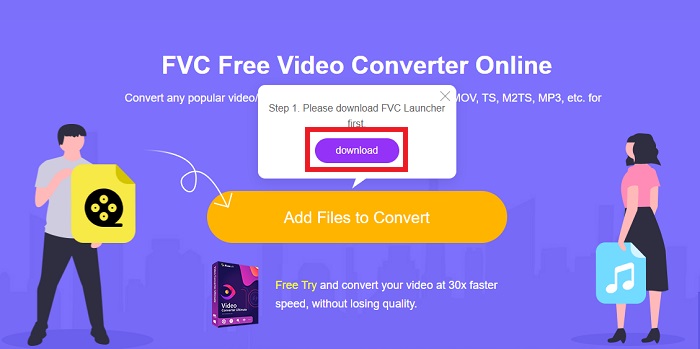
گام 2: پس از اتمام، اکنون میتوانید با کلیک دوباره روی همین دکمه، فایل خود را بارگذاری کنید. اگر آپلود موفقیتآمیز باشد، یک پنجره ظاهر میشود. از آنجا میتوانید در میان دیگر فرمتهای ارائهشده در پایین پنجره، FLV را انتخاب کنید.
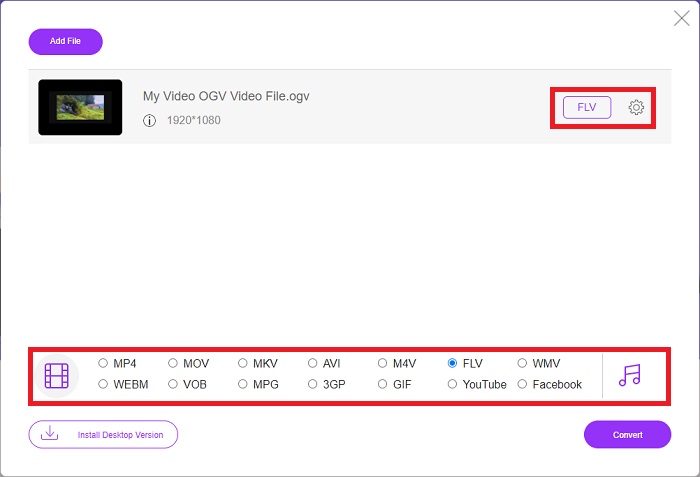
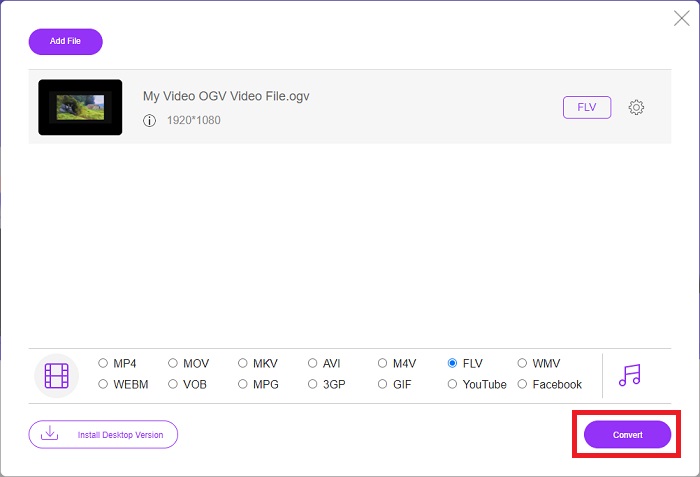
گام 3: به همین صورت، میتوانید در دورترین قسمت سمت راست، آیکون چرخدندهای بیابید که از طریق آن میتوانید ویدیوی خود را بیشتر ویرایش کنید. با کلیک روی آن، تنظیمات ویدیو و صدا را برای ویرایش انکودرها، وضوح تصویر، نرخ فریم و موارد دیگر میبینید. روی «OK» کلیک کرده و سپس روی دکمه «Convert» در گوشه پایین سمت راست بزنید تا فرآیند تبدیل آغاز شود.
بخش 3. دانش گسترده درباره OGV و FLV
اگر میخواهید درباره دو فایل مورد مقایسه بیشتر بدانید، در اینجا تمام اطلاعات لازم را که ممکن است بخواهید بخوانید در اختیار شما قرار میدهیم:
روش رمزگذاری ویدیوی Ogg Vorbis معمولاً می تواند با فایل هایی با پسوند فایل ogv. پیوند برقرار کند. Ogg Vorbis یک فرمت فشرده سازی صوتی منبع باز و بدون ثبت اختراع است. فرمت کانتینر برای فایل های صوتی، تصویری و اطلاعاتی به نام Ogg شناخته می شود، در حالی که فناوری فشرده سازی صدا Vorbis از این نام نامگذاری شده است. فرمت فایل OGV محفظه ای برای فایل های ویدئویی است. جریانهای ویدیویی مرتبط با یک یا چند کدک ویدیویی، مانند Theora و DivX، ممکن است در فایلهای OGV یافت شوند. کاربران ممکن است با استفاده از این فایل ها، مطالب ضبط شده را در داخل فایل محتوا در چندین دستگاه رسانه پخش کنند.
از طرف دیگر، یک فایل ویدئویی ذخیره شده در فرمت کانتینر Adobe Flash Video (FLV) یک فایل FLV است. Adobe Flash Player عمدتاً از آن برای ارائه محتوای ویدیویی آنلاین مانند فیلم ها و قسمت های تلویزیونی استفاده می کند. همچنین، ذکر این نکته ضروری است که این یک فرمت باز است که توسط انواع برنامه های غیر Adobe/Macromedia پشتیبانی می شود. برای مقایسه دقیقتر این دو، جدولی را فقط برای شما درست کردیم.
| Ogg Vorbis (OGV) | فیلم Adobe Flash (FLV) | |
| فرمت فایل | ogv | .flv |
| توسعه دهنده | بنیاد Xiph.Org | Adobe Systems Incorporated |
| برنامه های حمایتی | MPlayer Classic، VLC Media Player، Jriver Media Center، MPUI | RealPlayer، Apple QuickTime Player، Mplayer، VLC Media Player |
| مزایای | OGG این مزیت را دارد که بدون حق ثبت اختراع است، به طور کلی مورد تایید است و به طور بومی توسط اکثر مرورگرها پشتیبانی می شود. در نتیجه، اگر می خواهید فیلمی را در وب سایت خود آپلود کنید، این فرمت گزینه خوبی است. | زیبایی فلش در این است که می تواند به وب سایت هایی که می خواهند محتوای متحرک و تعاملی را ترکیب کنند کمک کند. این روش ساده است و در نهایت ممکن است تأثیر قابل توجهی داشته باشد. همه همچنین از Flash برای بازی های ابتدایی در اوج خود استفاده می کردند. |
| معایب | با وجود استفاده گسترده، فرمت ویدئویی OGG دارای چند اشکال است. برای مثال Safari و Internet Explorer فقط تا حدی از آن پشتیبانی می کنند. بنابراین، کاربران ممکن است ویدیوی شما را به درستی در این مرورگرها مشاهده نکنند. | البته اشکال این است که فرمت FLV در سالهای اخیر محبوبتر شده است. ایجاد محتوای FLV ممکن است زمان زیادی طول بکشد و گران باشد. یکی دیگر از معایب این است که مواد فلش را نمی توان در دستگاه های iOS پخش کرد و توانایی آن را برای جذب دنبال کنندگان جدید به شدت محدود می کند. |
بخش 4. سوالات متداول در مورد تبدیل OGV و FLV
آیا OGG و OGV یکسان هستند؟
این یک زیرمجموعه مناسب از نوع رسانه ویدئویی Ogg video/Ogg با پسوند فایل است. ogv. سایر برنامه های Ogg از پسوند فایل استفاده می کنند. ogv با نوع رسانه application/ogg since. ogx ابرمجموعه ویدیو/ogg است.
آیا کیفیت FLV بهتر از MP4 است؟
گفته میشود MP4 شامل کدگذاری دیجیتال ویدیویی و صوتی با کیفیت بالا است. نظر عمومی درباره FLV چندان روشن نیست، هرچند مزایا و معایب FLV بهندرت بر کیفیت خود فرمت فایل تمرکز دارند. با درجه بالاتر فشردهسازی، MP4 افت کیفیت کمتری دارد. در اینجا میتوانید روشهای تبدیل فایلهای FLV به MP4 را بررسی کنید.
آیا FLV مانند OGV بدون اتلاف یا اتلاف است؟
فرمت فایل FLV برای Flash Video از دو نسخه از کدک اشتراک صفحه (Screen video) پشتیبانی می کند که یک روش رمزگذاری صفحه نمایش است. این فرمت ها بر اساس کاشی های بیت مپ هستند و زمانی که عمق رنگ ها با استفاده از Zlib کاهش یافته و فشرده می شوند، از دست می روند.
نتیجه
صرف نظر از اینکه چقدر زمان برای تبدیل فایل های ویدیویی خود دارید، نرم افزار و همتای ابزار آنلاین آن راحت ترین کار را برای شما ارائه می دهند. بنابراین، به طور خلاصه، Video Convert Ultimate و Free Video Converter آنهایی هستند که باید اولین چیزی باشد که در مورد تبدیل ویدیو به آن فکر می کنید تا در وقت مرور اینترنت و پیدا کردن بهترین آن صرفه جویی کنید. در اینجا، ما بهترین ها را به شما می دهیم.
-
 بهترین راه برای تبدیل VOB به FLV [رایگان و آنلاین شامل]
 آیا می خواهید یک فایل VOB را به یک فایل FLV تبدیل کنید؟ به راحتی می توانید کار را با مبدل های دسک تاپ یا آنلاین انجام دهید. این راهنما را بخوانید و یاد بگیرید که چگونه VOB را به راحتی و به سرعت به FLV تبدیل کنید.
-
 4 برنامه برتر RMVB به FLV مبدل رایگان در دسک تاپ یا آنلاین
 این مقاله بهترین نرم افزار مبدل RMVB به FLV و برنامه های وب را به شما می گوید که می توانند فایل های RMVB (میزان بیت متغیر RealMedia) را به فیلم FLV تبدیل کنند.
-
 نحوه فشرده سازی فایل OGV بدون افت کیفیت
 آیا نمی توانید فایل های OGV بزرگ را برای دیگران ارسال کنید؟ خوب، این مقاله 2 راه آسان را به شما معرفی می کند که به شما کمک می کند تا فایل های OGV را به راحتی فشرده کنید.
