


 Video Converter Ultimate
 ضبط صفحه
 تعمیر ویدیو
نحوه تبدیل AMV به FLV به روش های قابل اعتماد و قابل اعتماد
برای کسانی که آشنا نیستند، AMV مخفف Anime Music Video (ویدئوی موسیقی انیمه) است. پسوند فایل .amv از ویدئوهای فشردهشده استفاده میکند. پخشکنندههای قابلحمل رسانه که در چین تولید میشوند، بیشترین احتمال را برای استفاده از فایلهای AMV دارند. ویدئوهای با وضوح پایین متناسب با صفحهنمایش پخشکننده رسانه هستند تا هنگام پخش بهدرستی نمایش داده شوند. بااینحال، شرکت Adobe سیستم فایل FLV (Flash Video File) را ساخته است که شامل یک هدر کوتاه، بستههای درهمآمیختهٔ صدا، تصویر، متاداده و همچنین دادههای صوتی و تصویری ذخیرهشده در فایلهای SWF است. جریانهای ویدئویی را میتوان با استفاده از Flash Video در برنامههای Adobe و افزونههای فلش جاسازی کرد. اکنون که کمی با این دو فرمت آشنا شدید، خود را برای ورود به دنیای مبدلها آماده کنید. بد نیست به تبدیل AMV به FLV فکر کنید.

بخش 1. عالی ترین مبدل برای استفاده در تبدیل AMV به FLV
Video Converter Ultimate یک برنامه حرفهای است که میتواند تبدیل ویدئوهای شما را انجام دهد. این نرمافزار از تبدیل آسان و بدون افت کیفیت FLV به MOV در هر دو سیستمعامل ویندوز و مک پشتیبانی میکند و بهصورت رایگان در دسترس است. علاوه بر این، این ابزار میتواند بین بیش از ۱۰۰ فرمت مختلف، ازجمله فایلهای با کیفیت بالا، تبدیل انجام دهد. یک ویرایشگر ویدئویی کامل نیز همراه آن ارائه میشود که به شما اجازه میدهد ویدئو را برش دهید، قیچی کنید، تریم کنید، واترمارک اضافه کنید و از افکتهای ویژه استفاده کنید. علاوه بر تبدیل ویدئو، Video Converter Ultimate از دانلود ویدئو، انتقال ویدئو و سایر قابلیتها نیز پشتیبانی میکند. برای اینکه یاد بگیرید چطور از این نرمافزار استفاده کنید، باید با دستورالعملهایی که در این بخش به شما داده میشود آشنا شوید.
گام ۱: برای دسترسی به نرمافزار، ابتدا باید آن را روی رایانه خود دانلود کنید. برای این کار، کافی است روی دکمه Free Download که در پایین این گام قرار دارد کلیک کنید. همانطور که میبینید، هنگام دانلود نرمافزار دو گزینه دارید: نسخه ویندوز یا مک. پس از دانلود، نرمافزار را روی رایانه نصب کرده و سپس آن را اجرا کنید.
دانلود رایگانبرای ویندوز 7 یا بالاتردانلود امن
دانلود رایگانبرای MacOS 10.7 یا بالاتردانلود امن
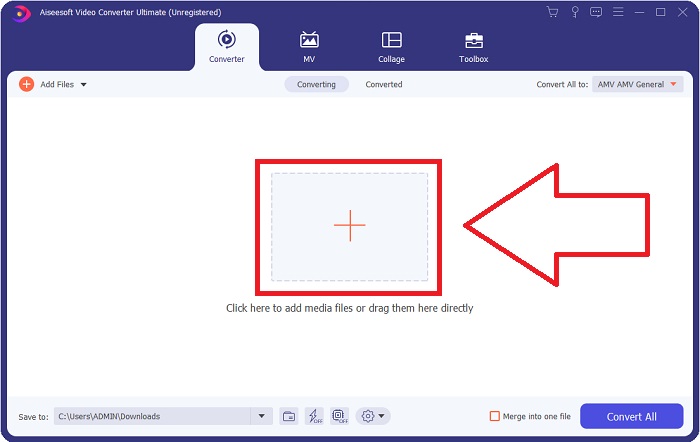
گام ۲: بعد از اجرای نرمافزار، یک پنجره روی صفحه ظاهر میشود. رابط Converter روی صفحه شما نمایش داده میشود و ناحیه بارگذاری فایل را نیز میبینید. روی دکمه + کلیک کنید یا هر فایل ویدئویی را از دسکتاپ خود بکشید و در این ناحیه رها کنید تا ادامه دهید.
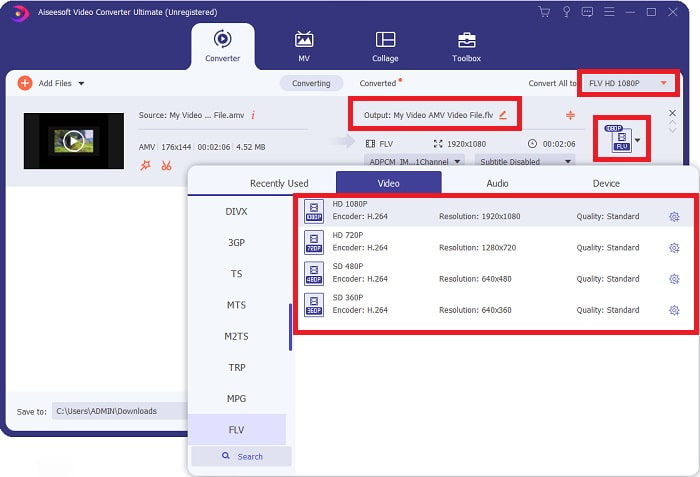
گام ۳: برای تبدیل فرمت ویدئوی AMV به FLV، بعد از بارگذاری فایل در نرمافزار، باید به بخش انتخاب فرمت بروید و فرمت FLV را انتخاب کنید. همچنین میتوانید پس از آن، کیفیت دلخواه ویدئوی خروجی را انتخاب کنید.
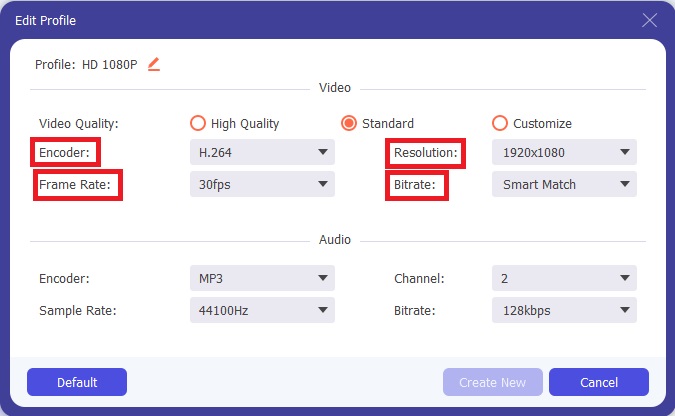
گام ۴: اگر لازم است کیفیت جدیدی برای ویدئو مطابق سلیقه خودتان بسازید یا آن را شخصیسازی کنید، میتوانید روی آیکون چرخدنده در کنار بخش انتخاب کیفیتهای ویدئو کلیک کنید.
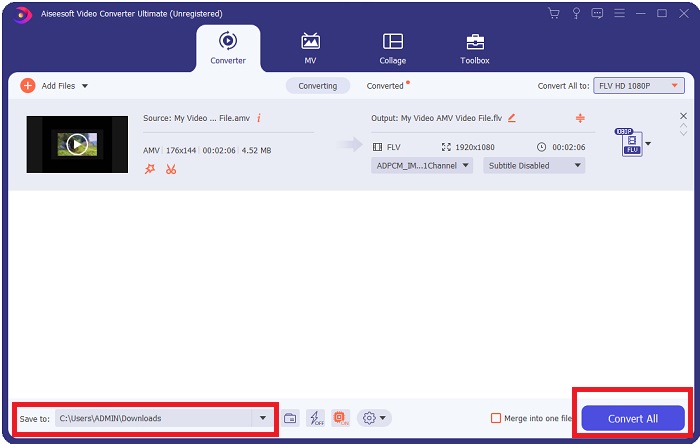
گام ۵: تقریباً تمام است! حالا که همه تنظیمات و مشخصات دلخواه خود را اعمال کردهاید، میتوانید محل ذخیرهسازی فایل تبدیلشده را با کلیک روی آیکون پوشه کنار فیلد Save to در گوشه پایین سمت چپ پنجره انتخاب کنید. اکنون میتوانید با کلیک روی دکمه Convert All ویدئوی خود را تبدیل کنید.
بخش 2. ابزار آنلاین برای استفاده در تبدیل AMV به FLV
استفاده از مبدلهای آنلاین آسان است، زیرا نیازی به دانلود یا نصب هیچ نرمافزاری ندارند. Free Video Converter Online نمونه بسیار خوبی از برنامهای است که میتواند بهسرعت و بهسادگی AMV را به FLV تبدیل کند. با استفاده از این برنامه میتوانید دامنهٔ وسیعی از فرمتهای صوتی و ویدئویی را تبدیل کنید و استفاده از آن کاملاً رایگان است. میتوانید دو فایل را برای تبدیل در برنامه بارگذاری کنید و پس از پایان فرآیند، فایل تبدیلشده بهطور خودکار روی هارددیسک شما ذخیره میشود. در ادامه تمام مراحلی را که برای استفاده از این ابزار آنلاین عالی لازم است بدانید، به شما معرفی میکنم.
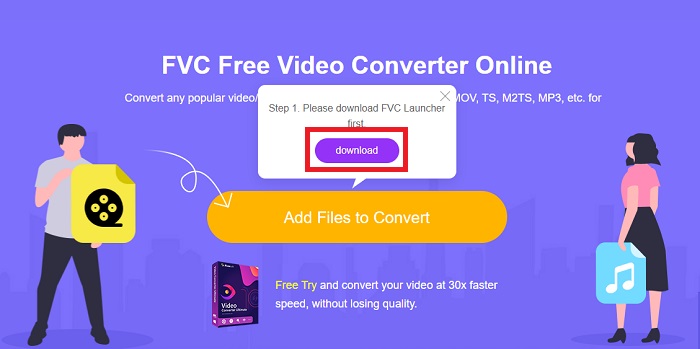
گام ۱: برای دسترسی به صفحه اصلی این ابزار آنلاین، روی این لینک کلیک کنید. بعد از ورود، با کلیک روی Add Files to Convert تبدیل یک فایل را آغاز کنید. سپس دکمه دانلود در گوشه بالای صفحهنمایش شما ظاهر میشود. بعد از اینکه لانچر بهطور کامل نصب شد، میتوانید شروع کنید و یک فایل را از رایانه خود در این ابزار آپلود کنید.
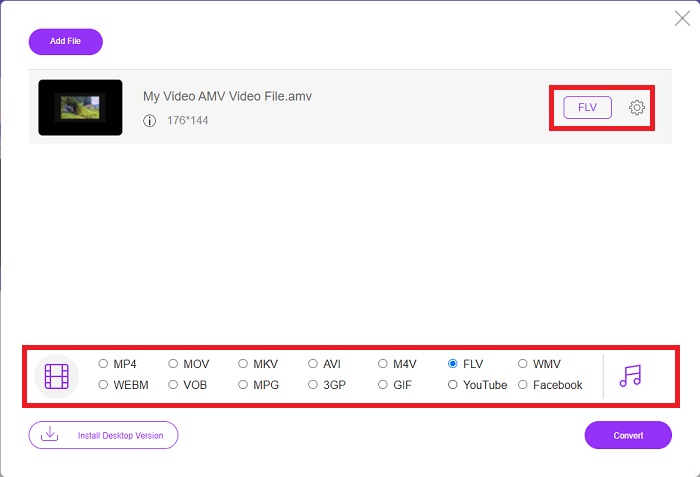
گام ۲: حالا که فایل واردشده شما آماده است، روی فرمت ویدئویی FLV که در پایین قرار دارد کلیک کنید. همانطور که در نرمافزار امکانپذیر است، در اینجا نیز میتوانید با کلیک روی آیکون چرخدنده همه مشخصات ویدئوی خروجی را تنظیم کنید.
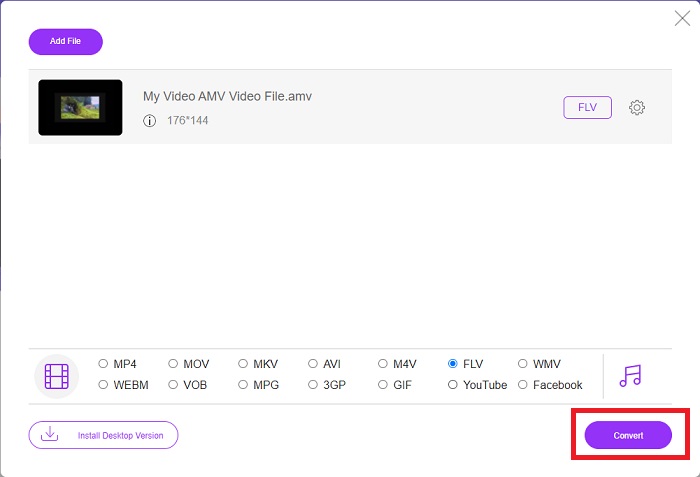
گام ۳: در پایان، برای تغییر فایلهای AMV خود به فرمت FLV روی دکمه Convert کلیک کنید.
مرتبط:
بخش 3. دانش گسترده در مورد AMV و FLV
AMV پخش کننده های رسانه ای همه کاره کم را با پردازنده های کند و صفحه نمایش های کوچک مانند پخش کننده MP3 S1 بهینه می کند. کدک ویدیویی Motion JPEG با جداول کوانتیزاسیون ثابت است. کدک صوتی IMA ADPCM است که در آن 8 بایت اول هر فریم منبع (16 بیت)، فهرست (16 بیت) و مقدار نمونه های 16 بیتی رمزگذاری شده (32 بیت) است. سربار رمزگشایی برای این کدک های ساده شده ناچیز است. فشرده سازی ویدیو کم است (4 پیکسل در بایت در مقابل بیش از 10 پیکسل در بایت برای MPEG-2)، اما اندازه فایل به دلیل کاهش وضوح (96x96 بالاتر یا برابر با 208x176) و فریم در ثانیه (10، 12، یا 16 فریم در ثانیه). یک ویدیوی 30 دقیقهای فشردهشده در 128x96 پیکسل و 12 فریم بر ثانیه 80 مگابایت خواهد بود.
با این حال، یک فایل ویدئویی با پسوند. برای مدت طولانی، Flash Video فرمت ویدئویی پیشفرض برای تقریباً تمام ویدیوهای آنلاین، از جمله موارد موجود در سایتهایی مانند YouTube، Hulu و تعداد بیشماری دیگر بود. به همین دلیل، سرویسهای پخش و توسعهدهندگان نرمافزار دیگر از فرمت فلش اختصاصی Adobe استفاده نمیکنند. با تمام این مقایسه که بیان شد، در اینجا یک کمک کوچک برای شما وجود دارد، این مقاله نمودار مقایسه ای را در اختیار شما قرار داد:
| فرمت فایل | AMV | FLV |
| نام فایل | موزیک ویدیو انیمه | فایل ویدیویی فلش |
| توسعه یافته توسط | جیم کاپوستاس | Adobe System Incorporated |
| طرفداران | ◆ AMV یکی از محبوب ترین موزیک ویدیوهای انیمه ساخته شده توسط طرفداران تا به امروز است. ◆ اندازه فایل کوچک است. | Adobe Flash برای صفحات وب پویا و تعاملی می تواند یک مزیت بزرگ باشد. حتی اگر این یک فرآیند ساده است، نتایج می تواند قابل توجه باشد. فلش زمانی یک انتخاب محبوب برای بازی های ویدیویی ساده نیز بود. |
| منفی ها | ◆ ناسازگار با اکثر پخش کننده های رسانه و دستگاه ها. کیفیت پایین. | کاهش محبوبیت FLV یک نقطه ضعف بوده است. ایجاد محتوای FLV می تواند زمان بر و پرهزینه باشد. عدم پشتیبانی از فلش در دستگاه های iOS به شدت توانایی آن را برای جذب کاربران جدید محدود می کند. |
| برنامه هایی که از فایل پشتیبانی می کنند | ◆ VLC Media Player ◆ مبدل iOrgsoft AMV | ◆ RealPlayer ◆ اپل QuickTime Player ◆ VLC Media Player ◆ MPplayer |
بخش 4. سوالات متداول در مورد تبدیل AMV به FLV
هدف از AMV چیست؟
همگام سازی و یکپارچگی در یک AMV می تواند به سبک های مختلف ویرایش ویدیو دست یابد. دستیابی به ویرایش خام با بزرگنمایی ساده و کوچک کردن «افکتها» و انتقال ساده امکان پذیر است. از جمله نمونه های فراوان به شرح زیر است.
AMV ها چگونه ساخته می شوند؟
برای موفقیت یک AMV، باید از آهنگی استفاده کند که ارتباط نزدیکی با موضوع داشته باشد و تقریباً آن را کاملاً توصیف کند. هر کسی که این را میخواند میتواند با گفتن این جمله پاسخ دهد: «وای، این شگفتانگیز است! این آهنگ، آهنگ اصلی اوست. به همین دلیل، شما یک قطعه خوب را انتخاب کرده اید.
آیا FLV کیفیت بهتری دارد؟
فرمت FLV و MP4 قادر به ذخیره کدگذاری دیجیتالی تصویری و صوتی با کیفیت بالا هستند. کیفیت فایل های FLV موضوع بحث است، اما مزایا و معایب FLV می تواند فرمت فایل را مورد بحث قرار دهد. نسبت تراکم بالاتر در MP4 باعث کاهش کیفیت می شود.
نتیجه
برای جمع بندی، اهمیت انتخاب بهترین مبدل در تبدیل AMV به FLV را خواهید دانست. دیگران پس از تبدیل ویدیو، ویدیوهای با کیفیت پایین و غیرهمگام تولید خواهند کرد. اما دو مبدلی که این مقاله توصیه می کند مبدل درجه یک است که لازم نیست نگران کیفیت آن باشید.
-
 بهترین روش برای تبدیل AMV به AVI [تایید شده]
 آیا برای تبدیل فایل ویدئویی با فرمت AMV به AVI مشکل دارید؟ در اینجا چند نکته ارائه شده است که فقط در این مقاله می توانید آنها را بیابید.
-
 3 جدیدترین مبدل AMV موجود برای تبدیل فرمت AMV به MOV [2022]
 نمی دانید چگونه فایل های AMV خود را به فرمت MOV تبدیل کنید؟ سپس این مقاله در مورد 3 مبدل AMV به MOV صحبت می کند که می توانید به صورت آنلاین یا آفلاین از آنها استفاده کنید.
-
 4 روش تایید شده برای تبدیل TS به FLV در دسک تاپ / آنلاین
 به طور پیش فرض نمی توانید TS را در رایانه یا تلفن همراه باز کنید. تنها راه برای تماشای فایل های ویدئویی تبدیل TS به FLV یا قالب های دیگر با راهنمای بتن ما است.
