


 Video Converter Ultimate
 ضبط صفحه
 تعمیر ویدیو
ابزار آفلاین و آنلاین در تبدیل TRP به FLV که باید درباره آن بدانید
TRP یک قالب فایل برای ذخیره فایلهای تلویزیونی ضبطشده است. چون تعداد کمی از پخشکنندهها میتوانند این نوع فایل را در نسخه اصلی آن اجرا کنند، ممکن است لازم باشد پیش از تماشا، فایل خود را به قالب دیگری تبدیل کنید. برای پشتیبانی از تبدیل فایلهای TRP به فایلهای FLV، باید از ابزار نرمافزاری مناسبی استفاده کنید. خوشبختانه با استفاده از نرمافزار ما یا نسخه آنلاین آن، انجام این کار بسیار سادهتر است و در تمام فرایند تبدیل، هیچ زحمتی برای شما ایجاد نخواهد شد. مراحل زیر را که در ادامه میآید دنبال کنید تا بتوانید ویدیوهای TRP خود را با موفقیت به قالب FLV تبدیل کنید.

قسمت 1. روش آفلاین برای تبدیل TRP به FLV
قالب فایل TRP برای اغلب مصرفکنندگان ویدیو قالبی ناآشناست و توسط سازندگان نیز زیاد استفاده نمیشود. با توجه به این موضوع، بیشتر نرمافزارها و ابزارهای آنلاین از این نوع فایل ویدیویی پشتیبانی نمیکنند. به همین دلیل است که Video Converter Ultimate در زمان نیاز به تبدیل ویدیوها از یک قالب به قالب دیگر، گزینهای شایان توجه است. این نرمافزار میتواند تنها با یک کلیک، فایل TRP شما را به هر قالب دلخواهتان تبدیل کند.
این ابزار مبدل ویدیویی ویژگیهای ویرایش پیشرفته را ارائه میکند و دارای یک رابط گرافیکی است که حتی اگر دانش فنی یا مهارتی ندارید، استفاده از آن ساده است. با کمک این اپلیکیشن می توانید فایل ها را تبدیل کنید و از زمان تبدیل فوق العاده سریع و خروجی با کیفیت بهره مند شوید. در اینجا ما مراحل ساده ای را که باید دنبال کنید به شما ارائه می دهیم:
مرحله 1: فایل .exe را با کلیک روی دکمه دانلود رایگان زیر و بر اساس سیستمعاملی که استفاده میکنید دانلود کنید. پس از اتمام دانلود، آن را باز کرده و فرایند نصب را آغاز کنید. صبر کنید تا نصب به پایان برسد، سپس نرمافزار را اجرا کنید.
دانلود رایگانبرای ویندوز 7 یا بالاتردانلود امن
دانلود رایگانبرای MacOS 10.7 یا بالاتردانلود امن
مرحله 2. به محض اجرای نرمافزار، یک رابط کاربری ظاهر میشود. از آنجا روی دکمه + در وسط کلیک کرده و شروع به وارد کردن فایل ویدیوییای کنید که میخواهید آن را تبدیل کنید، یا به سادگی فایل را بکشید و رها کنید.
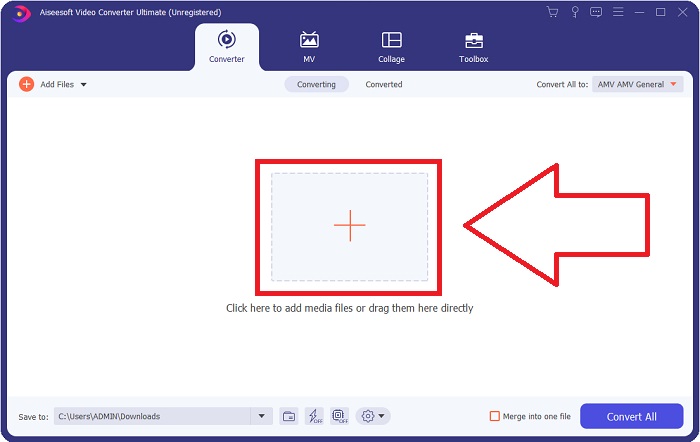
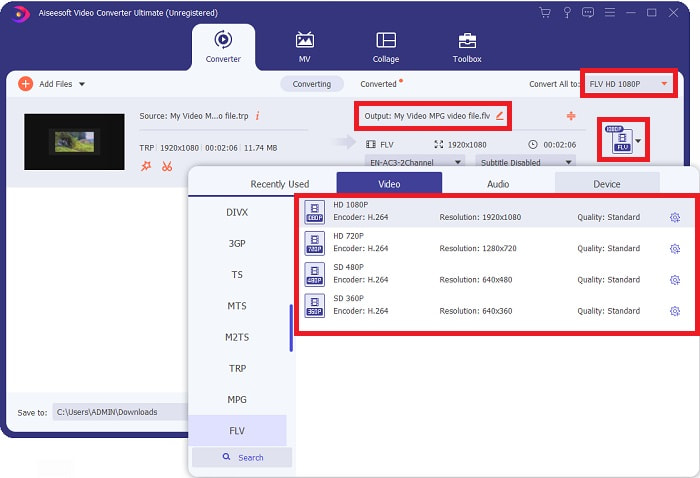
مرحله 3: در سمت راست فایل، قالب فعلی ویدیوی خود را خواهید دید. برای انتخاب قالبی که قرار است ویدیو به آن تبدیل شود، روی آن کلیک کنید تا همه قالبهای در دسترس نمایش داده شوند. به دنبال FLV بگردید یا فقط آن را در نوار جستوجو تایپ کنید. در سمت راست، گزینههای کیفیت ویدیو نیز برای شما وجود دارد.
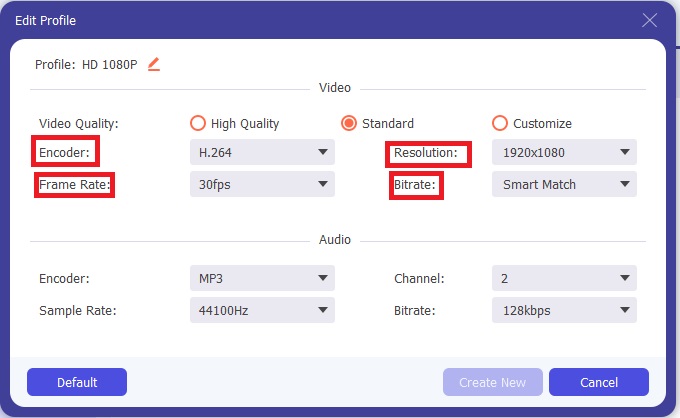
مرحله 4: برای استفاده از قابلیتهای اضافی که درباره آن صحبت کردیم، روی آیکون چرخدنده در سمت راست کیفیت ویدیویی که انتخاب کردهاید کلیک کنید تا رابط دیگری ظاهر شود. از آنجا میتوانید مجموعهای از تنظیمات ویدیو و صدا را مطابق نیاز خود ویرایش کنید. برای حفظ تغییرات روی دکمه Create New کلیک کنید.
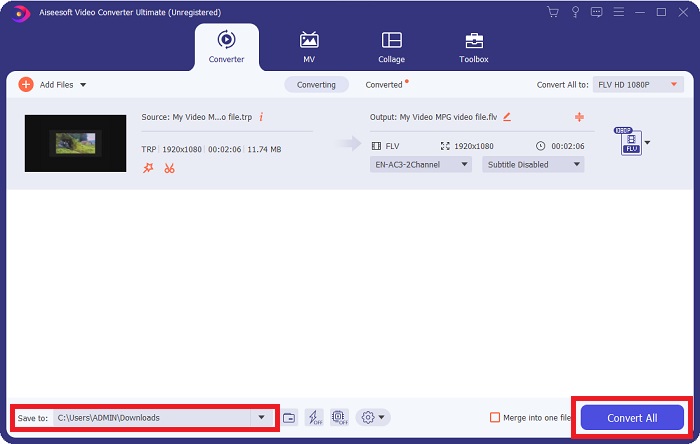
مرحله 5: هنگامی که تنظیمات و ویرایشها را به پایان رساندید، برای شروع فرایند تبدیل روی دکمه Convert All در گوشه پایین سمت راست رابط کاربری کلیک کنید و منتظر بمانید تا فرایند کامل شود.
قسمت 2. روش آنلاین برای تبدیل TRP به FLV
اگر میخواهید کار را با مراجعه به یک ابزار وب و بدون نصب کامل نرمافزار انجام دهید، تبدیل فایلهای ویدیویی گزینه دیگری است که باید در نظر بگیرید. در این مورد، ما نسخه آنلاین این نرمافزار را نیز در اختیار داریم ــ FVC Free Video Converter Online. این ابزار همچنان گزینههای اضافی موجود در نرمافزار را ارائه میدهد، هرچند تمام قابلیتها را در بر نمیگیرد. با این حال، در بازه زمانی معقول موردنیاز، هدف خود را بهخوبی برآورده میکند. برای استفاده از این ابزار وب، مراحل زیر را دنبال کنید:
مرحله 1: با کلیک روی این لینک بهدرستی وارد مبدل شوید. از آنجا میتوانید با دانلود لانچری که برای وارد کردن فایلها نیاز دارید شروع کنید. برای آغاز فرایند، روی دکمه Add Files to Convert در وسط صفحه کلیک کنید.
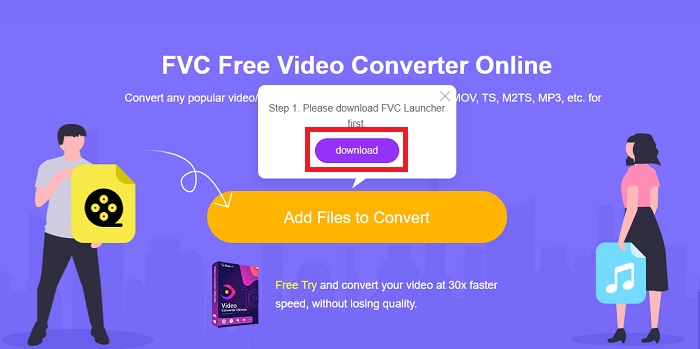
مرحله 2: دوباره روی همین دکمه کلیک کرده و فایل ویدیوییای را که میخواهید تبدیل کنید بارگذاری کنید. پس از وارد کردن فایل، رابط کاربری جدیدی ظاهر میشود که همه قالبهای در دسترس را برای انتخاب به شما نشان میدهد. در اینجا، قالب FLV را انتخاب کنید.
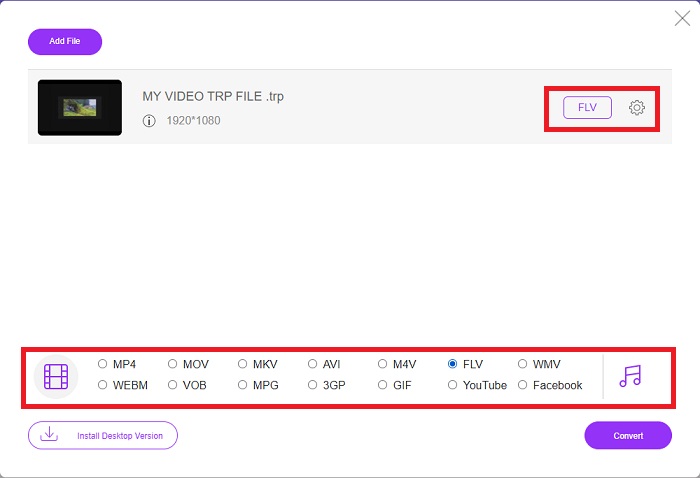
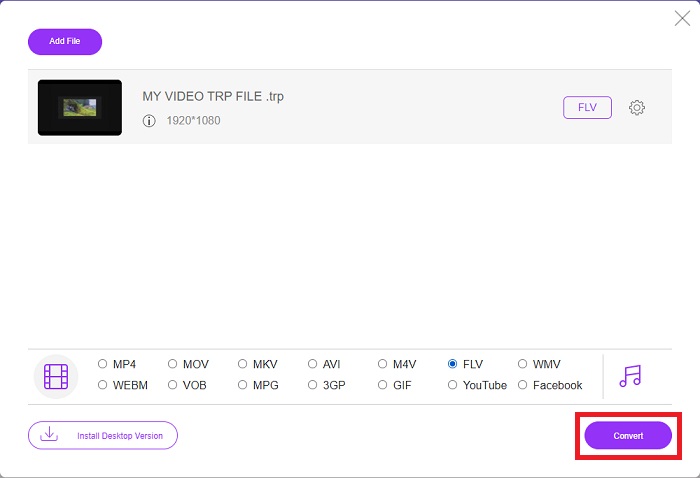
مرحله 3: برای گزینههای اضافی، درست مانند خود نرمافزار، روی آیکون چرخدنده در سمت راست کلیک کنید. تنظیمات ویدیو و صدا ظاهر میشوند تا بتوانید ویدیوی خود را از نظر وضوح تصویر، نرخ فریم و موارد بیشتر ویرایش کنید. پس از پایان کار، روی OK کلیک کنید تا تغییرات ذخیره شوند. در نهایت، با کلیک روی دکمه Convert در گوشه پایین سمت راست، فرایند تبدیل را آغاز کنید.
مرتبط:
بخش 3. دانش گسترده از TRP و FLV
برای آشنایی بیشتر با دو قالب ذکر شده، اطلاعات مختصری و همچنین مقایسه این دو را در اختیار شما قرار می دهیم.
فایل های TRP معمولاً با VLC VideoLAN مرتبط هستند. پسوند نام فایل TRP میتواند با MPEG-2 Part 1 که فیلمهای با کیفیت بالا را نگه میدارد، جمعآوری کند. فایلهای TRP میتوانند بستههای دادهای را که بهعنوان ویدیو و صدا دیجیتال از طریق شبکههای پخش ویدیوی دیجیتال، فرکانسهای رادیویی یا دستگاههای ضبط خطی مانند ضبطکنندههای ویدیو ارسال میشوند، داشته باشند و ذخیره کنند. چندین جریان صوتی و تصویری، و همچنین کد تصحیح خطا، در یک فایل TRP گنجانده شده است. کاربران همچنین ممکن است متادیتا مانند زمان ضبط، شناسه دوربین و منبع را در محتویات فایل قرار دهند.
از سوی دیگر، فایلی با پسوند flv. مخفف Flash Video است. پسوند فایل FLV به یک فایل ویدیویی یا صوتی که از طریق اینترنت با استفاده از Adobe Flash Player یا Adobe Air ارسال می شود، اشاره دارد. Flash Video مدتهاست که فرمت اصلی ویدیو برای تقریباً همه ویدیوهای جاسازی شده در اینترنت از جمله ویدیوهای YouTube، Hulu و سایتهای مختلف دیگر بوده است. از سوی دیگر، ارائه دهندگان جریان و توسعه دهندگان نرم افزار، از زمان توقف رسمی Adobe، Flash را به نفع HTML5 و سایر فرمت ها کنار گذاشته اند.
| TRP | FLV | |
| فرمت فایل | trp | .flv |
| توسعه دهنده | تیم پروژه VideoLAN | Adobe Systems Incorporated |
| برنامه های حمایتی | ◆ SMPlayer ◆ VLC Media Player ◆ اپل QuickTime Player | ◆ RealPlayer ◆ اپل QuickTime Player ◆ Mplayer ◆ VLC Media Player |
بخش 4. سوالات متداول در مورد تبدیل TRP به FLV
چگونه با استفاده از VLC فرمت ویدیوی TRP را باز کنیم؟
هنگامی که VLC Media Player بر روی رایانه شما نصب شد، فایل ویدئویی TRP را روی هارد دیسک خود پیدا کرده و با دکمه سمت راست ماوس انتخاب کنید. "VLC media player" را از منوی کشویی "Open with" انتخاب کنید. سیستم فایل ویدیویی که از این برنامه پخش می شود را به محض راه اندازی باز می کند.
چگونه یک فایل FLV را به Windows Media Player تبدیل کنم؟
ابتدا باید فایل FLV را که می خواهید تبدیل کنید انتخاب کنید. شما می توانید WMV را به عنوان فرمتی که می خواهید فایل FLV خود را به آن تبدیل کنید انتخاب کنید. برای تبدیل فایل FLV خود، "تبدیل" را از منوی کشویی انتخاب کنید.
آیا می توانم TRP را در هر جایی بازی کنم؟
اگر میخواهید فایلهای TRP را در همه جا و روی یا روی هر دستگاه یا پخشکنندهی رسانهای پخش کنید، تبدیل TRP به فرمتهای شناخته شده MP4، AVI، MOV، MKV، FLV، WMV و سایر فرمتهای دیگر گزینه پیشنهادی است.
نتیجه
به طور کلی، Video Converter Ultimate و همتای ابزار آنلاین آن ابزاری است که شما به دنبال آن هستید تا کل فرآیند تبدیل را انجام دهید و در عین حال تمام ویژگیهای لازم را ارائه دهید. هیچ مزاحمتی ایجاد نمی کند، به علاوه اگر نرم افزار را روی دسکتاپ خود نصب کرده باشید، در هر زمانی از روز در دسترس است. شما هرگز نمی دانید چه زمانی به مبدلی مانند این نیاز خواهید داشت، بنابراین توصیه می کنیم برای سهولت خود از این نرم افزار استفاده کنید.
-
 ساده ترین راهنمای نحوه تبدیل TRP به AVI در ویندوز و مک
 شاید با فرمت ویدیوی TRP آشنایی نداشته باشید و تعجب کنید که چگونه می خواهید TRP را به AVI تبدیل کنید؟ این مقاله را بیشتر بخوانید تا جزئیات مربوط به موضوع را بدانید.
-
 3 راه حل برای تبدیل MTS به FLV رایگان و آنلاین
 آیا می خواهید MTS را به FLV تبدیل کنید؟ در اینجا 3 نرم افزار مبدل رایگان MTS به FLV آورده شده است که می توانید MAC را به FLV در Mac OS X و Windows 10/8/7 تبدیل کنید.
-
 بهترین راه برای تبدیل VOB به FLV [رایگان و آنلاین شامل]
 آیا می خواهید یک فایل VOB را به یک فایل FLV تبدیل کنید؟ به راحتی می توانید کار را با مبدل های دسک تاپ یا آنلاین انجام دهید. این راهنما را بخوانید و یاد بگیرید که چگونه VOB را به راحتی و به سرعت به FLV تبدیل کنید.
