


 Video Converter Ultimate
 ضبط صفحه
 تعمیر ویدیو
نحوه تبدیل 3GP به WMV به روشی حرفه ای [آنلاین و آفلاین]
فرمت 3GP یک فرمت رایج مخصوص موبایل است که امکان انتقال داده از طریق تلفنهای همراه را بدون مصرف زیاد پهنای باند و با صرفهجویی در فضا فراهم میکند. همچنین این فرمت برای ضبط ویدئو روی گوشیهای نسل سوم استاندارد شده است، اما خیالتان راحت، میتوانید ویدئو را روی گوشیهای نسل دوم و چهارم هم پخش کنید. هرچند روی گوشیها عملکرد بسیار خوبی دارد، اما بیشتر محدود به گوشیهای هوشمند است. به همین دلیل تعجبآور نیست اگر فایل .3gp روی دسکتاپ چندان خوب عمل نکند. با این حال، میتوانید یاد بگیرید که 3GP را به فرمتی تبدیل کنید که روی دسکتاپ پشتیبانی بسیار گستردهتری دارد، مانند WMV. میخواهید یاد بگیرید چطور به شکل حرفهای 3GP را به WMV تبدیل کنید؟ در این صورت، بیایید بدون اتلاف وقت نگاهی دقیق به آن بیندازیم.

قسمت 1. 3GP چیست
این یک فرمت مبتنی بر ISO است که جریانهای رسانهای مانند H.263 یا H.264 را برای ویدیو و AMR یا AAC را برای صدا ذخیره میکند و برای فشردهسازی با اتلاف عالی است. علاوه بر این، این فرمت نسل سوم برای ذخیره سازی داده ها در درایوهای قابل حمل در تلفن های ما، حتی در IOS، مناسب است. با وجود اینکه 3GP هنوز در دسترس است، نرخ کارایی این فرمت شروع به کاهش کرد و به همین دلیل، 3GPP به صحنه پیوست و نسخه بهتری از آن شد.
قسمت 2. WMV چیست
این یک فرمت چند رسانه ای اختصاصی است که توسط ویندوز برای پخش آنلاین فیلم ها توسعه یافته است. بر خلاف هر فرمت دیگری، مانند 3GP، WMV از یک رمزگذار چند برابری استفاده می کند تا فایل را حتی فشرده تر کند. به دلیل قابلیت استفاده از بسیاری از رمزگذارها، اشتراک گذاری کارآمد فیلم ها در این فرمت در دسترس تر است. با این حال، استفاده از بسیاری از رمزگذارها، به خصوص در ویرایش و پخش، یک نقطه ضعف دارد، زیرا همه پخش کننده ها و ویرایشگرهای رسانه از طیف گسترده ای از کدک ها پشتیبانی نمی کنند. اگرچه فرمت از کمپرسور استفاده می کند، کیفیت رسانه تغییر یا کاهش نمی یابد.
قسمت 3. روش حرفه ای برای تبدیل 3GP به WMV با Video Converter Ultimate
آیا میخواهید یک مبدل حرفهای 3GP به WMV را بهصورت رایگان روی پلتفرم خود دریافت کنید؟ FVC Video Converter Ultimate یک فرایند تبدیل کاملاً حرفهای را بدون نیاز به صرف تلاش زیاد در اختیار شما قرار میدهد. این مبدل شما را به سطح دیگری از تبدیل میبرد که هیچیک از مبدلهای آنلاین یا آفلاین دیگر نمیتوانند به شما ارائه کنند. علاوه بر این، این ابزار نهایی از بیش از ۲۰۰ فرمت رسانهای مختلف پشتیبانی میکند، چیزی که در سایر ابزارها کمتر دیده میشود.
تا زمانی که این مبدل را دارید، همیشه منتظر خروجی حرفه ای در فرمت رسانه تبدیل شده خود باشید. آیا می خواهید از مبدل حرفه ای برای تبدیل فایل های 3GP خود استفاده کنید؟ اگر اینطور است، میتوانید مراحل زیر را دنبال کنید تا با ابزار نهایی با موفقیت تبدیل شوید.
مراحل تبدیل فایل 3GP به WMV با FVC Video Converter Ultimate
مرحله 1. در پایین دکمههای دانلود نمایش داده شدهاند؛ متناسب با پلتفرمی که استفاده میکنید، آن را انتخاب کنید. برای مثال، اگر کاربر ویندوز هستید روی دکمه دانلود ویندوز کلیک کنید؛ اما اگر از مک استفاده میکنید، روی دکمه مخصوص مک کلیک کنید. پس از اتمام دانلود، مبدل را نصب کرده و با کلیک روی Start Now آن را اجرا کنید. مهمتر از همه اینکه پس از اجرا، پیش از رفتن به مراحل بعدی، لازم است کمی با رابط کاربری آن آشنا شوید.
دانلود رایگانبرای ویندوز 7 یا بالاتردانلود امن
دانلود رایگانبرای MacOS 10.7 یا بالاتردانلود امن
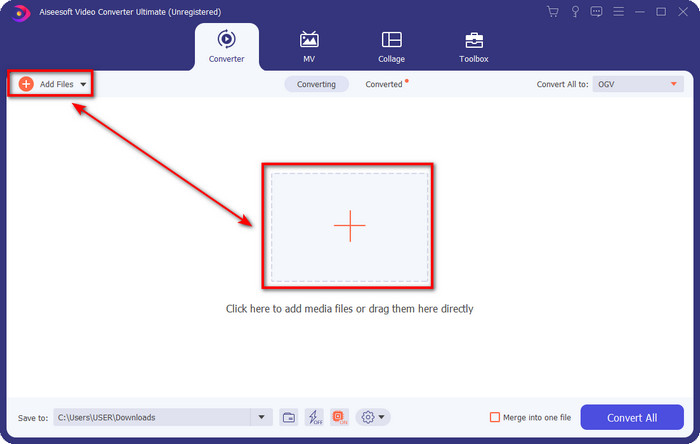
مرحله 2. در قسمت بالای چپ رابط کاربری، گزینه Add Files را میبینید؛ روی آن کلیک کنید تا یک پوشه باز شود. فایل .3gp را در درایو کامپیوتر خود پیدا کرده و سپس با فشردن دکمه Open آن را بارگذاری کنید.
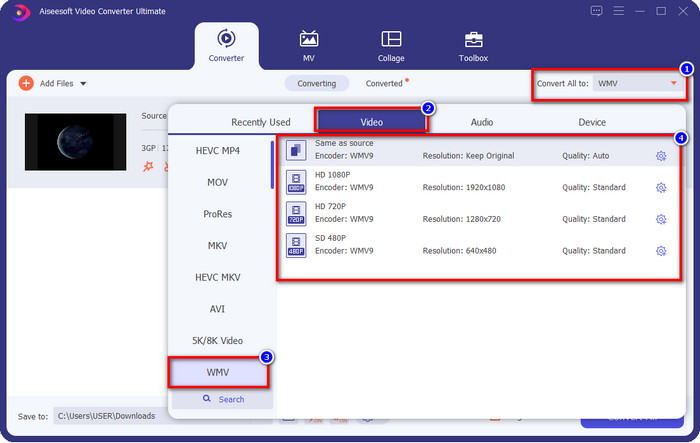
مرحله 3. روی Convert All to کلیک کنید تا فرمت WMV مورد نظر خود یا همان WMV را بهعنوان خروجی نهایی انتخاب کنید.
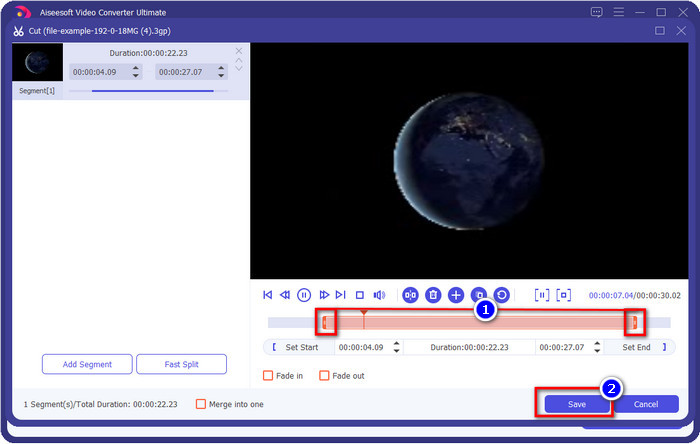
اختیاری. پیش از آنکه فایل 3GP را به WMV تبدیل کنیم، اجازه دهید بهطور خلاصه در مورد سایر قابلیتهای این ابزار صحبت کنیم. نیاز به برش ویدئو دارید؟ مشکلی نیست. روی دکمه scissor کلیک کنید، در صورت تمایل، نوار لغزنده را در دو طرف بکشید و سپس برای اعمال برشی که انجام دادهاید روی Save بزنید.
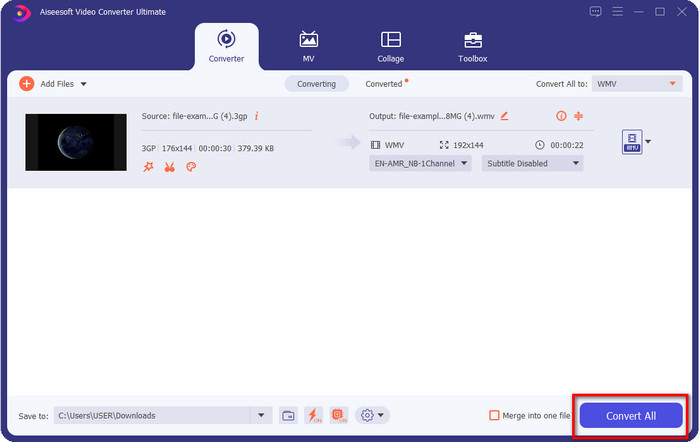
مرحله 4. با کلیک روی دکمه Convert All فرایند تبدیل را آغاز کنید. تبدیل در مدت زمان کوتاهی به پایان میرسد و تمام؛ فایل WMV در درایو کامپیوتر شما ذخیره خواهد شد.
قسمت 4. روش آنلاین تبدیل MXF به WMV با تبدیل آنلاین رایگان ویدیو
یکی دیگر از محصولات FVC که اینبار بهصورت آنلاین ارائه میشود، FVC Free Video Converter Online است. این مبدل حرفهای تحت وب، رابطی مرتب و تمیزتر نسبت به سایر مبدلهای آنلاین دارد. علاوه بر این، پیش از استفاده، نیازی به دانلود مبدل روی دستگاه خود ندارید؛ کافی است مرورگر را باز کرده و وارد صفحه مبدل شوید. هرچند این مبدل تحت وب عالی است، اما بسیاری از قابلیتهای تخصصی ابزار دسکتاپ را ارائه نمیدهد. با این حال، اگر میخواهید 3GP را به WMV بهصورت آنلاین تبدیل کنید، این گزینه مناسبی است؛ کافی است مراحل زیر را کپیبرداری کرده و برای استفاده از این ابزار دنبال کنید.
مراحل تبدیل رایگان 3GP به WMV بهصورت آنلاین با FVC Free Video Converter Online
مرحله 1. برای باز کردن مبدل آنلاین، روی این لینک کلیک کنید.
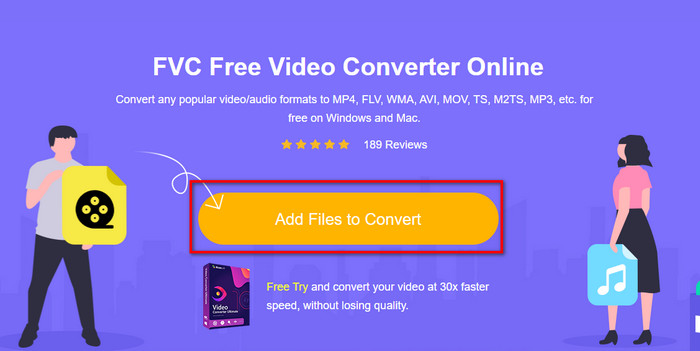
مرحله 2. پس از کلیک، روی Add Files to Convert بزنید تا مبدل راهاندازی شود. اگر اولین بار است که از این مبدل استفاده میکنید، لازم است لانچر را با کلیک روی Add Files to Convert نصب کنید، اما حجم آن به بزرگی نسخه Ultimate نیست. فایل 3gp موردنظر برای تبدیل را جستوجو کرده و روی Open کلیک کنید.
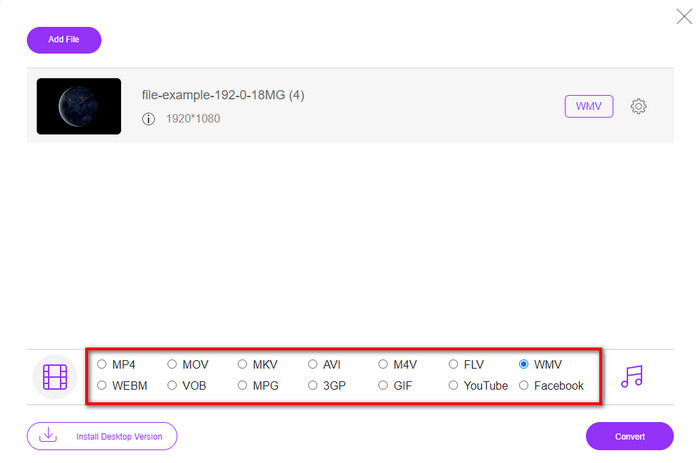
مرحله 3. بعد از بارگذاری فایل 3GP، حالا وقت آن است که یکی از فرمتهای نمایش دادهشده در پایین، یا گزینه WMV را انتخاب کنید.
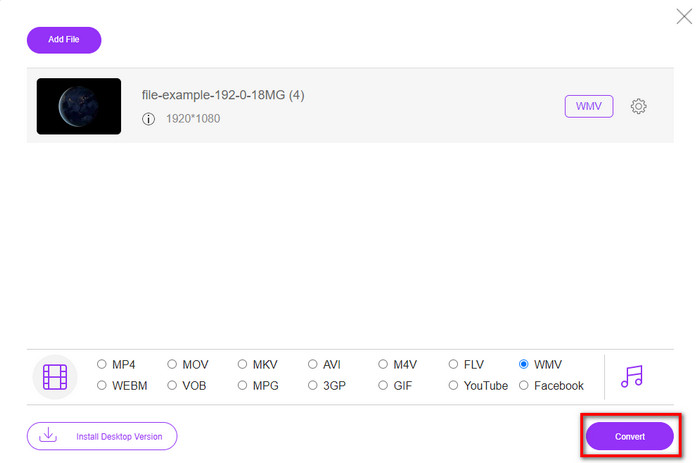
مرحله 4. فرمت را انتخاب کردهاید؟ اگر بله، روی Convert کلیک کنید تا فرایند تبدیل فایل آغاز شود.
بخش 5. سوالات متداول در مورد تبدیل 3GP به WMV
آیا استفاده از مبدل 3GP به WMV به صورت آنلاین ایده خوبی است؟
اگر نمی خواهید مبدلی را روی دستگاه خود دانلود کنید، ایده آل است که از یک مبدل آنلاین استفاده کنید. اما به یاد داشته باشید، استفاده از همه مبدل های آنلاین یا آفلاین ایمن نیست. اگر آنها را نصب کنید یا کار را به طور موثر انجام ندهید، اکثر اوقات ویروس دارند. اما اگر میخواهید از تبدیل خود اطمینان حاصل کنید، توصیه میکنیم از محصولات مبدل FVC استفاده کنید زیرا این 101% بدون بدافزار است و موفقیت فرآیند تبدیل شما را تضمین میکند.
آیا امکان ادغام چندین ویدیوی 3GP وجود دارد؟
بله، با کمک ابزارهای ادغامکننده FVC میتوانید چندین ویدئوی با فرمت 3GP را با هم ترکیب کنید. پس حالا اگر میخواهید بدانید چطور چند ویدئوی 3GP خود را ادغام کنید، باید این مقاله را بخوانید تا روش انجام آن را یاد بگیرید.
آیا ویدیوهای 3GP کیفیت خوبی دارند؟
3GP کیفیت خوبی دارد، اما نمی تواند کیفیت وضوح بالا را ذخیره کند، بنابراین انتظار داشته باشید که کیفیت ویدیوی 3GP پایین باشد.
نتیجه
در پایان، مبدلهایی که در این مقاله فهرست شدهاند با دقت و بر اساس یک استاندارد مشخص برای ارائه خروجی حرفهای انتخاب شدهاند. علاوه بر این، ما خودمان نیز از این ابزارها استفاده کردهایم تا فقط حقایق مربوط به ویژگیهای آنها را ارائه کنیم. همچنین، اگر نمیخواهید برای صرفهجویی در فضا، مبدلی روی دسکتاپ خود دانلود کنید و در عین حال به خروجی حرفهای نیاز دارید، بهشدت توصیه میکنیم از FVC Free Video Converter Online استفاده کنید. اما اگر میخواهید فایل 3GP خود را به شکل بسیار حرفهایتر ترنسکد کنید، قویاً پیشنهاد میکنیم از FVC Video Converter Ultimate بهره ببرید. هنوز از توضیحاتی که ارائه شد راضی نشدهاید؟ در این صورت، حتماً خودتان آن را امتحان کنید تا از فرآیند تبدیل حرفهای این ابزار بهرهمند شوید و یاد بگیرید چگونه 3GP را به WMV تبدیل کنید.
-
 4 روش برتر در مورد نحوه تبدیل 3GP به فرمت AVI [2025]
 آیا می توانم فایل های 3GP خود را به AVI تبدیل کنم؟ خوب، اگر این ابزارهای موجود را امتحان کنید، می توانید آن را به راحتی تبدیل کنید زیرا ما همه راه حل های ممکن برای مشکل تبدیل 3GP به AVI شما را جمع آوری کرده ایم.
-
 بهترین مبدل 3GP به FLV برای استفاده در تبدیل 3GP به FLV [2025]
 آیا تا به حال سعی کرده اید 3GP را به FLV تبدیل کنید، اما نمی دانید از چه نوع مبدلی استفاده خواهید کرد؟ این مقاله را بخوانید تا با تمام جزئیات در مورد تبدیل 3GP به FLV آشنا شوید.
-
 2 بهترین راه ممکن برای تبدیل 3GP پشتیبانی نشده به DivX [2025]
 بسیاری از کاربران می پرسند که چگونه 3GP را به DivX تبدیل کنیم. بنابراین در حال حاضر، ما یک مقاله برای آن ارائه می دهیم تا به شما در تبدیل فایل .3gp خود بدون دردسر کمک کند.
