


 Video Converter Ultimate
 ضبط صفحه
 تعمیر ویدیو
[بررسی کامل] 5 آخرین برش MP3 موجود در Windows/Mac/Online
ما اغلب میخواهیم بخشهایی از فایل صوتیای را که گوش میدهیم ببُریم و آن را بهعنوان رینگتون تنظیم کنیم، تا قسمت مهم را برجسته کرده یا جزئیات غیرضروری صدا را حذف کنیم. هرچند روی همه پلتفرمها مجموعهای از برشدهندهها برای استفاده وجود دارد، اما برخی از آنها قابل اعتماد نیستند. بنابراین امروز برشدهندههایی را که در بازار پیدا کردهایم و میتوانید به آنها اعتماد کنید به شما معرفی میکنیم، چون همه این ابزارها را خودمان امتحان کردهایم تا مطمئن شویم بدون بدافزار و قابل اطمینان هستند. پیش از انتخاب، ما برای مخاطبانی که به یک برشدهنده قابل اعتماد نیاز دارند، یک استاندارد بسیار سختگیرانه را رعایت کردهایم. برای اینکه جستوجوی شما در اینترنت با نهایت سرعت انجام شود، در ادامه پنج برشدهنده MP3 را که آماده انجام کار برش هر فرمت صوتی هستند، معرفی کردهایم.

قسمت 1. 2 نرم افزارهای آفلاین برش MP3 Windows & Mac
1. Video Converter Ultimate – بهترین برش MP3 [به شدت توصیه می شود]
بهترین برشدهنده صوتی MP3 در این فهرست، Video Converter Ultimate است که به کاربران اجازه میدهد هر فایل صوتی را بهراحتی برش دهند. با کمک این ابزار نهایی، میتوانید صدا را برای حذف بخشهای ناخواسته کوتاه کنید، حتی چندین فایل صوتی بُرشخورده را در یک فایل ادغام کرده و اگر احساس میکنید حجم صدا کمی کم است آن را تقویت کنید. علاوه بر این، نرمافزار فرآیندی فوقالعاده سریع را ارائه میدهد و در عین حال کیفیت اصلی صداها را حفظ میکند.
برخلاف هر کاتر، این ابزار از طیف گستردهای از فرمتها پشتیبانی میکند، نه تنها MP3، بلکه از FLAC، M4R، M4A، OGG، MKA، WAV، WMA و موارد دیگر، و در واقع فایل صوتی شما در اینجا برای برش پشتیبانی میشود. شاید در حال حاضر ندانید چگونه فایل صوتی خود را برش دهید و از آن برای نیازهای خود استفاده کنید. امروز روز خوش شانس شماست زیرا ما با دنبال کردن آموزش زیر نحوه استفاده از دستگاه کاتر MP3 و سازنده آهنگ زنگ را به صورت رایگان به شما آموزش می دهیم.
مرحله 1. برشدهنده صوتی را با کلیک روی دکمه دانلود زیر روی دسکتاپ خود دانلود کنید. بسته به اینکه از ویندوز یا مک استفاده میکنید، نسخه مناسب را انتخاب، سپس نرمافزار را نصب و اجرا کنید. به خاطر داشته باشید که لازم است با رابط کاربری ابزار آشنا شوید تا دنبال کردن مراحل بعدی برای شما سادهتر باشد.
دانلود رایگانبرای ویندوز 7 یا بالاتردانلود امن
دانلود رایگانبرای MacOS 10.7 یا بالاتردانلود امن
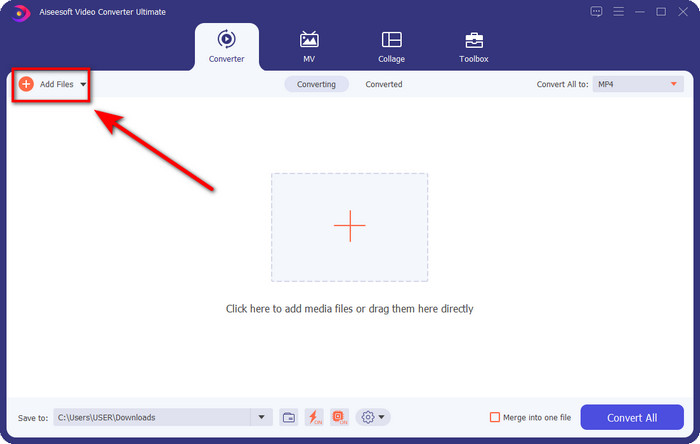
مرحله 2. فایل صوتیای را که میخواهید برش دهید روی رابط بکشید و رها کنید، یا میتوانید روی Add Files کلیک کرده و فایل صوتی را در پوشهای که روی رایانه باز میشود پیدا کنید. برای رفتن به مرحله بعد روی Open کلیک کنید.
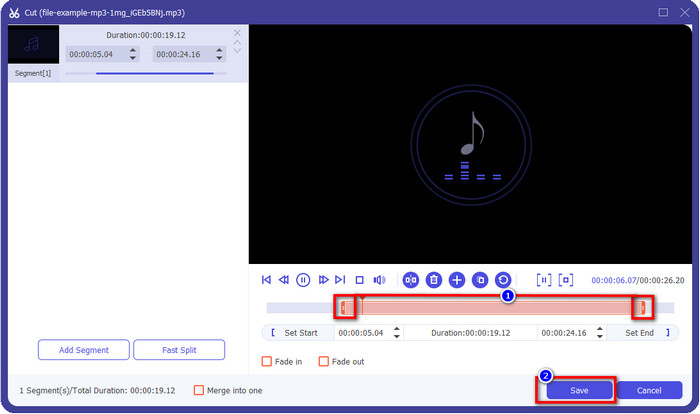
مرحله 3. پس از وارد کردن فایل صوتی، اکنون وقت آن است که روی دکمه قیچیمانند کلیک کنید. نشانگرهای play in و play out را به طول دلخواه صدایی که میخواهید نگه دارید بکشید. به یاد داشته باشید بخشی از صدا که بین play in و play out برجسته شده، تنها بخشی است که حفظ میشود. سپس برای برش صدا روی Save کلیک کنید.
اختیاری. لازم است صدای خود را تقویت کنید؟ اگر چنین است، روی دکمه چوبدستی کلیک کنید، نشانگر حجم صدا را با کشیدن به سمت بالا تنظیم کرده و برای ذخیره روی OK بزنید.
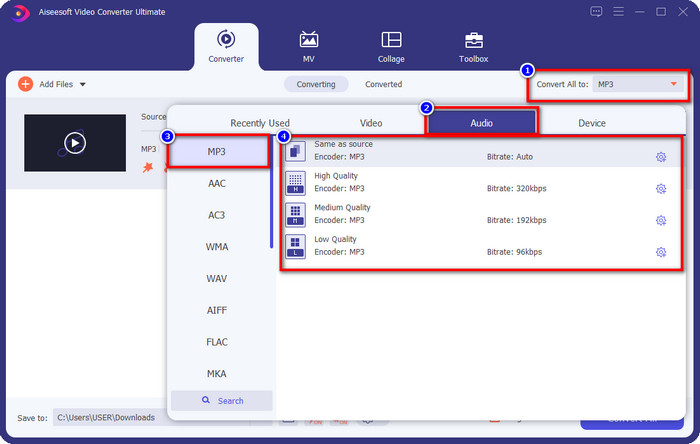
مرحله 4. به بخش Convert All to, Audio بروید و فرمت را روی MP3 تنظیم کنید. هرچند در عمل تبدیل انجام نمیدهید، اما مطمئن شوید نام زیر Convert All to روی MP3 تنظیم شده و روی فرمت دیگری نیست تا از تغییر ناخواسته فرمت جلوگیری شود.
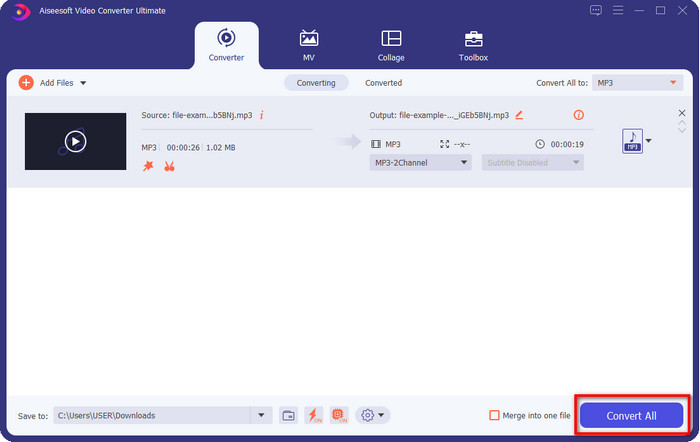
مرحله 5. با کلیک روی Convert All، ذخیره فایل صوتی بُرشخورده آغاز میشود. به همین سادگی اکنون با استفاده از بهترین برشدهنده رایگان MP3 فایل صوتی برشخورده خود را در اختیار دارید.
طرفداران
- این می تواند صدای شما را با بیشترین سرعت ممکن قطع کند و در کمتر از یک ثانیه آن را پردازش کند.
- ویژگی های پیشرفته ای برای افزایش قدرت صدا در دسترس هستند.
- از تمامی سیستم عامل ها مانند ویندوز یا مک پشتیبانی می کند.
- ادغام چند فایل صوتی با ادغام صوتی این ابزار امکان پذیر است.
منفی ها
- خرید ابزار مورد نیاز است.
2. جسارت
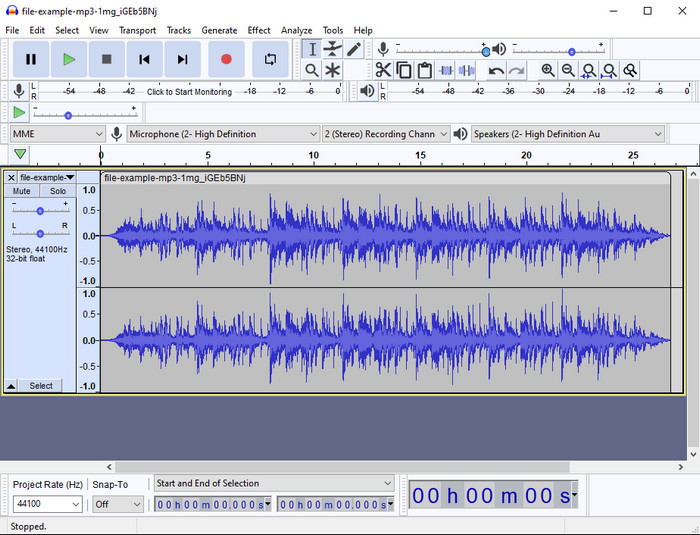
Audacity در طول سالها امکانات ویرایشی حرفهای برای صدای شما فراهم کرده است. این برنامه رایگان است و به کاربران امکان میدهد چندین ترک را با هم میکس کنند. این نرمافزار بهخوبی نزد پادکسترها شناخته شده و برای ضبط و ویرایش پادکست بهراحتی استفاده میشود. با این حال، برخی از قابلیتهای آن، بهویژه اگر به استفاده از نرمافزارهای تخصصی از این نوع عادت نداشته باشید، دشوار و پیچیده است.
اگرچه هنوز هم میتوانید نحوه استفاده از آن را یاد بگیرید، اما استفاده از پتانسیل کامل این دستگاه موبر صوتی MP3 زمان میبرد و برای برش صدا، عادلانه است که بگوییم در صورت نیاز فوراً و بدون دردسر قطع میشود.
طرفداران
- دانلود رایگان در تمامی برنامه ها مانند ویندوز و مک.
- ویرایشگرهای صوتی پیشرفته و حرفه ای برای ایجاد صدای عالی در دسترس هستند.
- برای ضبط پادکست و موارد دیگر بهترین است.
منفی ها
- بسیاری از رقبا یک رابط کاربر پسند ارائه می دهند.
- بهترین انتخاب برای مبتدیان برای یک نتیجه فوری از برش و سایر اهداف ویرایش نیست.
- برخی گزارشها نشان میدهند که در صورت استفاده از این ابزار، دادههای شما جمعآوری میشوند، اما هنوز شواهد قوی وجود ندارد.
قسمت 2. 3 برش MP3 آنلاین قابل دسترسی در وب
1. mp3cut.net
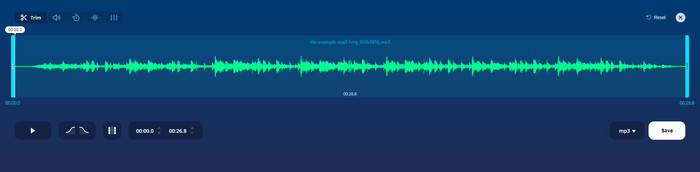
اگر به یک برش MP3 آنلاین برای این کار نیاز دارید، ممکن است از mp3cut.net استفاده کنید. پس از آپلود فایل در این کاتر آنلاین، اکنون می توانید صدایی را که می خواهید روی فایل صوتی خود بکشید حذف کنید. علاوه بر این، این ابزار همچنین دارای برخی از ویژگی های ویرایش جزئی برای تغییر سرعت و زیر و بم صدا در صورت نیاز است.
اگرچه این نوع توانایی را دارد، اما در اکثر مواقع ابزار از کار می افتد و اگر آن را به درستی برش دهید نمی تواند صدا را برای گوش دادن پخش کند. بنابراین، برای استفاده مجدد از آن، باید مرورگر خود را بهروزرسانی کنید و تنظیماتی را که انجام دادهاید دوباره تکرار کنید.
طرفداران
- کاربر پسند و در دسترس از طریق اینترنت.
- در نقطه، ویژگی هایی برای کمک به کاهش صدا.
- ویژگی های اصلی ویرایش در دسترس هستند.
منفی ها
- دارای تبلیغات در رابط وب است.
- گاهی اوقات خراب می شود و برای استفاده از آن نیاز به بارگذاری مجدد دارد.
2. audiotrimmer.com
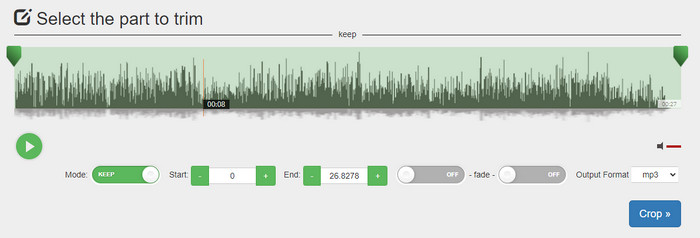
یکی دیگر از برشدهندههای رایگان mp3 آنلاین، سایت audiotrimmer.com. است. این ابزار امکانات برش ساده و قابلفهمی ارائه میدهد؛ همه قابلیتهای آن دقیق و روشن است. با آن میتوانید انتخاب کنید که میخواهید بخشی از صدا را نگه دارید یا حذف کنید. همچنین مانند دیگر برشدهندههای ذکرشده، افکت محو شدن تدریجی (fade-in و fade-out) نیز دارد. با این حال، زمانی که ما تلاش کردیم از افکتهای fade-in و fade-out استفاده کنیم، عمل نکرد و هیچ افکتی به صدای ما اضافه نشد. اما اگر بهدنبال برش ساده و سریع هستید، این ابزار وب حتماً ارزش امتحان کردن را دارد.
طرفداران
- رایگان و در همه مرورگرها برای دسترسی در دسترس است.
- استفاده آسان برای برش صدا.
- دارای اثرات محو شدن و خروجی است.
منفی ها
- محو شدن و خروج به خوبی کار نمی کند.
- اگر به آنها دسترسی داشته باشید، تبلیغات مزاحم زیادی وجود دارد. بنابراین، مراقب باشید که روی آنها کلیک نکنید.
3. کلیدیو

یکی از بهترین برشدهندهها و چسبانندههای آنلاین MP3 که میتوانید از آن استفاده کنید، Clideo است. بیشتر کاربران از این ابزار بهخاطر قابلیتهای ویرایشیاش لذت میبرند و آن را ترجیح میدهند. علاوه بر این، در صورت نیاز میتوانید به فایل صوتی خود افکت محو شدن تدریجی در آغاز و پایان (fade in و fade out) نیز اضافه کنید. اما پس از خروجی گرفتن و گوش دادن به فایل، هیچ افکت fade in یا fade out به فایل صوتی ما اضافه نشده بود. ما با یک مشکل جزئی در این ابزار روبهرو شدیم: بارگذاری و دانلود فایل. برخلاف ابزار اولی که ذکر شد، بارگذاری فایل صوتی در برشدهنده این سایت زمانبر است و گاهی به دلایل نامشخص در بارگذاری فایل صوتی شکست میخوریم.
اگرچه ما با مشکلاتی روبرو هستیم، اما همچنان بهترین برش آنلاین است، و همچنین استفاده از آن امن است.
طرفداران
- بهترین برش آنلاین آنلاین.
- رابط کاربری حرفه ای.
- آسان برای استفاده.
منفی ها
- فرآیند آپلود و دانلود زمان زیادی از شما خواهد گرفت.
- محو شدن و خارج شدن کار می کند اما خوب نیست.
بخش 3. سوالات متداول در مورد برش MP3
بهترین دستگاه اصلاح MP3 در مک چیست؟
FVC Video Converter Ultimate روی مک نیز در دسترس است. پس اگر لازم است روی مک فایل صوتی خود را برش بزنید، بهتر است این ابزار نهایی را دانلود کنید تا بهدرستی از پس فایل صوتی شما برآید. این ابزار نهایی نهتنها برای برش صدای شما عالی است، بلکه میتوانید با آن صدای خود را تقویت هم بکنید. افزون بر این، اگر به کمکی در تبدیل، ادغام، همگامسازی صدا و غیره نیاز داشته باشید، این ابزار نهایی به کمک شما میآید. اگر لازم است درباره این ابزار نهایی بیشتر بدانید، بهتر است جزئیات ارائهشده در بالا را مطالعه کنید.
آیا کوتاه کردن صدا اندازه آن را کاهش می دهد؟
اندازه فایل صوتی پس از برش آن کاهش می یابد. همانطور که فایل صوتی اصلی را با فایل قطع شده مقایسه کردیم، شاهد تغییراتی در ارتفاع بودیم. بنابراین، به این معنی است که هر چه فایل صوتی کوتاهتر باشد، حجم آن کمتر است، اما اگر فایل صوتی شما بسیار طولانی است، انتظار داشته باشید که حجم آن نیز قابل توجه باشد.
آیا می توانم از Audacity برای ادغام چندین فایل صوتی استفاده کنم؟
بله، میتوانید؛ Audacity از ادغام چند ترک صوتی در یک فایل واحد پشتیبانی میکند. با این حال، این کار دشوار است، مخصوصاً اگر آموزش مناسبی برای دنبال کردن نداشته باشید. بنابراین اگر لازم است با Audacity صداها را ادغام کنید، میتوانید روی این لینک کلیک کرده و از آن آموزش بگیرید.
نتیجه
برشدهندههای MP3 معرفیشده در اینجا همگی از فیلتر استانداردهایی که برای ارائه بهترین برشدهنده به شما تعیین کردهایم، عبور کردهاند. این مقاله نشان میدهد که انتخاب برشدهنده درست و مناسب بر اساس نیازهای شما تا چه اندازه مهم است. هرچند همه برشدهندههای اینجا کارکرد اصلی مشابهی دارند، اما FVC Video Converter Ultimate برش صوتی را بهشکل بسیار کارآمدتری انجام میدهد. طبق تحقیق ما، این ابزار نهایی از تمام استانداردهایی که تعیین کرده بودیم فراتر میرود. پس اگر میخواهید یک برشدهنده درجهیک در اختیار داشته باشید، این بهترین انتخاب در میان همه برشدهندههای موجود در بازار است. آنقدر خوب است که باورش سخت باشد؟ خب، بهتر است خودتان آن را دانلود کرده و امتحان کنید.
-
 نحوه قطع و ادغام آهنگ های آنلاین - 4 بهترین راهی که باید بدانید
 هنگامی که می خواهید آهنگ ها را به صورت آنلاین قطع و ادغام کنید تا یک قطعه موسیقی ایجاد کنید ، می توانید با 4 بهترین ابزار آنلاین برای کلیپ کردن آهنگ ها و ترکیب فایل ها از مقاله ، اطلاعات بیشتری کسب کنید.
-
 با روش و اطلاعات ، بهترین دستگاه برش MP4 را کشف کنید
 آیا می خواهید یاد بگیرید که چگونه ویدیوهایی را مانند ولاگرهایی که تماشا می کنید برش دهید؟ سپس به خواندن این پست ادامه دهید تا بدانید از چه تریمرهای MP4 می توانید استفاده کنید.
-
 دانلود پخش کننده MP3 – 10 بهترین پخش کننده موسیقی MP3 رایگان در سال 2025
 بهترین پخش کننده موسیقی MP3 چیست؟ چگونه می توانم موسیقی را روی دستگاه پخش MP3 قرار دهم؟ چگونه می توان MP3 Player Player را بارگیری کرد؟ این پست به شما یک مرور دقیق از 10 بهترین پخش کننده MP3 رایگان برای Windows PC و Mac می دهد.
