


 Video Converter Ultimate
 ضبط صفحه
 تعمیر ویدیو
به سرعت ابرداده ویدیو را در آیفون مانند یک حرفه ای در کمتر از یک دقیقه تغییر دهید
امروزه ساماندهی فایلها برای بسیاری از کاربران، بهویژه کاربران آیفون، به یک ضرورت تبدیل شده است. با استفاده از برچسبگذاری (تَگ) مناسب میتوانیم محل ذخیره فایل را مشخص کنیم و فایلهای صوتی و تصویری خود را در کتابخانه یا پوشهها مرتب سازیم. در برخی موارد، کاربران iOS بهدلیل فراداده (متادیتای) نامناسب، پیدا کردن فایل روی آیفون را آزاردهنده میدانند، چون جستوجوی آنها آسان نیست. میخواهید بدانید چطور میتوان این مشکل را برطرف کرد؟ راهحل مناسب برای اصلاح متادیتا روی آیفون این است که آنها را مطابق سلیقه و نیاز خود تغییر دهید تا قابل مشاهدهتر و منظمتر شوند. آگاه باشید و با خواندن این مقاله یاد بگیرید چگونه متادیتای ویدیو را در آیفون تغییر دهید.

قسمت 1. 2 از بهترین برنامه ها برای تغییر متادیتای ویدیو در آیفون
Metapho – ویرایشگر تگ ویدیو و عکس در آیفون
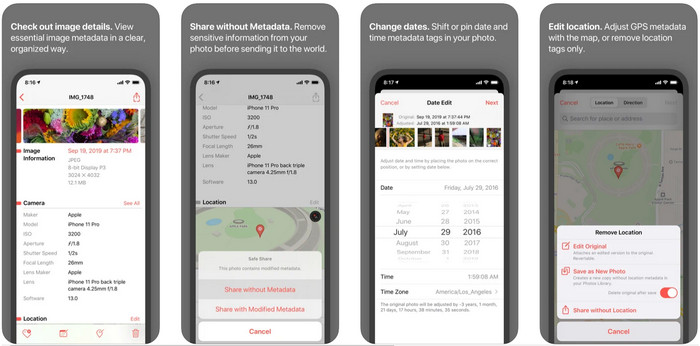
Metapho یکی از بهترین ویرایشگرهای تَگ است که میتوانید آن را دانلود کرده و برای تغییر متادیتای ویدیو در آیفون استفاده کنید. این اپلیکیشن یک ویرایشگر ساده است که به شما اجازه میدهد تاریخ، نام فایل، اندازه، مدل دستگاه، سرعت شاتر و موقعیت مکانی را تغییر دهید. با این برنامه همچنین میتوانید متادیتای هر عکس زنده (Live Photo) که میگیرید را ببینید و در صورت تمایل آن را بهدرستی ویرایش کنید. با اینکه این اپلیکیشن بسیار امیدوارکننده است، برای ویرایش متادیتا باید نسخه کامل آن را خریداری کنید؛ در غیر این صورت فقط میتوانید متادیتا را بهطور رایگان مشاهده کنید و نه بیشتر. اما جای نگرانی نیست، چون این خرید تنها یکبار انجام میشود و بعد از آن میتوانید همیشه از امکانات برنامه لذت ببرید.
مرحله 1. App Store را باز کرده و Metapho را روی آیفون خود دانلود کنید.
مرحله 2. برنامه را باز کنید، یک فایل را که میخواهید از میان Photos باز کنید انتخاب کرده و روی آن بزنید تا ادامه دهید. سپس فهرستی از گزینههای ویرایش تَگ نمایش داده میشود؛ آنها را مطابق نیازهای خود ویرایش کنید.
مرحله 3. پس از پایان ویرایش تگها، روی دکمه Save بزنید.
Exif Metadata – ویرایشگر برچسب عکس و عکس زنده در آیفون
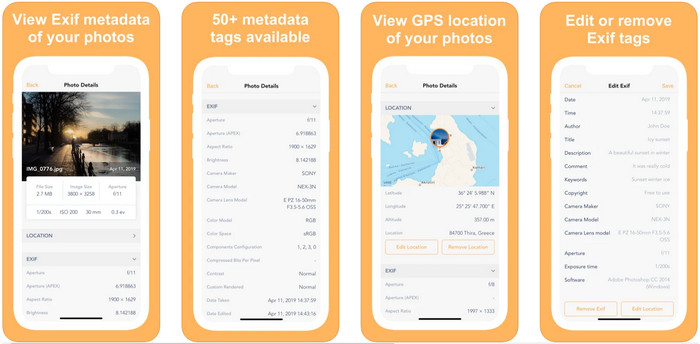
EXIF Metadata همان کاری را انجام میدهد که یک ویرایشگر متادیتا باید برای کمک به کاربران آیفون در ویرایش تگها انجام دهد. این ابزار رابط کاربری گرافیکی منحصربهفرد و جذابتری نسبت به Metapho دارد. با این اپلیکیشن میتوانید بهصورت رایگان اطلاعات بسیار جزئی و عمیقی درباره تصویر خود مشاهده کنید. هرچند برنامه نسخه حرفهای هم ارائه میدهد، اما امکانات ویرایشی مورد نیاز شما در همان نسخه رایگان وجود دارد؛ با این حال میتوانید با خرید نسخه حرفهای، اطلاعات بیشتری به متادیتا اضافه کنید. یکی از معایب این اپلیکیشن این است که فقط از فایلهای تصویر پشتیبانی میکند، بنابراین تغییر متادیتای ویدیو با آن امکانپذیر نیست. پس اگر میخواهید متادیتای تصویر را در آیفون تغییر دهید، مراحل زیر را دنبال کنید.
مرحله 1. برنامه را روی آیفون خود دانلود و نصب کنید.
مرحله 2. ابزار را باز کنید، روی دکمه + بزنید و تصویری را که میخواهید تگ آن را تغییر دهید انتخاب کنید.
مرحله 3. روی Edit بزنید، اطلاعات مورد نیاز را اضافه کنید و سپس روی Save کلیک کنید.
بخش 2. بهترین ویرایشگر فراداده رسانه برای ویندوز و مک – تبدیل نهایی ویدیو FVC
همه اطلاعاتی که لازم دارید در متادیتای خود تغییر دهید، در اپلیکیشنهای ذکرشده پشتیبانی نمیشوند. اگر میخواهید اطلاعات دقیقتر و کاملتری در تگها داشته باشید، پیشنهاد میکنیم از بهترین ویرایشگر تگ در ویندوز و مک یعنی FVC Video Converter Ultimate استفاده کنید. این نرمافزار میتواند تنها با چند کلیک، اطلاعات تگ بیشتری به فایلهای رسانهای شما اضافه کند. فرقی نمیکند حرفهای باشید یا نه، افزودن متادیتا به فایلها با کمک این نرمافزار نهایی به مشکلی جدی تبدیل نخواهد شد.
اگر فایل شما در اینجا پشتیبانی می شود، شاید نگران باشید. این ابزار بیش از 1000 فرمت را پشتیبانی می کند و در واقع فرمتی که شما دارید پشتیبانی می شود. برای اینکه به شما در مورد نحوه تغییر ابرداده ویدیوی آیفون خود بپردازید، لطفاً اطلاعات دقیقی را که در زیر لیست کردهایم بخوانید تا مطابق با آنها دنبال کنید زیرا موفقیت در راه است.
مرحله 1. با کلیک روی دکمه دانلود زیر میتوانید این ابزار جامع را هم بر روی ویندوز و هم مک دریافت کنید. روی فایلی که دانلود کردهاید کلیک کنید تا ابزار روی سیستم شما نصب شود، سپس آن را اجرا کنید.
دانلود رایگانبرای ویندوز 7 یا بالاتردانلود امن
دانلود رایگانبرای MacOS 10.7 یا بالاتردانلود امن
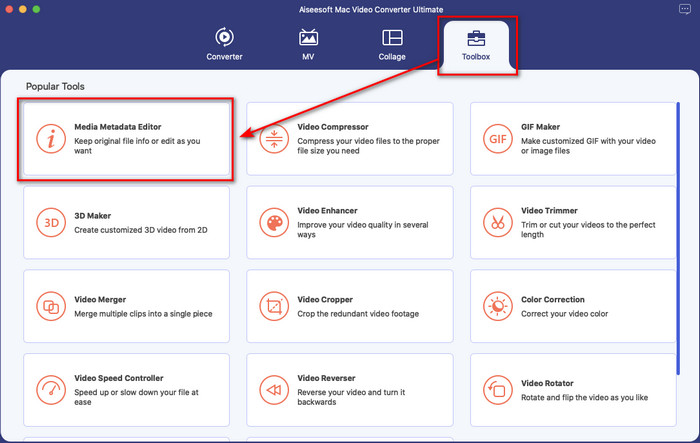
مرحله 2. به بخش Toolbox بروید و در میان مجموعه قابلیتها روی Media Metadata Editor کلیک کنید.
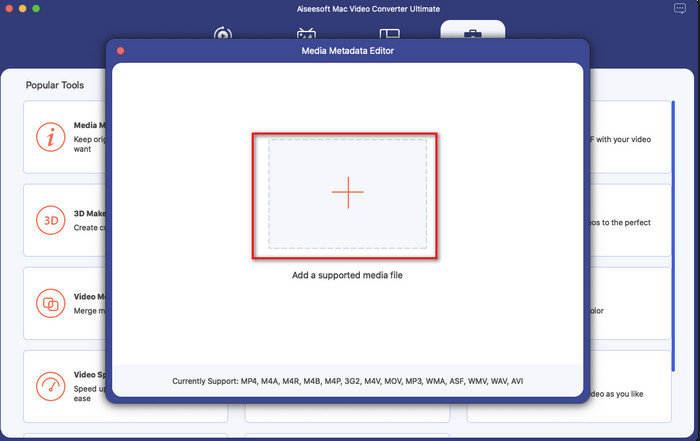
مرحله 3. دکمه + را فشار دهید؛ یک پنجره انتخاب فایل روی صفحه نمایش ظاهر میشود، فایلی را که میخواهید به آن متادیتا اضافه کنید پیدا کرده و برای بارگذاری روی Open کلیک کنید.
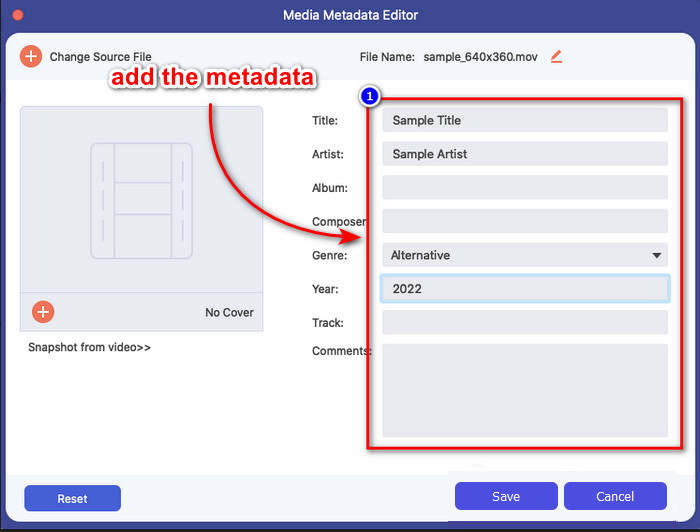
مرحله 4. در پنجره جدید میتوانید متادیتای فایل خود را ویرایش یا حذف کنید؛ روی هر کادر متنی کلیک کرده و اطلاعاتی را که میخواهید بهعنوان متادیتا اضافه کنید، تایپ کنید. علاوه بر این، اگر مایل باشید میتوانید با فشردن دکمه + یک تصویر جلد (کاور آلبوم) نیز به فایل رسانهای خود اضافه کنید، سپس تصویر آلبوم را در فایلها پیدا کرده و با کلیک روی Open آن را درج کنید.
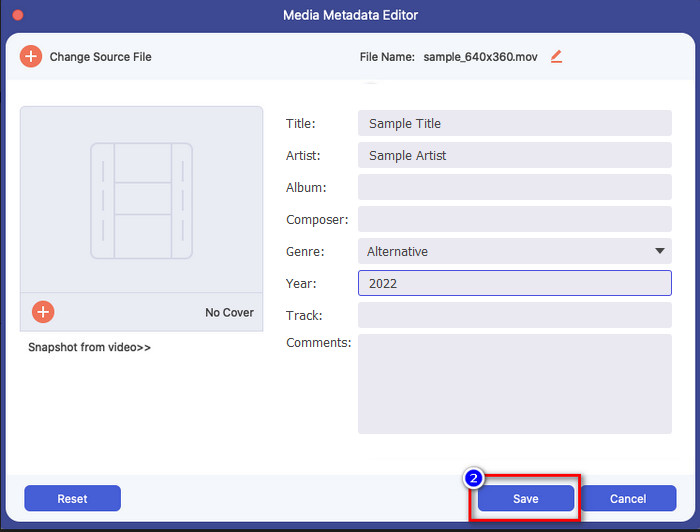
مرحله 5. پس از اتمام تمام ویرایشها و تغییرات روی فایل رسانهای، اکنون میتوانید روی Save کلیک کنید. در یک لحظه متادیتای فایل رسانهای شما تغییر خواهد کرد؛ با چند کلیک ساده و کمک این ابزار، انجام این کار ممکن و آسان میشود.
بخش 3. سوالات متداول در مورد ویرایشگر فراداده آیفون
آیا می توانم متادیتا را در آیفون ویرایش کنم؟
بله، شما می توانید متادیتا را در آیفون خود ویرایش کنید، اما فقط مجاز به ویرایش مکان و مشاهده تگ های اصلی فایل هستید، اما آنها را ویرایش نکنید. اگر میخواهید فراداده فایل را با جزئیات تغییر دهید، پیشنهاد میکنیم از یک برنامه شخص ثالث استفاده کنید که نیازهای شما را برای مشکل ابرداده شما کافی خواهد بود.
چرا باید ابرداده را حذف کنم؟
ما برای حفظ حریم خصوصی، متادیتا را حذف میکنیم. برخی افراد میتوانند از طریق متادیتا اطلاعات عمیقی درباره ما بهدست آورند؛ در حالی که شاید ندانید متادیتا میتواند محل دقیق، تاریخ، زمان، مختصات و حتی شماره موبایل شما را ذخیره کند. اگر نمیخواهید اطلاعات شخصی شما افشا شود، پیشنهاد میکنیم متادیتای فایلهای خود را حذف کنید. میخواهید بدانید چطور؟ اگر چنین است، این مقاله به شما کمک میکند در کمتر از یک دقیقه متادیتای فایل خود را حذف کنید.
آیا تغییر متادیتا در آیفون آسان است؟
کاملاً، بله، تغییر ابرداده در آیفون با کمک ویرایشگر متادیتا مناسب آسان است. اگرچه این کار کمی سخت به نظر می رسد، اما هنوز هم برای هر کاربر قابل مدیریت است. اگر می خواهید بهترین ابزار برای انجام این کار را بشناسید، باید اطلاعات مربوط به دو ابزاری که در بالا ارائه کردیم را بخوانید. برای کمک به شما برای تکمیل تغییر تگ در آیفون مانند یک حرفه ای.
نتیجه
حالا که به پایان رسیدهاید، آموختیم که تغییر متادیتای ویدیو در آیفون کاری آسان است. با کمک این مقاله و پشتکار شما، این کار ممکن شد. اکنون باید روشی را که با نیازهای شما سازگارتر است انتخاب کنید. هرچند FVC Video Converter Ultimate روی آیفون در دسترس نیست، اما همچنان یکی از بهترین نرمافزارهایی است که میتوانید روی مک یا ویندوز برای ویرایش تگها داشته باشید. این ابزار از افزودن اطلاعات عمیق و دقیق درباره فایلهای رسانهای شما پشتیبانی میکند تا به شما کمک کند آنها را مرتب و قابل مشاهده کنید. میخواهید بدانید سایر قابلیتها و عملکردهای این نرمافزار چیست؟ روی دکمه دانلود بالا کلیک کنید تا نگاهی به آنها بیندازید.
-
 3 ویرایشگر برتر فراداده FLAC در مک و ویندوز [به روز رسانی 2022]
 آیا می خواهید ابرداده FLAC را تغییر دهید؟ در این مورد، شما باید این مقاله را بخوانید زیرا ما دانش کافی در مورد آخرین ویرایشگر ابرداده FLAC برای استفاده ارائه می دهیم.
-
 بهترین روشها برای ویرایش متادیتا MKV مانند یک حرفهای [آسان]
 آیا ایده ای برای ویرایش ابرداده های MKV ندارید؟ برای برخی از کاربران ویرایش برچسب ها در MKV مشکل است، اگر شما یکی از آنها هستید، این مقاله را بخوانید.
-
 بهترین تکنیک در مورد نحوه ویرایش سریع ابرداده WebM
 جزئیات کاملی که در زیر ارائه کردهایم را بخوانید، زیرا آموزش نحوه ویرایش ابرداده WebM را درج میکنیم. این لینک را کلیک کنید تا بیشتر در مورد آن بدانید.
