


 Video Converter Ultimate
 ضبط صفحه
 تعمیر ویدیو
یک راهنمای سریع برای تبدیل MKV به DivX به صورت آنلاین و آفلاین به صورت رایگان
قالب فایل MKV یک کانتینر فایل است که ترکهای صدا، ویدئو و زیرنویس را ذخیره میکند. این قالب، چندمنظوره است زیرا میتواند ویدئوهای HD را هم در خود نگه دارد. با این حال، چون میتواند حجم زیادی داده را در یک فایل ذخیره کند، فضای زیادی در دستگاه شما اشغال میکند. بنابراین، اگر میخواهید حجم فایل MKV خود را کاهش دهید، باید آن را به قالب فایل DivX تبدیل کنید. همراه ما بمانید، زیرا قرار است بهترین روشهای تبدیل MKV به DivX بهصورت آنلاین و آفلاین و رایگان را بررسی کنیم.

بخش 1. اطلاعات در مورد MKV و DivX
قبل از پرداختن به مبدل های آنلاین و آفلاین MKV و DivX، ابتدا باید شباهت ها و تفاوت های بین فرمت های فایل MKV و DivX را بدانیم. در این قسمت با داده های واقعی و اطلاعات مربوط به این دو فرمت فایل آشنا خواهید شد.
فایل های MKV یا Matroska فرمت فایلی است که برای علاقه مندان به فیلم معروف است، زیرا یک محفظه فایل است که می تواند چندین جریان زیرنویس و آهنگ های صوتی را به زبان های مختلف مدیریت کند. علاوه بر این، این فایل ضد آینده است، به این معنی که در آینده قدیمی نخواهد شد.
بر خلاف فایل MKV، DivX یک فرمت فایل است که به شما امکان می دهد اندازه فایل های عظیم را تا دوازدهم اندازه فایل اصلی فشرده کنید. با این اوصاف، این بهترین انتخاب افرادی است که می خواهند فایل های MKV خود را فشرده کنند.
از آنجایی که اکنون می دانیم فایل های MKV و DivX چیست، اکنون یاد می گیریم که چگونه فایل های MKV را به فرمت فایل DivX تبدیل کنیم.
بخش 2. 5 ابزار برای تبدیل MKV به فرمت DivX بدون زحمت
یافتن مبدل MKV به DivX سخت است زیرا تعداد کمی از مبدل ها می توانند فرمت های فایل DivX را پشتیبانی کنند. اما ما بهترین مبدل های MKV به DivX را ارائه می کنیم تا MKV شما را به راحتی به فایل DivX تبدیل کنید.
FVC Video Converter Ultimate
FVC Video Converter Ultimate ابزاری مناسب است اگر بهدنبال مبدل نهایی برای تبدیل MKV به DivX هستید. این مبدل آفلاین از بیش از 1000 قالب فایل پشتیبانی میکند، از جمله MKV، DivX، XviD، MOV، AVI، MP4، M4V، FLV و غیره. همچنین دارای بهترین قابلیتها مانند افزودن افکت به فایل ویدئویی و بهبود کیفیت آن است. علاوه بر این، از تبدیل دستهای پشتیبانی میکند؛ یعنی میتوانید چندین قالب فایل را در یک فایل ادغام کنید. و اگر میخواهید برتری این ابزار را نسبت به دیگر مبدلها بدانید، مزایای زیر را بخوانید.

مزایای FVC Video Converter Ultimate:
5,689,200+ دانلود- از بسیاری از فرمتهای فایل، از جمله MKV، DivX، MP4، MPG، AVI، FLV، WMV و بیش از 1000 فرمت فایل پشتیبانی میکند.
- دارای ویژگی های پیشرفته ای مانند GIF maker، 3D maker و بسیاری موارد دیگر است.
- این یک فرآیند تبدیل فوق العاده سریع دارد.
- قابل دسترسی در تمام پلتفرم های چند رسانه ای مانند ویندوز و مک.
دانلود رایگانبرای ویندوز 7 یا بالاتردانلود امن
دانلود رایگانبرای MacOS 10.7 یا بالاتردانلود امن
در ادامه مراحل تبدیل MKV به قالب DivX با استفاده از FVC Video Converter Ultimate آمده است:
مرحله 1. با کلیک روی دکمه Download زیر، FVC Video Converter Ultimate را دانلود کنید. سپس مراحل نصب را دنبال کرده و برنامه را باز کنید.
دانلود رایگانبرای ویندوز 7 یا بالاتردانلود امن
دانلود رایگانبرای MacOS 10.7 یا بالاتردانلود امن
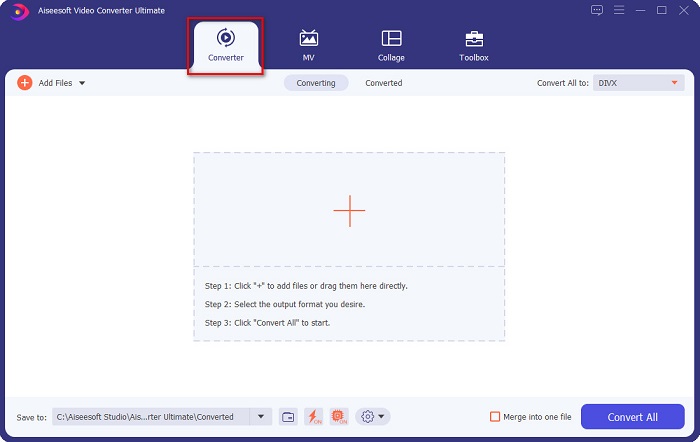
مرحله 2. در رابط اصلی نرمافزار، روی گزینه Converter کلیک کنید.
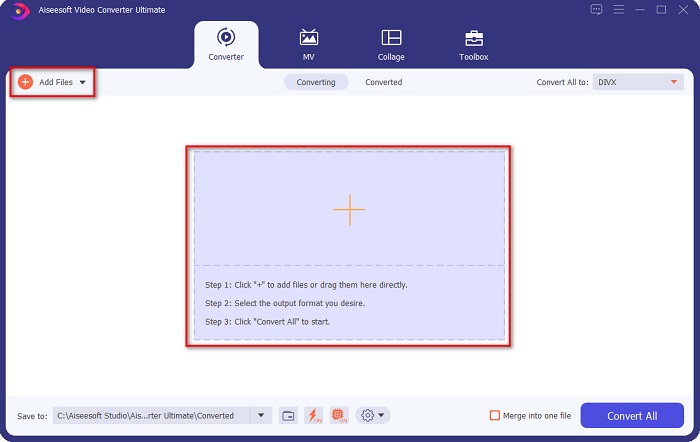
مرحله 3. روی دکمه Add Files یا دکمه علامت + در همان رابط کلیک کنید. فایلهای رایانه شما نمایش داده میشوند، سپس فایل MKV خود را انتخاب کنید تا بارگذاری شود.
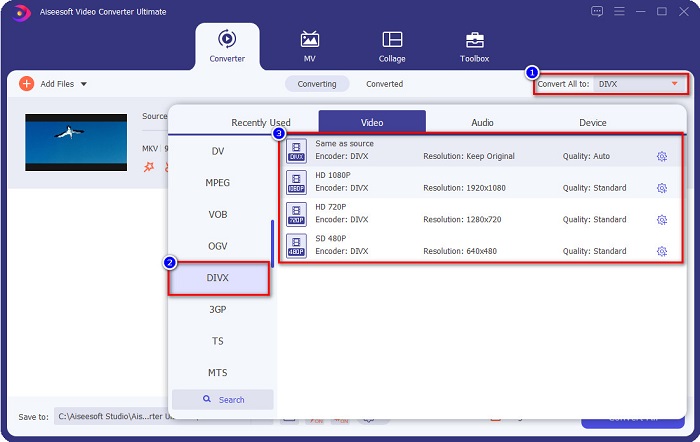
مرحله 4. پس از بارگذاری فایل MKV، روی دکمه Convert All to کلیک کنید تا قالب خروجی مورد نظر را انتخاب کنید؛ قالب فایل DivX را بزنید.
مرحله 5. در نهایت، روی دکمه Convert All کلیک کنید تا فایل MKV شما به قالب فایل DivX تبدیل شود.
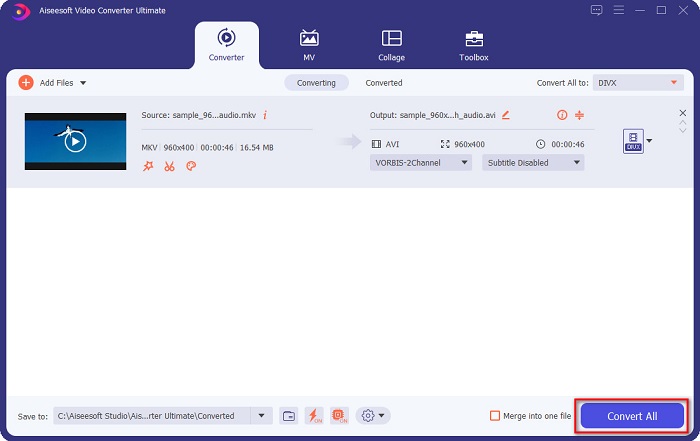
سپس فقط برای چند ثانیه صبر کنید، و voila! فایل MKV شما اکنون یک فرمت فایل DivX است!
مبدل ویدیوی AnyMP4
AnyMP4 Video Converter یک مبدل رایگان ویدئویی MKV به DivX است که از قالبهای فایل مختلفی پشتیبانی میکند. رابط نرمافزار آن ساده است و آن را به ابزاری کاربرپسند تبدیل کرده است. همچنین میتوانید از قابلیتهای متعددی که این مبدل ارائه میدهد استفاده کنید؛ با این حال، اگر نسخه پولی برنامه را تهیه نکنید، به امکانات ویژه آن دسترسی نخواهید داشت.
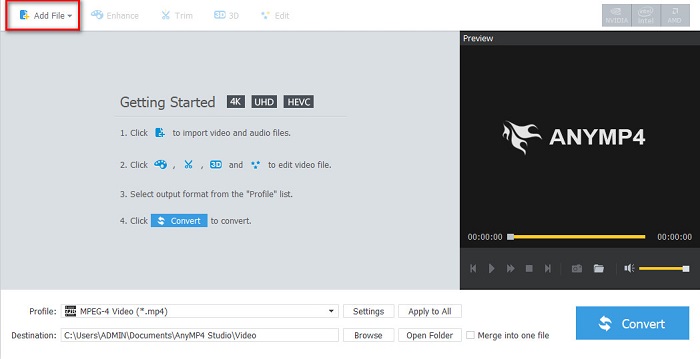
مرحله 1. در مرورگر خود، عبارت AnyMP4 Video Converter را جستجو کرده و برنامه را دانلود کنید. سپس در رابط اصلی نرمافزار، روی دکمه Add File کلیک کنید تا فایل MKV خود را بارگذاری کنید.
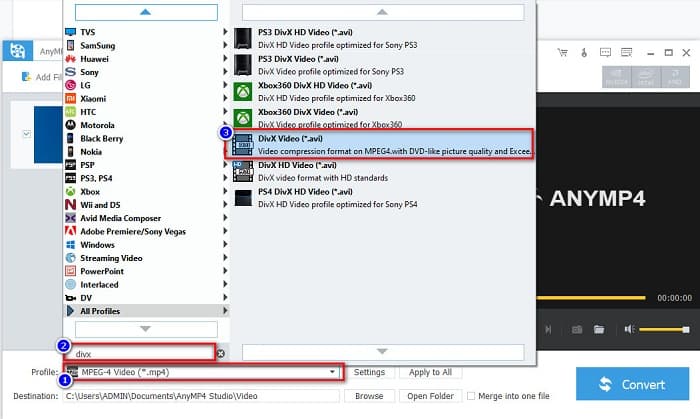
مرحله 2. سپس در گزینه Profile در پایین رابط نرمافزار، قالب فایل DivX را جستجو کرده و روی آن کلیک کنید.
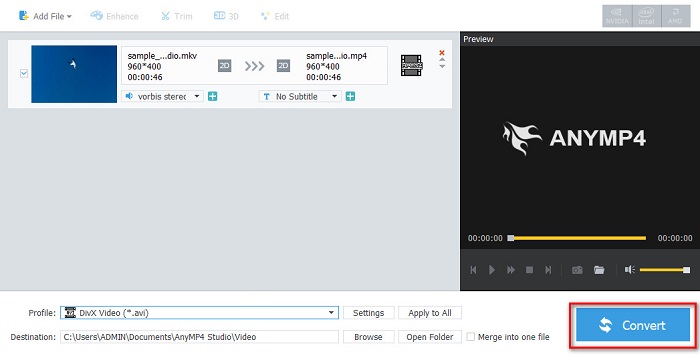
مرحله 3. در مرحله آخر، روی دکمه Convert در گوشه پایین سمت راست رابط کلیک کنید. سپس منتظر بمانید تا فرایند تبدیل به پایان برسد. و تمام!
Media.io
Media.io یک مبدل رایگان است که میتواند MKV را بهصورت آنلاین به DivX تبدیل کند. این مبدل آنلاین رابط کاربری سادهای دارد. علاوه بر این، برخلاف بسیاری از مبدلهای آنلاین دیگر، هیچ تبلیغی در آن وجود ندارد. با این حال، ممکن است به دلیل تحت وب بودن، با سرعت پایین در فرایند تبدیل روبهرو شوید.
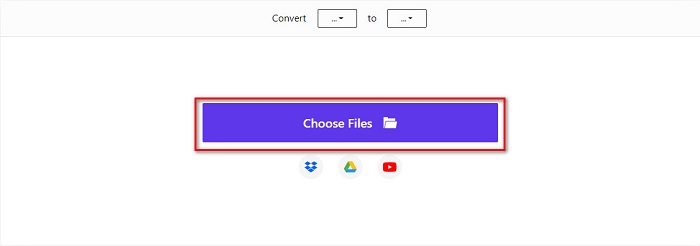
مرحله 1. در مرورگر مورد اعتماد خود، Media.io را جستجو کنید. سپس در رابط اصلی سایت، روی دکمه Choose Files کلیک کنید.
مرحله 2. سپس روی دکمه drop-down کلیک کنید تا قالب خروجی DivX را انتخاب کنید.
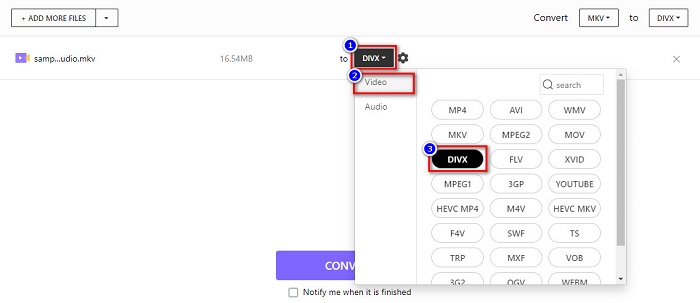
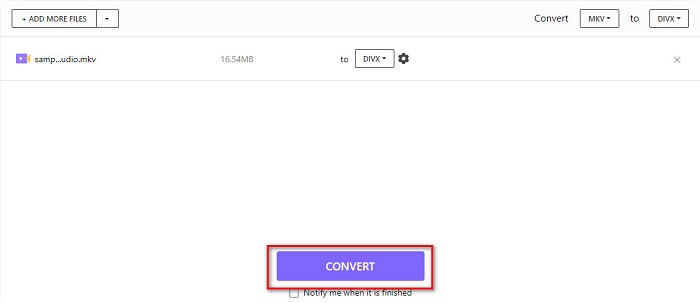
مرحله 3. و بعد، روی دکمه Convert در پایین کلیک کنید تا تبدیل فایل MKV به قالب DivX را آغاز کنید.
MiConv
روش دیگر برای تبدیل MKV به DivX بهصورت آنلاین و رایگان، استفاده از MiConv است. این مبدل آنلاین یکی از معروفترین مبدلهای تحت وبی است که میتوانید در اینترنت پیدا کنید. این یک برنامه تحت وب است؛ بنابراین نیازی به دانلود هیچ چیز ندارید. علاوه بر این، به دلیل رابط گرافیکی ساده، ابزاری مناسب برای مبتدیهاست. با این حال، شامل تبلیغات آزاردهندهای است که ممکن است برای شما مزاحم باشد. با این وجود، همچنان افراد زیادی از این مبدل آنلاین استفاده میکنند.
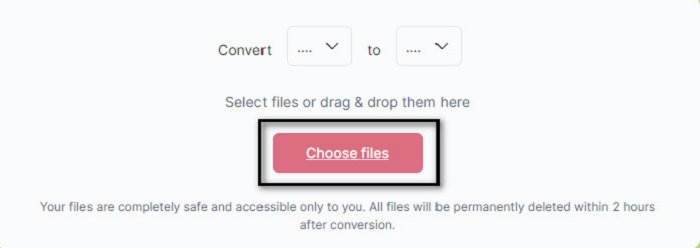
مرحله 1. در مرورگر خود MiConv را جستجو کنید تا به صفحه وب آن بروید. سپس روی دکمه Choose files کلیک کنید. پوشههای رایانه شما نمایش داده میشوند و در آنجا فایل MKV خود را انتخاب میکنید.
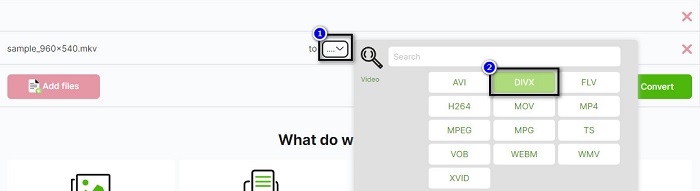
مرحله 2. سپس روی دکمه کشویی در قسمت پایین رابط وبسایت کلیک کنید تا قالب خروجی خود را انتخاب کنید.
مرحله 3. در نهایت، روی دکمه Convert کلیک کنید تا فایل MKV خود را به DivX تبدیل کنید.

AnyConv
آخرین مبدلی که درباره آن صحبت میکنیم مبدل آنلاین AnyConv است. این مبدل رایگان ویدئوی MKV به DivX یکی از پرکاربردترین مبدلهای آنلاین در اینترنت است. مانند سایر ابزارهای آنلاینِ معرفیشده در بالا، رابط آن نیز ساده و آسان برای استفاده است. علاوه بر این، تقریباً از همه قالبهای استاندارد ویدئویی پشتیبانی میکند. با این حال، شامل تبلیغات مزاحم است و به اینترنت وابسته است؛ یعنی سرعت فرایند تبدیل به سرعت اتصال شما بستگی دارد.
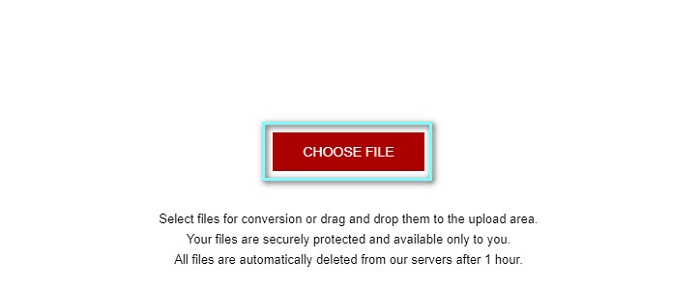
مرحله 1. با جستجوی عبارت AnyConv online converter در مرورگر خود، به وبسایت AnyConv بروید. سپس روی دکمه Choose File کلیک کنید.
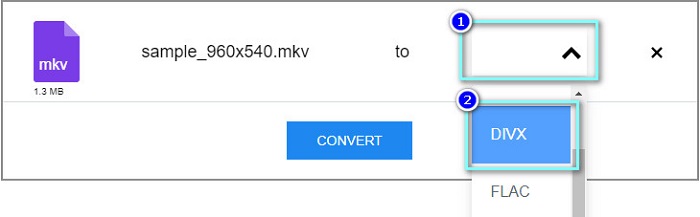
مرحله 2. در مرحله بعد، در منوی کشویی، قالب فایل DivX را بهعنوان قالب خروجی انتخاب کنید.
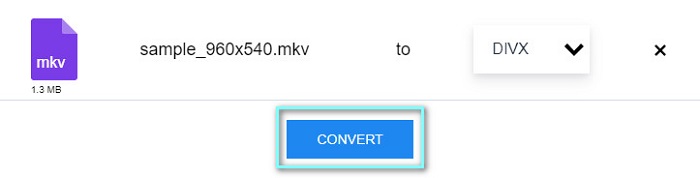
مرحله 3. سپس برای آغاز فرایند تبدیل، روی دکمه Convert کلیک کنید.
بخش 3. سوالات متداول در مورد تبدیل MKV به DivX
آیا می توانید فایل MKV را در Windows Media Player پخش کنید؟
پخشکننده Windows Media بهصورت پیشفرض از قالب فایل MKV پشتیبانی نمیکند. پخش فایل MKV در Windows Media Player ممکن است فقط صدا را نمایش دهد. بنابراین، اگر میخواهید فایل MKV خود را در Windows Media Player پخش کنید، میتوانید آن را به قالب MKV به AVI تبدیل کنید.
کدوم کیفیت بهتری داره MKV یا DivX؟
MKV کیفیت بهتری نسبت به فایل DivX دارد. با این حال، فایل MKV فشرده نشده است و آن را در اندازه فایل برجسته تر می کند. در مقابل، DivX یک فرمت فایل فشرده است.
آیا می توانید فایل های DivX را در macOS پخش کنید؟
متأسفانه، مدیا پلیر داخلی مک که QuickTime است از فرمت فایل DivX پشتیبانی نمی کند.
نتیجه
اوه! این یک ماجراجویی بزرگ بود که ما داشتیم. تمام دانش و اطلاعاتی که امروز دارید به شما کمک می کند تا بهترین مبدل MKV به DivX را انتخاب کنید. بنابراین، اگر می خواهید مبدلی با بسیاری از ویژگی های عالی استفاده کنید، بسیاری از افراد از FVC Video Converter Ultimate به عنوان خط اول انتخاب خود استفاده می کنند.
-
 MKV به MOV - نحوه تبدیل MKV به MOV
 چگونه می توانم MKV را به MOV در Mac تبدیل کنم؟ آیا iMovie می تواند MKV را بخواند؟ فرمت MOV به چه معناست؟ در این پست 2 روش ساده برای کمک به شما در تبدیل MKV به MOV با مبدل های ویدیویی رایگان آنلاین و حرفه ای آورده شده است.
-
 نحوه تبدیل فیلم های MKV به GIF های متحرک بدون Photoshop/FFmpeg
 پس از بارگیری و تماشای فیلم های MKV در رایانه خود ، ممکن است بخواهید لحظات فوق العاده ای را با دوستان یا در اینترنت به عنوان GIF به اشتراک بگذارید. در این مقاله می توانید با 2 روش ساده تبدیل MKV به GIF آشنا شوید.
-
 نکات و ترفندهایی در مورد نحوه تبدیل فایل های MKV به MP3 [2021]
 آیا در انتخاب مبدل مناسب برای MKV به MP3 مشکل دارید؟ سپس به خواندن این پست ادامه دهید زیرا راه حل های مختلفی برای یک مشکل ارائه کردیم.
