


 Video Converter Ultimate
 ضبط صفحه
 تعمیر ویدیو
راه های آسان برای حذف واترمارک Coub به صورت آنلاین و آفلاین
Coub یک وبسایت برای بهاشتراکگذاری ویدئوهای آنلاین است. این وبسایت محبوب به کاربران امکان میدهد ویدئوهایی تا ده ثانیه بسازند و به اشتراک بگذارند. برخلاف GIF ها، ویدئوهای Coub دارای صدای باکیفیت هستند، که آنها را در میان بسیاری از افراد محبوب کرده است. با این حال، وقتی ویدئوهای Coub را ذخیره یا دانلود میکنید، ویدئو دارای واترمارک است. بنابراین، اگر میخواهید واترمارک Coub را حذف کنید، باید از ابزاری استفاده کنید که توانایی حذف واترمارک را داشته باشد. در این مقاله، شگفتانگیزترین ابزارها برای اینکه بهسادگی واترمارک Coub را حذف کنید به شما معرفی میشود.

قسمت 1. 4 روش برای حذف واترمارک Coub
در حال حاضر بسیاری از افراد علاقه مند به تماشا و دانلود ویدیوهای Coub به صورت آنلاین هستند. اما وقتی ویدیوها را از coub دانلود میکنید، حاوی یک واترمارک است. شما می دانید که چگونه با استفاده از این چهار راه آسان، واترمارک Coub را حذف کنید.
FVC Video Converter Ultimate
FVC Video Converter Ultimate یک برنامه دسکتاپ است که میتواند هر نوع واترمارک را از روی ویدئوهای شما حذف کند. این ابزار کاربرپسند است، زیرا رابط کاربری سادهای دارد و بهراحتی قابل دانلود است. علاوه بر این، از نظر فرمت فایلها با مشکلی مواجه نخواهید شد، چون از فرمتهای زیادی مانند MP4، MKV، AVI، MOV، M4V، WEBM، FLV و بیش از 1000 فرمت دیگر پشتیبانی میکند.
همچنین دارای ویژگیهای ویرایش پیشرفته، از جمله ویرایشگر فراداده رسانه، ادغام ویدیو، کمپرسور ویدیو و موارد دیگر از جعبه ابزار است. و هنگامی که واترمارک را از ویدیوی خود حذف می کنید، به شما امکان می دهد اندازه ناحیه حذف را تنظیم کنید. همچنین یک ویدیوی پیش نمایش از فایل خود خواهید دید تا بتوانید خروجی ویدیوی خود را بررسی کنید. اگر می خواهید از این مبدل برای حذف واترمارک Coub استفاده کنید، مراحل زیر را دنبال کنید.
مرحله 1. برنامه FVC Video Converter Ultimate را با کلیک روی دکمه Download زیر روی دسکتاپ خود دانلود کنید. مراحل نصب را دنبال کرده و سپس برنامه را اجرا کنید.
دانلود رایگانبرای ویندوز 7 یا بالاتردانلود امن
دانلود رایگانبرای MacOS 10.7 یا بالاتردانلود امن
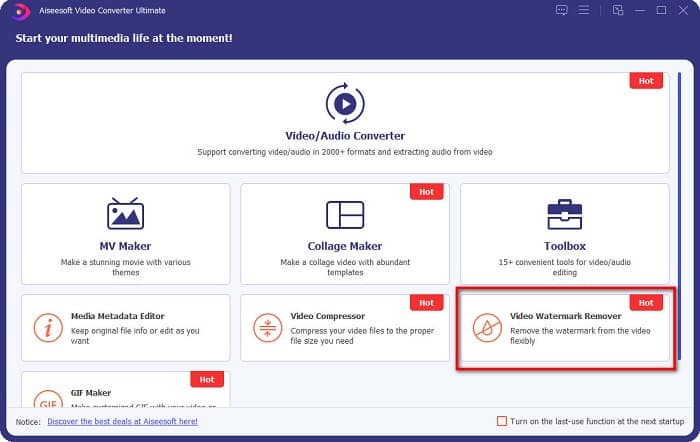
مرحله 2. سپس در اولین رابط نرمافزار، به بخش Video Watermark Remover بروید. اگر آن را در رابط اول پیدا نکردید، روی Toolbox کلیک کنید.
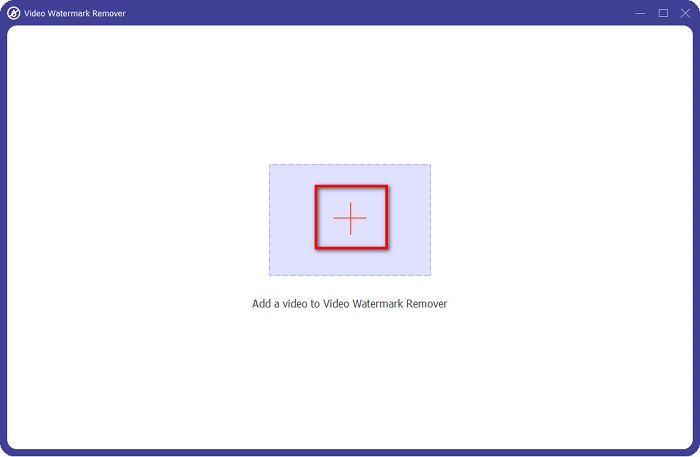
مرحله 3. روی دکمه علامت + کلیک کنید تا در رابط بعدی ویدئوی Coub را آپلود کنید. فایلهای رایانه شما باز میشود؛ ویدئو را انتخاب کرده و روی Open کلیک کنید.
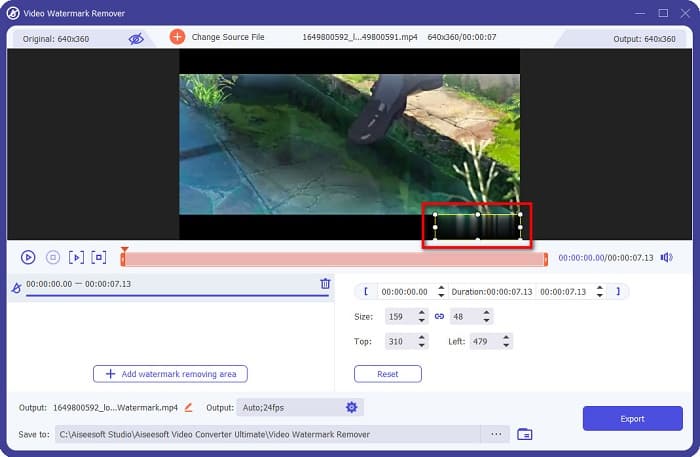
مرحله 4. سپس روی دکمه Add watermark removing area کلیک کنید تا ناحیه حذف ظاهر شود. سپس جعبه ناحیه حذف را روی واترمارک Coub قرار دهید. خواهید دید که ناحیه انتخابشده محو (Blur) میشود.
مرحله 5. در نهایت، روی دکمه Export کلیک کنید تا واترمارک Coub حذف شود، سپس خروجی شما بهطور خودکار در پوشههای رایانهتان ذخیره خواهد شد.

آسان است، نه؟ با انجام مراحل ساده بالا، میتوانید واترمارک Coub را از روی ویدئوی خود حذف کنید. برای یادگیری نحوه حذف واترمارک تیکتاک اینجا کلیک کنید.
حذف واترمارک Hitpaw
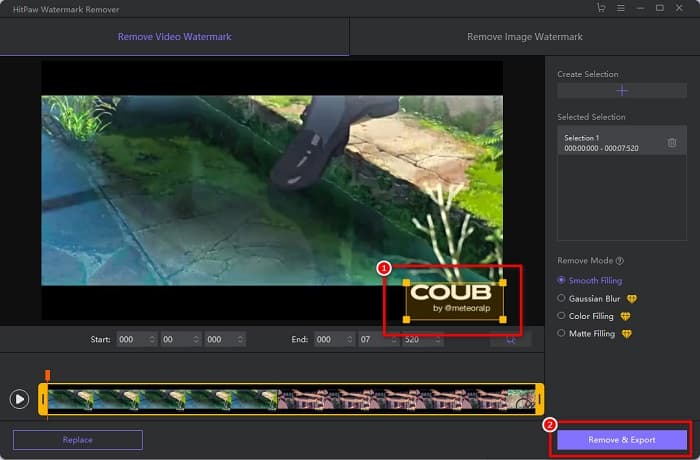
Hitpaw Watermark Remover یکی از محبوبترین برنامههای قابل دانلود برای حذف واترمارک است که به شما اجازه میدهد بهآسانی واترمارک Coub را از روی ویدئوی خود حذف کنید. اگر میخواهید یک ویدئوی Coub بدون واترمارک داشته باشید، میتوانید از این ابزار برای حذف آن استفاده کنید. علاوه بر این، این ابزار رابط کاربری سادهای دارد که آن را کاربرپسند میکند.
همچنین حذف واترمارک روی قسمت خاصی از ویدیو با حرکت دادن اسلایدرها برای شما آسان خواهد بود. علاوه بر این، به شما این امکان را می دهد که هنگام برداشتن واترمارک، پر شدن صافی داشته باشید. همچنین تقریباً در تمام دستگاه های رسانه ای برای بارگیری رایگان است.
مرحله 1. ابتدا Hitpaw Watermark Remover را دانلود کنید، مراحل نصب را انجام دهید و برنامه را اجرا کنید.
مرحله 2. سپس روی دکمه Choose File در رابط اصلی نرمافزار کلیک کنید تا ویدئوی Coub خود را آپلود کنید. فایلهای رایانه شما باز شده و در آنجا ویدئوی Coub خود را باز میکنید.
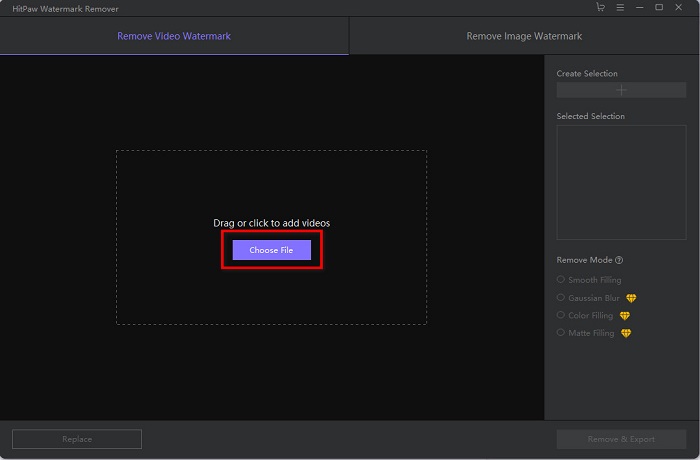
مرحله 3. ناحیه حذف را روی واترمارک Coub قرار دهید، سپس روی دکمه Remove & Export در پایین سمت راست رابط کلیک کنید تا واترمارک برای همیشه حذف شود.
Media.io
Media.io یک ابزار آنلاین برای حذف واترمارک از ویدئوها است. این ابزار آنلاین میتواند واترمارکهایی مانند لوگو، متن و مهر (Stamp) را حذف کند. اگر برای اولین بار است که از یک ابزار حذف واترمارک استفاده میکنید، کار با این ابزار آنلاین برای شما دشوار نخواهد بود، زیرا استفاده از آن آسان است. علاوه بر این، از رایجترین فرمتهای ویدئویی مانند MP4، MKV، AVI، FLV، MOV و غیره پشتیبانی میکند. همچنین میتوانید فایلهای ویدئویی را از Dropbox، Google Drive و YouTube انتخاب کنید. علاوه بر آن، این ابزار امن و رایگان است. Media.io روی تمام مرورگرهای وب، از جمله Google، Firefox و Safari قابل دسترسی است.
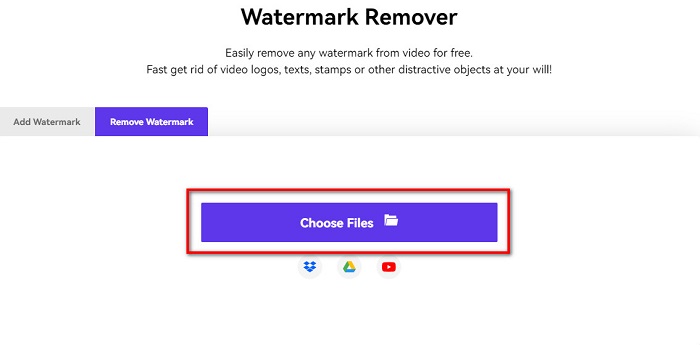
مرحله 1. در مرورگری که استفاده میکنید، Media.io را جستوجو کرده و سپس وارد صفحه وب آن شوید. در رابط اصلی وبسایت، روی دکمه Choose Files کلیک کنید.
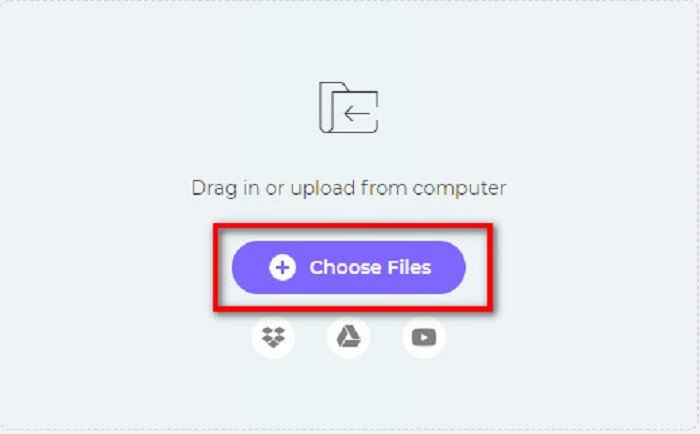
مرحله 2. یک رابط جدید ظاهر میشود که در آن باید روی دکمه Choose Files کلیک کنید یا ویدئوی Coub خود را روی رابط نرمافزار بکشید و رها کنید. منتظر بمانید تا ویدئوی شما آپلود شود و سپس به مرحله بعد بروید.
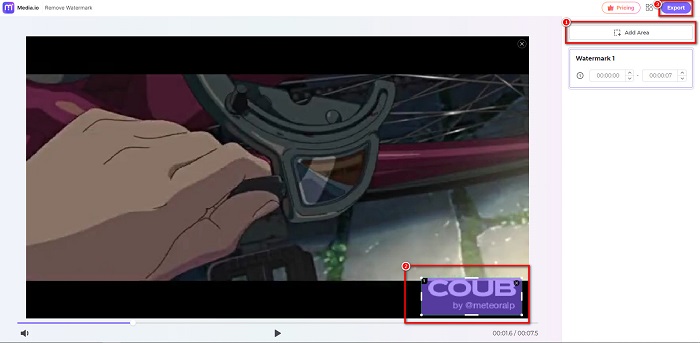
مرحله 3. سپس روی Add Area در گوشه چپ رابط کلیک کنید و ناحیه حذف را روی واترمارک Coub قرار دهید. برای حذف واترمارک روی دکمه Export کلیک کنید؛ فایل شما بهطور خودکار روی دستگاهتان ذخیره خواهد شد. همچنین میتوانید از این روش برای حذف واترمارک ویدئو استفاده کنید.
BeeCut
BeeCut روش دیگری برای حذف آنلاین واترمارک Coub است. این ابزار بسیار کاربردی است، زیرا لازم نیست چیزی روی دستگاه خود دانلود کنید. علاوه بر این، رایگان و امن است. نکته جالب این است که این ابزار از فرمتهای فایل متعددی از جمله MP4، AVI، MKV، FLV و سایر فرمتهای رایج پشتیبانی میکند.
علاوه بر این، این یک ابزار مبتدی پسند است زیرا دارای یک رابط کاربری آسان برای کار است. با این حال، زمانی که اتصال اینترنت شما کند است، ممکن است فرآیند عملیاتی کندی را تجربه کنید زیرا به اینترنت وابسته است. برای حذف واترمارک coub با استفاده از BeeCut، راهنمای ساده زیر را دنبال کنید.
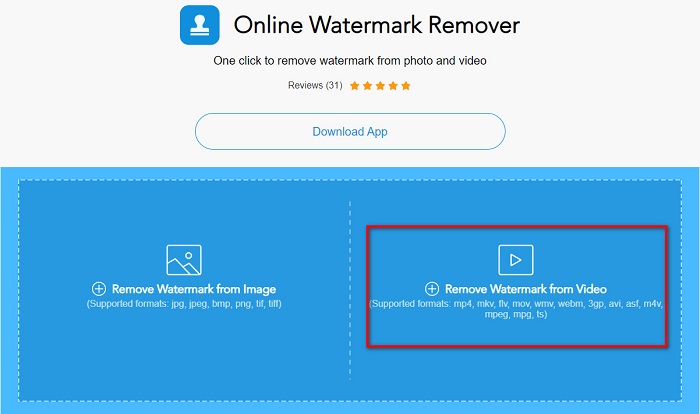
مرحله 1. در مرورگر خود BeeCut را جستوجو کنید، سپس در رابط اصلی وبسایت روی گزینه Remove Watermark from Video کلیک کنید. ویدئوی خود را با باز کردن آن از فایلهای رایانهتان آپلود کنید.
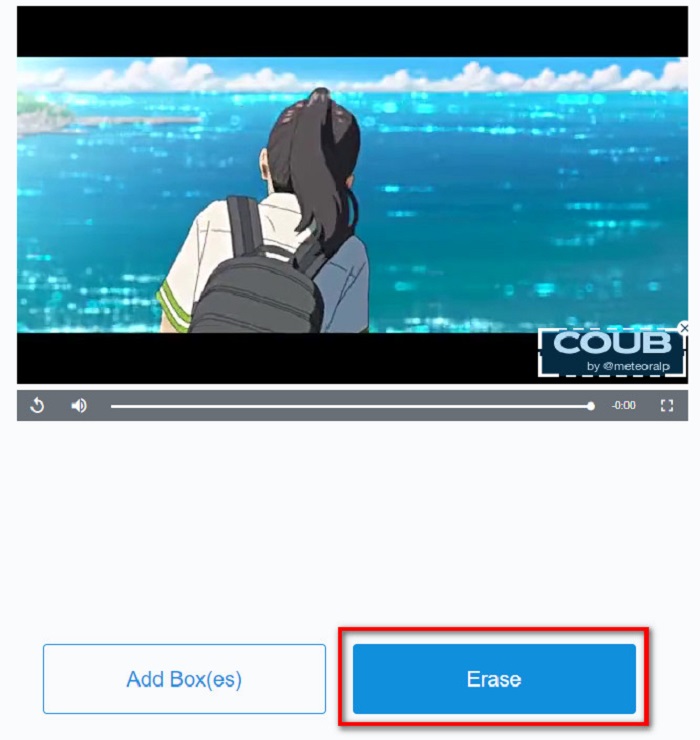
مرحله 2. در رابط بعدی، ناحیه حذف را روی واترمارک Coub که میخواهید حذف کنید، قرار دهید. و اگر واترمارکها، لوگوها یا مهرهای دیگری روی ویدئوی شما وجود دارد، میتوانید با کلیک روی Add Box(es) یک جعبه حذف دیگر اضافه کنید.
مرحله 3. در نهایت، روی دکمه Erase کلیک کنید تا واترمارک Coub از روی ویدئوی شما حذف شود. خروجی خود را در پوشههای رایانه خواهید دید.
بخش 2. سوالات متداول در مورد حذف واترمارک Coub
آیا می توانید ویدیوهای کوب را بدون واترمارک دریافت کنید؟
متأسفانه، هیچ راه یا ابزار خاصی برای دانلود ویدیوی کوب بدون واترمارک وجود ندارد. با این حال، حذفکنندههای واترمارک به شما کمک میکنند یک ویدیوی کوب بدون واترمارک داشته باشید.
آیا حذف واترمارک حجم فایل ویدیوی شما را کاهش می دهد؟
خیر. حذف واترمارک از ویدیوی شما تأثیری بر اندازه فایل ویدیوی شما ندارد.
چرا بعد از حذف واترمارک روی ناحیه آن تاری وجود دارد؟
وجود یک تاری در ناحیه واترمارکی که حذف کردهاید، زیرا ابزارها به این ترتیب واترمارک روی تصاویر یا ویدیوهای شما را حذف میکنند.
نتیجه
حذف واترمارک Coub از روی ویدئوها ممکن است پیچیده به نظر برسد. اما با استفاده از ابزارهایی که در بالا معرفی شد، میتوانید بهراحتی واترمارک Coub را از ویدئوی خود حذف کنید. با این حال، اگر میخواهید از ابزاری برای حذف واترمارک استفاده کنید که پردازش سریعی دارد و امکانات زیادی در اختیار شما میگذارد، FVC Video Converter Ultimate را دانلود کنید.
-
 4 بهترین راه برای حذف واترمارک از GIF [آنلاین و آفلاین]
 آیا نیاز به حذف واترمارک از GIF دارید؟ با ابزار موجود در این مقاله، سبک های مختلف را با پاک کننده های مختلف واترمارک موجود در پلت فرم خود خواهید آموخت.
-
 برجسته Photobucket Watermark Remover آنلاین و آفلاین
 نحوه حذف واترمارک Photobucket را با استفاده از این حذف کننده واترمارک Photobucket از عکس های خود بیاموزید. این مقاله را بخوانید تا راه ها را بیاموزید.
-
 به راحتی واترمارک را از PDF با مراحل ساده حذف کنید
 با دنبال کردن این مراحل ساده، واترمارک را از PDF حذف کنید. یاد بگیرید چگونه با استفاده از این ابزارهای شگفت انگیز، واترمارک ها را از فایل PDF خود به راحتی حذف کنید.
