


 Video Converter Ultimate
 ضبط صفحه
 تعمیر ویدیو
آموزش آسان برای حذف واترمارک DeviantArt با ابزارهای نهایی
DeviantArt به عنوان بزرگترین گالری و انجمن هنری آنلاین شناخته می شود. دارای تصاویر استوک است که می توانید به صورت آنلاین به آنها دسترسی داشته باشید. شما می توانید بیش از 350 میلیون قطعه از آثار هنری و تصاویری را که توسط هنرمندان و علاقه مندان به هنر در سرتاسر جهان خلق شده اند، کاوش کنید. علاوه بر این، بسیاری از آثار هنری، عکاسی و فیلمبرداری را در خود جای داده است. هدف اصلی آن تبلیغ، نمایش و به اشتراک گذاری آثار هنرمندان است. DeviantArt همچنین یک رسانه برای ارتباط هنرمندان در سراسر جهان است، جایی که آنها می توانند علایق خود را به اشتراک بگذارند، با یکدیگر ارتباط برقرار کنند و در مورد هنرهای خود صحبت کنند.
با این حال، وقتی از DeviantArt تصویر دانلود میکنید و ثبتنام نکردهاید، روی آن واترمارک وجود دارد. بنابراین، بهترین کاری که میتوانید انجام دهید این است که با استفاده از برنامههای شخص ثالث واترمارک را حذف کنید. خوشبختانه ما ابزارهای آنلاین پیدا کردهایم که به شما اجازه میدهند هر نوع واترمارکی را از عکس DeviantArt خود حذف کنید. این مقاله را بهدقت بخوانید تا با برجستهترین ابزارهای حذف واترمارک DeviantArt آشنا شوید و یاد بگیرید چگونه واترمارک DeviantArt را حذف کنید با استفاده از قدرتمندترین ابزارها.
قسمت 1. چرا DeviantArt واترمارک را روی تصاویر قرار می دهد؟
بسیاری از واترمارک ها برای جلوگیری از کپی شدن کارشان، چه عکس و چه ویدئو، استفاده می کنند. لحظه ای که عکسی را از رسانه های اجتماعی آپلود یا به اشتراک می گذارید، مستعد کپی شدن است. بنابراین، اگر میخواهید برای کارتان اعتبار کسب کنید، بهترین کار این است که یک واترمارک روی تصویر یا ویدیوی خود اضافه کنید.
DeviantArt نیز همین کار را انجام می دهد. آنها واترمارک یا آرم روی تصاویر خود تعبیه می کنند تا حتی بدون خرید تصویر کپی نشوند. DeviantArt همچنین یک واترمارک روی تصاویر خود قرار می دهد تا این شرکت به خاطر آثار تصویری که تولید می کند شناخته شود. علاوه بر این، واترمارک DeviantArt تضمین میکند که تصاویر بدون اجازه مالک استفاده مجدد یا تغییر نخواهند کرد.
بنابراین، اگر روی تصویری که دانلود میکنید واترمارک DeviantArt دارید، بهترین کاری که میتوانید انجام دهید حذف آن واترمارک است. برای این کار قسمت بعدی را بخوانید.
قسمت 2. نحوه حذف واترمارک DeviantArt به صورت آنلاین
اگر می خواهید تصویر واترمارک DeviantArt را حذف کنید، ابتدا باید یک پاک کننده واترمارک پیدا کنید. خوشبختانه، بسیاری از نرم افزارهای کاربردی به شما کمک می کنند تا واترمارک DeviantArt را حذف کنید. و اگر میخواهید به راحتی واترمارک را حذف کنید، توصیه میشود از یک ابزار آنلاین استفاده کنید زیرا نیازی به دانلود چیزی در دستگاه خود ندارید. بنابراین، این بخش را به طور جامع بخوانید تا شگفتانگیزترین ابزار استفاده را بشناسید و یاد بگیرید که چگونه واترمارک DeviantArt را روی تصاویر خود حذف کنید.
حذف واترمارک رایگان FVC
FVC Free Watermark Remover یکی از معروفترین پاککنندههای آنلاین واترمارک است که میتوانید در تمام مرورگرهای وب به آن دسترسی داشته باشید. علاوه بر این، از رایجترین فرمتهای تصویری مانند PNG، JPEG، JPG و BMP پشتیبانی میکند. استفاده از آن نیز آسان است، به همین دلیل بسیاری از مبتدیان ترجیح میدهند از این ابزار استفاده کنند. همچنین میتوانید بهصورت دستی واترمارک DeviantArt را با استفاده از ابزارهای حذف این برنامه (Polygonal، Lasso و Brush) از تصویر خود پاک کنید. علاوه بر آن، نیازی به ورود به هیچ حسابی ندارد و استفاده از آن رایگان است. نگران فرمت خروجی تصویر خود هم نباشید، زیرا تصویر را در فرمت اصلیاش صادر میکند.
نحوه حذف واترمارک DeviantArt روی تصویر خود با استفاده از FVC Free Watermark Remover:
مرحله 1. مرورگر خود را باز کرده و FVC Free Watermark Remover را جستوجو کنید. یا میتوانید روی لینکی که ارائه شده کلیک کنید تا مستقیماً به صفحه وب آن بروید.
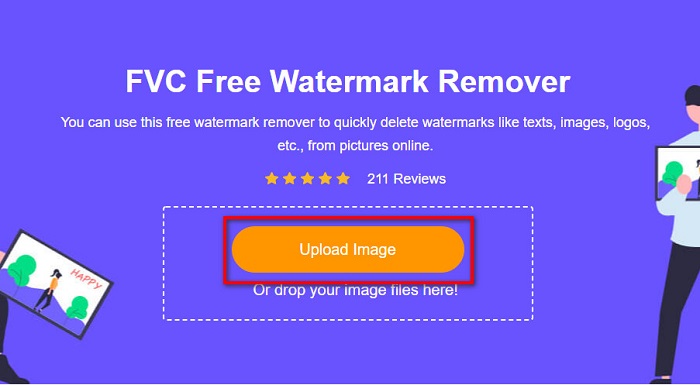
مرحله 2. سپس روی دکمه Upload Image کلیک کنید تا تصویر DeviantArt خود را در رابط اصلی نرمافزار بارگذاری کنید.
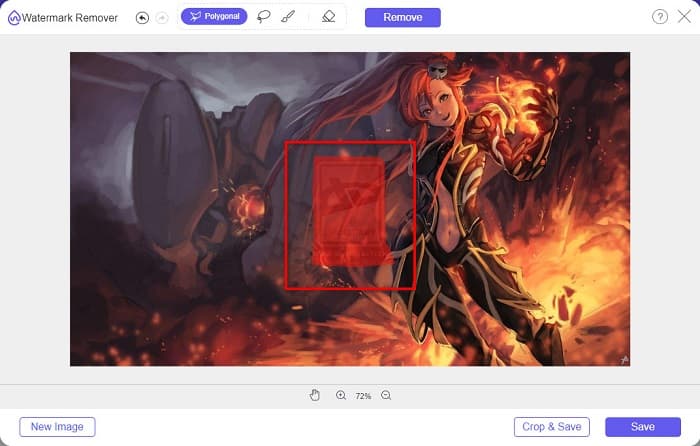
مرحله 3. سپس ابزار حذفکننده مورد نظر خود را انتخاب کنید. اینبار، ما از Polygonal Tool استفاده میکنیم. بعد، ناحیه واترمارک روی تصویر خود را انتخاب کنید.
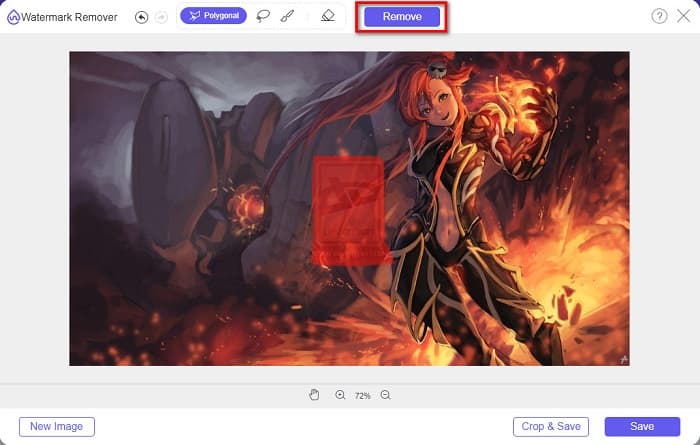
مرحله 4. روی دکمه Remove کلیک کنید تا واترمارک روی تصویر DeviantArt شما حذف شود.
مرحله 5. در نهایت، روی دکمه Save کلیک کنید تا تصویر خود را در دستگاه ذخیره کنید. همین! میتوانید از همین روش برای حذف واترمارک Lumion هم استفاده کنید.
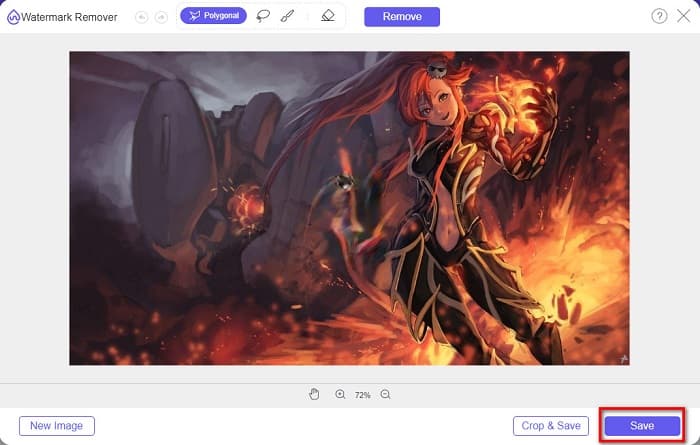
به عنوان یک پاک کننده کاملاً رایگان واترمارک Deviantart، FVC Watermark Remover به شما امکان می دهد با استفاده از ابزارهای Polygonal، Lasso و Brush ناحیه ناخواسته را انتخاب کنید و از انتخاب دقیق اطمینان حاصل کنید. با یک کلیک، به راحتی می تواند واترمارک Deviantart را بصورت آنلاین و رایگان حذف کند. اگرچه این فرآیند نسبتاً ساده است، اما نتیجه مطمئناً شما را شکست نخواهد داد. من این ابزار را بیشتر ترجیح می دهم.
Watermark Remover.io
Watermark Remover.io یک ابزار محبوب برای حذف انواع واترمارک است. این ابزار بهخاطر رابط کاربری سادهاش، کاربرپسند محسوب میشود. همچنین از فرمتهای رایج تصویری مانند PNG، JPEG، JPG، WEBP و دیگر فرمتها پشتیبانی میکند. نکته شگفتانگیز این است که از فرایند حذف مبتنی بر هوش مصنوعی استفاده میکند؛ یعنی پس از آپلود تصویر، واترمارک را بهطور خودکار حذف میکند. علاوه بر این، تقریباً در همه مرورگرهای وب مانند گوگل کروم و فایرفاکس در دسترس است.
مراحل حذف واترمارک DevianArt روی تصویر:
مرحله 1. به مرورگر خود بروید و Watermark Remover.io را جستوجو کنید. سپس روی صفحهای که به ابزار منتهی میشود کلیک کنید.
مرحله 2. در رابط اصلی، دکمه Upload Image را میبینید؛ روی آن کلیک کنید.
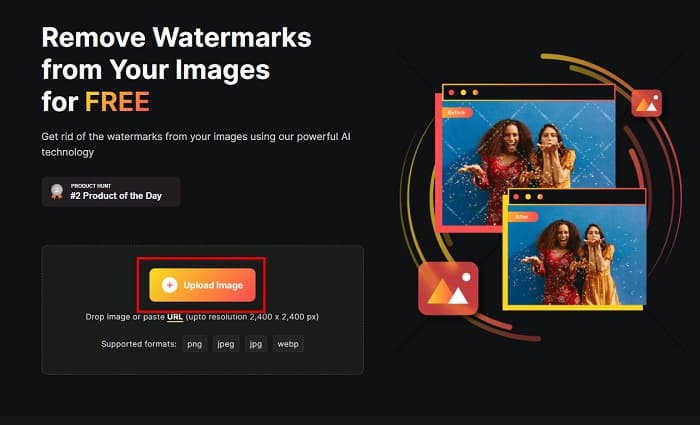
مرحله 3. پس از آپلود تصویر، واترمارکِ روی آن بهطور خودکار حذف خواهد شد. همین! به همین سادگی میتوانید واترمارک DeviantArt را از تصویر خود حذف کنید.
این ابزار همچنین برای استفاده با فرمتهای تصویری با پشتیبانی گسترده مانند PNG، JPEG، WEBP و غیره خوب است. همچنین به شما امکان میدهد آدرسهای اینترنتی تصویر را مستقیماً برای پردازش جایگذاری کنید. با این حال، در مقایسه با FVC Free Watermark Remover، این ابزار کاملاً رایگان نیست. برای استفاده از این پاک کننده واترمارک Deviantart به صورت آنلاین، باید اعتبارات را خریداری کنید.
عکس خنده دار
ابزار آنلاین دیگری برای حذف واترمارک که باید امتحان کنید PhotoFunny است. این ابزار آنلاین برای مبتدیان مناسب است، به این معنی که رابط سادهای دارد. به شما اجازه میدهد لوگو، متن یا واترمارک تصویری را از روی عکس خود حذف کنید. با این حال، کاری که در اصل انجام میدهد این است که ناحیه تصویر را محو (blur) میکند تا خیلی مشخص نباشد. با اینهمه، همچنان ابزار خوبی برای حذف واترمارک DeviantArt از تصویر شماست.
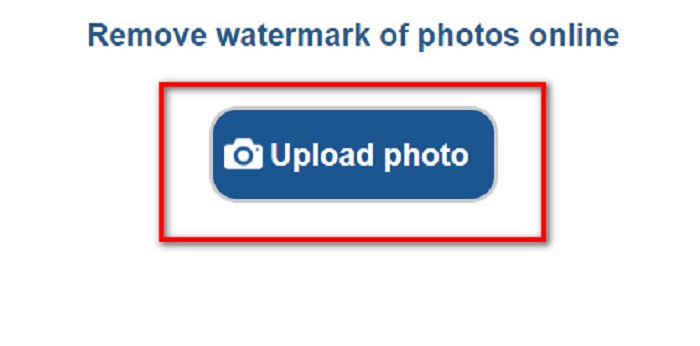
مرحله 1. در مرورگری که استفاده میکنید، PhotoFunny را جستوجو کنید. سپس روی دکمه Upload Photo در رابط اصلی نرمافزار کلیک کنید تا تصویر DeviantArt خود را بارگذاری کنید.
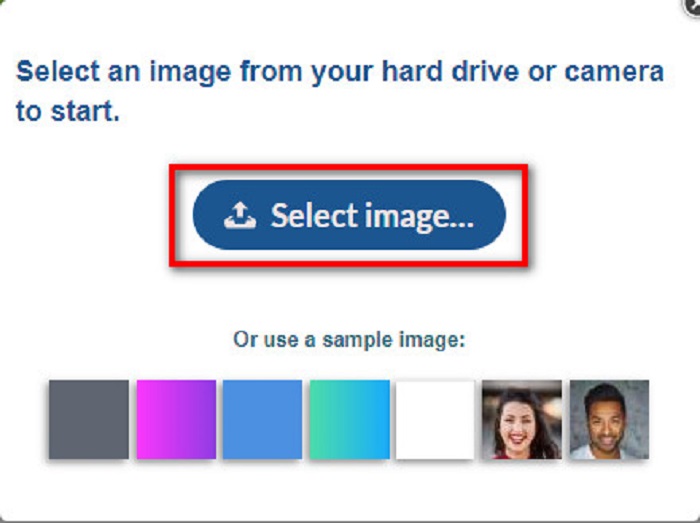
مرحله 2. سپس یک جعبه توضیحات ظاهر میشود که باید در آن روی دکمه Select Image کلیک کنید تا تصویر خود را آپلود کنید.
مرحله 3. در نهایت، جعبه حذفکننده را روی ناحیه واترمارک جابهجا کنید، روی دکمه Remove Watermark کلیک کنید و خواهید دید که واترمارک DeviantArt روی تصویر شما دیگر بهچشم نمیآید. برای یادگیری نحوه حذف واترمارکهای Movavi اینجا کلیک کنید.
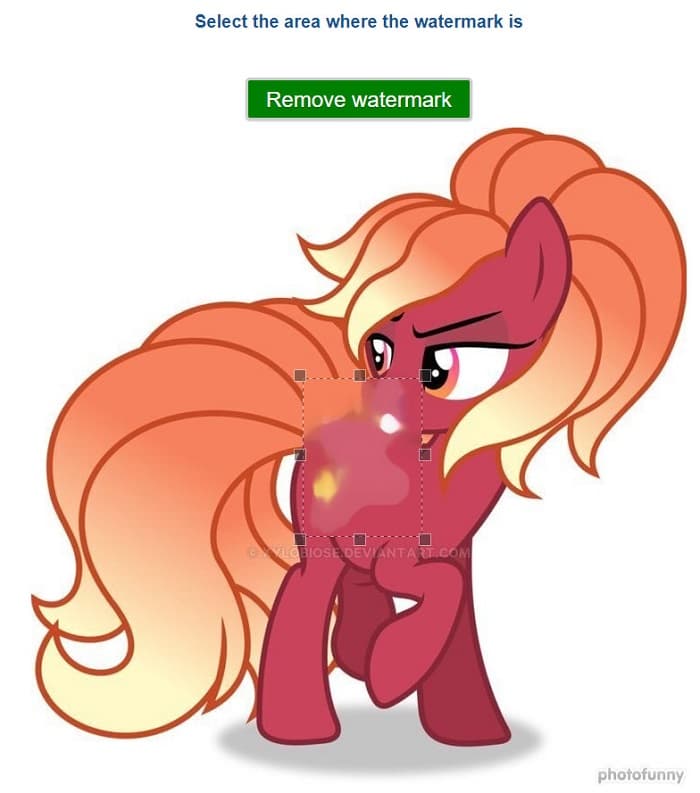
علاوه بر حذف واترمارک Deviantart، Photofunny همچنین یک ویرایشگر عکس برجسته است که به شما امکان می دهد قاب، افکت، کلاژ و موارد دیگر را به عکس های خود اضافه کنید. این سایت توابع زیادی دارد که می توانید آنها را کشف کنید، اما برای کاربرانی که فقط می خواهند واترمارک را حذف کنند، مسیریابی واضح نیست، بنابراین ممکن است تلاش زیادی برای یافتن این ابزار و استفاده از آن لازم باشد.
فوتور
برای پاک کردن واترمارک Deviantart، میتوانید Fotor را نیز امتحان کنید. این یک ابزار آنلاین است که به شما کمک میکند متن، لوگو یا نمادهای ناخواسته (همان واترمارکها) را از عکسهایتان پاک کنید. این قابلیت بخشی از مجموعه ابزارهای ویرایش عکس Fotor است و بهخاطر مبتدیپسند و بسیار در دسترس بودنش شناخته میشود؛ یعنی به مهارتهای حرفهای ویرایش نیاز ندارید.
مراحل حذف واترمارک Deviantart با Fotor:
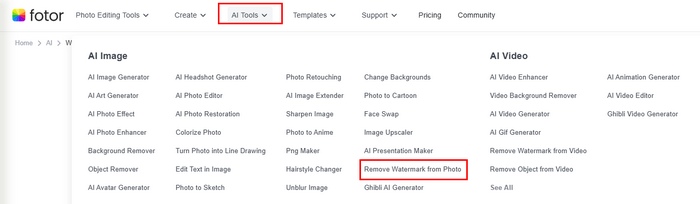
مرحله 1. به سایت رسمی Fotor بروید و زیر تب AI Tools گزینه Remove Watermark from Photo را انتخاب کنید.
مرحله 2. روی دکمه Try AI Watermark Remover کلیک کنید تا عکس Deviantart خود را آپلود کنید.
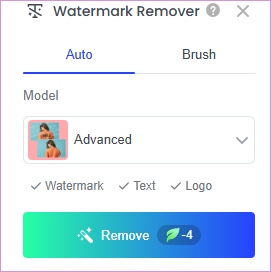
مرحله 3. میتوانید گزینه Auto را انتخاب کرده و روی Remove کلیک کنید تا واترمارک بهطور خودکار پاک شود. یا اگر میخواهید واترمارک را دستی حذف کنید، میتوانید از Brush برای انتخاب واترمارکهای ناخواسته استفاده کنید.
مرحله 4. در نهایت، روی Download کلیک کنید تا نتیجه را در دستگاه خود ذخیره کنید.
این ابزار همچنین اثر حذف خوبی دارد. اما این ابزار دارای یک واترمارک داخلی است اگر شما یکی از اعضای VIP آن را ارتقا ندهید. و قبل از دانلود نتیجه باید آن را ارتقا دهید.
Media.io
Media.io Watermark Remover یک پلت فرم آنلاین است که از فناوری هوش مصنوعی برای کمک به کاربران برای حذف عناصر ناخواسته مانند واترمارک، لوگو، متن یا حتی افراد از عکس ها و ویدیوهای خود استفاده می کند. این برنامه به گونه ای طراحی شده است که کاربر پسند باشد و تا زمانی که بتوانید به مرورگر وب دسترسی داشته باشید، در دستگاه های مختلف قابل دسترسی باشد. اگر کاربر ویندوز هستید، می توانید آن را روی دسکتاپ نیز دانلود کنید.
مراحل حذف واترمارک های Deviantart با استفاده از Media.io:
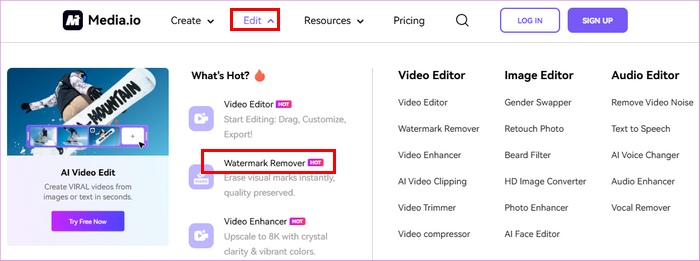
مرحله 1. به سایت رسمی Media.io بروید و زیر منوی Edit گزینه Watermark Remover را انتخاب کنید.
مرحله 2. روی Upload Here کلیک کنید تا تصویر Deviantart خود را اضافه کنید.
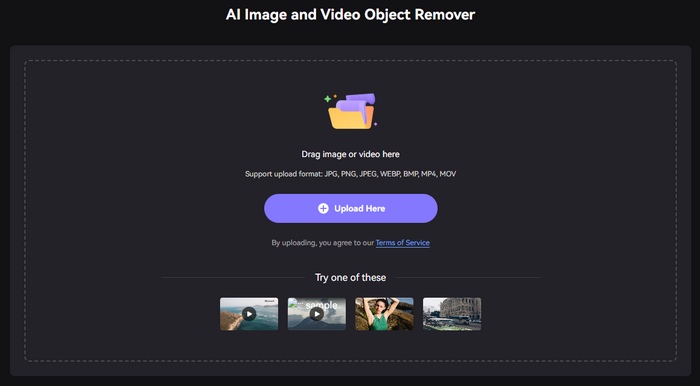
مرحله 3. حالا میتوانید اندازه براش را تنظیم کرده و آن را روی ناحیهای که واترمارک در آن قرار دارد بکشید. سپس روی Remove objects now کلیک کنید.
این ابزار رابط کاربری واضحی دارد و چیزی که آن را متمایز می کند این است که از حذف واترمارک های ویدئویی نیز پشتیبانی می کند. با این حال، قبل از استفاده آنلاین Media.io Deviantart watermark remover باید وارد سیستم شوید. علاوه بر این، این ابزار همان Fotor است، برای دانلود نتیجه بدون واترمارک باید نسخه Pro آن را خریداری کنید.
بخش 3. سوالات متداول در مورد حذف واترمارک DeviantArt
آیا می توانید واترمارک DeviantArt را حذف کرده و در همان قالب ذخیره کنید؟
آره. حذف کننده های واترمارک وجود دارند که به شما امکان می دهند بدون تغییر فرمت فایل تصویر، هر واترمارکی را حذف کنید.
آیا می توانید واترمارک را به صورت آفلاین حذف کنید؟
هزاران برنامه نرم افزاری وجود دارد که می توانید برای حذف واترمارک دانلود کنید. یکی از محبوب ترین برنامه های حذف واترمارک FVC Video Converter Ultimate است.
آیا واترمارک به عنوان حق چاپ به حساب می آید؟
واترمارک به عنوان مالکیت کار فرد عمل می کند. این روشی است که توسط مالکان برای جلوگیری از تخلف از کار استفاده می شود.
چگونه تصاویر انبوه را از Deviantart دانلود کنیم؟
Deviantart از دانلود انبوه تصاویر به صورت رسمی پشتیبانی نمی کند تا از آثار هنرمندان محافظت شود. با این حال، اگر همچنان میخواهید این کار را انجام دهید، میتوانید سایر ابزارهای دانلود تصویر آنلاین شخص ثالث را امتحان کنید.
نتیجه
از آنجا که اکنون میدانید چگونه واترمارک DeviantArt را حذف کنید، حالا انتخاب اینکه کدام یک از این ابزارها را به کار ببرید، به عهده خودتان است. اگر میخواهید هنگام حذف واترمارک، تصویر خود را تزئین هم بکنید، میتوانید PhotoFunny را امتحان کنید. اگر به دنبال یک ابزار جامعتر برای ویرایش عکس هستید، Fotor احتمالاً بیشتر به دل شما مینشیند. اگر یک راهحل رایگان با اثر حذف واترمارک خوب میخواهید، FVC Free Free Watermark Remover میتواند انتخاب مناسبی باشد. کافی است بر اساس نیاز خود آنها را امتحان کنید!
-
 به راحتی واترمارک را از PDF با مراحل ساده حذف کنید
 با دنبال کردن این مراحل ساده، واترمارک را از PDF حذف کنید. یاد بگیرید چگونه با استفاده از این ابزارهای شگفت انگیز، واترمارک ها را از فایل PDF خود به راحتی حذف کنید.
-
 نحوه حذف واترمارک Coub با مراحل ساده
 نحوه حذف واترمارک coub را با استفاده از این پاک کننده های واترمارک محبوب روی ویدیوهای خود بیاموزید. این مقاله را بخوانید تا با این ابزارهای شگفت انگیز و نحوه استفاده از آنها آشنا شوید.
-
 راه های آسان برای حذف واترمارک از تصاویر فارغ التحصیلی
 آیا می خواهید بهترین راه های حذف واترمارک از تصاویر فارغ التحصیلی را بدانید؟ با خواندن این مقاله، میتوانید نحوه حذف واترمارک روی عکسهای grad را به راحتی بدانید.
