


 Video Converter Ultimate
 ضبط صفحه
 تعمیر ویدیو
۲ روش آسان برای حذف واترمارک Dxtory
وقتی صحبت از ضبط گیمپلی و سایر برنامهها میشود، Dxtory یکی از محبوبترین نرمافزارهای ضبط صفحه برای بسیاری از افراد است. خیلیها از این نرمافزار ضبط صفحه استفاده میکنند، چون یکی از معدود برنامههایی است که میتواند تا ۱۲۰ فریم بر ثانیه ضبط کند. علاوه بر این، اطلاعات ویدئویی DirectX و OpenGL را بهسرعت روی سیستم شما ضبط میکند. با این حال، وقتی با Dxtory Screen Recorder ضبط میکنید، روی ویدیوی شما واترمارک میگذارد. در نتیجه، افراد بهدنبال روشی برای حذف این واترمارک آزاردهنده هستند. این مقاله به شما آموزش میدهد که چگونه واترمارک Dxtory را حذف کنید ویدیوی ضبطشده از صفحهنمایش خود را.

قسمت 1. نحوه ضبط صفحه با استفاده از Dxtory
اگر به دنبال نرم افزاری هستید که بتواند نکات برجسته بازی شما را ضبط کند، Dxtory یک برنامه مناسب است. Dxtory برنامهای است که میتواند به شما در ضبط صفحه نمایش خود در حین بازی، بحث در مورد یک درس آنلاین یا تماشای ویدیو در رایانه کمک کند. این یک نرم افزار شناخته شده برای ضبط صفحه نمایش است. ضبط کننده صفحه Dxtory ابزارهای لازم برای دسترسی به تنظیمات Global، Advanced، Hotkey، Screenshot، Video و Audio و غیره را دارد.
علاوه بر این، این ضبط کننده صفحه به شما این امکان را می دهد که در حین ضبط از صفحه اسکرین شات بگیرید. همچنین میتوانید آن اسکرینشاتها را با گزینههای لبهبندی، مقیاسگذاری و برش تغییر دهید. همچنین دارای چندین منبع صوتی ضبط شده است، به این معنی که Dxtory می تواند به طور همزمان بازی و صدای میکروفون را ضبط کند. همچنین سریعترین فیلمبرداری برای برنامه های DirectX و OpenGL است. بنابراین، اگر می خواهید از Dxtory برای ضبط صفحه نمایش استفاده کنید، به خواندن این قسمت ادامه دهید.
نحوه ضبط گیم پلی با استفاده از ضبط کننده صفحه Dxtory:
مرحله ۱. ابتدا باید Dxtory را روی دستگاه خود دانلود کنید. روند نصب را دنبال کنید. میتوانید لایسنس را خریداری کنید تا هیچ محدودیتی در ضبط نداشته باشید و روی خروجی ویدیوی شما هیچ واترمارکی قرار نگیرد.
مرحله ۲. برنامهای را که میخواهید ضبط کنید اجرا کرده و Dxtory را هم اجرا کنید.
مرحله ۳. به تب Target بروید و روی بازیای که در حال انجام آن هستید کلیک کنید. فهرست پردازشها بلافاصله در فهرست Target ظاهر میشود.
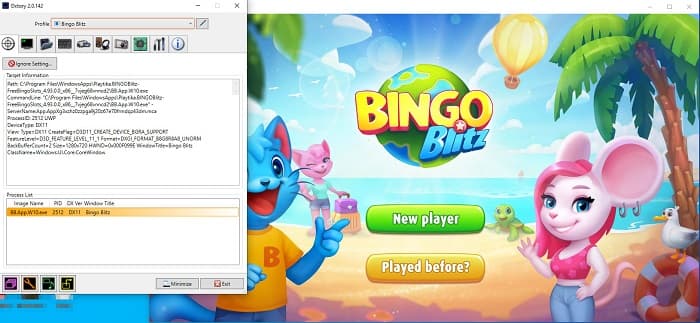
مرحله ۴. سپس به تب Folder بروید و محل ذخیره فایل خود را انتخاب کنید. بعد، به بخش Hotkeys بروید تا دکمههای فرایند ضبط صفحه را انتخاب کنید. همچنین میتوانید صدای صوت را تنظیم کنید.
مرحله ۵. برنامه Dxtory را مینیمایز کرده و بازی خود را شروع کنید. یک آیکون عددی در گوشه بالا سمت چپ رابط بازی خواهید دید که FPS شما را نشان میدهد. دکمه میانبری که در پنل Hotkeys برای ضبط ویدیو تنظیم کردهاید فشار دهید تا ضبط شروع شود.
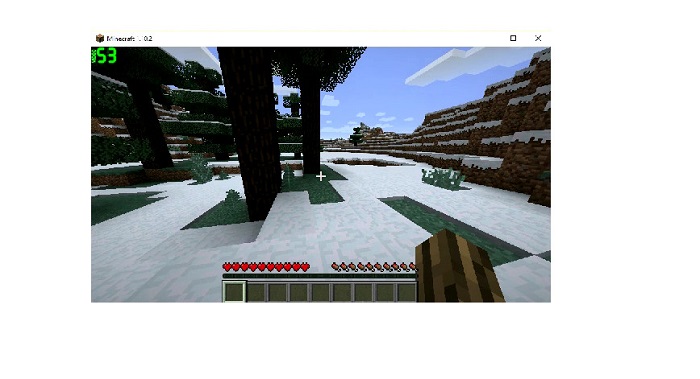
مرحله ۶. و سپس، اگر میخواهید ضبط را متوقف کنید، همان دکمهای را فشار دهید که برای شروع ضبط فشار داده بودید. بهمحض توقف ضبط، ویدیو در مسیر مقصدی که انتخاب کرده بودید ذخیره میشود.
اکنون میتوانید از تماشای ویدیوی ضبطشده از صفحه خود لذت ببرید. اگر لایسنس را خریداری نکرده باشید، روی ویدیوی شما واترمارک دیده میشود. بنابراین اگر میخواهید واترمارک ویدیو را حذف کنید، بخش بعدی را بخوانید.
قسمت 2. نحوه حذف واترمارک Dxtory با استفاده از ابزار Ultimate
اگر می خواهید واترمارک Dxtory را از فیلم ضبط کننده صفحه خود حذف کنید، احتمالاً می خواهید از این نرم افزار شگفت انگیز استفاده کنید. این قسمت را بخوانید تا با توضیحات کامل این ابزار و نحوه استفاده از آن برای فرآیند حذف واترمارک Dxtory آشنا شوید.
FVC Video Converter Ultimate یکی از معروفترین نرمافزارهایی است که امکان حذف واترمارک از هر ویدیویی را فراهم میکند. رابط کاربری این نرمافزار ساده است و آن را به ابزاری کاربرپسند تبدیل کرده است. علاوه بر این، FVC Video Converter Ultimate از فرمتهای فراوانی پشتیبانی میکند، از جمله MP4، MKV، MOV، M4V، AVI، FLV و بیش از ۱۰۰۰ فرمت دیگر. و اگر میخواهید برنامهای با امکانات ویرایشی متعدد داشته باشید، این ابزار بهترین گزینه برای شماست. این برنامه دارای قابلیتهای پیشرفته ویرایشی بسیاری است؛ مانند برش ویدیو (Video Cropper)، حذف واترمارک ویدیو (Video Watermark Remover)، ادغام ویدیو (Video Merger)، برش ویدیو (Video Trimmer) و موارد دیگر در جعبهابزار (Toolbox).
با رابط پردازش سریع آن، می توانید به راحتی هر واترمارکی که در ویدیوی خود تعبیه شده است حذف کنید. بنابراین، مراحل زیر را دنبال کنید تا یک ویدیوی Dxtory بدون واترمارک داشته باشید.
دو راه برای حذف واترمارک Dxtory در ویدیوی شما وجود دارد.
روش 1: نحوه حذف واترمارک Dxtory با استفاده از ویژگی برش ویدئو:
مرحله ۱. ابتدا با کلیک روی دکمه Download زیر، نسخه ویندوز یا مک FVC Video Converter Ultimate را روی دستگاه خود نصب کنید. روند نصب را دنبال کرده و برنامه را باز کنید.
دانلود رایگانبرای ویندوز 7 یا بالاتردانلود امن
دانلود رایگانبرای MacOS 10.7 یا بالاتردانلود امن
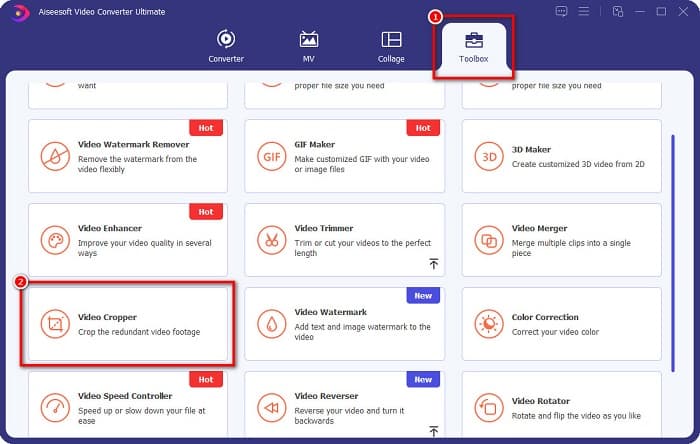
مرحله ۲. در رابط اصلی، روی پنل Toolbox کلیک کرده و قابلیت Video Cropper را انتخاب کنید.
مرحله ۳. سپس روی دکمه علامت بعلاوه (+) کلیک کنید تا ویدیویی را که میخواهید واترمارک آن را حذف کنید، آپلود کنید. همچنین میتوانید ویدیوی خود را از پوشههای کامپیوتر بکشید و رها کنید.
مرحله ۴. در ادامه میتوانید خروجی خود را پیشنمایش کنید. یک کادر برش (crop box) خواهید دید؛ سپس لبههای کادر برش را طوری تنظیم کنید که واترمارک داخل کادر ویدیو قرار نگیرد.
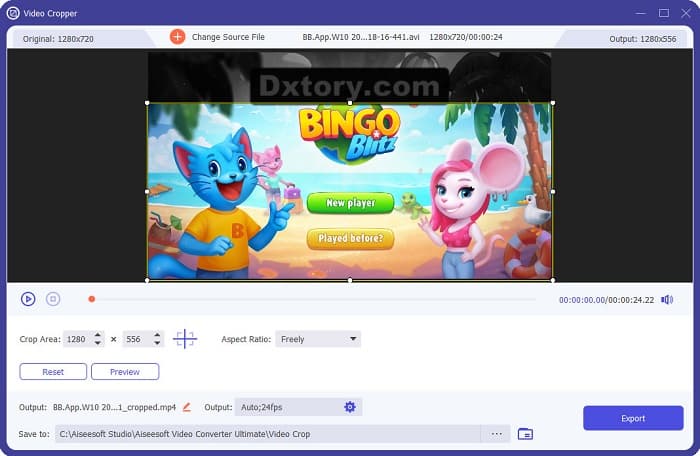
میتوانید با کلیک کردن روی دکمه بالا به پایین زیر پیشنمایش ویدیوتان، اندازه منطقه برش را تنظیم کنید.
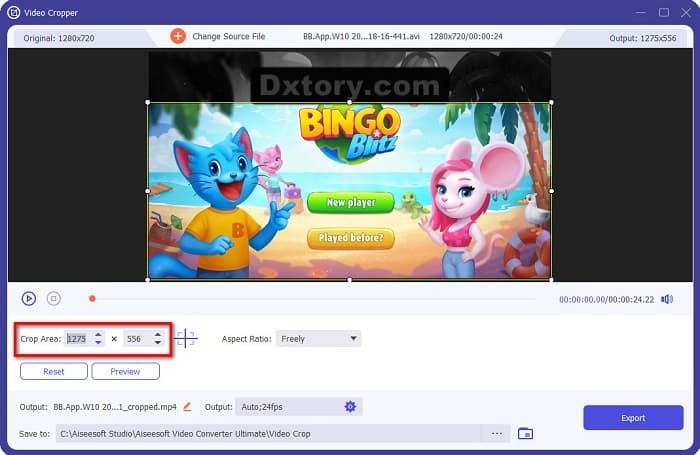
مرحله ۵. در نهایت، روی دکمه Preview کلیک کنید تا خروجی ویدیوی خود را ببینید و اگر از نتیجه راضی بودید، روی Export کلیک کنید.
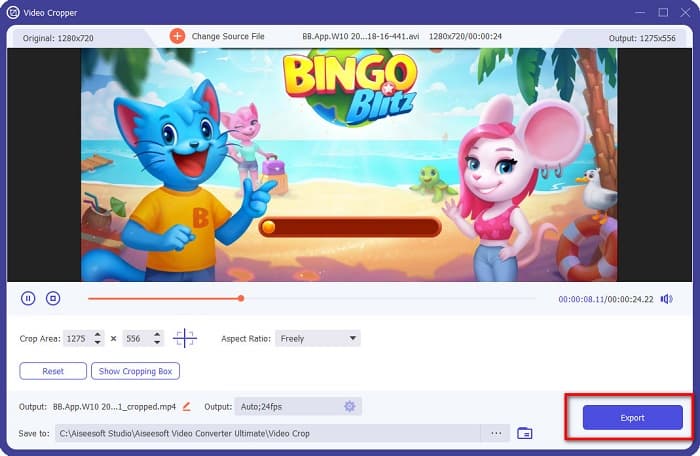
با این مراحل آسان، می توانید واترمارک Dxtory را با استفاده از ویژگی Video Cropper FVC Video Converter UItimate حذف کنید.
روش 2: نحوه حذف واترمارک Dxtory با استفاده از Video Watermark Remover FVC Video Converter Ultimate:
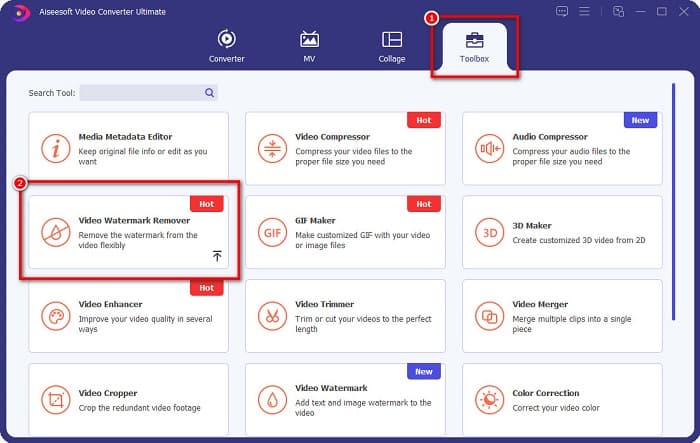
مرحله ۱. اگر نرمافزار روی دستگاه شما دانلود شده است، برنامه را باز کنید. سپس به Toolbox بروید و گزینه Video Watermark Remover را انتخاب کنید.
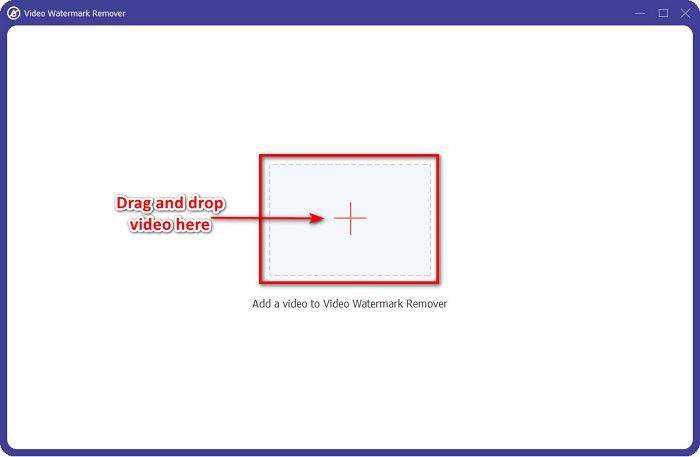
مرحله ۲. سپس روی دکمه + کلیک کنید یا ویدیوی Dxtory خود را داخل جعبه علامت + بکشید و رها کنید.
مرحله ۳. پس از آپلود ویدیو، پیشنمایش آن را مشاهده خواهید کرد. روی ناحیه Add watermark removing کلیک کنید.
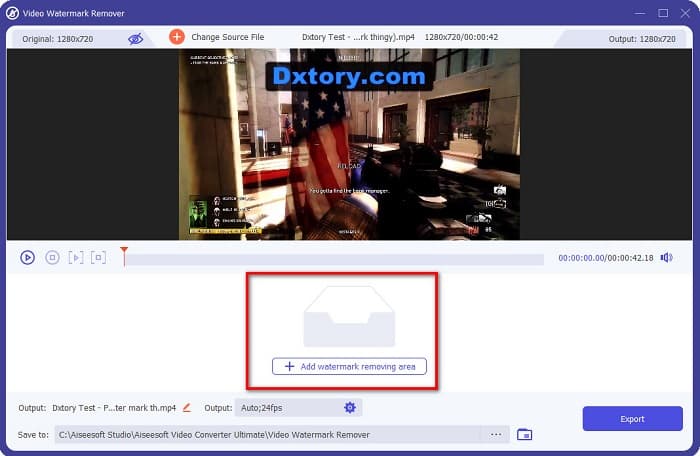
مرحله ۴. سپس یک ناحیه حذف واترمارک روی ویدیوی شما ظاهر میشود. آن را روی واترمارک Dxtory قرار دهید.
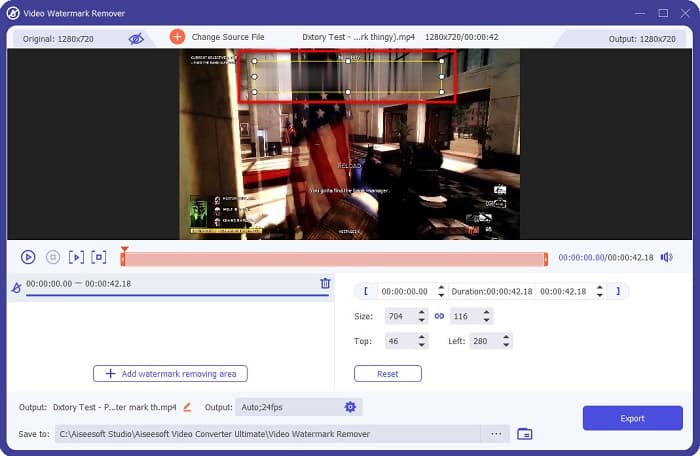
اختیاری. اگر دو یا چند واترمارک روی ویدیوی شما وجود دارد، روی add watermark removing area کلیک کنید تا یک جعبه حذف دیگر اضافه کنید.
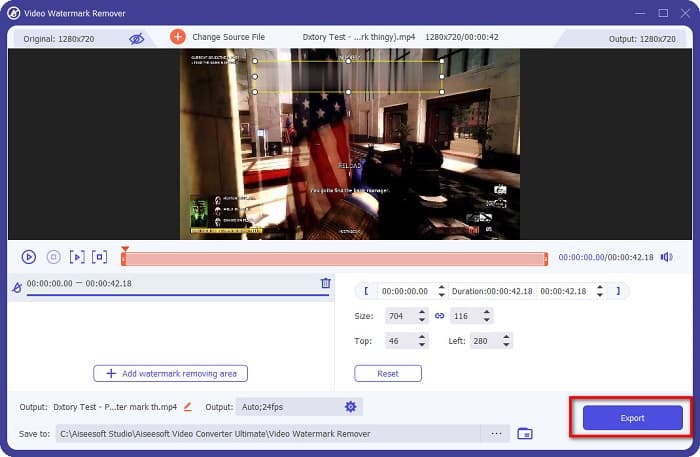
مرحله ۵. در پایان، روی دکمه Export کلیک کنید تا خروجی ویدیو روی دستگاه شما ذخیره شود. همین و بس!
ساده است، نه؟ به همین راحتی میتوانید واترمارک Dxtory را از ویدیوی خود حذف کنید. همچنین میتوانید به روشی مشابهِ بالا، واترمارکهای تیکتاک را نیز حذف کنید.
بخش 3. سوالات متداول در مورد حذف واترمارک Dxtory
آیا Adobe After Effects می تواند واترمارک Dxtory را حذف کند؟
بله. Adobe After Effects محبوبترین نرمافزار حذف واترمارک ویدیو است که میتواند هر نوع واترمارکی (لوگو، متن، تصویر) را از ویدیوی شما حذف کند. این برنامه میتواند واترمارک Dxtory را نیز از ویدیوی شما حذف کند. با این حال، بسیاری از کاربران در استفاده از آن با مشکل مواجه میشوند. واترمارک را روی تصویر خود پیدا کنید. جعبه حذف واترمارک را روی واترمارک قرار دهید. به پنل Layer بروید. Null Objects بسازید. روی Save Frame as کلیک کنید. ویدیوهای ویرایششده خود را وارد کنید. Opacity تصویر خود را کاهش دهید. از گزینه Pick-up whip استفاده کنید.
آیا می توانید واترمارک را از تصاویر خود حذف کنید؟
میتوانید واترمارکها را، مانند لوگو، متن یا هر عنصر دیگری را از روی تصاویر خود حذف کنید. میتوانید از FVC free watermark remover برای حذف هرگونه واترمارک از تصویر خود استفاده کنید.
چرا Dxtory روی ویدیوها واترمارک قرار می دهد؟
Dxtory روی ویدیوهای خود واترمارک گذاشته تا نسخه پولی آن را خریداری کنید. همچنین، آنها واترمارک روی ویدیوهای خود تعبیه می کنند تا از کپی رایت آنها جلوگیری شود.
نتیجه
همانطور که در بالا توضیح داده شد، روشهای ثابتشدهای برای حذف واترمارکهای Dxtory از ویدیوهای شما وجود دارد. و با استفاده از FVC Video Converter Ultimate میتوانید بهراحتی هر واترمارک آزاردهندهای را از تصویر خود حذف کنید. همین حالا آن را دانلود کنید و بهترین قابلیتهایش را تجربه کنید.
-
 نحوه حذف واترمارک از Wondershare DVD Creator به راحتی
 این مقاله اطلاعاتی در مورد نحوه حذف واترمارک از Wondershare DVD Creator را پوشش می دهد. برای به دست آوردن تمام اطلاعات مورد نیاز، خواندن این مطلب ضروری است.
-
 نحوه حذف واترمارک Coub با مراحل ساده
 نحوه حذف واترمارک coub را با استفاده از این پاک کننده های واترمارک محبوب روی ویدیوهای خود بیاموزید. این مقاله را بخوانید تا با این ابزارهای شگفت انگیز و نحوه استفاده از آنها آشنا شوید.
-
 چگونه به راحتی واترمارک Lumion را در ویندوز و مک حذف کنیم
 آیا باید واترمارک Lumion را برای ارائه حرفه ای حذف کنید؟ خوب، ابزارهایی وجود دارد که می توانید از آنها برای خلاص شدن از شر واترمارکی که به جا می گذارد استفاده کنید.
