


 Video Converter Ultimate
 ضبط صفحه
 تعمیر ویدیو
نحوه حذف واترمارک در SmartDraw با دو روش ممکن
اگر به یک راه ساده و قدرتمند برای ایجاد نمودار، ترسیم و نقشهکشی و سپس ارائه آنها با کیفیت در سطح سازمانی نیاز دارید، از SmartDraw استفاده کنید. میتوانید با کمک SmartDraw تخیل خود را به کار بگیرید و آن را به واقعیت تبدیل کنید. آیا این ابزار رایگان است؟ میتوانید از نسخه آزمایشی هفتروزه آن استفاده کنید که امکان استفاده رایگان از ابزار را با یک واترمارک روی خروجی فراهم میکند. کار کردن با فایلی که روی آن واترمارک خورده ممکن است برایتان آزاردهنده باشد. در اینجا این مقاله را به شما معرفی میکنیم، زیرا تنها بهترین ابزاری را ارائه میدهیم که در بازار پیدا میشود و در حذف واترمارک بهصورت کارآمد عمل میکند. ادامه دهید و اطلاعات زیر را بخوانید تا بیاموزید چگونه به دو روش مؤثر واترمارک را در SmartDraw حذف کنید.

قسمت 1. نحوه حذف واترمارک در Smart Draw با خرید کلید مجوز [نسخه رسمی]
چگونه واترمارک را از SmartDraw حذف کنیم؟ این اولین راهی است که به شما معرفی خواهیم کرد و آن هم با خرید کلید مجوز این ابزار است. این پلتفرم انواع مختلفی از طرح ها را به شما ارائه می دهد که می توانید دریافت کنید که به نفع شماست. علاوه بر این، شما نمی توانید دسترسی یک ماهه به این ابزار را خریداری کنید، بنابراین اگر قصد خرید کلید مجوز آن را دارید، صورتحساب ماهانه از شما دریافت می شود، اما کل مبلغی که پرداخت می کنید در نسخه سالانه آن است. اگر از عملکرد این ابزار قدردانی می کنید و می خواهید آن را خریداری کنید، می توانید مراحلی که در زیر اضافه می کنیم را دنبال کنید.
مراحل نحوه حذف واترمارک در SmartDraw با کلید مجوز:
مرحله ۱. وبسایت رسمی SmartDraw را باز کنید و مطمئن شوید برای انجام تراکنش امن، وارد وبسایت درست شدهاید.
مرحله ۲. در وبسایت روی گزینه «Buy» کلیک کنید تا پلنهای موجود را ببینید.
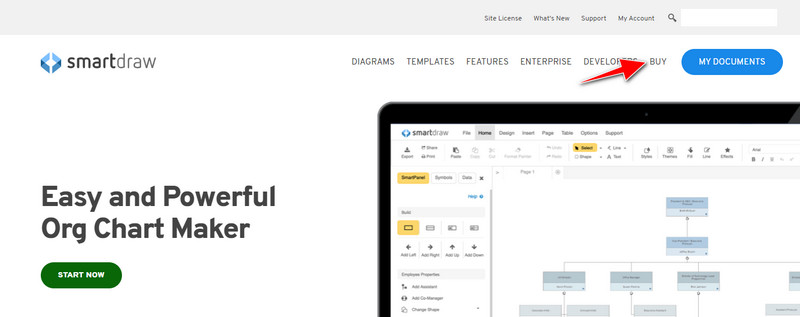
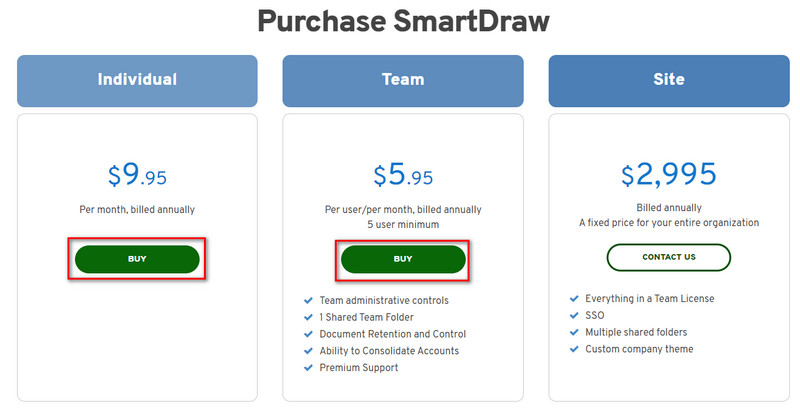
مرحله ۳. میتوانید SmartDraw را برای «Individual» (شخصی)، «Team» (تیمی) یا «Site» (سازمانی/سایتی) خریداری کنید. اگر قصد خرید نسخه Individual یا Team را دارید روی «Buy Now» کلیک کنید.
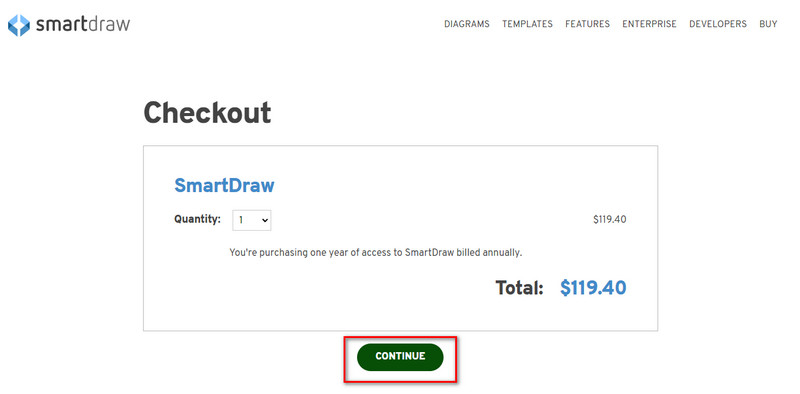
مرحله ۴. در سمت راست، جمع کل مبلغ ابزار را پس از یک سال مشاهده میکنید؛ برای ادامه روی «Continue» کلیک کنید.
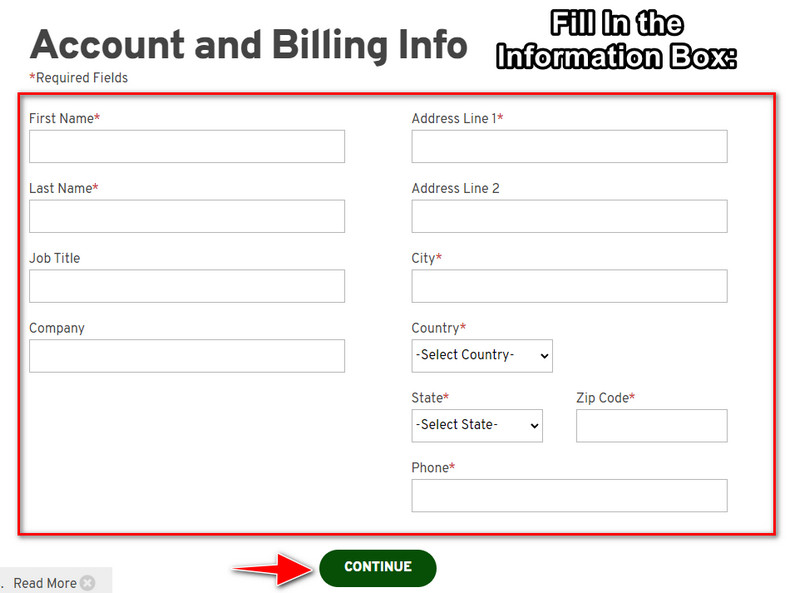
مرحله ۵. اطلاعات حساب و صورتحساب موردنیاز را وارد کرده و سپس روی «Continue» فشار دهید تا برای دریافت کلید لایسنس ادامه دهید.
قسمت 2. نحوه حذف واترمارک در Smart Draw به صورت رایگان با استفاده از وب سرویس [بدون هزینه]
چطور بدون خرید، واترمارک نسخه آزمایشی SmartDraw را حذف کنیم؟ در این صورت باید از FVC Free Watermark Remover Online استفاده کنید. این ابزار حذف واترمارک آماده استفاده شماست. برای پاک کردن واترمارک از روی تصویر، نیازی به تخصص ندارید، زیرا کار با این ابزار برایتان دشوار نخواهد بود. حتی اگر کاربر حرفهای هستید، باز هم میتوانید از این نرمافزار برای حذف واترمارکها یا اشیای ناخواسته روی تصویر خود استفاده کنید. با کمک این حذفکننده واترمارک، لکهای روی تصویر شما باقی نمیماند که نتواند آن را پاک کند. میخواهید بهجای خرید لایسنس، این نرمافزار را امتحان کنید؟ اگر چنین است، طبق آموزشی که در زیر آوردهایم عمل کنید تا واترمارک را بهطور مؤثر از روی تصاویر حذف کنید.
مراحل نحوه حذف واترمارک SmartDraw روی نمودار یا نمودار به صورت رایگان:
مرحله ۱. بهجای جستوجوی این ابزار وب در مرورگر، میتوانید روی این لینک کلیک کنید تا در یک تب جدید در موتور جستوجوی شما باز شود.
مرحله ۲. با استفاده از ماوس، تصویر نمودار یا دیاگرامی را که در SmartDraw ساختهاید «کشیده و رها کنید» تا آن را آپلود کنید.
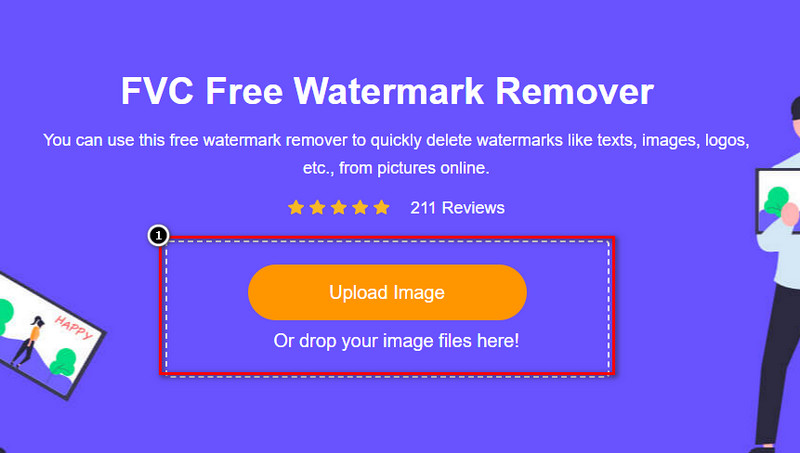
مرحله ۳. حالا که ابزار آنلاین حذف واترمارک باز شده است، ابزاری را انتخاب کنید که با آن میخواهید واترمارک را روی تصویر مشخص کنید.
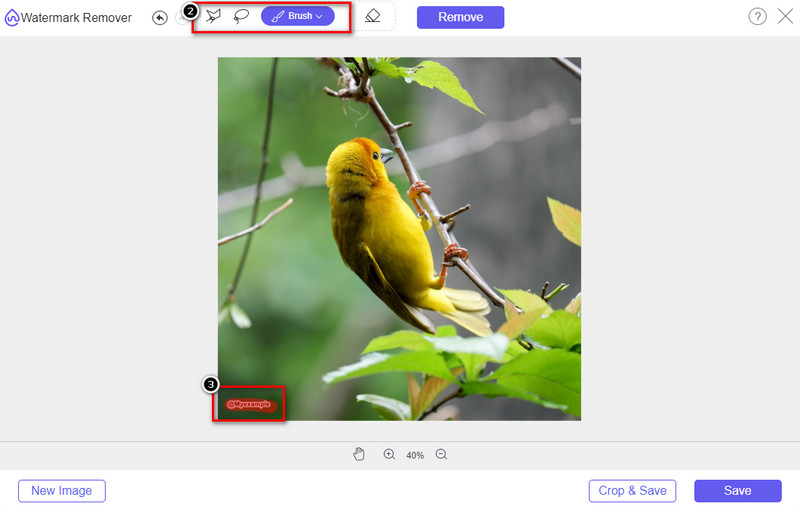
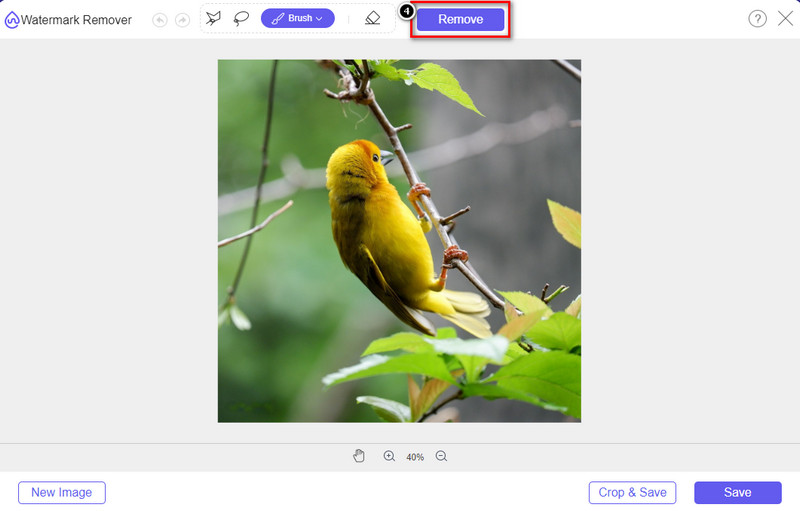
مرحله ۴. پس از مشخص کردن واترمارک یا لوگو روی تصویر آپلودشده، دکمه «Remove» را فشار دهید.
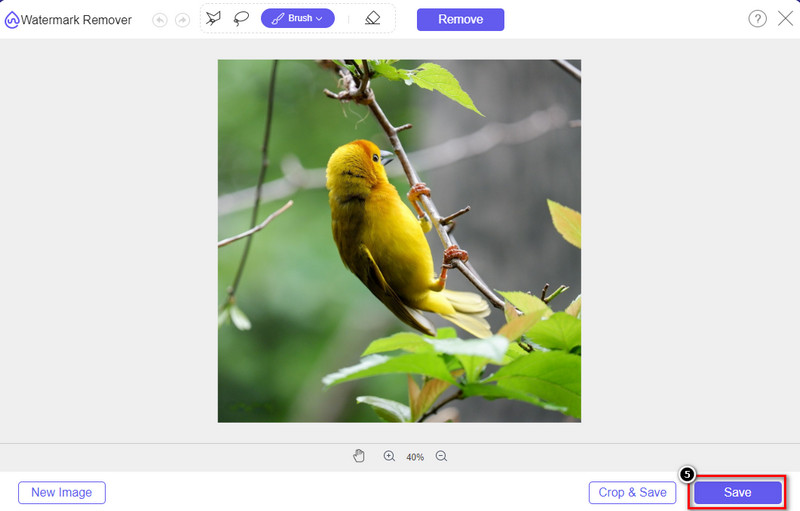
مرحله ۵. منتظر بمانید تا فرایند حذف واترمارک انجام شود و سپس روی «Save» کلیک کنید تا نمودار یا دیاگرام آپلودشده را دانلود کنید. پوشهای روی صفحهنمایش شما باز میشود؛ حالا نسخه نمودار یا دیاگرامی را که بدون واترمارک ایجاد کردهاید بررسی کنید.
مزایای استفاده از FVC Free Watermark Remover Online:
◆ دانلود برنامه ضروری نیست زیرا در وب در دسترس است.
◆ از طیف گسترده ای از تصاویر پشتیبانی می کند و می تواند واترمارک ها را به طور موثر حذف کند.
◆ این یک حذف کننده واترمارک اختصاصی است که خروجی باکیفیت تولید می کند.
◆ پس از صدور هیچ واترمارکی به خروجی نهایی اضافه نمی شود.
◆ بدون محدودیت در تعداد دفعات استفاده و اندازه فایل.
قسمت 3. بخش اضافی - نحوه ایجاد نمودار، نمودار یا نمودار در SmartDraw با مراحل دقیق
قسمت قبلی به شما می آموزد که چگونه از شر واترمارک SmartDraw خلاص شوید. در این قسمت نحوه ساخت نمودار، نمودار و نمودار را با کمک SmartDraw به شما آموزش می دهیم. می توانید مراحلی را که در زیر اضافه می کنیم دنبال کنید تا بدانید چگونه این کار را انجام دهید.
مرحله ۱. به وبسایت رسمی آن بروید تا یک نمودار، چارت یا دیاگرام ایجاد کنید.
مرحله ۲. حالا که وبسایت رسمی را باز کردهاید، روی «Start Now» کلیک کنید و حساب کاربریتان را باز کنید.
مرحله ۳. در سمت چپ، نوع قالب (Template) موردنظر برای ساخت یا استفاده را انتخاب کنید.
مرحله ۴. اطلاعات را به هر بخش از فلوچارت اضافه کنید. در سمت چپ وبسایت گزینههای بیشتری در دسترس شما خواهد بود.
مرحله ۵. روی دکمه «Export» کلیک کنید، نوع فرمت موردنظر را انتخاب کرده و روی آن کلیک کنید تا فرایند آغاز شود. اگر از نسخه رایگان استفاده میکنید، روی خروجی واترمارک خواهد بود؛ میتوانید برای حذف واترمارک، مراحل بخش ۲ را کپی و تکرار کنید.
مطالعه بیشتر:
چگونه واترمارک B612 را از روی تصاویر خود حذف کنیم
چگونه واترمارک WOW Slider را بهصورت رایگان حذف کنیم
بخش 4. سوالات متداول در مورد نحوه حذف واترمارک SmartDraw
آیا SmartDraw می تواند تصاویر PNG را صادر کند؟
بله، شما می توانید یک نمودار شفاف با فرمت PNG داشته باشید. با این حال، اگر از نسخه رایگان استفاده کنید، یک واترمارک اضافه می کند. شما می توانید نسخه رسمی را خریداری کنید، بنابراین یک واترمارک روی تصویر صادر شده وجود خواهد داشت.
قیمت SmartDraw چقدر است؟
اگر می خواهید طرحی را در SmartDraw خریداری کنید، می توانید طرح آن را از $ 5.95 خریداری کنید. می توانید قیمت های دیگری را که ارائه می دهد در وب سایت رسمی بررسی کنید.
مزیت خرید نسخه پریمیوم SmartDraw چیست؟
میتوانید به کنترل سرپرست تیم، پوشه تیم، پشتیبانی برتر و صادرات تصاویر بدون واترمارک برای برنامههای فردی دست پیدا کنید. برای سایر مزایای برتر، می توانید از وب سایت رسمی بازدید کنید و ببینید چه ویژگی ها و عملکردهایی را می توانید دریافت کنید.
نتیجه
اکنون که می دانید چگونه SmartDraw را بدون واترمارک با دو روشی که اضافه می کنیم ذخیره کنید. یا آن را خریداری می کنید یا از ابزاری برای حذف واترمارک روی فایل صادر شده استفاده می کنید. اگر دوست ندارید این ابزار را بخرید، باید از آن استفاده کنید زیرا کارآمدترین ابزار وب برای از بین بردن واترمارک است. اگر فکر می کنید که این مقاله به شما در حل مشکل کمک کرده است، به ما امتیاز 5 ستاره می دهید.
-
 4 بهترین راه برای حذف واترمارک از GIF [آنلاین و آفلاین]
 آیا نیاز به حذف واترمارک از GIF دارید؟ با ابزار موجود در این مقاله، سبک های مختلف را با پاک کننده های مختلف واترمارک موجود در پلت فرم خود خواهید آموخت.
-
 5 ساده ترین راه برای حذف متادیتا در هر فایل رسانه ای
 چگونه ابرداده را حذف کنیم؟ انجامش سخته؟ آیا نیاز به خرید یا استفاده از یک ابزار رایگان برای حذف برچسب ها دارم؟ همه این سوالات در این مقاله پاسخ دارند.
-
 برجسته Photobucket Watermark Remover آنلاین و آفلاین
 نحوه حذف واترمارک Photobucket را با استفاده از این حذف کننده واترمارک Photobucket از عکس های خود بیاموزید. این مقاله را بخوانید تا راه ها را بیاموزید.
