


 Video Converter Ultimate
 ضبط صفحه
 تعمیر ویدیو
راه های باشکوه برای حذف لوگو از یک ویدیو با استفاده از دستگاه های شما
تماشای ویدیوهای موردعلاقهتان لذتبخش است، تا وقتی که در ویدیو یک شیء اضافی مثل لوگو، واترمارک، متن و غیره دیده شود. اگر بهدنبال بهترین و کاربردیترین روشها هستید، باید این مقاله را بخوانید تا ایده بگیرید. با استفاده از برنامههای قدرتمند، میتوانید به روشهای مختلف لوگوها را بهصورت آفلاین و آنلاین از ویدیو حذف کنید. با کمک این ابزارهای حذف لوگو، میتوانید از تماشای فیلمها، کلیپها، اسلایدشوها و موارد دیگر بدون مزاحمت لذت ببرید و دیگر با همان مشکل روبهرو نشوید. اگر میخواهید روشهای مؤثر برای حذف لوگو از ویدیوهایتان را یاد بگیرید، این مقالهی کاربردی را از دست ندهید.

بخش 1: بهترین روش برای حذف لوگو از یک ویدیو
اگر بهدنبال یک حذفکنندهی لوگوی رایگان هستید، بهترین برنامهای که میتوانید از آن استفاده کنید Video Converter Ultimate است. این برنامه میتواند به شما کمک کند لوگو را از ویدیوی خود حذف کنید. نهفقط لوگو، بلکه هر شیء اضافی دیگر روی ویدیوهایتان مانند واترمارک، متن، تصویر و غیره را هم میتوانید پاک کنید. همچنین حذف لوگو با آن بسیار ساده است، چون فقط چند مرحلهی آسان دارد که حتی یک مبتدی هم میتواند انجام دهد.
علاوه بر این، Video Converter Ultimate برخلاف سایر برنامه هایی که برای حذف لوگوها از یک ویدیو زمان زیادی را صرف می کنند، روند حذف سریعی دارد. با استفاده از این اپلیکیشن می توانید لوگو را با دو ابزار آسان پاک کننده واترمارک ویدیویی و برش دهنده ویدئو حذف کنید. علاوه بر این، دارای ویژگی هایی است که می توانید از آنها لذت ببرید، مانند مبدل ویدیو، کنترل کننده سرعت ویدیو، کمپرسور ویدیو، تصحیح رنگ، برش دهنده ویدیو، سازنده کلاژ و موارد دیگر. اگر می خواهید این دو راه را برای حذف لوگوها با استفاده از Video Converter Ultimate بدانید، مراحل زیر را دنبال کنید.
1. استفاده از عملکرد Video Watermark Remover
مرحله 1: در گام اول، به وبسایت Video Converter Ultimate بروید و نرمافزار را دانلود کنید. پس از دانلود، مراحل نصب را انجام داده و Video Converter Ultimate را روی دسکتاپ خود اجرا کنید.
دانلود رایگانبرای ویندوز 7 یا بالاتردانلود امن
دانلود رایگانبرای MacOS 10.7 یا بالاتردانلود امن
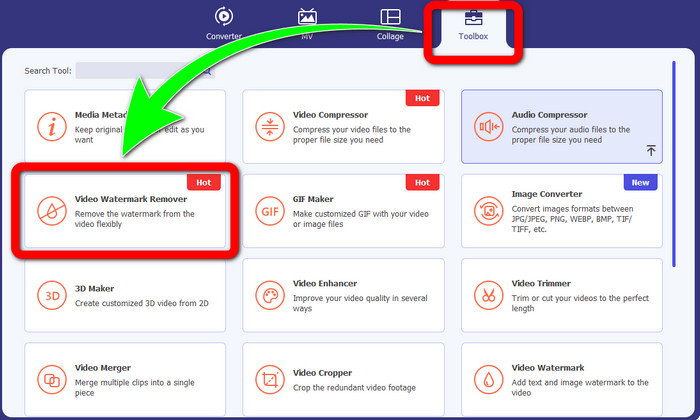
مرحله 2: بعد از اجرای نرمافزار، به بخش Toolbox بروید. سپس گزینهی Video Watermark Remover را پیدا کرده و روی آن کلیک کنید.
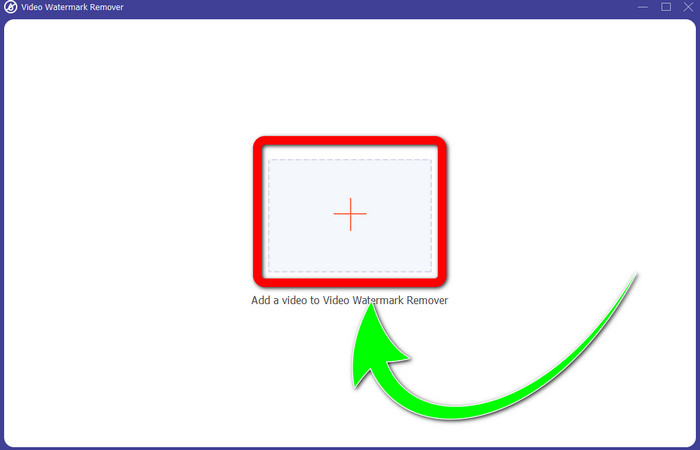
مرحله 3: پس از کلیک روی Video Watermark Remover، یک رابط کاربری جدید روی دسکتاپ شما باز میشود. دکمهی علامت بعلاوه را انتخاب کرده و ویدیوی حاوی لوگو را وارد کنید.
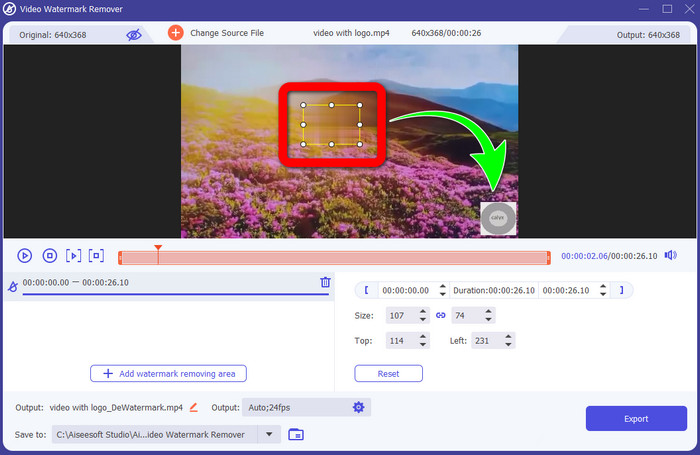
مرحله 4: دکمهی Add Watermark Removing Area را انتخاب کنید. یک کادر کوچک روی ویدیو ظاهر میشود. این کادر را روی لوگو جابهجا کنید تا آن را بپوشاند.
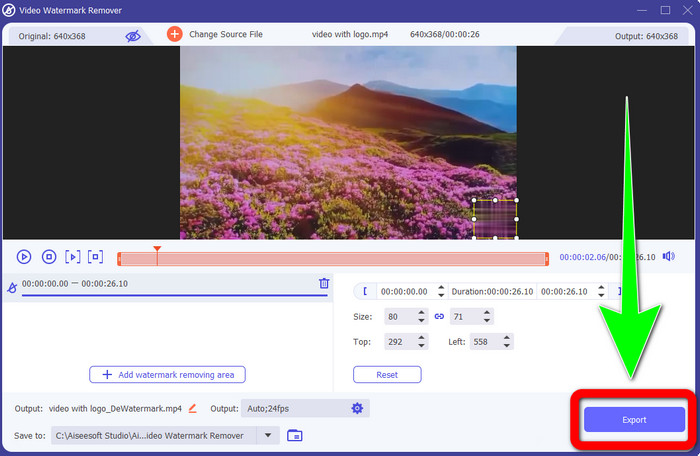
مرحله 5: وقتی جابهجایی کادر و پوشاندن لوگو را تمام کردید، برای ذخیرهی ویدیوی نهایی روی دکمهی Export کلیک کنید.
1. با استفاده از عملکرد Video Cropper
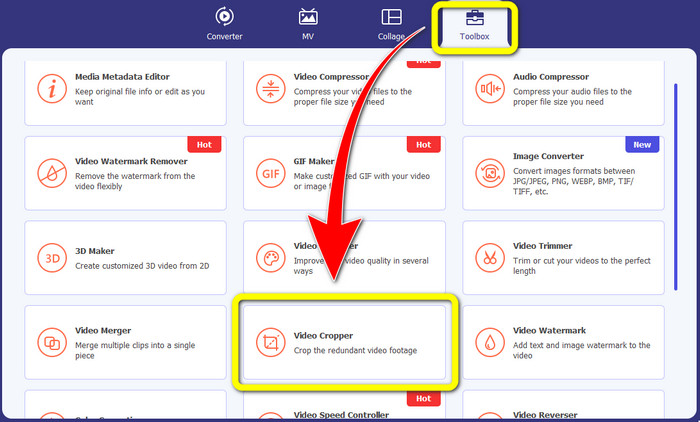
مرحله 1: Video Converter Ultimate را باز کنید، به بخش Toolbox بروید و روی دکمهی Video Cropper کلیک کنید. سپس یک رابط جدید روی صفحهنمایش شما باز میشود.
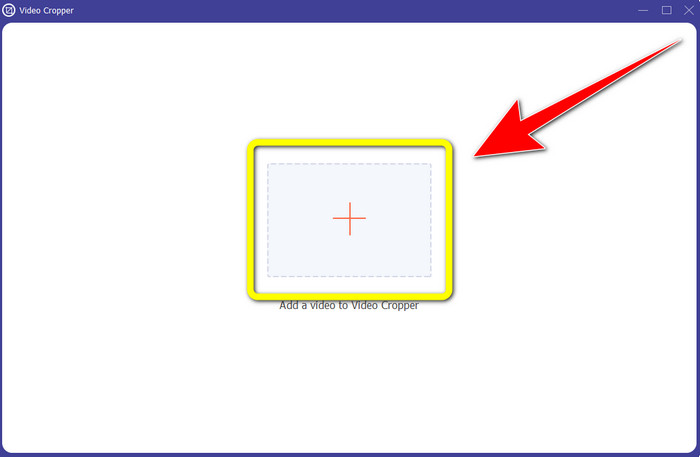
مرحله 2: وقتی رابط جدید روی صفحه ظاهر شد، دکمهی Plus را انتخاب کرده و ویدیوی حاوی لوگو را وارد کنید.
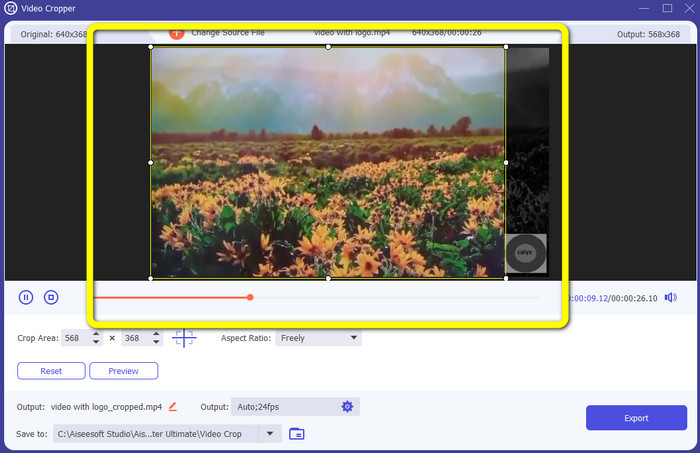
مرحله 3: پس از وارد کردن ویدیو، میتوانید ویدیوی خود را کراپ کنید تا لوگو را از تصویر حذف کنید.
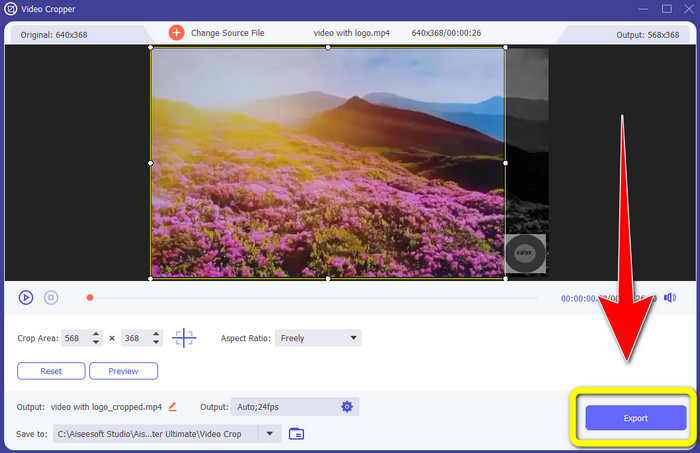
مرحله 4: بعد از کراپ کردن ویدیو، روی دکمهی Export کلیک کنید.
قسمت 2: نحوه حذف لوگو از ویدیو آنلاین
اگر بهدنبال یک ابزار عالی برای کمک به حذف لوگو از ویدیو هستید، میتوانید از 123APPS استفاده کنید. این برنامه میتواند بهسرعت و بهراحتی لوگو را از ویدیوی شما حذف کند، که آن را برای مبتدیان بسیار مناسب میسازد. علاوه بر این، این ابزار آنلاین رایگان است، بنابراین لازم نیست نگران خرید آن باشید. همچنین یکی از قابلیتهای خوب این برنامه، حذف اشیای آزاردهنده روی ویدیوها، مانند واترمارکها، متنها، تصاویر و غیره است. افزون بر این، از فرمتهای مختلف فایل مانند MOV، WMV، AVI، MP4 و غیره پشتیبانی میکند. با این حال، هر بار که فایلی را آپلود میکنید، عملیات بارگذاری زمانبر است و فرایند حذف نیز نسبتاً کند انجام میشود. اگر میخواهید لوگو را از ویدیوهای خود حذف کنید، مراحل سادهی زیر را دنبال کنید.
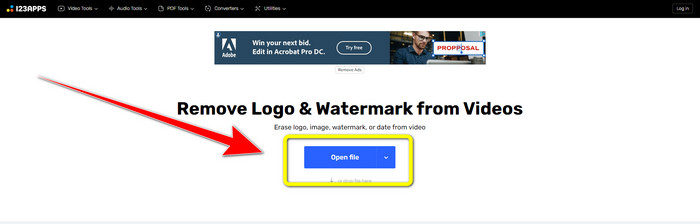
مرحله 1: به وبسایت 123APPS بروید. روی دکمهی Open file کلیک کرده و ویدیوی حاوی لوگوی تیکتاک را اضافه کنید.
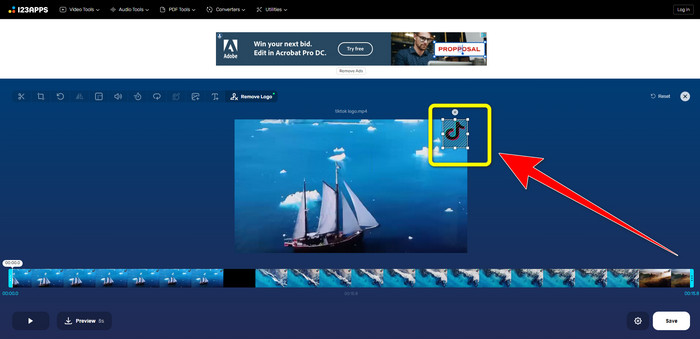
مرحله 2: بعد از ضمیمه کردن ویدیو، با استفاده از ماوس روی صفحه یک کادر رسم کنید و آن را روی لوگو قرار دهید تا پوشانده و حذف شود.
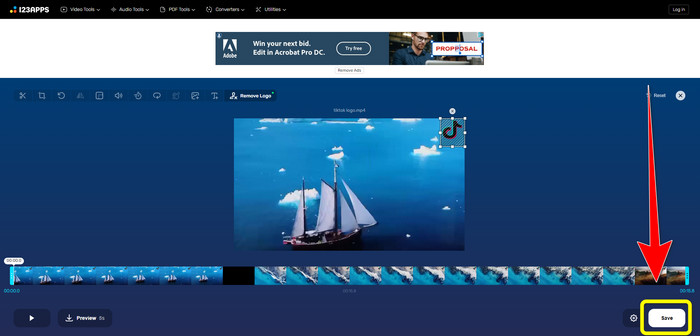
مرحله 3: پس از پوشاندن لوگو، اکنون میتوانید روی دکمهی Save کلیک کنید تا خروجی نهایی ویدیوی خود را بدون لوگو ذخیره کنید.
قسمت 3: نحوه حذف لوگو از ویدیو در آیفون و اندروید
چگونه لوگو را از ویدیو در اندروید پاک کنیم
اگر میخواهید بدانید چگونه با استفاده از اندروید لوگو را از ویدیو حذف کنید، برنامهی Remove and Add Watermark ابزاری است که میتوانید از آن بهره ببرید. این نرمافزار میتواند فوراً به شما کمک کند تا لوگو را از ویدیوهایتان حذف کنید. همچنین فقط برای حذف اشیای اضافی روی ویدیوها کاربرد ندارد، بلکه میتوانید لوگوها را از روی تصاویر خود نیز پاک کنید، که برای کاربران بسیار راحت است. علاوه بر این، کار با این حذفکننده ساده و آسان است و در ذخیرهی ویدیوها نیز سریع عمل میکند. اگر میخواهید لوگو را از ویدیوهای خود حذف کنید، مراحل سادهی زیر را دنبال کنید.
مرحله 1: برنامهی Remove and Add Watermark را روی دستگاه اندرویدی خود دانلود کنید.
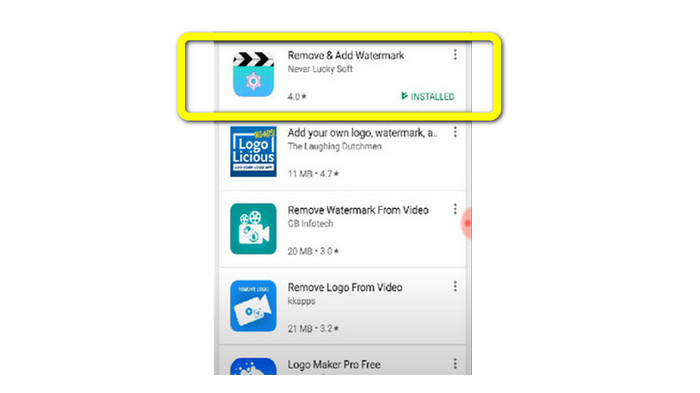
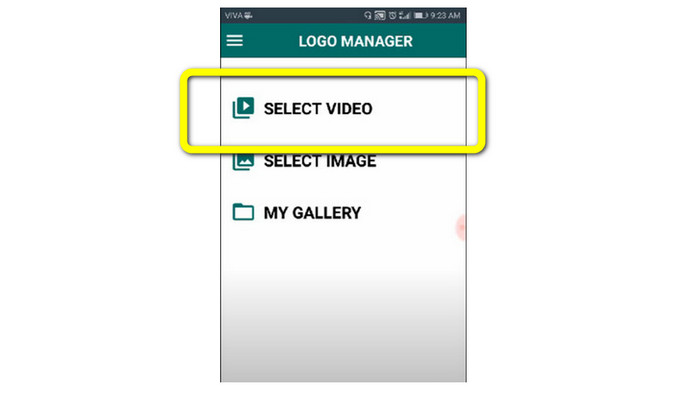
مرحله 2: پس از دانلود برنامه، برای افزودن ویدیوی دارای لوگو، روی دکمهی Select Video > Remove Logo کلیک کنید.
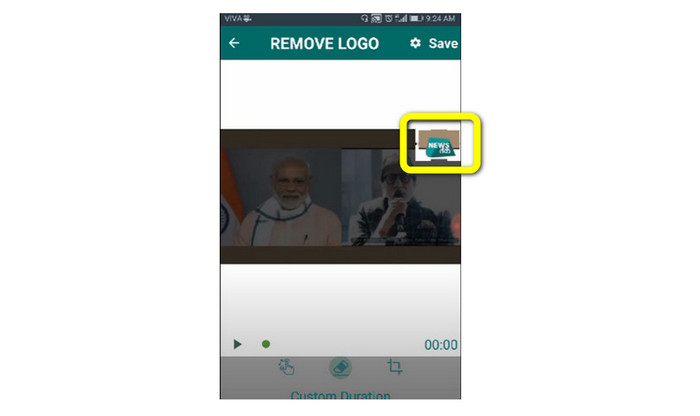
مرحله 3: وقتی ویدیو را اضافه کردید، یک کادر کوچک روی صفحهنمایش ظاهر میشود. از این کادر برای حذف لوگو استفاده کنید.
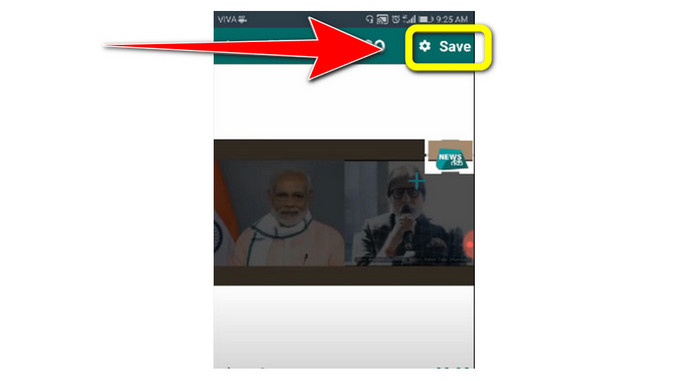
مرحله 4: وقتی پوشاندن لوگو را تمام کردید، برای ذخیرهی ویدیو بدون لوگو روی دکمهی Save کلیک کنید.
نحوه حذف لوگو از ویدیو در آیفون
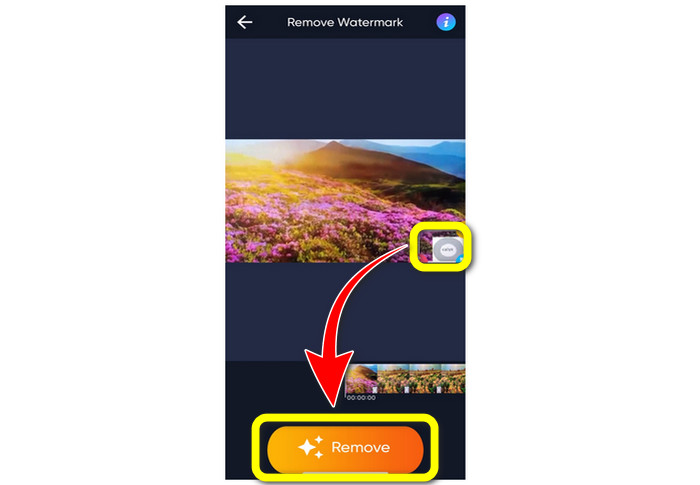
اگر میخواهید با استفاده از آیفون لوگو را از ویدیوهایتان پاک کنید، بهترین برنامهای که میتوانید استفاده کنید Watermark Remover Retouch است. این برنامه به شما اجازه میدهد اشیای اضافی را از روی ویدیوها، مانند لوگو، واترمارک، متن، تصویر و غیره حذف کنید. همچنین میتوانید آنها را خیلی سریع پاک کنید، که برای کاربران تازهکار بسیار مناسب است. افزون بر این، رابط کاربری سادهای دارد، بنابراین استفاده از آن راحت است. اگر میخواهید با استفاده از این برنامه لوگوها را از ویدیوی آیفون خود حذف کنید، مراحل سادهی زیر را دنبال کنید.
مرحله 1: برنامهی Watermark Remover Retouch را روی آیفون خود دانلود کنید. سپس برنامه را اجرا کرده و ویدیوی حاوی لوگو را اضافه کنید.
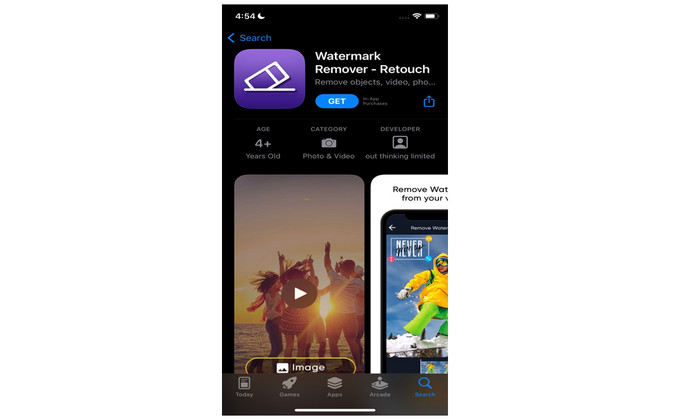
مرحله 2: وقتی ویدیو اضافه شد، یک کادر کوچک روی تصویر ویدیو ظاهر میشود. از این کادر برای پوشاندن لوگو استفاده کنید. سپس روی دکمهی Remove کلیک کرده و ویدیوی خود را بدون واترمارک ذخیره کنید.
مرتبط با:
چگونه واترمارک Filmora را بهصورت رایگان از روی ویدیوها یا پروژههای خود حذف کنیم
سریعترین ترفند برای حذف واترمارک Adobe Stock از یک ویدیو [آموزش]
بخش 4: سوالات متداول در مورد حذف لوگو از ویدیو
آیا حذف لوگو به صورت آنلاین امن است؟
بله همینطور است! برنامه های آنلاین برای استفاده ایمن و ایمن هستند. بهترین کاری که باید انجام دهید این است که به دنبال برنامه ای بگردید که به شما در حذف لوگوها و استفاده از آنها کمک کند.
آیا امکان حذف امضا از ویدیوهای من وجود دارد؟
بله، حتماً. میتوانید امضاها را با استفاده از Video Converter Ultimate از روی ویدیوهایتان حذف کنید. امضا، واترمارک، لوگو و متن را میتوان با این برنامهی قدرتمند بهراحتی از ویدیو پاک کرد.
بهترین برنامه ای که می توانم برای حذف لوگوها با استفاده از مک خود استفاده کنم چیست؟
بهترین برنامهای که میتوانید برای حذف لوگو روی مک استفاده کنید Video Converter Ultimate است. این برنامه نهفقط برای ویندوز، بلکه برای مک نیز در دسترس است که برای کاربران بسیار راحت و کاربردی است.
نتیجه
این مقاله روشهای مؤثر و قابلاعتمادی برای حذف لوگو از روی ویدیوهایتان در اختیار شما قرار داد. به این ترتیب میتوانید از تماشای ویدیوهای موردعلاقهی خود بدون لوگو لذت ببرید. در نهایت، اگر میخواهید سادهترین و بیدردسرترین روش برای حذف لوگو از ویدیوهایتان را انتخاب کنید، باید از Video Converter Ultimate استفاده کنید.
-
 نحوه حذف واترمارک Animaker بدون هزینه [راههای اثبات شده]
 چگونه واترمارک Animaker را حذف کنیم؟ با بهترین ابزارهایی که در این وبلاگ ثبت نام کرده ایم، می توانید از آنها برای خلاص شدن از شر واترمارک استفاده کنید.
-
 آموزش حذف واترمارک از Origin Graph [100% Working]
 برای حذف واترمارک از Origin Graph به کمک نیاز دارید. کمکی که نیاز دارید در این مقاله گنجانده شده است، برای دانستن آن می توانید آن را بخوانید.
-
 نحوه حذف واترمارک در SmartDraw به راحتی [2 راه اثبات شده]
 چگونه واترمارک را در Smart Draw حذف کنیم؟ اگر شما هم همین سوال را دارید، می توانید به این مقاله اعتماد کنید که ما شما را تحت پوشش قرار دادیم!
