


 Video Converter Ultimate
 ضبط صفحه
 تعمیر ویدیو
روش های بی چالش در مورد نحوه حذف لوگوی iSkysoft از ویدیو
iSkysoft یک برنامه عالی با ویژگیهای شگفتانگیز فراوان است که آن را از سایر نرمافزارها متمایز میکند. این یک برنامه ساده است که به شما امکان میدهد فرمت ویدیو را به فرمت دیگری تبدیل کرده و برخی ویرایشهای ویدیویی پایه را انجام دهید. با این حال، ناراحتکنندهترین بخش این نرمافزار این است که پس از استفاده از آن، واترمارک بزرگ iSkysoft روی ویدیوهای شما قرار میگیرد. داشتن یک واترمارک یا لوگوی بزرگ روی ویدیو اصلاً برای تماشا رضایتبخش نیست. خوشبختانه، برنامههای قابل اعتمادی وجود دارد که میتوانید برای حذف عناصر آزاردهندهای مانند لوگو/واترمارک iSkysoft از آنها استفاده کنید. اگر مشتاق هستید بهترین روشها برای حذف لوگوی iSkysoft از ویدیوی خود را پیدا کنید، باید این مطلب را بخوانید.

قسمت 1: حذف لوگوی iSkysoft از ویدیو روی دسکتاپ
لوگوی iSkysoft روی صفحهنمایشتان واقعاً آزاردهنده است، بهخصوص وقتی در حال تماشای ویدیوهای مورد علاقهتان هستید. اما دیگر لازم نیست نگران باشید. میتوانید با استفاده از Video Converter Ultimate از شر این لوگو خلاص شوید. این نرمافزار قابل اعتماد میتواند در دو روش ساده به شما کمک کند لوگوی iSkysoft را از روی ویدیوهایتان حذف کنید: ابزار Video Watermark Remover و ابزار Video Cropper. با این ابزارها میتوانید بهآسانی لوگوی iSkysoft را از ویدیوی خود حذف کنید. اگر لوگوی iSkysoft در گوشه ویدیو قرار دارد، توصیه میشود از ابزار Video Cropper استفاده کنید. اما اگر لوگو در قسمت میانی قرار گرفته است، میتوانید از ابزار Video Watermark Remover استفاده کنید. به این ترتیب، میتوانید فیلمها یا ویدیوهای مورد علاقهتان را بدون آزار دیدن از لوگو تماشا کنید.
علاوه بر این، علاوه بر حذف واترمارک از ویدیوهای شما، Video Converter Ultimate دارای ویژگی های بیشتری است. دارای تقویت کننده ویدئو، ادغام ویدئو، برش دهنده، صاف کننده، روتاتور، مبدل و غیره است. علاوه بر این، یکی از عملکردهای اصلی این اپلیکیشن تبدیل فرمت های مختلف فایل های ویدئویی است. کاربران غیرحرفه ای نیز می توانند از این اپلیکیشن استفاده کنند زیرا رابط کاربری ساده ای دارد. اگر می خواهید یاد بگیرید که چگونه لوگوی iSkysoft را از ویدیوی خود حذف کنید، ما دو راه آسان را به شما نشان خواهیم داد.
استفاده از Video Watermark Remover
مرحله 1: ابتدا باید Video Converter Ultimate را روی دسکتاپ خود دانلود کنید تا بتوانید از این نرمافزار عالی استفاده کنید. بعد از دانلود، مراحل نصب را دنبال کرده و برنامه را اجرا کنید.
دانلود رایگانبرای ویندوز 7 یا بالاتردانلود امن
دانلود رایگانبرای MacOS 10.7 یا بالاتردانلود امن
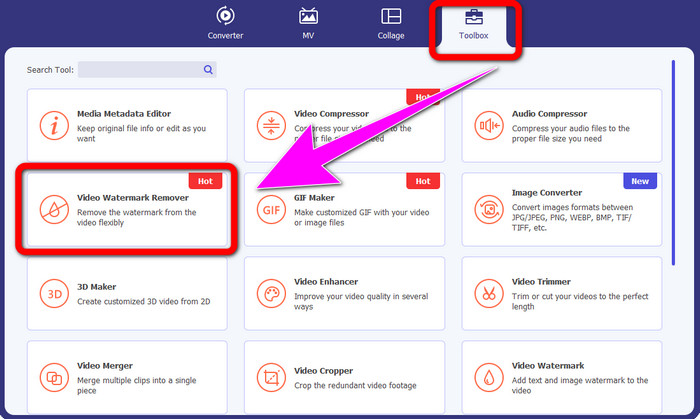
مرحله 2: هنگامی که نرمافزار را اجرا کردید، به بخش Toolbox بروید و ابزار Video Watermark Remover را انتخاب کنید. انتظار داشته باشید که رابط دیگری روی صفحه شما ظاهر شود.
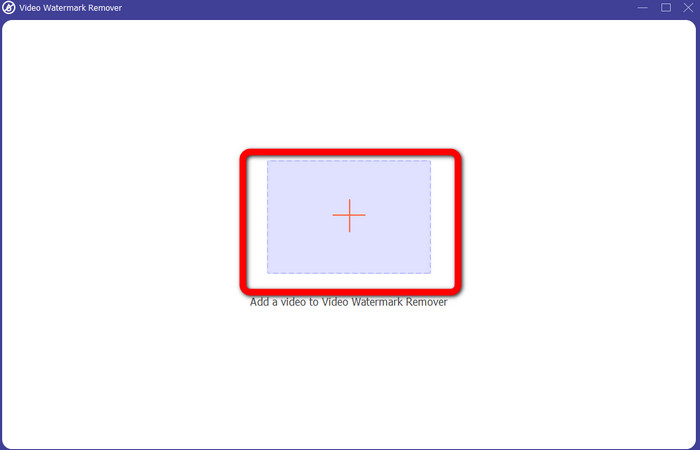
مرحله 3: وقتی رابط جدید را دیدید، روی آیکون بعلاوه کلیک کنید و ویدیوی حاوی لوگوی iSkysoft که میخواهید حذف کنید را ضمیمه کنید.
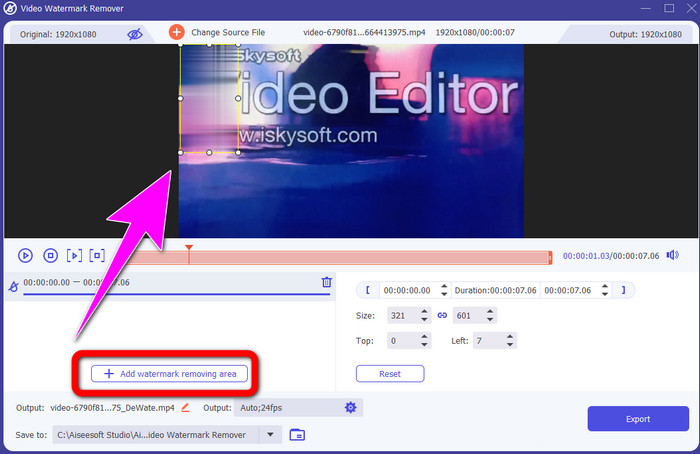
مرحله 4: سپس روی دکمه Add Watermark Removing Area کلیک کنید. جعبه را روی ویدیوی خود جابهجا کرده و روی لوگوی iSkysoft قرار دهید.
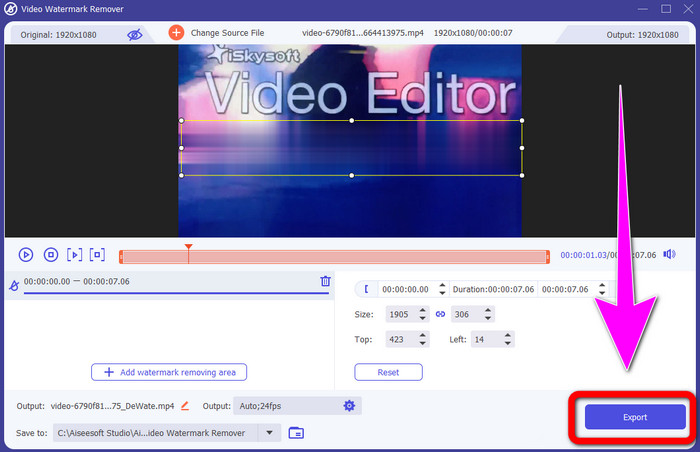
مرحله 5: در نهایت روی دکمه Export کلیک کنید تا ویدیوی نهایی خود را ذخیره کنید.
استفاده از Video Cropper
در این قسمت به شما نشان خواهیم داد که چگونه با استفاده از ابزار Video Cropper، لوگوی iSkysoft را از ویدیوی خود حذف کنید.
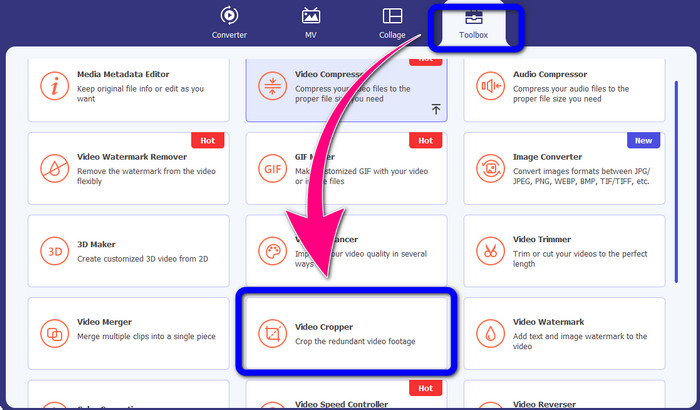
مرحله 1: برنامه را روی دسکتاپ خود اجرا کنید. در بخش Toolbox باید روی ابزار Video Cropper کلیک کنید. مانند ابزار قبلی، انتظار داشته باشید که رابط دیگری روی صفحه شما نمایش داده شود.
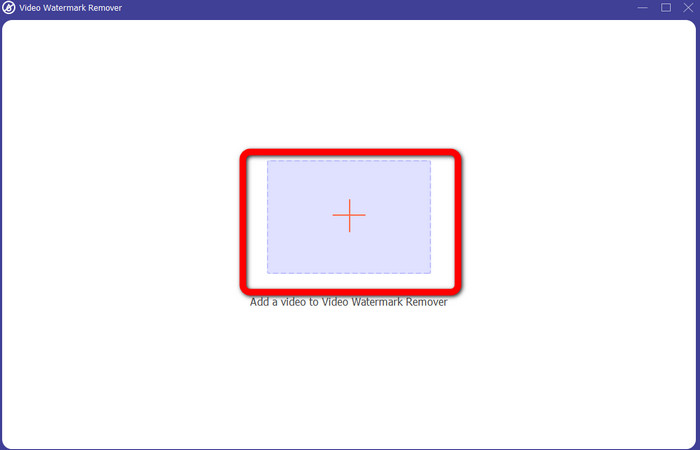
مرحله 2: روی دکمه Plus کلیک کنید تا ویدیوی حاوی لوگوی iSkysoft را وارد کنید.
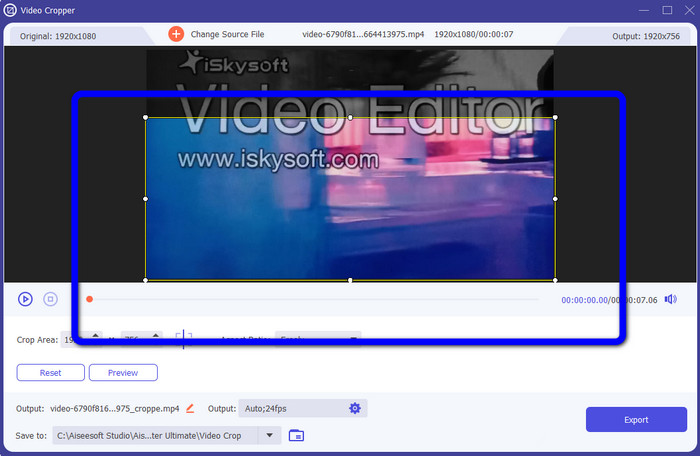
مرحله 3: در این بخش میتوانید برای حذف لوگوی iSkysoft ویدیو را برش دهید. با استفاده از ماوس لبههای ویدیو را جابهجا کنید.
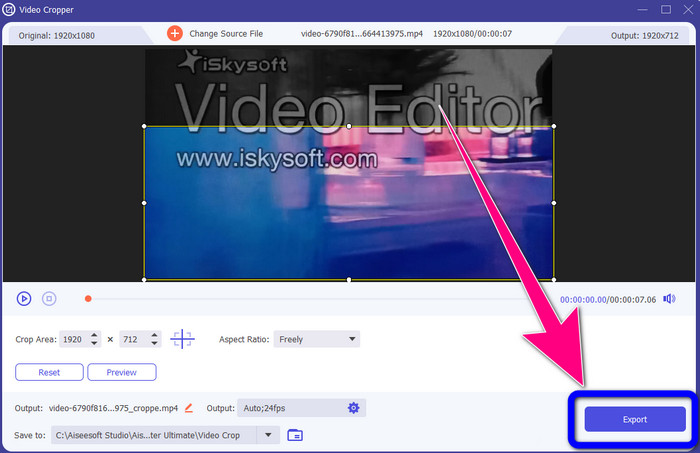
مرحله 4: در آخرین مرحله، روی دکمه Export کلیک کرده و خروجی خود را در دسکتاپ ذخیره کنید.
بخش 2: نحوه حذف لوگوی iSkysoft از ویدیو آنلاین
با استفاده از HitPaw
همچنین میتوانید لوگوی iSkysoft را بهصورت آنلاین حذف کنید. یکی از بهترین ابزارهایی که میتوانید استفاده کنید HitPaw است. این برنامه آنلاین میتواند بهراحتی لوگو را از روی ویدیوی شما حذف کند. میتوانید هم روی دسکتاپ و هم بهصورت آنلاین از آن استفاده کنید، که برای همه کاربران بسیار راحت است. همچنین HitPaw استفادهای امن دارد. این ابزار تضمین میکند که ویدیوها فقط توسط خود شما ویرایش و مشاهده میشوند. علاوه بر این، نیازی نیست نگران محدودیتهای این نرمافزار باشید. در زمینه حذف لوگو از ویدیوهای شما محدودیتی ندارد. لازم نیست این برنامه را خریداری کنید، چون رایگان است. با این حال، اگر لوگو یا هر
عناصر غیر ضروری از ویدیوی شما، باید کمی بیشتر صبر کنید. این اپلیکیشن روند حذف کندی دارد که برای کاربران وقت گیر است. همچنین بستگی به اتصال اینترنت شما دارد. اگر اتصال سریع داشته باشید عملکرد خوبی خواهد داشت. اما، اگر اتصال کندی دارید، منتظر کمی تاخیر باشید. برای حذف لوگوی iSkysoft از ویدیوهای خود مراحل ساده زیر را دنبال کنید.
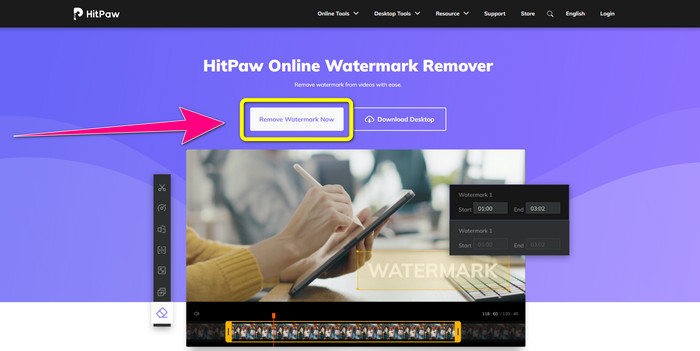
مرحله 1: به وبسایت HitPaw بروید. روی دکمه Remove Watermark Now - Choose File کلیک کنید تا ویدیوی حاوی لوگوی iSkysoft که میخواهید حذف کنید را وارد کنید.
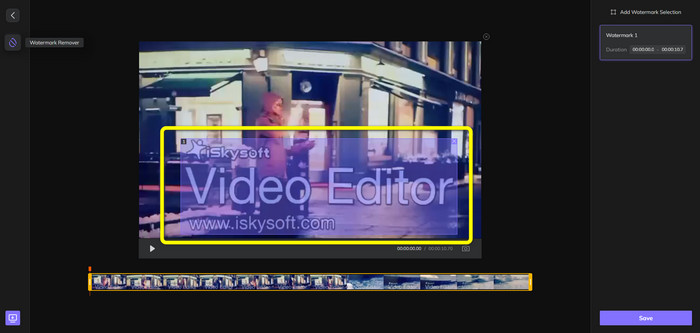
مرحله 2: وقتی فایل ویدیویی خود را ضمیمه کردید، یک جعبه آبیرنگ روی صفحه ظاهر میشود. از این جعبه برای پوشاندن لوگوی iSkysoft استفاده کنید. میتوانید اندازه جعبه را تغییر دهید.
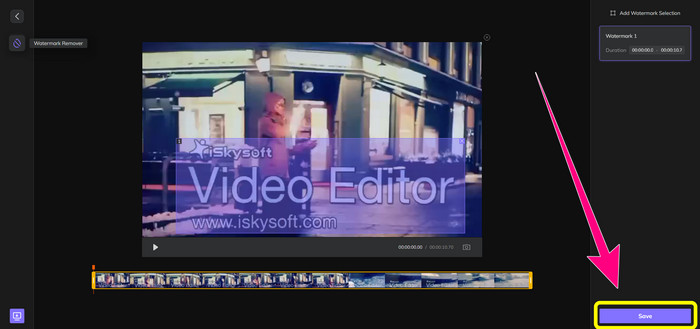
مرحله 3: اگر پوشاندن لوگوی iSkysoft در ویدیو را تمام کردید، روی دکمه Save کلیک کنید. منتظر بمانید تا فرایند حذف کامل شود و سپس ویدیوی خود را ذخیره کنید.
استفاده از Video Watermark Remover Online
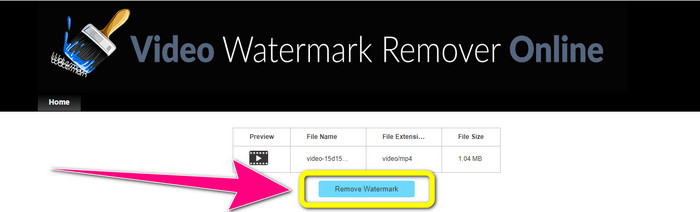
ابزار آنلاین دیگری که میتوانید استفاده کنید Video Watermark Remover Online است. با استفاده از این برنامه میتوانید لوگوی iSkysoft را از روی ویدیوهای خود حذف کنید. این نرمافزار همچنین کاربری آسانی دارد و برای کاربران غیرحرفهای مناسب است. میتوانید بدون افت کیفیت ویدیو، هر عنصر آزاردهنده دیگری را نیز از ویدیوهایتان حذف کنید. اما هنگام استفاده از نسخه رایگان، در حذف لوگو از ویدیوها محدودیت وجود دارد. فقط میتوانید از 5 ویدیو لوگو یا واترمارک را حذف کنید. اگر میخواهید ویدیوهای بیشتری را با Video Watermark Remover Online پردازش کنید، باید اشتراک آن را خریداری کنید. همچنین نمیتوانید خروجی خود را در فرمت دیگری ذخیره کنید. فقط میتوانید آن را در همان فرمت اصلی ذخیره کنید، که چندان مطلوب نیست. در نهایت، سرعت پردازش فایل در آن پایین است. برای حذف لوگوی iSkysoft از ویدیوهای خود، راهنمای ساده زیر را دنبال کنید.
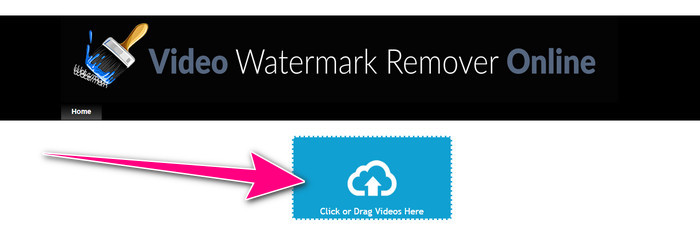
مرحله 1: به وبسایت Video Watermark Remover Online بروید. دکمه Click or Drag Videos Here را انتخاب کنید تا فایل ویدیوی حاوی لوگوی iSkysoft که میخواهید پاک کنید را وارد کنید.
مرحله 2: سپس روی دکمه Remove Watermark کلیک کنید و منتظر بمانید تا فرایند حذف انجام شود.
مرتبط با:
سریعترین روش حذف لوگو از ویدیو در Adobe Premiere Pro
نحوه حذف لوگو از ویدیو با استفاده از Windows Movie Maker
بخش 3: سوالات متداول در مورد حذف لوگوی iSkysoft
آیا می توانید یک لوگو را از یک عکس حذف کنید؟
بله، میتوانید از FVC Free Watermark Remover برای پاک کردن لوگو از تصویر خود بهآسانی و با سرعت استفاده کنید.
آیا حذف واترمارک غیرقانونی است؟
طبق قانون حق چاپ ایالات متحده، بخش 1202، حذف واترمارک بدون اجازه مالک غیرقانونی است.
چگونه لوگو را به صورت رایگان حذف کنم؟
می توانید از نسخه آزمایشی رایگان Video Converter Ultimate برای حذف یک لوگو از ویدیوی خود به صورت رایگان استفاده کنید.
نتیجه
این مقاله روشهای بسیار خوبی برای حذف لوگوی iSkysoft از ویدیوی شما با استفاده از ابزارهای دسکتاپ و آنلاین ارائه داد. اما اگر میخواهید بهدنبال یک حذفکننده لوگوی عالی باشید که بتوانید از آن استفاده کنید، میتوانید Video Converter Ultimate را دانلود کنید. این برنامه فرایند حذف سریعی ارائه میدهد و برای همه کاربران قابل دسترس است.
-
 8 حذف کننده واترمارک ویدیویی آنلاین و آفلاین
 اگر به دنبال بهترین نرم افزار حذف واترمارک ویدیویی رایگان هستید که می توانید در تلفن های ویندوز، مک، آیفون و اندروید خود استفاده کنید، این مقاله برای شما مناسب است.
-
 بهترین روش ها برای حذف واترمارک Biteable از ویدیو
 این مقاله مطمئن ترین و خارق العاده ترین پاک کننده واترمارک قابل گاز گرفتن را به شما نشان می دهد. این برنامه های فوق العاده به شما در حل این نوع مشکل کمک می کند
-
 روش های آسان برای یادگیری برای حذف لوگو از ویدیو
 آیا به دنبال بهترین و آسان حذف لوگوی ویدیویی هستید؟ سپس، این مقاله برای شما خوب است. از فرصت استفاده کنید و در مورد حذف لوگو از یک ویدیو بیاموزید.
