


 Video Converter Ultimate
 ضبط صفحه
 تعمیر ویدیو
روش های عالی در مورد نحوه ایجاد URL از یک تصویر را بیاموزید
امروزه قالبهای مختلف فایل تصویری بسیار رایج شدهاند. این قالبها یکی از بهترین روشها برای بهاشتراکگذاری و باز کردن تصاویر در مرورگرها و برنامههای گوناگون به شمار میآیند. با این حال، گاهی پیش میآید که هرچقدر هم پسوند فایل را عوض کنید، باز هم نمیتوانید تصویرتان را بهاشتراک بگذارید. این وضعیت میتواند دیگران را هم دچار دردسر کند. اما کمتر کسی میداند که برای این مشکل، راهحلی وجود دارد. اگر میخواهید عکسهای خود را در هر جا و برای هر کس بفرستید، بهترین راه این است که تصویر را به یک آدرس اینترنتی (URL) تبدیل کنید. با این کار، بدون نیاز به هیچ پسوند خاصی میتوانید عکس را برای دیگران بفرستید. خوشبختانه، این مقاله یک راهحل عالی در اختیار شما قرار میدهد. این مطلب را تا پایان بخوانید تا با بهترین آموزشها برای اینکه چطور تصاویر را به لینک تبدیل کنید، آشنا شوید.

بخش 1. روش های موثر برای تبدیل تصویر به پیوند
با استفاده از i-Converter تصویر را به لینک تبدیل کنید
برخی از مبدلهای آنلاین تصویر به URL آنطور که باید کار نمیکنند، به همین دلیل میخواهیم شما را با i-Converter آشنا کنیم. این یک مبدل آنلاین است که میتوانید برای تبدیل فایلهای تصویری خود به لینک URL روی آن حساب کنید. این ابزار آنلاین را میتوانید در مرورگرهای مختلف اجرا کنید؛ از جمله فایرفاکس، کروم، اج، اکسپلورر و غیره. همچنین روند تبدیل فایلها در آن ساده است؛ بنابراین چه کاربر حرفهای باشید و چه تازهکار، استفاده از ابزار برای شما مناسب است. علاوه بر این، از قالبهای گوناگون تصویر پشتیبانی میکند. میتوانید تصاویر خود را به JPEG، BMP، TIFF، PNG، GIF، DOC و موارد دیگر تبدیل کنید. از طرفی، i-Converter رایگان است؛ یعنی برای تبدیل تصاویر نیازی به خرید اشتراک ندارید. با این حال، i-Converter فقط مخصوص فایلهای تصویری JPG است. اگر تصویر شما پسوند .jpg نداشته باشد، نمیتوانید آن را در این ابزار آنلاین بارگذاری کنید. همچنین گاهی پیش میآید که ابزار عملکرد خوبی نداشته باشد. چون این سرویس آنلاین است، داشتن اتصال اینترنت مناسب بهشدت توصیه میشود.
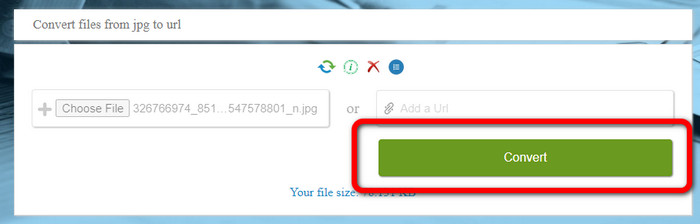
مرحله ۱. یکی از مرورگرهای موجود روی رایانه خود را باز کنید و به وبسایت i-Converter بروید. وقتی وارد صفحه اصلی شدید، روی دکمه Choose File کلیک کنید. وقتی پنجره فایلهای رایانه باز شد، تصویری را که میخواهید به URL تبدیل کنید انتخاب و باز کنید.
مرحله ۲. پس از بارگذاری فایل تصویری که میخواهید آن را تبدیل کنید، روی دکمه Convert کلیک کنید. سپس منتظر بمانید تا فرایند تبدیل انجام شود. بعد از چند ثانیه، ابزار لینک را در اختیار شما میگذارد. با کلیک روی دکمه Copy Code میتوانید لینک را کپی کرده و در مرورگر بچسبانید تا تصویر باز شود.
چگونه یک تصویر را با استفاده از تصویر به پیوند تبدیل کنیم
ابزار آنلاین دیگری که میتوانید برای تبدیل تصاویر به HTML از آن استفاده کنید، Image to Link است. در مقایسه با ابزار اول، این ابزار از قالبهای ورودی بیشتری مانند JPG، PNG و GIF پشتیبانی میکند. همچنین روش کار بسیار سرراستی دارد. پس از بارگذاری تصویر، ابزار بهطور خودکار آن را تبدیل میکند. فرایند تبدیل سریع است، بنابراین لینک را خیلی زود دریافت میکنید. علاوه بر این، Image to Link روی مرورگرهای وب مختلفی در دسترس است. میتوانید آن را در گوگل کروم، موزیلا، اکسپلورر و غیره استفاده کنید. بهدلیل گزینههای قابلفهم، همه کاربران قادر به کار کردن با این ابزار هستند. نکته خوب دیگر این است که میتوانید چندین تصویر را بهصورت همزمان تبدیل کنید؛ به این ترتیب، هنگام تبدیل تعداد بیشتری فایل، این ابزار بسیار مناسب است. با این حال، هنگام استفاده از این مبدل، برخی تبلیغات روی صفحه ظاهر میشود که ممکن است برای کاربران آزاردهنده باشد. همچنین در تبدیل دستهجمعی، حداکثر میتوانید پنج تصویر بارگذاری کنید. برای استفاده از این مبدل آنلاین تصویر، به اتصال اینترنت نیز نیاز دارید.
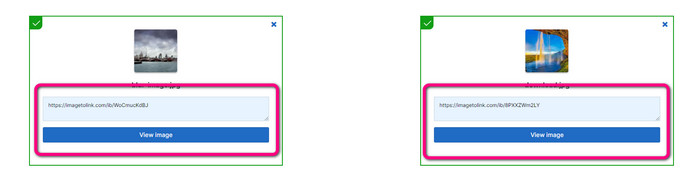
مرحله ۱. از طریق مرورگر خود به وبسایت Image to Link بروید. در صفحه وب، روی دکمه Start Uploading کلیک کنید. سپس از میان فایلهای رایانه، تصویر(هایی) را که میخواهید تبدیل کنید باز کنید. در فرایند تبدیل دستهای میتوانید تا پنج تصویر بارگذاری کنید.
مرحله ۲. پس از بارگذاری، ابزار بهطور خودکار تصویر را به لینک تبدیل میکند. سپس لینکی را در اختیار شما قرار میدهد که میتوانید برای باز کردن تصویر از آن استفاده کنید. برای مشاهده تصویر، لینک دادهشده را کپی کرده و در مرورگر خود جایگذاری کنید.
قسمت 2. نحوه تغییر تصاویر به JPG، PNG و GIF
در مبدل تصویر رایگان FVC تصاویر را به JPG، PNG و GIF تبدیل کنید
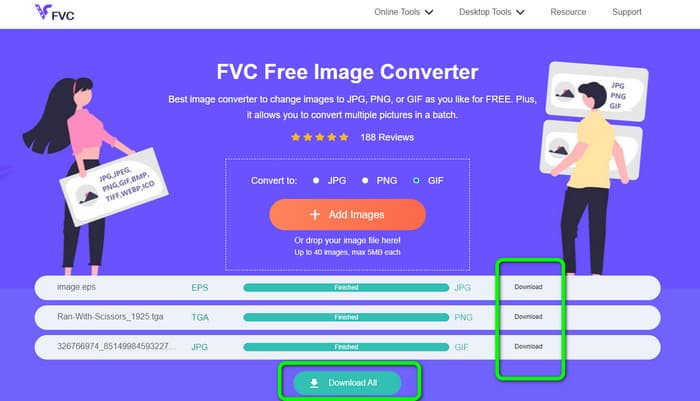
یکی از مطرحترین مبدلهای آنلاین تصویر که میتوانید از آن استفاده کنید، FVC Free Image Converter است. این ابزار میتواند تصویر شما را به قالبهای مختلفی مانند JPG، PNG و GIF تبدیل کند. همچنین از فرمتهای ورودی گوناگونی مانند BMP، SVG، ICO، WebP و موارد دیگر پشتیبانی میکند. میتوانید تنها با یک روش ساده تصاویر را تبدیل کنید، که برای کاربران بسیار مناسب است. علاوه بر این، این مبدل تصویر قابلیتهای خوبی برای استفاده در اختیار شما میگذارد؛ از جمله قابلیت تبدیل دستهای (Batch). این ویژگی به شما اجازه میدهد چندین تصویر را بارگذاری کرده و تنها با یک کلیک همه را تبدیل کنید. توجه داشته باشید که میتوانید تا ۴۰ فایل تصویری را تبدیل کنید. همچنین فرایند تبدیل در این ابزار سریع است و میتوانید در چند ثانیه تصاویر را تبدیل نمایید.
علاوه بر این، مبدل تصویر رایگان FVC در همه مرورگرها، بنابراین تا زمانی که به اینترنت متصل هستید، می توانید آن را در همه جا کار کنید. این ابزار همچنین حریم خصوصی شما را تضمین می کند. در طول فرآیند تبدیل، هرگز با تبلیغات مزاحم روی صفحه نمایش خود مواجه نخواهید شد. پس از ذخیره تصاویر تبدیل شده شما، این ابزار اطلاعات شما را حذف می کند، بنابراین هیچ کس نمی تواند عکس های آپلود شده و تبدیل شده شما را ببیند. از روش های ذکر شده در زیر برای تبدیل بی دردسر تصاویر به فرمت JPG، PNG یا GIF استفاده کنید.
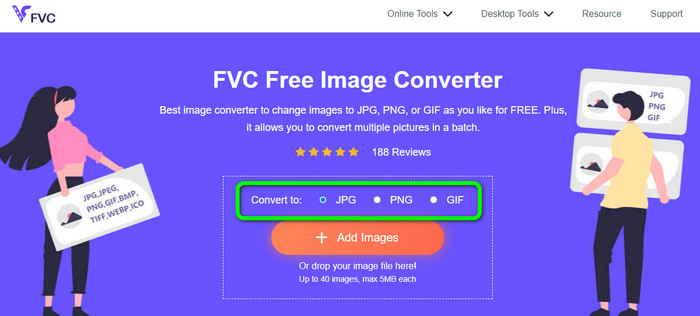
مرحله ۱. به وبسایت رسمی FVC Free Image Converter بروید. این مبدل تصویر آنلاین را میتوانید در همه مرورگرها اجرا کنید. پس از آن، از میان گزینههای موجود، قالب JPG، PNG یا GIF را انتخاب کنید.
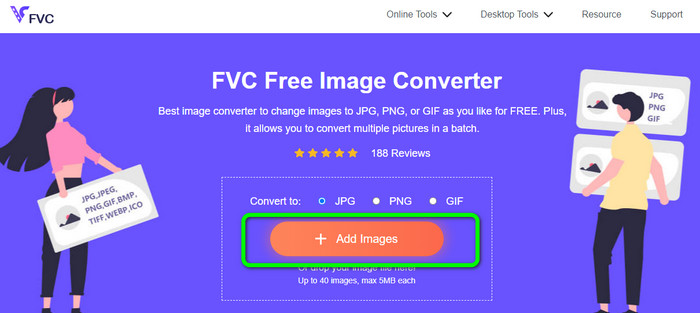
مرحله ۲. روی Add Images کلیک کنید تا فایل(های) تصویری را از رایانه خود بارگذاری کنید. همچنین میتوانید فایل را بکشید و درون کادر رها کنید. با توجه به اینکه ابزار از تبدیل دستهای پشتیبانی میکند، میتوانید چندین فایل را همزمان آپلود کنید.
مرحله ۳. پس از اتمام بارگذاری، میبینید که مبدل تصویر بهطور خودکار تصاویر را تبدیل میکند. وقتی فرایند تبدیل به پایان رسید، برای ذخیره همه فایلها با یک کلیک روی دکمه Download All کلیک کنید. اما اگر ترجیح میدهید تصاویر را بهصورت تکی ذخیره کنید، روی دکمه Download در سمت راست هر مورد کلیک کنید.
بخش 3. سوالات متداول در مورد تبدیل تصاویر به لینک
1. چرا تصویر را به لینک تبدیل کنیم؟
اگر وب سایت یا وبلاگی دارید، می توانید از یک تصویر به عنوان دکمه استفاده کنید. به این ترتیب کاربران می توانند به صفحه اصلی شما یا یک صفحه خاص دسترسی داشته باشند. علاوه بر این، پیوند دادن عکس ها در پست های رسانه های اجتماعی یا امضای ایمیل امکان پذیر است. همچنین، این یک راه فوق العاده برای تبلیغ وب سایت یا وبلاگ شما و افزایش ترافیک است. در اینجا تنها چند مورد از مهمترین توجیهات برای تبدیل URL از یک تصویر وجود دارد.
2. تبدیل تصویر به لینک چه مزایایی دارد؟
اگر یک عکس را به لینک تبدیل کنید، ممکن است برای کاربران ساده تر باشد که روی پیوند شما کلیک کنند. اگر میخواهید بازدیدکنندگان روی یک تصویر کوچک کلیک کنند، تبدیل تصویر به یک URL به آنها منطقه وسیعتری برای کلیک کردن میدهد. به اشتراک گذاری مطالب خود با دیگران ممکن است کشف کالاها یا خدمات جدید را بسیار ساده تر کند.
3. چگونه می توانم URL یک تصویر را در یک وب سایت پیدا کنم؟
روی تصویر کلیک راست کرده و گزینه Copy Image Link را انتخاب کنید تا URL یک تصویر در یک وب سایت را دریافت کنید. سپس می توانید URL را در یک برگه جدید باز کنید تا تصویر را ذخیره کنید یا URL را از طریق ایمیل، رسانه های اجتماعی و کانال های دیگر به اشتراک بگذارید.
نتیجه
تمام شد! حالا بهترین روشها برای تبدیل تصاویر به لینک را یاد گرفتید. علاوه بر این، با سرراستترین راههای تبدیل تصاویر به قالبهای JPG، PNG و GIF نیز آشنا شدید. بنابراین اگر میخواهید تصاویر خود را به لینکهای URL تبدیل کنید، روشهای مؤثر بالا را دنبال کنید. از سوی دیگر، اگر به یک مبدل تصویر قدرتمند برای تبدیل تصاویر به سایر قالبها نیاز دارید، از FVC Free Image Converter استفاده کنید.
-
 روش های تبدیل تصاویر به JPG آنلاین و آفلاین
 آیا به دلایلی می خواهید فایل را به فرمت JPG تبدیل کنید؟ پس این مقاله برای تو است. بهترین روش تبدیل تصویر به JPG را به شما آموزش می دهیم
-
 روش های مفید برای تبدیل آسان تصاویر به فرمت PNG
 آیا به دنبال بهترین راه برای ذخیره تصویر خود به صورت PNG هستید؟ این راهنما راه حل های عالی برای تبدیل تصاویر به PNG به صورت آنلاین و آفلاین ارائه می دهد
-
 JPEG/JPG چیست: بدون زحمت تصاویر خود را به JPG تبدیل کنید
 آیا در مورد معنای JPEG کنجکاو هستید؟ ما برای شما پاسخی داریم. همچنین، شما یاد خواهید گرفت که چگونه فرمت های مختلف تصویر را به فایل های JPG تبدیل کنید. اکنون پست را بخوانید.
